23232 comments found.

Hello, I tried to use this theme on one of my projects but ended up using a different one, would you please reset my purchase code. I want to try and us it on the one I am working on now. thanks
Hello, @gatorman2012,
I have reset your purchase code. Please try to re-register the theme again with the same purchase code on your desired domain, and let me know the result.
Regards, P-THEMES.
Please join our Discord Lesson
Hi, I have a few pre-purchase questions:
1) Is it possible to hide prices and only show them after a client logs in? 2) Can I approve clients before they are allowed to create or use an account? 3) If this theme doesn’t include B2B features, which plugin would you recommend for running a wholesale webshop?
Hello, @w_arman,
1. You can enable Catalog Mode to completely remove the product price, or use the “Select roles to see product price” option available in the theme settings. This allows you to control which user roles can view product prices.
2. WooCommerce does not include this feature by default, but you can easily add it using a third-party plugin.
3. The Porto WordPress theme is fully compatible with Dokan and WCFM plugins, so you can easily use them on your website to enable multi-vendor functionality.
Regards, P-THEMES.
Please join our Discord Lesson
How many days or weeks you reply our tickets? I need a technical support and its urgent. But still noone answer? Ticket ID: #66427
Hello, @mustafacoskun,
Sorry for the inconvenience. We typically respond to support tickets within 24 hours and always try to reply as quickly as possible.
Regarding your support ticket #66427, we had already responded, and it appears that the issue was marked as resolved on your end: https://postimg.cc/sGsf5YHT
When a ticket is marked as solved by the user, it is automatically removed from our to-do list.
I hope this clarifies the situation. If you still need assistance, please feel free to reopen the ticket and reply there. We will be more than happy to help you further.
Regards, P-THEMES.
Please join our Discord Lesson
When I go and reset the password for support it will NOT SEND me a email – been trying for days
Hello, @lighthousewebcreations,
Could you please let me know which email you used to create the support account on our support system here: https://www.portotheme.com/support/ so that I will have a look into it for you and help you out.
Regards, P-THEMES.
Please join our Discord Lesson
sales @ lighthousewebcreations . com
Hello, @lighthousewebcreations,
Thanks for sharing your email. I have successfully created the new support account for you via your email, and the password reset email has also been sent to that email. Please check and follow it, and you will be able to Login to your new support account.
Regards, P-THEMES.
Please join our Discord Lesson
So Now what this should be the simple part to LOGIN
Hello, @lighthousewebcreations,
I can confirm that both of your support tickets have already been replied to by our support engineer (#66469, #66468), and I have again sent the password reset email to your registered email. Please check it and follow it. After that, always try to Login to your support account via this link: https://www.portotheme.com/support/
Regards, P-THEMES.
Please join our Discord Lesson
Can I use a theme I previously purchased on another site? My old site closed down, and I want to reuse this theme on a new domain.
Hello, @yildiz86,
Yes, you can. I have reset your purchase code. Please try to re-register the theme again with the same purchase code on your desired domain, and let me know the result.
Regards, P-THEMES.
Please join our Discord Lesson
Hello. Thank you very much for your help. However, I have a problem. I think it’s due to the theme. The site’s admin panel page is very slow. Could you please help me?
Hello, @yildiz86,
Could you please submit a ticket via our support system here: https://www.portotheme.com/support/ , providing all the relevant details about your concerns? This will enable our support team to assist you more effectively.
Regards, P-THEMES.
Please join our Discord Lesson
I love the theme and have bought multiple licenses, but on a recent install no matter what theme I choose it looks a mess on the frontend. I logged a support ticket 6 days ago with no response and I am still within my support period, can anyone help?
Hello, @digital-soda,
Thank you for contacting us, and we apologize for the inconvenience. The delay occurred because an incorrect theme was selected in the form field while generating the support ticket, which caused the ticket to be misassigned. You can see the reference here: https://postimg.cc/68FdCpTB
However, our support engineer has already responded to your ticket. Please check our reply there and respond directly to the support ticket so we can assist you further.
Regards, P-THEMES.
Please join our Discord Lesson
Hello i’m unable to ask for support or update my website.if i try to register using my purchase code, i get “Purchase code already used.” if i try to recover my password using my email antonio.carrieri@gmail.com, i don’t get any email if i try to update my theme/plugin i get This code was already used in another site. One standard license is valid for only 1 website. Running multiple websites with a single license is a license violation according to Envato license terms. If this is a valid case, please reset your purchase codes through here or contact us with your site url.
I’m completely stuck
Hello, @Gotrekk,
Thank you for reaching out.
Our support system is available at: https://www.portotheme.com/support/
We were unable to locate any existing account associated with your information, so we have created a new support account for you using the email address antonio.carrieri@gmail.com and a password reset email has been sent to this address. Please check your inbox (including the spam folder) for a message from PThemes and follow the instructions to access your support account.
Regarding your issue, we have also reset your purchase code. Kindly try registering the theme again using the same purchase code, then proceed with the update. Please let us know the outcome.
Regards, P-THEMES.
Please join our Discord Lesson
Since a recent update the checkout buttons on cart and checkout pages are fixed at the bottom on mobile. Is there a way to turn off the sticky cart buttons and revert it to how it was before?
Hello, @jpsnyder,
Could you please submit a ticket via our support system here: https://www.portotheme.com/support/ , providing all the relevant details about your concerns? This will enable our support team to assist you more effectively.
Regards, P-THEMES.
Please join our Discord Lesson
Hi P-Themes!
Vulnerability advisory received: https://patchstack.com/database/wordpress/theme/porto/vulnerability/wordpress-porto-theme-7-6-2-reflected-cross-site-scripting-xss-vulnerabilityI’ve 7.8.2 version, I don’t know why I received it.
Please patch asap or inform they. Thanks!
Hello, @ZilogZ80A,
As you mentioned, you are already using the latest version. The warning refers to an older version, which was fixed in theme version 7.6.3.
You can review the changelog here: https://themeforest.net/item/porto-responsive-wordpress-ecommerce-theme/9207399#item-description__change_logs
It appears that the patch stack has not been updated or crawled yet. You can safely ignore this warning.
Regards, P-THEMES.
Please join our Discord Lesson
Hello. Can I display all categories in a grid instead of a slideshow? And the brands in another grid as well?
Hello, @nngg,
Thank you for your interest in Porto WordPress!
Yes, you can easily display categories and brands in a grid format instead of a slideshow. There are many ways to achieve this, and several elements provide an option to show them in a grid layout.
Regards, P-THEMES.
Please join our Discord Lesson
I’m trying to find an important timeline block and I can’t see it anymore… Where is the Experience Timeline Container block?
Are you removing blocks with each update? Thanks.
Hello, @renanmrcat,
No, we haven’t removed anything. You can use the “Porto Steps” element for the timeline and set it as per your requirements. Please refer to these screenshots: https://postimg.cc/BX7GLNTs & https://postimg.cc/phJw2BVM
Regards, P-THEMES.
Please join our Discord Lesson
I found it… it’s a little different, but it’s okay. Thank You.
You’re Most Welcome!!
Hey Porto.
Long time no speak. Theme is still awesome. Have a problem I cannot figure out. Shop36 is base demo. Latest everything theme, plugs.
The shop page calls a template block product archive. In that product archive block there is a secondary menu with links to product categories. When any product category link is clicked the page reloads. It does not show the products in their category.
I have done all the permalink recovery methods.Every other link works fine but the product categories. The menu recovers in wp theme 25. Yes alI plugins but woocommerce have been deactivated.
I have checked every setting and I cannot figure it out.Any ideas.Thanks Badd.
Hello, @badd,
Which secondary menu are you referring to? Could you please share a screenshot so I can better understand the issue? That will help me review it and assist you accordingly.
Regards, P-THEMES.
Please join our Discord Lesson
Hey Porto,
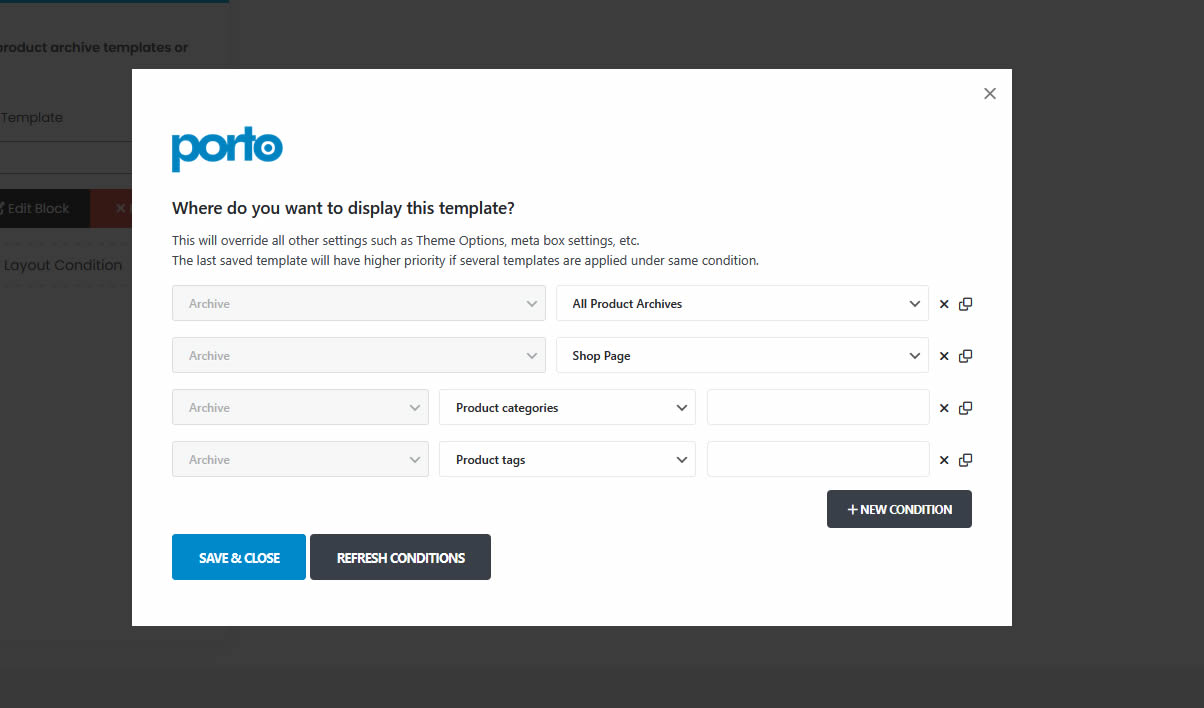
Sorry late. https://yerrex.com/porto-product-archives.jpg. Shop36 demo. porto, page layouts. select template points to “product archive” block. There are 4 conditions. Can you please explain these conditions.
Thanks Badd
Hello, @badd,
Your provided screenshot has 4 different conditions,
1. Archive >> All Product Archives: This will apply to all the product archive pages on your site, including the shop archive, category archive, tags archive, brands archive, etc…
2. Archive >> Shop Page: This will apply to the Shop archive page only.
3. Archive >> Product Categories: This will apply to all the product categories in the archive only.
4. Archive >> Product Tags: This will apply to all the product tags in the archive only.
Regards, P-THEMES.
Please join our Discord Lesson
Hey Porto,
I have reviewed your answer thank you. My problem still exists.
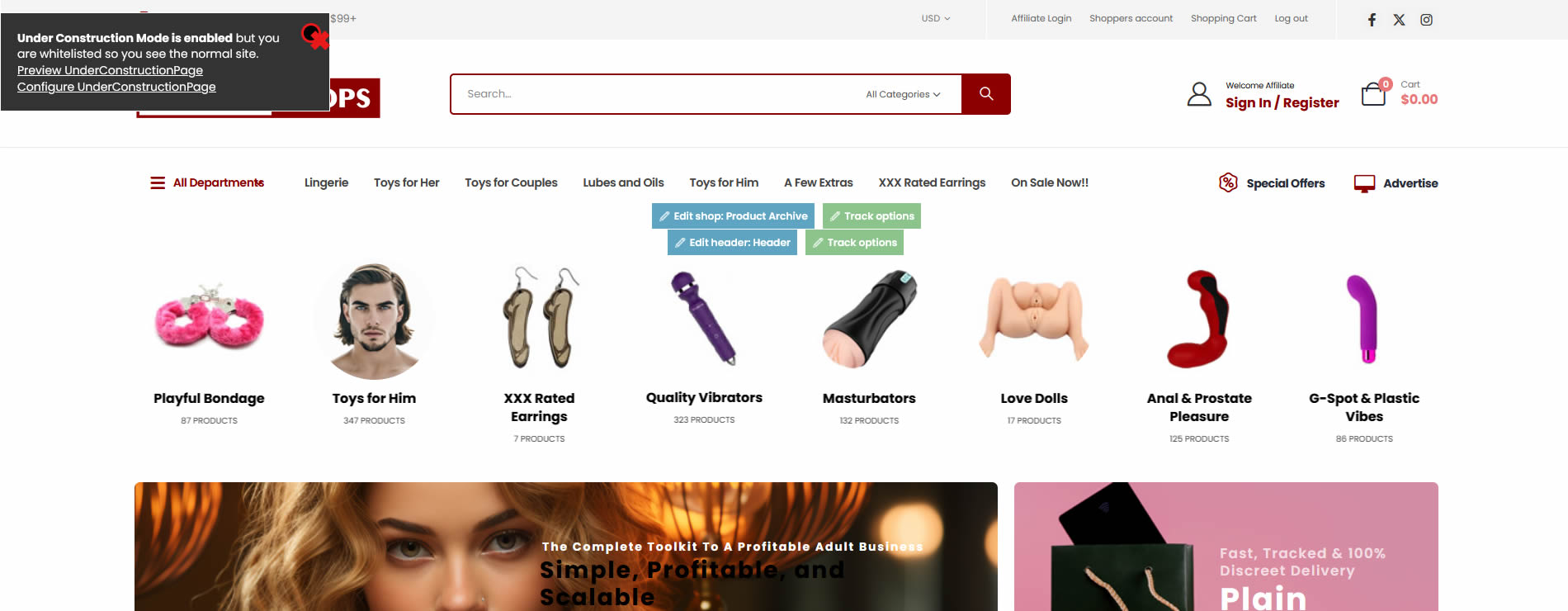
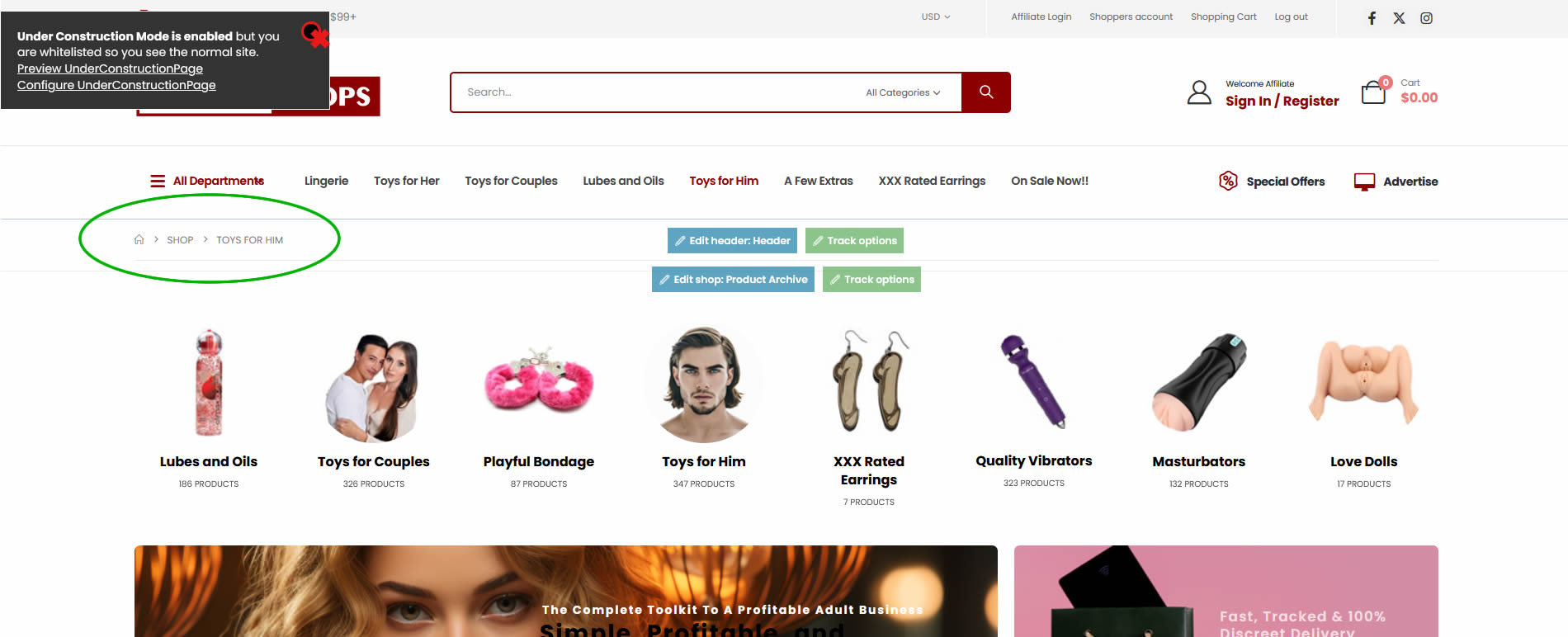
I have 2 menus, primary and secondary. The secondary menu is product categories. When you click any link in secondary menu instead of presenting the shop category products it reloads the same product archive block. No products.
https://yerrex.com/porto-menu-before.jpg https://yerrex.com/porto-menu-after.jpgI have done all the permalink fixes and still cant get the products to show. Any ideas?
Thanks Badd.
Hello, @badd,
Could you please submit a ticket via our support system here: https://www.portotheme.com/support/ , providing all the relevant details about your concerns? This will enable our support team to assist you more effectively.
Regards, P-THEMES.
Please join our Discord Lesson
Hello,
I have a pre-sale question. In the demo https://www.portotheme.com/wordpress/porto/elementor/industry-factory/product/ are the products created using WooCommerce or other plugin? I need the catalog format created with WooCommerce.
Thanks.
Hello, @lamiyabusiness,
First of all, thanks for showing your interest in Porto WordPress 
Porto WordPress is fully based on WooCommerce for the store functionality, so Yes that demo is also using WooCommerce for the store functionality.
Regards, P-THEMES.
Please join our Discord Lesson
I should at least be able to see my history, was able to the last couple weeks anyway. I know I need to rebuy the support for the ability to post future tickets, but this seems like something is broken.
Hello, @middlemann,
The Porto WordPress Theme support system is available at: http://portotheme.com/support
If you have any questions or need assistance, please submit a support ticket through this page: http://portotheme.com/support
Regards, P-THEMES.
Please join our Discord Lesson
Why I can’t change the default languaje of this string? Is a block widget. My web is .com (english) but the original string is spanish and I want to english.
thanks,
Hello, @Joaquim_,
Could you please submit a ticket via our support system here: https://www.portotheme.com/support/ , providing all the relevant details about your concerns? This will enable our support team to assist you more effectively.
Regards, P-THEMES.
Please join our Discord Lesson
Hello, When I try to update the version, failed and says “Purchase code is invalid”. How this is happened?
Hello, @Juan_Choe,
Please follow the steps below:
Go to Porto → Dashboard and unregister the theme license. Re-register the theme using the same purchase code. After re-registering, try updating the theme again.
If the issue persists, please attempt a manual update by following the instructions in the theme documentation: https://www.portotheme.com/wordpress/porto/documentation/update-theme/
Alternatively, you may contact us through our support system and provide your WordPress Admin URL and login credentials. Our support engineers will review your site and assist you further.
Regards, P-THEMES.
Please join our Discord Lesson
After demo content has been imported, and the website is finished – what does “Remove all installed demo contents” from the Theme Options actually do? Is it safe to remove all demo contents once the site is finished?
Hello, @MrADeveci,
“Remove all installed demo content” means deleting all existing content from your website and resetting it to a fresh, empty state. If you proceed, all current site content will be permanently deleted. Please consider this carefully before continuing.
Regards, P-THEMES.
Please join our Discord Lesson
OK – thanks for confirming.
You’re Most Welcome!!
Hi, I received an email about an update. I have a question: the Porto update appears in the extensions section. Should I update from there, or should I log into my account and download the Porto theme again?
Hello, @pillowcenter,
How to update the theme. Please refer to the theme documentation here: https://www.portotheme.com/wordpress/porto/documentation/update-theme/
Regards, P-THEMES.
Please join our Discord Lesson
Hello, Could you please reset all my licenses? I am closing these websites and will use the licenses on other sites. Thank you,
Hello, @fatihemregunes,
Thanks for your contact,
I have reset both of your licenses. Please try to re-register the theme again with the same purchase code on your desired domains, and let me know the result.
Regards, P-THEMES.
Please join our Discord Lesson
Hello Could you reset my purchased license as I can’t access the old website where I placed the license. I need to put the license on a different website
Hello, @ahna1004,
I have reset the license for you. Please try to re-register the theme again with the same purchase code on your desired domain and let me know the result.
Regards, P-THEMES.
Please join our Discord Lesson