38434 comments found.

Hey!
Is it possible to create pages for individual users? Like a client login page where they can see their data only?
Hey Jingcheng!
This would require a plugin most likely depending upon what data you’re trying to display to them.
Hello ThemeNectar Can you help me removing the text “Category Archives:”XX” category name” on the top of each category page. along with the padding/space that it takes up so there is no space there and no text.
Hey themanlifestyle, please see my response to your earlier post regarding this 
thank you you rock…:)
Thank you
Is it possible to have polish letters in Nevtar Slider (Caption)? How?
I mean for example: ?, ó, ?, ?, ?, in the same font as others… ?
Hey k_bednarczyk,
You just need to activate your custom fonts with in the typography options tab and select a font for the “Slider Caption & Testimonial”. If you want it to be the same as the default select Open Sans in the Book weight. Make sure to then check the box at the bottom for “Include Latin Characters” and you should be good to go.
Thanks a lot! I have the same problem with others places, captions in the theme… Should I change everything (in the typography options) for Open Sans in the Book weight?
and what’s the differences between 1. Home Slider and Nectar Slider, 2. Home Landing and Basic?
1. Skip to 1:12 in this tutorial video: http://www.youtube.com/watch?v=Sg62_DU8200
2. Different button styling, different transitions, different ways of handling videos. The Nectar Slider is the newer of the two and also performs better and more accurately in regards to its responsiveness.
3. Those are just two example pages I built for the demo showcasing how two different looks that can be created using the theme elements / shortcodes.
Cheers!
Hey again! One more question. Is there a way to automatically make the banner change to the next one?
Yes, you can define auto rotate timing at whatever you desire
I am getting a error. This is what it says with a blank page:
“Fatal error: Call to undefined function get_header() in /directory/directory/directory/directory/index.php on line 1”
Hey PixelConcepts,
get_header() is a built in WordPress function. If your setup is saying it’s undefined then it sounds like your install is corrupt. Please open a support ticket regarding this.
Hello ThemeNectar Can you help me removing the text “Category Archives:”XX” category name” on the top of each category page. along with the padding/space that it takes up so there is no space there and no text.
Hey themanlifestyle,
Add this to your custom css box:
.category .section-title {
  display: none!important;
}
thank you you rock…:)
Cheers!
Hi, I purchased the theme yesterday. I added my own images to the sliders and i’m still getting empty lots!! please help me out i’ve been at it for hours and hours. this is a sample page i’ve created with only a slider. and my image is still not loading. http://livelovelebanon.org/?page_id=761
Hey cyoumna, did you read the user guide regarding the nectar slider? “You must be running at least WordPress 3.6 to use this slider!”
The Nectar Slider makes use of the new media element included with 3.6 to render video backgrounds so to use this specific element you must update your WordPress
Thank you!! It worked !
Cheers
Hi ThemeNectar,
Can I please have the line differences for the update 2.05.
Thanks.
Hey again deepakkumarv,
they will be posted on the changelog when ready
Hey,
I have a prepurchase question. Is it possible to make it one-page?
thx
Sam
Hey Sam,
It would require you getting an animated scroll to plugin for the navigation and there are some elements like the portfolio which would need to be ported into the one page layout.
Cheers
Hi ThemeNectar, How to increase the the length of the Heading of the full width Nectar slider to container length ?
Thanks.
Please see my response to your first comment regarding this and try to not make duplicate comments on the same subject – I am doing my best to serve anyone and if you don’t get a response with in one hour it doesn’t mean I forgot about you
Cheers
Sorry themeNectar. I thought these were two different things. I didnt realize it would work with the same.
No worries
Hi ThemeNectar,
I have hosted my site on WP engine and that disallows W3 Total cache. Is there any other plugin that could do the same ? Or is there any other way to go about it. Can you please guide me along this.
Thanks in advance.
Hey deepakkumarv, I don’t have any experience with WP Engine. I would suggest you discuss this with them as they will have the answer
Thank you so much.
You’re welcome!
1) – I dont have Full Width Enable and Disable option provided in my “Portfolio Configuration” section. 2) I don’t Have Video Background Button available in “Slides Setting” section.
Kindly provide me the solution for the above two issues. I would appreciate your soon response.
Hello ahmedmurtaza,
are you using Salient 2.0? Both of those features were added in that version.
Hello,
How would I disable comments from individual images that are within a gallery?
Hey SparkyD,
Could you provide a link to the page you’re referring to so we’re on the same page.
Thanks
Add this to your custom css box:
.attachment .comments-section  {
  display: none!important;
}
Thank you
Cheers
Hi ThemeNectar,
How to move the heading of the full width nectar slider to the extreme left by moving it above the .container and .content class ?
Where can I edit this? Please guide me on this.
Thanks.
Hello deepakkumarv,
Just control it with css so you can bypass editing the files directly:
.swiper-slide .container {
  width: 1600px!important;
}
Thanks ThemeNectar.
I tried this and the heading still remains inside the container. 
That snippet should expand the container’s size. Please open a support ticket regarding
please have alook for the pic how i can actually move the li to the left?
Hey again jikey,
enter this into your custom css box:
.main-content ul, .main-content ol {
  margin-left: 0px!important;
}
Cheers!
thx… 1 more question u saw the the word ” goal” there ? how to make it align to the above line?
I couldn’t tell you from an image mate, I would need to see your URL to see the live code. Please open a ticket on the support forum regarding it
Hey Love the theme! About to purchase. One question though. Can I change the color of the header bar?
Hey ninbin! You have the choice to toggle between light and dark headers by default and changing the color to something else besides those would only require a line a css I could supply
Cheers!
You are the best! Thanks a bunch. Love the theme. Keep up the good work.
Cheers!
how come seem like i can’t put html tag in the tab shortcode?
Hey jikey! You can indeed use html in that shortcode, but you must remember to do so in the text tab on your editor rather than the visual tab. WordPress will not parse html in the visual tab in an case.
Cheers!
Thanks for answering my previous question. Any chance there’s a shortcode to display the map from the contact page template on other pages or posts?
Hey drudgeons! Not yet unfortunately but it’s something I will consider adding
Cheers
Hello. My client purchased a copy of Salient and I’m now trying to create a Child theme so that I don’t muck anything up. Is there something special that needs to be done? The Child I created doesn’t pick up any of the styling even though I am importing the style sheet data.
Hey marhue, nothing special needs to be done. The style.css inside of your child theme should look like this:
/*
Theme Name: My Child Theme
Theme URI: http: //mysite.com/
Description: This is a custom child theme I have created.
Author: My Name
Author URI: http: //mysite.com/
Template: salient
Version: 0.1
*/

@import url("../salient/style.css");
Thanks. Truth is I am a fool and screwed up on the directory name. Everything is super and I’m sorry for wasting your time.
It’s all good marhue! Glad you’ve sorted it now
Cheers!
Hi. We are having problems with the typography. Accented letters and some other special character aren’t taking the right font.
You can see an example of what I’m talking about here http://acopuo.com/lobezno-dobles-y-cine-latinoamericano-en-el-zinemaldia-2013/ as you can see if you search the word “Palmarés” the “é” character is working wrong.
We’ve changed the “latin characters” option but it never works fine.
Could you help us please?
Hey nsalas, this is because you put a bold tag inside of your h2 tag. Please remove the bold tag and it will work like the rest of the letters on the page that take the correct font. In older versions of Salient prior to 2.0 the font family was set for bold fonts and it would over ride the Google loaded font with ext. latin char support.
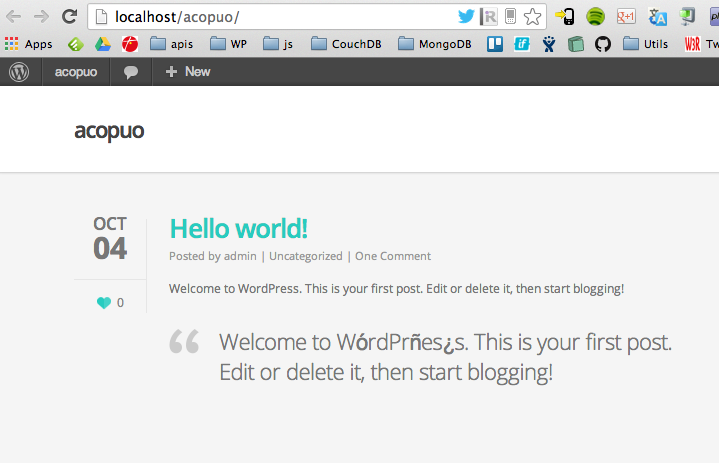
Yes, thanks that’s working. But we have an issue with other elements. It’s happening the same thing (we have not published the post yet). As you can see this screenshot of my local enviroment, with a fresh wordpress and salient instalation http://acopuo.com/wp-content/uploads/2013/10/Screen-Shot-2013-10-04-at-15.03.48.png (we can’t publish like that)
the blockquote code have this structure:Removing thethe text
element does not solve anything.
Could you help us, please?
Sorry the code is: <blockquote><p> the text</p></blockquote>
and removing <p> element nothing happens
And did you select a font for the caption in your typography options panel? If so, please open a private ticket with your info so I can see