38438 comments found.

Hi,
awesome theme! Some presales questions:
- Do you provide Styling for Gravity forms?
- Do you provide Styling for MyMail forms?
- Is there an option for a mobile sticky header?
- Are modals styled?
Thanks a lot!!
Hey gehrkensit!
1. Gravity forms will have a similar style to the form shown on the contact page  2. I haven;’t tested with that plugin, but it also should inherit Salient’s generic form styling.
3. There is not due to the fact a good deal of mobile devices still glitch when using the property of fixed. You could change it to do so with css but it’s not recommended.
4. The default lightbox is styled how you see in the portfolio when clicking view larger
2. I haven;’t tested with that plugin, but it also should inherit Salient’s generic form styling.
3. There is not due to the fact a good deal of mobile devices still glitch when using the property of fixed. You could change it to do so with css but it’s not recommended.
4. The default lightbox is styled how you see in the portfolio when clicking view larger
Cheers!
Thanks for reply,
Regarding 3.: Okay, I understand this, but maybe make it an option please, like other themes have working sticky headers on mobile. That would be GREAT
Hey again gehrkensit, the option will indeed work on the latest smart devices to an extent (a little shaky in some cases) it’s the mid/older generation ones that really have a hard time rednering, but I’ll note the option on the wishlist
Cheers
Thanks a lot!
You’re welcome
i got a weird position of home slider video (embed & upload). That video looks like move down and doesn’t fill out the header space. Even if i used the preview image nothing work.
i need a big help…
Thank You
Hey anto99, I’ll be glad to help you out – I just need a URL to see what you mean
Cheers!
Hello! This theme looks awesome! Just wondering if you have a “Load More” type of option for the portfolio? For example, I may want to limit the number of portfolio items to a certain amount because I have quite a few. Could I set a limit and then click to load more on the page? Thanks!
Oh, sorry I just read another post and saw that there is no “load more” yet. No need to reply. Thanks!
Hey fuzzo! I’m glad you found the answer prior to me writing back but I’ll still mention you can enable standard pagination on your portfolio’s for the time being to allow segmenting of the items
Cheers!
For some reason on our install the icons in the circles are not loading correctly in IE or FF. But they are working in Chrome.
for example [icon color=”Extra-Color-1” size=”large” image=”icon-briefcase”]
Any ideas?
I was able to correct the issue
Hey revolvedmedia! I’m glad to hear you sorted the issue
Cheers!
Hi there, can I get rid of the button “more details” on portfolio page thumbnails? Just want to use the lightbox. Further I’d need to change the language on “view larger” button. Where can I change the text? Great Theme! Thanks for your help.
Hey ollivarez! When generating the portfolio shortcode you can check the option for lightbox only which will remove the more details button. To change the text of the view larger button run a find and replace for “view larger” in the shortcode-processing.php file located in the nectar/tinymce directory
Cheers!
First of all, thanks for the quick reply! Hmm, I don’t have a shortcut to create a portfolio (at least not in the Nectar Shortcodes). I can only create a new portfolio page by using the portfolio-template for the page. Didn’t find the option for lightbox… Thanks again!
You’re very welcome!
You are probably on an outdated version – the portfolio and blog got their own shortcodes a couple releases ago. If you’re on a version before 2.5 just update and enjoy
Whats the difference between projects and portfolios
Hey jojo8026
The Portfolio is the equivalent of a Blog and Projects are the equivalent of Posts.
So basically you create projects that will be display through a portfolio shortcode or layout.
Cheers!
Hi there when I place non-full-width nectar slider it is by default 1100px wide (I can only determine the height), is there any way to make it smaller so I can include pictures which are 800px wide (without them being auto resized to fit the bigger width)? Cheers
i think it should be done by responsive.css folder, I just cannot find it.. Someone can help?
Hey jjpitrowicz, you can just place the slider shortcode into a column shortcode. The Slider will always occupy the entire width of the column it’s in, so that’s a good way to control it
Cheers
Hey I was wondering if you guys offer the service of customizing the theme by chance? Or know anyone who can?
Hey bensurdi!
Unfortunately I am totally swamped with work to the point where I can’t accept any freelance gigs, so if you need modifications done you would need head on over to microlancer, a service from Envato that offers paid WordPress customizations
Cheers
Hi! Is there a way to remove the “Additional Information” from the WooCommerce product pages? Thanks! -Will
Hey Will!
Add this to your custom css box in the Salient options panel:
.additional_information_tab, #tab-additional_information { display: none!important; }

#tab-reviews { display: block!important; }
Cheers!
Thanks so much! And super fast, as usual.
You’re welcome
Hi! I’m trying to use nectar slider in a custom code using do_shortcode in php. When I load the page it doesn’t appear, but when I dig in the html code, the slider code is hidden in a rule “display:none” even if change it, the slider doesn’t load. Any suggestion? And I want to add more icons in the icons section of the blog. Is there a way to add them throught some code? Thank you for your help. This is one of the best themes i have purchased!
Hey voxiel!
1. Try opening the functions.php file and removing the conditional check at the ”//nectarSlider mediaElement” section.
2. What exactly are you referring to by the icon section in the blog? Perhaps if you could provide me with a screenshot pointing to what you mean I could shed some light
Cheers!
Salient 6.0 will work with WordPress 3.8 “Parker”?
yes it work! cool
Yes, I can confirm from my testings I don’t see anything wrong
Cheers
Just identified answer to question #2 above re: multiple instances (as outlined in your product description and illustrated in demo).
And noted “child theme ready” in product description as well.
Is Salient prepackaged with a child version, or is it simply recommended to create a child version to avoid style overwrite upon theme update?
Salient is an impressive theme!
Cheers,
NINkitten
Hey again NINkitten!
The package doesn’t include one, but it’s super simple to make – I’ll actually note now to make a starred thread on the support forum in regards
Cheers!
2 Quick Questions:
01 Does this theme require a child theme to be made to avoid theme update style-overwrite?
02 Is it possible to add multiple horizontal sections per page (parallax or otherwise)?
Thanks!
Hey ninkitten!
1. That would be the ideal way, yes – but if you aren’t doing major overhauls you could get away with entering your css in the custom css box located in the theme options panel.
2. Yes of course!
Cheers
Hello guys.
Great work with your theme. I want to make it multi-language. The primary language must be romanian and the secondary one english.
I also posted a ticket yesterday here http://themenectar.ticksy.com/ticket/134382 but still no answer.
Please be kind and provide me on how to do this (i have php and wp experience) because tomorrow (in about 24 hours) is my deadline.
My email is mihai@mihaiteo.com
Best regards Mihai
Also i found that the contact page marker does not work. I put in the lat and long, also added a image market but nothing .
Ty again.
Look forward to your answer.
Hey avcstro,
1. The average queue time in indeed 24 hours so I should be with you today in regards.
2. http://youtu.be/Sg62_DU8200?t=6m18s
Cheers
Ty for the answer. Regarding the translation, you provided me with a plugin that works just fine, but how do i activate my language for salient to use? Ty
You’re welcome – I’ve responded on your ticket
How to update this theme without miss my own preferences?
When I’d like to update via upload theme.zip I have unsuccesful monit because folder salient is existing.
and how can I styling google map on contact page to use custom colors of map?
Hey microdesign_polska,
1. You can update your theme by downloading a fresh copy from ThemeForest, deleting the current version you have on your server and uploading the new.
2. You would need to follow the documentation on this here: https://developers.google.com/maps/documentation/javascript/styling and implement the changes into the map.js script located in the js folder.
Cheers!
I posted an issue on your support forum and I really need a fix. The issue is with one_whole columns and the icons. Please respond as it’s been a weeks time. Thanks.
Hello wesleysoccer,
I don’t have any tickets open with a wait over 2 days at the moment, can you please let me know your ticket number?
Thanks
132176
132176
132176
Just responded with the solution – the last comment was indeed posted two days ago by you, which is why I was confused when you said a week. I was unaware you were referring to the time in which you first opened the ticket.
Cheers
thanks but not working.
Have you cleared your cache? I see it behaving normally still.
I’m having some issues with the theme + Buddypress, it won’t display the div “page-header-wrap” when Buddypress is present on the page. How can I fix this?
It appears the line <?php nectar_page_header($post->ID); ?>
doesn’t work on buddypress pages. Any ideas on why?
Hey apena89,
it’s probably failing due to the fact that the $post->ID is different on every page in BuddyPress so it’s not lining up to whatever root page you’ve set the header on. If you open up the woocommerce.php file you’ll see for that plugin I also had to use a separate function to get the post id within the plugin’s system (woocommerce provides a nifty function for that) I assume BuddyPress would require a similar solution.
//page header for main shop page
nectar_page_header(woocommerce_get_page_id('shop'));
Cheers
I’ve searched everywhere and can’t seem to find a similar function for Buddypress. I don’t understand why the page just won’t use the header I have set, it’s clearly using the same page URL. Granted, I don’t really know what I’m doing since I’m not a PHP expert.
Hey again, yeah it’s actually a little more complicated than that but here’s a workaround.
There’s a function called “bp_is_blog_page()” that you could use in a conditional to use a separate page header. If you open the page.php file you could change this:
<?php nectar_page_header($post->ID); ?>into this:
<?php
if(!bp_is_blog_page()) {
   nectar_page_header(xx);
} else {
   nectar_page_header($post->ID);
}
?>
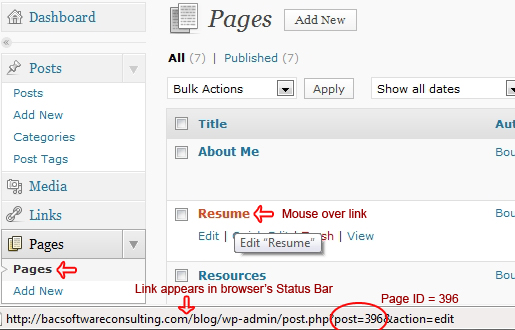
Just replace the xx with the id of the page that contains your desired header. You can find the page id by hovering over the edit link and looking in the status bar URL – see this image for reference.
Cheers!
That’s awesome! Thanks so much for your help!
You’re very welcome!
I was able to fix this problem using this in buddypress.php:
if(bp_is_page('BP-PAGE-SLUG')) {
nectar_page_header(PAGE-ID);
}
elseif(bp_is_page('BP-PAGE-SLUG')) {
nectar_page_header(PAGE-ID);
}
else {
nectar_page_header(PAGE-ID);
}
Thanks for the update – Happy Holidays!
Hello!
I need to create a home slider without widget. A 100% heigh slider but it seems that is not possible.
thanks
Hey markosansa!
Just use the Nectar Slider instead of the Home Slider – it has a fullscreen option for it
Cheers
Hi,
I’m already purchase this theme and it’s so awesome, But I have some little question.
How can I disable menu scrolling ? I want to disable this feature because it’s overlap my content.
Hey commandeaw!
If you are trying to stop the header from being fixed you’d need to use this in your custom css box in theme options panel:
body #header-outer {
  position: absolute!important;
}
Cheers
HI,
thank you soo much for this amazing theme. And thank you for your previous reply to my question. I have an other problem, which may not come from your theme. Anyway, here it is: We have a graphic made in Javascript at this adress: http://www.wine-services.com/Primeurs/Content/Primeurs_2012_wordpress.php We would like to load it here: http://www.wine-services.com/site2013-v2/essai/ We are able to load the page, but after we choose some data in the formular, the sizing doesn’t work at all (if you understand what I mean). I know it is a common problem with javascript in wordpress. I would appreciate if you had a solution to give or integrate to your theme (we already tried some iframe plugins but they don’t really work). I don’t mind paying some extra to get it working properly. Do not hesitate to contact me on a private message.Thanks a lot for your help Guillaume
Hey Guillaume!
Checking out the current setup now it appears you’re using an iframe embed instead of placing the elements directly on the page. Is there anyway you can go back to your integration on the page so I can see the sizing issues you were mentioning?
Cheers