38435 comments found.

Hi! Loving everything, just a couple of questions Ive been trying to solve but cant. On this page there is a white boarder under my nectar slider, but I cant see why… http://replayhouse.com/studio/ And Im getting a 404 when selecting four boxes icon from this page..http://replayhouse.com/portfolio/replayhouse-grand-tour/
Any advice would be much appreciated! Thanks lots, Jack
Hey Jack!
1. I’m seeing a lot of weird things happening in your stylesheet as if it’s been modified somehow. Is there anyway you could allow me to log in so I can check on the files?
2. Make sure you have a URL entered for that in the Portfolio options tab of the Salient options panel.
Cheers 
Hey! Thanks for the help. Oh modified in what way? Sure, do you need me to send the password via a secure email? Or can you get in without it?
Modified as in there’s missing rules from your style.css file – I’d be glad to log in and take a look for you
Can you please open a private ticket on the support forum here: http://themenectar.ticksy.com/ and post your ticket # here?
Cheers!
Great thanks! Im pretty code illiterate. Here you go: 171893
Thanks! I’ll be with you soon
I know my questions are going to sound so naive but here it goes.
With two of my copies of Salient, I’ve developed pages and customized with elements and added light html code to text widgets, social media links, videos etc.
I’ve never gone into any of the coding of Salient so I should be able to download the new version and all the things I’ve done will be fine, yes?
I haven’t gotten my mind around child themes or why I would use one.
Miabella
Hey again Miabella!
Yes, you’re completely safe! You would only have to worry if you modified core files of the theme directly – all of you WordPress content, theme settings etc will be safe
Hi! I made a comment on support pages, but maybe this is a better place. I’ve also searched questions a lot but didn’t find right answer.
And a new question: will the version update 3.1.5 show later in installation? It doesn’t yet.
I wonder how to remove grey area under header and over images in portfolio. I.e. grey area plus the subheader “Portfolio” and also sorting… (that I haven’t added). I’d like to get rid of the area all together so that the portfolio images begins right underneath top header. Can you please help? Link and image in supportforum.
I just want to add that this really is an AMAZING theme, it’s great! Great work!
Hey M1chaela!
1. The update is available for download on ThemeForest – just redownlolad the theme to get the latest version. (There’s no way to update through the admin dashboard)
2. Can you please share your URL so I can check out your portfolio and see if we’re thinking of the same thing?
Cheers
Thanks! Sure! http://www.creativeby.se/portfolio/
Add this into the Custom CSS box located in your Salient Options panel:
.page-id-69 .container-wrap {
   margin-top: -55px!important;
}
Cheers
<3 <3 <3 <3 <3 but now Sorry I tried it, copied exactly but it doesn’t work. In the CSS frame it says yellow warning: ! “Use of !important”
I know how to find a row in php and do the change in … what’s it called in english.. where the php is – if that helps..
Sorry! I just wrote the wrong number in – change it to:
.page-id-69 .container-wrap {
    margin-top: -95px !important;
}
HURRAY! THANK you! 
You’re welcome!
How i can change the hover color of the main menu links. I try a menu custom class with ”!important”. I dont want to change the salient main colors in the backend.
Hey prodes2014,
if you select “Custom” for the header color scheme in your Header options tab of the Salient options panel you’ll unlock a bunch of color pickers to change all the aspects of the header
thank you…
You’re welcome
Hi there,
I love the theme and am really enjoying working with it. 2 quick questions:
1. How can I remove the blog meta that is displayed under each blog post title and on the blog roll (posted by, date, categories, comments)?
2. How can I justify the the text in the Caption on the Nectar Slider like you have in your “Home-Landing Page” example?
Best
James
Hey James!
1. Add this into the Custom CSS box located in your Salient Options panel:
.meta-author, .meta-category, .meta-comment-count {
  display: none!important;
}
2. Which slide are you referring to? You can adjust the content alignment by using these options: http://i.imgur.com/g7GNJi7.png
Cheers
Hey thanks for getting back to me so quickly!
I’ve got another question. I’ve set the height of the Nectar slider to 600px but it keeps showing full screen – http://braincandyfilms.com/home-alt/ What am I doing wrong?
You’re welcome! It appears you’ve left the option for fullscreen on – can you please ensure that it is off on your slider element?
Cheers
Well that was easy, thanks!!
Is there also a way to embed a link in the background image of a nectar slide, whilst keeping the button links as they are?
One more thing. In the recent projects page element, it seems to handle portfolio items that have “tall” or “regular” featured images differently to ones that have “wide” or “wide and tall” images. If you take a look at my page – http://braincandyfilms.com/home/ – you will see that there is no + symbol on some of my portfolio items. If I change the setting in the recent projects element to “meta below thumb w/ links on hover”, these portfolio items have no meta and are a different size to the others.
Is there a bit of custom css I can use to fix this? Thanks.
Hey again James!
1. This would actually take some custom development since it’s only designed to handle one or the other right now.
2. I know it says the minimum dimensions for that size is 500×1000 but since you’re using the full width recent projects, you need to make sure the minimum width is 600px. So just upload the image at 600×1000
Cheers
Many thanks, that’s worked a treat!
Unfortunately I have more questions 
1. I’ve just tested my site on a few different computers and browsers and I’m having a few issues with the portfolio page. Firstly the page does not display correctly on Chrome. The portfolio items sit only on the left side and middle of the page and the right side is empty.
2. On different screen resolutions the items display differently, so I can get it looking great on one screen but on another screen it will have white spaces between the portfolio items. Is there any way to fill these spaces up? Maybe by using a few images that can be used as place holders to fill up those spaces when they appear?
3. Is it possible to reduce the opacity of the coloured overlay that appears on portfolio items when you hover over them?
4. I’ve been designing my website on a macbook but when I viewed it on an iMac just now, the front page was behaving strangely. When I scroll up the page as soon as the Nectar Slider starts to become visible, the image that’s in the slide flashes across the whole website. I know that’s a little vague so I’ve recorded a screen cast of it, which you can view here – https://vimeo.com/88263998. The password is flicker. Any ideas why this may be happening?
Many thanks and sorry for all the questions!!
Cheers
Hey again!
1. Please update to the latest release of the theme as this chrome 33 bug was sorted in v 3.15 of Salient.
2. Well you can certainly alter the BG color or put a BG image that will show through the empty space, but having the spaces go away completely would require ordering the projects a little differently by using this plugin to assist http://wordpress.org/plugins/intuitive-custom-post-order/
3. Open the init.js file located in the js folder and modify this section:
$(this).find('.work-info-bg').stop().animate({
    'opacity' : 0.88
},250,'easeOutCubic');
4. Can you try turning the smooth scrolling option off to see if it remedies this behavior?
Cheers
Thanks for your help!
1. Can I update without losing all of the work I’ve done? Is this a case of downloading the new theme and installing it again or is there an update function?
2. How can I put a background image that resizes to just fit the space behind the portfolio items when viewed on different devices?
3. That worked a treat!
4. This hasn’t fixed the issue.
5. Is there a way to adjust the paragraph spacing in the blog?
Best
Hey again!
1. Yes, you’re safe to update
2. That’s not really possible since it’s just empty space in a larger div element.
3. Glad to hear
4. If you open a private ticket in regards I’ll be glad to take care of this for you – just write your desired opacity level & leave admin credentials so I can hop in http://themenectar.ticksy.com/
5. Add this into the Custom CSS box located in your Salient Options panel: .post-content p {
line-height: 26px!Important;
}
Cheers!
Many thanks.
You’re very welcome
Hi TN,
is it possible to make the portfolio bar static when moving down the page, so its always there? The same way the main navigation bar is?
best,
Hey!
If you’re not using the header resize option it’s reasonably doable and I could assist with the css – but if you have that option on it would require custom development (JS & CSS)
Cheers
Hi ThemeNectar, I can have it on whichever is the easier method, so resize off is fine
Okay cool – can you please share your portfolio URL so I can assist with the css?
Cheers
Of course, im developing locally, as well as online so here is a live url http://devsoak.com/ if you can let me know the changes then i can apply to my local development as well. do u need my login details?
Yes, this will work on both instances for you – just add this into the Custom CSS box located in your Salient Options panel:
@media only screen and (min-width: 1000px) {
   html body #portfolio-filters-inline {
       left: 0!important;
       margin-top: -92px !important;
       position: fixed!important;
   }
}
Cheers!
Hi Guys,
I have a question. If I use the shortcode ‘full width section’ I can change the bg colour of a post (image/text). I was wondering if it is possible to add a shortcode, or whatever works, to change the bg colour of the different column sizes.
For instances, I use the [one_half] a lot, to split text and image. But I would be nice to change the bg colour of one of the halves I am using for text posts. Like so http://www.bibiveth.nl/wp-content/uploads/2014/02/bg-colour.jpg.
Could you add a feature like this or is this already possible?
Cheers!
Hey bveth!
This would require simply adding a class onto the column you want to give the BG color (you can do this in the page builder view as of 3.1.5) and then using css to set the BG color. If you would like me to set up an example of this for you on your site, please just open a private ticket at themenectar.ticksy.com/ with your credentials
Cheers!
Hey Guys, I will open up a private ticket. Thanks for your comment!
Cheers, Bibi
You’re welcome
Heya, I opened this ticket: #171857 like you asked. Looking forward to your example. Cheers.
Thanks Bibi! I’ll be with you soon on that
Heya, I’ve added my credentials. Something went wrong before. Thanks!
No worries
Hi
I have updated the theme, and it all worked great.
I have a few things:
we previously worked on Podcast audio link on a blog page and on individual post pages, and we fixed it with a code. after the update it has the empty space above and below the audio player link again. have a look: http://www.mmevelo.com/blog/ http://www.mmevelo.com/torba-rowerowa/torba-rowerowa/here are the codes we have added to custom.css one of these was created for the audio player issue:
.row .col img { margin-bottom: 0!important; margin-top: 0!important; }
.full-width-content .wpb_column { padding-left: 5px!important; padding-right: 5px!important; }
.full-width-content .img-with-animation { margin-bottom: -7px!important; margin-top: -7px!important; }
thanks!, best wishes M.
Hey again!
Just open the style.css and remove this
object, object embed {
 display: block;
 height: auto;
 max-width: 100%!important;
}
And then in the custom css box add this:
object {
  margin: 6px 0!important;
}
Cheers!
Hi!
Thank you, I have not implemented it yet, but we have some issues with the site. Whenever I want to save any changes, whether it is to save a page, or to remove a slider, blank screen appears with this eror message:
Warning: Cannot modify header information – headers already sent by (output started at /home/lukaszjankjn/ftp/mmevelo/wp-content/themes/salient/functions.php:2449) in /home/lukaszjankjn/ftp/mmevelo/wp-includes/pluggable.php on line 896
When I click “back” on the dasboard” it returns to the previous page, and when I refresh the page, it shows me that the changes I wanted to se, like the slide deleted, or page updated, took place, but this error message appears every time I want to save the changes.
Please help
Thank you
M.
and this same error message appears:
Warning: Cannot modify header information – headers already sent by (output started at /home/lukaszjankjn/ftp/mmevelo/wp-content/themes/salient/functions.php:2449) in /home/lukaszjankjn/ftp/mmevelo/wp-includes/pluggable.php on line 896
when I try saving the Contact page it comes back with:
Warning: Cannot modify header information – headers already sent by (output started at /home/lukaszjankjn/ftp/mmevelo/wp-content/themes/salient/functions.php:2449) in /home/lukaszjankjn/ftp/mmevelo/wp-admin/post.php on line 233
Warning: Cannot modify header information – headers already sent by (output started at /home/lukaszjankjn/ftp/mmevelo/wp-content/themes/salient/functions.php:2449) in /home/lukaszjankjn/ftp/mmevelo/wp-includes/pluggable.php on line 896
I am sure that this is something easy, and can be solved without a trouble. Thank you, best wishes M.
Theme Nectar
I have uploaded the theme again, and also changed the style.php again, and now it all works.
I think the first upload we did must have had some errors, or we did not upload everything, so it produced that error message.
Thank you for the update
Best wishes
M.
Hey New_Castle!
Glad to hear your issues were resolved by a clean install – make sure next time when you’re updating you delete the old theme prior to uploading the new to avoid any overwriting conflicts
Cheers!
Aj, you see, this is what I did not do, I did not delete the previous theme.
Cheers
Thanks
That’ll do it!
Cheers
Hi Guys,
Quick question – will the video slider work ok with an 852×480 video? Client has a smaller budget and would like not to fork out on the 1920x video.
Thanks!!
Hey davidsloly! Yes, that will work fine in turns out functionality – there will just be some quality loss if using it for a fullwidth slider/bg
Cheers
Thanks guys. 10/10 for speed of reply as always!
You’re very welcome
Thank you for the update ThemeNectar
Your theme and customer support rock
M.
Thanks a lot New_Castle!
Cheers
Cheers for the update! Uploaded and all looks great.
Thanks again!
You’re very welcome SamAsh
thanks for the update. Which files should I override. I made some changes in the theme touching files. If I know what files are part of the update, I check them for custom stuff.
Hey royaltask! I’ll post the changed file list in the morning
Hey,
I am trying to set an image using the nectar slider on the homepage, looks great full screen, but as son as i resize my browser, it crops out the right and left side of the image considerably. Is there any way to make it so that when i resize to a smaller screen, the image used on the slider stays in its correct proportions, displaying the whole image.
thanks
Hey silverleaf100!
Can you please share a URL so I can see how it’s cropping? The Nectar Slider only resizes the height to match every significant breakpoint (larger desktop, small desktop, iPad and phone). So in between those, cropping it to be expected.
Cheers
sure, http://www.eccora.com/wp
Thanks – I can indeed see that it’s responding how it should (if you drag your window from wide to small you’ll see each of the breakpoints I mentioned). If you would like the height of your slider to constantly adjust to the users window, enable the fullscreen option
thanks for the updates, much appreciated, now mmmm how to I install the update without compromising my mods the the previous one. ?!
Hey evenshill!
If you’ve made modifications directly to the core files without using a child theme, there’s no easy way to update without having to manually make your changes again. Please try and keep your edits in a child theme or the custom css box to have seamless updates
Salient v3.1.5 has landed
This is a minor update that I decided to make available prior to the next feature based release in order to clear all the bugs recent events have brought on (Chrome 33 & WooCommerce 2.1). In addition to the high priority fixes related to those two items, numerous other small bug fixes have been implemented as well. Feel free to check out the changelog for a full list of the included fixes
http://themenectar.com/changelogs/salient.html
Cheers!
Since updating to version 3.1, my portfolio page is coming up empty. When I change back to theme version 2.1, all the content is back. I can see the items in the backend and they’re all published.
Hey scratsmacker!
Sorry for the scare – the template names for the portfolio and contact just needed to be changed for 2.6.5 and there unfortunately was no way around having them unassign when doing that. I apologize you didn’t see the message I posted on here in regards because the update was a while ago:
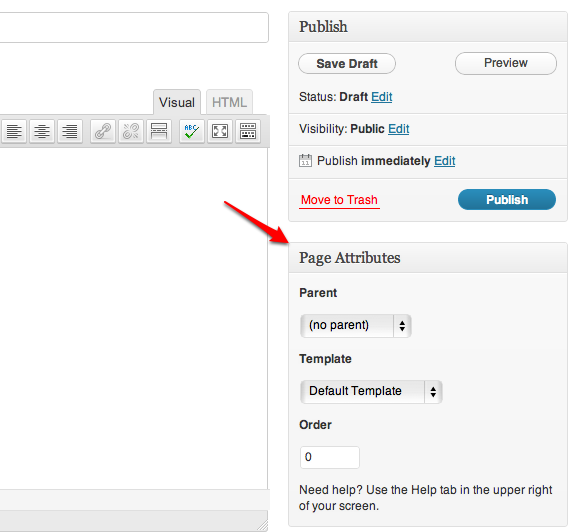
“One note for upgrading users – Please make sure the portfolio/contact templates are assigned in your “Page Attributes” box when editing the pages if you notice they are blank. Those two template files had to be renamed for the update and WordPress automatically reverts to the default one when that changes.”
Cheers!
Hey ThemeNectar!
Don’t worry, it didn’t scare me. I have enough experience with wordpress and themes to know that it’s almost never as bad as it looks
Thanks for the explanation but I’m at a loss finding this page attributes box. Could you tell me exactly where I can find it? It would be much appreciated.
Sure! Check this out: http://en.support.files.wordpress.com/2008/12/find_page_attributes.png?w=688
Of course! I was thrown off by the “page attributes”. My former theme doesn’t use pages for the portfolio. So I was constantly looking for this attributes thing within the porfolio items. Fixed now. Thanks again!
By the way, great theme! Bought it some time ago but kinda procrastinate on actually migrating the content from my old site. But now that I updated to the latest version I’ve seen again why I purchased it in the first place. Sooo much better than my old theme. Now I’m really inspired again to finish the darn thing. It’s just sooo much work 
One last thing. I promise! On your demosite portfolio, you have a horizontal bar with all categories instead of a pulldown menu. How do I activate that? Looked everywhere, honest
Nevermind, found it. This theme’s got many features, sometimes I just don’t see the forest for the trees.
Sorry for bugging you.
I’m glad to hear you sorted everything scratsmacker!
Cheers
HELP!!!!! On the Nectar Slider, how can I adjust the Slide Content Alignment,. both horizontal and vertcal alignment… H E L P !!!!
Hello chonafree,
You can adjust the position on the x & y axis using the “Slide Content Alignment” options: http://i.imgur.com/9lyT9lb.png If those are not working for you, please share a URL so I can see and if you need to position the content more specifically than that you’ll need to use css
Cheers
Good morning I set parameters in that area but need to make some adjustments. I sent you a message via support ticket. hope to hear from you soon. Thank you….
I’ll be with you as soon as I can
help please….
Hello Salient, Congrats on a most beautiful theme.
I have developed some shortcodes which are implemented in their own plugin.
I am able to use these shortcodes in the body of a page, however, they do not work in the “Page Header Title” or “Page Header Subtitle” sections of the page/theme. I simply see the [shortcode_name] tag.
I have already tried the following in functions.php:
add_filter('widget_text', 'do_shortcode');Is there another incantation which will get the shortcodes to work in the title and subtitle? I am on version 2.1.5.
Thanks.
Thanks sfsalsaman!
That snippet is only meant to allow shortcodes to be processed in text widgets and won’t effect what you’re trying to do. The reason it’s not working is because you can’t place shortcodes inside of shortcode attributes however you could easily just take the html from that shortcode and place your shortcode inside. So instead of using the centered heading shortcode, use this in the text tab on your editor: <div class="col span_12 section-title text-align-center extra-padding">
<h2> shortcode can be usable anywhere in here </h2>
<p>text here text here text here text here</p>
</div>
Cheers
Ok, thank you.
You’re welcome
I cannot get the sticky sidebar to work as you have it on your Blackbox example portfolio page. And there is nothing in the documentation about how to make a sidebar sticky. Was there supposed to be a plugin to acheive this? I can’t see any options to turn this on or off.
Found it, sorry.
Hey greatnorwegian! Glad you found the option
For anyone who might come across this – it’s located in the portfolio options tab of the Salient options panel
Cheers
BTW, if I wanted to make some other div sticky without having to add a redundent jquery plugin, can I leverage your sticky.js? I know css, not javascript. Wondering what it would entail to do this? For example, I’m adding a widget to a page as left-hand navigation but I’m doing it through the visual composer. I would like that widget to be sticky just like the portfolio sidebar option.
The calculations are only set to work on the portfolio page, but with some modifications to the sticky.js and init.js it could be made to work elsewhere. I’ll note this for the wishlist to try and make this an option
Hi there. Is there a way to center the image of a team member item? I’m able to center the text via custom CSS, but not the team member image. Thank you.
Hey marcfest!
If you can provide me a URL to the page where you’re trying to center it I’ll be able to assist
Cheers
Hi, thanks for your reply. THe URL is at http://outpost.marcfest.com/
While I have you, another question: How can I place a background graphic in the header space?
Thanks again.
Marc.
Hey again Marc!
1. After you set the team memeber to text-align: center, use this to have the image also center: .team-member a {
display: inline-block!important;
}
2.
#header-space {
    background-image: url('img-src.jpg');
}
Cheers
Hey there, thank you for your kind helpfulness. It worked.
You’re very welcome