38434 comments found.
@luci30
This hides the search on both desktop and mobile:
#mobile-menu #mobile-search, header#top nav ul #search-btn {
   display: none!important;
}
Thanks again for helping out others! 

Hi there. I’d like to have the regular menu (including search icon) appear for the middle responsive size (iPad, etc), rather than having it go to the mobile menu. I only have three items in my menu so there’s tons of room and no need for it to go to the mobile version. Is there an easy way to do this?
Regards Rob
Hey Rob!
Can you please open a ticket on the forum in regards? http://themenectar.ticksy.com/
Cheers
@LiskaD
How did you set that up in the Admin control panel?
Cause it seems to me that your “portfolio item post” does not have “Featured Image” uploaded. This only appears when there is no image uploaded to the “Featured image”
Sorted this for them, thanks again for being helpful to others!
@micoolcho What Visual Composer are you referring to please
He’s referring to the latest release of it
i’ve just added custom menu, and i want its font to be inherited from main menu, how can i do this?
Hey slowix,
have you defined a custom font in the typography options panel for the header or are you just trying to get it to use the default nav font? If you can provide me a link to your page with the custom menu i’ll give you the css you need either way
Cheers
Any plan or roadmap to support the new Visual Composer which features frontend editing? That’s a key feature that we really wanted and it’ll be great if future updates of Salient will also leverage on this to support posting from frontend.
Hey micoolcho, it’s definitely a possibility but no ETA yet
Cheers
Hi there
Firstly, I really love this theme – I have just purchased it for two of my websites!
One really really frustrating thing, which someone else mentioned a while back, is the fact that if you link directly to a filter category then the number of items displayed on the page doesn’t work properly.
It would be nice if this could be fixed, as we would like to offer the categories in our menu drop down.
Matt
Hey Matt, that’s great to hear!
There’s no way you can link directly to a filter category yet – you can either link to the project taxonomy page by doing /project-type/your-category in the URL like this: http://themenectar.com/demo/salient/project-type/music/
or you can choose a starting category when adding the portfolio element to the page. I’m unaware of any issues with items not displaying properly in these cases, can you please provide me a link demonstrating what you mean so I can take a peek?
Cheers
Hi there,
I am using the eye candy home page, and when I check it on the iphone the sort portfolio button is slightly cropped from the top, how can I reduce the padding for the page title please?
Thanks in advance
Hey 312Media!
Any way I could check your URL so I can see what’s up? Also, I assume the same thing occurs for you on the live demo?
Cheers
Sure no problem, when you get a chance to look at my ticket: #173455 you can take a look at this as well if you don’t mind. Also my home page is slightly different to your demo version so I can’t replicate it. Cheers
Will do
Thanks for taking a look at my ticket, I appreciate it. Did you get a chance to replicate the small issue with the portfolio button and find a fix in maybe the custom CSS box or anywhere else please?
Writing back in regards now
Thanks for your help. I cant say thank you enough! Awesome design with super support, these guys go the extra mile.
You’re very welcome 312Media!
ho to hide the search container?
Here’s the ticket that explains how to: http://themenectar.ticksy.com/ticket/52594/search/
Cheers
Hello,
Before I buy, is there a limit as to how many sections, as in parallax and sliders I can build into any one page? does the page builder work for all pages/
Is it child theme ready?
Hey michely3k!
1. Unlimited parallax sections, but only one parallax nectar slider per page is the current restriction.
2. Yes, it’s child theme ready
Cheers
Hello,
I can’t upload images via Upload button – after clicking nothing happens.
I’m using WP 3.8.1. I’ve just installed theme and WP.
Is this issue solved?
Best regards, Bartosz
Hey Bartosz,
this isn’t a known isssue so I would need you to open a private ticket in regards so I can log into your setup and check it out
Cheers
Dear Author,
There is open ticket on ThemeNectar: http://themenectar.ticksy.com/ticket/175069
You can find our login i password there.
Thank you!
One more question about the portfolio… Is it possible for a page to have multiple portfolios shown? And… do these pages utilise any lazyloading at all to save bandwidth when not scrolling down to the bottom?
Thanks in advance
Dan
Yes but there’s no lazy loading. This is another item on the wishlist, but one that probably won’t make it into the very next release.
Cheers
Hi ThemeNectar,
I guess you know “Elegant Themes”, I have seen lots of crappy websites during the last year based on one of their designs, but now their latest theme is a copy of “Salient”! You might wanna check it out and if you are in the States sue them!
http://www.elegantthemes.com/gallery/divi/Hey thebutterflyshow, thanks for the heads up!
Cheers
Hi again, im noticing a double scrollbar on my design now. http://imagebuddies.com/ Take a look. I added a snippet you have in some of these comments, cleared the cache but didnt removed it.
Please help
Also, getting different Fonts displayed on Chrome and Firefox. why is that ?
Hey itscroma!
I currently can’t see a double scrollbar in any browser i’ve checked – what are you noticing it on?
Also, is this something that just started happening or has it been like this the whole time? It appears none of your fonts are loading in correctly in FF.
Cheers
Well, I cleared the cache all over the places and now the double scrollbar has gone!
Now, Still getting Times New Roman in Firefox. I checked the site on mobile and everything looks ok, but don’t know if it’s a issue at my end.
Do you see the same fonts on Chrome and Firefox?
Thanks again for taking the time.
Glad one issue is sorted – the Firefox issue seems to be something strange though. Do you indeed remember if this has always been this way or something new?
Cheers
Actually it was the first time I was checking the site on firefox. But as of today it keeps showing Times New Roman. Any thoughts?
Thanks
I can’t seem to access your site at this moment – getting a “We Will Be Right Back” screen. Can you check the site with www. and see if the fonts work? www.imagebuddies.com/
Cheers
Hi there,
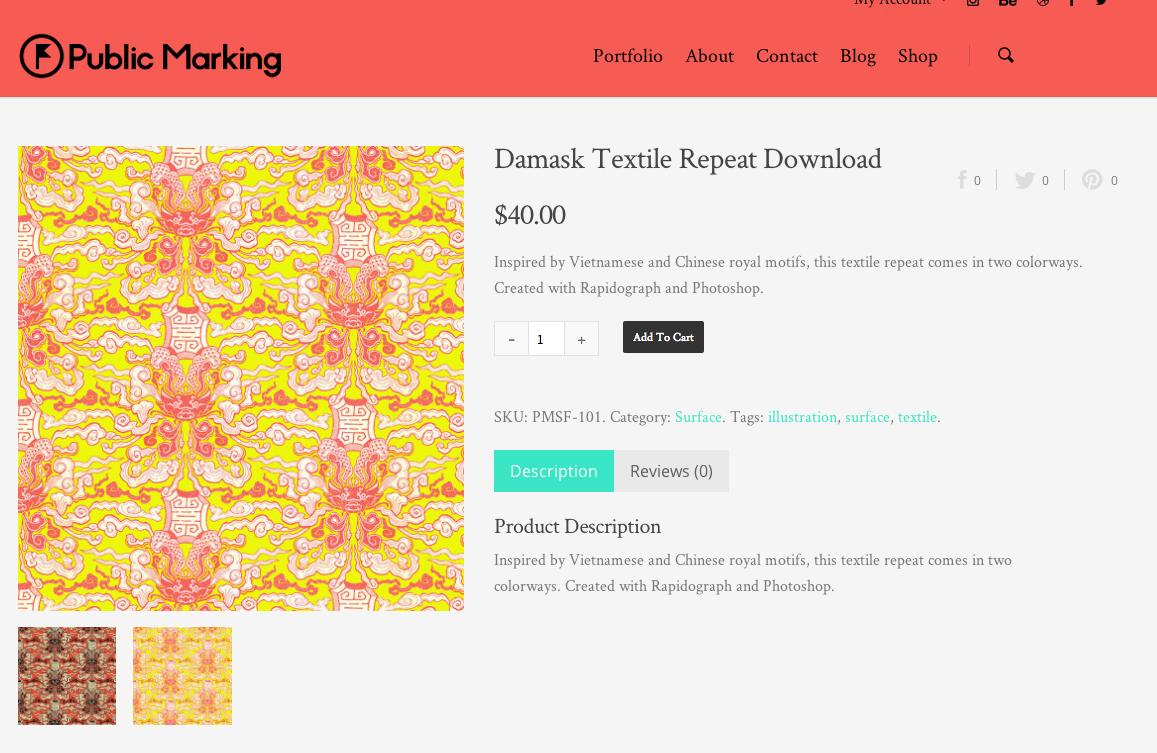
I’ve installed the WooCommerce YITH zoom plugin, and it doesn’t seem to work with this theme as it is (please see the example here: http://publicmarking.com/product/damask-textile-repeat/)
The plugin makes the original main product image take up the entire width of the page, and the thumbnail gallery is now missing.
Can you please help me to fix this? Thank you so much and I look forward to your reply.
Best, Larry
The plugin’s website is here btw: http://wordpress.org/plugins/yith-woocommerce-zoom-magnifier/ Thank you!
Hey Larry!
Try adding this into the Custom CSS box located in your Salient Options panel:
.caroufredsel_wrapper {
    min-height: 110px!important;
}
Hi there,
Thanks for your reply, however the carousel is still quite large (takes up the whole width). I believe it is supposed to look like this: http://demo.yithemes.com/room09/product/africa-style/
Is there anything I can do?
Thank you!
Best, Larry
Hey again!
Somehow the contents of that carousel/main image are outside of the normal div which makes them appear smaller on the left. When you deactivate the plugin does the image float on the left side again?
Yes it does! It just goes back to the way it was. like this: http://publicmarking.com/wp-content/uploads/2014/03/Screen-Shot-2014-03-09-at-12.39.49-PM.png
Thank you!
This means there has to be some sort of conflict between the Salient WooCommerce column sizes and the plugin – can you open a private ticket in regards so I can login and see what’s causing it?
http://themenectar.ticksy.com/Cheers!
Just submitted the ticket with subject line: “YITH zoom plugin” Thank you!
Thanks! I’ll be with you on that as soon as I can
I just realized I put the ticket as private – just changed it to public – hopefully you were able to find it – Thank you!
No worries!
Hi there,
I wrote a reply to my ticket “YITH zoom plugin” (I had created two of the subject by accident (private and public), but then closed the public one). I haven’t heard back from my latest reply for the private ticket – Did you happen to see it?
Thank you so much for all the help—it is much appreciated. Please let me know.
Thank you!
Best, Larry
Hey again Larry!
Just wrote back
Cheers
Have a question regarding the portfolio and the meta data displayed.
Is it possible to change the code somewhat so it shows the title of the portfolio item (as it does already) and then instead of just a date line, is it possible to add your own tag line somewhere??? (where?) but then display that instead of just the date
Is there somewhere that may explain this better? Sorry for my description, hope this question makes sense!! lol
Thanks Dan
Hey Dan!
I’m actually going to be adding this in as an option in upcoming release (2 weeks max so sit tight)
Cheers
Ok cool
Was thinking it’d be a custom meta data plugin extra but that’d mean an extra plugin and setup then tweak!!
Yeah it would take a development any way you look at it now.
Cheers
Hi, I am building the site now and it is not online yet, only on a local server. How do I link a button in the shortcode to another page on my site?
Hey Oneil15,
You can simply add your desired URL into the url parameter on the button shortcode
[button color="Accent-Color" size="medium" url="your-url.com" text="Your Button Text"]
Cheers
Oh man – apologies – please ignore my last message. We had the tabs all named the same thing, which was causing the problem. Got it working fine now! Matt
Cheers Matt!
Hello. Such a great theme, and incredible support from what I can see – congratulations!
I’m feeling stupid. We can’t get a simple tabs element to work. It just shows all the tab contents together, regardless of which tab we are clicked on. Example page: http://fundraising.linkethiopia.org/tabs-test/ (password: ethiopia). Is there anything we are doing wrong? Many thanks in advance. Matt
Thanks linkethiopia, glad to hear you sorted it!
We just updated to the lastest version and now the front-page slider will not load in ie8. It just spins and stops. Did something change? Is there a workaround? The site is http://smallfirmsuccess.org
Hey gregoryluce,
yes – please just open a ticket in regards with your admin credentials so I can help out
Cheers
Never mind – I just answered this for someone else and you can view the solution here now http://themenectar.ticksy.com/ticket/171019/