3106 comments found.

Is it possible to set up ads for single page ?
Hey,
If you’re talking about the single posts, then you can add ads before/after post using a plugin. For single pages, you can either the same plugin or use the page builder for further control.
Thanks. Have a good day.
From Where I can set up ads for single page except front page ? please I need to know it. help me answering the question.
If you have bought the theme and for support, please register and create a topic at our Support Forums. Thanks.
We just installed this theme and our advertisement and logo are not matching up. It looks terrible. What can I do? (highlightmagazine.net)
Hey,
Your logo is larger than usual and the space on the right is for 728px leaderboards.
Please create a topic at our Support Forums and Support will guide you on how to modify it for your requirement.
Thanks.
Hi,
1. I just bought the theme. I love the way it looks.But I’m having trouble installing it, I tried to install the Demo XML so it would look exactly like your sample on my old website. So I successfully import the XML, but when I tried to complete the import by downloading and import the attachment ( I put user ‘admin’ on both jane doe and john doe), it fails, and says this:
ERROR 500 – INTERNAL SERVER ERROR Why am I seeing this page?
Is there anything that I can do?
Understanding Filesystem Permissions
How to modify your .htaccess file
How to modify file and directory permissions
So what happened? How can I finished importing the demo?
2. Do I need to deactivate all my old plugins?
Thanks!
Hey,
It’s usually a problem with your webhost setting the memory limit or execution time limit. But it’s always a good idea to disable un-needed plugins.
Reminder: Tech support is only available at Support Forums.
For further support, please create a topic at our Support Forums.
Thanks.
I want to buy this item , my concern is ,since I am new to WP I want to be sure that after I install this Item in WP it will show up the same as the demo .So I can edit the content to my own ..guess the question is , will the author send me the .xml file with the demo data
Hey,
The demo data is included in the download packaged and the Documentation’s first section guides you how to import and what extra steps are needed.
Please note that images are replaced with placeholder gray images as the demo images are copyright property of their respective owners.
We’ll be able to help you with any issue you have at our Support Forums should you get stuck..
Cheers.
ThemeSphere:
I do not agreed with you in terms of supporting this template for Safari 5. There are many people that still has Safari 5, and it is not near 1% of the market share. You should ty to get around that, so people can buy your theme. It is a beautiful theme, and I will be the first one to buy it.
Thanks,
Wolffang
Hey,
The menu support on this browser is available on request. Rest of it works on it by default. If you would like to enable it, as mentioned earlier, you can request and add in the support with the side-effect mentioned earlier.
Considering there is demand, we will bring it back as default in a future release. Meanwhile, you can enable it on your installation if you want.
It was no longer enabled by default as the browser market share is only 0.88% http://caniuse.com/usage_table.php (Check Safari 5.1) and we didn’t want to add legacy code bloat anymore.
Cheers.
We were going through older feature requests and thought we’d update you.
This is supported by DEFAULT since past few versions.
Cheers.
How do I configure the slider images to be centered and fit within the entire image space like on the demo?
Hey,
If you have existing content and featured images, you will have to install Regenerate Thumbnails plugin and run it from Tools > Regen. Thumbnails. This will create suitable image sizes.
For further support, please create a topic at our Support Forums.
Thanks for choosing SmartMag.
Hello,
Can you tell me how I can change the title box color of bunyad Widget in the footer? or Which file has CSS part for this part? I tried to find with Firebug but I couldn’t.
Thanks.
Hey,
Technical support staff is only available at Support Forums. For support, please create a topic at our Support Forums.
Thanks for understanding.
Hi. I’m interested in buying this theme. I have a few questions, and sorry if it’s been asked before. 1. Do you have the option to hide/disable the “About Author” details which appears on the blog posts? 2. Is it possible to change the background color of the main navigation via the admin? (I don’t mean the hover over color, just the color in general) 3. Is it easy to change the size and font of the typography for individual elements such as general, navigation, H1, H2, etc via admin panel?
Thanks.
Hey,
1. Yes. It’s a default Theme Setting to turn it on/off.
2. Yes. Both colors can be changed via Style & Color settings in admin.
3. There are typography settings for main font, contrast font, general headings, contrast headings, excerpts, and so on. Should you need to change some font that’s not covered, we can help you with that at our Support Forums.
Cheers.
Oh great, thanks for your help. Just one more question, with the trending at the top, can this be taken out and a top navigation menu be put in it’s place easily?
Yes. You disable the trending bar in Theme Settings and add a “Custom Menu” widget in the top bar widget area.
Have a good day.
Hi,
You have made a great theme thank you.
Is there a way to remove the comment counter from the posts and homepage.
I would prefer not to display the number of comments.
This would really help.
Hey,
Glad to know you like the theme. Here’s a relevant topic to your question: http://theme-sphere.com/forums/topic/not-show-comments/#post-790
If you need something more specific than that or for further support, please create a topic at our Support Forums.
Cheers.
Is it possible to change what categories or tags show up in Trending? It was to be used more of a breaking news area etc.
Hey,
We sure can help you with that if you register and post at our support forums. Please note again this area is for pre-sales questions only and support staff is at the forums. For support, please create a topic at our Support Forums.
Thanks for understanding.
For some reason in Safari, the main menu doesn’t display the drop down menu. I have Safari 5.1.7. Do you know what could be hapenning?
Hey,
We do not support Safari 5.1 (only Safari 6.0+ is fully-supported on Desktop) by default because the market share of this browser is less than 1% and adding support for it disables menu effect on newer Safaris. We still have the code if you would like to support it – not recommended. Please create a topic at the support forums and we’ll give the fix – again note that the side-effect will be menu animations.
For further support, please create a topic at our Support Forums.
Thanks.
We were going through older feature requests and thought we’d update you.
This is supported by DEFAULT since past few versions.
Cheers.
I dont have credit card? How can i pay for this theme? Can i make a normal bank transfer? But here is no account number…Please answer because i relly love this theme 
Hey,
ThemeForest supports PayPal so you can consider further options available by Paypal. Check this: http://support.envato.com/index.php?/Knowledgebase/Article/View/217/54/how-do-i-pay-for-items-on-the-marketplaces
There’s a contact link on the right side on that same page should you need help from Envato.
Thanks.
Whats the best way to not show certain articles / posts on the home page?
Hello,
You can use tags or categories, to limit posts, in each of the home-page blocks.
Please note that support is offered through forums. This is for pre-sales questions only.
For further support, please create a topic at our Support Forums.
Thanks.
Hello, I can not update the plugin WPBakery Visual Composer
He asks me to buy for $ 30.
I think he is interfering with my theme because I can not upload via chrome, and when I change the theme with quietly.
I look forward
Hello,
We don’t use Visual Composer. There’s another plugin named “Bunyad Page Builder”. Please activate and use that.
If there’s some other issue, or for further support, please create a topic at our Support Forums.
Thanks.
Hi where is the custom.css file on the server itself? I would like to do my editing outside of the web interface for custom css.
Hey,
The Custom CSS available in Theme Settings is the best option as it’s preserved on all updates. A custom.css file would be lost if the theme was ever deleted.
If you would like to do advanced editing, create a Child Theme. That’s the best method for customization of WordPress themes. Learn how to create a Child Theme at Forums: http://theme-sphere.com/forums/topic/how-to-create-a-child-theme/
For further support, please create a topic at our Support Forums.
Cheers.
Cool looks like the child theme is the best way to go in this case. Thank you.
Hello, great theme!! i want to issue a problem. The sub-links of a caterogy Mega Menu Link are not visible on the mobile devices. How can we solve this issue?
Hey,
Please make sure you’re using Links Mega Menu. The category mega menu contains posts that are not shown on mobile menu.
If that doesn’t solve your issue and for further support, please create a topic at our Support Forums.
Thanks for buying. Have a good day.
Hi guys, So, I placed the social icons on the top header and they work great but they don´t open in a new tab, I don´t want my visitor to leave my website. Can you please provide me with the code so that social icons display in another tab.
Thanks in advance
Hey,
Thanks for choosing SmartMag. Please register and check this solution at our Support Forums: http://theme-sphere.com/forums/topic/how-to-make-share-links-open-in-new-windows/#post-2070
Do note that opening links in new tabs breaks the W3C Accessibility guidelines.
For further support, please create a topic at our Support Forums.
Cheers.
Hello… Purchased the SmartMag few day ago and haven’t rated it yet..
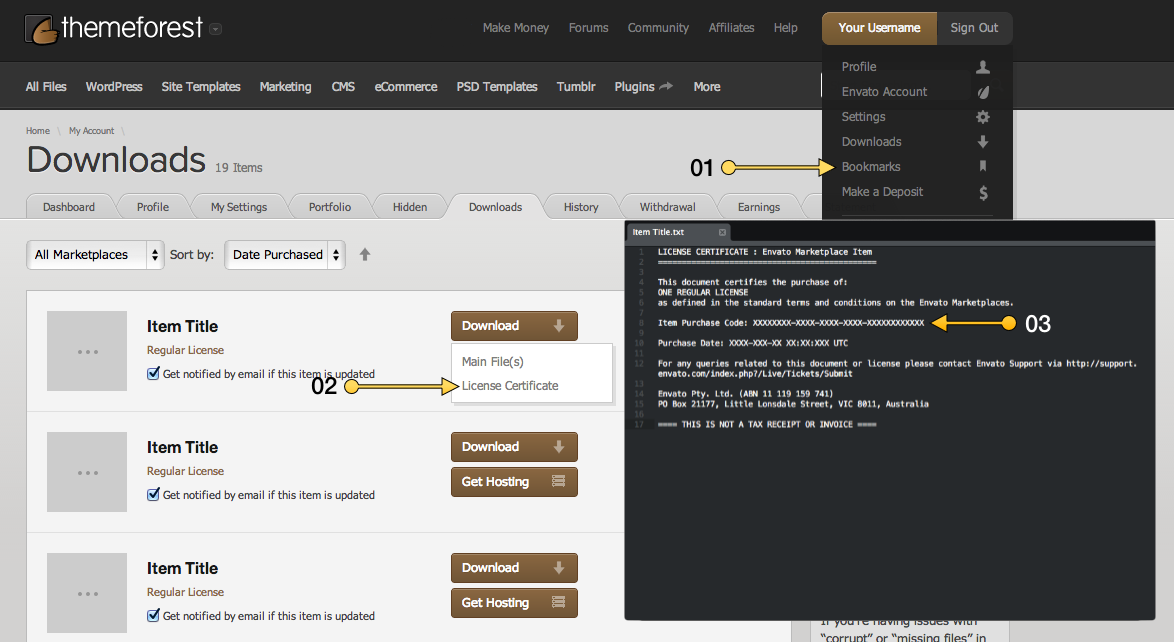
Haven’t find any item purchased code from my themeforest to get support from you… though i tried hard to find that out..
However, I just need to remove the category name with background with modern listing style featured image in the homepage… Did not find out any short-cut way to do that…
Can you assist by telling exactly what needs to do ?
Hey,
1. Have you seen this yet? http://theme-sphere.com/wp-content/plugins/Aqua-Verifier/img/find-item-purchase-code.png
2. If the above does not work, please go here and you will notice “Email ThemeSphere” on the right side: http://themeforest.net/user/ThemeSphere
Please email us with your question and the support will get in touch with you.
Edit: It appears you’re already registered on our Support Forums with that username. If you forgot your password, please use forgot password link on login.
Thanks.
Hi. I cant get mine to look nothing like the demo. Can you install it for me?
Hey,
We do not offer installation services but have you been following the documentation? Here’s a forum post offers a more step-by-step approach: http://theme-sphere.com/forums/topic/are-there-any-video-tutorials/#post-2459
Thanks.
Hi there, not purchased yet (but going to because ITS AWESOME): just a few questions as a tech-blogger:
- Source + Via Links: looking for a possibility to add (multiple) source and via-links to this theme with custom fields (easy for editing) and show them under the article in a nice way (VERY IMPORTANT TO ME)
- tags: no usage of wordpress tags in this theme?
- Ads & Ads inside article: i can see an ad widget in the sidebar and next to the logo but what about “manual” responsive ads and ads inside an article (like “after 1st or 2nd paragraph, any other ad areas to configure?
Looking forward to hear from you!
Hey Thomas,
1. It’s a default feature at the moment but we can suggest how to achieve this at our Forums.
2. Tags are used and are fully supported in all areas. One example: http://theme-sphere.com/smart-mag/gluten-free-delights-for-everyone/
3. You will have to install ads plugins to do automatic insertion of ads before/after post and so on (there are plenty of plugins that do it already). Pretty sure you wouldn’t want to manually insert them into every post but you can do is if you want. Ads can be used in footer, sidebar and page builder content area too.
Thanks for your interest. Have a good day.