38434 comments found.

Hi Guys,
Me again. Quick question.
I’m editing my .htaccess to parse the file types to play across all platforms and it seems to be working in Safari & Firefox now. However it is taking quite a while to load, and still isn’t working on my iPhone.
I know the code I need to add and have added it in both my blank .htaccess file in the web root and the .htaccess within the theme (that contains the following code)
# BEGIN WordPress
<IfModule mod_rewrite.c>
RewriteEngine On
RewriteBase /giggle/
RewriteRule ^index\.php$ - [L]
RewriteCond %{REQUEST_FILENAME} !-f
RewriteCond %{REQUEST_FILENAME} !-d
RewriteRule . /giggle/index.php [L]
</IfModule>

# END WordPress
However, where do I add this code…?
AddType video/mp4 mp4
AddType video/mp4 m4v
AddType video/ogg ogv
AddType video/webm webm
AddType video/webm webmv
I currently have it like this. Is it correct or is this why it isn’t playing on my phone and taking a while everywhere else?
# BEGIN WordPress
<IfModule mod_rewrite.c>
RewriteEngine On
RewriteBase /giggle/
RewriteRule ^index\.php$ - [L]
RewriteCond %{REQUEST_FILENAME} !-f
RewriteCond %{REQUEST_FILENAME} !-d
RewriteRule . /giggle/index.php [L]
AddType video/mp4 mp4
AddType video/mp4 m4v
AddType video/ogg ogv
AddType video/webm webm
AddType video/webm webmv
</IfModule>

# END WordPress
Thanks!
Hey again!
Your htaccess is fine actually – I can check your page to investigate why it may be slow to load if you can supply a URL though 
Also please see this in regards to mobile: http://youtu.be/FLU9Pxo_RD8?t=6m34s
Cheers
It’s http://hdtesting.co.uk/giggle.
They’re fine on desktop (a little slow maybe) but phone isn’t work.
Thanks!
Also – I’d like to change the colour of the ’+’ signs on the toggle sections of the home page. Can you advise how to do this??
Thanks a bunch guys. You’re stars!
Can you please feedback on this guys? It’s not loading in Safari now at all 
Hey again – sorry for the delay! There’s a big release coming out tomorrow for Salient and I’ve been working extra to make sure it’s as good as possible
1. In regards to the videos playing on mobile – did you check out that link I posted? I cover why it’s not possible to use video backgrounds on mobile devices and explain the fallback (image).
2. Add this into the Custom CSS box located in your Salient Options panel:
.toggle h3 a i {
    color: #000!important;
}
3. I just checked on Safari and can also see it not loading in – I also see that your mp4 supplied is pretty big which is most likely the cause. Can you try compressing it down as a test? Also I would recommend plugging in this source from the demo in the mp4 field:
http://themenectar.com/demo/salient/wp-content/uploads/2013/09/one_more_new_1.mp4just to see if it works. If so than we can know for sure the issue is simply with the mp4 you’re supplying for your own video
Cheers
First off I’d like to say this is a badass theme.
I’m currently using the Workality theme by Northeme on my (main) site, but I found Salient more pleasing to the eye and with some cooler features, so I purchased it and have almost finished setting it up to my likings.
I have one issue though which is a really cool feature in Workality.
The ability to have a custom post page.
What I specifically want to do is split my portfolio into 2 pages – one for my professional work and one for my personal work. Easy enough in Salient – in a way. I set up a new page to use the portfolio template and selected which categories should apply to each page, and that works like a charm.
What doesn’t work is the permalinks. If I click on Personal Work, I see my personal works and the menu item in the navigation bar highlighted correctly on Personal Work. If I click any project, the menu item in the navigation switches to Portfolio, which is incorrect.
Also if I browse through alle the Portfolio projects using the top right arrow navigation, it jumps between the 2 portfolio pages I’ve set up at the end of the line, which it shouldn’t do. It should stop when there are no more items to display under the Personal Work page.
I know the reason for this is because all of my stuff is collected under one admin tab called Portfolio, and that’s where a custom post page option would come in handy, just like you can do in Workality.
Please see these 2 images for reference or visit the page.
http://pixelpirate.dk/temp/salient01.jpg http://pixelpirate.dk/temp/salient02.jpgWhat happens is the Portfolio projects I apply to the Personal Work page gets a permalink like this …/portfolio/project-name/ where it should be like this …/personal-work/project-name/
Is a custom post page currently in development? If not here’s +1 for that to happen.
Alternatively, is there something I can do to make the navigation menu/permalinks work correctly when I split my portfolio up to separate pages like this?
An extra cool feature of having a custom post page option would be the ability to have one portfolio page be in a regular style, and the other in masonry style. Then you could customize the site even more, that would be really great. Then I could show of my personal work in a masonry style and my professional work in a standard style.
Thanks
Regards Lasse
Thanks Lasse!
You’re correct in assuming that having everything in one post is the culprit here – however, the solution that’s on the agenda is to add an ajax based portfolio so I can connect the parent portfolios easier and not have to deal with multiple post types. The drawback with adding another post type would be that you’re still limited to those two and can’t freely add as many you may want.
The easiest solution for now would be to sort the nav highlighting via javascript and possibly consider hiding the next/prev buttons with css. Let me know if you need assistance with either of those:)
Also in regards to your last request – you can already display your various portfolio pages in different styles. Simply use the portfolio shortcode/page builder element instead of the page template & you can display a different layout for every instance you place
Cheers!
Hmm yeah, I could use some help with the js solution, if possible.
I have some additional questions I hope you can answer too. I just tried to set up a clients carousel. The logos have various dimensions, some are long, some are short and some are square.
Here’s how I’d like it to look: http://pixelpirate.dk/temp/Clients_Array.jpg
And here’s how it actually looks on the site: http://pixelpirate.dk/temp/Clients_irl.jpg
They all have the same height of 110px, but the width varies, I assume by the look of it, that the clients carousel doesn’t look at the height of the image.
Ideally you should be able to set a desired height and spacing between logos.
Any advice to what I should do here with different sizes logos?
If I make them alle the same size in pixels, I will end up with blank space around the square logos, which will look stupid.
Also it’s not currently possible to add a home slider via shortcode, is that something that’s on the todo list as well?
I’m currently experiencing some bug with the nectar slider if I have one assigned to the top and another further down the page. If I enter the shortcode for the bottom nectar slider and publish the page, then head back to modify the nectar slider itself and publish it, the placement of the text and button get’s messed up, in example if I set it to be left aligned first it looks great, if I change it to right afterwards and publish it, it’s still left aligned, but pushed to the right.
Screenshot here: http://pixelpirate.dk/temp/nectar-slider.jpg
On top of that, something weird happens with the full width section below with Parallax enabled on the same page. The image sort of gets cut off/disappears/turns into white. Here’s a screenshot of that: http://pixelpirate.dk/temp/Parallax.jpg
Please take a look on the site here for yourself, I’ll leave those errors there for the next reply here: http://www.pixelpirate.dk/pp9/
Thanks again!
Lasse
Hey again Lasse, sorry for the delay! Been working all weekend to wrap up the new version coming out soon.
1. Just open a ticket in regards to the JS question with your admin credentials and I’ll log in and sort it for you http://themenectar.ticksy.com/ (please post your ticket number here)
2. The clients carousel sets the width of the items all to the same – having a dynamic width would be an easy change via css if you didn’t use the carousel option but assuming you want to keep that you’d have to tink with the JS. You can find the relevant code in the init.js file located in the js folder. Just search for:
$('.carousel.clients').each(function(){ to end up at the right section.
3. That’s actually how the right alignment was designed for the Nectar Slider – it simply moves all the text into the right quadrant as you can see on the demo in the third slide here: http://themenectar.com/demo/salient/ If you want to change that to actually align the text itself to the right enter this into the Custom CSS box located in your Salient Options panel:
.swiper-slide[data-x-pos="right"] .content {
    width: 70%!important;
    text-align: right!important;
}
4. I can’t see this anymore most likely because you’ve already moved the section but it sounds like you were experiencing this: http://themenectar.ticksy.com/ticket/128447/search/
Cheers
No worries man, I think it’s great you even have this place for all our silly questions! I’m quite busy myself, I get it – looking forward to the update though. 
To do it short:
1: I think I’ve found a doable solution for now, which is something you suggested even earlier, and that was using a default template instead of the portfolio and just adding the items with the shortcode. Then I also get the two looks like I wanted, Masonry for one and a full width for the second – no menu highlighting though, but meh, who’ll notice, right?
2: I’ll look into that some other time, but I hope I can manage.
3: Alright – thanks for the css, I also picked up some other css to change the font size, so now I’m in good shape with the nectar sliders too – thanks!
4: It was still happening for me in Safari on OS X 10.9.2, and yes that’s exactly what I’m experiencing. So I’ll try and see if I can cram some more crap into my front page to fill it out.
Thanks again! I’ll probably be back for more…
No problem at all! I’ll be here whenever you need me.
Also the update landed yesterday morning in case you haven’t seen yet
Cheers!
I didn’t see it, so after you wrote here I updated and found my way around it and it appears I’m experiencing a bug with my custom portfolio pages.
Remember that I set them to a default page template and added the nectar shortcode for portfolio and added the categories I needed.
The bottom row entries get’s their bottom cut off and also the little plus in the lower left corner isn’t visible because of this. It’s even more clear if you sort the items.
See the site here http://pixelpirate.dk/pp9/professional-work/ or here http://pixelpirate.dk/pp9/personal-work/
Alternatively see the 2 screenshots here http://pixelpirate.dk/temp/nectar-portfolio01.jpg and here http://pixelpirate.dk/temp/nectar-portfolio02.jpg
Please also notice on the first screenshot how the entry in focus width extends the width of the entry above it – bug too? I don’t think this happened before on 3.1.5.
This doesn’t happen on a page that uses the portfolio page template – look at this page (that is set as a draft and therefore isn’t in the navigation menu): http://pixelpirate.dk/pp9/portfolio/
There also seems to be missing a pixel or two on the portfolio lists I’ve put into the “Welcome page” – see the right side of the dinosaur image and the tøseTIRSDAG image below: http://pixelpirate.dk/pp9/
Further more – something weird has happened to my blog after the update. It’s put up the latest entry as a headline and caption in the header, even though the fields are blank in the page setup? http://pixelpirate.dk/pp9/blog/ it should just be an image, no text no nothing.
Finally a feature request for the social icons – one more for DeviantART please.
I’ll let you know if I run into more trouble.
Thanks!
SORRY – one more thing.
I want to use one big square image for a Masonry portfolio item, and another for the thumb on the Welcome page instead of a cropped version of the Masonry type image – how would I go about doing that?
If I set the custom thumbnail image to another than the square image, it looks fine on the Welcome page – but on the Personal Work page, it gets screwed up like this – it stretches the custom thumb and uses that instead of the feature image: http://pixelpirate.dk/temp/stretch.jpg
If I do it the other way around, Masonry image for the custom thumb, I’m still stuck with a cropped version I’m not happy about…
Hey there Lasse!
1. Switch into the visual composer view and make sure the portfolio is in a row – that should sort the clipping. Let me know if the second issue still exists though.
2. I’ve included a fix for the missing pixel in 4.0.1
3. ^
4. Thanks for the request! I’ve noted that for the wishlist.
5. Don’t use a custom thumbnail – just supply a large featured image (at least 1000px by 1000px) and it will get cut appropriately for both layouts
Cheers!
1. That fixed it
2. + 3. That fixes it!
(Thanks for the update).
4. Thanks for listening!
5. The “cut appropriately” isn’t good enough for me, as I don’t have full control of what’s in focus on the thumbnail image on my welcome page – it’s fine for the portfolio page, but when it just generates its own version for use in the nectar short code for recent items, I lose control of what it looks like. Look at the magnifying glass as an example – it gets cut off at the bottom, which is why I want to use a special image for this thumb compared to the masonry featured image. Same thing with the dinosaur, it’s head is cropped in a weird place.
http://pixelpirate.dk/pp9/6. New request for help here, but we’re going back in time to when you said to look in the init.js file for this section, to try and tinker with the clients carousel:
$(’.carousel.clients’).each(function(){
I want to set the image height to a fixed height of 110 px and the width to be dynamic. So I tried to put in:
height : 110,
width : ‘auto’, or width : ‘100%’ which didn’t do much other than break it. So a little help here to what I can do – I’m no js expert…
Setting the height alone to 110 didn’t change anything.
Thanks!
And just to let you know, this still happens with the portfolio in a row and with version 4.0.1:
http://pixelpirate.dk/temp/entry-extends.jpgAaaaand something crazy also happens with the portfolio in a row in masonry layout with the short code:
http://pixelpirate.dk/temp/personal-masonry.jpgSee how the bottom of the Futurama image extends over the bottom row entries, and the bottom row entries are misaligned?
There’s a gap from the CTA up to the row as well, but not on the hovered item, which appears taller than the other items on the bottom row.
Hey again,
5. Unfortunately there’s no way to use a custom thumbnail for one portfolio instance and not the other – it will either get used every time that item is called for display or the featured image will be depending on which you’ve set.
6. Try setting the width to “variable”. You might also need to remove the width declarations in the style.css file for each carousel item.
7. The last item extending a bit beyond is to be expected since each item has its bg a tad over 100% to avoid mysterious empty lines masonry will place between the images in webkit browsers depending on the screen size viewed on.
8. I can’t seem to see this happening on here: http://pixelpirate.dk/pp9/personal-work/ are you still having this issue?
Cheers
Hey
5. OK, then I’ll have to tinker with the preview images and make sure I get a result I like for the welcome page, not that a biggie, but it’ll require some trial and error on my end I guess, but not undoable.
6. I’ll try and mess around some more with it, but I think I finally get why you set it to a fixed width; so that it can autorotate properly on all resolutions, which makes sense, but in my case with all the different types of logos, long, short and square and round, some parts of the carousel looks like crap, but I guess it’ll have to do for now. It looks crammed around the Coloplast and Danske Spil logos as an example, but maybe I can tamper with those and get something I like. There’s a lot of tweaking involved in some parts, but ok.
7. OK, just wondering if that’s a bug.
8. I’m experiencing that in Mac OS X 10.9.2 running Safari 7.0.2 on a late 2013 Retina MacBook Pro with a res of 3840×2400px. I’ll try some other browsers and setups at work tomorrow at work and let you know how it looks there.
9. Another request – another social icon for WInCustomize.com – I have a bunch of skins and icons available for download over there, so I’d like to be able to link to it. Let me know if I can help you with creating icons for both DeviantART and WinCustomize if you choose to include them in an update – I’ll make them for you.
Thanks again (for your patience too). 
Thanks for the additional information & suggestion!
regarding 8 – I only tested your URL on a PC so far (Firefox, Chrome & Safari) so perhaps it’s only occurring on Safari with Mac. Will also test there soon.
Cheers!
OK…
OS X 10.9.2:
Firefox 28 renders the site perfectly, except the Lovelo font looks a lot fatter than the other browsers, the font smoothing is generally horrible.
Latest Chrome renders the site perfectly, but has the parallax issue (currently visible on the Welcome page). But that’s a matter of putting more content in between.
Safari 7.0.3 renders the Masonry portfolio incorrect as seen in my screenshot, but the parallax issue on the front page that Chrome has, Safari doesn’t.
Windows 8:
Firefox 28 renders the site perfectly too (hooray for consistency).
Latest Chrome renders the site the same way as on OS X (hooray for consistency).
IE10 renders the site perfectly too.
Safari 5.1.7 renders the Masonry portfolio perfectly, but has the same parallax issue that Chrome has on both systems.
So something weird happens with Safari on OS X somehow.
Cheers.
Thanks for the detailed report – will into it more
Hey again
I just recorded a short video to show some minor issues I have – minor, but if fixable it would be nice.
http://pixelpirate.dk/temp/pp9.mp4First part shows my Portfolio categories setup, where I have some category names that are the same but use different slugs, so I can have the same titles in my two portfolio pages (3D, Skins, Icons). But when using the visual composer which I’ve grown happy to use btw – I can’t select those categories, so I have to manually enter the slugs in the classic editor to get it to work properly.
Second part shows how it renders in Safari, Chrome and Firefox. My issue here is how the Nectar slider in the top animates in Chrome and Firefox when you scroll down the page – but not in Safari. The text and button just sits there statically. Is there something I (or you) can do to make it work in Safari too?
Thanks again!
Cheers
Hey!
1. I’ll look into this and see if there’s a practical way to get it to show duplicates
2. This effect is purposely disabled in Safari since it’s a lower performing browser and can cause a lot of extra stress on it. If you want to enable it open the nectar-slider.js file located in the js folder, search for “sliderParallaxInit” to end up at the right place and then remove this line:
if(navigator.userAgent.indexOf('Safari') != -1 && navigator.userAgent.indexOf('Chrome') == -1) { return false; }
Cheers!
Thanks man!
Would you mind explaining “lower performing browser” compared to Chrome and Firefox?
I had been using Firefox for many years, but found it to be quite “heavy”, slow at times, plus some sites it didn’t handle very well, and with the introduction of iCloud Keychain (for bookmarks syncing) I switched to Safari and was quite happy with both performance and site renderings.
Sure! Check out this article for some more information: http://mediaunmasked.com/browser-bash/
I think the article is flawed. It’s basing it’s Safari test by using the Windows version 5.1.7 which was released May 9th 2012. No newer releases on Windows has been made since and won’t be anyway, so it’s clearly outdated and not even a browser I think anyone uses on Windows anyway. He should’ve based his test on using an updated version of Safari on OS X, though he clearly hates that platform, which makes the article even more flawed.
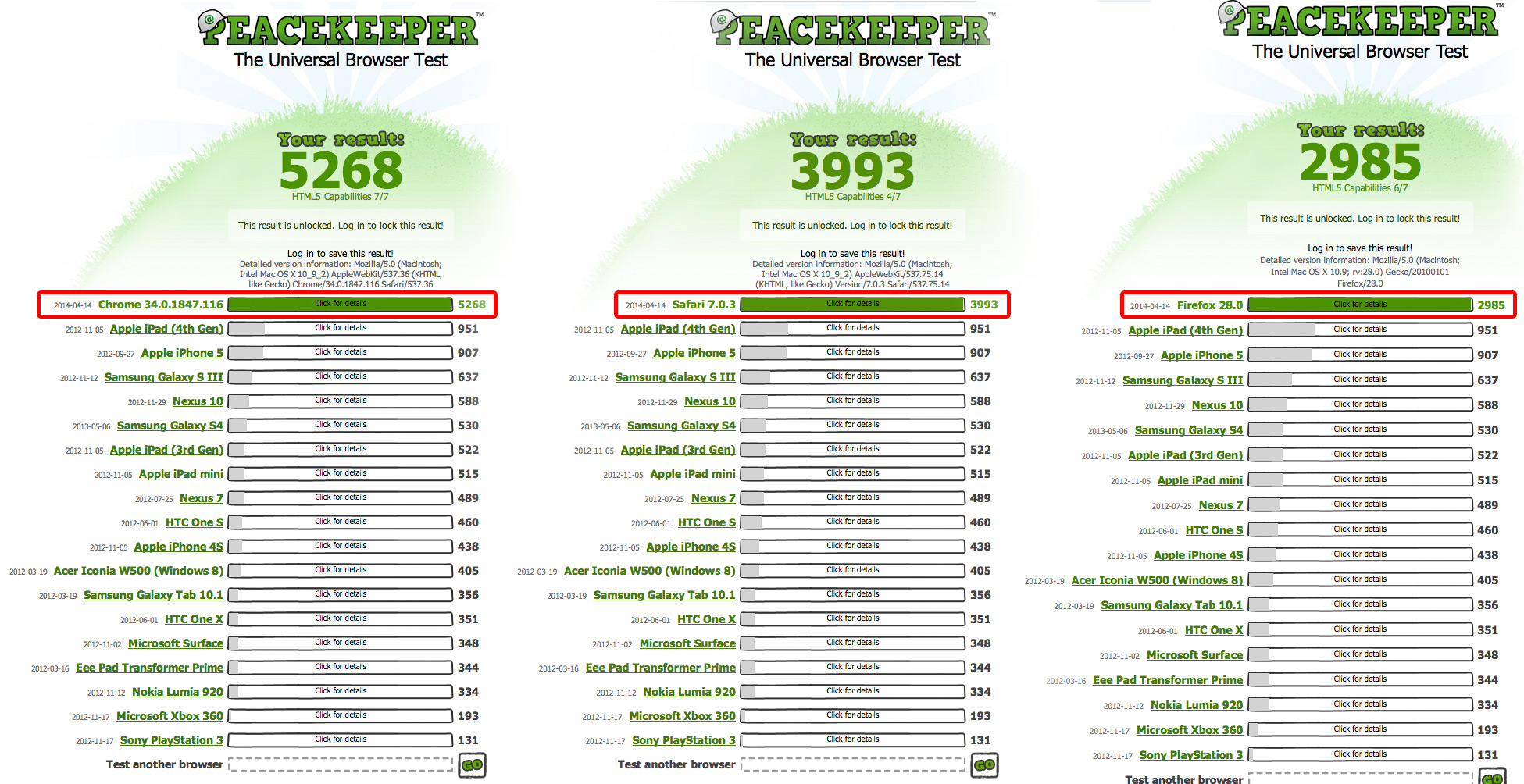
Take a look at this – this is my tests of today using the same test as him. I’m on an early 2013 iMac running OS X Mavericks 10.9.2 and the latest versions of Chrome, Firefox and Safari.
http://pixelpirate.dk/temp/browsers.jpgClearly Chrome does best. Then comes Safari. Then comes Firefox.
I notice no lags enabling the nectar slider animation in Safari (by altering the js you mentioned above), so maybe it’s time you enable them by default in Safari in the theme too?
Cheers
Another thing.
It’s mentioned in http://themenectar.ticksy.com/ticket/128447 that you can have as many full width parallax backgrounds as you want next to each other without issues, but introducing a nectar slider will cause trouble.
Well, in Chrome on OS X here I get this error on my MacBook Pro with a res of 3840×2400 and without any Nectar sliders:
http://pixelpirate.dk/temp/chrome_parallax.mp4I do not get this error at work in Chrome on my iMac with a res of 2560×1440…
http://www.pixelpirate.dk/pp9/about/Cheers
Hey!
1. Thanks for the additional information – I will retest on Safari with Mac instead of PC to see if I can enable it going forward
2. That’s odd – I suspect it has to do with the parallax page header. Somehow the retina resolution is causing the discrepancy. Will also note to test with this and see what can be done to sort it.
Cheers!
Hey guys!!
Parallax section isn’t kicking in until half way down the page. Can you explain why? I can’t figure it out and presume this has occurred before but can’t find any other comments on it!
http://hdtesting.co.uk/giggle/Thanks!
Hey MidasCreative_! Do you still have a parallax BG set on one of your rows? I’m not seeing any currently. If it was occurring on the Services row than this was the issue: http://themenectar.ticksy.com/ticket/128447/search/
Cheers
Yep, turned it off! That ticket makes sense. Thanks!
You’re very welcome
Cheers
Hiya
Stoopid question but how do i make a featured product on the home page? I used short code of WooComm and it comes out this lame small messed up style
Farrah
Hey Farrah,
Can I grab a URL so I can see what’s up? The shortcode method is actually the correct way
Cheers
Hi guys
Just wondering how I can get the blog posts to automatically get an url under the blog page (www.website.com/blog/blog-post-url). At the moment they get an URL under the home page (www.website.com/blog-post-url) which can conflict with page URL if the title is the same.
Thanks
Hey alienintelligence,
Since this doesn’t have anything to do with Salient specifically, I would need to do some research on the subject as well to get the best answer. From what I know off the top of my head is that it wouldn’t be that easy. Here’s a thread I found on the subject for you to review
Hi,
I seem to be experiencing an interesting issue – for one function to work I have to include RequireJS on my page. This leads to some issues:
1. there is now space between the menu sub-items and the main item 2. When I use the full-width background then the content in it isn’t displayed.
I sense some conflict there Any tips?
Hey jarmosiim! Is there anyway you can supply me your URL so I can check for conflicts?
Cheers
Sure: http://www.nextgaything.com/testileht/ – i’ve now put it so that the content is in a container, then you can see where it’s supposed to be.
Thanks!
It seems the first error to be thrown is:
Error: Mismatched anonymous define() module: function () { return impl; } http://requirejs.org/docs/errors.html#mismatch

var e = new Error(msg + '\nhttp://requirejs.org/docs/errors.html#' + id);
which is coming from the require.js file. The second error to come up is from the AJAX search in Salient:
TypeError: $(...).autocomplete is not a function
It’s reporting that autocomplete doesn’t exist as if jQuery UI isn’t present. This could be occurring because of the first error from require.js but it’s hard to say.
Thanks for this! I would really appreciate it if you could point me to a solution to this.. I do understand if you can’t.
The next step to do would simply be to check on the error from Salients file located at /salient/nectar/assets/functions/ajax-search/wpss-search-suggest.js and see if by deleting the entire contents of the file (for a second) fixes the issue. If so then you’ve narrowed it down to that file and if not than further testing would be required
Dear Nectar,
I have a question regarding a newsletter plugin I am using.
On my website I am using the Mailchimp for Wordpress plugin.
I made a horizontal bar that I would like to display at full width underneath the menu or underneath the header (which is currently the case on www.bosplaatjes.nl).
But when using the ‘full width’ block and adding the opt-in code, the form is not displayed full width. As you can see it doesn’t go the whole way like the header does.
I added a green background so you can see what I mean
Do you know how I could change this? I thought that full width would mean that it would reach to the edges of the website.
I hope you can help me with this Thanks very much in advance!
M.
Hey irrimiri,
You need to select “full width content” for your row type to achieve this – that’s the correct way to break out of the content container and touch the edge of the screen
Please see this in regards: http://www.youtube.com/watch?v=N4mt0lOJ888
Cheers
Dear Nectar, Thanks. I feel silly forgetting about this option. I tried this on a default template and I can get the items to be full width with the page.
But when I do it in the template for the home slider, it doesn’t show full width. When I change the page to the default template it shows full width again.
So I tried to add a nectar slider to the page instead of the homeslider. But I was using the animated caption of the homeslider so the gif image would slide in which was pretty neat. The nectar slider doesn’t do that.
Maybe I am doing something with the homepage. I updated to the latest salient version just in case
But when I am using the home slider template, I can’t get the rows to show full width. Is that correct?
Again thanks so much !!
x M.
Oh and one more thing. Since the update I have a problem with the portfolio and new projects row :/ This is odd. First when I would add ‘recent projects’ or a ‘portfolio’ it would show the images all in the same thumb size and neatly in colums. (like it does on my not-edited www.bosplaatjes.nl/illustration) I entered the amount of thumbs to show and told it to show ‘8’ on the homepage, but it’s now only showing 3 and in different sizes. I am not sure how this is suddenly happening since I didn’t change any css or anything else. I just re-added the ‘recent projects’ after altering the page. Am I doing something wrong? It worked earlier. Thanks! Sorry
Hey again, sorry for the delay irrimiri!
1. The Nectar Slider does actually slide in the caption – it’s just a lot faster. If you would like me to help you adjust it to be slower like the Home Slider please open a private ticket in regards (with admin credentials) and let me know the ticket # here
2. Currently I am actually seeing I am actually seeing 8 projects on the homepage at http://bosplaatjes.nl/ & they all appear to be sized correctly. Have you sorted this already?
Cheers
Thanks, you are the best! I will create a ticket. And about 2) Yeah I had to change that because someone was going to look at my site, so I copy/pasted a code from another page and it looked good again. Not sure what caused it since I did that update. Could it be cache? I did clear cache and cookies though. Will create a ticket. Thanks!
Now that the major release it out i’ll be hitting the forum hard again so if you wanna paste you’re ticket # here i’ll be glad to take a peek
Cheers
http://themenectar.ticksy.com/ticket/188171
Thanks!
I’m using the Portfolio element on a page with the “Lightbox Only” option checked. For the videos, I’m embedding an iframe embed code from Wistia.
I’m developing the site locally and my concern is whether or not the video will work optimally on mobile devices. I’ve tried using browser stack to see how it works on an iPhone and it shows the video in a lightbox that extends outside of the screen. This isn’t going to work.
Do you have any suggestions?
Thank you!
Hey erinpants!
As you should see via the demo lightbox only: http://themenectar.com/demo/salient/gallery-only-example/ the video project (named sticky sidebar) should display normally within on mobile view. Since you’re working locally it’s hard for me to troubleshoot why yours is not fitting – perhaps you can provide a URL when you move to a staging server so I can take a peek?
Cheers
Hello! Thanks so much for the fast response.
I created a testing page on my site. Using the Wistia embed with their ‘foam’ option, it allows the video to be responsive. It looks good!
I have more questions, and thank you again for your help!
1) I would like to use a Wistia video within the Nectar slider, but since it’s not YouTube or Vimeo, it doesn’t recognize it. So, instead of launching the video in the lightbox, it opens the video on Wistia. Can I change it so that it opens in the lightbox just like a YouTube or Vimeo video?
2) Wistia provides the ‘foam’ code as I mentioned above for embedding responsive video. You can see an example of it on my test page here: http://www.erintozour.com/testing/The code from Wistia is:
<iframe src="http://fast.wistia.net/embed/iframe/plz0p5l3n6?version=v1&videoHeight=304&videoWidth=540&videoFoam=true" allowtransparency="true" frameborder="0" scrolling="no" class="wistia_embed" name="wistia_embed" width="540" height="304"></iframe>
<script src='//fast.wistia.com/static/iframe-api-v1.js'></script>
This is working well for the portfolio items.
I’d like to be able to use this code on a button. I’ve see the solution for adding a lightbox to a button:
<a href="http://www.youtube.com/watch?v=qqXi8WmQ_WM" class="pp nectar-button medium extra-color-3">Button Code</a>
Can I modify this to create a button that launches the Wistia responsive video in a lightbox?
Sorry, I hope that’s clear! And thank you again for your help!!
Hey again,
1. Yes, just open the functions.php file and change this section:
if(strpos($button_2_link, 'youtube.com/watch') !== false) $link_extra = 'pp ';
if(strpos($button_2_link, 'vimeo.com/') !== false) $link_extra = 'pp ';
to this:
if(strpos($button_2_link, 'youtube.com/watch') !== false) $link_extra = 'pp ';
if(strpos($button_2_link, 'vimeo.com/') !== false) $link_extra = 'pp ';
if(strpos($button_2_link, 'wistia.net/') !== false) $link_extra = 'pp ';
2. The only way to do that would be to paste the actual source of the embed for the lightbox such as:
<a href="http://fast.wistia.net/embed/iframe/plz0p5l3n6" class="pp nectar-button medium extra-color-3">Button Code</a>
Cheers
Thank you so much for your help!
Unfortunately, neither of these is working for me.
1. Still opens a separate tab on Wistia’s website
2. I receive an error from my browser saying “Image cannot be loaded. Make sure the path is correct and image exists”
I will keep troubleshooting. But of course, any help you may have is much appreciated!
And thank you again.
Whoops! I forgot the button link should look slightly different in item #2. Change that to this:
<a href="http://fast.wistia.net/embed/iframe/plz0p5l3n6?iframe=true&width=1000&height=700" class="pp nectar-button medium extra-color-3">Button Code</a>
however it now appears that Wistia blocks these kind of requests :/
Hi Nectar! How can I change the colors (hover, active) and size of a text link in the body?
Thanks.
Hey powerhound!
Add this into the Custom CSS box located in your Salient Options panel:
body a {
    color: #444!important;
    font-size: 18px!important;
}
body a:hover {
    color: #ff0000!important;
}
Cheers
Thanks!
You’re welcome
Dear T.N. This works great in the custom CSS box on the Salient options page but it doesn’t work on the individual pagel custom CSS box. (Which is awesome btw!) Anyway to make this work on a per page basis? Thanks!
That’s actually odd – it should work in both css boxes. Would you be able to open a quick ticket with your admin credentials so I can log in and see what’s up?
Cheers
Is there an update on the way with V.C. 4 ?
Hey again OnlineThemes, it’s not on the roadmap yet – still going to wait a little longer before testing with all of Salients customizations to see if it can work practically.
Cheers
Is there no 1/5 column setup? I only see 1, 2, 3, 4 and 6? I tried doing the custom column with 5 but it doesn’t work.
Hey again luxerman,
Salient and Visual Composer are both built on a 12 column grid system so unfortunately 1/5 is not an option. If you needed to make a five column row it would have to be through a custom css class to set the widths.
Cheers
Hey, how can I change the Portfolio – Sort by.. font for another one?
Hey DakkoN,
are you using the dropdown for filters or the horizontal display?
Cheers
I need help limiting how much of a blog post is displayed initially on the blog post display page seen here. Where in the functions can I limit this and can you please send me an example here.
See link here with issue: http://www.shinycrowns.com/blog/
Hey mlett2009,
you can either use the more tag in the editor or enable the auto excerpt option in your Blog Options tab inside of the Salient Options panel
Cheers
Is there a way to remove the number from the love counter? I want to keep the heart but not the number associated with it.
Hey WittlinMedia,
enter this into the Custom CSS box located in your Salient Options panel:
body .nectar-love span {
    display: none !important;
}
Cheers
Awesome thank you. Out of curiosity is there a way to still track the likes on my end easily?
You’re welcome!
Unfortunately the answer is not really. Since the count differs from every page/post and there’s no count display in the admin panel the only way to view the count would be to remove that snippet without custom development.
When I try to add a “separator with text” on my page it cuts off the top half portion of the text. Sorry if this has been discussed already, but is there a solution? Thank you for your help.
Hey csmith1824!
Anyway you could share the URL where the issue is visible so I can see why that’s occurring for you?
Cheers
Hi,
can you please help me out with an issue? when i want to share the front page on facebook and there are no thumbnails to select. http://onairmusicawards.ro/ – this is the front page.
i have set the featured image and i know this is the image that may show as thumbnail when shared on social networks / or the logo from header.
on other pages, i can choose between logo or an image that is added on the page, but what should i do with the front page?
Hey crdesign1,
You can use this tool to debug open graph tags when things aren’t working right: https://developers.facebook.com/tools/debug/og/object?q=http%3A%2F%2Fonairmusicawards.ro%2F It looks like the current issue is that “More Than One OG URL Specified”
It looks like the source of the problem is from JetPack since it’s adding the second set. Can you please remove that feature and test through the debugger again?
Cheers
thanks a million!
You’re welcome
Hi!
On my website I have to columns with toggle panels. –which by the way is a pretty cool feature. It seems to me that the colour of the toggle panel by standard is some kind of grey, with a high level of opacity.
In the row with my toggle panels I would like to have a full width background image. But then the toggle panels kinds of disappears. The panel it self has too high an opacity, and the font is to light for the panel to be visible.
Is it somehow possible to change the opacity of the toggle panel? (to be clear this is when there are closed) – the colour of the closed panel? Maybe the colour of the text/title and the line around the panel? Just so the toggle panels gets clearly visible? The toggle panel is fully visible in unfolded condition.
Thx.!
Hey friis80!
Is you can share a URL to the page where this issue occurs I’ll gladly provide the necessary CSS to sort it for you
Cheers
thank you so much. Found a fellow student who helped me out. Cheers anyway!
You’re very welcome & glad to hear you sorted it
Woocommerce: How can I style this single button without changing the others. I want it blue, the other buttons have to stay grey. <input id=”place_order” class=”button alt” type=”submit” value=”Buy” name=”woocommerce_checkout_place_order”>
Hey,
add this into the Custom CSS box located in your Salient Options panel:
.single-product .summary .single_add_to_cart_button,
.single-product .summary .single_add_to_cart_button:hover {
  background-color: #30cde9!important;
}
Cheers
Works like a charme. I changed other bottons with this method, too. One button of two showing is difficult to catch cause it has the same class name. Can you have a quick look: HTML: <input id=”place_order” class=”button alt” type=”submit” value=”back” name=”woocommerce_checkout_update_totals”> <input id=”place_order” class=”button alt” type=”submit” value=”buy” name=”woocommerce_checkout_place_order”> CSS: .woocommerce-page .place-order .button, .woocommerce-page .place-order .button:hover {
It catches both buttons, I want only the first (back) to have a custom color (grey).
Hey again!
Change that to this:
.woocommerce-page .place-order .button[name="woocommerce_checkout_update_totals"], .woocommerce-page .place-order .button[name="woocommerce_checkout_update_totals"]:hover {
Cheers
Great theme but I have a question. How can I add tables? For example I would like a 2 column table with one column having a background color and the other a different color…
Thanks ctrlinternet
If you don’t wanna write the tables with HTML I would suggest using a plugin for a visual friendly method: http://wordpress.org/plugins/easy-table/
Cheers
After placing order it redirects to http://mysite.com/cart instead of thankyou.php How can I redirect customers to actual thankyou page!?
Hey again!
Salient doesn’t modify the behavior of WooCommerce in regards to anything with the checkout process – I’m seeing the regular thank you appear locally/on the demo as well. Can I see your URL again so I can test for this as well?
Thanks.
You’re welcome