992 comments found.

Hi,
Where can I edit the responsive aspects – can’t see them in the stylesheet!
Thanks
You can change the settings on responsiveness from the Dashboard -> Kidszone -> Responsive & Mobile. If you need to edit the style sheet, you need to directly edit it from the file wp-content/themes/kidszone/css/responsive.css
Hello! I have published the website http://www.costabravaparcaventura.com/. To publish I had to migrate all the contents to this domain and I had to change all the links and url’s from “costabravapa.com.mialias.net” to “costabravaparcaventura.com”. I have tried to edit the home slider in order to change the links but I click to edit the slide I get a white page and I can’t do anything. I’ll send you a private message with the details to access so you can have a look. Thanks!
Hi,
Just purchased this theme and installed it but the menu does not work, it seems that jQuery or something is not loading…
http://brightbulbz.com/Thanks.
Hi!., It seems that you have found the option to set the menu from the dashboard. Your site looks fine with menus. Let us know if you have any queries.
Hi Guys. I am loving the theme. How ever i have a quick question. when i upload images to use in the store they always seem to be converted to some random size. All images are the same size on my computer but when i upload and use them for the product images they are changed. Is there a quick way to upload all the images for my products and keep them the same size so the store looks neat and tidy?
Thanks Craig
.
Yes you can change the size of the product images from Dashboard -> Woocommerce -> Settings -> Products -> Product Image Sizes. Check screenshot http://snag.gy/u2vco.jpg . The image that you upload will be resized according to the image sizes setup in that section. For ex: if you upload 1000×1000 image for a product, the image will be uploaded with the 3 sizes shown in the screenshot.
Hi,
So can each customer sell their product? i.e is this a market place? or just admin can add products to sell?
Hi.,
Thanks for the interest in our theme. Only the admin can add the products to sell.
Hi,
Can i use something like this http://wp-types.com/learn/wordpress-classifieds-site/building-marketplace-sites-with-woocommerce-and-toolset/ ?
So I can accept products through a forum using this plugin http://wp-types.com/home/cred/ ?
Cheers
Sorry..! We have not tested our site with any external plugins other than the plugins listed in themeforest page.
Hi
I am using your theme for almost a month now but suddenly the currency symbol is not getting displayed properly. It’s all messed up. I would really appreciate it if you can look into the matter. Here’s the link of my website http://kidsler.com/
Hi., Let us know the correct ftp and admin details. The details which we already have does not work.
Hi, I have sent you the login details. Please check.
i try to get link on my service icon ( follow your link “www.dropbox.com/s/s1uaffw4gc5mpz1/Add-Link-on-Services_shortcode.png” ) but i got theme_shortcodes.php on line 420. how can i fix that? Please Help Thank you
i can fix that from FTP Thank
Hi…
Glad that you can fix the issue.
Let us know, if you find any issues in future..
Note: If you like our theme and support, please feel free to give us your best rating (5/5 stars) !!
Hi!.,
We have noticed that you have provided us 3 star rating.
We have helped you resolve your issues and yet you have rated us low. Let us know what is the issue with us, so that we can resolve the problem.
Ratings play a major role in our profile, a bad rating affects all the theme and our whole profile.
Please revise the rating that you have done now. We are always ready to help you.
Regards., DesignThemes Support.
Hello,i purchased your theme ’’Kidzone’’ and i have run the installation but am having issue bringing up the layerslider on the website i intend using it for.Please,kindly profer solution as soon as possible because i intend delivering the job in few days time.
Here is the purchase code of the theme ’’9ee92867-01c0-48e9-aab4-ef76af6cd5b3’‘ Thanks
Hi..!
Thank you for your purchase…
Please follow the step below:-
Import the attached json file in Dashboard -> Layerslider WP , so as to get the slider as our demo. Once importing the slider, just replace the images in the slider with your own images. https://www.dropbox.com/s/7ja06jm6bn2rjtn/kidszone_layer-slider.jsonNote: If you like our theme and support, please feel free to give us your best rating (5/5 stars) !!
Thanks for your reply. I have done what you said and even ran the entire installation again and the slider yet to come up. Please I need your urgent assistance.
This is the site I am working on – http://www.frannberryfoundationyears.com
Please mail us your site credentials (WP & FTP access logins) immediately via the right bottom form located @ http://themeforest.net/user/designthemes So that, we can check and have a clear look on our end. Then we’ll help you get rid of it ASAP !!
I have sent the information. Thanks
Still waiting to hear from you. Thanks
Sorry., We are not receiving any mail from you., please send your site credentials (WP & FTP access logins) immediately via the right bottom form located @ http://themeforest.net/user/designthemes So that, we can help you get rid of it ASAP!!
Hello designthemes, I have sent the details again. Please check.
Please let me know if you have received the login details.
Waiting to hear from you.
We are not receiving any mail from you… kindly send us again…
I have sent it again. Please check.
I have sent the login details again. Please check. The problem I have is with slides not coming up and I have everything you said. Please I need to deliver this project soon and I am running out of time.
This is the link http://www.frannberryfoundationyears.com
Sorry for the inconvenience., Still we are not receiving any mail from you, Please send your mail id through the command we will get back you..
My mail is “comfort_micadenuga@yahoo.com” and I have even sent the login details again to you through – http://themeforest.net/user/designthemes. Please looking forward to hearing from you.
Is this your webmail so that I can send the details to you through your webmail “info@designthemes.com”?
Waiting to hear from you.
Please let me know if you have received the login details because I have sent it again. Looking forward to hearing from you.
I have replied the mail. Please let me know if you have received it and looking forward to hearing from you.
Hello! A friend of mine bought the theme for me and it’s great. I really like it.
The thing is that I cannot find the shortcode builder. I have the last WP but I don’t want to downgrade it. Can you help me?
Hi..!
Thank you for your interest in our theme..
Please update our theme with latest version compatible with wordpress 3.9. Follow the below steps to update the theme:-
1) Download the theme from themeforest page.
2) If you have made any custom changes in the code, please take a backup of it.
3) Overwrite the updated theme files to the older theme files. Update the custom change that you had already.
4) go to wp-content/plugins/ through ftp
5) Remove the folder designthemes-core-features/ from wp-content/plugins/
6) Then Login to Dashboard -> Appearance -> Install Plugins. Install the Designthemes Core Features plugin. That’s it. Now you are updated to the latest version.
Note: If you have already updated our theme, just follow the steps 4,5,6 to update our designthemes-core-features plugin, which will solve all your issues.
Thanks for your help. I downloaded the newest version of your theme and followed all your steps and nothing happens. Can you give some more help? Maybe I’m doing sth wrong.
Is there any chance that you can send me the plugin “Designthemes Core Features plugin” so I can give it a try or what should I do?
Thanks in advance for your help… It’s kind of urgent because I have to finish my web and I’m getting short of time.
Sorry….! Please help us know or confirm that you were actually purchased our theme by getting back with the purchase code or the purchase ID you’ve used to buy this theme.
Along with mail us your site credentials (WP & FTP access logins) immediately via the right bottom form located @ http://themeforest.net/user/designthemes So that, we can check and have a clear look at our end. Then we’ll help you get rid of it ASAP !!
Hello,
I have released a new website using your theme to the internet. The website looks great on a computer and tablet but doesn’t render properly on a smartphone. The website uses the stretched mode. When viewing on a tablet the theme handles the space on the sides correctly and eliminates them so that the website looks like it should. However, on a smartphone (iPhone) the spaces are still showing on the sides and when you first go to the website it is pushed across to the right. I have used the meta tag
<meta name=”viewport” content=”initial-scale=1.0, width=device-width, user-scalable=yes” />
based on what I read from nichekeys post 3 months ago to handle the zoom in and zoom out functionality which works. I have to use that to zoom out so that the whole website across is shown but is really narrow due to the space still present on the sides. Using TinyURL for a web address you can go to http://tinyurl.com/omdnsr9 to see what I mean on a smartphone.
I have not increased any width at all so it is the size it should be. Could you please assist quickly as it is now live and shouldn’t look like it does an smartphones.
Please mail us your site credentials (WP & FTP access logins) immediately via the right bottom form located @ http://themeforest.net/user/designthemes So that, we can check and have a clear look on our end. Then we’ll help you get rid of it ASAP !!
Hello,
Thanks so much for your reply. I have sent through the details you need via the email form at http://themeforest.net/user/designthemes. I look forward to hearing back from you as soon as possible so the new website looks the way it should on smartphones.
We received your details. Our support team is processing your request. We will update you as soon as possible.
Hello,
Thank you for your email in regards to this issue. For the benefit of others, in my child theme I had a copy of the body tag so that I could update the font-size. Within that was min-width:600px which was causing the issue I have explained above. By commenting this out, the website now renders properly on an iPhone. I am yet to test on an android phone but anticipate the same result. Th meta tag
<meta name=”viewport” content=”initial-scale=1.0, width=device-width, user-scalable=yes” />
no longer has any affect of zooming in and out but as everything is sized the way it should then I suppose you no longer need it.
Thanks again for your quick assistance as the website had gone live this week!
Hi..!
Thanks for the Appreciation :-)))
Let us know, if you find any issues in future..
Note: If you like our theme and support, please feel free to give us your best rating (5/5 stars) !!
I have almost finished this site http://www.costabravapa.com.mialias.net/ 
I have translated the widget in contact page side bar but it shows the widget only in the catalan version. As it is indicated by WPML I have translated the widget from English.
I am very happy with the template and with your support. Thanks!
Hi..!
Thanks for letting us know the issue, it’s a bug in our time. We will fix it in our next update.
Note : If you’re really happy with our theme and support, please give us your best rating (5/5 stars) !!
Thanks! I already gave you the best rating!
Thanks for the update  Let us know, if you find any issues in future..
Hi,
Previously, to change the skins you said to change the style sheet, which style sheet is this and do we need to change colours or images?
Also, How do we enable the menu on a mobile device?
Hi..!
Please follow the steps listed below:-
1) You can create or change your own custom skin (Blue) into this KidsZone theme easily as following,
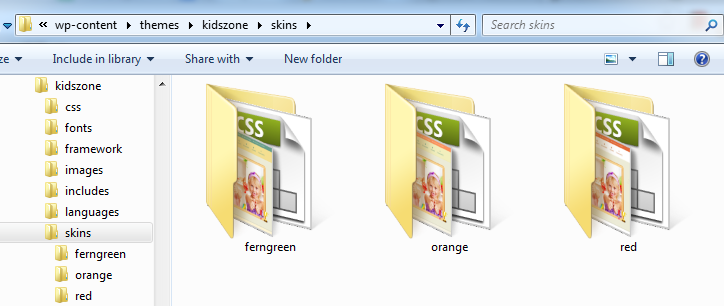
(i). Get into the skins folder from your theme directory, where we’ve added 20 folders with their skin names. Look at the screenshot we’ve attached here for your reference, http://snag.gy/bMXM5.jpg
(ii). Just copy and paste any of them, and then rename it with the new skin name you’re about to be added.
(iii). Then you’ll be needed to edit the “style.css” of new custom skin you’ve replicated. (Just like the images, color, background and border color hex codes with your new custom skin color as needed).
(iv). Now you can find you new custom skin folder (created) on your Buddha Panel skin settings. So you can choose your custom skin and save changes thereby as here, http://snag.gy/bMXM5.jpg
2) No need to enable the menus for mobile devices. I will appear by default.
Cheers, our menu isn’t appearing on mobile devices how can we fix this?
Also, we are trying to put a 3 column layout inside of a toggle/accordion, but its not displaying…how can we fix this?
Hi..!
We have fixed issue. Kindly, check it out now!
The problem was due to the external plugin “Timetable Responsive Schedule For WordPress”. We have deactivated it now.
Note: If you like our theme and support, please feel free to give us your best rating (5/5 stars) !!
Hi!.,
Please try the following shortcode,
[dt_sc_toggle_framed title=”What is Lorem Ipsum?”] ipsum dolor sit amet, consectetur adipiscing elit. Morbi hendrerit elit turpis, a porttitor tellus sollicitudin at. Class aptent taciti sociosqu ad litora torquent per conubia nostra, per inceptos himenaeos.[/dt_sc_one_third] ipsum dolor sit amet, consectetur adipiscing elit. Morbi hendrerit elit turpis, a porttitor tellus sollicitudin at. Class aptent taciti sociosqu ad litora torquent per conubia nostra, per inceptos himenaeos.[/dt_sc_one_third] ipsum dolor sit amet, consectetur adipiscing elit. Morbi hendrerit elit turpis, a porttitor tellus sollicitudin at. Class aptent taciti sociosqu ad litora torquent per conubia nostra, per inceptos himenaeos.[/dt_sc_one_third]
/dt_sc_toggle_framed Lorem ipsum dolor sit amet, consectetur adipiscing elit. Morbi hendrerit elit turpis, a porttitor tellus sollicitudin at. Class aptent taciti sociosqu ad litora torquent per conubia nostra, per inceptos himenaeos. /dt_sc_toggle_framed Lorem ipsum dolor sit amet, consectetur adipiscing elit. Morbi hendrerit elit turpis, a porttitor tellus sollicitudin at. Class aptent taciti sociosqu ad litora torquent per conubia nostra, per inceptos himenaeos. [/dt_sc_toggle_framed]
Thank you…
Dear IamDesiging~
I’ve figured out a way to remove the Pagination on the blog shortcode; I edited the theme_shortcodes.php file. I then created a Child Theme because I don’t want future changes or updates in your Theme to override my additions. My Child Theme is working perfectly, but now it’s not pulling in the edited and modified theme_shortcodes.php file.
It’s located like this: kidszone-child/framework/theme_shortcodes.php.
Can you please assist me as to why this is not working? Thanks in advance.
Z
Hi,
the logo we are trying to upload is very wide 449px width by 250px height. Whenever I upload it, it resizes to a very small image. How can we upload a full size logo?
One more, how do I change the euro symbol to dollars for products?
http://newsite.read3zero.org/Hello again, I’ve set up a blog post with 1/3 and 2/3 column, but when I place the text it will not keep the returns on the left 1/3 column.
You can view the page here http://newsite.read3zero.org/5th-anniversary-luncheon-book-signing/
I even put in and it will not keep the formatting. I want the list to look like Honorary Chair Speaker Andrea White.
Please help.
On the cart and order details on the front-end, alle numbers are being rounded while in the order details in the back-end everything is fine.
for example 25,22 is displayed 25,00 in the cart or order overview
Using V1.3 of the theme.
Thanks.
Any feedback on this one please?
Let us know the exact query for which you need feedback.
Query? On the standard Woocommerce cart and checkout page.
Hi..! Let us know the exact issue that you are facing in woocommerce cart and checkout page. So that, we will help you ASAP !!.
I include a document where I show the orderprocess and give you a view of the amounts that are being shown.
As you can see, all totals and everything is OK. But on the order-received page and in the confirmation mail, the figures are rounded. Even the total is not correct.
http://lemit.be/wp-content/uploads/2014/06/purchase-example.pngCan you please have a look at this? Never encountered these rounding issues before.
Hi.,
This issues may be fixed in updated version So update woo-commerce latest version plugin and check it out.
I am already on the latest version 2.1.11. Product updates and logs are always the first place to check.
I also can’t find anything on the net or woocommerce documentation/support about this issue, neither where you can set rounding of the amounts. So I’m coming here if it somehow slipped into the theme. That was the only suggestion I found on the net.
Thanks you.
Hi., In your site woo-commerce page we cant add products to cart(Not visible Add to Cart Button). Also cant use select options.So follow the steps 1) Go to wp-folder / wp-content / plugins / delete woo-commerce plugins and Go to Dashboard / Appearance / Install plugins .Install woo-commerce plugin again 2) Go to Theme-directory / framework / replace woocommerce folder by attached woocommerce folder.
And Check it out. https://www.dropbox.com/s/yc8t65adtdw4jpi/woocommerce.zipNot being able to ad products to the cart is normal. Only a few articles have stock, we’re about to do a full stock update. The article that has stock and can be used for test is Ej Sikke Lej (category), and then the basic t-shirt uil blauw.
So I assume a full delete and install of the woocommerce plugin is not required.
If so, I will do step 2 only tonight. Is this where the rounding issue is located and you got an update? Thanks
Hi., We checked this page http://soitsme.eu/product/ej-sikke-lej-basic-t-shirt-uil-blauw/, when we add to cart with the select option 104 which ( € 10,00) the cart only shows € 8,26. Why it is not adding the full amount € 10,00 to the cart? Have you made any changes?
No, my customer wants to display the products in the webshop incl. Tax but when checking out excl the tax. Tax is 21%. As you can see, the issue occurs on the order-received page and in the confirmation mail, the numbers are shown rounded. Well, 99,17 to 99,00 is rounded, but 24,79 to 24 is not really. Seems that the Tenths and Hundredths are just gone meening the total (24 + 99) is not the same as the order total (150)
I have an update, looking a bit further into this rounding issue. The problem also occurs in the back-end.
Please look at this documentation: http://lemit.be/wp-content/uploads/2014/06/Woocommerce-rounding-issue-back-end.jpgI assume it’s more or less the same behaviour … Where does this come from? Thanks.
Hi!., When we try to place some test order in your page we always get “Invalid shipping method.” How do we proceed to the order confirmation page? Please enable your shipping methods, so that we can proceed further to the order confirmation page.
Sorry for that. I disabled yesterday night most of the plugins to see if it was related to one of the plugins. Well, it didn’t.
All works fine now. I will send you a PM via themeforest with a link for an order I just made. You can directly check it out.
If you go to the back-end, to an order, go look in the html code of on the prices. There you find the numbers and a span tag with the rounded figures. Something, a parameter, must trigger this.
Thanks.
Hello! What should I do to center a video in the slider? I have tried with…
<iframe width=”791” height=”445” src=”//www.youtube.com/embed/J6-zcXlcnKU?rel=0” frameborder=”0” allowfullscreen></iframe>but it does not work. Si the screen capture https://www.dropbox.com/s/61p90h4idv5isz2/Untitled-1.jpg
Thank you!
Hi.,
Hope you had a great weekend
In the same window in which you have sent the screenshot, you can see the option of “Style”.
Click that and adjust the left position to make the video center.
Thanks again!!
Thanks for your appreciation Let us know, if you find any issues in future..
Note: If you like our theme and support, please feel free to give us your best rating (5/5 stars) !!
hi dear,
Smaller fonts. because; I need it. But the sub-menu does not work. Shutting down now. Thanks…
Best Regards
For the smaller font, submenu issue,
We have attached style.css file, kindly follow the link, download & replace into, kidszone \ style.css
Click to Download: https://www.dropbox.com/s/qya7pwltml7t5ut/style.css
The following css updated for this issue:
.header2 #main-menu > ul.menu > li > a { display:block; padding:37px 15px 34px; } menu-main-menu li.menu-item-simple-parent ul { position:absolute; left:0; top:95px; display:none; width:220px; padding-left:0; margin-top:0; z-index:10001; }
.megamenu-child-container { padding:10px 10px 0px; position:absolute; top:95px; left:0px; float:left; }
Thank you very much.
Best Regards.
Thanks for your appreciation Let us know, if you find any issues in future..
Note: If you like our theme and support, please feel free to give us your best rating (5/5 stars) !!
hi dear,
These areas are very high. Please squish.
Thanks.
Best Regards.
Hi., Go to open kidszone \ style.css, find line no: 308. Kindly add the following styles in the stylesheet.
.header3 #logo { height: 70px; } .header3 #main-menu > ul.menu > li { line-height:60px; } .header3 #menu-main-menu li.menu-item-simple-parent ul { top:60px; } .header3 .megamenu-child-container { top: 60px; }
Check this screenshot after changes: http://grab.by/xL7g
Note: If you like our theme and support, please feel free to give us your best rating (5/5 stars) !!