38438 comments found.
Hi my one and only webdev!
1. Nectar slider loop: How to switch this off? And – if possible, would it be possible A: Pause the last frame or B: End displaying an image? – also, will it be possible to NOT replay at next visit to the page? IE save info in cookie or such? Or does it do that automatically?
2. Before spending hours on the process, can you tell me if the alternate image on animation sliders (for IOS-devices) will accept animated GIF?
3. When adding local video content, where its possible to add a “cover photo”, is there also a way to make the cover photo clickable to start? I.e. what I really miss in this theme, big time, is a HUGE PLAY BUTTON overlay of the screen. I wondered if I could make this part of the image and make the image “play video”.
4. Toggles: Are they 100% loaded a page-load, or would it be possible to load content when Toggle is clicked? (to improve pageload)
5. Winner question of em all: I would it be possible to add LAYERED NAVIGATION on your portfolio/ blog??? It would be SO COOL if I could A: insert my portfolio into an iframe of a different site and determine the content displayed. Or e.g. send a link to a customer and say like “Hey, look, this is my GRAPHIC work, and I oculd send a link like www.mypage.com/portfolio?filter=graphic-design
thanks a million!!!
Hey Peter,
1. That would require some custom development as of now but stoping the slider on the last slide when using the auto rotate could be possible with a nectar-slider.js mod
2. Yes that should work
3. Unfortunately not without some custom javascript to trigger it if you’re referring to the nectar slider or row BG – but if you’re using a row you could just use the full width content type to place a self hosted video shortcode or external embed that would have controls
4. There are loaded with the page, but you might be able to find some sort of ajax loading plugin for that
5. RIght now you could link to direct categories by using /project-type/category-name on your URL e.g. http://themenectar.com/demo/salient-frostwave/project-type/video/
Cheers
1. How many nice words or bucks would that take?
2. Sweet – now I can start playing about
3. How many nice words or bucks would it take to get a wee help on how to do this the self-hosted way?
4. You should add that to the wishlist, as it would be cool to have your theme loading faster :0)
5. AAAh thats pretty f sweet! That will do it!
Thanks my favorite dev 4eva
Open the init.js file and remove this:
1.
else {
    $nectarSliders[sliderNum].swipeTo(0,800);
}
3. You could take a look at Envato Studio for help 
Hi. I tried searching for this line but did not find it. It is the one within the salient theme JS-folder, right? Which line about should I search ? (The document is thousand lines…)
My apologies I meant to say nectar-slider.js file, not the init.js
Hi. Now replaced, but the video does not stop after 1st play. It loops just as always…
Sorry I thought you were trying to stop the slider from looping during the autorotate function i.e. when it hits the last slide. Stopping a video at the end as you’ve now mentioned would take different development

For the image gallery module under visual composer, I love the Image Grid Style, but can I have it Mansory style?
The only way to do this is through portfolio and that just too cumbersome and time consuming to create one picture per portfolio.
Hey eluzion,
Unfortunately that’s not possible yet – but the idea is already on the wishlist
Cheers
I would like to know if in the portfolio section I can click on a project and once the user lands in that section, for example we see a logo, ad, the billboard to the ad, then the website and the press kit etc…. with clicking left and right buttons and automatically resize the different pieces in the project…
How can i go on forward doing that? something like this:
http://pnankoo.com/portfolio/watties-paintings/Thank You
Hey MNankoo,
you can the Visual Composer image gallery element in the basic slider style for a similar effect
Cheers
Thanks, but where would I find that?
Never mind I found it, BUT I have a problem my images are different sizes how can the theme resize it automatically?
Hey again! Have you specified an image size in the gallery element?
Hey… Thanks for following up, Well once i create the gallery there is a line to add the size. I add the size for the first image how can i add the size for the other image?, cause every other image is taking the size of the first image cause of the size i place in the box.
You could enter “full” for the size
My site no longer works on Safari on the iPhone. The responsiveness no longer functions… any ideas? impactmenusystems.com
Hey westwardstrategy, have you tried to disable any plugins to check for a conflict?
Sorry if this has been asked before, but I couldn’t seem to find it. Is it possible to run the BOXED theme but still have a full-width header?
Or, vice-versa, to run the theme in full width normal mode, but put the slider inside a boxed-width?
Hey Sean,
Unfortunately not without custom modding to the files since the boxed div constrains the header by default
Cheers
Hello, thank you for this theme, its by far the best one I’ve seen… Ever!
Anyways, most of my posts are set to “754 Shares”? How do I fix this?
http://erikssonjonas.com/Thank you
Hey rockroyalty!
Could you kindly open a ticket in regards so I can take a further look? themenectar.ticksy.com
Cheers
Hi there, thanks for developing a truly exceptional theme.
I have one (hopefully quick) question that I would very much appreciate some resolution to – I’ve searched as far as possible for an answer but here goes.
I am making a 1/4 (text) + 3/4 (full width image) row to hold images with text overlaid – the images are full width and look great as does the text overlay- what is bugging me is that I can’t find a way to do this that has a consistent image size that is not relative to the text column content (i.e. padding).
As an example, I can create an image with say, 200+200 padding but if I add text content on the 1/4 column that is then additional to the height of the text, which, for obvious reasons is not an absolute value – what I want to achieve is full width images of a specific and consistent height that also have 1/4 text columns on top that do not alter these absolute image dimensions – padding seems quite a clumsy way of doing this, I can’t think of an alternative method for doing this so any advice would be very much appreciated.
Hey voltcg!
It would indeed take some custom css – if you could apply a class to the row so that it may targeted separately and provide your URL i’d be glad to assist
Cheers
Hi there,
I have two questions;
1) How can I set the size of an embed video that I place on the Caption field of a Nectar Slide? I’m using an iframe with width and height set, but the video is resized automatically to 1304×733.5.
2) How can I place an image above the Heading on a Nectar Slide? By default, when I place an image using the Caption field it’s displayed below the heading, I would like to switch that.
Many thanks in advance for your always quick replies.
Hey iBoardCanada!
1. You could use css to set a max size:.swiper-slide iframe {
margin: 0 auto;
display: block!important;
max-width: 700px!important;
}
2. This would require not specifying a heading for the slide and then doing everything in the caption field:
<img src=" " />
<h2> Text </h2>
Cheers
Hi there,
Amazing theme – can’t wait to get started with it!!
I’m setting up Multi Layer Parallax on the homepage. What is the best image size for this and do you have a guide on how to do this
Many thanks!
Get sjrickwood!
Here’s a video tutorial on the subject https://www.youtube.com/watch?v=NIgi-YyspcE
Hi Salient Team
I’m having trouble replicating something you show in your demo. Whenever I try it just doesn’t seem to work ie the text is too big, the pie charts aren’t centred and it just doesn’t look correct.
I’d love it to look as you’ve got it in your about me page example at this link – http://themenectar.com/demo/salient-ascend/about/about-me-example/
The bit with the 4 pie charts and then text on the right please?!
Would it be possible to assist in the steps it took to build this? Or if easier do you have anything I could upload to mimic this particular page without overriding what I already have in place so that i can take it apart and look into it myself?
Thanks!
Joe
Hey Joe!
If you don’t want to upload the dummy data file – add this on a page directly into the text tab of your editor: http://pastebin.com/7Cu2bGqACheers
Hi, thanks for that! Unfortunately that doesn’t seem to be the right page. It doesn’t have the milestone pie charts. Its the about me – Trevor Smith – page I need 
Thanks!
Joe
Hey! Try this one http://pastebin.com/VZA8d2pg
Pre-sale question.. Is there a under construction or coming soon option built in to this theme?
Hey digitalspit, there isn’t – for that I’d recommend one of the many suitable plugins out there for that functionality
Cheers
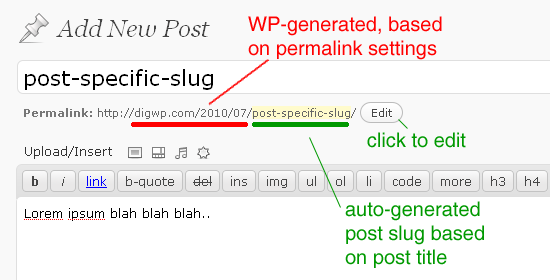
Hello, you guys are so responsive! It’s great! I hope you can help me with my current issue. The url for my about page and portfolio have a dash and a number after. I’ve tried to delete the number in the edit post function, but it still returns. A developer friend told me to clear my trash, which i’ve done. Is there another way i can get rid of that number?
Hey mrindubitably!
If no other pages share the same permalink, you can rename it http://digwp.com/wp-content/blog-images/optimize-permalinks-slugs.gif
Cheers
A few more for the wish list:
- A full screen image which slides down on mouse scroll
- Infinite loading (pull down bottom of the page to load)
- Split screen splash pages that lead to content eg: http://www.jakobdeboer.com/gallery/
- Slide in side bar that can carry latest slides or articles
- Full screen isotope grid of projects with reveal details button (top right hand corner) http://www.jakobdeboer.com/gallery/series/
- Blog & Social media timetime
- 500px/Dribbble/instagram etc api to pull in feeds of images to different areas of the theme/website
- Exif data pull for photographic details
- Extra option for css overlay to nectar sliders
- Audio website player for background music, with toggle/mute button
- Parallax scrolling for mobiles
- Parallax scrolling round buttons for next/previous sections
- More options for feedback & contact forms (layout especially)
Think that’s it for now bud, look forward to seeing the latest release and your thoughts on these.
Rich
Thanks for the suggestions as usual Rich
Hiya,
I have a new idea for you to add to your feature list please.
And that is an audio player for the site in general, eg you can turn it on or off in the back end, but when on you get an audio mute button in the bottom left corner, the music could be uploaded to the admin panel etc…
This website does it very nicely: http://www.jakobdeboer.com/
Cheers Rich
Hey Rich,
Yes – this is already an item on the wishlist
Cheers
Hey, I wonder why I get black borders on the left and right side of self-hosted videos (on portfolio pages), like this: http://teemuluoma.fi/portfolio/environment-intro/ The video looks too small. The video is 16:9, and 1280×720 px actually.
Help would be appreciated.
Cheers, Teemu
Hey Teemu,
For some reason I can’t see the lines you’re talking about – could you please let me know what browser you’re using?
Cheers
Hey ThemeNectar,
Thank you. I’m sorry I forgot to mention that I’m using IE 11 (the newest version).
The actual on screen video size in pixels while using IE 11 is currently 540×304 px only (for some reason). However, the width of video player is the full column width, 914 px, which means in practise that there are black areas (188 px wide each) on the left and right side of the video.
Cheers
...
I tried with the newest version of Chrome, and it is no different, except that the borders or empty areas on the left and right side of the video are white, not black.
I tried also to enter the Video Height. No effect. The video on the screen remains too small.
(BTW, I just noticed that the help text under the Video Height reads: “Enter your height based on 845 px width.” However, the column width is (or seems to be) 912 px. Is this intentional?)
Cheers
I tried with just the m4v (which for sure is 1280×720 px), i.e. without the ogv. No effect. Hmm, I wonder what might cause this.
Thanks for the additional info – have you attempted to also deactivate Salient for a minute to ensure this doesn’t happen in one of the default themes?
Hi ThemeNectar,
Thank you. I’m sorry for the delay in my answering.
I now tried with one of the default themes (Twenty Fourteen) which didn’t render my site or the portfolio page properly – the video and video player didn’t show up at all.
BTW, may I ask, how does the video or self-hosted videos of portfolio items in general appear on your screen while using Salient? I.e. Is the width of video or videos, full column width, or smaller, like 540×304 px (like in my case)? http://teemuluoma.fi/portfolio/environment-intro/
Cheers
Hey again! I’ve recently discovered that WP changed how self hosted videos are sized in 4.0 – the next update I release in a few days will sort this
Hey ThemeNectar, that’s wonderful news. Super. Thank you.
Have an awesome day.
Cheers, Teemu
Cheers
by chance do you have the contact form 7 code to make the form fields side by side (name, email, subject) such as on http://themenectar.com/demo/salient-ascend/contact/
NM, dug through comments and found the answer
Hey! Glad you found the answer
Cheers
Hi
If I copy some of the text from my home page and paste into Google several pages with this text occurs in the index:
www.fotabrollop.se/page/2/
www.fotabrollop.se/page/3/
www.fotabrollop.se/page/4/
and so on…
Why is this? I don’t think it’s good from a SEO pov.
Thanks
(Try Google “Många kallar mig bröllopsfotograf Jag kallar mig bildberättare som berättar bröllopshistorier”)
Hey fredrics1,
Salient doesn’t add any meta description tags by itself – SEO plugins are recommended to do that. The description Google generates for your pages should be reflective solely of what’s set for that and on page content – have you done any tests with Salient to ensure the behavior is different?
Cheers
Where can I find this layout from the admin panel?
http://themeforest.net/item/salient-responsive-multipurpose-theme/full_screen_preview/4363266thamnks in advance, TEO
ok ok…just imported dummy content…! sorry for the question!
No worries, glad you sorted it
Hiya, when my page: http://richpearson.co.uk/ first loads the background dark grey colour in the header flashes before the transparency kicks in, is there any way of removing that please?
Cheers Rich
Hey Rich,
Try entering this into the custom css box located in your Salient Options panel:
.ns-loading-cover {
   display: none!important;
}
Cheers
Hi When I’m assigning a menu in the Menu and Salient settings it doesn’t display menu on the webpage. It doesn’t seem to add any html after the Title tag in the menu. You can see my page here: http://www.go4adscreative.com/demo/
Help me plzzz!!!
Hey Fairz420!
At this current moment it looks like WP isn’t installed on that URL – can you verify that’s correct?
Cheers
Unfortunately I can’t access that URL now – just getting the “This webpage is not available” message