540 comments found.

Great theme, the more I use it, the more i like it. BTW, when the header is sticky, on the iPhone 5 mobile version it jitters when you scroll down as it tries to keep the header at the top…
If you keep header sticky then it will obviously stick at top only. You may consider disabling sticky header if you don’t like.
What I mean is that, the screen bounces up and down when I scroll down giving a jittering effect, so the header does not stay at the top when you scroll down on the phone…
Works fine on my mobile phone. It will bounce up only once when you scroll down to stick at top or again when you come at top of screen.
It bounces up each time I scroll down for me…
Strange. I’ll check on iPhone then.
Is there a way to add a meta info “Time” of post on the homepage and on the single post page? It currently only has date, but most blogs also have the date with it.
No, time of post is not added to theme.
Really? Is there anyway I can add this? This is a big deal breaker, quite important for my site, if users can’t see the time of post, I have to get another theme…
I can add it for you but you will lose the changes again when you update. Are you asking to add it on right side of post icon?
Is there a way to put it to the right of the “Post Author” meta info? (E.g. written by Author 1 at 2:00pm PST). Can I repost the code into the files after the update?
Yes you can repost the code.
Ok great thanks, when should I expect the code?
After 30 september
Hi just wondering if you have time to work on that code? Would like to get it sooner. Let me know when you think you can get it, thanks!
Hi
Sorry, I didn’t get time yet 
Really busy. Can you remind me on Monday? I will add the code for you without extra charges 
How do I change the background of the blog from white to another color or image?
You can change it from Theme Options -> Styling Options
O duh! Thanks for the quick response.
Hi love the theme. I had private posts by a user that only the user can see, but after installing the theme, the posts cannot be even seen by the creator, is this suppose to happen? When I un-private the posts the user who created it can see it… let me know if you need any other info.
Yes. private posts are not shown. I am releasing an update now.
OK let me know when you release thanks!
You will get an email when it’s available.
When are you targeting the next release to be distributed out?
Within this week.
Hi just wanted to followup, are you still on track on releasing a new release before end of this week? I need this private feature quite badly… I don’t mind testing it for you as well pre-release…
It is fully tested and will be released within this week. I am not at home otherwise I could have released it till now. If you are in hurry, I can separately mail you before uploading here.
If you are going to release it by the end of the week that is ok, I just wanted to have my expectations set. I will await for the update on my wordpress site. Thanks again =)
Just uploaded the update. You will get email one it is approved.
Hi It is now Thursday and I have not received the update, looks like it is taking a long time to get it approved? Can you please send me the update please?
Hi
It was approved the same day. Didn’t you get mail?
You can see update date.
That is weird I did not get an email. I see the update, but it did not update my wordpress I don’t even see a “Updates” notification within wordpress…. how should I update it now?
If you add your details in Updates tab of theme options then only you will see update notification in WorPpress dashboard. You can download the theme again and upload it using FTP.
Hi, I got the theme installed on my Wordpress and just selected the 2 sidebar option, but the one on the right is below all my content. Can you please fix this in CSS?
Hi
There is no such problem. Sidebar are on proper position. Can you give me your URL so I can check.
You may check this screenshot – http://prntscr.com/4osr0s
Hi,
http://www.rihannaworld.nl http://www.rihannaworld.nl/2014/09/08/test/You can see that on the homepage the sidebar below all the content. Looks like the space between the left bar and the content in the middle are too big on the homepage..
Working fine on my side. Let me figure out the issue at your end.
Thanks, let me soon asap.
http://prntscr.com/4ox1s8 this is at my browser. Some other friends have the same problem.Got the issue and fixed it. Works fine here though. Your installation has some different configuration.
So, what to do?
You will get update for it.
Love GoBlog, but some issues….
Issues since latest update:
1) Header image doesn’t centre on mobile. Only on desktop 2) Text Widget box is playing games. I use this code from Soundcloud:
<iframe width=”100%” height=”300” scrolling=”no” frameborder=”no” src=”https://w.soundcloud.com/player/?url=https%3A//api.soundcloud.com/users/66523685&color=ff5500&auto_play=false&hide_related=false&show_comments=true&show_user=true&show_reposts=false”></iframe>
On old version of GoBlog, worked 100%. Now it stretches the side widget too much. See DennisDoesCricket.com. Height should be only 300 pixels. It is much more! On my other site with the non updated GoBlog (http://cantbowlcantthrow.com/homepage/), it works perfectly still (I have set height in that instance to 800 pixels), it’s not a Soundcloud issue.
Perhaps text box is treating height command different to within a post?
Which header image?
You need not to add height and width to code of soundcloud in latest version. Modified the code in latest version to make audio players responsive. Now player automatically sets width. If you manually add width and height then it will not display fine. you must remove width and height from code.
Bug??
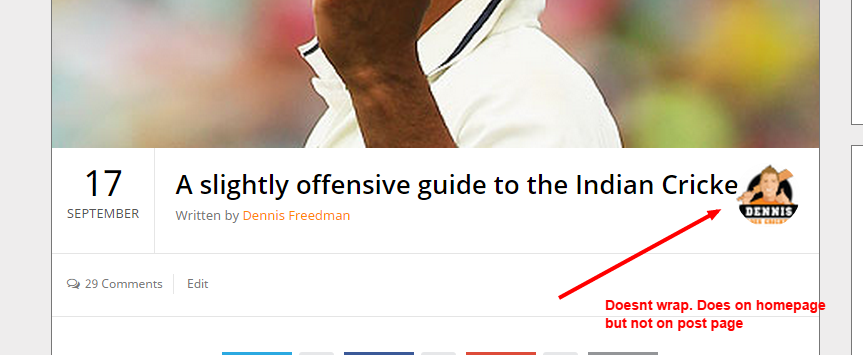
In latest update, If I use the ‘show author avatar” meta, then any longer post titles are hidden behind the avatar. I now have to turn this feature off
This is not a bug. Long titles work fine. In latest update I modified the CSS of post meta and title. Your blog might be showing old CSS due to cache. You may clear the cache and then see.
I tried clearing browser cache and WP cache. same issue. What else should i try?
May I see where you are seeing the issue?
I need the URL. I can’t check code on screenshot.
Hello i would like to show my blog like your exemple and i can’t configure the same mine are smaller can you explain me how to do it please?
i would like to show my article *
When you install the theme it is shown like demo by default. What’s the difference you seeing?
Article are small they don’t take all the width i have two articles side by side
You might have selected this layout style for articles from theme options. Default style is as shown in demo. Make sure in layout style you didn’t change article style.
ok thank you it’s better!
For some reason, my GoBlog theme isn’t auto updating. I can load the new one manually, but will need to delete the old one first I assume.
How do I keep my settings so I don’t have to rebuild the site again?
Have you filled the details for uodate in options panel?
If you have problems updating, you may upload files using FTP. You will not loose your settings.
Update option? Where is that hiding?
also, are you confirming i can delete the goblog theme and then upload the new one and all my settings will stay?
Auto update option was added later in this theme. If it’s not in options panel for you then you have to manually update it. But next time you will get option of auto update.
Yes, settings will remain there but I suggest to take backup of settings in case they are lost.
There is an import export option in options panel. You can export the settings to be on safer side.
ok. Ive updated. Thankyou!
Hi Bloom pixel…I’ve upgraded but noticed my custom header has disappeared. If I edit header.php it will disappear every update. Is there some CSS code I can put somewhere to put a custom banner above your header?
Hi
Customer banner space is not added aboce header. You may need to edit header file in every update.
ok. maybe alter the logo to be a full width header?
You can try using full width logo. It may work fine.
Boss,
This is the best theme ever…..but….now I have released an ebook and need a landing page
When will the landing page update be released?
Thanks mate
You can create a page that can be used for landing page. I have added the option to hide page title. So if you want to hide page title, you can do it easily.
What kind of features you are looking for in a landing page?
Would love to be able to take the full screen and have an opt in form for email that links to Mailchimp (I guess I Can use a plug in)
Will see if it’s feasible to add these features in this theme
I updated the theme on hougeek.com to the Sept release and now the slider on the homepage is not loading and the video posts do no go full-width. I have no idea how to fix this.
Hi
It should work because it’s working here. May I get access to check on your end?
sure. What email would you like me to send it to?
You can message me from my profile.
Thanks for the help. Why is the soundcloud embed height not showing correctly?
A script was added in this version to make soundcloud and other audios and videos responsive but forgot to modify code for audio post type. An update is uploaded and you will get a mail as soon as it is approved.
Thanks for reporting it
Heyy, just wanted to say that this theme is great! Thanks.
Thanks for appreciating my work
Hi, I’m using the theme and so far everything works as described except one thing: When I make a tile gallery the images show up in the blog post with a magnify icon as in your demo, but I don’t get the left/right navigation arrows as in your demo when an image is open. Instead I have to open and close each image individually. Do you know how I can get the navigation to work?
Which version of theme you using?
It’s v1.2
You must update it to v1.2.1. Version 1.2 got this bug.
Ok I will try and get back to you. Thanks.
Ok
How do I adjust the location of the menu on the header? Currently its flush with the top of the image and i would like it moved to the bottom. Thanks for your time. dc
May I get your URL?
www.roablog.com
You used full background banner as logo that’s why menu is above it. You should use that image as background of header.
You can also try using Header style 2.
Ok, but where and how do I do that? How do i use that image as background of header? Where would i find Header style 2? Neither are in the documentation. Nor can you find anyway to do that in the Them Options in the Wordpress dashboard. Thx.
Here are the screenshots of theme options panel for:
1) Header Background:
http://prntscr.com/4ljrh32) Header Styles:
http://prntscr.com/4ljs7dIf it is difficult for you to find then let me know. I may guide you further. It is explained in simple English.
Thanks
How do I navigate to the Header background option? The header styles option is under the Header heading in Theme Options, but there is no header background option there, only sticky header and slider below header.
Background and other styling options are under Styling Options tab. It’s your theme and your blog, feel free to look around all the tabs in theme options for different options provided by theme.
ok, thanks for your help, I think I got it and really appreciated it, one question – i cannot seem to find the place where i made that image the full background banner as logo—how do i delete it to move on?
Under General Options.
Ok, figured that out, follow up question please. I’m having trouble with the featured image, i looked through documentation but what is the preferred dimensions for a featured image? I’ve used several and they are severely cropped. Thanks.
The size of featured image is 770×260px
Hello, Where can i check RTL option ??
It is almost same as I shown you the screenshot of UBlog RTL version.
Hi,
I bought your theme some while ago and i started just a short time ago to customize it. I went crazy since i am not a tech person.
I have two issues that made me crazy:
1. When i create a new post it does not appear on home page as well. If is skincare category does not show, if is makeup category does show. Why is that? What settings i have to do to have each post no matter of category to appear on home page as well?
2. I want to change color font of the main description of posts. Right now is a light gray and i need a darker shade. Current color is color: #7c7c7c; and need something darker. When using firebug it says ?p=27#4(line 68)
I tried to find that in css but is not there, it must be on a page that i could not find.
Hope i will hear back from you re this issue.
Thanks
Hi
1) This theme shows all posts by default on homepage. It only shows posts from certain category/categories if you choose it from options panel. Make sure you didn’t choose that option.
2) You may find this option “Posts Main Text Color” under Styling Options to change the color of content.
Thanks
Do you provide the theme with German translation files?
Theme can ne translated to any language. You can follow the procedure mentioned in documentation to translate it to German.
A few post ago, I have a over space between the gravar icon and the title. You can check it on www.djexpressions.net
Hi
It’s because in your language date is too stretched. I fixed the issue and will be available in update. For now you can use the following custom CSS until the update is available:
.title-wrap { max-width:69% }
This CSS will fix it for you. But once you update the theme to latest version (whenever it is available), you must remove this CSS.
Thank, but in spanish can we say Septiembre without the “P” and is ok. Better to mess with the css.
Another Question, how can I make the youtube videos responsive inside the post.
No, it’s not possible.
Videos are already made responsive inside articles but the update is delayed. I will soon upload the update.
I love this theme for my blog. However, I have a question – I have installed jetpack for wordpress and the feature for photo gallery will not work because it will not override theme functions. Jetpack will load your photos in a cool mosaic format, which i want. Is there any way to override your theme to allow the jetpack function to work? I’m not versed in code so is there a simple solution that you know of?
I didn’t get you completely. Do you want to replace the theme’s gallery with jatpack gallery?
yes!
Featured gallery that is shown on homepage cant be replaced with any other gallery. It uses theme’s built in gallery only.
jetpack has the ability to show the gallery in a cool format – not so static – no way to change the options in the built in gallery?
I have added 2 styles for built in gallery – Slider and Tiled. You can use that.
Jatpack gallery can be added inside article if you want but can’t be used as featured.
I will see if it can be added in an update.
do you know how to add it inside the article? I couldn’t figure that out – is there a shortcode? where would you choose the photos?
When you press Add Media button there is an option to create gallery and also an option to choose the style for gallery. make sure you activate the plugin first.
You may also refer to this link of jetpack – http://jetpack.me/support/tiled-galleries/
thank you!!!!
that worked!!! thanks a lot!
Is there a way to have the featured image on the homepage cropped to about half the height—width stays the same?
No, it’s not possible.