38357 comments found.

Hi ThemeNecter! I’m having trouble updating theme. Everythings works fine, but update change my style.css every time and all my customizations are gone. Is there any possibility to update your theme, and have current customizations?
Hey! If you’re modding the style.css file make sure to use a child theme so that the mods can persist through updates
Hi there,
Two pre-sale questions :
1. Is it possible to insert Vimeo or Youtube URL for video display (sliders, parallax background, etc.), instead of self-hosted MP4+Webm?
2. Does Salient have theme auto-updater (eg. Envato plugin, or your own…)? Isaw the documentation about theme update, and it’s seem a little bit “outdated process”.
3. Can you plan to implement a built-in child theme? It will be a huge ease about keeping specials customizations while updating flawlessly.
Thanks for your kind responses.
Hey,
1. For video BG’s currently you can only use self hosted – but you can indeed do fullwidth video displays for external videos as long as they don’t have content overlaid on top of them
2. The envato toolkit plugin some authors bundle is still available as a separate plugin: http://premium.wpmudev.org/blog/how-to-update-themeforest-themes-with-the-envato-wordpress-toolkit/
3. The theme does indeed include a child theme with the download for you to get started with it 
Cheers
Thanks for your kind responses!
One more question, is there a Mailchimp lists integration with your built-in CF7?
There’s not custom integration for mailchimp unfortunately, but you could always use a a plugin in regards
Hey there, great theme!
Is there a way to remove the wigdet area or/and header area completely for a specific page and keep them for the others?
Thanks in advance..
Thanks mrltnts!
Yes, you’d need to enter this in the css box inside of Visual Composer on the given pages:
#header-outer, #footer-outer {
   display: none!important;

}
Cheers
Did Salient support Ad Banners? How can i integrate Banners ?
Hey hornedry2k,
you’d need to use a plugin for that, but the odds are it might still take some integration in the theme files depending on where you want them to display
Hi there,
Is it possible to have the “Insert Down Arrow That Leads to Content Below?” for the home slider. It is present on Nectar Slider but not on the home slider.
Many thanks!
Hey Barou_WP!
Unfortunately that would take some custom development at this point
Hi, would it be possible to the client images swap from B&W to color with CSS? So when the user rollsover the image it changes from a b&w logo to a colored version.
I’ve been looking on the support but can’t seem to find anything.
Thanks!
Hey haydaw,
Here’s the css – but it would need to be altered to fit the clients class http://jsfiddle.net/gyvyj9c9/
Im running Salient 4.1.1 right now.. I want to upgrade to the latest version because I love the right side widget menu and some of the newer options..
What is the best way to update without breaking my site..?
Hey! You can update by downloading a fresh copy from ThemeForest, deleting the current version you have on your server and uploading the new. I recommend using FTP, but you can use the WP dashboard if you prefer. You won’t lose any of your content or theme settings so don’t worry about that if you were
Where are theme settings saved? I have the site basically finished and dont want to lose anything that I have built.
Those are saved in the database, but you could also export them from your theme options panel in the import/export tab
Thank you!
You’re welcome
Having an issue with toggle panels… The section doesn’t expand accordingly. 
compassprep.com/current-clients
Cheers!
Hey,
did you try removing the parallax option from the row yet?
Added a portfolio feature on a page, which overrides the Salient section to create settings for showing the date, but the date is not showing up on a page with the portfolio feature even if I enabled it in the Salient section. It did before. I don’t understand why it’s not now. Please help. Thank you.
Hey,
Could you kindly share the URL in regards?
Cheers
It seems that there are 2 options – 1. Show the date 2. Project excerpt. So I’m assuming I have to choose between one or the other and can’t have both or is there a way to have both?
If you wanted to show them both you’d need to mod the shortcode-processing.php file located in the nectar/tinymce directory at the portfolio section in regards
I’m trying to import the dummy data file, but when I do so, it just fails. ex:
“Failed to import post tag Failed to import post tag Failed to import Failed to import “Auto Draft”: Invalid post type ...”
I think it is not importing ANYTHING, since there’s no new menus. This is the first time it happens to me, what should I do? Thanks
Hey,
could you please open a ticket in regards with your admin credentials so I can see what’s going on? http://themenectar.ticksy.com/
What is the CSS Code to hide the short text and just show the title in the main Blog page – masonry with no sidebar?
Also, in Typography, what is the setting to change the blog post titles to a smaller text?
Rather urgent request. Thank you for understanding and for your help
Hey,
add this into the custom css box in the Salient options panel:
#post-area .content-inner p {
   display: none!important;
}
It didn’t work. If you look at my recent tickets you will know which site this is for, as I do not want to post it here as it is private. Please help.
Try this instead:
.article-content-wrap > *:not(.post-header) {
    display: none!important;
}
It’s not working. Please review my ticket ending with the numbers 20 Thank you
Sent in a response earlier in regards
Thank you. I appreciate your responses. I responded to the tickets as well. by the way, I used to receive notifications when one of my tickets is replied to but I don’t receive any notifications anymore. I think there were notifications for replied tickets, right? Is there a way to add a setting to receive notifications on tickets you respond to?
I keep trying to change my background color (boxed layout) and nothing happens. I am trying to change it to a yellow color and it remains charcoal. Same for the Nectar slider background on the home page. Am I forgetting something? Thanks Jenny www.learncurious.com/
Hey Jenny!
I’m actually seeing the BG set to yellow currently – did you get this sorted?
Cheers
Well, I read through comments about BG color and someone said the BG will be the same color as the second footer color – the copyright footer. And that was true, it worked. That’s fine with me unless there is some other way to handle it? Thanks. Jenny
That’s correct – the secondary footer does inherit the BG color so that if there’s little content on the page and no scroll bar, the footer will blend into the BG
Is it possible to have a footer with just one column?
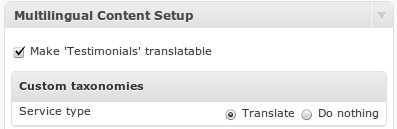
Also how can i change language of nectar slider on homepage.. I use WPML
Hey Tom,
1. That would require custom css since the footer can only go down to 3 columns – If you set it to three columns, use this css in the Salient options panel:
#footer-outer .row .col {
  display: none!important;
}

#footer-outer .row > div:nth-child(1) {
  display: block!important;
  width: 100%!important;
  margin: 0!important;
  padding: 0!important;
}
2. There should be a tab like this in the Nectar Slider http://d2salfytceyqoe.cloudfront.net/wp-content/uploads/2011/05/mcs-for-testimonials.png which would be a checkbox asking you to allow the slider post type to be translatable
Cheers
Does Salient offer adding HTML content to the mega menu? I know a lot of themes these days allow widgets, and HTML content like pictures and shortcodes and stuff to display in the drop down mega menu. (Click for example) Does Salient have that capability? If not, are there plans to add this very useful functionality soon? Thanks!
Hey!
As of now that would only be possible through a plugin like Ubermenu unfortunately
Cheers
Hi, I’m going well with the theme.
But I found it’s more and more difficult to manage the Media library after Hundreds of uploads, is there any plugin or even gallery plugin you Recommend and Compatible with our theme?
I also hope there will be a gallery section in future version
Thanks in advance!
Hey jiafaspike!
Have you looked into the image gallery element inside of Visual Composer? It offers the possibility of displaying the images in all of the portfolio styles
Cheers
Actually, I need masonry layout, but I cannot find way yet. And if I select grid style and full width for the gallery, the thumbnail looks blur, seems it reduce to much for the thumbnail images for full width style. Is there any further setting for gallery I missed?
Cheers!
Hey! Unfortunately the masonry style is not currently offered in the image gallery element – however if you’ve defined the thumbnail size correctly inside of the VC image gallery element and it’s still blurring could you kindly share your URL so I can take a look?
Hi there.
Why is my head-line cut off half way through?
Cheers
Peter
http://www.erhverv.peterpackroff.dk/project-attributes/kontor-syd/Add this into your custom css box located in your Salient Options panel:
.archive .container-wrap, .archive .project-title {
  margin-top: 0!important;
}
thanks!
You’re welcome
Is there a way for me to put a form in a salient slider? I’d like to ask for the users email address.
Hey! You should be able to embed it into the caption field in your slider – if that’s giving you issues just let me know the page URL
Hi, I have some french text on a testimonial slider however every accented letter ( è/à etc) is showing up in bold. How can I stop this? Thanks.
http://stayanotherday.uk.com/testimonials/(down the bottom)
Also how can i make testimonial text smaller? Thanks.
Hey ridehouse!
1. Check the option for “Load Ext. Characters in Default Font” in your typography options tab
2. You can control the font size for that also in the same area in your options panel – look for the “Testimonial Slider / Blockquote”
Cheers
Hi there,
one question:
the “order portfolio dropdown” generates an display error. If you select a category and then select another, the dropdown is behind the portfolios.
You can see this here: http://benkohler.de/MSF (Use “Möbelstoffe” for testing).
How can I solve this?
Thank you!
And another questions: the search don’t find any text within my portfolios. How can I change this?
Hey,
1. Add this into the custom css box located in your Salient Options panel:
#portfolio-filters, #portfolio-nav {
    z-index: 1000000!important;
}
2. You could try and plugin like https://wordpress.org/plugins/better-search/ to have the search
Perfect!! Worked both!! Thank you very much!
You’re welcome
Hi Support!
Just wondering how to fix this little “glitch”
In the red section of this page, when the toggle panels expand, the red section does not expand correctly.
http://www.compassprep.com/current-clients/Thanks!!! Dave
Hey Dave!
If you turn the parallax off on that row it should be fine
Cheers