12220 comments found.
Hi  ,
,
For large datatables you can use the ajax datatable feature as demonstrated here: http://www.keenthemes.com/preview/metronic/theme/templates/admin/table_ajax.html.
If you need any further clarifications please let us know.
To stay updated on Metronic’s new releases please follow us on http://twitter.com/keenthemes 
Thanks.
Good day, dear keenthemes!
Yes, I saw the ajax datatable
Thanks! Good luck with your project!
How to determine which column and what direction need to sort out a SQL database in the file “table_ajax.php” when you click on the column header in the file “table_ajax.html”?
Hi ,
You should check the parameters sent to “table_ajax.php” script whenever your datatable loads a data. If you are using firefox or chrome you can watch the parameters being sent via firebug or chrome’s dev tools. Just open the console and go to networks tab and expand the request header tab and you will see a list of the parameters.
Thanks.
Hello dear keenthemes!
Thank you very much , I forgot about it…
You are welcome! Good luck with your project!

Hello, I am interested in hiring you, are you currently available for outside project? My email is designaddictz@gmail.com
Thank you.
Regards, Alex
thanks for the great work, have one question here, how do I change the default theme color of an admin theme?
Hi ,
All available theme colors css files are located in ‘assets/admin/layout/css/themes’ folder. So you can load your preferred theme color as shown below:
<link href="../../assets/admin/layout/css/themes/[default.css]" rel="stylesheet" type="text/css" id="style_color"/>
If you need any further assistance please let us know.
To stay updated on Metronic’s new releases please follow us on http://twitter.com/keenthemes
Thanks.
Hi,
I want to make a row clickable on “Datatable with TableTools”. Please advice.
Thanks in anticipation.
Hi ,
If you need any further assistance please let us know.
To stay updated on Metronic’s new releases please follow us on http://twitter.com/keenthemes
Thanks.
How do I disable the annoying messages that pop ups in a black box? “Meet Metronic!....blah blah”
I tried as described in one of the tech notes to edit the .js file but the method is not found.
Hi ,
Please remove Index.initIntro(); from the bottom your the index page.
If you need any further assistance please let us know.
To stay updated on Metronic’s new releases please follow us on http://twitter.com/keenthemes
Pleae
I still see the messages being displayed. It is really very annoying. You do not need to market your solution like this as we would anyway do it as it is a good one among the rest here. Can you release a a version with the annoying message.
Hi,
What version of Metronic are you using ? You can find the version number in style.css file. By right you should be able to disable it by removing “Index.initIntro()” from the bottom of index.html page. If you need any further assistance please contact our support via support@keenthemes.com and provide us more details.
Thanks.
The version I am using is metronic_3.3.0
Hi ,
Can you please email our support(support@keenthemes.com) your index.html file ? We will check it further and fix it for your.
Thanks.
Hi, i install the new version but i have the error on ie 10
SCRIPT438: Object doesn’t support property or method ‘isAngularJsApp’ layout.js, line 552 character 13
could you help?
Hi,
Did you update metronic.js file with the one from latest version ? ‘isAngularJsApp’ method was added in metronic.js since AngularJS support. If you need any further assistance please email us(support@keenthemes.com) a link to your developing site.
To stay updated on Metronic’s new releases please follow us on http://twitter.com/keenthemes
Thanks.
thank you, I copy all the files for the directory assets, and overwritte with the last version, now is working
Great! Good luck with your project!
Hi, I am using your theme but i have a quick questions…..
I would like to change the font size of the website, but also change the font size of the left menu.
This is the code i am using but it is not working….
/* change body font size globally */

body {
  font-size: 12px;
}

/* change sidebar menu link font size */

.page-sidebar .page-sidebar-menu > li > a,
.page-sidebar-closed.page-sidebar-fixed .page-sidebar:hover .page-sidebar-menu > li > a {
   font-size: 12px;
}
Hi ,
You can’t change font size globally since each element has own font size and you will need to override the font sizes individually. Please use chrome’s code inspector and find selected elements current font size and override it in custom.css.
To override the sidebar menu’s font-size you can use below code in custom.css:
.page-sidebar .page-sidebar-menu > li > a,
.page-sidebar-closed.page-sidebar-fixed .page-sidebar:hover .page-sidebar-menu > li > a {
   font-size: 12px;
   font-weight: 300;
}
If you need any further assistance please let us know.
To stay updated on Metronic’s new releases please follow us on http://twitter.com/keenthemes
Thanks.
what about the sub-menu? and the size of the side bar?
Hi,
To change the sub-menu’s font-size you can use below code:
.page-sidebar .page-sidebar-menu .sub-menu li > a, .page-sidebar-closed.page-sidebar-fixed .page-sidebar:hover .page-sidebar-menu .sub-menu li > a {
font-size: 13px;
}
To change the sidebar’w width you will need to change it through SASS file. You can check the documentation(_documentation/admin/index.html) to learn how to work with SASS files. Basically you just need open assets/sass/admin/layout/_variables.scss and change $sidebar-width variable and compile layout.scss file.
Thanks.
Hi,
I want to make the page full width (fluid)
I can’t seem to find how to do this. Can you please advise?
Many thanks
Hi ,
If you are working on admin 2 theme then you can refer to this page http://www.keenthemes.com/preview/metronic/theme/templates/admin2/layout_fluid_page.html to setup a fluid page. Otherwise please let us know which theme are you referring.
To stay updated on Metronic’s new releases please follow us on http://twitter.com/keenthemes
Thanks.
Hello, could you tell me what is the difference in one being angularJs and other not? What advantages or disadvantages that have.
Hi ,
Metronic is by default an HTML theme. But recently we added AngularJS support. You can learn more about AngularJS here https://angularjs.org/.
If you need any further clarifications please let us know.
Thanks.
Just found out there has been an AngularJS version since 3.4. I’ll keep watching this part of Metronic. Great Job!
Many thanks
Hello ,
I have a question , when I use a calendar picker , the output of the form ie <input has not, as it is called by the JS , how do I know which name = value = or exits the form that has the pickers ?
grateful,
Hi,
Sorry i could not understand your question. Could you please clarify your question with more details ? You can check http://bootstrap-datepicker.readthedocs.org/en/release/ to learn more about the plugin. For any further assistance please contact our support at support@keenthemes.com
Thanks
Hello , this template was designed very well , is nicely divided into folders , the comments in the code are perfect , there is no incompatibility JS and CSS , and settings were very easy .
All templates that have already bought , this is certainly by far the best .
Continue to evolve this template .
Att . Tiago Buzatto
Hi ,
Many thanks for your farm comments. Sure, we will do our best to add more amazing features.
To stay updated on Metronic’s new releases please follow us on http://twitter.com/keenthemes
Thanks.
Hi,
I found that if you want to setup a full height “light” portlet, the calculation is not right and the portlet is to big. I can’t find a right solution, any help ?
You can test this by just adding “light” to the portlet in the full height example (in v3.5)
Hi ,
Thanks for your feedback. We will check it further and fix it in the next update asap.
Thanks.
Here’s what I came up with:
if (target.hasClass('portlet')) {
    var portletBody = target.find('.portlet-body');
            if (Metronic.getViewPort().width < 992) {
                Metronic.destroySlimScroll(portletBody.find('.full-height-content-body')); // destroy slimscroll
                return;
            }

            height = height -
                target.find('.portlet-title').outerHeight(true) -
                parseInt(target.css('padding-top')) -
                parseInt(target.css('padding-bottom')) - 2 -
                parseInt(target.find('.portlet-body').css('padding-top')) -
                parseInt(target.find('.portlet-body').css('padding-bottom')) - 2 -
                parseInt($('.page-content').css('padding-top')) -
                parseInt($('.page-content').css('padding-bottom'));
Hi ,
Thanks for sharing this. We will check it further and use it in the next update.
Thanks.
Hi, I’m using Metronic in my project and checkboxes are not showing in the page… what could be the problem?
Hi,
Could you please send us a link of your demo to support@keenthemes.com . Then we could check it and advise further.
Thank you.
How can I buy metronic front end corporate and one page parallax ?
Hi ,
Just go to the item page and find ‘purchase’ button on the ride sidebar. After your purchase you will get 3 admin themes and 3 frontend themes. But one license can be used only for one client/domain. Let say if you use the corporate theme for website A and the one page theme for website B then you will need to purchase 2 regular licenses.
For more info please contact our support at support@keenthemes.com.
Thanks.
Means if i get two regular licences than I can get both of them but how ?
Hi,
If both frontend & admin layouts are for 1 project, then 1 regular license is enough.
After purchasing you are able to download whole package – 3 admin layouts and 3 frontend layouts. After that you can start to develop your project. Once it’s completed and ready to launch you can decide, how many license you need. For more details please kindly check Themeforest’s official license policy at: http://themeforest.net/licenses/standard?license=regular
Please let us know, if you need further clarifications.
Thank you.
Please fix categories render bug
At page
http://www.keenthemes.com/preview/metronic/theme/templates/frontend/shop-product-list.html
Hi ,
Thanks for your feedback. We will check it further and fix it asap.
To stay updated on Metronic’s new releases please follow us on http://twitter.com/keenthemes
Thanks.
Hi! how do i change the BG video to a yotube video in the onepage background?? thanks
Hi ,
In onepage-index.html you will need to change the URL in below code:
<video class="video-js vjs-default-skin" preload="none" width="100%" height="100%">
     <source src='http://goodwebtheme.com/previewvideo/forest_edit.mp4' type='video/mp4'>
</video>
You just need to replace the URL ‘http://goodwebtheme.com/previewvideo/forest_edit.mp4' with your youtube video’s URL. Refer this https://developers.google.com/youtube/player_parameters to learn how to get a direct URL for youtube video.
If you need any further assistance please contact our support at support@keenthemes.com
Thanks.
Thank you, will I only need the .mp4 version?
Yes, you should try that
Hi,
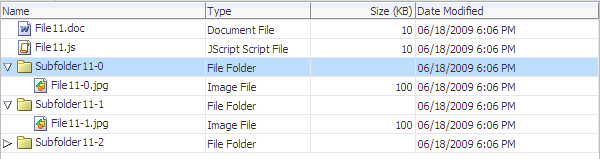
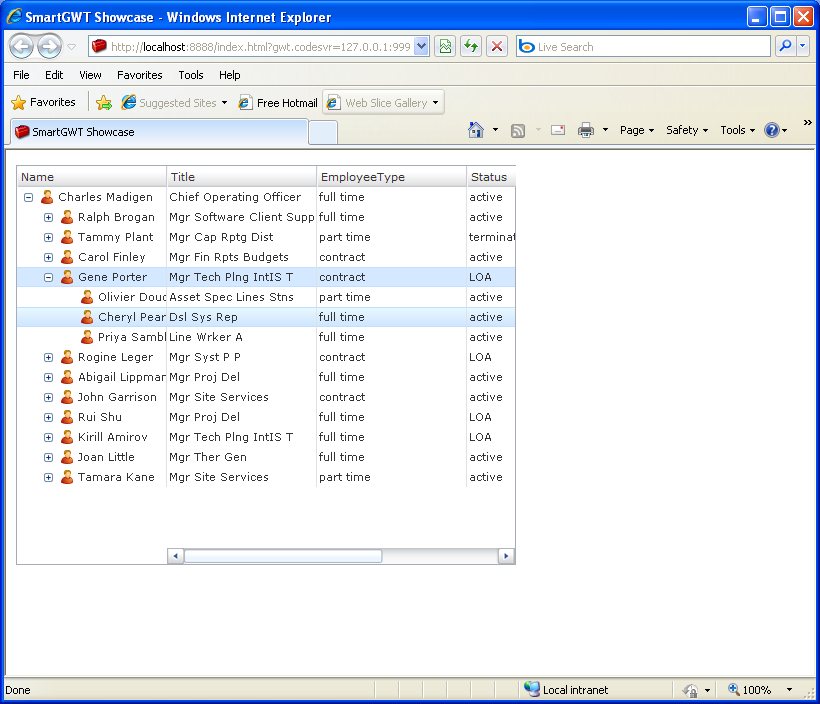
I just want to learn if it is possible to create tree tables similar to these;
https://docs.oracle.com/cd/E16162_01/web.1112/e16181/img/table_basic_treetable.gif http://gasp.hcs.ufl.edu/ppw/docs/html/images/tut-treetable.png http://www.java2s.com/Code/JavaImages/SmartGWT-TreeTableWithFrozenColumnsSample.PNGThanks
Hi ,
At the moment this kind of feature is not available. We will check it further and consider adding it in a future release.
To stay updated on Metronic’s new releases please follow us on http://twitter.com/keenthemes
Thanks.
We have purchased Metronics library and product is great. We are creating application where need to show 3 different types of gauges on web page. How I can create different types of gauges using flot chart? As per documentation amChart is not free and license cost is high.
Hi ,
amChart has free version as well. The once difference between free and commercial licenses that the free version displays ‘amchart’ copyright in the charts. To learn more about flotchart you can just refer to the official documentation here: http://flotcharts.org/. More samples can be found here: http://www.flotcharts.org/flot/examples/
if you need any further clarifications please let us know.
To stay updated on Metronic’s new releases please follow us on http://twitter.com/keenthemes
Thanks.
this template works in whatever template html? How do I install?
Hi ,
You don’t have to install it. Just drop the theme’s html files and assets folder in your web directory and you can browse the html templates. However this is not fully functional admin panel. It only provides the templates and plugins. You will need to use some server side languages to make it fully functional according to your project requirements. For more info i would suggest you to talk to your web developer who can explain how to utilize this theme for your project.
To stay updated on Metronic’s new releases please follow us on http://twitter.com/keenthemes
Thanks.

This item was featured on ThemeForest

Power Elite Author
Contact the Envato Market Help Team