39369 comments found.

Hey I am building a site with your theme which I love !
Question: How could I add a “Click To Call” button that would only show up on the mobile version not desktop.
The button showing up on the desktop version would not serve any purpose.
Do you know what files I would edit?
Any ideas?
Website for reference:
http://www.meltondesignbuild.com/on the desktop version it says “Schedule Consultation” on mobile version it says “Click To Call”
Your help is greatly appreciated,
Pat
Hi Pat!
Hmmm this involves a few steps and would be custom work. However please post a new topic on our support forum so our team can take a look and point you in the right direction.
Click Here To Create A Forum Account & Get Free Support
Thank you, we look forward to helping you!
I need help!!! The fusion shortcode generator does not appear on the page/post edit. Can you please let me know why?
It’s OK the fusion plugin wasn’t activated – I solved the issue.
Ah good to hear  Thanks for the follow up!
Avada v3.7.1 Is Live!
Click Here To See What’s New!
We are thrilled to bring you this update with many new features and functionality. Please see the link below to see whats new. We hope you enjoy it!
……………………………………………………………………….……………………
Click Here To Get Free Support
……………………………………………………………………….……………………
Thank you, we look forward to serving you!
ThemeFusion Team
Congrats Avada 
Thank you very much
Hello,
I have a question about this theme. I want to start a webshop but without shipping, is this possible?
So you order products and then you can pick it up at our shop.
Thanks,
Jerôme
Hey!
Yes you can use WooCommerce for that.
Thanks!
Hello, I am thinking of buying this theme. I have tested the demo in my phone and the header does not fit properly on its place, it just go everywhere around. I am on a samsung galaxy S3, android 4.3, native browser. Is there any issue with this theme running in that browser? Thanks
Hey!
Hmmm no there are no issues we see on our end. I would make sure your phone browser software is up to date as well. Also do you have Chrome on your phone, it should be fine there also.
Thanks!
I wanna buy the Avada | Responsive Multi-Purpose Theme.
One question I have about the Live Preview >> Top menu >> Shortcodes >> Pricing Tables !
The regular License is $58 >> comes the pricing table than on top of the regular license ?
Or can I use this template also without the Shop ?
Regards, Joe
Hey Joe!
The pricing tables are included with the theme, so the $58 purchase includes them as well as anything else you see on our demo.
Yes you can use Avada without the Shop. The Shop is controlled by WooCommerce plugin so you can choose to not use it.
Thanks!
Thx you’re the Best !
Thank you
This theme is virus and spam scripts paradise. Never use this on your own web server.
Hi Dotitlv,
This is not true. Avada is clean and secure. You must be referring to recent revolution slider exploit which was fixed in Feb 2014 and Avada always included an update for it. You must be using a really old version of Revolution Slider.
Anyways, keeping your themes and plugins updated is very important.
Rest assured, your claim is not true and Avada is 100% safe to use.
please help, thanks
Hey!
You have the megamenu enabled for that parent item. Edit your menu and look for the fusion megamenu setting, make sure that is not checked. See our docs here: https://theme-fusion.com/avada-doc/header/using-the-mega-menu/
If you have further questions or need assistance with that, please signup at our support center and post a new topic in our forum. Include all the details about the issue, your site URL and version of Avada. For faster service, please include your WP and FTP login info when creating the thread. Our support team will check it out and let you know.
Click Here To Create A Forum Account & Get Free Support
Thank you, we look forward to helping you!
Hi
When I try to add a page all I get is the title box and the Fusion Page Builder button… nothing else – all blank. The button doesn’t do anything. This is a brand new Wordpress installation so it can’t really interfere with anything… Only your plugins are installed. I tried two Safari and Firefox with the same result.
I tried to disable the Fusion Page Builder from theme options but still not working… What am I doing wrong?
Hey!
Make sure you are using Avada 3.7 or higher and Fusion Core 1.6 or higher. See this post as well: https://theme-fusion.com/knowledgebase/avada-3-7-fusion-builder-editing-screen-grayed/
If you have further questions or need assistance with that, please signup at our support center and post a new topic in our forum. Include all the details about the issue, your site URL and version of Avada. For faster service, please include your WP and FTP login info when creating the thread. Our support team will check it out and let you know.
Click Here To Create A Forum Account & Get Free Support
Thank you, we look forward to helping you!
Hi
I have both Avada 3.7.1 and Fusion Core 1.6.1. The issue persists as described. I’ll post on the forum
Yes please do. Those versions are definitely compatible with WP 4.1 and do not have the issue.
First clear your cache to be sure, browser cache, plugin cache and server cache if you use it.
If that is not it, then it could be a 3rd party plugin conflict. Check those as well.
See you on the forum!
Hi I set side Navigation template on 2 pages, one is parent, one is child, then I still don’t know how to make them appear on the left of the page. In side bar I can’t see any choice. What’s next? Thanks for the help!
Hey!
Edit your pages and check the sidebar position setting, that also controls the side navigation.
If you have further questions or need assistance with that, please signup at our support center and post a new topic in our forum. Include all the details about the issue, your site URL and version of Avada. For faster service, please include your WP and FTP login info when creating the thread. Our support team will check it out and let you know.
Click Here To Create A Forum Account & Get Free Support
Thank you, we look forward to helping you!
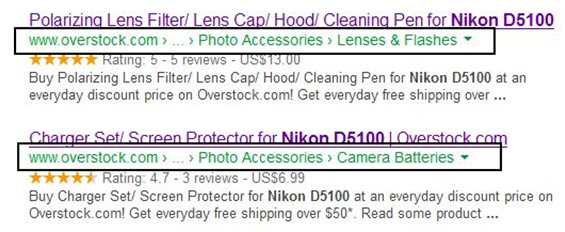
How I can add like this http://searchengineland.com/figz/wp-content/seloads/2013/06/Breadcrumb-Examples.jpg ?
Thanks.
Hey!
Currently rich snippets in breadcrumbs is not standard so it is not added to the theme yet, we’re unsure of when that would be. For now, you would need to perform this customization on your end.
In the meantime, may I suggest you add this to our new ideas section of our support site? We’re always listening to our users. If you have any feature requests, recommendations or ideas – you can add them to our idea section. Each idea that is submitted can be voted on by other users. This allows our team to have a list of the most popular requests for future development. We value everyone’s opinion and continue to improve Avada with your help!
Click Here To Submit Your Idea!
Thank you for choosing Avada!
When setting up fusion slider I am able to get all the steps done. However when editing a page… on the slider type I select Fusion Slider then go down and try and select fusion slider the slider I created is not there.
Disregard about the fusion slider got it figured out I didn’t see you need to place check in box when creating the slide.
On another note how do you get the transparency for the header? Editing the CSS?
Hey!
For transparency, it is a global theme option (styling tab) or an individual page option (header tab of page options).
If you have further questions or need assistance with that, please signup at our support center and post a new topic in our forum. Include all the details about the issue, your site URL and version of Avada. For faster service, please include your WP and FTP login info when creating the thread. Our support team will check it out and let you know.
Click Here To Create A Forum Account & Get Free Support
Thank you, we look forward to helping you!
Awesome theme – if not the best. Both for quality and support.
One thing though I would like to see is a much more customizable menu.
Hey!
Thanks for the comments, we appreciate that
We have some new options for our menu listed out for a future release, what types of features are you looking for?
Thanks!
Thank You For Helping Us Sell 100K Copies of Avada!
Over the past two and a half years, the Avada community has continued to grow and develop. We never thought 100K sales would be possible! We are truly honored and humbled to have reached this milestone with Envato. This would not be possible without our dedicated users, amazing team members and supportive marketplace.
……………………………………………………………………….……………………
Thank you from the bottom of our hearts!
ThemeFusion Team
Avada v3.7.1 Is Live!
Click Here To See What’s New!
We are thrilled to bring you this update with many new features and functionality. Please see the link below to see whats new. We hope you enjoy it!
……………………………………………………………………….……………………
Click Here To Get Free Support
……………………………………………………………………….……………………
Thank you, we look forward to serving you!
ThemeFusion Team
I have some translation problems, i try to translate the search in the header ( search …) and in the tabs ( No comments have been published yet. ) I used Poedit save the both files and upload it to the ftp but it wont translate…..
Hey!
Hmmm our support team can assist with this, they will need to check this out for you. First please check over our translation docs here: https://theme-fusion.com/avada-doc/translations/
If the issue persists, please signup at our support center and post a new topic in our forum. Include all the details about the issue, your site URL and version of Avada. For faster service, please include your WP and FTP login info when creating the thread. Our support team will check it out and let you know.
Click Here To Create A Forum Account & Get Free Support
Thank you, we look forward to helping you!
Hi
I was wondering what the chances are of the Sly Gallery being incorporated? It is an awesome horizontal sliding gallery… Would really complete this already awesome theme..
Cheers
Hey!
We will not be adding that to the theme, however you can use it on your own if you wish. The good news on this topic is that we have a nice surprise coming sometime in the 1Q of 2014 
Thanks!
Thanks for the fast reply. I would use it if I knew how to add it but I’m not much a js coder I’m really after a carousel slider/scroller that can handle portrait and landscape images in the same gallery like lots of other photographers Anyway, thanks for the heads up, I am intrigued and look forward to the Q’1 of (what I’m hoping you meant of) 2015
You can use our image carousel for that, it allows both portrait and landscape imagery in the same slider. Just make sure the picture size setting is set to “auto” so the images are not cropped.
Thanks!
Yeah but it leaves a gap between the portrait and landscape ones, I need them to be right next to each other.
Are you referring to the gap between each image? For example, like here: http://d.pr/i/oYBs
If so, our next major update 3.8 will have a new feature to control the column spacing, so you can set it to 0px and the images will be right next to each other
Yeah thats what I mean so that the portrait doesn’t take all the space of a landscape image but instead lines up against the next one. That is awesome, I can’t wait
Yep its already been implemented on our end and we’re currently working on finishing other items for the build. 3.8 will be out sometime in February Also, this item is separate from the other gallery features we are adding.
Thanks!
Brilliant! Thanks again
ok, i’m back now that the Q1 update is out that you suggested I wait for.
With the image carousel, how do I get the images to retain a certain height, or even their actual pixel height. If I put 3 images visible (for example one portrait followed by 2 landscape images) in the carousel, they are all next to each other with no gaps (as I can now specify) but the landscape ones are reduced in height to make the 3 images appear equal width so it looks odd. I know that is obviously by design but can I stop it from reducing and instead partially show the image so that it retains the correct height?
If I select only one image visible in the carousel to try and get around this problem it just fills the width of the container and enlarges the image to fill the width and almost whole page. This happens whether I choose fixed or auto height with one visible column. How can I keep the carousel at a specific height?
Ultimately I want the carousel to behave like a sly gallery where the images are aligned horizontally and of the same height , with no (or a specifiable gap) between them that can be navigated left and right. Is there any way I can achieve this with Avada since this new update?
Many thanks in advance for you time in answering.
Hello,
Thank you for updating and waiting for it.
Unfortunately, you cannot control the carousel images height. They’re set automatically based on the options set. The auto option uses full image while the cropped mode uses cropped images and will always be smaller than the container.
Thanks!
Hi, I am using header 4. I would like to add a background image. I would like this to display for desktop but would like to disable it for mobile. Is this possible. Thanks
Hey!
Yes you can but need to use custom CSS and target the correct media query to hide it on mobile. Our support team can point you in the right direction, post a new topic on our forum with these details.
Thanks!
I have a site where I can not access the text in the fusion core builder because I updated the WordPress to 4.1 and I am still on version 3.6.
How do I update the theme and plugin so it will work properly? Do I just need to reinstall the theme again?
Also I was wondering is I also have the automatic update feature filled out and it didn’t update properly. How do I get that to work right? The site is hosted at Godaddy and I have had troubles with updating.
Hey!
Yes just make sure you are using Avada 3.7+ and Fusion Core 1.6+ if you are using WP 4.1. See this post: https://theme-fusion.com/knowledgebase/avada-3-7-fusion-builder-editing-screen-grayed/
For auto update, there are 3 reasons why this could happen.
1. The Themeforest server was down when you tried the update. In this case, please try again now
2. Wrong API key information in theme options. Please double check the info you provided in theme options, also I would regenerate a new API key and try it again.
3. API limit exhausted – this is the API from Themeforest and it has a limit on it. There may have been many users updating at the same time and it exhausted the limit. In this case, please try it again now.
If you have further questions or need assistance with that, please signup at our support center and post a new topic in our forum. Include all the details about the issue, your site URL and version of Avada. For faster service, please include your WP and FTP login info when creating the thread. Our support team will check it out and let you know.
Click Here To Create A Forum Account & Get Free Support
Thank you, we look forward to helping you!