1415 comments found.
Hi Radu,
Please let me know if you have any answer for for questions, my questions are here for 3 days.
I responded on them a minute ago  Please take a look
Radu
Thanks

Hi guys, is it possible that I can time schedule the on and offline times of pictures in galleries? Thanks!
This is an interesting idea Unfortunately, we don’t have this kind of option on our theme. You have to manually add images on the gallery when you want them to be displayed.
Thanks, Radu
Hi,
I have 3 questions:
1. I have installed and setup my site, but the shopping page is different with your demo and I am not able to set up the product options even I have created the product attributes at WooCommerce.
2. I created 2 galleries, but they did not show up under the gallery tab on the menu.
3. I have changed the menu background color as black under the theme options, but the color does not updated.
Site: http://dennisphotography.com.au/ Shop URL: http://dennisphotography.com.au/shop/
Please help. Thanks
Further Questions
4: When point on the picture at the shop page the mouse over isn’t working
5: When mouse over to the pictures, it shows the file name seems like it is different with your demo. Is anyway to change it only show the title and picture info?
6. The cart icon and figure on the mobile is upside down, is the problem with CSS?
Hey!
1 I think that the difference that you are talking about is that we have added the clips on every image. You can achieve this by using Photopshop and this PSD
2 Once you created the galleries, you have to add them manually inside the menu. For this, you have to go on Appearance » Menu and, on the top right side of the page, click on Screen Options and select Galleries. Now, you should be able to add galleries on your menu as you do with the pages or posts.
3 Please go on Theme Options » Custom Code » Apply Custom CSS and make sure that you have selected Inline option.
4 Please deactivate your plugins and see if you still have this problem. It seems that you have some problems with the spacing too o the Shop area.
5 The hover informations on projects, galleries and archives are different. On galleries, if you hover the image, you will only see a plus sign. The informations are displayed when you are on a projects or galleries archive.
6 As I mentioned before, it seems that there are a few problems in your Shop that can be generated by another plugin. In order to take a closer look on this, please open a ticket on HelpDesk and we’ll search for a solution
Have a nice day, Radu
Hi, my theme doesn’t show on Mobile mode, on my ipad or iphone….
Have you managed to solve this? Can you give me a link to your website, please, so I can take a look?
Thank you, Radu
Hi,
I would like to setup THE SHOP section as it is shown in the demo. Is there an “import e-commerce demo data” option?
Thanks!
I most certainly like the shop section as well as the template as a whole. Thanks for the swift reply and the nice tips!
When using the inverted menu (White) the hover text color is black, text bold. Can I change this color to the same personal color I have chosen for the theme? CSS code maybe?
Please give me a link to your website and I will give you the right CSS that will help you to have the same color on hover
Radu
Thanks, you can’t write down the CSS here? You need my login you mean?
Also have a question about having some padding around the gallery images. Tried this: img { margin:5px !important; } But then the hover color overlays the upper and left white border of the image (overlays the padding). Any suggestions.
Nothing????
hallo Can you let me know what the recommended image sizes and dpi Thanks
There’s no fixed size for the image that you should use on your website. I recommend you to use images around 1900*1200px to make sure that your website will look fine on mobile devices and bigger monitors too. Also, the size of the image is important on loading time of your pages.
Thanks, Radu
Guys! Can I write .css for move sidebar on top?
We don’t have any CSS to help you with this change but you can give it a try. I think that you’ll need a lot of work in order to move the sidebar to the top.
Radu
Hi
I installed eveything so far but the import data button is not where you way… what can i do???
http://lesmesfotografia.com/errors/1.pngThe button for importing the demo data can be found on Theme Options » Utilities Options.
Thanks, Radu
HI, today I updated the theme and now the “previous” and “next” text which used to show at the bottom of a project page has been replaced with simply “All Projects”. Is there any way to turn it back to the way it was?
Augusto
This is strange. We have not made any changes on those elements. Can you write here a link to your website so I can take a look, please?
Thanks, Radu
Here you go – http://www.mediaskystudio.com
It seems that you have the areas for Next and Previous but they are removed. Have you made any changes on theme files?
Can you open a ticket on HelpDesk so we can take a closer look?
Thanks, Radu
Sure, I’ll open a ticket. I haven’t done any changes to the theme files so this does seem very strange.
Hey what’s up? I bought the theme and somehow the yellow-faded-vertical stripes that were suppose to be next to the menu, as in the demo, were gone. Any clue? Custom css maybe? Tnx.
Hey buddy,
Do you have any CSS on your website? Try to disable your plugins maybe there’s one of them that it’s adding some CSS and it’s blocking the stripes from the left side. Also, a link to your website would help.
Thanks, Radu
Hey C’ Tnx for the answer,
I’ve deleted any custom css and even installed the template again but no breakthrough yet there’s the site, I just started to construct it: walktalk.co.il/
Regards, Niro.
Please open a ticket on HelpDesk and we’ll take a closer look on your website.
Best regards, Radu
Hi, quick question – what is the the custom CSS to give some spacing between the titles/photos in all the galleries.
Awesome theme, congratulations on all your hard work building it.
Can you give me a link from our demo as an example where you want to add this space, please? Just indicate me what elements you want to have more spaces between them so we can make sure that we are talking about same things
Thanks, Radu
We’re excited to announce that our theme is working GREAT and an UPDATE is now available! 
VERSION 2.1.0 (March 7th, 2015)
Some new things that were improved:
- Added Woocommerce 2.3.x compatibility
- Added the Inverse sidebar option
- Fixed Youtube Videos in Full Screen
- Fixed Main Color on Mobile
- Fixed Links which should be opened in a new tab
- Fixed Missing icons from PixCodes
- Fixed Next and Previous Buttons on Projects
- Fixed Progress Circle spinning with custom colors
View the full changelog and the roadmap here. Enjoy!
*People that already bought this theme can download the update for FREE !
First off all guys AMAZING work. Love the theme and love the easy way of doing everything. Money well spent!
I just have one small favour i really really REALLY need. When you see my site www.RibasAbbas.com you will land on a page with a full page gallery.
I want that when somebody goes to my site with her of his mobile he or she doesnt land on the full page gallery but directly goes to my portfolio. Is that possible? I know this is outside your support but some help would be so much appreciated. Thank you in advance and keep up the good work.You can set any page from your website as homepage. This change can be made from Settings » Readin » Front page displays » Front page. Well, you just have to set here your Portolio page. Give it a try 
Radu
I understand that. But I want that when you go with a mobile phone to my page you get another page then when you go with your desktop. That should be possible right?
The page that you set as front page will be the same on both desktop and mobile device version. Basically, you access the same page
- 1. I need to have a top menu item called ‘Client Login’, which opens a page containing a list of event names, and upon clicking one of the event names (such as Smith Wedding), the next page is password-protected, and upon entering the password, next is a link leading to an outside site (dropbox.com). Is this possible?
- 2. Can I create a ‘Pricing’ page which allows visitors to open PDF? If not, how can I show pricing info?
- 3. Can I create a page that plays a video?
And to throw in question #4. When I view this theme demo on my iPhone 5c, the fullscreen and fullwidth galleries are cropped vertically. I’ve seen themes where the the full width is given priority on phones. Is this possible with your theme?
Sorry for late reply.
1. For this list of events, you can create a page with Projects (like this one) and put a password on every project. Inside the project, you will have a gallery and a description for the event. Inside this description, you can add you link to Dropbox.
2. A simple PDF can be added anywhere in pages, posts or projects, even on the menu. Once the visitors will click on it, the Pricing page will be opened.
3. You can play a video on galleries, if you want. You can find a simple exemple here (the 4th image).
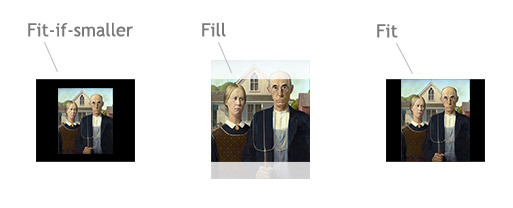
4. For the mobile display, it’s all about the scalling that you choose for your gallery. In this image you will find a little explanation. On the galleries from the demo, we are using Fill scalling options.
Best regards,
Radu
Great Theme.. Wonderful look and feel and easy to use and manage! Support is great as well, I required some assistance to make some changes and gotten a reply promptly.
Thanks guys and keep up the marvelous work!
Thank you!
hello, how can i change the ‘yellow’ background on masonry style into pure white? thank you
Hey! Do you want to change the yellow color that appears on hover over the images? When you change the Main Color from Appearacen ? Customize ? Colors, this hover color will be affected too. If you want to change only this color from Masonry gallery and let the other elements with other color, I can give you some custom CSS that will help.
Have a nice day, Radu
hello, no. what i mean is. if i switch the gallery to masonry style, the background has not that pure white like the white sidebar. it is a different color. a bit yellow… how can i change that? thank you
I guess that I have to take a look on your website so I can see the color of your sidebar. Can you give me, please, a link to the Masonry gallery from your website?
Radu
I see now. Well, you can copy the folowing code on Theme Options » Custom Code » Custom CSS field and everything will look perfect:
.masonry--gallery .span.span-3 {
background-color: white;
}
I hope that this is what you want to achieve
Radu
wow, thank you man!!!
A disaster, many problems and the support is awful
13916
Hey rebor!
The ‘many’ problems that you’re referring to, are regarding our extra efforts to help you, even your requests were outside of our support scope. Sorry about this and thanks for the rating!
– George
In the descriptions of the theme shows clearly that it is full width. This is a lie and it took 4 days waiting for the technical support the issue resolved. A true disaster.
In the description we stated that only the Galleries and Portfolio projects are full width – we’re not saying anything about blog posts. Sorry for this misunderstanding.
Hi there seems to be some sort of disconnect with the shipping … the woocommerce settings has flat rate ,free shipping , international delivery , local delivery & local pickup while the products settings has no shipping ,flat rate , table rate and weight rate and calculated rate . . i set up something in the woocommerce setting and its not showing up . How do i fix this ?
We’ll need to take a look on those settings that you’ve changed on your website. Please open a ticket on HelpDesk and we’ll take a closer look on this.
Radu
Hi, I like your LENS theme very much – I read here about some issues with the lightbox on mobile devices… so I tested it by myself.
There are in fact some troubles on ipads.
Is it possible to change the current lightbox with the PhotoSwipe-lightbox?
Thanks in advance
I understand that PhotoSwipe offers different options for lightbox. About the compatibility with this plugin, I will install it on my side and see if we can make some improvements on our them without any serious structure changes. If we’ll find anything helping, it will be included on a future update
Thanks, Radu