28307 comments found.

hi, I want to put the WPML language and currency switch on the top bar, we hope it can be show under (ADD ANYTHING HERE OR JUST REMOVE IT)on the mobiles instead of the menu?
Hi there, you can assign WPML language selector to the top bar menu. Not sure about the currency switch, but I think it’s possible.
we can fiter from ALL IDENTITY ILLUSTRATION MOTION PRESENTATION PRINT WEB DEVELOPMENT
Thanks.
Hi there. We’ll add filter options to portfolio shortcodes soon 
thanks for your quick reply
Pre-Sales Question – Are all the pages you show in your “online preview” included in the demo content that can be downloaded after purchase. And if so, are they exactly as seen in the preview? I’ve read that the images are not included, so would there just be a placeholder where the images would be? Thanks!!
Hi there, yes you need to replace placeholder images with your own images. The pages are included in the demo content
Hi there is there a separate help forum for this theme? it would be great to see help threads by topic. going through the hundreds of pages is quite overwhelming.
Hi there, we don’t have any forum, but we post most asked questions in our knowledge base: http://uxthemes.helpscoutdocs.com/
Hi,
Couple questions
First, how to display the Facebook login elsewhere in the website ? like in the footer widget ?
And second question, in your demo, in the footer widget on the left there are social media icons, couldn’t find how to do that with the actual plugins from flatsome ..
Thanks
Try add a [facebook_login_button] shortcode in a text widget
Sweet. Thanks What about social media icons ?
Add [follow] shortcode: http://flatsome.uxthemes.com/shortcodes/shortcode-sharefollow-icons/
Yes thanks .. I just got it few seconds ago I understand now, it’s all about shortcodes with this theme .. very clever gives a lot of flexibility … Brilliant work
Yes that’s true
Sorry, today is the day. Just one more question.
The price filter, with its big button, gets wrapped in two rows and looks weird. Is it possible to remove the button and have the slider filter right away, once you release the mouse button. Like other ecommerce platforms do it.
My website is right here: http://makeurcake.ch/shop/ Price Filter is at the bottom left of the left sidebar.
Hi there, you could try add this to custom CSS: .price_slider_amount .price_label{ line-height: 100%; font-size: 11px;}
That helped for the moment. Thanks a lot.
Any information on the functionality I mentioned? Is it planed in a future release to remove the button and have the filter work right away, once the silder ist moved/released.
Hi again, sorry I don’t have any quick solutions for that.
Hi how can I add this google font “Roboto Condensed, sans-serif” ?
Cant find it anywhere. Only Roboto and Roboto Sans/xx
Thank you
Hi there, we’ll have added this font to next version
HI,
I would like to check with you why is when I have select the 10th preset header style and whenever I were to made any changes in the theme options and save the header menu style would be reset to the default?
Edit: It’s alright, I have play around with the settings in the header options instead and manage to get the header style similar to the 10th header preset. Though it’s weird that when I load the preset header style is not saving for me though.
Regards,
Joel
Hi there, we’ll take a look why its resetting. What browser are you using?
Love the theme. I need to know however, if I can add a text description and banner at the top of each category. We manufacture our own products and we sell a variety of gear that is primarily purchased by dealers. We would like to have each category page have a description of that product family and have an area for a possible graphic.
Ideally, this area would be below the top navigation bar but above all the products in the category.
Is this possible with your theme?
Hi there, yes this is possible. You can add top and bottom content to each category
Is there an example of this in action? I see some images on some product categories, but no text. I’m curious what it could look like.
Also, am I correct in assuming that there’s demo content available that sets up the site like your demo?
Hi there , there is demo content available, but all images are gray dummy images. You need to replace the dummy images with your own images You can view an example of footer content here: http://flatsome.uxthemes.com/product-category/men/
Thanks. a couple more questions….
1) Is there a “header content” available just like there is your footer content there? I like the header banner idea and may use it, but the client may want to have it be more flexible, essentially having the same ability that exists in the category footer in the category header (where the banner currently is).
2) I’m also considering your Magnium theme. Does it also have the same type of header/footer content ability?
lol nvm about #2. I thought for some reason you guys created that theme, it appears to be made by someone else. I realized that after the time window available to edit the above post.
Hi, In “ux_bestseller_products” or “ux_latest_products” shortcodes in my homepage, when we hover mouse over the product, the “Add to Wish” bottom (That Translated) shows and in the back of the the Add to Wish Icon, we see the title of Add to wish icon. How can I remove it? You can see what I say here: http://beroozlux.com Also you can see this screenshot: http://beroozlux.com/beroozlux.png
Hi there, thanks for noticing. We’ll have that fixed in next version of the theme
You could try add this to custom CSS to fix it quickly:
.yith-wcwl-add-button a.add_to_wishlist{ direction: ltr; }
Thanks a lot… Would you please add a part in theme settings for upload custom fonts? We really need it… And Please add font-size settings in theme settings…
I add that to custom CSS, that problem fixed but a new problem appear! in product page or shop page, again when we hover mouse over the product, the “Add to Wish” bottom (That Translated) shows and in the back of the the Add to Wish Icon, we see the title of Add to wish icon. You can see here: http://beroozlux.com/product/macho-dm355/ and http://beroozlux.com/shop
Weird Try add this to custom CSS:
.product-image .yith-wcwl-add-button a.add_to_wishlist{direction:rtl}
Thank you very much… but it solved just in product page! In shop page http://beroozlux.com/shop/ and in recent products page http://beroozlux.com/recent-products/ and other pages like this, the problem exists… How can I fixed it?
Try add this: .yith-wcwl-add-button a.add_to_wishlist{direction:rtl}
Thanks, Now fixed… and 2 more problem: 1. The Main Navigation is not RTL, you can see here: http://beroozlux.com 2. Any time that I go to Theme Settings, the font settings change automatically to Arial font and I should change font every time!
Oh, No… Again: In “ux_bestseller_products” or “ux_latest_products” shortcodes in my homepage, when we hover mouse over the product, the “Add to Wish” bottom (That Translated) shows and in the back of the the Add to Wish Icon, we see the title of Add to wish icon. How can I remove it? http://beroozlux.com I add all codes that you say in custom CSS…
i’m not able to find ‘load presets’ under theme options to change and see other style examples
also where are the quick view settings for picture
Hi there, you can load a header present in Theme Option > Header Take a look at the top
Hi there,
First of the theme is awesome. I use it since a year or two and it is always up-to-date.
Just one quick question. As I am writing texts I just figured out that html links are not formatted differently than the regular text. It should be bold and underline for example. How can I change that? Maybe just a short statement for the custom css would be great.
My website is right here: http://makeurcake.ch Text is at the bottom of the page.
Thanks a lot.
Hi there, you could try add this to custom CSS:
a:not(.button){text-decoration:underline}
Thanks a lot for the quick reply. Unfortunately that underlines everything. Links in Banners, all menu entries and so on. I just need links to be bold when it is in a text. e.g. in a
e.g. in a <p></p>
Try: p > a:not(.button){text-decoration:underline}
Awesome! Works like a charm. Thanks a bunch!
Can add an option for this in next version?
1. Revolution Slider Plugin or Awesome Parallax Layer Slider Plugin because it work for full width slider banner on mobile devices.
2. Infinite scroll.
Thank you
Hi there,
1) We’ll not add these to Flatsome, but they will work with Flatsome if you purchase them separately
2) I think the WordPress Jetpack plugin will make that possible.
Hello,
I have one query. In Flatsome theme, When we place any new order, Its status is set to “Completed”. I want to set default status as “Processing”. Where do I change it?
Hi there, I’m afraid I’m not able to help with questions regarding the WooCommerce plugin. Try searching in the WooCommerce documentation for how to set it up: http://docs.woothemes.com/documentation/plugins/woocommerce/. Hope you understand
Hi,
I have been trying to use the plugin SMART CURRENCY CONVERTER with this theme – http://codecanyon.net/item/smart-currency-converter-for-woocommerce/6650944/comments
However it returns an error – I’ve been talking to the author of the plugin and he’s asked me to pass this onto you to see if you can help??
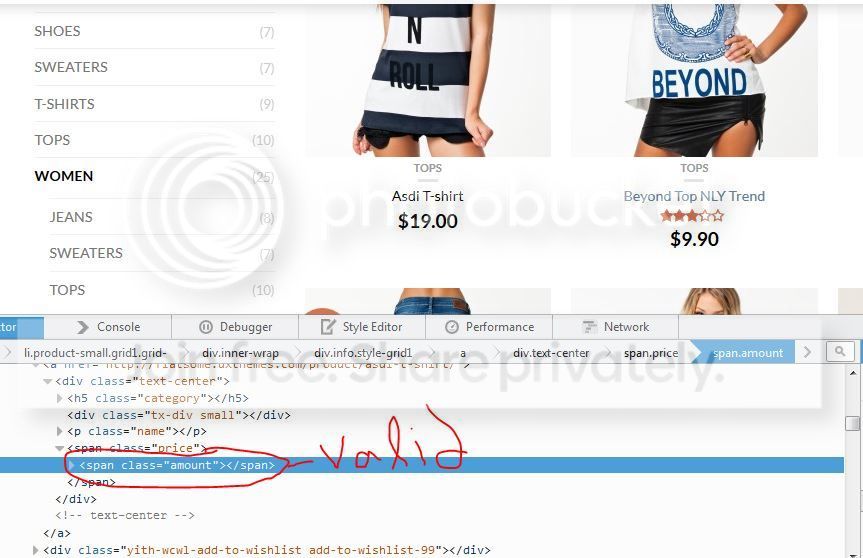
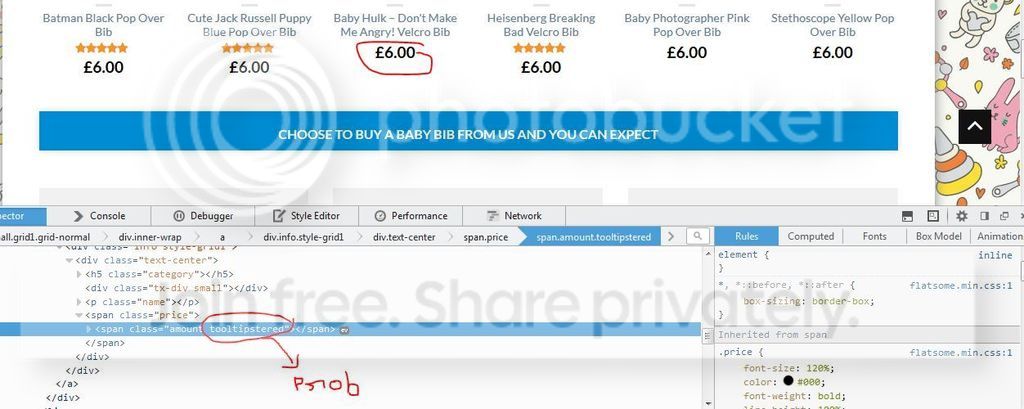
“Hi, I have checked the issue with all the plugins of the site , it has no conflict with the plugins but has a conflict with the Theme it self.Our Plugin works with a Class named “amount” which is the default woocommerce price class but in your theme that price class is tweaked with addition of a class named “tooltipstered”,which is causing the problem.In the original flatsome theme there is no extra class named tooltipstered but in your tweaked theme there is so I will suggest you to talk with the theme author and show him the attached screen shots.”
“Also Tell the Theme author that the html table needed for converted amount to show in tooltip is being “Escaped” (not being rendered as html ) , So the theme may be using php escape function somewhere , which is hampering with our plugin’s generated html. Mursalin ,CodeHound”
http://i619.photobucket.com/albums/tt274/seanmates/image1_zpscgex4dce.jpg
http://i619.photobucket.com/albums/tt274/seanmates/image2_zpsf3lcqir3.jpg
My web site is: http://www.gagabibs.com
Any idea’s?
Thanks,
Sean.
Hi Sean, I have sent this to our developer for further investigation We’ll hopefully have a fix included in next version.
Thank you. I look forward to it.
Was disappointed not to see a fix for my issue in this release 
Hi Sean, sorry about that. Could you email the plugin to post@uxthemes.com and we’ll take a look at it asap
Hi, any news regarding this issue? I forwarded my email/plugin to post@uxthemes.com as requested.
Thanks,
Sean.
Hi Sean, we have’t had time to investigate this yet. Been busy fixing problems with latest version. I will take a look early next week / Tommy
OK Tommy no problem, thanks
How do you change the bottom footer menu colors?
Could someone please help me?
Hi there, you need to do that with CSS. Try add this to custom CSS: .absolute-footer ul li a{color:#FFF}
Is it possible to get rid of the “Read More” button that appears at the bottom of a product on the catalog page?
Hi there, not sure what button you are referring to. Do you have an example side I could take a look at?
Hi there, there is no “read more” button there. Did you manage to fix it?
sorry, yes I have been working on the design of my site. Here is a link that will show you what I am refering too. http://theamateurphotographer.net/product-category/digital-cameras/
Now that I look at it again, I want to get rid of the “Add to cart” button.
You can disable that in Theme Options > Category page.
Thanks
Quick question…
Why does my site say, ‘Thanks for visiting user’ under every product? Id this a theme issue, WooCommerce issue, or an issue with s2Member, which I’m using for member registration? Can I get rid of that?? It is really annoying!! Thanks!
https://cameleonjackets.comSo I turned off the s2Member plugin and the text was still there, so it has to be woocommerce or the theme, help!
Hi there, this must a plugin issue. Flatsome does not have a functionality like that included. Try disable various plugins and check if it helps.
Hello,
I’m using the template in catalog mode. Unfortunately, I can’t get the main menu to align to the right.
Here’s our site, fotoworkspro.wpengine.com
The menu is set to “top left (beside logo)” because it will disappear once I set it to “top right” in the theme options menu under main navigation position.
Thanks for your help.
Hi there, thanks for noticing. We’ll have this fixed in next version
Hello, how can I update my flatsome to the new version ? I have 2.1 version and this doesn’t work with 2.3 updated Woo Commerce and Wordpress. I alreda bought in on January. E-shop doesn’t work very well. Thanks.
Hi there, try search the documentation for help. Take a look here: http://uxthemes.helpscoutdocs.com/article/77-how-do-i-update-the-theme

This item was featured on ThemeForest

Power Elite Author
Contact the Envato Market Help Team