23226 comments found.

Hi,
I’m having problems with the images. Can you help with this?
Problem: Fatal error : Call to undefined method WooCommerce :: get_image_siz to () in /home/joyetecheroll/public_html/wp-content/themes/seoyusuf/inc/functions/woocommerce.php on line 524
But did not solve the problems associated with product images.
Could you send me wp admin and ftp accounts through support page? Let me check.
Hello, Why have you removed “Porto Multipurpose Wordpress”? We are very happy with it and we are working on our site, but the item is no longer available and we can’t see the live preview anymore. Could you please share it again so people who still have their websites can continue working? Thanks a lot! Best regards, Sandra
Hello. We’re not the author of “Porto Multipurpose Wordpress”, we made only ecommerce version of Porto. “Porto Multipurpose Wordpress” was developed by another author, but removed due to lack customer service that you may be already aware of. Regards.
Ups, ok, thanks a lot! Good luck!
Regards 
Hi, Is there any option to remove currency symbol from product price ??? I want to add custom currency symbol.
Hi, Could you configure the currency options in Woocommerce > Settings > General > Currency Options? You can find Woocommerce > Settings on admin sidebar.
One more… Visual Composer needs an update and is of course required by your theme. Yet we do not have a license key for it so I searched and followed your directions at http://newsmartwave.net/wordpress/porto/documentation/#faqs
How to update Porto Content Types, Porto Shortcodes, Porto Widgets, Ultimate Addons for Visual Composer, Master Slider, WPBackery Visual Composer Plugins? Please go “Plugins” on admin sidebar. Please select these plugins. Please deactivate these plugins. Please select these plugins. Please delete these plugins. Please go “Appearance -> Install Plugins” on admin sidebar. Please select these plugins. Please install these plugins. Please activate these plugins.
Yet when I do this it still installs 4.4.3 instead of 4.4.4 AND I can’t do any auto updates from Envato as the VC key is required on the same page. So… do you have an agreement with VC and a key or ???
VC isn’t available via WordPress so it has to come from Code Canyon which means we have to spend $33 to buy it??
Hi, We embedded again visual composer plugin in porto theme and uploaded again on themeforest. Will be approve soon. After update porto theme, please deactivate and delete visual composer, porto plugins, ulimate addons for visual composer, master slider plugins in Plugins on admin sidebar. Please install and activate again in Appearance > Install Plugins. Regards, SW
Updated yet?
FIXED: Updates to Chrome today have borked something. Opera is fine…..freakin’ Google!
For some reason the admin images quit loading…not the WP logo on the login nor any of the Porto images. They were working fine…then not. I have only installed the recommended plugins…then deactivated all of them. Admin hangs up trying to load any images. Works fine otherwise. CSS is loading. I’m stumped.
Front end is fine, only admin images. ‘Processing request…’ in bottom browser bar.
Could you send me wp admin and ftp accounts through support page? Let me check.
I am now getting this message.
Your theme has bundled outdated copies of WooCommerce template files. If you notice an issue on your site, this could be the reason. Please contact your theme developer for further assistance. You can review the System Status report for full details or learn more about WooCommerce Template Structure here.
Hi, Please update porto theme. Latest version is compatible with woocommerce 2.3.8.
Just installed this in a new 4.1.2 WP/Woocommerce site.
“Your theme has bundled outdated copies of WooCommerce template files. If you notice an issue on your site, this could be the reason. Please contact your theme developer for further assistance. You can review the System Status report for full details or learn more about WooCommerce Template Structure here.”
Any thoughts?
Hi, Please update porto theme. Latest version is compatible with woocommerce 2.3.8.
Hello,
I need your help for several adjustment on porto template :
1. Can i remove add to cart button below product grid on my home page?
2. I tried to removed rating on theme setting but it still show up under product grid, can i remove that?
2. Everytime i scrool to the top to the header , my logo getting bigger. Can i deactivate that setting?
Hi,
1, 2 Porto theme have a catalog mode feature. You can configure the options in Theme Options > Woocommerce > Catalog Mode. 3. We will add more options in the future. Please add the following style in style.css: #header .logo img { transition: none; }
Hi,
Thank you for your reply,
1. Catalog mode hide add to cart button for all product page. For this matter, i just want to hide rating and add to cart button on home page only. can we do that?
2. Can percentage of discount show up for variable product?
Hi, 1. It’s impossible to hide rating and add cart button on home page only. 2. You should select “Show Saved Sale Price Percentage” to “Yes” in Theme Options > Woocommerce > Product. When edit the product, you should configure the special price.
Hello, How can I change the color of the header? When I try to change it(theme options, skin), it does not change.
Hi, Could you configure in Theme Options > Skin > Header? You can see Main Menu, Search Form, Mini Cart, etc.
Social links seems to be a bit broken. Facebook link sometimes displays random images – not images of product shared.
example:
http://www.dolledup.ie/product/nina-ricci-love-in-paris-eau-de-parfum-30ml/I sent you email.
hi. nice theme. im trying to install dummy data. but dosnt work. please advice the step to import the dummy files. thanks
Hi, Please extend max_execution_time and max_input_time to 30000 in php.ini and try again. If you can’t import dummy, please send me wp admin and ftp accounts through support page. Let me check. Thanks
hi thanks for your reply. may i know where i can find php.ini file?
Create a new file (phpinfo.php) in wp root folder and add the following code: <?php phpinfo(); ?> Please go http://your_site.com/phpinfo.php You can find php.ini path.
hi i have sent an email via support page. hope to hear from you soon and i’m sorry for any inconvenient…my english is not that good and same goes to my programming knowledge.. lol
Hi I have resent. My email is n1z4m0081@gmail.com thank you
I sent you email. Did you received?
please update your installer
your changelog reflects woo template update, but todays installer is still 1.2.2, it should be 1.2.3
Hi, New version will be approve soon.
Hello, I have a question about the Custom Tab on the product page. If i want to put the custom Tab before the Reviews Tab. How to do? Thank you!
Hi, Could you customize woocommerce/single-product/tabs/tabs.php? Regards, SW
Please add more color and styling options for all the buttons. Great theme!
Thanks for your suggestion. Thank you!
Full width header doesn’t seem to work
trying to achieve this: http://newsmartwave.net/wordpress/porto/demo6/ I compile theme CSS do I need to compile plugin css as well? here’s the staging site that I can’t make fullwidth menu: http://h20.nz/turns out wide is full and full is wide. Full width should look like: http://newsmartwave.net/wordpress/porto/demo6/ and wide should adhere to “Container Max Width” (ex:1280) settings. I think that should be changed in your next theme update
No other plugs and clean install
I add to add this to help: ``` .home.page div.main-content.col-md-12 { padding-top: 0!important; } ``` And force the VC containers to full width and no spaces
Could you please contact us through purchased account?
ah yes, I am working for a client of yours, I will do that
None of the Porto Shortcodes are showing in Visual Composer Elements.
I have version 1.0.4 installed with the latest theme update.
Master Slider & Woocommerce Widgets are not showing in VC elements either with latest plugins installed.
They do show in the Tinymce Editor dropdown.
Based on your Documentation they should appear – http://newsmartwave.net/wordpress/porto/documentation/#shortcodes
Would you suggest uninstall & reinstall Visual Composer?
Please send me wp admin and ftp accounts. Let me check.
UPDATE: Fixed
The shortcodes were not checked in the Visual Composer settings.
My Bad 
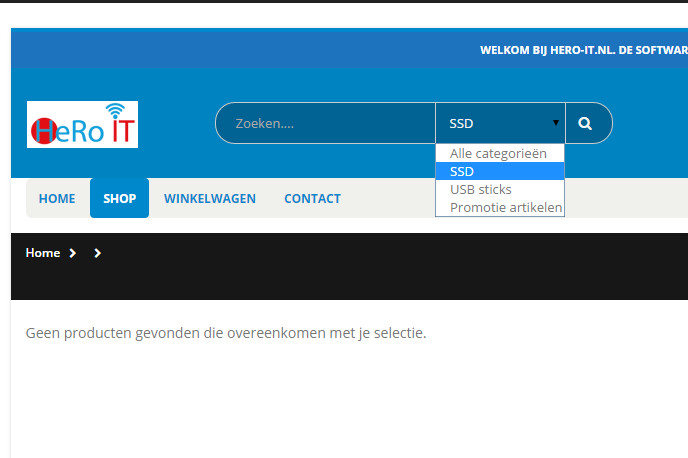
I can’t seem to set the search bar categories to pull Product Categories. I have set up a couple of categories, but nothing shows.
http://www.hero-it.nl/support already has WP and FTP codes.
kind regards, Claudia Bakker
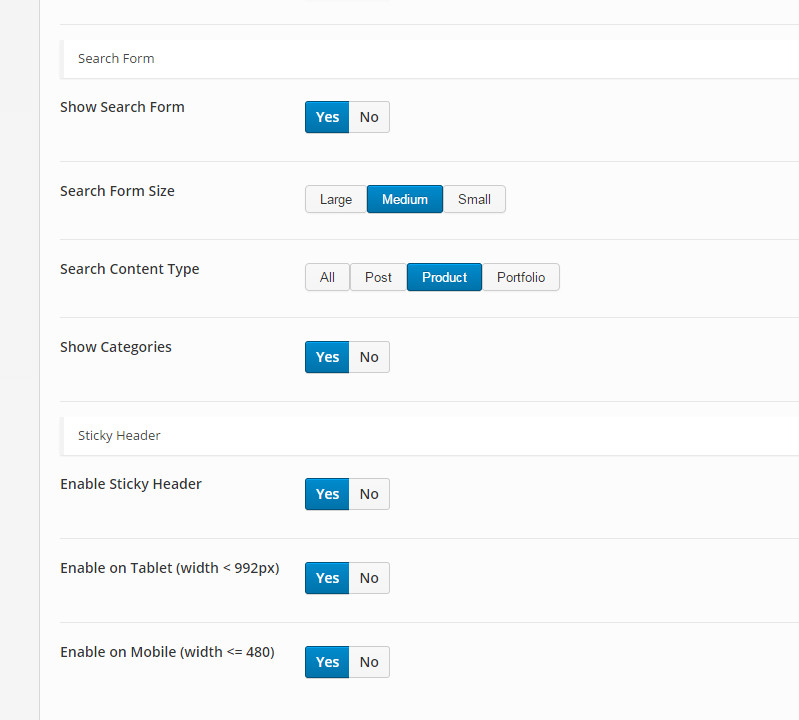
You should select “Search Content Type” to “Product” in Theme Options > Header > Search Form.
yes I know. I have select “product”. The product categorie shows in search bar, but the link to the categories does not work.
Could you add the woocommerce categories widget in sidebar or add the categories in the main menu? Wordpress search don’t have this feature.
yes I can add it to widget in sidebar but I wanted to add it into the seach bar of the header, just like header type 1, 4,5 , not in the sidebar or menu.
Did you selected “Show Categories” to “Yes” in Theme Options > Header > Search Form?
Sorry, I don’t have another solution.
too bad, I thought it was pretty nice to be able to show a categorie like that.
Hello,
Nice template and nice to see that it is often update. I activated the header 10 (side one), have a body and page transparent background Skin. My background is dark and for exemple the feathered products shortcode contain grey fonts, I want to change it in white to read it on black background… don’t know how !!?
Bests
shop.skullsmini.com
Hi, We didn’t added the dark version in porto theme. Could you add custom styles in style.css? ul.product_list_widget li .product-details a, .widget ul.product_list_widget li .product-details a { color: #fff; } ul.product_list_widget li .product-details .amount, .widget ul.product_list_widget li .product-details .amount { color: #fff; } Regards, SW
thanks a lot, that’s working. but don’t know anything of the css process. have you a custom style for all porto shortcode? (titles, textes, prices for slider etc) etc) thanks a to for your support !! Antonioooh
Could you change the colors in css/theme_X.css, plugins_X.css? X is blog id (default: 1).
I don’t know, it would be the first time for me.
And really I don’t understand how I can do :/
Hi, I need add defer code to js files at the header.php, but i cant found js files at the header.php
I must do like this js files <script type=”text/javascript” src=”http://www.site.com/wp-content/themes/Themename/js/jquery-1.8.3.min.js”defer></script>
Could you add the javascript files in head.php?