21578 comments found.

Hi,
Is it possible to place the logo to the right?
Thanks
Hello,
Technically yes. But it will require certain amount of CSS (and probably PHP) editing.
Hey Guy, I am about your buy second licence for a client site and have one question, how do i highlight a menu item, here the link from a site made with your theme. http://www.iplaylikeagirl.org/ i mean the donate button. Thanks
Hi,
Please, submit a request via our online help-desk http://support.dream-theme.com – our guys will assist with it 
Thanks!
Congratulation !!!
The best template that I ever seen !
Well documented, and no bugs !
If I have to say something negative, the template is a little bit heavy. And not really compatible with WP cache module to concat CSS and JS.
But really great job ! You’re close to the perfection !
Hi,
Thank you very much for feedback!
You’re 99% correct: more features requires more CSS and JavaScript (both in terms of quantity and complexity).
1% of “incorrectness” is you actually can set up caching plugins to concat assets  Please contact our guys at support (support.dream-theme.com; ask your ticket to be assigned to Yana) for assistance
BTW, in upcoming major updates (within couple of month) we’re going to introduce options that will allow users to selectively trim unwanted features and corresponding bits of CSS and JavaScript.
Hello there!
How can I enable/configure rightside toolbar on my site like in demo site (icons with gear and $, allows to Choose Skin, Choose Skin, Choose Layout and link to The7 market page) or it is custom feature on your demo site?
Thank You.
Hi,
That is a custom plugin. Our guys at support (support.dream-theme.com) can provide you a copy of it, but its customization for your needs is (naturally) beyond the scope of support.
Hi,
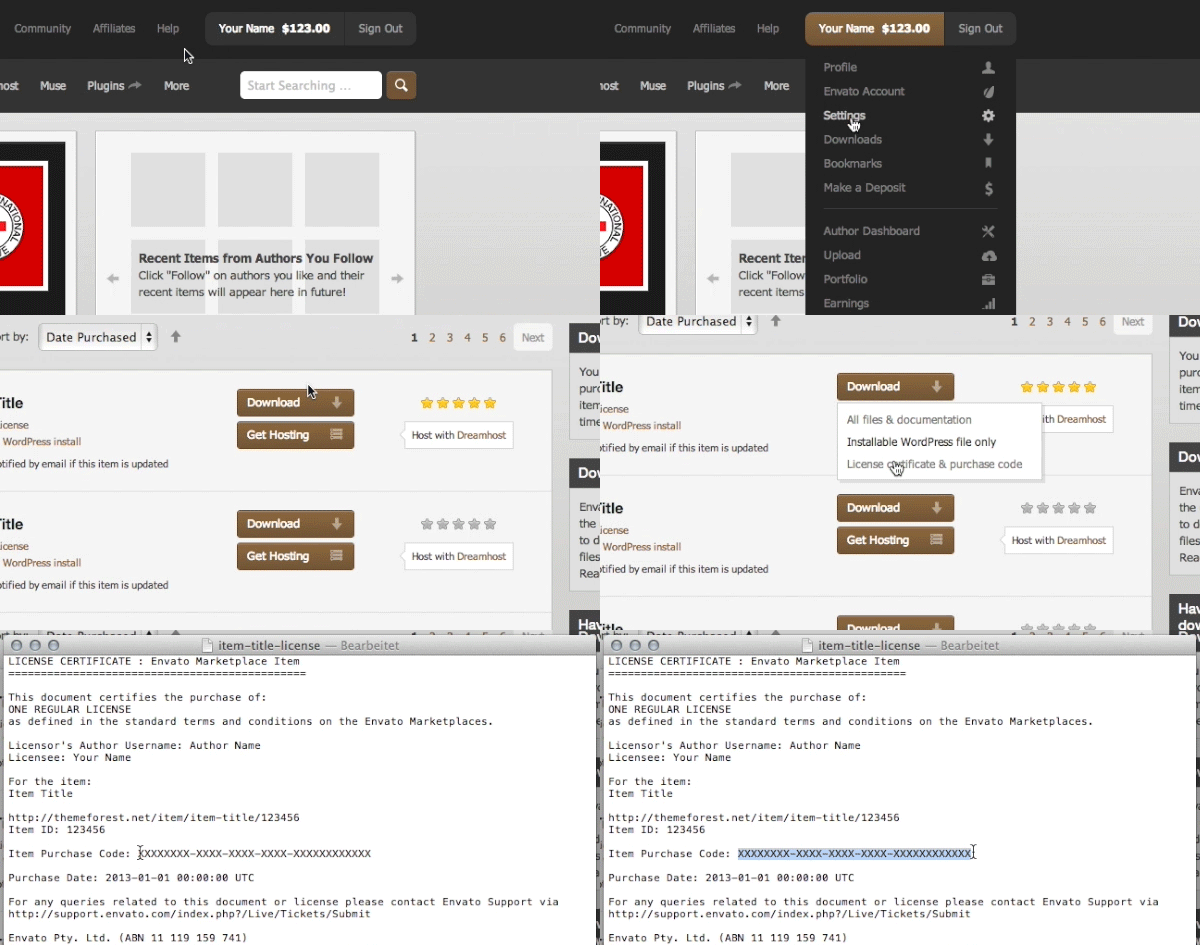
I’ve got short question – how to add flags/countries from Multisite Language Switcher to Top Bar? (I tired to make a ticket in support.dream-theme.com, but I couldn’t find my “Item Purchase Code”). Thank you in advance for help with flags
Hi,
To create a multi-lingual site, you’ll need to get a copy of WPML plugin first.
BTW, here’s how to get a purchase code: http://support.dream-theme.com/code.gif
Hi how can i remove overlay and + sign from the blog post thumbnails.
Hi,
Please note that we can provide technical support only via our online help-desk: http://support.dream-theme.com (here in comments we can only answer some general and pre-purchase question). Submit a ticket there and we’ll get back to you ASAP.
Thanks!
Sir, I try to upgrade my theme via theme option, I also filled in the username and API Key, but i get the error as below
Error: Downloading upgrade package from the Envato API… Download failed. Operation timed out after 299827 milliseconds with 14830983 out of 32609491 bytes received
Hi,
Please, submit a request via our online help-desk http://support.dream-theme.com – we’ll get back to you ASAP and take a look what is wrong.
Thanks!
Hi I got many issues with sitespeed. How can i solve those problems?
Hi,
Please, submit a request via our online help-desk http://support.dream-theme.com – we’ll get back to you ASAP and take a look what is wrong.
Thanks!
Hi, how do I add a picture in “About the author” on comments? Thanks
Hi,
You need to use a “gravatar” service for that. Please google for details. Thanks!
Good day dear,
Can you please tell me how to change headings that pop up on the porthole slider. In the case of Dummy content for “Creative” version in the main HOME menu uses Porthole slider, but I can seem to find where to change the text that appears on the slides? (As now it floats in from bottom – dummy text)
Print screen link attached just in case – http://joxi.ru/LmGVR9dIzdVarl
Also if possible where can I change the colour of the text / size / or appearing effect? Thank you in advance!
Hi,
Please note that we can provide technical support only via our online help-desk: http://support.dream-theme.com (here in comments we can only answer some general and pre-purchase question). Submit a ticket there and we’ll get back to you ASAP.
Thanks!
How can i add images (in place of icons) into mega menu items?
and what are the fonts used in your main navigational menu and content at http://the7.dream-demo.com/
we would like to use the same
Hi,
Please note that we can provide technical support only via our online help-desk: http://support.dream-theme.com (here in comments we can only answer some general and pre-purchase question). Submit a ticket there and we’ll get back to you ASAP.
Thanks!
Hi,
On a portfolio project and you select show media as a gallery. Why does it stack the images on top of another when there are a lot of images? It’s very ugly to have lots of rows and half empty rows? I also don’t want to work out the exact amount of photos I can use for it to look ok?
It never used to do this using the old theme I swear? You used to just slide along to see the rest and it would never go more then two rows with one big image at the beginning?
Can I change it somehow?
Thanks Tom
Hi,
Please note that we can provide technical support only via our online help-desk: http://support.dream-theme.com (here in comments we can only answer some general and pre-purchase question). Submit a ticket there and we’ll get back to you ASAP.
Thanks!
Hi
Does this theme come with any form of mega menu? Thanks!
Hello,
Yes. You can hover over the “shortcodes” menu item on theme demo to see it in action.
Der Sirs, Devs., I need someting not special in The 7.2. In Visual Composer is “animated Progressbar” This wirks fine, but only TO 100%. Same as Pie Charts. I need to illustrate jears of experiance, i.e. 12 years development, 8 years coding and so on. It will be fine in next updates to find inside this functions a new parameter as reference quantity, in my example over last 15 years I build up expiriance 12 years development, 8 years coding and so on. Effect: The bar or the pice in the pie is longer or grater. Is this possible? A statisfied customer from germany, jrgkop
Hi,
Please, submit a request via our online help-desk http://support.dream-theme.com – we’ll get back to you ASAP and take a look what is wrong.
Thanks!
Hi. Any suggestions for the links in buttons not working issue?
Thanks
Hi,
Please update the theme to newest version via Theme Options > Update Theme. And afterwards, update the Visual Composer via Appearance > Install Plugins interface.
Thanks
Hi,
You are welcome.
Hi.
When I try to install “WPBakery Visual Composer” from Wordpress, it takes an error:
Descomprimiendo…
No ha sido posible copiar el archivo. js_composer/assets/lib/bower/flexslider/images/bg_play_pause.png
The permissions of uploads folder is 777
Regards.
Hi,
Please, submit a request via our online help-desk http://support.dream-theme.com – we’ll get back to you ASAP and take a look what is wrong.
Thanks!
Hello,
I get this error:
“Your theme has bundled outdated copies of WooCommerce template files.”
I have The 7.2 V 2.1.3 installed.
How to fix this error, please?
Thanks
Hi,
Please, submit a request via our online help-desk http://support.dream-theme.com – we’ll get back to you ASAP and take a look what is wrong.
Thanks!
Hi,
In your demo (http://the7.dream-demo.com/) there is a beautiful slider. I like the layer parts (two screendumps diagonal) above and below the slider within the “SEO-Opitmized Valid Code” slider. Please see the arrows in the graphic below:
http://ontwerptis.nl/the7.pngAfter importing your demo content within RevSlider it is not the same as in your demo, no opacity parts above and below the graphic. Can you tell me how to set this in the theme settings so I’ve the same effect as within your demo?
Best regards, Hans.
Hi Hans,
Please, submit a request via our online help-desk http://support.dream-theme.com – we’ll get back to you ASAP and take a look what is wrong.
Thanks!
Just did
i have a problem with the info contact widget in the footer, the title of the widget is link instead of being just plain text, it is a broken image link i’ve no idea why it does that because i’m using the same kind of widget twice and the problem afflict only the the first
Hi,
Please note that we can provide technical support only via our online help-desk: http://support.dream-theme.com (here in comments we can only answer some general and pre-purchase question). Submit a ticket there and we’ll get back to you ASAP.
Thanks!
After intaling the theme and all the plugings I get an error:
Fatal error: Allowed memory size of 67108864 bytes exhausted (tried to allocate 408672 bytes) in /home/metrocubicoeng/public_html/wp-content/themes/dt-the7/inc/extensions/options-framework/options-framework.php on line 135
I tried the following toturial:
http://support.dream-theme.com/knowledgebase/allowed-memory-size-error/But it did not work. Do I have to change the – default-constants.php – file before instaling wordpress?
Hi,
Please, submit a request via our online help-desk http://support.dream-theme.com – we’ll get back to you ASAP and take a look what is wrong.
Thanks!