413 comments found.

Hello your theme is in HTML and i only use wordpress, and it can not be installed. can you please give me the refund. Thank you
I have problems in mobile menu, the sub menu links don’t work well can you help me?
Hello,
Make sure you updated the WHMCS and the template to the latest version.
Please send me your website URL to faisal@brandio.io
Regards
Hello, I found that this template has some problems in the navigation bar of WHMCS, which affects the appearance and use. I hope you can fix it soon.
Problem Description:
Screenshot: https://jpg.red/images/2022/04/10/QQ202204101557113704ea186718847f.png
This template has some problems with the adaptive page of WHMCS’s navigation bar on small screen devices (such as mobile phones).
That is, the menu of the navigation bar cannot be collapsed and can only be displayed in an expanded state.
This problem was discovered very early, and have been forgetting to feedback. It greatly affects the user experience and aesthetics. Hope you can fix it soon, thanks a lot!
Hi,
This issue is fixed, you will receive the update today.
Thank you
Hi, thanks for your quick reply and fix.
Happily, my WHMCS navbar submenu now collapses on mobile pages.
but! It now has a new problem, the collapsed submenu options are not clickable on mobile pages…
Please fix it asap.
Screenshot: https://jpg.red/images/2022/04/10/1d847055c2d8e1d42.png
Hi,
it’s updated now.
Thank you
Hello, after testing, the problem has been successfully solved, and now the mobile phone navigation bar is displayed normally and beautifully, thank you for fixing it so quickly.
Also, I found a new problem that I hope will be fixed:
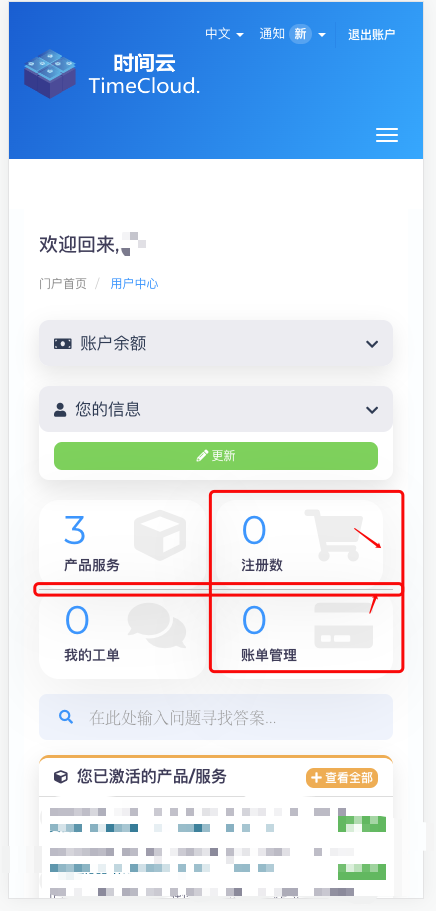
Visit the WHMCS User Center on your mobile phone, there are four buttons on the page, one of which is asymmetrical.
In addition, there is a horizontal line in the middle of the four buttons, which affects the appearance. Maybe it would be a lot better if it was removed and replaced with a blank gap!
Screenshot: https://jpg.red/images/2022/04/15/C5A951EE-22CB-4107-B7C5-6819C73DC9ACc48f9d8f0fd2cde7.jpg
Thank you.
Hi,
Please send me the screenshot, it’s not working.
Thank you
Hi, the screenshot link I provided you is not accessible?
I give you a new link, please try again:https://jpg.red/images/2022/04/15/1c89bd6441224133c.png
Thanks.
Hi,
Thank you for waiting,
We will fix this in the next update.
For now you can fix it by adding the following CSS code to “custom.css” file:
@media (max-width: 767px){
 .tiles .tile:nth-child(1), .tiles .tile:nth-child(2) {
     border-bottom: 0px;
     margin-bottom: 1rem;
 }
 .tiles .tile:nth-child(even){
     padding-right: 0;
 }
}
Good luck 
Hi, thanks for your reply.
Following your method, I have successfully aligned the buttons on the phone.
However, it seems that these four buttons are not the same size on both sides (the two buttons on the left are 167×89, and the two buttons on the right are 177×89). I hope you can modify them again.
Screenshot:
Haha, I’m a perfectionist, please don’t mind.
sorry to bother you.
Hello,
No problem at all 
Here is the solution, replace the last code with this:
@media (max-width: 767px){
  .tiles .tile{
      padding-right: 5px
 }
 .tiles .tile:nth-child(1), .tiles .tile:nth-child(2) {
     border-bottom: 0px;
     margin-bottom: 1rem;
 }
 .tiles .tile:nth-child(even){
     padding-right: 0;
     padding-left: 5px;
 }
}
Best Regards
Hi, glad to tell you that your solution to the above problem worked great, now it’s very nice and neat, love it!
In the process of using templates, I found another place that is not suitable for human-friendly design:
It is hoped that after the WHMCS front-end user logs in, a button linking to the home page of the user center will be added to the expanded menu of the user navigation bar.
Because I found that the template currently does not have a button to directly enter the home page of the user center in the navigation bar, that is, the ”/clientarea.php” page.
As shown below, it will be more humanized after adding!
By the way, this button can be distinguished from the existing button with the hr tag and placed on top, I think it makes more sense!
Thank you very much!
Good Evening
I hope you are well. We are having some issues with trojans on the theme area. Is their new security patches for your theme and could you send me an update on the security modifications.
Thank you
Hello ,
We always updated our template to support the latest WHMCS version, take a look at the WHMCS blog to see the new features and updates https://blog.whmcs.com/
Update the WHMCS to the latest version and download the latest Hostify.
Thank you
Hi after buying the WHMCS theme I’m having struggles editing it. I’m using dreamweaver to try to edit the content as of not but can not seem to get to a spot to actually edit the content from the template text.
I’ve checked several index.php files and still can’t seem to get to the main content, I get an “oops we couldn’t find this webpage” error display can you help me get to a better starting point to change the template content?
Thank you.
Hi,
You have to edit the ”.tpl” files, for example if you want to edit the homepage you have to modify “header.tpl”, and for the footer “footer.tpl”.
Let me know if you have any other issues.
Thank you
There are two misalignments in the input box of this template on the WHMCS registration page, which affects the appearance and requires adjustment.
Example image: https://jpg.red/images/2022/02/27/2022-02-27_15-45-12b5a556efda498039.png
Hello,
Thank you for the notice, will be solved in the next update.
Regards
Hi, I have received the latest template update.
But that doesn’t seem to solve the problem I’m asking.
Can you fix it asap?
The template is beautiful, don’t want this little detail to ruin it.
Thank you.
Hello,
Thank you for waiting.
There is a new update that will be ready today to fix this bug.
To fix it now, open “style.css” file and lookup for the following code:
.signin-signup-form .row div[class^="col-"]:first-child {
    padding-right: 5px;
}
.signin-signup-form .row div[class^="col-"]:last-child {
    padding-left: 5px;
}
Replace it with this:
.signin-signup-form .row div[class^="col-"]:first-child {
    padding-right: 10px;
}
.signin-signup-form .row div[class^="col-"]:last-child {
    padding-left: 10px;
}
And make sure to clear cache.
Good luck
Yes, I have replaced the latest style.css file and the problem has been fixed, it is now perfect, thank you very much for the update.
You’re most welcome!
Also is there any update to the theme for the new version of WHMCS
Hello,
It’s ready now for WHMCS v8.4.1
Thanks
I want to create some additional pages like privacy policy and for a product. I know how to edit the home pages and others… I just need to know how to create a page like mywebsite.com/shared-hosting with a somewhat better design
Hello,
Thank you for waiting.
Here you can see how to create custom pages https://developers.whmcs.com/advanced/creating-pages/
If want me to create it for you, send me an email faisal@brandio.io
Regards
Any update for this?
Hello,
You will receive the update soon.
Thank you
Hi,
I would like to build a unique website for web hosting, domain registrar, vps and cloud server provider.
1. Is your theme suitable for my purposes?
2. Does it support multi-lingual plugin like Polylang or WPML? -do I need to by either of them separately?
3. Does it have WHMCS integration for domain registration, web hosing and server provision management? -do I need to buy WHMCS separately?
4. Does your theme has built-in page builder like Elementor, Beaver Builder, etc. or I need to buy one?
5. Do you have demo so that I could see what they look like?
Please tell me more about how I can use your theme to build such a website?
Thanks
Hello.
Thanks for your interest in Hostify. Hostify is a ready-made template, built especially for Hosting businesses depending on WHMCS software. You’ll need to buy WHMCS and upload the template, and use all the software features like domain and web hosting integrations they provide, as well as multi-languages.
Or you can use the HTML version, change colors, images and text with an HTML editor, or you’ll need to hire a developer to customize it, depending on what you need to customize. We’re not using any page builders, it’s built from scratch for code quality.
- You can find the WHMCS demo here: http://brandio.io/envato/whmcs/index.php?systpl=hostify
- HTML Demo here: http://brandio.io/envato/hostify/html/index.htmlIf you’re looking for a fully customized website, you can contact us for a quote today! at hello@brandio.io
Thank you!
Hi,
Is it possible to make changes to the colors of this theme to our company colors? also the navbar can be fixed even if we scroll down?
Thank you
Hello! Yes it can be, with little css modifications, if you need help please contact us via the contact form. Thanks!
Hello
The data tables for services, invoices and tickets look broken on mobile.
https://snipboard.io/Qob29C.jpgHello,
Add this CSS code to “custom.css” file:
@media screen and (max-width: 767px){
 .listtable {
    width: 100%;
    margin-bottom: 15px;
    overflow-y: hidden;
    -ms-overflow-style: -ms-autohiding-scrollbar;
    border: 1px solid #ddd;
 }

 div.dataTables_wrapper div.dataTables_info{
    padding: 5px !important;
    color: #000;
    background-color: transparent;
 }

}
.listtable {
    min-height: .01%;
    overflow-x: auto;
}
Good luck
It’s been updated again.
Hi,
You will get the update soon. By the way, the update is only in “standard_cart”
Thank you
Here’s another Addon 1. Kis Chart ( Not working design chrased, This is how is looking right,
2. Kis Community Not working design chrased
This is how is looking right,that doesn’t work properly because of Yout template. Tried on 5 other templates and works normally.
Please contact me to resolve the issue. I also sent you an email at faisal@brandio.io with additional pictures. Please check this. Thanks.
On the second Kis Communiti try to click on Join Us button
Hello,
Please update the WHMCS to the latest version 8.3.0, and download the updated template (released today) and try the Addon using a fresh copy of the template first.
Let me know if it’s working or not.
Thank you
Thank you for your reply
Ok so first part is working OK, second not.
For second part 1. Button Join Us – not working You can look how it shoud be working on this url:
https://whmcs.teriakis.com/portal.php?do=main&prefixid=1and by me it’s like this
https://howto-base.eu/portal.php?do=main&prefixid=1The window opening is a problem!
2 .When you select Discussions menu on https://howto-base.eu/portal.php?do=main&prefixid=1 the window is colapsed
This is how it shoud look
https://howto-base.eu/images/discussion_window.pngOne more thing, the first part Addon 1. Kis Chart is also not displaying good on mobile / tablet devices its colapsed (Iphone / Android )
sorry also is colapsed in https://howto-base.eu/index.php?rp=/store/test
On community it’s showing both mobile and desktop tabs
But when i change to twenty one template everything is OK
So I think that you didn’t add all css stiles that are needed…
so when I copy theme.css from 21 everything to custom.css in hostify is ok with modules but heder is not. navbar is not working (red color)
https://howto-base.eu/images/hostify-with_theme_css-from21-incuston._css.pngHi,
Please try it using “Six” template, “Hostify” is based on “Six”. We are already working to upgrade “Hositfy” to be based on “Twenty-one”.
I replied to your email. Let’s fix the issue one by one.
Thank you.
Hi,
The template is now based on “twenty-one.”
Best regards,
Is the template Bootstrap 4x compatible
Hello,
No, but we are working on that. wait for the update,
Thank you
Is it ok to update to 8.3.0? Thanks
Hello,
Thank you for waiting,
Still not ready for v8.3.0, you will receive the update today.
Best regards
Please update when you get the chance.
Hello,
Thank you for waiting, It’s ready for latest WHMCS update v8.3.0
Good luck
How i can redirect home page to clientarea.php?
Hello,
Thank you for waiting, To do it go to WHMCS admin panel “System Settings > General Settings > Other” then check box next to “Default to Client Area”.
Hope this help you
Thank you
i need redirect main page to client area(.../index.php)
Hello,
Thank you for waiting, To do it go to WHMCS admin panel “System Settings > General Settings > Other” then check box next to “Default to Client Area”.
Hope this help you
Thank you
When will a gut fashion come, so that the whole page is like that?
Hello,
Please explain more, I didn’t get you.
Thank you