130 comments found.

I just want to know how does this theme relate with a toy/comicbook toy store. Interested in purchase and also need to be able to use a pre-order function. please let me know
Hi
There is no relation. We just feel that it will fit these kinds of stores and that is why we’ve added the toy store demos.
Preorder option isn’t added to this theme but we can add it for you if you want as we’ve already added the option in our latest themes.
Hey,
i bought your theme and installed it. I would like for you to add the preorder functionality and tell me how the new arrivals section works
Hi
For collection sections you need to add collection of your products and then add these collections over here.
For preorder, kindly invite support@masstechnologist.com as admin user and we’ll add it for you.
I added your email and also i can not find that section. also the theme states there are some broken links in the liquid file. can you please check and lastly in the section for the service boxes not sure how to fix those icons
Alright, we’ll check it in a moment and respond accordingly.
Hi
I’ve added preorder functionality to your store theme. For any product to be preorder you need to set the template as preorder, and enable selling option as can be seen here, https://nimb.ws/m2oTkz
No broken links find and everything seem to be working.
For services box, you need to add images which I’ve upload as well. Kindly check.
everything looks great so far… I just have one request is there a possibility to add ETA dates to preorder items ? also like the flag that says “sold out” can there be one that says Preorder in Blue?
Hi
These are customization requests and not support. For customization requests kindly contact us through support@masstechnologist.com. Kindly check themeforest policy, https://themeforest.net/page/item_support_policy , for getting an idea of what is included in support and what falls under customizations. Note that working on customization requests requires a nominal fee to be paid for.
We try our best to satisfy our customers and even work on the customization requests for free if they are small ones and can be done in a short period of time. It becomes hard for us to work on major customisations due to time required.
understood, I will email about the functionality. On the products that have more than one picture the right arrow is backwards
Hi
Kindly share a link of the product with the issue as I was unable to find.
I need an answer URGENT, ¿why can’t i nest a second submenu level? i PAID for renew of support for this theme but i didn’t get yet a solution for my problem.
Hi
What is your problem and where have you shared? Kindly share details of your issue and share your site link as well.
Theme has a megamenu but, i don’t know, how make 3 levels menu, i mean, i need to have a submenu item into a submenu item, so, i need 3 levels to nesting.. how can i do it, with this theme?
Though the feature is not there as we’re using the mega menu but still invite support@masstechnologist.com as admin user and we’ll add it into the theme for you.
We gave you admin access to our site, sent a email, and we received no response. Do you need more time to solve the issue? i can’t keep that admin access any longer, please tell me what are you going to do.
Hi
Sorry we’ve lost track of your invitation. Can you send it again?
Dude, We gave you access againa, what it´s happening, we paid for this support service.
Hi
Code has been updated. Response sent on support ticket.
Hi, I purchased Legend – Multipurpose Responsive Electronics Shopify Theme (Sections Ready) last night, so far so good but one problem i am having is that ‘The Heading’ and ‘Sub Heading’ text wont display on the second banner image? and i dont know why, can you please help me figure out this issue? get back to me as soon as possible thanks!
Item ID: 19835675
Item Purchase Code: c79ae0f8-3f9c-4201-a45e-89606243ae0c
Purchase Date: 2020-03-21 07:54:43 UTC
Hi
Kindly share your site/store link to check.
www.studiotrapsounds.com But i havent published it yet because i am still customizing it, if you can email me @ studiotrapsounds@gmail.com i can give you access to my site to look into it further.
Kindly invite support@masstechnologist.com as admin user and we’ll check or either share a screenshot of the admin customization area.
will do just a sec.
Ive just sent you the invite, i just need ‘The Heading’ and ‘Sub Heading’ text to display the same as the first banner image.
never mind i figured it out
Great. Best of luck for your store now.
I’m a site builder for my client, and i have been having troubles with this theme, I can’t install plugins where I need to put a script in the code to show something in the interface (frontend). Plugins like “Globo Mega Menu” don’t work on this theme, and I know it’s not a problem with the plugin because I’m using it right now with another Shopify themes seamlessly.
Please contact me ASAP to jvielma@screen.com.ve
Hi
The theme already comes with mega menu so I wonder what is the need of adding another. Still share your site link with us and we’ll check it for you.
Hello, I have a question on how to upload an .svg file for the logo on my shopify website header. Can you please help me find how and where the correct .liquid files are relating to upleading an svg image.
Hi
Well the logo doesn’t support adding SVG images but if you want to update the code then the relevant code can be found in logo.liquid snippet file.
hello, why can we not found the included psd files in zip file. Should we request it?
Hi
Kindly contact us through support@masstechnologist.com and we’ll send you the download link.
Thanks. Mail send.
Hi Response sent through support email.
Hi,
How can I disable the image image effect on mouse over.
Best Regards
Hi
Add the below css to the custom.css and it won’t show anymore
.image2 {
    display: none !important;
}
Hello,
Firstly, the theme keep giving me error: https://envato.d.pr/e9XEUd secondly, could you please update the theme, so i can edit short description: https://envato.d.pr/LqxJM4
Any help is appreciated.
Hi
Theme zip is within the main zip. You need to unzip the main folder first. Kindly check the video tutorials regarding upload, demos setup and other theme setup instructions from the link below
https://www.youtube.com/playlist?list=PLvJCnPMUAdwrSvIt6G6Rmoc7f5x6Vv2p0Hi, can you tell me how my customers can create an account and also access their account from my website??
Hi
Kindly check the guide below for customer account setup
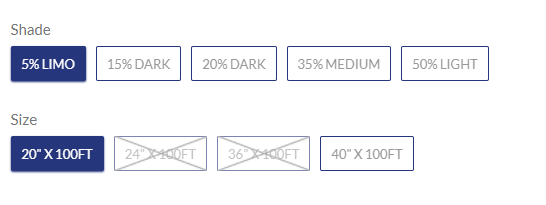
https://help.shopify.com/en/manual/customers/customer-accountsHi, 1) I have multiple variants on my store. And when one variant is out of stock there is no ‘X’ mark. I have to select all variants to 0 in order to show the ‘X’ mark. For example as you can see it in the picture: https://i.postimg.cc/3rpDZ1hq/Screenshot.png I have 5% shade with different sizes. And if I set the quantity of 24inx100, 36inx100 for 5% shade to ‘0’, it doesn’t mark the X. I have to set all the quantity of shade to 0 in order to show the mark. Please help us out.
2) Special instruction for seller is not working.
Hi
I don’t think it is true but still i’ll check it if you invite support@masstechnologist.com as admin user.
Hi
I’ve checked your store and couldn’t replicate the issue you’ve highlighted. While checking one of your product marked with 0 quantity, https://lexenauto.com/products/2ply-professional-grade-premium-carbon-roll-window-tint-film , i see that the cross signs are showing quite fine. Kindly check and confirm.
Here is a little bit more clear explanation what my problem is.. 1) For example, when 5% LIMO shade & 24”X100FT, 36”X100FT is out of stock then I only want them to be out of stock. If 15,20,35,50% are still in stock then it won’t show the cross sign for the 5% shade.
2) I don’t see any ‘special instruction’ under orders even if customers write them down from the cart page before checking out.
Hi
There is no issue with the swatches.
Regarding special instructions to check, you need to provide access to orders tab. Once access provided then let me know and i’ll check it again.
This is how the product, https://lexenauto.com/products/2ply-professional-grade-premium-carbon-roll-window-tint-film , is showing on my screen, https://nimb.ws/3ridoL
If you’re referring to another product then share the correct link.
thanks for the fast reply. could you please go to bulk editor then set quantity one of the zeroes to 1? then you will see all will become available as shown in the pictures.
it would be better if I can share my screen through team viewer so you have a better understanding what I mean. please get back to me with your email address. thanks!
If the quantity is 1 then it means that it is available. It isn’t available when the quantity is 0.
Can you provide your email address so I can show it to you and what exactly the problem is.
Sent.
Hi
Kindly check the updated code. Hopefully it will work fine.
NO REPLY???? Bug on your design!
Reply was sent to you on the same day as can be seen here, https://nimb.ws/w315Uy
Hi I just purchased the theme from you. but it has error :
zip does not contain a valid theme: missing template “layout/theme.liquid”, missing template “templates/index.liquid”, missing template “templates/collection.liquid”, missing template “templates/product.liquid”, missing template “templates/page.liquid”, missing template “templates/cart.liquid”, and missing template “templates/blog.liquid”
please advise
Hi
Theme zip is within the main zip. You need to unzip the main folder first. Kindly check the video tutorials regarding upload, demos setup and other theme setup instructions from the link below
https://www.youtube.com/playlist?list=PLvJCnPMUAdwrSvIt6G6Rmoc7f5x6Vv2p0Hello, variant title is not showing on a product & cart, check out page.. Also, the footer menu is not working properly when i’m on mobile (It’s not opening). Please kindly look at the site: lexenfilms.com. Thank you.
Hi
Kindly invite support@masstechnologist.com as admin user and we’ll add them on product and cart page.
Done
Hi
Code has been updated. Kindly check now.
Thank you, but the footer is still having a problem when you’re on mobile. It’s not doing anything when I press on the menu,
Corrected.
Thank you. Two more things 1) When I search up “license”, products are showing up but when there are 7 products there are 3 products for the first column, only 1 product 2nd col, and 3 products for the last column. Can you fix this so that it shows up properly? 2) How can I add a search bar on my main homepage? Is there a specific code?
3) and the footer is not working again..
1 – corrected. 2 – Search bar is already there on home page in header. 3 – It is because you’re overriding my changes. Kindly don’t make changes when i’m working.
Hello, thank you. And when I add a product to cart from the product page, it won’t let me go to the cart page after clicking on the cart icon.
2) Drop down menu is not working
Thank you
Hi
It says ‘Your access to Lexen Auto has been suspended’
Can you please try again?
I was able to fix the menu. Just need a help with the cart. Whenever I am at my product page and add the product to cart, the cart menu isn’t working.
for now, I am temporarily using the ‘a href’ code to the cart page.. drop down, cart ajax pop up doesn’t seem to be working on the product page. Thank you.
It is because you’ve overridden my changes again and it generated the issue. I’ve made the changes again to ‘product.liquid’ template file. Kindly close the page before making any new changes so that it doesn’t override. You also need to correct the header positions of cart because you’ve customised that as well.
thank you!!
Can you please why it’s still not working? I closed the page and even refreshed it but it seems to override it once again.
You’re even overriding it now. Note that this is the last time we’re doing it for free. Next time it will be paid.
Removed
Hi I’m having trouble configuring the template’s mega menu
Can you help me with more information about this?
Hi
Kindly follow the youtube tutorial to setup the mega menu.
https://www.youtube.com/watch?v=UOnLJzlEByE&list=PLvJCnPMUAdwrSvIt6G6Rmoc7f5x6Vv2p0&index=7&t=0s Note that the main point is to have a main menu link text and a mega menu name text the same to show the menu.Hi, can you help me?
Hi
Sure we can help you. kindly share your issue with your site link and we’ll go through it.
Hello,
Can I add text box like the picture below (below the product but above tabs? https://i.postimg.cc/13FcvGpZ/1.pngThank you!
Hi Sure you can add such code but it will require theme customization. You need to make changes to product.liquid template file if such changes required.
Hello,
I was wondering what the best was to use custom hex codes when creating colour variants for products, as the standard html blue etc wont be good enough, especially when there is multiple shades.
Thanks
Hi
It is already using classes where you can add your own hexa. If it is not this way then can you share a screenshot depicting the issue and also the site link.
Is it? Looks like its just adding the name of the colour variant. style=”background-color: {{ value | split: ’ ’ | last | handle }}
Kindly share your site link to check.
Hi, thanks for your great template. We have a problem. The price does not update if we choose a product with a different color. Is there an update since my purchase, or how can I solve it?
Thanks and greetings
Pluto
Hi
Kindly share your site link either here or on support@masstechnologist.com to check.
and I would like to disable the image change when I fly over the articles on the collection pages. Thank you for your support
Well this needs to be done in the code. For that you need to remove the second tag option on the ‘product-grid-item-collection.liquid’ snippet.
thank you super support
Hello, I need your help. when I am on a product page, after adding the item to the cart, there is no longer the possibility to access the cart
Hi Kindly share your site link to check.
Hi When you hover over the cart then you’ll see these buttons which redirects to cart and checkout page as can be seen here, https://nimb.ws/bGeK4R
Hi, in the homepage it works but if I click on a product to go on the page of the one if and then I add it to the basket, the basket remains blocked
Hi
Kindly invite support@masstechnologist.com as an admin user in order to inspect the issue for you.
I sent you an invitation
Kindly check now.
it works perfectly thank you for the speed
You’re welcome. Best of luck for your store