21578 comments found.

good afternoon, I would like if possible to erase the www.siteweb.com/project/picture/. because in my project is not necessary. thank you very much
Hi,
Yes, simply “move it to trash”. This is a standard WordPress feature: https://en.support.wordpress.com/trash/
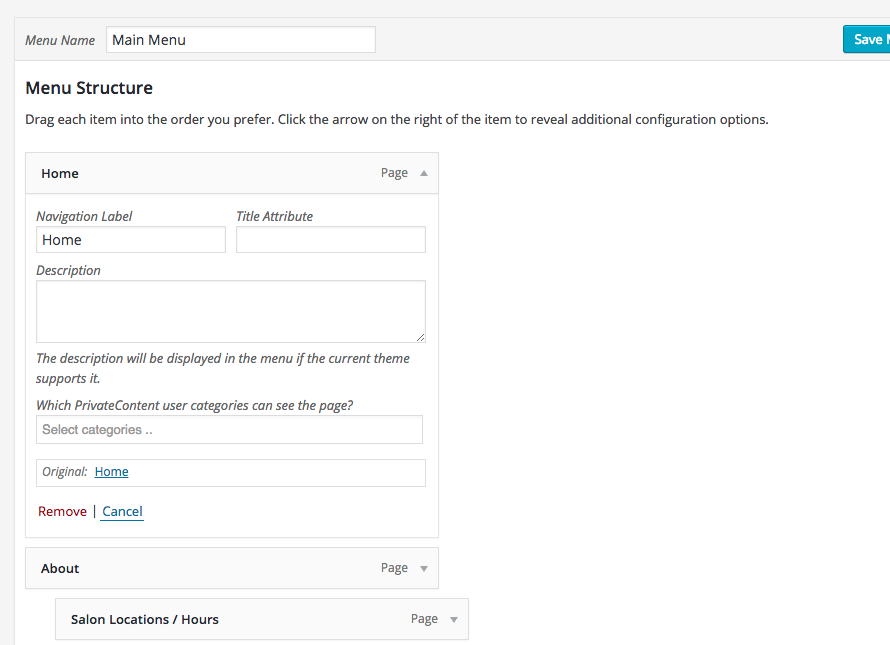
Hi i have the latest build of theme with everything updated… i just spent a whole hour trying to find the mega menu functionality and even followed your guide, watched the video, but its simply not there….
http://i.gyazo.com/8a4192345ac09e6aa563912150487228.png
please advise
Hi,
It seems you’re using some sort of plugin that conflicts with theme mega-menu features. Please, submit a request via our online help-desk http://support.dream-theme.com – we’ll get back to you ASAP and take a look what is wrong.
Thanks!
hi. i have had a problem with another theme which works poorly on windows phones. My client seeks a new theme and i recommended this one, but before they commit, can you confirm this is OK on windows devices 8.1 ?
Hi,
At this moment I cannot recommend any theme if windows mobile devices are crucial for your client.
Not because themes works with them poorly, but because of Microsoft “special” attitude towards making browsers  Microsoft mobile browsers market share is vanishingly small. And if I’m not mistaking theme developers in general are not paying to much attention to testing in these browsers.
So the best advice would be to test the theme (or other themes) on that specific device that is crucial for you/your client.
okay, great! can you explain how to prepare that separate thumbnail image? smth. in functions.php?
Hi,
Please note that we can provide technical support only via our online help-desk: http://support.dream-theme.com (here in comments we can only answer some general and pre-purchase question). Submit a ticket there and we’ll get back to you ASAP.
Thanks!
Hello!
Great theme.
Question, I want to disable underline from my links, so edited main.css, however it’s only when I changed css in /uploads/css does anything change.
But of course when I make a change to theme options, it overrides any file in wpless/css/
HOW DO I DISABLE UNDERLINE DECORATION?!
Thanks always!
Rob
Hi,
Please note that we can provide technical support only via our online help-desk: http://support.dream-theme.com (here in comments we can only answer some general and pre-purchase question). Submit a ticket there and we’ll get back to you ASAP.
Thanks!
solved
Hi,
Thanks for update.
Hiya, could you tell me please how can i reduce the height of the main menu?
Hi,
WP-admin > Theme Options > Header and Top bar. On the “Main menu” tab you’ll find the “Menu height” setting.
ok, thank you, but this option doesn’t work for the side header? Is it possible to change it for the side header??? 6thsenseofstyle.com thank you
Well, there’s no such thing as the height of menu in side header. It depends on users screen height.
Can you please describe in details what exactly you need to achieve, so we make sure that we’re talking about same things?
Thanks!
ok, I’ll try)))on my homepage http://www.6thsenseofstyle.com il’d like to push the slider picture and the banners towards the top, so you can see the text below the banners, therefore you can see the possibility to scroll down the page, otherwise its not very clear that there is still something below the banners…... so i was thinking that i can minimise the menu height, and everything else will pull up to the top???thank you
Now I’m completely confused.. That’s what WP-admin > Theme Options > Header and Top bar > “Main menu” tab > “Menu height” setting is for!
Why have you asked about “side header” in one of your previous comments? Your site have regular top header..
oops))) sorry language barrier))) i’ve got confused the side menu with the left and right aligned header menu…..and i know why…. because when i tried this option which you have suggested before, it didn’t work and its still not working btw…. and there is a small print next to this option that it doesn’t work for the side menu, so assumed that right aligned header menu is the side menu…...ok so hopefully we are on the same page now, and i’ve tried it a few time again , different height from 1 to 20(the default height was about 30) and still no changes to my height menu???/ thank you
Hi,
That sounds weird.. Please, submit a request via our online help-desk http://support.dream-theme.com – our guys will get back to you ASAP and take a look what is wrong.
Thanks!
Hi,
Please note that we can provide technical support only via our online help-desk: http://support.dream-theme.com (here in comments we can only answer some general and pre-purchase question). Submit a ticket there and we’ll get back to you ASAP.
Thanks!
Hi there.
There seems to be conflict between Ultimate Addons for Visual Composer.
and some functionality of the theme.
The masonry image grid, counter are not working at all when plugin is activated. It works fine as soon as the plugin is deactivated.
I have latest version of theme and plugin.
Thanks
Hi,
Please, submit a request via our online help-desk http://support.dream-theme.com – we’ll get back to you ASAP and take a look what is wrong.
Thanks!
Hello,
I can’t find some item of Ultimate Addons for VC like “fancy text slidup” and “fancy text type”. I updated with the last version and still unavailable?
+ 8 more because I see 32 elements on the plugin page demo and I have only 22 available.
Ok I’ve found why. Some of the modules were OFF by default. Works now
Hi,
Thanks for letting know!
I think the ”single Image” option from Visual Composer is no longer responsive in the latest the7.2 version.
Hi,
There was such a problem with older versions of theme. Thought our guys fixed it.. Can you please specify which version of theme you are using exactly? Thanks!
Hi, It is version: 2.1.5
That’s weird.. Please, submit a request via our online help-desk http://support.dream-theme.com – our guys will take a look whats’s wrong with it.
Thanks!
I can confirm version 2.1.5 does have the problem as I reverted to an older version – version 2.0.1 and immediately that cured the problem.
Hello,
I cannot find a way to edit/translate navigation “Home/...” next to title of page. Can you help me, please? Check screenshot. It is not in your online help-desk. http://screenshot.co/#!/a4567417d6Hi,
Please, submit a request via our online help-desk http://support.dream-theme.com – our guys will get back to you ASAP and assist with it.
Thanks!
I have serious problems with using gravity form, when I active gravityform pluging, the plugins page doesn’t work anymore.
Neil
Hi,
Please, submit a request via our online help-desk http://support.dream-theme.com – we’ll get back to you ASAP and take a look what is wrong.
Thanks!
This theme seems to have some responsive issues. If you are fixing this, I shall buy this theme.
Mobile Device: Micromax A116 Mobile browser: Mozilla Firefox
Hello,
I’m afraid every single site on face of this planet will have issues in Firefox on Android 
I agree , but cant convince the end user on this. Kindly let me know if/when you fix it.
Sorry, we’re not planning to adapt The7 for Firefox Mobile. This is not justified economically since its market share is neglectable.
I purchased this theme but somehow I am not able to configure W3TC plugin settings. My site is slow and I request everyone to help me to provide the necessary settings for this plugin to optimize the speed. Theme author has provided settings for the same but I didn’t understand their settings. Currently I am using WP Super Cache for time being. Also, I would like to use CDN service so speed up more, please let me know the best CDN (Free service as of now) for the same.
Thanks in Advance
Hi,
Already posted this link many times here Here you go: http://support.dream-theme.com/knowledgebase/w3tc-settings/
Hi i have a question, i’m setting up a webshop with your theme and woocommerce. At the moment i’m putting all the seo in the right place.
But when i added my product category description i found out your theme put the category description in the webshops front.
Where could i change that? I cant seem to find it in the code?
Hope to hear from you, Regards, Juliette
Hi,
Please note that we can provide technical support only via our online help-desk: http://support.dream-theme.com (here in comments we can only answer some general and pre-purchase question). Submit a ticket there and we’ll get back to you ASAP.
Thanks!
will do that.. my question isn’t general enough?
You question is quite technical, though
Seriously, our guys at support have proper expertise to consult you regarding it. And I’m just a humble co-founder who’s trying to be closer to his customers – not a programmer.
Thanks for understanding!
Kind regards,
Miroslav
haha thats a good answer  didn’t thought it was that technical though.. Gonna ask it in support then!
Thanks
Juliette
Hi I want to Royal Slider Auto Play How to Do it?
Hi,
Please note that we can provide technical support only via our online help-desk: http://support.dream-theme.com (here in comments we can only answer some general and pre-purchase question). Submit a ticket there and we’ll get back to you ASAP.
Thanks!
I write support Look it.
It is clearly stated on theme support page that
Requests are being processed on business days from 9:00 to 19:00 (GMT 0.0) [normally] within 24-48h in the order they were received.
We are not going to prioritize one ticket over another – it is not fair to other buyers.
Thank you so much for understanding!
okey thanks I waiting you
Hi, I have pre-sale question. If this possible to turn off the woocomerce cart on product single page in your theme? I know that is possible on product list page, but need this function on single product page.
Hi,
This can be done by tiny bit of css (our support will assist with it). OR you disable cart altogether via WC settings (if that’s what you need).
Unfortunately in WooCommerce I need additional plugins to turn shop to catalog mode. But I know that some themes have this functionality buil in theme.
Hi,
Thanks for sharing!
A small tip though. We strongly recommend to use W3TC caching plugin with page cache enabled. This will yield significant performance boost to your site! Please refer to this article for more details: http://support.dream-theme.com/knowledgebase/w3tc-settings/
thanks!!!
no problem
BTW, just checked your site again. I’m on another side of the globe and now your site opens almost as fast as local sites!
Cheers!
feel free to use my site in its portfolio . I will be very happy
Thank you very much – we will!
Help! I just bought and downloaded this theme and when I installed Ultimate Addons for Visual Composer it turned my wp adimin all white! I had to go into the server and delete the plugin so now it works but how do I get Ultimate Addons for Visual Composer?????
Hi,
I suspect there’s simply a memory limit issue: http://codex.wordpress.org/Editing_wp-config.php#Increasing_memory_allocated_to_PHP
If this will not help, please, submit a request via our online help-desk http://support.dream-theme.com – we’ll get back to you ASAP and take a look what is wrong.
Thanks!