8337 comments found.

Hi,
site: http://youngday.tbm2-f8wn.accessdomain.com/welldesign/?page_id=3893
When I click on the red block on mobile. it unable link. I want it click on the red block that can link on mobile. what can I do?
TKS~
Hi youngday, can you please post with the account you bought the theme, this way we can verify that you’re a real customer as we do not offer support to users who doesn’t have “Purchased” badge.
Kind Regards,
—Ylli
Hi
site: http://youngday.tbm2-f8wn.accessdomain.com/welldesign/?page_id=3893
When I click on the red block on mobile. it unable link. I want it click on the red block that can link on mobile.
But in your demo site. When I click on the block that can link well on mobile.
What can I do?
TKS~
Hi youngday,
You are using an old version of our theme (1.1.5) and the latest version for the moment is (1.5.2), please update theme first.
The easiest way to update our themes is if you use Envato Toolkit. On this link How to update Themes and Plugins
you can learn this easy step-by-step procedure 
Then don’t forget to go to Appearance > Install Plugins to update all your premium plugins to the latest version that we support. <—this is very important.
Kind Regards,
—Ylli
Hi there,
We bought Kalium theme of Laborator few days ago. And we have some problems with Kalium and reaching out to you for help request. There are 3 problems that we are facing with:
1) First, main page slider does not fit into page eventhough we created it like ‘Arch’ example on Laborator website. It is set to fullscreen but there are still white blank spaces at the left and also at the bottom. Screenshot is attached.
http://i.cubeupload.com/zIbQEn.png2) We set single image elements at the press page after dividing the space into 6 columns. We wanted the link that attached to images, to open in new window not at the same window. So we changed it and updated, but it is still opening in the same window. After update, wordpress changes ‘new window’ to ‘same window’.
3) Last problem is theme’s accordion and tabs options. When we put an accordion element to awards page, it turns out as a parse error. I also attached a photo of error. How can we use accordion and fit this error?
http://i.cubeupload.com/8NXy3d.pngAlso if you want to check the problems by yourselves here is the URL of our worksite at constraction.
http://designnobis.com/wordpress/There you for your time and I’ll be waiting for your advices. Best regards, Koray Hisarli
Hi Koray
1. For your first issue here is the quickfix:
<script type="text/javascript">
    jQuery(document).ready( function($) {
        $( window ).resize();
    } );
</script>
Copy that code and paste to Custom JavaScript in Theme Options > Footer
2. If you are using Visual Composer 4.6.1 its a bug, so please send us an email we will give you 4.6.2 version that will fix the problem.
3. This error may be fixed with the new update I will send you, it is related to visual composer.
Arlind
Hi Arlind,
Thank you for the feedback, we’ve solved the first issue. I’ll be waiting for your e-mail about the new version of visual composer. Please mail me at: korayhisarli@gmail.com
Best,
Hi Koray,
Just sent you the latest version of the plugin.
Kind Regards,
Art
Hi Koray
Just sent you an email with the latest VC version.
Arlind
Thanks, we’ve solved the two issues via updating the visual composer version.
Best,
Koray
Hello.
My name is Diogo. I have bought Kalium theme this morning. Ive been trying to install it but i couldn’t. I downloaded your files and when i go to upload new theme i wait and wait but the theme doesn’t instal.
I have ended downloading the theme folder using ftp, i could select the theme but when i go to the Laborator to choose a style the page never opens and a error is displayed.
Ive contacted my host (go daddy) and they told me to contact you… i really don’t know what to do i am new to all this.
Thank you very much Diogo
Hi Diogo,
Can you post the errors you’re having or any screenshots from your issue.
There may be an issue with the PHP configuration limits
Kind Regards,
Art
Loving this theme. It’s exactly what I was looking for, especially what I see in the Agency demo.
One question: how do I add and modify the “Clear thinking at the wrong moment…” text that appears at the top of the page? (This feature is one of my favorite parts of the theme!)
Thank you for whatever help and assistance you can provide.
Hi there,
Thank you for your kind words, regarding your question about the text which is called the Auto Type Element, here is the video tutorial on how to set it up and modify it:https://www.youtube.com/watch?v=b3Pivn4nufo
Kind Regards,
Art
Questions: Team Page > When I click on the picture > Is It possible to open a Pop Up with the img and information? or Do you know any plugins for this effect?
Thanks!
Hi Curlin.
You can add a link that will open on a new tab when it’s pressed with this code
so you can upload the image somewhere and then the code will be for example:
Kind Regards,
—Ylli
OK. Another questions I would like in the home page: remove the Menú and only have a full background image with logo.
Thanks, Lucas.
Hi Lucas,
Can you please write us your site URL here on comments first? We need to investigate your site and then get back to you with possible solution
Kind Regards,
—Ylli
Hi, I would love to purchase your Kalium theme – but now I’m not sure whether I can mix the different Kalium elements? I would like to have a Start-Homepage with Shop-Element, Blog-Element, Portfolio-Element and so on – and I would like to habe the blog and the shop in my navigation.
Is that possible? Or do I have to buy Oxygen instead?
Many greetings Suse from RevoluzZza
Hi RevoluzZza,
You can leave each page that you want to be your homepage, then for the other pages you jut put them on menu.
Kind Regards,
—Ylli
Thanks for the fast response! Ans can I mix content elements on the Homepage? Not only in the navigation? So that I can show teaser-content-elements from the shop, from the blog in the content area…?
Hi there,
Yes of course you can, you can add shop products, blog posts and many other elements in a custom page.
Kind Regards,
Art
Hello,
Is it possible with the Kalium Theme to have Welcome page with all the country as Aurum Theme ? Where Can i download the ” Like 2 discount ” plugin ?
Kind regards.
Hi Martymcfly2015,
1. That is not possible.
2. If you have purchased L2D you will see it on your download tab http://codecanyon.net/downloads
Kind Regards,
—Ylli
Hi, since I updated to Kalium 1.4.1 its strange but is seems the top menu that I choose is not taken into account.
In Appearance -> Menus, I have created a menu with the Menu Structure that I want.
Then in Laborator -> Theme Options -> Header and Menu I make sure I use the correct menu in 3. Settings Top Menu.
However after saving everything my pages keep displaying a menu having all the top pages items, not just the ones I selected in my structure. I have cleared the cache many time but my menu refuses to appear.
Also in Menu Settings I made sure “Auto add pages” is not selected.
Is the top menu something that will appear for all pages if you specify it in: Laborator -> Theme Options -> Header and Menu
or do I need to set it for every page, and if so where do I specify it when I edit my pages ?
Thanks a lot for help
Pietro
Hi Pietro,
Can you please write us your site URL here on comments first? We need to investigate your site and then get back to you with possible solution
Kind Regards,
—Ylli
Hi Ylli,
sure the URL is: http://www.visual-lab.ch/You’ll notice that the items of the menu are: AbouteMe – Blog – Contact – FAQ -FAQ-Fullscreen – Home – Portfolio
However what I specified in my menu should display:
Home-Portfolio-Blog-Contact-About Me
Thanks in advance Pietro
Hi Ylli,
just let you know that I found how to solve this problem.
Under Menu Structure there is Menu Settings with some options:
If I put a tick for "Theme locations" - Main MenuThen my chosen menu appear on all my pages. Best Regards
Pietro
Hi Pietro,
Very glad to hear that, we’re sure that this will help us and the other customers when they search for the same question
Kind Regards,
—Ylli
Ok, however there is still one issue remaining:
If I put “Theme Location” – Main Menu I get the menu I choose, but the problem is then my menu position seem to not react to the following code I’ve put in the CSS:
.menu { margin-top:50px; }
If I remove the “Theme Location” – Main Menu then I get the wrong menu again, but this time its position move according to what I’ve put in the CSS.
Any other idea how to position the menu from the top of the browser in the Custom CSS ?
Thanks Pietro
Hi Pietro,
Here is the original code where you can modify it.
Just add the code below to Custom CSS
.main-header {
    padding-top: 50px !Important;
    padding-bottom: 50px !Important;
}
- and then increase or decrease pixels.
Kind Regards,
—Ylli
Hello, Laborator,
is there support for multiple portfolios? I need one for every discipline.
Make up artist 1 artist 2 Photography artist 1 artist 2 etc
Thank you for any advice. Great theme, by the way!
Warm regards, Robert
b1e23d3e-204d-4f1f-b479-c9c90b651be8
Hi Robert
Firstly thank you for your kind words!
This is possible, especially if you separate the items in categories.
So then you can create a Page with Portfolio Page template then choose custom Query:
1. http://drops.laborator.co/15kaQ
2. http://drops.laborator.co/1cKW6
I hope this will help you.
Cheers
Arlind
Thanks, Arlind, that was a quick reply! It still looks like a two-level portfolio to me, but I might be looking at it completely wrong. We need this: Professions -> Artists -> works with categories. If you know what i mean. This agency represents artists in different professions.
Like this:
-Film John Lash (actual portfolio) Fashion (cat) Commercials (cat) Fiction (cat) Ingrid West (actual portfolio) Fashion (cat) Commercials (cat) Fiction (cat) Blake Johnson (actual portfolio) Fashion Commercials Fiction -Photography Irvin Levine (actual portfolio) Peter Sellers (actual portfolio) Lisa Stansfield (actual portfolio) -Make Up Dominika Neo (actual portfolio) Fashion Film Editorial Ingrid West (actual portfolio) Fashion Film Editorial -Hair….etc
If this is not possible, should I then (have someone) make multiple Portfolio Post Types (film, photography, makeup, hair) that can all use the categories (fashion, fiction, commercials, editorial etc) ? And if so, how deep should this duplication go, so that i can still use the functionality and styling of the Portfolio post type?
Could Laborator be commissioned for this?
{sorry if i am getting ahead of the questions. just wanna have it all there ; )
Thanks again, Arlind.
Robert
... i can’t find where your screenshots are taken from…
Hi Robert
So you are trying to separate artists in different kind of categories, then for each portfolio item (artist in this case) assign a category.
Then the next step is to create the pages for examples you have 10 categories, create 10 new pages, with custom portfolio query, then select the category you want to show portfolio posts from, for each page. I guess this is what are you trying to achieve.
I am sorry if I understood you incorrectly. But if there is anything you need simply feel free to ask and we will see what we can do for this.
Arlind
it’s kinda tricky, isn’t it? words are too confusing here for me. you say this, i believe:
page 1: category 1 artists categories page 2: category 2 artists categories
so, we will use Categories on 2 levels?
i would love to try to reproduce what you are saying, but i still cannot find where you took the screenshots from.
sorry for being such a pain in the ass.
Can you please create a sketch for me (even with a pen) and describe how you want the content to be organized, with simple rectangles draw the portfolio items so I can give you more appropriate answer.
Don’t worry mate, we are here to help you any time you need.
Arlind
Hi Arlind, sorry it took me so long. Got it sketched out now. How shall i get it to you?
Hi robertdupper,
Just upload the image somewhere, such as Cube Upload and then write the link on this thread
Kind Regards,
—Ylli
how about that ; ) I am very proud of my short burst of insight.
Hi Robert
This type of filtering is not supported by the theme, it is only supported in two levels, Categories and selecting custom portfolio items for each page.
But this form can be achieved only if you create custom page for each artist category. So all you need to do is to create a page with Portfolio Page template and then check Custom Query box like shown here:
http://drops.laborator.co/1inkDAnd select the items you want to group (one by one) like shown here:
http://drops.laborator.co/15aQqAdd this page as link in Menus so it will show only the items you select.
Arlind
Thank you, Arlind. I will try that!
Hi
I have updated the theme to the latest version and now the only item I can see is the logo at the top left hand side of the page, the rest of the screen is white and the menu bar does not work. Please can you suggest a fix ASAP?
Thanks
Hi mark_crone,
You need to update all the plugins to the latest version. To do so please go to Appearance > Install Plugins to update all your premium plugins to the latest version that we support.
The site will work as it should then
Kind Regards,
—Ylli
Hi
Thanks but all the plugins have been updated and the same problem still exists?
Hi mark_crone,
Can you please send us your WP and FTP credentials on email, and we will try to check what is the problem for you
To send us email use this link and please write us your request again, because we receive a lot of emails on daily basis and we unfortunately can’t remember all customers requests.
P.S: Please note that we usually do not respond to emails that request support, because here is our primary support forum. We use contact form just for sending sensitive information.
Kind Regards,
—Ylli
Hi
E-mail has been sent
Thanks
Hi Mark
I have logged in to your site and updated the Visual Composer plugin now your site works fine and the page shows entirely.
Best regards
Arlind
Hi
Thanks, it was strange as it said Visual Composer was updated. I also have another issue regarding the formatting issue with the Auto Type function. Issue occur when I try to have 2 different sized fonts e.g. a H1 and a H3. Can you review this link and advise how I can correct the issue – https://www.dropbox.com/s/tw4i298n4wu2rnm/Screen%20Shot%20-%20Kalium.png?dl=0
Kind regards
Hi Mark
If you want to include two different sized fonts in Auto Type, then I suggest you to set the H3 display: inline-block, can you please give me the current code you are putting in the auto type field. Paste that code there:
http://pastebin.com/I need to see it how you have created the markup.
Arlind
Hi
The current code is:If we were good at everything, we’d have no need for each other
- Simon Sinek
Thanks
Sorry not sure what happened above, try http://pastebin.com/NhXJvLeZ
Hi Simon,
You’ve put it wrong, this is the right way you should do it: http://pastebin.com/eX2ENAyJKind Regards,
Art
Hi
Thanks for the feedback but this still has not fixed the problem, any other suggestions?
Hi mark_crone,
Can you please send us your WP credentials on email? We need to investigate your code and then get back to you with possible solution.
To send us email use this link and please write us your request again, because we receive a lot of emails on daily basis and we unfortunately can’t remember all customers requests.
P.S: Please note that we usually do not respond to emails that request support, because here is our primary support forum. We use contact form just for sending sensitive information.
Kind Regards,
—Ylli
Hi
Thanks, but do you need me to send them again, you had them when you corrected the issue with Visual Composer?
Cheers
Hi mark_crone,
Just send us again, and explain your issue on email too please.
Kind Regards,
—Ylli
Hi
It has been sent
Thanks!
Hi again
I still have a whithe gap on the left side of my homepage since update 1.4., please have a look at it (see login data sent by email).
Thanks, Andi
Hi Andi,
I replied your e-mail, if you ever have the same problem then go to Revolution Slider see which slider you’re using and click on Slider Settings, there scroll down and open the Custom JavaScript and paste this:
jQuery(document).ready(function(){
  jQuery(window).resize();
});
Kind Regards,
Art
Hi Art, I did not get your reply. But anyway, as I see you could fix my homepage problem, so thanks a lot!
Andi
But, hmmm… referring to the preview images in the blog: ALL my previews are now blurry! That wasn’t the case before, and I did not change any setting. I really need this to be fixed, because the cool thing was that a visitor could click through a preview gallery on the blog’s archive page.
And: navigation arrow only works to the right – both in preview and in single blog gallery. Definitely need your help, Art For sure, I haven’t changed anything!
Hi hollybolly,
Can you please write us your site URL here on comments first? We need to investigate your site and then get back to you with possible solution
Kind Regards,
—Ylli
Hi Ylli
Thanks for coming back to my request. I’ve sent the login data via email. Cheers,
Andi
Hi Andi,
We will reply to you through email soon
Kind Regards,
—Ylli
Hi, fantastic theme guys! I’m liking the rounded icon option for blogs a lot. However I’ve noticed if I use a rectangular (not square) image as a featured image of a blog post, the rounded icon will be stretch to an ellipse. Is there a way to keep the rounded icon always a perfect circle? Besides having to crop my images into squares? Thanks for your time!
Hi HUAstudio,
Can you please write us your site URL of this problem on comments first? We need to investigate your site and then get back to you with possible solution
Kind Regards,
—Ylli
Hi Ylli,
Thanks for the swift response. Here’s a link: http://huazhouliu.com/?page_id=2937
Regards, HUA
Hi
It is so strange how this happens. Because it doesn’t depends on image size, the system will automatically resize all the thumbnails to square images in this case. Can you please try to regenerate thumbnails with this plugin:
https://wordpress.org/plugins/regenerate-thumbnails/It should work!
Arlind
Hi,
Thank you very much for the response. The plugin did work, however I then added a new post with a rectangle feature image and it appears as an ellipse again. 
HUA
Hi HUA,
I think that you have changed the blog layout, is this problem still present?
Kind Regards,
—Ylli
Installed it all and worked okay but now when i go to THEME OPTIONS it just shows blank and i can’t update anything. Whats going on?
Hi SquaremoonStudio,
This is very strange, can you please send us your WP and FTP credentials on email, and we hope that we will find a solution for your problem.
To send us email use this link and please write us your request again, because we receive a lot of emails on daily basis and we unfortunately can’t remember all customers requests.
P.S: Please note that we usually do not respond to emails that request support, because here is our primary support forum. We use contact form just for sending sensitive information.
Kind Regards,
—Ylli
Hello to lavorator team Some questions to solve problems on my project with the theme Kalium . Question 1: My home consists of a slider and menu bug the passage of the third image with the kalium logo appears with a movement of the burger menu. Moreover I love the burger and titles are just white on this page too. Question 2: Can do you copy an item portefolio to change the content ? Question 3: How is it to move the contents of portefolio menu (for example : if we want the third to the second position) ? Question 4 : In the footer of the pages, I would like to remove : ” Kalium . We are a multi functional agency , we love good things and great design. Say hello to us hello@kalium.com ” and replace it with another text ?
Thank you for answering my questions and congratulations for your achievements !
Hi vanesviti
1. I am not able to clearly understand this issue, can you please describe more precisely and provide the URL of the homepage so I can figure out what is wrong here.
2. Do you mean can you modify the item? Sure this is possible, just click Edit Portfolio Item and you will be redirected to the edit page.
3. If you want to set a menu link from portfolio, go to Appearance > Menus like shown here:
http://drops.laborator.co/1jdlvThen click Save Menu, it should work.
4. For this go Appearance > Widget and edit Footer Widgets, like shown here:
http://drops.laborator.co/gjsjThank you so much for your kind words, I hope my answers will help you.
Arlind
When I browse portfolio items with Tags, it takes me to the blog single post page and shows “loading content..” while there is no XHR at all and therefore nothing happens and I see a blank page. There is no tag links on the portfolio list page and individual portfolio pages either. Is there a fix for this? Thanks.
Hi dje29,
Can you please write us your site URL here on comments first? We need to investigate your site and then get back to you with possible solution
Kind Regards,
—Ylli
Hello,
I installed the theme locally on my machine and tried to create a portfolio item. After giving it some filler content, a featured image, and selecting full screen item type, when I go to its page, the featured image never loads. It will load on the “archive” for portfolio items, but not as the full screen background image.
Also, after loading demo content (for architecture skin) the menu on the home page stopped working. That is, when I click the hamburger icon, nothing happens.
Hi there,
The problem is with the Revolution slider and we have fixed it in newer versions of the theme, you will need to go to the Slider Settings in Revolution Slider and then search for something like revapi in the custom JavaScript, make sure it has the same number as the revapi codes above.
Kind Regards,
Art
“make sure it has the same number as the revapi codes above.”
What revapi codes are you referring to?
Hi bblack
I see what is the issue. This error is preventing the theme from executing properly the javascript code so here is how to quickly fix it:
Go to Revolution Slider, click Edit Settings and then go to Css/JavaScript just like shown here:
http://drops.laborator.co/1k9dJRemove all the code there, it should fix all the issues.
Arlind
That made the menu work on the homepage, thank you. But my portfolio item’s featured image still doesn’t appear as its single page background image.
Can you give me the URL of the portfolio single page? I need to see why it doesn’t work
Arlind
The WP install is on my local machine. I do have VirtualHostX, but have never been able to figure out the Lift Off feature.
Hi there,
I don’t know how can we help you like this, if you had your site online we could login and see the problem live but this way we can’t take any step further.
Kind Regards,
Art
Hi there,
I had left a comment in my previous thread but I’m not sure you are still reading a week-old answer so I’m reposting it here after trying to do what I could about my problems. (I already installed the new 1.4.1 version)
I would like to set my portfolio on the homepage but, I can only try to put the portfolio on the homepage (VC portfolio, not portfolio template page), in this case it seems that I can’t use the masonry with customized tile sizes. Or I could also put the Rev slider (like the homepage) on a portfolio template page, but it seems VC isn’t accepted on such templates. Is there a solution ?
Also, on my portfolio page (permalink renamed so I could override the laborator options and use a customized tile size) I can’t find the way to have spacing between the tiles.
One last detail, I noticed that in portfolio cases, the menu appears behind videos, and the videos aren’t affected by the website’s outter margins parameters.
In case you need them again, my codes were sent in my previous mail.
Thank you for your help, Kind regards,
Fabian.
Hi Fabian
1. Portfolio page template is supported on homepage as well but you need to create it first, then set the portfolio page as frontpage in Settings > Reading, I have tried it and worked just fine. The same is applied to our demo sites for example: Main and Agency:
http://drops.laborator.co/Y4Tz2. Can you please send me a screenshot of this because I cannot figure out what is the issue here with tiles?
3. Can you please send the URL of this page so I can see how video overlaps the menu?
Best regards
Arlind
Hi Laborator Team,
is there a way to position the logo with some padding? (From the upper left corner of the page I would like to set a number of pixel in x an y to position my logo) For example, to position the top menu from the top of the browser page I use:
.menu { margin-top:50px; }
Is there a similar command to put in Custom CSS or is there some settings in the theme option ?
Thanks in advance and keep up the good work ! Cheers
Pietro
Hi Pietro,
You can add the code below to Custom CSS, for example:
.header-logo.logo-image {
    margin-top: 50px !important;
    margin-right: 50px !important;
    margin-bottom: 50px !important;
    margin-left: 50px !important;
}
Kind Regards,
—Ylli
Thanks a lot Ylli !
Hi pietro_maffei,
Glad to hear that
Kind Regards,
—Ylli
Hi criativofortaleza,
I think that i can’t understand you, can you be more specific about your question?
Kind Regards,
—Ylli
full background image just on blog single post
Hi criativofortaleza,
Just click this option when you edit the Post
and then choose those options
Kind Regards,
—Ylli
Hi criativofortaleza,
Just click this option when you edit the Post
and then choose those options
Kind Regards,
—Ylli
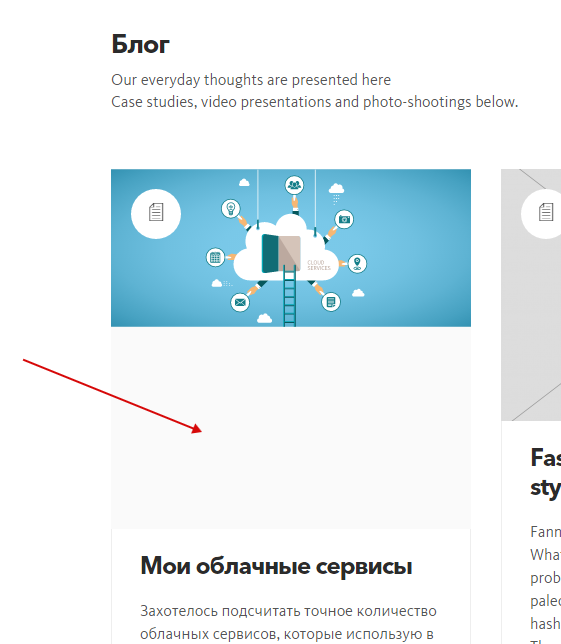
I try to use svg images (through SVG Complete plugin). Now whenever I use svg for featured image in blogpost I am getting this http://kalium.zzkk.ru/2015/07/my-cloud-services/ (svg has double height with empty lower half). Screenshot http://c2n.me/3lk62XC.png . And this effect is present both in blog list and on the post page. Is is possible to fix it? Thanks.
Hi alexschneider,
You are using an old version of our theme (1.1.5) and the latest version for the moment is (1.4.1), please update theme first.
The easiest way to update our themes is if you use Envato Toolkit. On this link How to update Themes and Plugins
you can learn this easy step-by-step procedure
Then go to Appearance > Install Plugins to update all your premium plugins to the latest version that we support.
Then if you still have the problem after the update, just write us again in this comment.
P.S: Great job with the site 
Kind Regards,
—Ylli
I (or rather you ) update theme but the problem with svg remains http://kalium.zzkk.ru/2015/07/my-cloud-services/ . Please help.
Hi Alex
Our theme is familiar only with JPG/PNG/GIF formats so this is unexpected. I need to login to your ftp to see how can I fix this issue.
Arlind
?k, I have sent you login and password via contact form.
Great I will check it when I have some time later today. Thanks
Arlind
All the issues disappeared. Thanks.
P.S. Please include “svg blogpost fix” in the next update of theme so as the alterations will not be lost. Thanks again.
Hi Alex,
Glad to hear that, we will include the fix on the next update for sure
—Ylli
Sorry Yilli but your fix is not working correctly yet. New posts with svg as featured image show same problem as the first one http://kalium.zzkk.ru/2015/07/kak-snyat-kvartiru/ Please make the needed corrections. Thanks.
I found the reason for uncorrect svg appearance. The problem is that: this certain svg has in itself a clipping mask. Obviously the theme do not understands dimension of such a svg. Then I use svg without clipping mask everything is working just fine. Issue is closed.
Hi Alex,
Very glad to hear this, we where just checking how to fix your problem but without success.
Hopefully this will help others who have the same issue too
Kind Regards,
—Ylli

This item was featured on ThemeForest

Power Elite Author
Contact the Envato Market Help Team