1753 comments found.

Hi,
When first importing the theme , once it install and activate . The theme of the edit menu is not displayed and each time we try a change on the theme , the following error message appears :
“You do not have permission to access this page.”
Best Regards
Hi,
This is rather a problem with your WordPress installation or some plugin you have installed. First, try to deactivate all plugins and see if that helps.
After that, if you have any further problems please open a support ticket via http://mekshq.com/contact with your website URL and we would be glad to have a look and help you out!
Cheers 
Hello. Can you do something for Google PageSpeed score? Especially mobile score is really poor.
Another thing is how will it be when there is many visitors? Do you have any client that use this theme and got thousands of visitors? I am not sure that my hosting will be ok with this theme.
If i can get helpfull answers I will buy it. It looks nice.
Hi,
Thanks for your comment. Please understand that this score mostly depends of your server setup, caching, etc…
Everything regarding code and the theme itself is covered with probably the best optimization practices.
When you purchase the theme, you can always contact us for support and we will provide further optimization guidelines for you 
p.s. also make sure to check the real demo website URL which is: http://demo.mekshq.com/voice
Cheers!
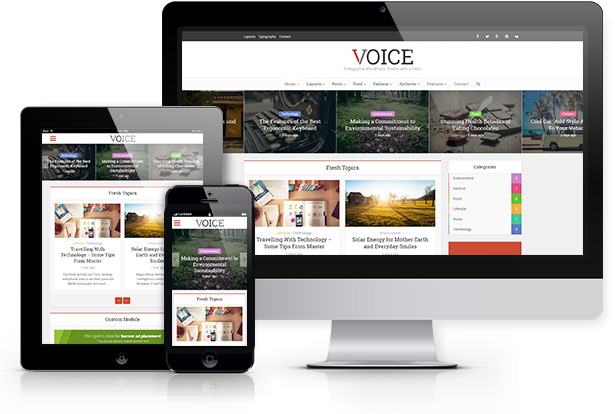
On the main ThemeForest Voice Theme page image ( mekshq.com/static/voice/01_voice_feat_responsive.jpg ) there is an image that shows the Voice theme on a TABLET device. It show the full normal desktop header and menu on the tablet image (and a small responsive header on the phone image).
I can not get my tablet (Ipad 3) using Safari or Chrome to display anything but the scaled down phone header, but i want tablets to show the larger header like it shows in your Theme advertising page on Themeforest (while keeping phone devices with the small header).
see your image at: http://mekshq.com/static/voice/01_voice_feat_responsive.jpg
Hi,
Pleas open a support ticket via http://mekshq.com/contact and we will see how to modify this for you.
Cheers!
I’d like to suggest a feature for a future update or perhaps a custom option I’d be willing to pay for now.
I’d like to have an ad area directly below the main menu nav but directly above the content on each page so I can use the 970×250 ad. Also, if this ad area could be responsive and scale down to mobile size that would be awesome. I’ll be using this theme for my blog and that’s the feature that would make this theme a perfect 10/10
Hi
This is nice idea. Can you please contact us to support@mekshq.com and we will try to help you out with this?
Thank you for your feedback and looking forward to your email
Cheers
Hello,
Im trying to remove /Category/ from URL, im trying to do it on Voice Translation with this:
If you want to remove the text completely instead of modifying it, you can use “-1” as a value for particular field translation.
Hi
Yeah, but this is only related to “Category – ” string of title area on archive page.
If you want to remove /Category/ word from URL you need to go to your Settings/ Permalinks and change permalink structure from:/%category%/%postname%/To this:
/%postname%/
Please let us know if this helps
im trying to change it, but when i save changes is not working, it return to default Post Name settings.
I can’t change on Custom Structure.
I can’t change Custom Structure, when i save settings it return to default on Post Name Settings.
So i cant put / postname /
is not working, please is very important i get off category
Hi
Can you please email us to support@mekshq.com with your WP admin details and we will try to help you out.
Basically this has nothing to do with our theme since this is WordPress functionality – but we are good people and we will try to help you out.
Cheers
okey i have done something.
I add ”.” on “category base”, now categories are all merged, so i need to add modules on “pages”, the problem is now “Mega menu” is not working on “Menu Bar” with “Pages” instead with “categories”.
Is that the way to get ”/category/” removed from URL?, i think that is not the way because now categories on “Appearance/Menu” is not working properly.
Another question, when next update? normally every month? so the next update is on day 27?
Ok, i have found a solution i post here to help others:
To remove /category/
-Permanent Link: category base (empty)
-Theme Translation put in Category: (empty or any other translation)
-Install Yoast SEO Plugin then use remove /category/
done
Cool
You are welcome
I want to hide “Header ad space” in mobile version. How can i do it?
Hi
Paste this code into Theme Options / General / Additional CSS filed:
@media (max-width: 728px){
.vce-header-ads {
display:none;
}}
Please let me know if this helps
Cheers
Guys, i need to upload a big header inside my header area… i tried upload as logo but isn`t working.. i tried upload as ad (header with logo + ads) but isn`t working too
http://smaispublicidade.com.br/jobs/jessica/wp-content/uploads/2015/07/header-jessica-menor-2.jpgthis is the image size im trying to upload and this is the website http://www.smaispublicidade.com.br/jobs/jessica can you help me how do i do this?
Hi
Paste this code into your Theme Options / General / Additional CSS filed:
.main-header .container{
max-width:100%;
padding:0;
}
But then you will have to make this image stretch. You will need to make bigger image, adjust image width to 1920px.
Please let me know if this helps
Cheers
Guys, i`m not sure about your answer… this code will resolve my issue with the -> 1 (centered) or 2 (with ad space)
and, about the height, wich is the perfect size?
Hi
Leave your settings as it is just paste this code and you will see that image is fitting nicely. All you need to do is upload image with larger width if you want to cover whole header area.
Please let me know if this helps
Hello! I love this theme but I am having trouble with adjusting my header, it appears to get small when I view my site on my iPhone. Can you help me with that?
Most importantly, I need more assistance with the “disable comments” seems to not be working. I would like to use “Facebook Comment” rather than the Wordpress commenting system. Is there an extra CSS style I need to put in? Could you please help me?
Thank for creating an awesome theme!
Hi
Yes we can help you out but can you please email us to support@mekshq.com with your website URL so we can provide you with code right away.
If you are going to use “Facebook Comment” system this should be done automatically without switching off WordPress comments.
Please email us to support and we will help you with your both questions
Thank you
I emailed you. Could please get back to me as soon as possible! i would like to really get this fixed.
Hi
Our support is working on it so you should get your response really soon.
Thank you
How to add a ‘font-awesome” icon to a main menu nav item ?
I added an icon (fa fa-fire) to the main menu nav but the icon shows on my site far above the nav text. I want icon to show on left side of nav item text. I am using the #3-Minimal header settings.
Thank you
Hi,
It should work properly if you add this:
<i class="fa fa-fire"> </i> Some link title
If this doesn’t work for you it means that someone changed the original theme styling. Please open a ticket via http://mekshq.com/contact and let us know your website URL so we can provide further help.
Cheers!
hey. I was approached by a client who bought from you the template. he have a problem with the carousel js. its look like http://prntscr.com/7uuh7h. (in the main menu) the meaninkg is that we dont see all the posts even there is more than 3 ( like in the picture ) and its not scrolling them at all. what should i need to do to fix it? thanks!
Hi
1. Can you please check if you have “Do not duplicate” option checked.
2. Do you have enough posts for this slider?
Please let me know if this helps
i have enough posts and i try to mark Do not duplicate and its the same. there is any other solution? thanks
1. seems it may be a caching issue, do you have any caching plugins turned on? If so, turn it off during the theme setup.
2. You need to have a featured image for each post, do you have it?
If this doesn’t help, please open a support ticket via http://mekshq.com/contact and we will try to help further.
Cheers!
hey, i have a problem on the mobile site. Sometimes, in Chrome for Android, the author and catogries look like this -> https://goo.gl/photos/DqfY881paRjXupyx5
I dont know why. refresh the site will bring back the normal letters. www.smartdroid.de
There is probably some setting on your server side which may cause this. Please open a ticket via http://mekshq.com/contact and we will investigate further.
Cheers!
Hello, -I want to add in Widgets, voice video, a list of my youtube videos. -I want to show full posts on main page with out use voice child theme, i want on main theme. when the update?.. this is very important to SEO… and this theme is for SEO.. -Left side-bar for sticky social icons -This theme is for woocommerce, so a shop cart on menu will be good. -I use Voice theme size image for posts, on thumbnail the images are good, but when you put the mouse over, the zoom breaks the images some borders are not showing. -On mega menu, when you have more things they are not showing, so arrow keys will be good to show on mega menu more things, then in voice options, on general, mega menu= show arrows “ON” or “OFF”
Hello,
-I want to add in Widgets, voice video, a list of my youtube videos.
-I want to show full posts on main page with out use voice child theme, i want on main theme. when the update?.. this is very important to SEO… and this theme is for SEO.. and must show the short-codes used on post.
-Left side-bar for sticky social icons
-This theme is for woocommerce, so a shop cart on menu will be good.
-I use Voice theme size image for posts, on thumbnail the images are good, but when you put the mouse over, the zoom breaks the images some borders are not showing.
-On mega menu, when you have more things they are not showing, so arrow keys will be good to show on mega menu more things, then in voice options, on general, mega menu= show arrows “ON” or “OFF”
Hi,
Please open a ticket via http://mekshq.com/contact as that is official place for providing support. This is a long list and it is best to keep all the conversation there. We will try to help!
Cheers!
Hello
I just send the ticket via contact.
Thanks you very much.
You are welcome
can i put videos in the featured area slider? is that possible?
Hi,
At the moment this is not possible, only images are allowed.
Please let us know if you have any other questions.
Cheers!
Amazing theme. Love it! How do I get authors photos to appear in the circles in the posts. Been scratching my head for hours. Thanks
Hi and thanks for your words!
There are two possible solutions, please take a look at FAQ section of documentation: http://demo.mekshq.com/voice/documentation/#faq
Let us know if this helps!
Cheers
How to change the size (width) of the Featured Image on all Single posts and center the image in the container area ? example: I want the post’s Featured Image to be proportunate to the orginal image size except I need the image scaled to display a 1000 px width, centered in area. Thank you
Please open a support ticket via http://mekshq.com/contact and we will try to help with additional css code to solve this
Cheers!
hello meks, great theme you’ve got. please i need the colour codes of your modules i.e. environment, food, lifestyle, etc. in the demo theme. thanks
These are category colors on demo:
#ca85ca
#e54e7e
#61c436
#f4b23f
#46c49c
#607ec7
Hope this helps!
yes, thanks a bunch
do you have any support forum website?
Hi,
Sure, you can open a support ticket via http://mekshq.com/contact/ and we would be glad to help!
Cheers
Hello,
do i need to have bbpress or woocommerce installed in order to see the available menus in the theme options? I do not see them there.
Yes, you need to install and activate plugins. We thought it is the best way to hide the options and not bother users who don’t want to use WooCommerce and bbPress. Hope this makes sense.
Please let me know if you have any further questions.
Cheers
That’s all i wanted to know. Its better to have them hidden for users who do not have them installed. Thanks for your support
That’s all i wanted to know. Its better to have them hidden for users who do not have them installed. Thanks for your support
Hello! Where i can remove “archives” title before category name?
You can check the FAQ section for further explanation: http://demo.mekshq.com/voice/documentation/#faq
Basically, you just need to put “-1” in translation field and it will remove the text entirely.
Hope this helps!
Hi, I am using your theme from almost 1 year and loving it , being very successful with this theme. I need support for two issues . 1. When i place adsence ads between layouts on homepage it take lot of white space and doesn’t fits into width and height of ads , can we do something on this 2. I need to edit my homepage theme, actually want to place ads for mobile site inside a layout , how i am suppose to do it
Hi,
Please open a support ticket via http://mekshq.com/contact and provide us with your website URL so we can try to help further
Cheers!
hi i have already done , waiting for the reply of the same
hi can you please reply on the support ticket , it is almost 1 and half day
Hi,
Please understand that some requests need a bit more time to investigate. Be sure that someone will get in touch with you soon.
Thanks for your patience.
Cheers!
hi , i am still waiting for the same, it had been almost 4 days
Hi,
Please let us know your ticket ID and I will try to reach support team and see what happens.
Cheers