5510 comments found.

I would like to have a website with a listing of retail spaces/kiosk. The public can login using Social Media account, browse through the list of retail spaces/kiosk (advertised by others), and if interested, they can reserve the one they like by selecting the date and the number of hours (duration), the price will then be listed based on the duration (hours) and they will make a payment through the site.
Can this theme itself fulfill the above, i.e. instead of per day/night, can I change to per hour?
Or, have both options available, i.e. select day/night and by hours.
Hi Will
Thank you for the email. I am afraid the theme doesn’t have hourly booking. Minimum booking is 1 day and all booking features are around this feature.
Thank you Anna
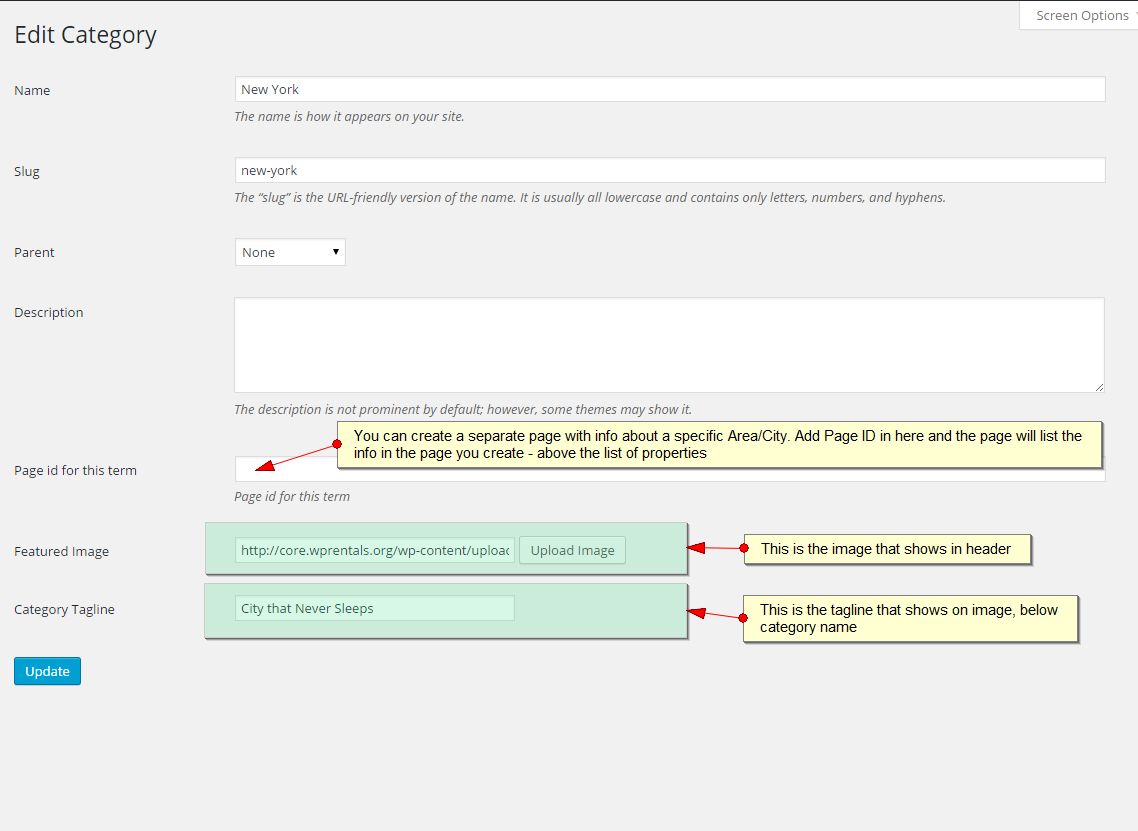
Hi, I’ve just bought this wonderful theme. Everything were work quite well so far. However, there’s a problem to set the featured Image for both City and Neighborhood / Area. It’s not working for me, after i select the image and click “Insert into Post”, It just stall into a blank at there.
Hi weebernet
Thank you for the comment. This issue is related to wordpress 4.4
Yesterday we released 1.13.2 and we included the function update for upload media for 4.4 wordpress.
Please update to this version. Help http://help.wprentals.org/2015/10/28/how-to-update-the-theme-and-plugins/
If you still need help after the update please open a ticket here – http://support.wpestate.org/ and give us FTP and wp-admin to check theme update.
Thank you Anna
Hi Anna,
Thanks for the help, I’ve update the theme, and it’s works totally fine now.
Good Job on this theme, and Happy Holidays.
Hi,
I was actually see that there’s a option of “Price to make the listing featured” in the theme options, But i couldn’t see any option of it for free membership owner to request it from their Front-end Dashboard.
1) Is it set only for owner with membership? Is it possible to let free membership owner to pay for featured their properties?
2) Is this on the wishlist?—> Can the steps of add/edit property to be really continue/moving to the next steps after save? Rather than just finish save the step and click on another step to continue.
Hi weebernet
Thank you for the follow up. Please see my reply below:
“Price to make the listing featured” in the theme options, But i couldn’t see any option of it for free membership owner to request it from their Front-end Dashboard.—> “featured property” is a making money option. That’s why it exists only for membership or paid listing. If you wish to give free listings and free featured, enable membership option and set unlimited free listings and as many featured listings as you wish.
1) Is it set only for owner with membership? Is it possible to let free membership owner to pay for featured their properties?—> It’s not possible to pay just for featured unless you make this scenario:
- you create packages with unlimited listings and x number of featured listings and you let people buy the package.
2) Is this on the wishlist?—> Can the steps of add/edit property to be really continue/moving to the next steps after save? Rather than just finish save the step and click on another step to continue.—> It’s not on the wishlist, but I will add it and review with my colleagues. I can’t tell at this point more.
Thank you Anna
Hi Anna, Hope you are well. The latest issues since your last update are- featured place does not work. shows a black square that doesn’t click to anything. proper place ID entered. Map on 1/2 page and header shows rings of numbers, but when clicked, they simply disappear and no action occurs. map pins are no longer present /visible when a property is clicked in half page view. any thoughts? The recent items slider filter still does not work for me. i reloaded your update and follow directions implicitly. any ideas there? best, Kimberly
Hi Kimberly
Hope you are well too.
The latest issues since your last update are- featured place does not work. shows a black square that doesn’t click to anything. proper place ID entered.—> Black square means no image is set. —> If the correct id is added, it should also have city name below the image. —> Please let me check your settings in client support. I just did a test with latest theme update (1.13.2) and all works fine. See test here http://bit.ly/1m63a51
Map on 1/2 page and header shows rings of numbers, but when clicked, they simply disappear and no action occurs. map pins are no longer present /visible when a property is clicked in half page view. any thoughts?-> You must add pins in theme options – pin management after you change categories/”what do you wish to rent” names. There could be 2 other situations. Please check the settings with help here http://help.wprentals.org/2015/12/07/google-maps-why-pins-dont-show-on-the-map/ If you need our assistance please open a ticket.
—
The recent items slider filter still does not work for me. i reloaded your update and follow directions implicitly. any ideas there?—> I still need to see exactly what you did to advise. Also, I don’t understand the exact issue. As I said before, I did a test with recent items slider filtered by one “what do you wish to rent category”. Tell me what you set and will test the same on our domain if you don’t wish to give me your wp-admin to check. Please understand that without seeing what you did and without replicating I cannot do much to help. I do tests, but mine are ok. So need to do the above to help you further. On the same page I have above I added my test again to see how it works for me.
Thank you Anna
Hi, I set the image for the area / place in the place builder workflow (properties-area- add new area). Is there somewhere else it should be added? Trying to set slider to a specific AREA / NEIGHBORHOOD. Thanks for the link to pin mgmt. Lots of unexpected work to set a custom pin for 50+ entries, though. best, Kimberly
Hi Kimberly
The image must be added in edit/add area. You see to have added it correctly. Help – http://help.wprentals.org/assets/images/city3.jpg
The Recent Items Slider shows properties from a specific areas. Not specific areas. And I just tested it. It works ok.
To show areas, you can use the places shortcode – http://help.wprentals.org/2015/12/17/list-of-cities-or-areas-shortcode/
The pins must be set for your categories / actions because they are saved based on category name.
Thank you Anna
Pre-sale question. Is there option to enable keyword search? I don’t see it in demo.
Hi borisjer
Thank you for the question. The theme doesn’t have keyword search. Sorry. Thank you, Anna
Hello Anna,
I was looking for a rental wordpress theme and I found your awesome WP rentals ! Actually, I would like to create a car rental marketplace, not a property one. I have found some car rental themes but they don’t allow users to submit their own car; these themes are designed for B2C websites, not for C2C websites. According to you, if I buy WP Rentals theme, could I customize / change it for my needs ? I’m a developer and I use Wordpress everyday. Thanks for your reply.
Hi Atalmy
Thank you for the interest in our theme. Please consider that the theme has been designed to work for booking properties. This means that from start we have a minim 1 day booking requirement. We have default fields in forms. We have default search. Changing it to a different purpose implies modifying code. I can’t tell you how complex changes will be, but for sure you must consult with a developer for a quote.
Perhaps you can find a developer on Envato Studio for a quote. It’s the best direction I can offer. Thank you, Anna
Holidays schedule announcement:
Our company offices will be closed from 23 December to 4 January. We will reopen on Monday, January 4.
On 23, 27, 28, 30 December we will be online only for emergencies. From 24-28 December and 31 December – 3 January we will be offline.
We wish you all happy holidays!
Hi again Anna, one more question for you. I would like to have a “browse all listings” page which shows all listings and most importantly shows the entire United States rather than a specific city. I have attempted to accomplish that by creating a page using the half-map template and the map shows up correctly, however only four listings show up and there is no pagination. I know that I can just point to advance search page without criteria, but in that case the map shows the landing location specified in settings. Any suggestions how I can have both a country view on the map and all listings with pagination show up if user does not specify specific location? Thanks!
Hi Waterbased
Please see my reply below:
I would like to have a “browse all listings” page which shows all listings and most importantly shows the entire United States rather than a specific city. I have attempted to accomplish that by creating a page using the half-map template and the map shows up correctly, however only four listings show up and there is no pagination.—> For sure you can select all properties to show on half map page. As you see in our demo http://wprentals.org/properties-list-half-map/ the page has pagination and you can show all properties. If this doesn’t happen for you, check that you have made the page correctly http://help.wprentals.org/2015/10/28/properties-list-half/
—> If you can’t make this happen – please open a ticket with your site wp-admin and page link to check all these settings. Client support is here http://support.wpestate.org/
I know that I can just point to advance search page without criteria, but in that case the map shows the landing location specified in settings. Any suggestions how I can have both a country view on the map and all listings with pagination show up if user does not specify specific location? Thanks!—> Please see above answer. Hope it helps.
Thank you Anna
Hello, can you tellme please where are you hosting the demos? thanks Marcelo
Hi Marxxelo,
We have a dedicated sever at Hetzner. Thank you Anna
1) must have some restriction for advertiser to upload their number image that they can upload so that it can avoid load in our server. Can you release this features?
2) can you make image that uploaded by adbvertiser at our site using your theme, can be resize the image size
3) Hi, when user check ads on map via their mobile phone, is it have function user location will appear on map (when they turn on location services on phone) so that they can more visualize and can know here is the nearest vacation rentals from their current location?
4) Did you provide function, so that have option beside paypal or stripe which is another one like offline payment that will appear info such as account name, account number etc. How?
5) is it correct that ads that already approve by admin to appear, when they want to edit again their ads info including to add new photo, they must get approval also from admin. Is it true?
6) why didn’t just make the sign up or login in popup style like airbnb? I think it more better for user to clear and understand how to signup and login
7) maybe you can add badge tick in green color at their ads which mean that ads already visit and verfied by admin or genuine ads to boost the confidence to user. can you make it?
Hi mywazzup
Thank you for the list of suggestions. Will reply below one by one based on what I can answer at this moment:
1) must have some restriction for advertiser to upload their number image that they can upload so that it can avoid load in our server. Can you release this features?—> I understand the concern about loading the server. Added to wishlist for my colleagues to review this idea. But unfortunately I can’t tell you when/if it will be added at this moment. We have a complex list of changes that we wish to add in the next versions. Until we clear the current list, we’re forced to work only on these items and these new ideas will be discussed and reviewed after that.
2) can you make image that uploaded by adbvertiser at our site using your theme, can be resize the image size—> There are 2 resize rules – for header featured image and for the thumb gallery style. Not sure if we can limit all locations. Will add to wishlist to be discussed, but I don’t know.
3) Hi, when user check ads on map via their mobile phone, is it have function user location will appear on map (when they turn on location services on phone) so that they can more visualize and can know here is the nearest vacation rentals from their current location?—> If user has enabled to share location in browser, he can use Geolocation button to see properties near his location – http://i.imgur.com/npzO4lD.jpg
4) Did you provide function, so that have option beside paypal or stripe which is another one like offline payment that will appear info such as account name, account number etc. How?—> I am afraid not. We have on wishlist wiretransfer but we didn’t make any plans for this yet. It’s the same situation as 1.
5) is it correct that ads that already approve by admin to appear, when they want to edit again their ads info including to add new photo, they must get approval also from admin. Is it true?—> Yes. Because if admin wishes control over the properties submitted, he needs to check also edits or else the manual approval would lose its purpose (to control all content quality). Who doesn’t wish this can use auto approval.
6) why didn’t just make the sign up or login in popup style like airbnb? I think it more better for user to clear and understand how to signup and login—> It was our professional web designer’s choice. I don’t have any other argument because he didn’t explain to me why he made that choice. We liked it as usability and we added it. If you consider it’s not good enough, we will add to wishlist to review, but again, please see point 1 for all these new wishlist ideas.
7) maybe you can add badge tick in green color at their ads which mean that ads already visit and verfied by admin or genuine ads to boost the confidence to user. can you make it?-> It’s also on wishlist and i noted you also want this.
Thank you Anna
Hello, what would be the quickest way to change the “per night” label to “per day” throughout the site, ensuring this would remain even after updates? Thanks!
Hi waterbased
Thank you for the comment. To have that text edited best is to use poedit. Po files can be used to modifying english labels to other english labels. And .po files can be added in child theme as well.
Help http://help.wprentals.org/2015/12/21/how-to-modify-theme-text-in-english-with-poedit/ http://help.wprentals.org/2015/12/21/how-to-add-translated-po-files-in-child-theme/Thank you Anna
Dear Anna, I tried to delete my own booking as shown on help page (http://help.wprentals.org/2015/10/28/adddelete-booked-periods-as-owner/) but booking still showing on calendar. How to delete it from the calendar permanently? Thank you
Hi Sevil
Thank you for the comment. My colleagues will need to follow up with you on this. Please open a ticket in our private support http://support.wpestate.org/ and we will help with this in there. Thank you, Anna
Hello, prebuy question: I would like to use your theme (is fantastic) but we are a real estate, we want to use for vacations rentals, so we do not one that anyone else can upload properties or bedrooms… just us. Moreover i would like to use without payments or just pay a reservation fee but not the total price (they will pay it in our office), could be possible? and all the contact info should go to our email. Regards and great theme 
Hi salamero
Thank you for the interest in our theme.
I don’t know if you read my other comments to similar request.
The user dashboard in the theme comes with all pages as you see on demo (including submit property). The theme is designed to be used for front end submission and front end bookings, one user with all the options after he registers/logins.
To get the messages from users about new booking requests in your user INBOX the properties must be added by a subscriber/owner in front end. If you add in admin by admin, contact will not apply.
Users must register to send contact messages via private message system or to book properties. Once they register/login, they have access to the pages add property, my properties.
You can create your own subscriber to add properties in front end – and limit submission for the other users. With the membership option on, admin can set 0 listings for new users which means that these users can’t submit a property. And admin can edit manually a user and add to his account as many listings as he wishes. So only the user you wish to add properties can do that.
If you need contact to email – then you’ll need to add a contact widget. That would work with a plugin (like contact 7 form).
A reservation fee is possible if you use the option where admin can ask a %fee from total invoice (excluding city fee and cleaning fee). User will need to pay the fee for booking to be confirmed. Please see this video – https://www.youtube.com/watch?v=p1S47DabGYM&index=2&list=PLEQZUYyA_PUmbUBXepGKk8UOLIn9AMFCf
Thank you Anna
Thank you very much, so it is possible I think, i am not english  . So, Could I remove the button in the website for uploading properties? And moreover, in the homepage, theres a location to fill with dates, can i only display the cities where I have properties?
Really Really Thanks!
Hi Salamero
I do hope my explanations have been clear.
Regarding: So, Could I remove the button in the website for uploading properties?
—> If you refer to the button that shows in user dashboard, after you are logged in, that should be in there so you can add properties. You remove it, then you can’t use the theme as explained above.
And moreover, in the homepage, theres a location to fill with dates, can i only display the cities where I have properties?—> No, not at this moment. We wish to create a 2nd search with this option. But it’s not yet done. We will plan this for one of the next versions. Will be able to tell more on a timeline in January.
Thank you Anna
Hi, great theme  We would like to change the property ordering on advanced search page to an order based on the proximity to the city searched.
If it isn’t possible, could we order the properties from the expensive one to the cheapest one?
We would like to change the property ordering on advanced search page to an order based on the proximity to the city searched.
If it isn’t possible, could we order the properties from the expensive one to the cheapest one?
Thanks so much
Hi kakao88,
Thank you for the compliment You can change order by price (not by proximity). The file is in advanced_search_results.php Apply the same steps as here – http://wpestate.org/forums/topic/advanced-search-results/
Thank you Anna
Hi, thanks, but as you can see here the properties aren’t order by price: http://goo.gl/AXvx6h
Thanks
Hi, one more thing; I would like to add one more pin on the maps showed on the search results page. This pin has to be related with the “search_location” field, so the customers could see the distance between the searched area and the properties.
Thanks again
Hi kakao88,
My colleagues created the technical documentation for advanced search results page here – http://help.wprentals.org/2015/12/18/advanced-search-explained/
As part of theme support we’re more than happy to give technical instruction about how our code is written and organized and point you (when possible) where changes can be made as I did above. Unfortunately doing the code changes for our clients is not possible. These types of code changes are outside the scope of what we’re able to support.
For the advanced search results order, after you make the code changes – we can take a look over your code to advise if we can spot something wrong. We can’t do the code for you, but we can take a look. So please add the code and then open a ticket here – http://support.wpestate.org/. Give us FTP, wp-admin and tell us exactly which lines you edited to be able to look at your code. Give me the ticket ID here please to let my colleagues know.
About: I would like to add one more pin on the maps showed on the search results page. This pin has to be related with the “search_location” field, so the customers could see the distance between the searched area and the properties.
Unfortunately since we never did such a feature it is impossible for us to guide you and to confirm how/if it’s possible without research. If you would like to work with someone more closely to help you with this, confirm if it’s possible, give quote, please consider working with a freelancer or one of the Envato Studio providers.
Thank you Anna
Hi Anna, first of all congratulations for the work you are doing. I would ask if it is planned to implement the function “Search as I move the map” so that the results are reloaded if I move the map.
Hi Darpre
Thank you very much for the compliment. I couldn’t advise if this feature can be added or not because we didn’t make any research on it. I will add to wishlist for further review when we get to this idea, but I can’t make any promises at this moment.
PS: I checked. It’s already on the wishlist. So we will review this when we get the chance as said above.
Thank you Anna
Hi Anna, the ‘recent items slider’ will not grab one specific data set. Please confirm that I should be using the ‘places / property / category ID (meaning the number associated), or otherwise advise. best, Kimberly
Hi Kimberly
Recent Items Slider cand list properties from specific categories, cities, area in any combination.
Please see this help http://help.wprentals.org/2015/10/28/recent-items-slider/ I updated today with more details.
Thank you, anna
Hi Anna, thank you. That’s not working.
Hi Kimberly
I just created a page to list properties from a category and it worked for me. Please open a support ticket with your page and wp-admin to re-test the same settings as you do and help with this. Thank you, Anna
I’m talking about the ‘recent items slider”, not a new page.
Hi Kimberly
My test was a page with recent items slider. Sorry if that wasn’t clear. If you wish to see my test and wp-admin email me at annapx0909@gmail.com. I can’t share wp-admin access here.
As I said, my test for the recent items slider from a specific category worked. If you can’t make this shortcode work on your domain, please let us look at your site to understand how to replicate.
Thank you, Anna
This is still outstanding. Sliders will not show just featured images.
Hi Kimberly
Considering my tests I believe this is related to confusing settings. Please send me screenshots with what you do in admin and what you have in front end. If you don’t want to give wp-admin, I can only look at screenshots to see if I can help you. Not sure if that will be enough, but I will try. The recent items slider shortcode is only for properties/listings and it shows just featured properties as long as you have featured properties published. Thank you Anna
can wp rental set available or unavailable at availability date, so that every search result is based on what advertiser set
Hi mywazzup
Thank you for the comment. Unfortunately I don’t understand the question very well.
If this is what you ask, dates booked in calendar do not show in search results for those booked dates. If this is not it, please send me more details.
Thank you Anna
I mean is it the ads will appear based on what they set at the availability ads?
Hi mywazzup
I understand this is the same as I understood when I replied above. That if a property has booked dates, it shouldn’t appear in search results. And that’s something that should happen.
Thank you Anna
Hi Anna, This theme is beautiful! Before to purchase, I would like to know which plug in you use , and if there are any payment plug in in? Does this theme need a lot of “memory” ???? Thanks a lot!
Hi Spazio8
Thank you for the comment.
We don’t have any payment plugin. All payment merchants have been integrated by our development team in code.
We use optional Rev Slider, Ultimate Addons and Visual Composer. These come with the theme as a special offer from our end.
We recommend 96MB memory for our theme and plugins included.
Thank you Anna
Hello, i could translate front end with LOCO tranalator, but from where i can translate the back end panel. thanks !
Hi Marxxelo
Thank you for the comment. The theme admin options are available in theme .po file. You can translate with poedit. Help – http://help.wprentals.org/2015/10/28/translation/
Thank you Anna
yes, i could, it was a problem of my default language es_ES
Hi Marxxelo
Happy to hear you managed to sort this out. Thanks for the follow up. Anna
hi Anna, how can I use google font for this theme? I don’t want to use easy google plugin or how change default font for visual composer?
I add custom code to functions.php (child-theme folder) and edit font-family in style.css. But it’s doesn’t work:
function load_fonts() {
           wp_register_style('googleFonts','https://fonts.googleapis.com/css?family=Lobster&subset=latin,vietnamese,latin-ext,cyrillic' , 'https://fonts.googleapis.com/css?family=EB+Garamond&subset=latin,vietnamese,cyrillic-ext,latin-ext,cyrillic');
           wp_enqueue_style( ‘googleFonts’);
       }
add_action('wp_print_styles', 'load_fonts');Beside, I post ticket 11805 on support forum. Kindly check with thanks.
Best regard!
Sophie
Hi Sophie, We wrote this help document about how to use Google fonts in child theme. :http://help.wprentals.org/2015/12/15/how-to-add-a-google-font/
Look over, it should help you doing that. Thanks
Thanks for your reply. If I want to use 2 google fonts?
hi, thank you so much, it works! But I have another problem, when I try to add the code at above, my mobile website is unreponsive anymore. Can you help me?
Hi Sophie
The code provided in that help could not affect responsive (and how my_media.css) loads.
We can try to look at the code you added to see if we can spot the error. Please open a ticket with your site ftp and wp-admin.
Thank you Anna
Can I add woocommerce plugin with some custom development or you can provide some directions to our developer. Thanks!
Hi klickmagic
Thank you for the comment. Unfortunately we have never worked with WooCommerce and for that reason we wouldn’t be able to offer pertinent technical guidance. Really sorry we can’t help with this one.
Thank you Anna