59158 comments found.

Hello With the plugin egg content I changed files with Poedit but the date remains English. How to make it in French? The code in TemplateHelper.php public static function getLastUpdateFormatted($module_id, $timezone = true)
{$format = get_option('date_format') . ' ' . get_option('time_format');if ($timezone)$format .= ' T';// local timereturn get_date_from_gmt(date('d-F-Y H:i:s', self::getLastUpdate($module_id)), $format);}Thanks
What date do you mean?
Hi Igor, I have a problem with woocommerce images resize. Woocommerce catalog show 180180 images resized to 256256 and appear blurry. The original size of pictures I uploaded is 325325 and I wish this size for catalog. But it’s impossible for me. I tried everything I know: wordpress options, resizer script theme, woocommerce product images settings, some css codes, regenerate thumbnails plugin… and no good results. I want to show original size of images I uploaded (325325) but, if it’s no possible, evoid blurry at least. I have this css code on rehub theme options to show full width woocommerce page: .post-type-archive-product .main-side{width:100%} .post-type-archive-product .sidebar{display:none} and I don’t know if this may cause conflicts for the issue. This is the link if you want to see it: http://smartwatchbrands.com/comprar-smartwatch/
How did you make this page? Archive page must be with sidebar.
With this css code you posted in a comment (if I remember correctly): .post-type-archive-product .main-side{width:100%} .post-type-archive-product .sidebar{display:none}. May be this code the cause of blurry images and incorrect resize? Can I resize images as I want with this code? How? I prefer woocommerce catalog full width page.
Yes, this code causes. because, by default, 4 columned item has width 180, but with this changes it becomes 265 and images look blury.
I think, I will add option to make width and height configurable.
Currently, you can change size in code
File
inc/parts/woocolumnpart.php
change
180 on 265
Ok, just fine. I forgot size of columns  It’s impossible 325px size for 4 columns. Thank you Igor.
I wrote you how to change above, you can use any size
Hi,
How can i disable the auto changing images in a normal post slider? i am using the wpsm_quick_slider, it looks like this: [wpsm_quick_slider ids=”837,834,836”]
It keeps changing and constantly resizing the post.
Thanks in advance
js/custom.js
find
slideshow: true,
delete this
HI
I am interested in your design. I want to know if you support to integration recash with rehub together.
I want to built a tech news site, and also want to share some tech deals.
thanks
Recash is not separate theme, it’s child theme, so all functions from Rehub will work also in Recash
Hello,
how can I add pagination to the title off top reviews page? Something like “Title | Page 2 of 3 | Website name”. It works for pagination of category or tags, but not for TOP RATING REVIEWS.
I use plugin YOAST SEO.
Thanks
Yes, it looks like Seo by Yoast can’t check some variables on pages. I posted issue here https://wordpress.org/support/topic/page-variables-dont-work-on-paginated-pages-in-title
Dobryj den, Igor. Filtry na jetoj stranice http://botonline.ru/comparison-table-with-map/ ne rabotajut na mobilnoj versii. Redirekt na glavnuju
answered in email
As you have too low number of user’s reviews, I recommend to use Schema by Editor, instead of user’s. Change it in theme option – review/afiliate option
Yes, this must work
Thanks!
Hi,
There is a clean & efficient way to go multilingual : “Multisite allows you to create several websites from one WordPress install. Each website can be set up in its own language, providing cleanly separated site translations.” Ex : webdomain.com/us, webdomain.com/fr etc
Can i use one rehub licence for all these sub websites for multilingual purpose?
Yes
Is there a Merge Code for sidebar to populate the current posts WooCommerce Offer?
(On “review” posts within a particular category, I’m using a specific sidebar. In this sidebar, I currently display the MDTF details for the post.
Now, I’d like to:
A) Ensure the MDTF details I display for the review post are the MDTF details associated with the WooCommerce Product (that is associated with the review post, via a properly formatted short code, like [wpsm_specification] )
and
 I’d like to display the offers associated with the WooCommerce Product I’m reviewing in the review post. I’m hoping to use the widget “REHUB TOP OFFERS” and specify a “meta key name” that would be found within the individual product / offer
technically, this is possible, but only with customization. price for such customization will be $30.
This includes next logic. You will connect post with woocommerce product. Script will check this product and will show MDTF data for product in widget + offers of this product if they are exist.
That’s perfect. How can we proceed? (Thanks!)
Before start, tell me how you added offers inside woocommerce? Do you place them in additional shortcode area? Do you use Content Egg or your custom sollution?
I simply use woo commerce products, and within each product include the price (or current offer). (I don’t use content egg. I manually enter product price within the woo commerce product.)
I have MDTF details on this woo commerce product.
On each product’s associated review page, i’d love to show the product’s MDTF data - OR - synch the data from the product’s MDTF data fields over to the review posts data fields.
NOTE: I’d also love to have the “attributes” for the woo commerce product to hold the same data as within the product’s MDTF fields.
I’d happily pay extra for all these places to be synched: MDTF for the Product (and it’s Review Post) as well as the Product’s Attributes within WooCommerce.
Thanks so much!
Ok. But what about your words “I’d like to display the offers associated with the WooCommerce Product”. If you don’t add any offers inside each woocommerce product, what offers did you mean?
When I use the sidebar widget “REHUB TOP OFFERS”, I’d like to display the current review posts’ associated product’s associated offer(s) only.
There should always be an offer for every product.
And, I highly doubt I’ll ever create a review for a product that has no offer.
NOTE: I’m using offers for each product as my basic affiliate link, in addition to time-sensitive deals or coupons. Therefore, every product should have at least one offer.
However: If there are no offers for a product, and I create a review post for the product and the sidebar includes “REHUB TOP OFFERS” (designed to only show the offers for the associated product), this widget would not display at all.
ok. this is possible with code customization.
How do you assign woocommerce offers to post? Is it here http://screencast.com/t/E1QTKtLl
Yes, that’s exactly where. (I’ll email you directly to pay you.)
Top list works for dividing post’s content. To make list of product – you don’t need it, there are output shortcodes as list. http://screencast.com/t/supquyE3
I plan to register this Themes, but it won’t register. Please what is wrong?
I have registered other themes in the past, but this particular themes seems to exclude my imagination
what error do you have while registration? Theme uses official API of Envato.
How can I enable breadcrumbs on all pages, categories and forum pages? At this moment it’s only enabled on posts.
A couple more questions:
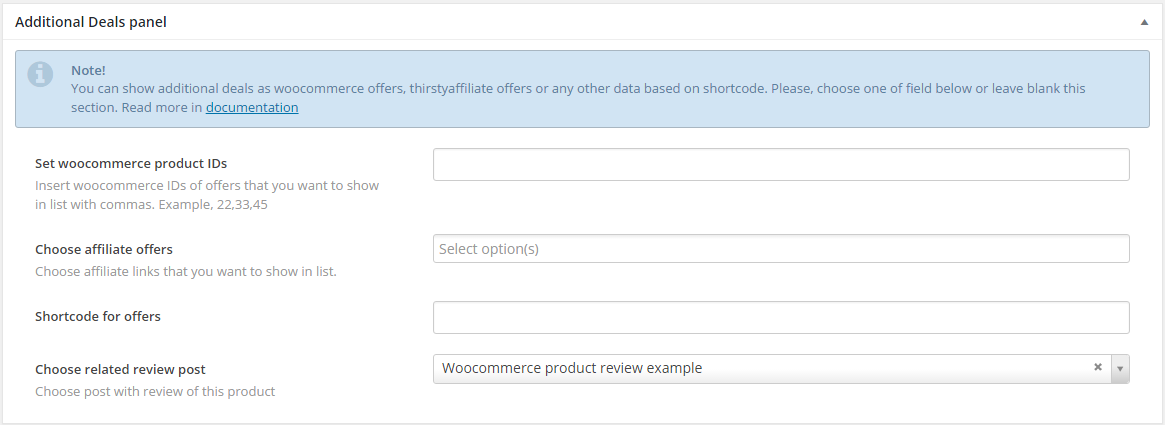
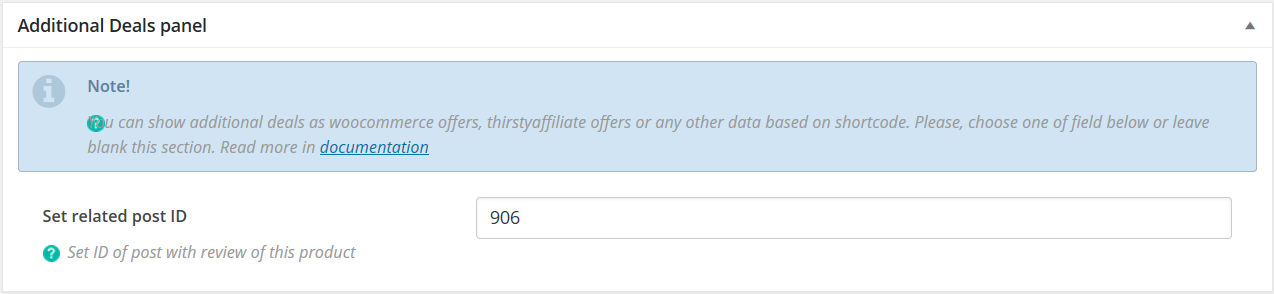
1. How do you get this ‘Additional deals panel’ https://i.gyazo.com/df72957b850b21853b4ed85d0a99113a.png in your product page? All I have is this: https://i.gyazo.com/1cda9dd0db55bcd46b05290dc0555f8c.png
2. Looks like the demo stack link for rething theme isn’t working.
1. You need to customize page.php, category.php pages and add
code
    <?php
        $crumb = '';
        if( function_exists( 'yoast_breadcrumb' ) ) {
            $crumb = yoast_breadcrumb('<div class="breadcrumb">','</div>', false);
        }
        if( ! is_string( $crumb ) || $crumb === '' ) {
            if(rehub_option('rehub_disable_breadcrumbs') == '1' || vp_metabox('rehub_post_side.disable_parts') == '1') {echo '';}
            elseif (function_exists('dimox_breadcrumbs')) {
                dimox_breadcrumbs();
            }
        }
        echo $crumb;
    ?>
after
< div class="main-side page clearfix">
2. Additional Deals panel is moved to woocommerce fields. There is a link on docs in notice http://rehub.wpsoul.com/documentation/docs.html#31
3. Thank you that you found this. Try now
Perfect, thank you for making it work!
One more question if you don’t mind: Is it possible to have both buttons (‘read more’ and ‘price’) in post meta? like this: https://i.gyazo.com/8340afe714c30998238c771849a8f71f.png
Only with code customization. And I can’t write you universal code, each module requires separate customization. If you want hire us – this will have price $20
Can you please change or add a way to change the heading to the comments section? Every time you update the theme, we have to go in and edit the text that says “We will be happy to hear your thoughts” to what we want it to say. This makes updates tedious. It would be great if you could add that into the admin somewhere.
it was added half year ago. Check theme option – localization
Hi Sizam
I sent an email few days ago and this is a remainder. My question was, how can I make the posts on the main page’s grid supports RTL languages? Do I need to edit the code or there is an option somewhere? Thank you
It must support be default (just use RTL as main language of your site). If not – provide link, I will check
hi
please tell me how do i install the updates you do on the theme ?
Hello, thanks for the great theme. I have got a question for the Newsletter widget, can you give me the right code? This is the code from mailchimp website:
<!<!-End mc_embed_signup->
Code is
<div class="rehub_chimp centered_form">
<h3>GET THE BEST DEALS IN YOUR INBOX</h3>
<!-- YOUR FORM HERE -->
<p>Don't worry we don't spam</p>
</div>
insert inside your code, but without
<link href=”//cdn-images.mailchimp.com/embedcode/slim-10_7.css” rel=”stylesheet” type=”text/css”> <style type=”text/css”> #mc_embed_signup{background:#fff; clear:left; font:14px Helvetica,Arial,sans-serif; } /* Add your own MailChimp form style overrides in your site stylesheet or in this style block. We recommend moving this block and the preceding CSS link to the HEAD of your HTML file. */ </style>
how? doesnt work… The code is now:
GET THE BEST DEALS IN YOUR INBOX
<!Don’t worry we don’t spam
<!<!-End mc_embed_signup->
You need insert form in place
<!- YOUR FORM HERE ->
What is the original code that is used at the demo theme?
Comments here doesn’t allow to place correct code.
Do you have problem? I wrote you correct code.
Send me code on email
Hello. Am I able to both upload theme and visual composer through envato tool kit? And when i use envato tool kit. Will my theme settings then dont change?
Theme settings will not lose after update. Envato toolkit is not supported by Envato, new plugin is Envato market http://envato.github.io/wp-envato-market/
I recommend update visual composer from theme http://rehub.wpsoul.com/documentation/docs.html#5
Okay, when i insert my API key (which i have created from themeforest settings), and then check the API connection. Then i get this fail message: The OAuth Personal Token could not be verified. Please check that the Token has been entered correctly and has the minimum required permissions.
Please help me
Currently I can’t support Envato Market plugin, because it’s not my plugin. Usually, I don’t use it. I just delete theme from admin page and install new version.
Check all methods how you can update theme http://rehub.wpsoul.com/documentation/docs.html#5
But what when i want to update my visual composer then? I have updated my theme now. But i have not updated my visual composer? how to do that.
I already wrote answer http://rehub.wpsoul.com/documentation/docs.html#5
Are there plans to have some support for StackCommerce? Products via StackSocial, CitizenGoods and SkillWise?
currently, I can’t find their API
I believe they use heroku, no?
we will investigate this, but I don’t promiss to make it very soon
Thanks. If I learn anything, I’ll pass along. Cheers.
This plugin may help. Either seeing how they connect to StackCommerce or by including support for the plugin https://wordpress.org/plugins/stackcommerce-deal-feed/
Sizam, after updating WooCommerce today, my products layout is messy. http://www.portaldomontador.com.br/montadores-de-moveis/ My Rehub version 6.0.4 What should i do? C. Perin
Update theme
Hi, I was wondering can Adsense be easily added to this theme. To place on right and left or maybe between posts?
Yes. Theme has 7 ads area + sideout widget + sticky widget. Also possible to add ads between posts, but this is more harder. You need to place two post modules on page. First module must show, for example, 3 posts, second module must have offset 3.