28315 comments found.

can you tell me how to select Lato with latin-extended subset in theme styling?
ok i think Lato doesnt support latin letters like Ş or Ă thats weird
Hi, in Flatsome > Advanced > Site Search i set to search in page and posts but doesn’t works. It show only the posts, nothing for the page. Any solution?
Hi there, are you on latest version of the theme?
I can’t figure out how to configure the header so that the logo is in the center and the menu is centered below it… such as the 4th example on this page: http://flatsome3.uxthemes.com/features/header-designer/?style=layout-grid-style-1
I want it… Shop>category page <- copy
Try this plugin https://wordpress.org/plugins/tags/duplicate-taxonomy-term
flatsome > theme option > shop > category page Above route is the form of the page , could i copy of that part ?
Hi again. After my post, I’ve been investigating this bug and I’ve found out that it is caused by WPMLs woocomerce multilingual CMS plugin. It has a bug that makes the discount not being calculated on the homepage. Sorry for the trouble. Best regards, Paulo.
Ok, thanks for letting us know 
Is there a way / option to show NEW bubble on all products added last 7 days (or selected number of days) ?
Hi there, sorry there is currently no option for this.
It has different colors, align than default grey menu.
How have you changed that? Is there any feature, settings customizer I missed or I just need to work with CSS code?
P.S. Chrome and Edge browsers shows the scroll grey arrows next to the menu, which is strange. It shoudn’t be there.
WP Customizer bug > Header Sidebar > Mobile
Tablet mode
Menu Mobile Overlay: left or right
I got more menu links that require to scroll the menu.
in WP Customizer scrolling not working in tablet mode, in these overlays.
I wonder if the menu scrolling works on tablets? When I resize the window on a page (outside WP Customizer), scrolling works.
What’s the easiest way to add “Free Shipping on all orders” text above the Add to Cart button on each product? Thanks.
Hi I would like to get advice regarding choosing plugin or company to easily create IOS and android app for my store.
Hi, There’s a bug with the multi-columns menu in 3.1.6 version. I made a custom column type which has a larger width, and for some reason the class “nav-dropdown-full” gets applied on the ul tag. It seems to be automatically applied in javascript and I have no control over it. When this class is applied, the ul css changes to position: fixed, which makes a huge gap between the navbar and the dropdown menu as soon as we scroll. Then the sticky header appears, and the dropdown stick to the navbar with normal behavior.
Hi can someone help me for morney to pre edit my page?
Hi, your textbox editor sometimes adds automatic
even when i manualy delete them and press “Update” on ux builder, could you please help me out? thanks!
Hi there. Please click the item support tab or go to WP-Admin > Flatsome > Help & Guides. That’s the correct way to get support Include a link to your site if possible.
*-- Auto reply
Your Support time has expired. To continue to get support please renew your support by clicking ‘Renew Support’ button on
this page.
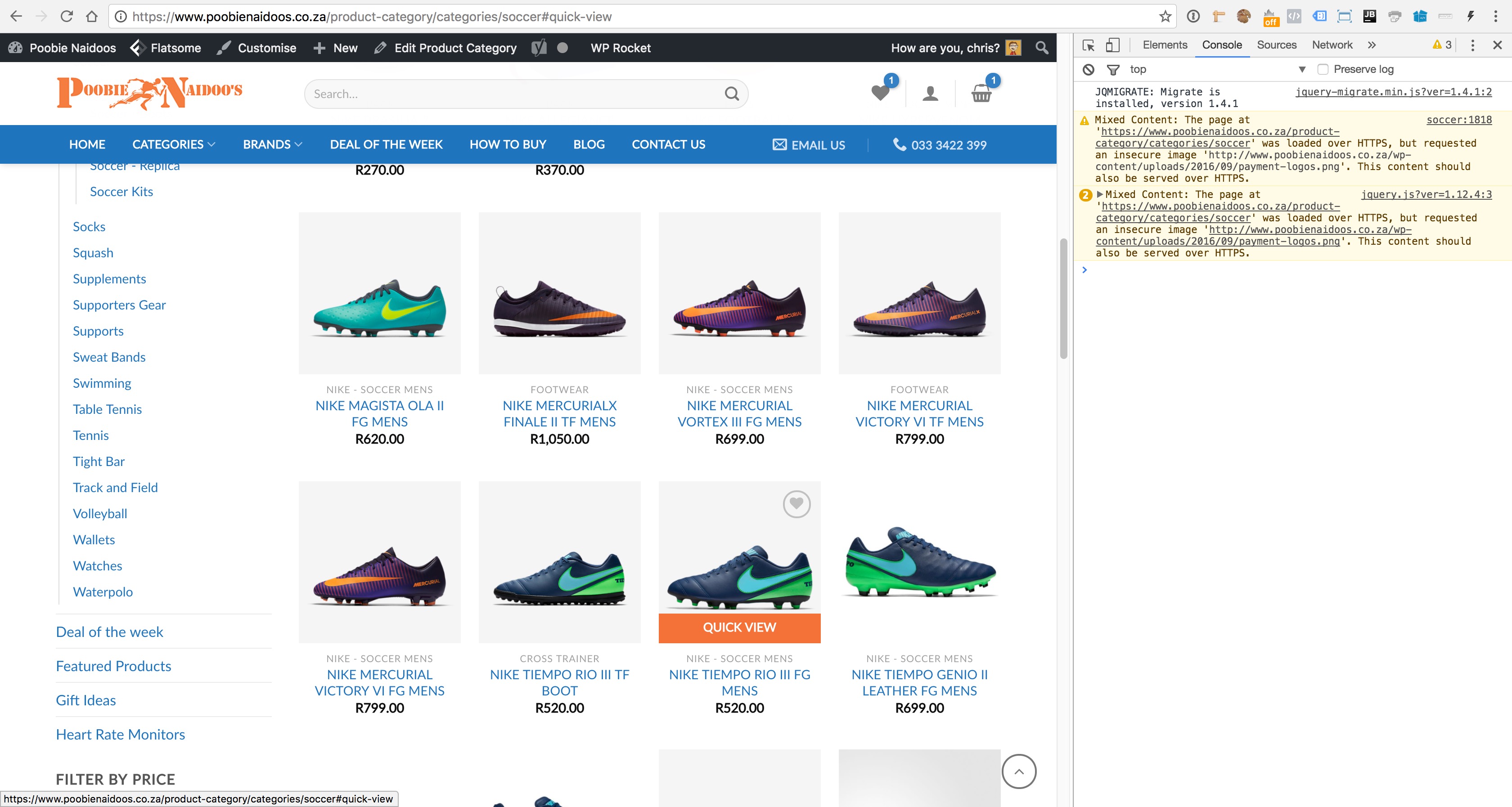
Hi – issue with YITH Infinitive Scroll and Flatsome’s Quick View. When infinitive scroll is active and you scroll down on products, the products loaded by infinitive scroll does not activate the quick view function. Using the latest version of Flatsome 3. Please let me know what we can do here, don’t see anything additional we should do in Flatsome docs. TIA
Hi there, could you check if you have any JS errors in your console? http://docs.uxthemes.com/article/194-how-to-access-web-console
Hi there, no JS errors at all. When clicking on Quick View it just appends #quick-view to the URL. Here is a screenshot of what appears in console log: https://dl.dropboxusercontent.com/s/5bkcqzn8nbu3i7e/2016-11-14%20at%2010.10.jpg
We’ve also tried disabling other plugins and only running the plugins that came standard with the theme (other than the infinitive scroll plugin) and still have the same issue. Please can you have a look into this for us?
Ah, I think I know the problem. We’ll have this fixed in a future version of the theme
Hello,
I’m using the 2.9 version. I would like to change the position of the terms & conditions on the checkout page. it is currently under the button place an order, I would like to put in above it.
Could you please let me know how to do that?
Ps: I don’t want to upgrade to the version 3.
Thanks
Hi there, I’m sorry but we use default WooCommerce and WordPress functionality for this, so this is not controlled by the theme. You need to use a plugin or get someone to help you with custom development to do that. Hope you understand
Hi, I keep having issues with the Flatsome and Woocommerce. I’ve tried going through support but Ahmed Ehsaan from your team has been unable to help us. Our website is www.streamingbundles.com. I writing to you here in the hopes of someone more senior on your team will escalate the situation. We’re very dissapointed in your level of service through email. We keep getting one sentence responses with not actual solution in sight. We keep losing revenue and time fixing this issue. PLEASE HELP US.
BUG in summary: UX Builder crashes into a 404 screen when Woocommerce is enabled. We can edit pages if we turn off the plugins, and then turn them back on when we are done. But it is a pain in the ass. Server support has said that the theme is causing segfaulting errors. We already set the recommended parameters for memory limit and in PHP.ini. We need someone to actually help us debug the theme. I’ve done trial and error to see which plugins are causing the crash, and it is definitely Woocommerce related.
Please reach out to us ASAP. daniel@streamingbundles.com. Thanks!
Hi Daniel, I’m the owner / senior developer of Flatsome. Ehsaan will send you a new version where this is hopefully fixed.
Let me know if it does not work.
Best regards,
Tommy Vedvik
Hi, is it possible to add attribute filter for a specific product category?
Think i found what i’m looking for.
Awesome
Share icons appear twice on product page
Try add this to custom CSS: .social-icons + .social-icons{display:none}
hi thanks for the reply
but that will remove both instances
Did you remember the ”+” ?
+ ???
Did you add this?:
.social-icons + .social-icons{display:none}
Hi UX-themes, I’m setting up a category page for all products which have ‘color’ attribute as ‘red’. I’m using Flatsome ux_products shortcode — [ux_products style=”normal” type=”row” cat=”41”]. How do I display only ‘color’=’red’ products in ux_products shortcode? Thank you.
Hi there. Please click the item support tab or go to WP-Admin > Flatsome > Help & Guides. That’s the correct way to get support Include a link to your site if possible.
I have my site layout to full width, but when I try and insert a section/background to be full width, it isn’t. It stays the same size as the main body content instead of being full width. We’re using the latest version of the theme too.
Hi there. Please click the item support tab or email support@uxthemes.com to get help. That’s the correct way to get support. Include a link to your site if possible
*-- Auto reply
Your Support time has expired. To continue to get support please renew your support by clicking ‘Renew Support’ button on
this page.

This item was featured on ThemeForest

Power Elite Author
Contact the Envato Market Help Team