39360 comments found.

Hello for some reason the icons aren’t showing up when they should be on our site : http://mendocoastpm.com – this is all throughout the site – any idea why?
Hello @Chasedesignsinc.
That must mean that your FontAwesome icons are disabled from Theme Options > Advanced > Theme Features
Screenshot : http://prntscr.com/d70v9l
Please make sure they are not disabled from there and check again please, if the issue persist do open a new support ticket and we will gladly help.
Click Here To Create An Account & Get Avada Support
Thanks
Ammar
Hi. Is it possible to create a global container / section / page part and put it to content of some pages and after change it content it will affect into theese pages?
Case: I have CTA section and i have it on around 30 pages. After one month i want to change content of this section in all 30 pages. But i want to do it in one place not in all 30 pages.
Hello @Patrickciesluk
You can indeed save and re use the content of any container or full page any where you want to with our new Library system however editing this same time on all pages or editing one page instance of the content and getting it changed for all the other instances is not a possibility, you will have to individually change it one by one for each page.
If you need to know anything else, please do open a new ticket and we will get back to you as soon as possible.
Click Here To Create An Account & Get Avada Support
Thanks
Ammar
Hi ThemeFusion
i am buy the theme ,but Purchase Code not working please active my code to start the work.my domain name is codeplan.net
please see this is images http://awesomescreenshot.com/07366iq8a1.i need to have a quick solution.
Hello @Ahasan.
The Screenshot you provided us with appears to be removed, i want you to please make sure that you are using our new Token to register the purchase and not the purchase code, you can not use purchase code to register the product and a token needs to be generated.
Please read this article for more info here : https://theme-fusion.com/avada-doc/getting-started/how-to-register-your-purchase/
However if you still have the issues, please do open a new ticket and our support team will gladly take a look at it for you.
Click Here To Create An Account & Get Avada Support
Thanks
Ammar
My use fusion page builder button isn’t showing! I have gone to the setting to change to show then don’t show then show and nothing changes! how do i make it show?
Hello @Thepartyliaison.
Please make sure that you are on the latest version of theme 5.0.3 with the latest version of FC and FB that must be 3.0.3 and 1.0.3 respectively.
Then please go to Fusion Builder > Settings and make sure that Fusion Builder is enabled for all the post types from there.
Read more here : https://theme-fusion.com/support/documentation/fusion-builder-documentation/#posttypes
However if the issue persist please do open a new ticket and our team will gladly take a look at it for you.
Click Here To Create An Account & Get Avada Support
Thanks
Ammar
I have submitted a support ticket on your system im still waiting, This is really not going to keep happening this is the longest ive ever taken to complete the site! i have updated all the plugins (as in your knowledgebase) i have madesure that the [hp data is minimum requirements at the hosting company yet still no page builder! i have a client crapping me out and im silling like a lost sole waiting for i dont know what! but its not the Avada team!I used your theme about a year and a half ago at another company i worked for and you guys had an amazing theme. Now you have a waste of time! this is so not on any more!
Hello There.
I have just replied to your ticket and your Fusion Builder is now working, as i expected and instructed you to do, the Fusion Builder was disabled for your post types from Fusion Builder > Settings Area
Screenshot : http://prnt.sc/d74j72
Screenshot : http://prnt.sc/d74jvx
That is the sole reason i provided you with documentation link as well. It is really important to read our documentation when a new feature is introduced so you shall know how to activate enable it.
We are and will be 200% dedicated towards our customers, there is no difference and compromise on that and never it will be so.
Have a great day 
Thanks
Ammar
Oh so you have more than one section to activate it, i like when a car starts with the turn of one key not 7. If this fusion builder is so amazing why are you using your utmost efforts to stop people using it?
Hello @Thepartyliasion.
Not at all, there is only 1 place to turn it on and off and that is from the Settings, However with this new builder we have included the support for all your custom post types too so some how in your case it got disabled for all of your post types and that includes pages and posts too, this should have never happened but we will have the documentation about it there in place
I am sorry if you feel that way, but only YOU can decide if you like the Fusion Builder or if its Amazing.
We really hope you like it.
Cheers and have a great day!
Ammar
hello.. i’m waiting your replay..
Hello @MahmoudTaha1978
Please read the above comment i have posted for you, Because the Themeforest comments section is meant only for pre-sale questions and generalities, we are not able to provide support here. Please create a support ticket using the link below and out support team will gladly assist and guide you.
Click Here To Create An Account & Get Avada Support
Thanks
Ammar
thank you very much..
It is our pleasure
Salam Alekom,,
after i installed lingotek, I faced many issues, 1- Slider fusion not open, just Continuous load 2- I do not see the option choice between the languages in top page.
Please I do not know what I have to do now.. Help please.. thank you very much..
Hello!
It sounds like a possible js error maybe. Also make sure you are on PHP 5.3 or higher.
For us to help, please submit a ticket so we can check into this for you. Signup at our support center and submit a new ticket. Our support team will gladly help!
Click Here To Create An Account & Get Avada Support
Thank you!
you mean this: phpMyAdmin
Version information: 4.0.10.14 ?
but the slider was good working (video background).. If this php is the reason, what i have to do?
thank you for Response speed..
Hello!
Hmm yes, WordPress itself recommends using PHP 5.6+, so v45+ is much lower. We’ve made adjustments to make sure it works on PHP 5.3, but you will need to update.
I’d contact your host and mention they are running a much lower version of PHP (which is also not safe for security reasons), and they should update you.
If the issue persists, please signup at our support center and submit a new ticket. Include all the details about the issue, your site URL and version of Avada. For faster service, please include your WP and FTP login info when creating the ticket. Our support team will check it out and let you know.
Click Here To Create An Account & Get Avada Support
Thank you, we look forward to helping you!
now my Current PHP version: 5.6.. i see the php version is not the pb
Hello!
Can you submit a ticket so our support experts can take a look?
Click Here To Create An Account & Get Avada Support
Thank you!
I did .. Thank you
Perfect thank you! One of our support experts will reply soon, they reply in the order the tickets come in so be sure to not reply back before we do or the time resets. You should be getting a reply soon (keep in mind we are in various timezones).
thank you!
Just keep following up in your ticket via email.
Thanks!
Salam Alekom, Please I use Resume theme and I can’t change any photo in this theme only that in slider, but I can’t change any one more, where is it in fusion builder element? In any column or anywhere?
Thank you..
Please do follow up in your ticket, it is the fastest and most efficient way to get help
Resume demo has several images so it depends. The top one is the fusion slider, which you can edit in two places, see this: http://d.pr/i/l9yG
Other images on the page are column background images, edit the column, click on the “Design” tab, then find the image: http://d.pr/i/EU3D
If you have further questions or need assistance with anything, please do follow up in your ticket or create a new one for us. Our support team will gladly help!
Thank you!
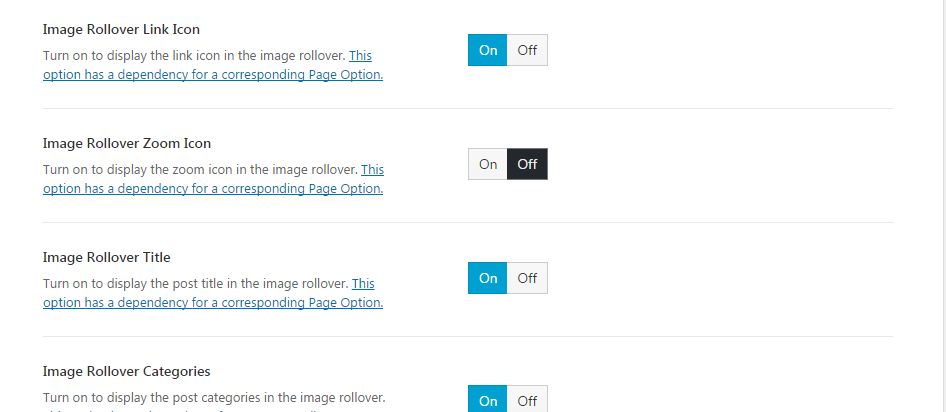
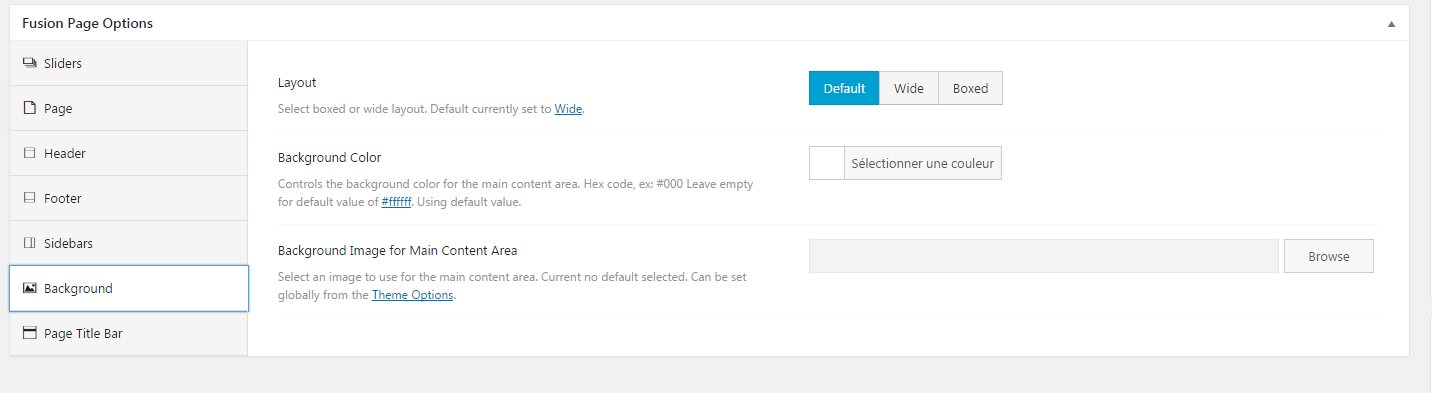
Hello, I’m in love with the theme. Good job ! Buuut.. I can’t take off the zoom option of my portfolio. I took it off in the Theme Options > Extra > Featured Image Rollover tab but it’s not doing anything. I know I should go to my page options and go to the portfolio tab but well.. THERE IS NO PORTFOLIO TAB ! Theme options : https://i.gyazo.com/6c466026fc1b1d2cbce568053f0215c9.png Page options : https://i.gyazo.com/ffb0e7c0e2f7a3443507fb67ff5c6020.png
Please help me to take off the zoom icon !
I succeed with using “fusion-rollover-link” & “fusion-rollover-gallery” classes with “display:none” but if there’s any other “basic” way, let me know !
Hello @SkelOne.
There should actually be no use of custom CSS for you at all and Theme Options should work just fine, however if not then it indicates you have different options set for the Fusion Options. You are not seeing the Fusion Option > Portfolio Tab because you need to check it from the single portfolio page and not the main portfolio page, you will get the portfolio tab if you edit your particular portfolio single page please : http://prntscr.com/d6oidu
However if you still have the issue please do open up a ticket and we will get back to you as soon as possible.
Click Here To Create An Account & Get Avada Support
Thanks
Ammar
Hello! Can we use default text editor with Avada 5 ? (Or only Fusion Builder?)
Hello @Musteba.
Yes you can for sure, You can disable the Fusion Builder (if required) by simply disabling the plugin and it will not be loaded on your post types, you can also disable it for certain post types from Fusion Builder > Settings
If you need further assistance, please do open a ticket and we will gladly assist you with it.
Click Here To Create An Account & Get Avada Support
Thanks
Ammar
Hi. I’ve purchased your theme. I’ve registered it via token. However, when I sign in for support at Theme Fusion, it tells me that my username linked with Envato has already been registered. Don’t remember registering for it before. I try retrieving my password by providing my username or e-mail address. Tells me that there is no e-mail registered with Theme Fusion. I need help, because Theme Fusion page does not provide any other option to contact, no direct email. You can check my credentials and purchase license. Would you please help me and contact me directly to solve this problem? Thanks a lot in advance.
Hello @Oscar3D
We will love to assist you with this issue, i can definitely see that you are eligible for support for sure. I want you to please send us your complete details, Purchase code as well as the username for themeforest on this email please support@theme-fusion.com and put your complete query there.
We will get back to you as soon as possible.
Thanks
Ammar
Hello, after updating Avada from 4.x to 5.0.2 or 5.0.2 to 5.0.3. I found some of my iframed content ( added into Fusion Builder Code Block ) has problems, no scrollbar can be found on the right of browser window. I had to resize the browser window (top right corner, clicking on previous size element, after that click on full window size element), so after that scrollbar appears again. Tested in both FF and Chrome.
What I find on page 1) if I check it in Fusion Builder / Code Block, I see the script coded like
PGlmcmFtZSBjbGFzcz0nY2FtcGFpZ25fZW1iZWQnIHNyYz0nLy9lL
2) if I check it in Visual Composer, I see some Fusion Builder shortcodes and a coded (like above quoted) content in [fusion_code] tags.
It similarly doesn’t work on 4 of 4 similar pages, which all worked with the earlier version. I didn’t experience any other problems after update. Thanks
Hello @Vanetreg
If the content was working before 5.0 it should have no issues with 5.0 as well in case the iframe code has some conflict with the builder, this needs to be checked in details.
I see you have Grandfathered Support on your license that means you have a lifetime of support, if you can please open a ticket about this so we can take a closer look at your your issue.
Click Here To Create An Account & Get Avada Support
Looking forward to assist you
Thanks
Ammar
salam alekom, actually fantastic theme, thank you for this.. but please i want to add new language.. where is it wpml in them plugin?.. or what i have to do to add other language(specifically Arabic language).. thank you and i apologize for my bag English..
Hello @mahmoudtaha1978
Thank you for liking our theme and YES we have 100% compatibility for WPML in our theme, we also have a very detailed documentation for this in our theme that you can read here : https://theme-fusion.com/avada-doc/translations/using-wpml-avada/
If you need further assistance with this, we suggest you to open a new ticket and we will gladly assist you with it.
Click Here To Create An Account & Get Avada Support
Looking forward to assist you
Cheers.
Ammar
you mean i have to buy wpml to use it in avada theme?
other questions please: why the background video slider not working like demo.. could you to see please, in: “www.yousifalzaman.com” .. thank you
Hello There.
Yes, you will need to purchase WPML for this, however you can also use Polylang plugin that is free to use and also works with our theme, You can read all about it here : https://theme-fusion.com/avada-doc/translations/using-polylang-with-avada/
Because the Themeforest comments section is meant only for pre-sale questions and generalities, we are not able to provide support here. Please create a support ticket using the link below and out support team will gladly assist and guide you
Click Here To Create An Account & Get Avada Support
Thanks
Ammar
Hallo,
... the Fusion Builder (in Avada5.0.3), has a little bug!
First: That the container headlines are editable, is very great!
But ever if I edit the container settings, the container lost the my own (custom) headline after the saving!
Please chek this for your next version/update!
Thanks for quickly reaction!
Hello @Mike73
We have fixed this issue in our latest version 5.0.3 already and you should be able to save container (custom) names without any issues, please make sure you are on latest version of theme along with the latest version of fusion core plugin 3.0.3 and Fusion builder plugin 1.0.3 please.
However if you still see the issue, please do open a new ticket and we will look into this for you as soon as possible.
Click Here To Create An Account & Get Avada Support
Looking forward to server you.
Thanks
Ammar
Hallo Ammar,
... thanks for your reaction!
But – you’ve read my post?!?
My installed theme version is 5.0.3! That’s implies of course the latest versions of fusion core plugin 3.0.3 and Fusion builder plugin 1.0.3.
But the problem still exists!
I have already opened a support ticket.
Thanks for quickly check and reaction!
Hey MIke.
Indeed i have, however some times people forget to update the FC and FB to their compatible versions of theme that causes this issue.
Worry not as you have already opened up a ticket and our support team will get back to you as soon as possible.
Thanks for being patient.
Cheers.
Ammar
HIya, our hosting Zen.co.uk says you have a virus on your files inside Avada > Assets > JS
The file you uploaded, main.js, contains a virus so the upload was canceled: SecuriteInfo.com.JS.Agent-2927.UNOFFICIAL FOUND main.min.js
The file you uploaded, main.min.js, contains a virus so the upload was canceled: SecuriteInfo.com.JS.Agent-2927.UNOFFICIAL FOUND
Also in your languages folder.
Hello @Purpleheart
We can assure you there is no virus in our theme at all and that must be a false notification from your host, We have thousands of customers using our theme and they never had any issues, sometimes false threat indications like that comes up in different antivirus plugins / programs.
Here is a quick Analysis report for you for our theme and it shows 0 virus as you can see : http://prntscr.com/d6cqo6
If you want to discuss it more, please do open a new ticket and will look into this for you
Click Here To Create An Account & Get Avada Support
Cheers.
Ammar
Getting this error when trying to change “Background Color For Outer Areas In Boxed Mode”: There was a problem with your action. Please try again or reload the page.
Hello @talkbox808
That means your Theme Options are not being saved, please try clearing your browser or plugin cache (if one is installed) and check once again please, also try to use another browser.
Do make sure that your System Status is all set as mentioned here : https://theme-fusion.com/avada-doc/special-features/system-status/
If the issue persist please do open a new ticket and we will gladly look into this for you.
Click Here To Create An Account & Get Avada Support
Thanks
Ammar
Hi, I have one question: AVADA include a feature in MEDIA LIBRERY where pictures are marked and catalogated depending from they are uploaded? For example, if I upload a picture form a BLOG, picture will be marked like a “BLOG PICTURE”? And if I upload a picture from a specific X POST TYPE of GEODIRECTORY PLUGIN, it will be marked like “X POST TYPE”. Thanks for your support.
Hello @Giuseppecuttone
All the pictures are uploaded in media library in same manner and no categories are defined. However we are continuously listening to our customers and will very much appreciate if you can please send this to us as a feature request to support@theme-fusion.com please.
Thanks for choosing Avada.
Ammar
Can you please pass on this request to your developers, to create a one page mobile home page with icons as menu options so that you can switch home pages for mobile users. This page should be available to be imported by any demo.
Hello @Booysen.
I do believe you mean a different theme / layout for mobile phones and a switch in the menu for that? We actually have a different option in our Fusion Builder where you can disable each of the column or element for mobile layout or tablet or desktop only with the visibility options.
You can read all about it here : https://theme-fusion.com/fb-doc/options/fusion-builders-visibility-system/
However we are continuously listening to our customers for feature request and you can send them to support@theme-fusion.com please.
Thanks for choosing Avada.
Ammar
Lightbox in Imageframe not working! When mousing over the images the image link just shows the page with # behind it. Nothing happens. I’ve referred to your knowledgebase and have the newest version of Avada installed. Literally have been on this all day I’m trying everything. Is there a new version (to match the new Fusion Builder 5.0) of documents somewhere you can refer me to???
Hello @Mackmorg.
Please make sure that you are enabling the lightbox for image frame element, there is an option to enable it from the Image Frame element itself : http://prntscr.com/d6chg4
If that is ON and lightbox is still not working please make sure that none of your 3rd party plugin is causing this issue by disabling them one by one. However in any case if you need our assistance we will need you to please open a ticket and our support rep. will look into that as soon as possible.
Click Here To Create An Account & Get Avada Support
Looking forward to assist you.
Ammar
Hello, could you tell me a link with information where I can know what I should do to migrate the theme to version 5? Thank you!
Hello @MWNS
We have complete update information section here : https://theme-fusion.com/avada-doc/install-update/important-update-information/
We would like you to please read this information and you should never have any issues with the update process.
If anything comes up do not hesitate to open a new ticket with our support and we will gladly take a look at it.
Looking forward to assist you.
Click Here To Create An Account & Get Avada Support
Thanks
Ammar
Cannot create token.. im stuck here https://build.envato.com/create-token/?purchase:download=t&purchase:verify=t&purchase:list=t
Hello @Jalmz
That might be an issue with your browser or any other cache, please try using another browser if you have installed to create token and make sure you are signed in from the same account from which you purchased your Avada theme.
If the still have issues, please fill in a ticket and our team will gladly look into that for you.
Click Here To Create An Account & Get Avada Support
Thanks
Ammar
Hi! After hearing such good feedback on your themes and service, I would love to purchase your Travel theme.
Two important question though:
Does it work with WCVendors as we would like to create a multi-vendor marketplace.
And what Google maps geolocalization capabilities does the theme have?
Many thanks! Robert
Hello @RobertFeelGood
We are glad to hear that you like our theme, regarding your query on WC vendors we have never personally tried that plugin our selves so cant really provided a very solid response here however i did a quick google search and i found this article where WC vendor guys checked our theme and it worked fine for them, here is the thread i found : http://bit.ly/2eS1afN
We have a Google Map shortcode that can show multiple locations with the custom or default info box content for each address including zoom levels, you can read all about our Google Map Element here please : https://theme-fusion.com/fb-doc/elements/fusion-builder-elements-list/#fbel-maps
We will be delighted to welcome you in this Amazing Community.
Thanks
Ammar
Hello Everyone
We are excited to introduce Avada 5.0! Check out the links below.
We are dedicated to continually provide an excellent product with superb customer service to all our users. If you have any pre-sales questions, please post them here in the item comments and our team will answer them promptly.
If you have already purchased Avada, please signup at our Support Center to use our support resources and ticket system to interact directly with one of our expert team members.
See What’s New In Our Latest Update!
The Avada Options Network
The Fusion Builder
Our Professionally Designed Demos
Industry Leading Demo Importer
Fusion Builder Elements Overview
Mobile Visibility System
Flexible Site Framework
Advanced Header Options
Responsive Framework
WooCommerce Design Integration & Demos
bbPress Design Integration & Demo
Events Calendar Design Integration
And we have many more amazing features coming in future updates that are free to any customer who has bought a license.
Thank you, we look forward to helping you!
ThemeFusion Team