741 comments found.

Hello! Can I have multiple “Procedures” pages with different procedures? Thanks in advance
Hi Juliasbeauty.,
Thank you for your interest on our theme.
Yes, you can create a multiple procedures page with different procedures content. But in our theme we don’t have a procedure custom post type.
Regards., DesignThemes Support.
Hi Team,
I bought your template and I need the license for LayerSlider,
Thank you so much, Stefano
Hi.,
Please mail us your request immediately via the right bottom form located @ http://themeforest.net/user/designthemes So that, we can send layer slider files ASAP!!.
Regards., DesignThemes Support.
Hi, the Visual Composer not working,I installed the theme 7 days a go, but not working, what I do? thanks
Hi.,
Thank you for contacting us.
The Visual composer page builder works with only newly created pages and not with the dummy pages that are created using the “Import Option”. Only our default page builder will work with dummy pages created with Import Option.
Thank you, we look forward to helping you!
Regards., DesignThemes Support.
Hi Sriram, I am using version 1.7.6 which was installed by a design company I engaged last year which has disappeared and I can’t catch hold of the guy. How can I upgrade to latest version 1.8 now. my challenge is I don’t have the login credentials this company used to d/load the new version. Can you help. Now I maintain the site. thanks in advance
Hi Sriram…my design company responded with a license key purchased on Jul 6 2016 in the name of Sys2Net Solutions. Is there a way I can now update the theme to new version. Understand in your instructions one can d/load it by login into Envato Market portal. Is it something I can do it with in Word Press itself? thanks in advance.
Hi.,
Thank you for contacting us.
Step 1: Log into your ThemeForest account and click your username in the top right corner to access the dropdown.
Step 2 : You can download latest version of Dream Spa from ”Downloads” tab http://themeforest.net/downloads .
Thank you, we look forward to helping you!
Regards., DesignThemes Support.
Hi. In the reservation template.I select service, staff, date and hour, i dont see the 3 step, name, mail and payment. In the Budda Panel is on the option Enable Pay At Arrival. Thanks
Hi maximilianolc.,
Please mail us your site credentials (WP access logins) immediately via the right bottom form located @ http://themeforest.net/user/designthemes.So that, we can check and have a clear look from our end.
Regards., DesignThemes Support.
Hi! How can I delete “about author” in portfolio publications? Thanks
Hi.,
Get into Admin panel > DreamsSap > Integration > General > Custom CSS > Enable Custom CSS > Yes > Pasted the below css code inside the text area > Save All.
.single-post .author-info { display: none; }
Regards., DesignThemes Support.
Thanks rsriram, work in the single post, don’t work in the extension unyson portfolio, this is the link example http://web.palasatenea.com.ar/archivos/cursos/aparatologia-integral
Hi.,
Removed “about author” section in this page – http://web.palasatenea.com.ar/archivos/cursos/aparatologia-integral Please have a look.
Regards., DesignThemes Support.
Again…after I updated wordpress and theme, I can’t edit anything… When I change any data on page it isn’t saved…
Interesting thing is that: 1. when I disable “DesignTheme Core Features Plugin” it saves the data 2. When I enable and save the same page again it restores data, that was before 1.
Any solution ?
Hi Tymcio.,
It seems that you are still using a very older version 1.7.6 of our theme. Please update our theme with latest version version 1.8 released on 2017.01.25 to fix the issue. Please follow the instructions in the below knowledge base link for updating the theme.
http://wedesignthemes.com/support/knowledge-base/steps-to-update-the-theme/If you are not sure about, please let us know your FTP details so that we can update it for you.
It seems that your support expired on 02/03/2016. Please renew the support to get more help from us. Please follow the instructions in the below knowledge base link for extending the theme support
http://wedesignthemes.com/support/knowledge-base/how-to-extendrenew-your-support-period/Regards., DesignThemes Support.
I’ve updated theme, but it doesn’t work neither. Clicking “Update content” after update doesn’t make any action… could you please finally release update, that will fix this problem? I face it for a year or more now…
I don’t see a reason to renew support – I paid for theme that should work. This is n-th time, that I face the same problem…
Hi Tymcio.,
We have tested your site with the problem said and it seems to working fine. We have added some contents in your home page backend and it is saved correctly and can be viewable in the frontend. Please have a look at the video taken from your site.
Video Link – http://recordit.co/Qhtifj8NIX
Regards., DesignThemes Support.
Interesting…
But anyway, thank you  It works now.
Hi.,
Okay., Thank you Let us know, if you find any issues in future..
Regards., DesignThemes Support.
Hi! I send the ftp access because i dont see the dummy installation. I register in the forum support, but i dont get the email in to my hotmail. Thanks.
Hi.,
Thank you for contacting us.
1) Sorry for the inconvenience, We have removed the importer option from the Buddha Panel. Instead of that option we have used “Unyson” Plugin for import the demo contents. So kindly import the demo contents via the unyson plugin.
Please follow the instructions in the below knowledge base link for installing the demo contents using the Unyson plugin.
http://wedesignthemes.com/support/knowledge-base/how-to-install-the-demo-content-via-unyson-plugin/If you still have any issues, let us know your domain name and wordpress admin details through the right bottom form @ http://themeforest.net/user/designthemes so that we can install the demo data for you.
2) We have mailed the forum login details to your email id. Please have a look at it.
Regards., DesignThemes Support.
I added reservation page using the reservation template, and when it search available time slot and i click to reserve, it doesn’t show the reservation form. it looks it is not calling the method that shows the form, please help
when i install the Demo Conatent data, as soon as it finishs installing, it takes me back to the my site and reservation page works fine, but when i try to go back to my dashboard, it prompts ‘Database Update Required, WordPress has been updated! Before we send you on your way, we have to update your database to the newest version.” and the only button i have to click is “Update Wordpress Database”. If i click update, it updates successfully and it takes me back to my dashboard, but the reservation page doesn’t work. i can search available reservation slot and it can display all the open slots, but when i click a slot, nothing happens, it doesn’t display the reservation form. Please help
Hi!.,
Kindly, mail us your site credentials (WordPress admin login & FTP access login details) immediately via the right bottom form located @ http://themeforest.net/user/designthemes So that, we can check and have a clear look form our end.
Regards., DesignThemes Support.
When i installed this theme, all the plugging this requires are asking me to enter product key in order to activate such as Visual Composer, Unyson, LayerSlider WP etc, aren’t these plugins included with theme? I though that is what you said in the description of the theme page?
Hi.,
Your Plugins are already active. You can just ignore that message in your dashboard. That message appears in your dashboard, you can get the latest version of plug-in files from us when there is an update. Send us a message through the right bottom form @ http://themeforest.net/user/designthemes so that we will send you the latest version of plug-in files.
We have sent the latest version of plugin files to you mail. please have a look.
Please follow the instructions in the below knowledge base link for how to update Layer slider plugin
For Ex : Layer slider
http://wedesignthemes.com/support/knowledge-base/how-to-update-layer-slider-plugins/Regards., DesignThemes Support.
How did you do the Dream Spa Slider? did you used Slider Revelation or LayerSlider WP? and are there walk through steps that i see? please
Hi.,
We have used the LayerSlider in our theme. We have send the dummy slider files to your mail. Please import it via Dashboard > LayerSlider WP > Import Slider.
http://prntscr.com/ehqcixRegards., DesignThemes Support.
I am having hard time installing the Demo Content, can some one help me please. In my deam Spa dashboard, i dont see import demo icon
Hi!.,
Kindly, mail us your site credentials (WordPress admin login & FTP access login details) immediately via the right bottom form located @ http://themeforest.net/user/designthemes So that, we can check and have a clear look form our end.
Regards., DesignThemes Support.
Hi there, i would like to but this theme, but does it support Stripe payment getway, or paypal? and also when client schedules an appointment, does it sends email confirmation only or it can also send SMS mesasge ?
Hi.,
Thank you for the interest in our theme and contacting us.
Our theme support PayPal Payment Methods.
For schedules an appointment only send the confirmation email not send the SMS mesasge.
Regards., DesignThemes Support.
Hi there, i would like to but this theme, but does it support Stripe payment getway, or paypal?
Hi.,
Thank you for the interest in our theme and contacting us.
Our theme support PayPal Payment Methods.
Regards., DesignThemes Support.
Good day,
In Theme Dream Spa I have a problem in the reservation form.
A worker carries out several services. If service 1 is booked by a customer and another customer calls the reservation form and also selects service 1, the still free treatment times are shown automatically.
If, however, the second customer chooses another service, the already booked time is visible and can be booked by the second customer.
Where is the error, what do I need to adjust.
Best regards
Hi KontiPol.,
Sorry for the inconvenience, Please mail us your site credentials (WP & FTP access logins) immediately via the right bottom form located @ http://themeforest.net/user/designthemes.So that, we can check and have a clear look from our end.
Regards., DesignThemes Support.
The DreamSpa Theme does not resize large logos on MobileDevices proportionally. It’s distorted in length and width. Please fix this.
Hi probax..,
Kindly mail your FTP and Login Credentials through the right bottom form @ http://themeforest.net/user/designthemes so that we will check the issue.
It seems that your support expired on 15/07/2016. Please renew the support to get more help from us. Please follow the instructions in the below knowledge base link for extending the theme support
http://wedesignthemes.com/support/knowledge-base/how-to-extendrenew-your-support-period/Regards., DesignThemes Support.
I have two questions
1- How can I actively location? not work now look to the link http://srbeauty.be/contact
2- my site is ready How can I best backup can you help me
best regards
Hi Refikkaya.,
1) Kindly refer our knowledgebase link for how to rectify the google map error http://wedesignthemes.com/support/knowledge-base/google-maps-api-error/
2) The best practice to backup both your files and database regularly and especially before making some serious updates.
Regards., DesignThemes Support.
Hi.,
Thank you for contacting us.
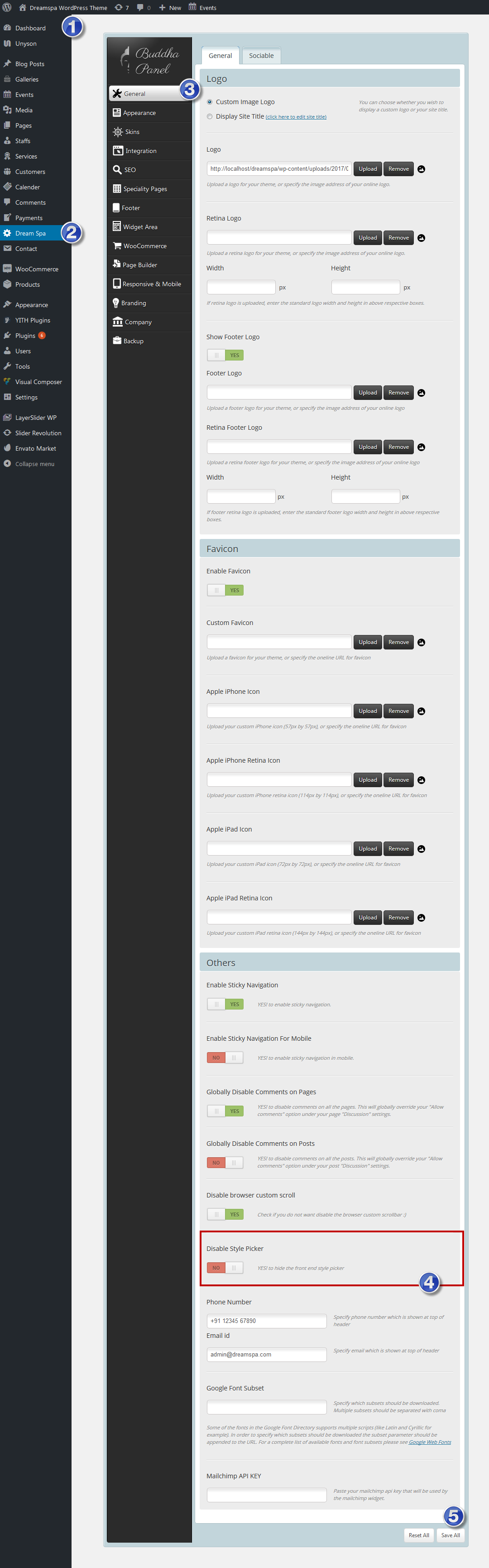
You can disable it from Dashboard -> DreamSpa -> General -> Others -> Disable Style Picker.
Please check attached screenshot : https://snag.gy/49AEoZ.jpg
Thank you, we look forward to helping you!
Regards., DesignThemes Support.
Hi, I want PRICING TABLES color and title change How can I change
Hi.,
1) Do you want to change the pricing table color http://prntscr.com/eb0usr ? then you can add a variation attribute with the color value.
Refer the screenshot: http://prntscr.com/eb0xwf
Note: You can use only available colors which are defined under the /wp-content/plugins/designthemes-core-features/shortcodes/css/shortcodes.css.
Refer the screenshot: http://prntscr.com/eb0ymd
2) To change the title http://prntscr.com/eb0z9j , get into the edit page there you can edit the title.
Refer the screenshot: http://prntscr.com/eb0zhh
Regards., DesignThemes Support.
I am receiving multiple attempts to upload malicious files with this theme. I believe you have a vulnerability. blocked by firewall for a Malicous File Upload in file: yiw_contact=sfn.php
Hi westernway.,
There is no way that our theme has the vulnerability, since themeforest wont be allowing the theme with malicious files.
Please follow the below steps,
1) Update the wordpress, theme and all the plugins to the latest version.
2) Update all the passwords related to the site.
3) Remove any unwanted plugins/ external plugin other than theme recommended plugins that you are using.
Regards., DesignThemes Support.
Hello, i have a probleme with notification email, whene i use [SERVICE] all time i get something like this : Your new Booking id : 44753 Service: helllaun
there’s no service in the text just keyword ‘helllaun’
Thanks to show me how i can resolve this probleme
Hi.,
It seems that your support has expired on 24/03/2016.Please follow the instructions in the below knowledge base link for extending the theme support and Kindly mail your WordPress and FTP Login Credentials through the right bottom form @ http://themeforest.net/user/designthemes so that we will check the issue.
http://wedesignthemes.com/support/knowledge-base/how-to-extendrenew-your-support-period/Regards., DesignThemes Support.
Hi, I am facing some problems with my Dream Spa theme. I do not manage to either change a text in an existing “Popular Procedure” or edit a new text in a new “Popular Procedure”. Thanks in advance for your support !
I can choose whatever I want for the Title, the Image, the link, the button text, the number of Hours, the Price but it’s impossible to change the Content, to see what is the current Content, to write a new Content and so on…
Hi Praticienne.,
Make sure that you have been using our update Dreamspa version 1.8. If not, kindly update the theme and check out the issue.
Kindly refer our knowledgebase link for how to update the theme http://wedesignthemes.com/support/knowledge-base/steps-to-update-the-theme/
If you still have any issues, kindly send us your WordPress admin login and FTP Login Credentials through the right bottom form located @http://themeforest.net/user/designthemes so that we will check the issue.
Note: It seems that your support has expired on 02/03/2016. Please renew the support if you need any more help from us. Please follow the instructions in the below knowledge base link for extending the theme support.
Visit the below link for renewing the support
http://wedesignthemes.com/support/knowledge-base/how-to-extendrenew-your-support-period/Regards., DesignThemes Support.
thank you for the answer How to upload dreamspa-child.zip and dummy-layerslider.zip files Regards
Hi Refikkaya.,
1) Kindly follow the below steps to activate the child theme.
Step 1: The theme child folder is already included with the theme files. Please have a look. Extract the file and copy/paste the folder under the theme directory file path.
Refer the screenshot: http://prntscr.com/e2nbia , http://prntscr.com/e2nc3q
Step 2: Then get into your admin Panel > Appearance > Themes > here you can activate your child theme.
2) Kindly refer our knowledgebase link for how to setup the layer-slider http://wedesignthemes.com/support/knowledge-base/how-to-set-up-the-layer-slider/
Regards., DesignThemes Support.
Hello there Very complicated and very hard thema I want to make it the same as the example I see I just know that I will change the information on the menu, Above is changing in english words like call us mail to Address is not changing can you help me You can adjust themby http://wedesignthemes.com/themes/index.php?theme=dreamspa
Hi Refikkaya.,
Do you want to translate the Call US and Mail Us words ? then get into the file path /wp-content/themes/dreamspa/languages/ there you can translate those words.
Refer the screenshot: http://prntscr.com/e3f6q5
Kindly refer our knowledgebase link for how to translate the theme http://wedesignthemes.com/support/knowledge-base/how-to-translate-the-theme-2/
And you can change the call us and mail us values under the Admin Panel > Dream Spa > General > Others > here you can change the values.
Refer the screenshot: http://prntscr.com/e3f90n
Regards., DesignThemes Support.
Hi.,
Thank you for contacting us.
Please follow the instructions in the below knowledge base link for import the dummy data.
http://wedesignthemes.com/support/knowledge-base/how-to-upload-the-dummy-data/OR
Please follow the instructions in the below knowledge base link for installing the demo contents using the Unyson plugin.
http://wedesignthemes.com/support/knowledge-base/how-to-install-the-demo-content-via-unyson-plugin/If you found any difficulties, Kindly, mail us your site credentials (WordPress admin login & FTP access login details) immediately via the right bottom form located @ http://themeforest.net/user/designthemes So that, we can check and have a clear look form our end.
Regards., DesignThemes Support.
I got an error in uploading and you’ll be helping me do it This theme requires the following plugins: DesignThemes Core Shortcode Plugins and Unyson. This theme recommends the following plugins: Contact Form 7, Envato Market, Layer Slider, Like This, Responsive Google Maps, Revolution Slider, The Event Calender ( Modern Tribe ), Visual Composer, WooCommerce – excelling eCommerce, YITH WooCommerce Wishlist and YITH WooCommerce Zoom Magnifier. Begin installing plugins | Dismiss this notice
Hi.,
Thank you for contacting us.
This is not an error, its notification message. You need to install and activate the required and recommended Plugins click the Begin installing plugins to install and activate. So that the dummy contents and theme works fine.
Please follow the instructions in the below knowledge base link for import the dummy data
http://wedesignthemes.com/support/knowledge-base/how-to-upload-the-dummy-data/OR
Please follow the instructions in the below knowledge base link for installing the demo contents using the Unyson plugin.
http://wedesignthemes.com/support/knowledge-base/how-to-install-the-demo-content-via-unyson-plugin/If you found any difficulties to import dummy data, Hi!., Kindly, mail us your site credentials (WordPress admin login & FTP access login details) immediately via the right bottom form located @ http://themeforest.net/user/designthemes So that, we will import the dummy data for you.
Regards., DesignThemes Support.