28315 comments found.
ho9w to get rid of the craptastic ux builder using visual composer
Could you please next offer a way to dis able Ux builder in the pages, it conflicts with visual page builder saving content after updating to 3.5 now my visual pages will not save content. let me know what line to or how to turn off or disable the ux builder for pages. It is a pain in the ass and our site was built with visual composer as UX builder is a shitty useless builder.
Hi there, sorry for the trouble.
I am afraid there is no setting to turn off the UX Builder. I will share this with the development team so that they can check the incompatibility issues and also explore the possibility of providing a setting to turn off the builder.

Hi – My UX Builder page is blank! .... It was working fine till last week, and when i tried editing any page today it is Completely blank dark page. I have tried signing in signing out, restarted but no use. i am using Woo Commerce Version: 3.0.7 and Flatsome Theme Version 3.3.5
Is there there any reason this should be happening?? Kindly help
Hi there, sorry for the trouble.
Please see this troubleshooting guide http://docs.uxthemes.com/article/202-missing-customizer-or-ux-builder
Im using: WP version: 4.7.5 WC version: 3.0.7 WP memory limit: 256 MB PHP version: 7.0.12
It was painful to deactivate all my plugins as i was afraid i will lose my settings, but i did it it one by one. Now it is fixed and i can see the UX builder. It is Either one of the “JaW Widgets” or Jetpack.
Can you tell me if “Jetpack by WordPress.com” is a plugin that comes with the flatsome theme… as it’s asking me to connect with WP and im not sure if i should ?
Hi there,
Jetpack does not come bundled with the theme.
Is it possible to display the menu name in mobile version?
Hi there,
There is no setting to achieve this in the default template. You will need a bit of customization to achieve this.
Hello,
I’m a completely beginner in Wordpress so I would like to know some things before buying the theme.
1. Do I have to know HTML and CSS to make an e-commerce with Wordpress, WooCommerce and this theme?
2. Which plan of Wordpress do I have to have to apply and manage this theme? Does it work with the free plan or only with the expensive one?
3. Can I add payment plugins using this theme? I’m from Brazil and here we have a payment method called pagseguro (It’s pretty much like Paypal). Would it work on this theme?
Thanks a lot
Hi there,
1. No  We have the UX Builder which makes design easier http://docs.uxthemes.com/article/186-how-to-use-the-ux-builder
2. I’d recommend you install the theme on a self hosted server.
3. Yes you can
Hi,
How can I enable new user email verification? means that wordpress send a user activation email once a new user register in order to complete the process.
Thanks
Hi there,
You can activate the email in WooCommerce > Settings > Emails > New Customer
Hi there. I want to put the sale countdown on white color but it displays on grey. How can I make it white. Site wildd.co.uk
Hi there,
This CSS should do the trick. Place the CSS in Theme Options > Style > Custom CSS
.ux-timer-text{ color: white; }
Hello, love the theme. But the feature in the product pages supposed to produce a video in a lightbox? I have input the video link from YouTube into the video form and when I click on the play button on the product, it goes straight onto the YouTube page for the video. (it doesn’t open in a lightbox) please help!
Hi there,
That’s a bit strange. Please shoot an email via support and we’ll look into it.
Hi,
My checkout page in the portuguese version shows the “checkout-page-title page-title” but on the english version it doesn’t show it.
When I try to edit the Checkout page template in English on the page beckoffice or via builder, despite the “your settings have been saved” message, the changes aren’t record.
How can I fix this?
In the portuguese version of the checkout page, despites it show the “checkout-page-title page-title” this page selected template is the “default”.
Thanks.
Sorry, I just sent you the support request e-mail. Thanks
Hi there,
Our team has responded to your query. Lets resolve this via email
how can i update my theme? i don’t see any “update” button or notification on WP admin panel.. :=o
Hi there,
Please see this guide uxthemes.helpscoutdocs.com/article/77-how-do-i-update-the-theme
Hi there. I would like to change the box radius of the contact form box. How could I do that to make it more square? Thanks
Hi there,
This CSS should do the trick. Place it in Theme Options > Style > Custom CSS
.wpcf7-form-control.wpcf7-text, .wpcf7-textarea{ border-radius: 10px; }
Hi, It didn’t work. Have a look here
https://www.wildd.co.uk/blocks/newsletter/Kind Regards, Victor
Does the theme offer contact form builder or we use a plugin?
Hi there,
You will need a third party plugin to build forms. We recommend https://wordpress.org/plugins/contact-form-7/
hello What css class i need to add to have i mobile and tablet version, would to have in menu. When i am on the simple page, In menu this page is not selected, would to have example “font bold” this page
People which open menu meobile and tablet menu know on current page are
Lukas
Hello Lukas,
I am afraid I can’t quite understand what you mean. Please elaborate on email via support and we’ll look into it.
how can i enable the “Customer who buy this also buy this …” module?
Hi there,
You will need to add cross sell items to your products https://docs.woocommerce.com/document/related-products-up-sells-and-cross-sells/#section-2
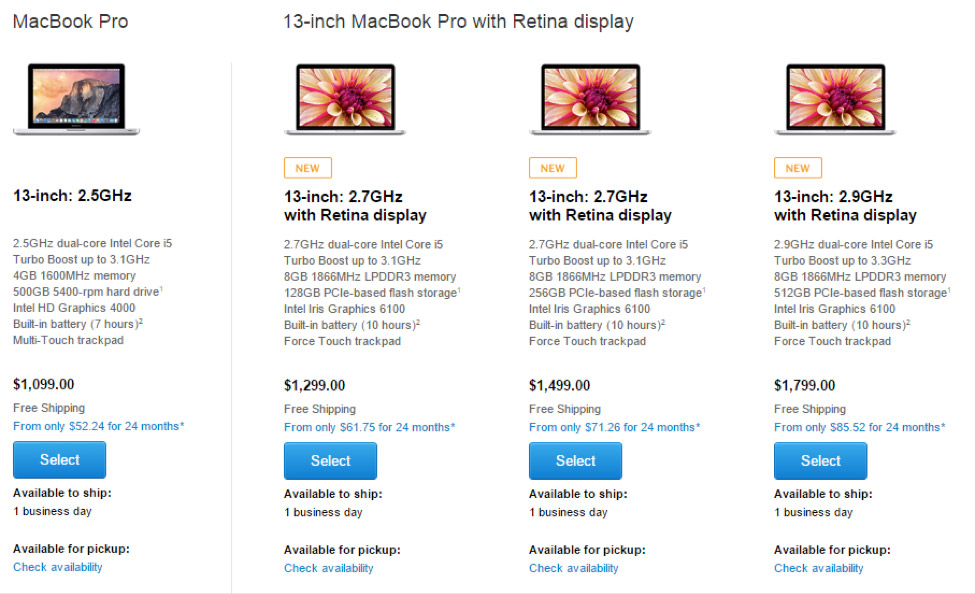
Hi, is there any way to add images to the pricing tables? Or Custom CSS?
I want to create tables on my homepage that looks similar to this: https://blog.kissmetrics.com/wp-content/uploads/2015/04/macbook-pricing-page.jpg
Hi there,
You could achieve a better layout using the products element http://flatsome3.uxthemes.com/elements/products/
Hello. I want to disable UX Builder completely. I do not want it to show the button above title when creating new page and also I do not want it in quick menu in page list. Is there a way just to turn it off as it was possible in Flatsome 2. Thanks.
Hi there,
I am afraid there is no setting to disable the UX Builder. You can place a feature request for this here https://uxthemes.canny.io/flatsome
Hi there,
I am afraid there is no setting to disable the UX Builder. You can place a feature request for this here https://uxthemes.canny.io/flatsome
hi i uploaded the website onlive but the icons are missing
Hi there, sorry for the trouble.
Please shoot an email via support and we’ll look into it.
Awesome Work, how can i get your email or skype?
Hi there, thank you for the kind words.
Please contact the author here tommy@uxthemes.com
How to disable woocommerce single product page ?
Hi there,
I am afraid there is no setting to achieve this. You will need to modify the theme files.
Im having an issue with making products variable. Im getting an error message. Everything is setup correcting in the product options.
Fatal error: Call to undefined method WC_Product_Variable::get_variation_default_attribute() in /home/lashpalace/public_html/wp-content/themes/flatsome/woocommerce/single-product/add-to-cart/variable.php on line 40
Hi there,
Please ensure that you are running the latest version of Flatsome (Version 3.3.5) and WooCommerce (Version 3.0.6).
Hello. I need to change the domain name of my site. Can I disable the license for the old site and activate it for the new site? Thanks!
Hi there, yes that’s possible

This item was featured on ThemeForest

Power Elite Author
Contact the Envato Market Help Team