12923 comments found.

Hi good day,
I’m having a similar issue to one of the users on the discussion.
The error I’m getting is Less compile error: expected color value: C:\home\site\wwwroot/wp-content/themes/ronneby/assets/less/app.less on line 10
I can’t access or update anything in theme options and the site itself is broken.
I have a purchase code should you need it.
Can you assist?
Thanks
Hello Kidrobot2!
Could you please mail us the details of this issue with your wp and ftp access details to dynamicframeworks@gmail.com and we’ll help you to solve this issue.
Best regards,
DFD team.
Thanks for the prompt reply. I’ve emailed with the details. Thanks much!
Thanks, we’ll check your email and mail you back as soon as we proceed your request.
Best regards,
DFD team.
Hello Kidrobot2!
Seems that we’ve not received the email with access details from you.
Could you be so kind to resend it for us to dynamicframeworks@gmail.com email so our team could access the site and help you to fix the issue.
Regards, DFD Support Team
Hi, i need some help with my theme please (restaurant theme). I would like to change the menu items but the Visual Composer dosnt seem to be installed there? Can you please advise? Thank you
Hello Remusvalean!
We’ve received your ticket ad our support team will check it for you and mail you the solution back shortly.
Regards, DFD Support Team
Hi there
I recently purchased the Ronneby theme and was impressed by the demos i have seen. However I have a few questions about the theme if you could please answer them it would be appreciated:
How do Change the location of the menu in the header? How do I change the size of text I see there are 14 header styles. How do i select one to be edited?
Your quick response will be appreciated.
Regards Theuns
Hello Theuns!
Thank you for choosing our theme!
The menu typography is set in theme options > menus section.
Each header styles’ appearance can be adjusted to your needs in theme options > header options > Select header style you are using.
The header style for each page is set in page backend editor > Select header type section. Please check the screenshot. for more reference.
Also, the header style can be set globally for the whole site in Theme Options > Layout Settings > Single pages header.
The location of menu on each page can be set in page backend editor > Menu position section.
We can also provide you with useful links to facilitate your work with our theme:
As for the tutorials, please, use our knowledge base, support forum, theme documentation or mail us directly to dynamicframeworks@gmail.com so we’ll be able to provide you with proper instructions.We’re always glad to help you!
Here you can find Visual Composer plugin tutorials and here you can find the theme elements tutorial.
Regards, DFD Support Team
Hi, I have some problems with customizing the menu: I can not customize hover color. Can you help me? thank you
Hello Simonepolleschi!
Please get in touch with our support team via dynamicframeworks@gmail.com email and specify more details about the desired hover color so we could provide you with a solution.
Regards, DFD Support Team
Hello, please I am so confused, I saw two types, one of 39 and one of 49, which one is the best to use, please help me out. Thanks
Hello Olusabel!
Thank you for your attention to our theme!
If we understood you correctly, you need our assistance with choosing the demo for your future project.
Could you please specify more details about your future site and we’ll help you.
In case it is not what you’ve requested, please get in touch with us via this form and provide us with more details about your request so our support team could check it and provide you with proper instructions.
Regards, DFD Support Team
Thanks so much for your reply, but please, all the details I need are in that site known as emmanuel.tv , can I get like an exact clone or better of that site, because that site ‘emmanuel.tv’ carries all the details I want so far, please kindly help me out and I will be very happy if it can be available for me to purchase today. Thanks Alot
Olusabel, thank you for reply!
We’ve received the email from you, our support team will check it and mail you back shortly.
Regards, DFD Support Team
PLease, I thinkg I am satisfy, but I need one more thing, can I add a next event plugin to the homepage?
Olusabel, glad to be helpful to you!
As for your question, we’ve not tested the Next event plugin with our theme and cannot be sure about its compatibility.
Regards, DFD Support Team
thank you so much ma, I already choose one I am okay with this, can I go ahead with my purchase?
Surely, thank you for choosing our theme.
After the purchase, please get in touch with us via dynamicframeworks@gmail.com email, so there will be support manager assigned to you and you’ll be cooperating regarding your project.
Regards, DFD Support Team
good day please I just purchased, but couldn’t find my license key
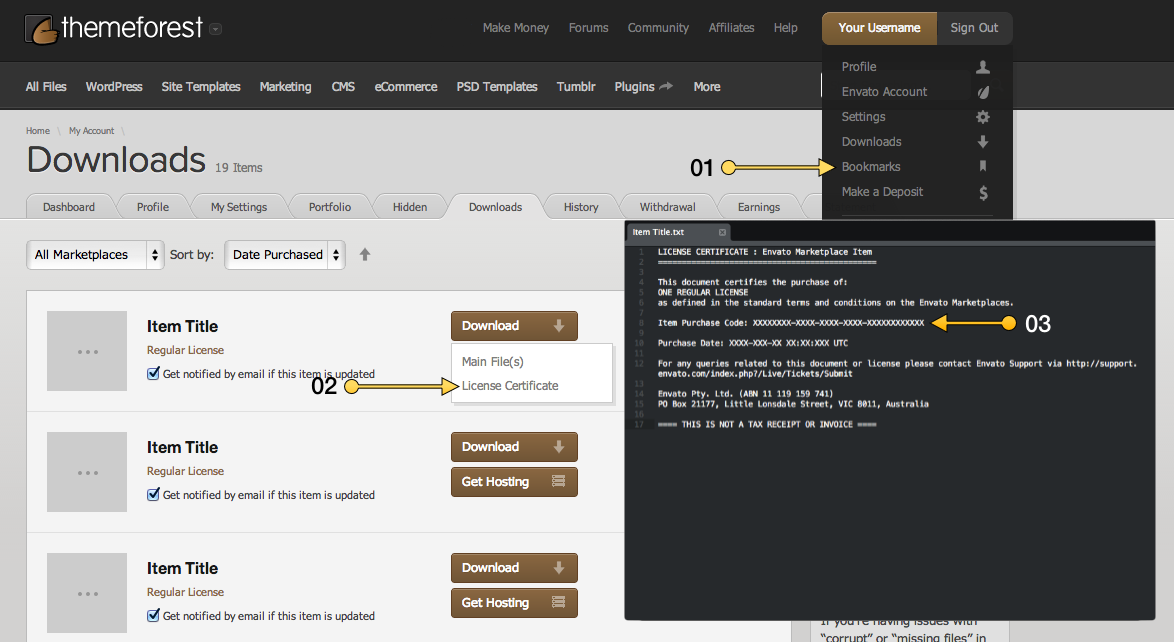
Purchase code can be found on Themeforest in downloads > click on our theme and you’ll be able to see the license in pdf or txt. Or on our theme page.
Regards, DFD Support Team
good day please, how do i change my background? here is my site, cmdm.online
Hello Olusabel!
Could you please submit a ticket here with the desctiption of the element you need to change the background for and we’ll send you short instructions back.
Best regards,
DFD team.
please what is my username and password to signin please?
hello, please answer me
You have to enter the email address and the password you want while the registration process and then simply use these credentials to log in on our support center.
Best regards,
DFD team.
sorry please, how does the lincense code look like, I am just seeing different kind of note
Please check this link, it shows how to get your purchase code.
Best regards,
DFD team.
yep, I did but my purchase code has nothing in front of it I just purchase to day, why will I not be given my purchase code?
this is everything written inside
LICENSE CERTIFICATE : Envato Market Item
This document certifies the purchase of: ONE EXTENDED LICENSE as defined in the standard terms and conditions on Envato Market.
Licensor’s Author Username: kreatura
Licensee: Maksim Chistuchin
Item Title: LayerSlider Responsive WordPress Slider Plugin
Item URL: https://codecanyon.net/item/layerslider-responsive-wordpress-slider-plugin/1362246Item ID: 1362246
Item Purchase Code:
Purchase Date: 2017-03-28 12:22:38 UTC
For any queries related to this document or license please contact Help Team via https://help.market.envato.com
Envato Pty. Ltd. (ABN 11 119 159 741) PO Box 16122, Collins Street West, VIC 8007, Australia
==== THIS IS NOT A TAX RECEIPT OR INVOICE ====
hello, please, is someone there to answer me?
That’s a license for the Layer Slider which is bundled plugin but not the theme. Let’s do it another way, please get in touch with us via our Themeforest profile contact form and our support will create and account on our support center for you manually.
Best regards,
DFD team.
trying to change my logo also, it is not changing, can someone please try to help me out with this theme?
Hello Olusabel!
First of all, as we can see you’ve purchase Native theme, please, leave your request in the Native’s theme comments section – here.
In case you need any assistance, please submit a ticket in our support center and our support managers will help you.
Also, you may contact the person you’ve communicated via email and resolve the questions which may appear.
Looking forward to your email or ticket!
Regards, DFD Support Team
Hi! Love your theme!!! Want to buy it. Please forgive me b/c I’ve looked through ALL of your demos … and your comments … but cannot find an example of self-hosted video (everything appears to be YouTube or Vimeo). I see an example self-hosted audio and it looks great! Can you please point me to an example of self-hosted video?
Also, is it possible to password protect a page within this theme?
Just to clarify … I’m not looking to use self-hosted video for a background … just embedded on the page in a smaller format. Thanks!
Hello Veryprettynikki!
Thanks for paying attention to our theme and for your kind reply!
As for your questions, our theme does support the self-hosted video as a row background and inside the blog post and it does support the password protected pages but it doesn’t support the self-hosted inside the Visual Composer shortcode. There are no examples on our demo of these features at the moment but we can create one for you if you get in touch with us via dynamicframeworks@gmail.com email and send us the details of the element you want.
Best regards,
DFD team.
Hi,
Are there any spanish translation for the theme?
Hello Lonbali!
Sorry but there is no translation into Spanish at the moment. The files for translation are available only.
Best regards,
DFD team.
Hello, before making this purchase I need to know if it is possible to embed self hosted videos (autoplay, loop and no control) instead of images on this theme http://rnbtheme.com/third/ Thank you.
Hello GloryBeBoom!
The self-hosted video is available as a background style of the row. Could you please mail us the screenshots of the elements you want to edit to dynamicframeworks@gmail.com and we’ll mail you if it’s possible in your case.
Best regards,
DFD team.
So, I can use video like a image in background style of the row?
Yes, it’s not a problem but this option is not available for inner rows and columns so it will be better if you mail us the screenshots of the elements you want to use the background video for just to make sure that all of them can be customized the way you need before purchase to avoid misunderstandings.
Best regards,
DFD team.
OK, I will mail about it. Thank you very much.
Glad to help, looking forward to your email.
Best regards,
DFD team.
Hi, I have noticed my alt text is not working on my website, could you confirm if you have not allowed this on the template and how to activate it?
Hello JayKay-limetec!
Could you please specify more details about the issue with text that you faced up with and forward them to dynamicframeworks@gmail.com.
Our support team will check it for you and help you to resolve it.
Regards, DFD Support Team
Hi DFD
How come the theme still comes with VC 4.12 when 5.0.1 is available?
Thanks Leon
Hello Leon!
Surely, we are working on theme update with the updated plugins to enclose.
Please find the update for the plugin here.
Please go to Plugins section, delete the outdated version of the plugins and upload the ones we’ve provided you with.
Please let us know if you need our help with updating!.
Regards, DFD Support Team
Hi Kate
Thanks a lot for the reply and the link. Much appreciated.
Regards Leon
No problem, Leon! Glad to help you.
In case you have any questions, please, let us know.
Regards, DFD Support Team
Will do, thanks Kate. Must say, this is stellar service.
Thank you a lot for you kind words.
It really means a lot to our team and we appreciate this very much!
Just remember, we’re always an email away if you need help.
Regards, DFD Support Team
Sorry Kate, one more thing I only see now, wasn’t there a couple of minutes ago. Do you perhaps have a link to the new version of Rev slider?
Surely!
The latest version of the Revolution Slider plugin (5.4.5) can be found following this link.
The steps to update it are the same as for the Visual Composer plugins described in the previous comments.
Regards, DFD Support Team
Thanks a lot, really appreciate the help.
Hope you have a super day or night where ever you are.
Regards Leon
You are welcome, Leon!
Wishing you a wonderful day too!
Regards, DFD Support Team
Hi Kate
I have a problem that I don’t know if it is just a setting, or a bug.
When I build pages with VC (latest version), every time I change something, like create an element, change the order, save settings, doesn’t matter what, I am taken to the top of the page.
This might seem like nothing major, but it does take time to scroll down to where you were before, and doing that 400 times on a page is really bothersome.
Kind regards Leon
Hello Leon!
The requested issue is caused by default Visual Composer editor setting and can be easily fixed.
Please navigate to Screen options section on the top right corner of your page editor, click on it and remove the check-box set for Enable full-height editor and distraction-free functionality.
The screenshot can be helpful to you.
Let us know if you need our assistance.
Regards, DFD Support Team
Thanks Kate, works like a charm. As usual, great service. Hope you have a stunning day.
Kind regards Leon
Leon, thank you for your kind reply! Always glad to help you!
In case any questions appear, simply let us know.
Wishing you a wonderful day ahead too!
Regards, DFD Support Team
Hi Kate Sorry for all the questions, and I know that I don’t have official support at this stage. On the categories page on the front end, the featured image is massive, how can I get that to original size?
Thank you so much for all the help.
Kind regards Leon
Leon, could you please mail us the link to the page in question with your WP access details to dynamicframeworks@gmail.com.
We’ll check it for you and provide you with a solution.
Looking forward to your email!
Regards, DFD Support Team
Thanks a lot Kate, will do. Much appreciated.
Kind regards Leon Kotze
No problem!
Always glad to help you, Leon!
Regards, DFD Support Team
Kate, are you looking for FTP details, or admin dashboard?
Please, mail us both WP and FTP access so we could check the issue properly and provide you with a solution.
Regards, DFD Support Team
Will do. Just have to unlock your country for FTP.
Surely!
We’re located in Ukraine. Our IP is: 134.249.155.204
Regards, DFD Support Team
Thanks a lot, give me 5 minutes.
Regards Leon
No problem, Leon!
Looking forward to the email.
Regards, DFD Support Team
Hi Kate, for some reason that Email is not working. I received a “can’t deliver” Email.
Sorry, think that was my bad, just clicked on the link and the full stop in the link also carried over. Will try again.
Leon, please try to get in touch with us via this form.
Also, you may specify your email address so we could mail you.
Regards, DFD Support Team
Thanks Kate, you guys are beyond belief…
Kind Regards Leon
Leon, you are welcome!
We appreciate your kind reply a lot! In case any questions appear, you are welcome to contact us.
Regards, DFD Support Team
Hello,
I am seriously considering purchasing the Ronneby theme. I am trying to decide between Ronneby and your newer Native theme.
The purpose of my current project is to create a modern looking magazine. It needs to have a striking design but also automate a fair bit of the content display. The following questions about the Ronneby theme pertain to this.
- In this theme (http://rnbtheme.com/third/), does the content populate to the page automatically from the most recent posts (like a blog)? Is it possible to set different areas of this page to automatically load recent posts with specific categories? Are these possible uses for this theme? Or do the content elements have to be manually related to the scrolling content page?
Thank you for your help.
Hello Nilblank!
We appreciate your attention to our themes very much!
As for your question, this demo layout consists of the main page with several inner single posts and portfolio items.
You may replace the demo content from demos with yours as well as create your custom works and display them on your page using the Blog and Portfolio modules or on the separate pages as well.
Regards, DFD Support Team
With header animation enabled, when the main top menu navigation is floating after scrolling, the menu item text goes to white (invisible) on hover after the text crossing effect. With header animation disabled, it has a transparent background and the text of the menu items overlays the rest of the webpage.
Hello Ashanti’s I!
Please check your Sticky header options in Theme options -> Header options section from your admin area. The sticky header background is most obviously set to transparent and the sticky header menu items title color is set to white what can cause such kind of issue. Please get in touch with us via dynamicframeworks@gmail.com if you need our assistance with that.
Best regards,
DFD team.
Hi (sorry for my english)
I would have some questions to ask you if possible:
1) Can we remove the language icon and the Login icon from the hamburger menu and form the oder style of menu ?
2) Can we change the gray background color? (http://elleresine.it/my-product/lavori-civili-elle-resine/)
3) I ha ve problem whit google maps. I correctly generated the key API. in fact until 2 days ago it worked, now I do not see it anymore.
Can you help me,please?
Best regards Simone
Hello Simonepolleschi!
Our team received the email from you with the list of questions and is currently working on them.
We’ll mail you back as soon as we finish.
Regards, DFD Support Team
Hello and sorry for my poor english. Improvisably I find this error at the bottom of the theme options: “Less compile error: expected color value: /home/simonep5/public_html/wp-content/themes/ronneby/assets/less/app.less on line 10” Now I can no longer open any theme options for editing it. Can you help me? thank you
Hello Simonepolleschi!
Thank you for contacting us!
This issue is connected with the incorrect value set for one of the theme options variables, which does not allow to recompile all the styles.
Please mail us your FTP and WP access details with the link to your site to dynamicframeworks@gmail.com email, so we’ll be able to check the issue and fix it for you asap!
Regards, DFD Support Team
One thing I really wanted was to use the share buttons on all pages and not always sharing the main homepage. Can we do that soon? Thanks.
Hello Bloomland!
There is Share module available which allows you to share the link to your home page on the social networks.
For such post types as single posts/portfolios/galleries/products, there is share available in two styles, so you may share the certain link to each work.
Could you please provide us with moe details about the desired share and forward them to dynamicframeworks@gmail.com email, so our team could provide you with the proper information.
Regards, DFD Support Team
Hi there, We have an issue with the theme. We are setting up products and have found that we are unable to add Attributes. When we click on the Add button we see the loading icon appear – and thats all it does. Looking at the error console I see the following error appear – also when you click the add attributes button.
Uncaught Error: Option ‘ajax’ is not allowed for Select2 when attached to a <select> element. at String.<anonymous> (select2.js?ver=4.7.5:770) at Function.each (load-scripts.php?c=1&load[]=jquery-core,jquery-migrate,jquery-ui-core,jquery-ui-widget,jquery-ui-mo…:2) at constructor.prepareOpts (select2.js?ver=4.7.5:768) at constructor.prepareOpts (select2.js?ver=4.7.5:2121) at constructor.init (select2.js?ver=4.7.5:588) at HTMLSelectElement.<anonymous> (select2.js?ver=4.7.5:2789) at Function.each (load-scripts.php?c=1&load[]=jquery-core,jquery-migrate,jquery-ui-core,jquery-ui-widget,jquery-ui-mo…:2) at a.fn.init.each (load-scripts.php?c=1&load[]=jquery-core,jquery-migrate,jquery-ui-core,jquery-ui-widget,jquery-ui-mo…:2) at a.fn.init.$.fn.select2 (select2.js?ver=4.7.5:2778) at HTMLSelectElement.<anonymous> (wc-enhanced-select.min.js?ver=3.0.7:1)
Can you please take a look into this. Happy to provide logins to our admin if that helps.
Thanks, Daniel
Hello Daniel!
We’d be glad to check into the issue for you and provide you with a solution.
Please, get in touch with us via dynamicframeworks@gmail.com email and provide us with your site URL, WP and FTP access details.
Looking forward to your email!
Regards, DFD Support Team
Is there anyway you can look at my website just from the front and tell what is wrong with it?
I paid Envato for an install of this theme and it did not go over well and now my top nav bar does not show up correctly and all the product pictures are coming through as letters and numbers.
The site is Artisticweaveshop.com
Hello DarkfrostLC!
Your purchase is supported and of course we can check your site for you. Please mail us the list of the elements you want us to check with the description you want them to look like to dynamicframeworks@gmail.com and our support will help you to get all of your issues solved. Please get in touch with us first if you need any assistance with our theme before you go to third-party developers as far as you have already paid for your support when purchasing theme and we are always here to help.
Best regards,
DFD team.
Hi,
I just imported multiple blog posts. Can I set all of them to display logo_position in top center in bulk?
Hello Lonbali!
Could you please forward the details of this request to dynamicframeworks@gmail.com and we’ll mail you the available solutions back.
Best regards,
DFD team.
Just edited the code in themes/ronneby/templates/header/style-1.php to make logo_position top-center by default.
Thanks.
Glad you could get this sorted.
Best regards,
DFD team.
www.evangelword.org is currently running your theme. After a update the menus are not appearing on the home page any more. Or they look very very small.
Hello Mikwebb!
Could you please mail us the details of this issue with your wp access details to dynamicframeworks@gmail.com and we’ll help you to get this sorted.
Best regards,
DFD team.
Would you be so kind to send me the mock-up files used for tablets, phones and laptops as seen here: http://rnbtheme.com/twenty_ninth/wp-content/uploads/2015/08/mockup.png http://rnbtheme.com/thirty_first/wp-content/uploads/2015/08/mockup_1.jpg and all the ones at http://rnbtheme.com/twenty_fifth/ including http://rnbtheme.com/twenty_fifth/wp-content/uploads/2015/07/Mac_332.png Can you send the files to luiz.pimenta@live.com ?
Hello Luizpimenta!
We sure will but could you please forward this request to dynamicframeworks@gmail.com? We’ll mail you the mock-up files as a reply.
Best regards,
DFD team.
E-Mail sent. Looking forward to your reply! Thanks DFD team! You guys are the best!
Thanks! We’ll mail you back shortly.
Best regards,
DFD team.