8686 comments found.

Hi there – Can you please say here how to make anchor links work on mobile devices? Currently they only on desktop. Thanks.
Hi BroughtonHQ! I’m sorry but there aren’t extra tricks, tested now our demo and perfectly works on mobile too: https://undsgn.com/uncode/homepages/creative-artist/
Please use Help Center for any support requests so we can check your installation privately: https://support.undsgn.com/hc/en-us
Hi there thanks for your reply.
Unfortunately, anchor linking still does not work properly on mobile phones. Here is an example for you to test.
Try anchor linking to a row in your example from another page for example http://yourdomainname/creative-artist/#Soundcloud (this only works on desktop computers).
If you could please provide all of with a solution here that would be easiest for us all.
Many thanks.
Instructions below.
1. Create a link within your site for example http://yourdomain/creative-artist/#Soundcloud
2. Anchor the link to an internal page within your site #Soundcloud
3. Open the browser and click on that link in point 1 above. This works perfectly in desktop however it does not work on mobile devices.
Open this URL with your phones and click the first blue button “Included Concepts”, this perfectly works just for example: https://undsgn.com/uncode
Please open a ticket as suggested, this wall is not for support and make any conversations tricky, you just need to show your site so we can check.
PS: are you sure the correct link to use is not http://yourdomain/creative-artist/#soundcloud (lowercase “s”)?
Hi. Considering purchasing the theme, as I’m struggling to find a theme with full header control. I’ve looked through your documentation regarding content blocks as headers which I can use on any page. What I’m unsure about is as if I will have full control of the menu using visual composer as well with the header. I can’t seem to find anywhere a VC plugin that allows me to take over any themes header/menu. Here is the design I’m trying to recreate http://prntscr.com/h52r5c – please be as descriptive in your response as you can 
Hi SiteTonight and thank you for interest!
In our documentation we refer header as the main banner area, not the menu. No sorry you cannot use the Page Builder to create your menu area. You need to manually modify some files to create the layout you need, sorry.
Hi – Icons have disappeared from the icon box, I cannot add any font awesome icons? Thanks
Hi ShankDesign! What you mean exactly with the fact that icons disappeared? It’s a bit odd something that worked is now broken without any actions. Have you installed extra stuff? The only thing I can think off is that your host change some permissions and now your installation don’t read the JSON format that is the file type of the icons list.
Thanks in advance!
http://lake5.eu/en/l5-consulting/
Hi matthiasmoebus! Do you refer to portfolio details? https://support.undsgn.com/hc/en-us/articles/214002865
This area is reserved for portfolio items only. Anyway please note that you can have this layout also with a portfolio item since you can use Visual Composer in portfolios too (ex: https://undsgn.com/uncode/portfolio/centered-custom-one/). In the case you need a page with fake portfolio items, you can use Visual Composer to create something pretty similar. I hope this helps!
Hi thanks a lot for your quick response What I’m trying to achieve is the portfolio big text effect https://undsgn.com/uncode/works/portfolio-full-width-bigtext/ but without linking portfolio elements behind the big text. Is this possible?
Hi matthiasmoebus! So if I understand you you just want this effect but without portfolios link right? You just need to create some Heading text elements with Visual Composer, set the font size to “BigText” and apply an animation. You’ll end with the same exact layout.
Thanks a lot, I didn’t think of this!
Thank you for confirm! 
Hi – watershedgroup.com password watershed – please see the home page and and our story page (happens on all pages) – there is a carousel testimonial at the bottom of the page just above the footer… The problem is the image in the background, it resizes as if in a lightbox if you click the dots or the image? Please help – launching soon..
Hi maildaithi and sorry for delay! Unfortunately checking your site we don’t see the carousel, do you refer to this section right? http://undsgn.d.pr/S4ThDK/8IGtRh4J
Anyway I think this happen cause some testimonials in the carousel are bigger then other so when you change slides the section become bigger. Note that here you have a background with parallax and cover property, this mean the background cover the available also when the section become bigger or smaller, so it adapts this area.
Hello, can the woomenucart feature be disabled? I use A2Hosting and they have a developer on staff from Wordpress who noticed some loading issues with your theme. We have followed your optimization and speed suggestions exactly as you suggest and they have ruled out third party plug in interference by disabling all of them. They ran a GTMetrix speed test on the product page and according to the Waterfall graph, it shows that the uncode-ajax.php file and the admin-ajax.php files are both taking a while to load. https://gtmetrix.com/reports/nrskratom.com/yPMeADFh This increases the overall page load time, in effect slowing the page itself. Thanks so much for your time and response!
Hi!
1. Plugins. On your site there are 35 active plugins (Uncode just need 2 plugins Uncode Core and Uncode Visual Composer + WooCommerce if you need a store) so it’s really unlikely to be able to assess what the problems are causing. Plugins are cool but it’s known to slowly degrade the performance of a site. Please note that if you have also installed during time plugins you need also to clean up your database if you are looking for performances.
2. Fonts. You have 60+ imported fonts on your site from Google, please note that a single font can be about 1mb.
3. Not consistent URL. Your site is not https but some of your products are loaded via https, you have inconsistent URL between https://i1.wp.com/n*****tom.com/ and http://n*****tom.com/
Pretty odd your host doesn’t note both and they complain it’s a theme problem when you clearly can see this is super fast loading theme, you just need to check some random Uncode based sites: https://undsgn.com/uncode/showcase
So we repeat our advices: lot of extra plugins, database clean up, lot of fonts, inconsistent urls. We repeat again. If you need support is offered only in our Help Center, when you buy an item on Theme Forest you have 6 months of support included so we can help with any issues during the building of your site. Now if you have created another site based on our product (this is not the site you asked support 1 year ago) you cannot pretend we can help re-resolve issues caused by third parties (so far all the issues you’ve reported have always been linked to extra plugins). I hope you can understand that this is one of the rule in this Marketplace. We have already helped you many times at most of our possibilities.
Hi guys! I agree-that is pretty odd. I know A2Hosting told me he is a Wordpress Guru directly from Wordpress so I don’t know why or how they missed that? They also told me I did have https (SSL) and confirmed that yesterday: https://www.nrskratom.com so I am caught in the middle trying to understand everything. I have always been very confident in your theme and have told them how amazing your support is and that I doubted that it was the theme causing the problems. I am quite literally, just repeating information they provided me with. I will go back to them with this new information. Thank you so much for shedding a light on the problem. I truly appreciate it!! BTW-if my support license is renewed will you guys be able to help solve this once and for all? I am happy to do that as your support has always been top-notch!
The database was cleaned up using the plug ins you recommended in your speed and optimization documentation. So how can this site only run on two core plug ins when you guys recommend others such as WP Rocket, WP Smoosh, WP Sweep, Jetpack? I am not trying to be combative. I am simply confused. Not a developer or a web designer. Just a humble beginner who attempted to customize your theme from the demo content. I’ve learned so much and I sincerely thank you for that!! I’m happy to renew anything that I need to if it solves the issue. Please let me know if I should do that now. Thank you once again for your time!
Guys, I do agree that it is odd they missed that. I am caught in the middle and I have no interest in pointing the finger or blaming anyone. I sincerely appreciate all of your help. I only want to resolve this issue once and for all. If that requires me to renew anything, please let me know asap. I’m happy to do that if it helps to solve the issues. I have forwarded your info to A2hosting and I appreciate you shining a light on the issues with https you found since they confirmed that they successfully set up my SSL certificate. I’m super confused and I truly appreciate your patience and support.
Hi guys..regarding your showcase sites, which ones are running woocommerce stores on shared hosting? I can’t seem to find any.
We don’t ask you renew support to fix the issue (we have offered more than we can even if your support is expired). We just want to note that you used your support in the past for another site, so please not pretend we help again if you are now building another site. There are some rules on this marketplace. We are more happy if you fix your issues that are cleary not theme related. These are a few links:
https://verdadsnowboards.com/shop/7th-range/capitaine/
https://traisikkha.com/shop/rings/triangel-mineral-ring-white/
https://jeanspatch.nl/en/patches/patch-rock-roll-7-5x7-5cm/
http://mondaycompany.se/en/shop/patches/dog-design-hannah-lii-molin/
https://kuehnertova.com/shop/duette/ihre-augen-waren-klar-und-ruhig-einstecktuch-anthrazitrotweiss/
http://loova.be/product/anna/
http://lanefortyfive.com/portfolio/hardy-jacket/
http://www.taffy.no/produkt/maxi-jakke/
https://www.aidalorenabridal.com/product/salmon-tulle-wedding-dress-with-a-corset-and-foam-type-frills/
I’m not pretending about anything. That other site is not even being used and if you recall, there were so many issues with the way the developer I hired and paid alot of money to customize it that you guys actually advised me to reinstall and start over. So that is exactly what I did! Only I took the time and taught myself how to do it this time around since I got ripped off by the first developer. Why are you guys so defensive any time someone has an issue that may be related to your theme? The SSL has been properly configured there are no inconsistent URLS. You can check for your self if you think I’m lying. I’m not interested in blaming you. I have always acknowledged your kindness and responsive support. So please do not take offense. But from the GTMetrix report you will be able to see that woomenucart is what is being fired through admin-ajax. Also, from the test, you can also see that the admin-ajax.php file is the last file to load and takes almost a full second on its own in that particular test. So guys, where is the documentation for this issue as there are others who have expressed concerned about it? I have followed your instructions, used the hosting you recommended, the speed and optimization plugs in you recommended and disabled every single plug in the staging area to rule out a third party plug in conflict. The biggest factor in the site being slow is that woomenucart is what is being called up through the admin-ajax. That is adding a full second onto the sites loading time. That is the biggest offender, not these other issues you keep trying to blame. Please address this issue. You keep ignoring this issue. Why? I don’t understand as this is only going to help everyone else! Not just me!
First it seems clear, however, that you claim that we give you the solution of your problems, since you continually accuse our product and ask our team something which more than once you saw was not a problem of the theme. We showed yesterday lot of issue that I don’t think you have fixed (60 fonts, lot of extra plugins, database cleanup, inconsistent URL that we still see). You are also saying that you have had a lot of problems with the first site, the problem you say is that the develoepr has helped you and that you paid a lot, is it our fault? We don’t have any documentation since this is not an issue of Uncode. You asked us to show you example of shop websites based on Uncode and they are all incredibly fast, so if all these sites are fast I think you should really understand that the problem is not the theme. We close these discussions forever here, we are happy to give you the refund if you ask for it. I think we said all there was to say and also show that other shops Uncode based websites are fast as proof that the nature of these problems is not our product.
And by the way, thank you for sending me those woocommerce links. Are the on shared hosting? I am not trying to be diffcult guys. I am caught in the middle of my hosting company A2 and you guys. How do I remove the google fonts that I am not using? They are still being called up in one big file as shown on the GTMetrix report. I am happy to hear that you are willing to help because I am also willing to do whatever you tell me as I have shown you. Please can you explain the woomenucart issue being called up through admin-ajax? Its adding a full one second to page loading times.
You still didn’t explain the issue of The biggest factor in the site being slow is that woomenucart is what is being called up through the admin-ajax. That is adding a full second onto the sites loading time. The database has been cleaned up through WP Sweep the very plug in that you recommended. What URLS are still inconsistent?? A2Hosting fixed that issue.
I dont want a refund. I want my site to work. I want you to address the issue that GPMetrix test clearly shows “The biggest factor in the site being slow is that woomenucart is what is being called up through the admin-ajax. That is adding a full second onto the sites loading time. Explain that. You’ve already pointed the finger at every thing else. Explain that please.
The inconsistent URLS you refer to are from the JetPack CDN in place. They are not showing up as the reason why the site is loading slowly as that is common. In fact, if anything it will serve up the images faster with a CDN. My developer has said that it is the woomenucart that is being called up through admin-ajax that is the problem. Now the only think left to do if you are refusing to address the woomenucart issue is to change out themes and test the speed and loading times again. If it is faster, we know for sure and for certain it is the Uncode theme, not hosting or any of the optimization plug ins. All I want to do is fix the issue. I hope you do too.
Hi guys..just wanted to let you know that I have new team of Wordpress experts looking into the issues you brought up to determine the root cause of my speed problems.Even though you guys recommended A2 Hosting, a shared server environment might actually be causing all of my issues. My team is from Flywheel, a dedicated wordpress hosting solution. I may have to swtich hosting providers once again. I will update once we find the root cause so we can finally get to the bottom of this, not just for myself but for the Uncode community. I don’t want to give up my Uncode them. I love it too much and this actually may be a shared server issue, even going with better shared hosting provider recommended by you guys. We will know soon enough! Thanks guys!
After upgrade my wordpress to 4.8.3, my website shows 404 on “https://fonts.googleapis.com/css?family=none:400,700,400italic,700italicsubset=None” Can you help me??
Hi allandsm! Where do you have this specific problem? Have you also updated the theme to the latest version? https://support.undsgn.com/hc/articles/214001205
Hey, when I installed plugins I got this message:
This page isn’t working
www.logo.expert is currently unable to handle this request. HTTP ERROR 500
my site is www.logo.expert
Hi Gza and sorry for delay! Pretty odd, actually we are able to preview your site. Anyway if you need dedicated support is offered in our Help Center, there we have a completely dedicated support team, please submit a ticket and we care to support the solution (so we can access and check the problem privately)! Thank you!
https://support.undsgn.com/hc
Hey, how long it takes to install the theme for me?
Have you opened a ticket? I don’t see your username in the open ticket list…
Hi there. Love the theme, I just have one issue with it. When I view the site on desktop the header is perfect (just my logo top left and twitter link top right – e.g. no actual menu). However, when I view on mobile, the twitter icon disappears, a menu icon appears even though I have no menu, and the logo is not spaced centrally in the header. Please could you let me know how to fix?
site is www.vacr.co
Hi gazatkins2002, sorry for delay and thank you for appreciate Uncode!
We are not able to preview your site, when accessing the link we have this: http://undsgn.d.pr/BlXOcX/7Shl1maI
Apologies, please try again www.vacr.co
Hi! This happen since the Uncode menu, hide the socials on mobile to show inside the menu, please check this: https://undsgn.com/uncode/homepages/creative-digital-agency/
Now from the outside is not easy to guide you, try to paste this code in the Theme Options > CSS:
@media (max-width: 569px){
.menu-item-link.social-icon.tablet-hidden.mobile-hidden{
    display: block !important;
}
}
Let me know how it goes!
Hi, This now displays the twitter icon in the menu, but not within the header (as when you view site on a desktop). The logo is also still not vertically centred on mobile either
Hi gazatkins2002! This is what I mean, in Uncode the social icons you insert in the top menu are never display next to the burger menu or as replacement of the burger menu, this is not common scenario where you don’t have any menu items and just a social, please check this demo to understand how to the Uncode menu works on mobile: https://undsgn.com/uncode/homepages/creative-digital-agency/
About the logo not vertically center it seems you have insert some aggressive CSS code, can you please try to remove or insert inside a desktop Media Queries?
Ok thank you. Please can you let me know which CSS code to remove? Thanks you
Ok thank you. Please can you let me know which CSS code to remove? Thanks you
Here you are: http://undsgn.d.pr/11bPvp/3YPhn2mR
Im afraid that link doesn’t work
Can you please check again? This work from here: http://undsgn.d.pr/11bPvp/3YPhn2mR
I have sorted the issue with header spacing. However, I have just updated the the latest wordpress, and when I now try to edit text I am getting a popup saying “Failed to load content css: http://www.vacr.co/wp-content/plugins/wordpress-seo/dist/inside-editor-571.min.csshttp://www.vacr.co/wp-content/uploads/uncode-fonts/uncodefont.css
Please advise
Hi gazatkins2002! What version of Uncode do you have?
I don’t know i’m afraid – how would I find this out? I purchased 11th March
In the screen where you set the theme.
Version: 1.4.2
Ok, please check more infos here: https://themeforest.net/item/uncode-creative-multiuse-wordpress-theme/13373220/comments?page=100&filter=all#comment_16729240
You need to update to latest version: https://support.undsgn.com/hc/en-us/articles/214001205
If you are not confident with updates please note that this notice inside the admin don’t produce any errors on the site.
Hi, I have a different theme installed right now and when installing uncode.zip, it tells me that stylesheet is missing. Could you please help me out with this?
Hi bohuslavbenuch! The file you need to upload is “uncode.zip”, if you have this error is caused by the fact you are trying to upload the main download folder from Theme Forest (this is not the theme, Uncode is inside this folder and it’s named “uncode.zip”): https://support.undsgn.com/hc/en-us/articles/214000625
Anyway if you need dedicated support is offered in our Help Center, there we have a completely dedicated support team, please submit a ticket and we care to support the solution! Thank you!
https://support.undsgn.com/hc
I did upload “uncode.zip”. Anyways, I submitted a ticket at your support. thanks.
Really? This is more than odd, ok anyway Support Team will be back soon.
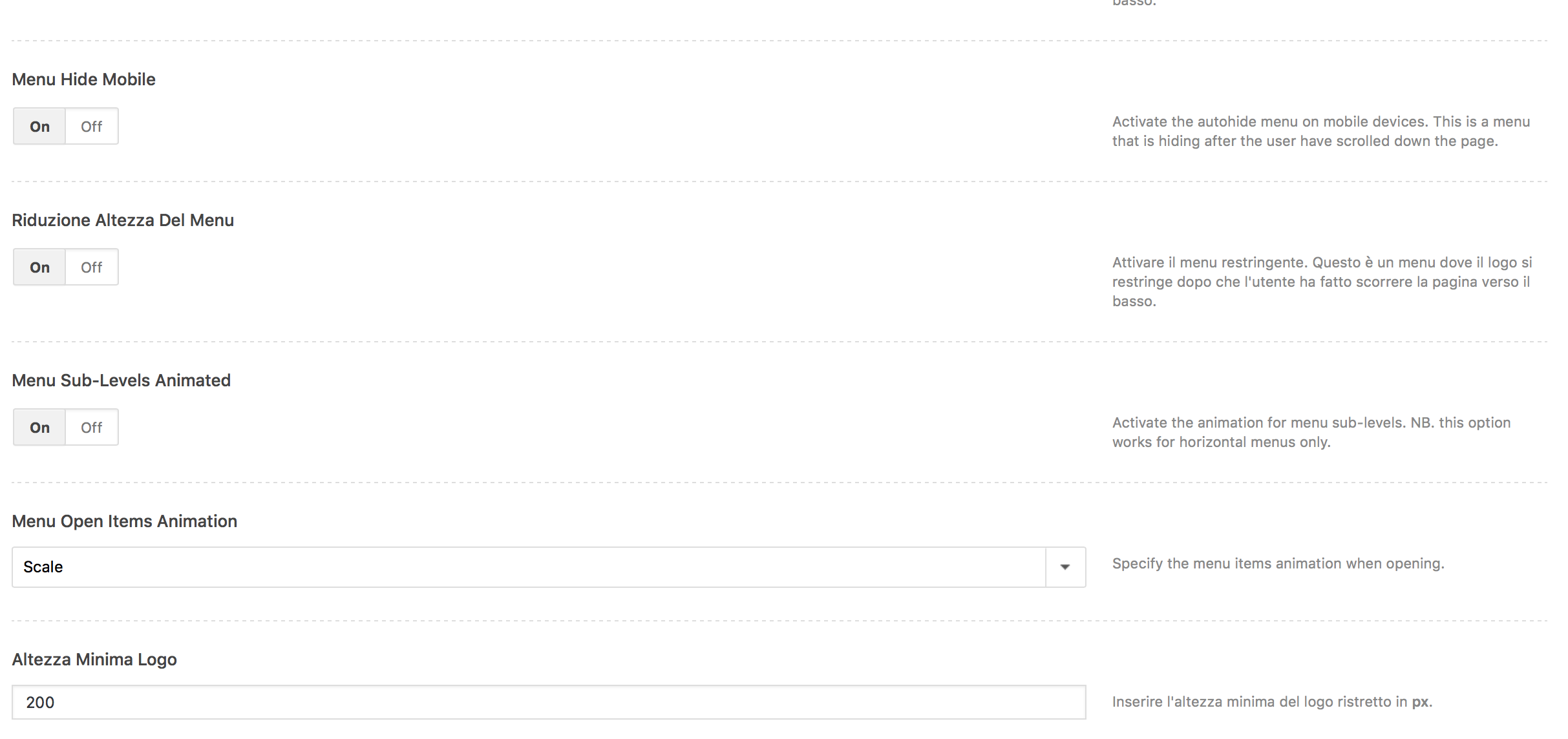
Hello Undsgn. Can you please tell me how can I enlarge my logo here, (http://myplantgarden.com/wp-content/uploads/2017/10/Schermata-2017-10-31-alle-09.13.46.png) when I scroll the page is too small. Thank you for your help! Best.
Hi sdoganati! In Theme Options > Menu > Animation please set the Minimum Logo Height at the very bottom: http://undsgn.d.pr/wgzQkF/4kJF5aIG
Have you tested a real value like 80, 100 etc that is smaller than the real logo? Unless you have not inserted custom codes this is the option for the Shrink menu.
Is there any way to upload 360 panorama so it will work inside media gallery? I want it to be visible with other files when viewing in lightbox. I tried upload oEmbed from Pannellum but it is not supported. Is there any other way to put panorama into media library?
Hi! Pannellum is not one of the supported formats not by WordPress not by Uncode (https://support.undsgn.com/hc/en-us/articles/213457109), some users used YouTube panaroma videos. Anyway if you need dedicated support is offered in our Help Center, there we have a completely dedicated support team, please submit a ticket and we care to support the solution! Thank you!
https://support.undsgn.com/hc
Thanks, Youtube 360 will do
Hi matelek! Can you please open a ticket so we can check privately?
Hello!
After i updated the theme today, all the backgrounds, lost on the site, and i cant do it back, because if i pick a color for it in the composer nothing happens.
www.kisdunadokk.eu
I was thinking, if i cant fix this alone, i really need to buy the support for a new 6months even this is the themes fault?
Hi wolfskullpro! We are sorry for this problem but you cannot say it’s a theme problem, otherwise here should read 28.000+ message of angry users that have update their websites and they missed styles. Please note that any update is strictly tested by our team, our beta testers and Envato too. What backgrounds do you refer? Sorry but I see you have dark blue backgrounds on your site…
Hello! What are some reasons that a video background header would suddenly stop loading? I’ve disabled the plugins one by one, and they don’t appear to be the cause.
Hi thegildagency! I’m sorry but we have never received this complaint, otherwise here you should see hundreds of similar messages. Please open a ticket and we’ll check what is the problem soon.
Hey & thanks for this great theme! One question: is it possible to have an alphabetical order in the portfolio? I’m using the portfolio as a member-list for a creative community. Or is there a better way to handle it? Best, Hendrik
Hi Durango95 and thank you for appreciate Uncode!
Please check the Posts module > Build Query options: http://undsgn.d.pr/KKg9ne/3U9d5lpG
Anyway if you need dedicated support is offered in our Help Center, there we have a completely dedicated support team, please submit a ticket and we care to support the solution! Thank you!
https://support.undsgn.com/hc
Now that was a quick reply. Thanks a million!
Hi and thank you for confirm!
Hello, when I create new shop main page and do the permalink to …domain.com/shop it shows demo structure on the shop with my products. Why it do thing like that? Where I can change that?
Hi Acilt! When you set your shop page from WooCommerce option note that WooCommerce overrides a possible static page that you have, this is ust how WooCommerce works. So you need to style this page from the Theme Options > Products and use the Content Block method to create your page (if you need an advanced layout). To style this kind of special pages, as you can see this pages are not accessible as normal pages, you can follow this:
Doc 1 -https://support.undsgn.com/hc/articles/213459529
Doc 2- https://support.undsgn.com/hc/articles/213459549
Video – https://support.undsgn.com/hc/articles/214006505
Anyway if you need dedicated support is offered in our Help Center, there we have a completely dedicated support team, please submit a ticket and we care to support the solution! Thank you!
https://support.undsgn.com/hc
Yes! Now it work perfectly Thank you!
Thank you for confirm!
Great theme, but the lightbox will not work for me, whenever I click on a image in a post, it just takes me to a attachment page or goes straight to the media file ie, website.url/wp-content/uploads/2017/10/01.jpg
Any ideas how to get this working as I have reinstalled every from the beginning and it still does not work
Hi and thank you for appreciate Uncode! It seems you are having some JavaScript issue, probably triggered by extra plugins. Anyway if you need dedicated support is offered in our Help Center, there we have a completely dedicated support team, please submit a ticket and we care to support the solution! Thank you!
https://support.undsgn.com/hc
Thank you, I am in the process of re-installing one more time, I will log a support ticket if I still cannot resolve this,
Hi! I don’t think it’s installation related, please try deactivate extra plugin or open a ticket so we can check privately!
Hello again, I just reset my hosting and when I install the theme it looked like its broken, please take a look : http://gadgetyzer.com
Failed to load content css Failed to load plugin url
Hi! It seems you are suffering for new server permissions issue. Please contact your host soon as ask to fix, there’s nothing broken in Uncode, these are server issue and we cannot help better here.
Hi! Already fixed, I have theme file back up that I already put code in it. Thanks again
Thank you for confirm!
Hi. I’ve run a site on your them and just gone live. Getting a really bad jitter on the navbar. Any chance anyone could let me know how to resolve? www.polupoke.co.uk
@media (min-width: 960px){
.menu-wrapper.menu-sticky .menu-container {
    position: fixed !important;
    top: 0px !important;
}
}
Hey, thanks very much, a really nice theme to work with!! Thanks for the CSS, still getting a the jittering when I scroll down unfortunately. Have tried clearing browsing data and purging the cache too and no joy?! Should I update the theme? Thanks again for the nice comments too, appreciated.
Hi! What browser are you? Now I see perfectly fixed to the top: http://undsgn.d.pr/IKZRGw/3CSTNeRY
Hi There, yeah it’s fixing to the top, it’s more when the logo shrinks it it’s not at all smooth, it stops and starts a bit on the shrink/grow?
I think this is caused by the fact this page pretty heavy with on going animations during sections. As you can see normally things go smoother: https://undsgn.com/uncode/homepages/creative-digital-agency/
Ah ok that would make sense! I’ll try switching the CSS animations off and see if that works. Thanks for the help.
That’s fixed it, thanks for the help!
ps: really nice customisation of Uncode theme, would you like to get featured? http://www.undsgn.com/uncode/showcase/
Hi, We’d be absolutely honoured to get it up on the showcase. We have a few bits left to smooth out for mobile which we’re working on over the next few weeks. Would it be possible to send someone an email when it’s all done? If so who can I send it to? Thanks again for the positive feedback. Much appreciated
Hi PADDLER_P and thank you for confirm! Really love the customisations you created! Yes feel free to notify: https://support.undsgn.com/hc/en-us/articles/214025429
ps: just as suggestion I think that the problem is that your CSS animations are always running, generally when you see these effects on some websites the effects are coded to be triggered only when the elements become visible, otherwise you risk to stress the browser… I hope this make sense and helps!
Ah thanks so much that’s super helpful and definitely makes sense. I’ll have a look into that and see if I can get that working properly!
Cheers,
Paddy
i’va got a problem with a video gallery masonry: the thumbnails don’t align correctly in the last row
http://serviziotagliolaser.it/video-2/Hi mattiaconti! What you mean exactly? We see that you have 12 slots and 11 elements so you have an empty space.





)