22360 comments found.

Hi AJ, I am using jotform (the oEmbed Plugin) which I personally think is a phenomenal form creator compared to Contact Form 7. I was hoping to past the shortcode it generates into a page as opposed to a post but it’s not working. It does, however, seem to work in a post. Are you familiar with jotform? Thanks! Robert
Hi Robert,
I just tested the plugin and it’s working just fine for me on a page – https://cl.ly/pCSW
I did notice though it’s not showing in the Front-end builder when using the WPBakery Page builder but when you save and view the live site it works.
Can you share the link where it’s not working for you?
The plugin basically just turns the link into an iFrame, which you could also just do yourself, https://www.jotform.com/help/148-Getting-the-Form-iFrame-Code – and may be better anyway.
- AJ
Thanks, AJ, Yes, I found the solution shortly after I messaged you. Thanks for replying. Do you like JotForm? I think it’s awesome but I’d like to know what you think. Best, Robert
Oh nice, I’m glad you got it working 
Yes it’s a very nice site and if it works for you that’s awesome. I just personally don’t like having emails sent through a 3rd party server for privacy reasons. When you use a form like Contact Form 7 it’s sent from your your own server.
And being in the USA with so many privacy laws it’s not something I personally would use. Of course it depends a lot on the information you are collecting and if you have one of the premium (not free) accounts so if there is ever any sort of privacy breach that you can hopefully resolve it through them if it was their fault.
- AJ
I am collecting some info so I am definitely going to heed that warning about Privacy and use Contact Form 7. Thanks for the advice. I was actually wondering about that so have clarified the point. I wish that it were easier to modify the format for Contact Form 7. I did install the customizer plugin and that helps. However, do you know what code I would use to get the data entry fields and their names on one line as opposed to two. I always see, for example, a label like Email Address and then the entry box is below it when I would like it to be beside it. Thanks, AJ.
Hi,
To have items on the same line you just need a little custom CSS, usually labels are blocks so they are added before the input. But you could also just use a placeholder instead of a label – https://contactform7.com/setting-placeholder-text/
That said, there are soo many form plugins out there that do offer a lot more. Contact form 7 is just free which is why it’s recommended. I don’t want to add forms to a live demo site and then tell customers to go out and purchase a plugin before importing the demo.
So you can always do a little search to see if you find something better with more design options (some people really like WPForms but I’m not sure if it has styling options built-in)
- AJ
Thanks, Could you possible tell me what custom CSS I would use for that? Paid plugins are really excessive for my needs so Contact Form 7 is the route I will go.
If you share the URL and let me know which fields you want side by side, sure I can help with that.
WP Bakery
Hi AJ – Have you ever come across a problem where by the VC /WP Bakery back end editor does not display. If I click classic mode I see ‘classic mode’ and the vc code / text.
But is I click Back end editor the code box collapses / disappears and I cant see of work with VC in the back end ?
WP is up to date, I’ve tried deleting the plugin and reinstalling, ?
I’ve checked as many setting I can find, they all appear to be correct , on etc?
Thanks
Hi Chris,
Normally this would be one of the following:
- Memory limit being reached so it can’t render: http://wpexplorer-themes.com/total/docs/increasing-memory-limit-to-php/
- 3rd party plugin causing a javascript error in the backend. Do you see any issues if you open the browser console? and did you try de-activating any 3rd party plugins?
- WordPress is outdated but your theme and plugins are up to date.
- AJ
I am seeing the following outdated templates in 4.5.4.3:
Total/woocommerce/archive-product.php version 2.0.0 is out of date. The core version is 3.3.0, Total/woocommerce/content-widget-product.php version 3.0.0 is out of date. The core version is 3.3.0, Total/woocommerce/loop/pagination.php version 2.2.2 is out of date. The core version is 3.3.0,
Hi there,
WooCommerce 3.3.0 was literally released yesterday. I am aware of this and I’m updating the theme today with any required WooCommerce fixes. While I wish I could always release an update instantly to the theme it does take some time to go through everything, tweak things if needed as well as finish up any pending updates.
Thank you for your patience,
- AJ
Thank you for your response, I did not know when it was released so I was just reporting. Sorry for this seeming like a quick report. actually I would have held off upgrading if I knew the release date.
Oh no worries! It’s just sometimes it gets a bit overwhelming when a lot of customers are doing the same But I can totally understand especially since not all theme developers are on top of things. Sorry if I came across as being a bit rude.
I am doing some final tweaks and checks and then I’ll push out the update. If you want you can view the upcoming changelog here: https://wpexplorer-themes.com/total/upcoming-update-changelog/
- AJ
Hi AJ Very last request for help. I recently added the Total – Facebook Page widget to the sidebar. This increased the number of http requests by 16 (eg from 45 to 61 for one page with lots of content). Is this what you would expec? It seems way over the top. Most seem to be js files called at the end, but several are loaded at the beginning. Any comment or advice welcome. Thanks for encouraging me through this. You are amazing. Regards, David
Hi David,
Yes this is quite normal, most the requests will be from the little pictures though of people that like your page. There isn’t anything you or I can do about it though because it’s just an embed directly from Facebook – https://developers.facebook.com/docs/plugins/page-plugin/ – you could maybe lazy load the widget but wouldn’t really do much. Facebook has a fast CDN so it shouldn’t really slow down your site loading time at all. Of course the alternative is to just make a nice banner image and insert an image to your sidebar that links to Facebook instead if speed is a concern.
- AJ
You gave me a good idea though…I just added some new options to the widget for the upcoming 4.5.5 update to be released today: https://cl.ly/pFVJ
Glad to have helped!! This old man just bought electric mountain bike. Feel like a teenager again. Roll on Spring. Very best wishes to you. David
Dam nice, I was actually looking at some youtube videos about the electric bikes yesterday on the Global Mountain Bike Network channel. I love MB – can’t wait for the weekend to ride
Hi there,
I am using the Glitz & Glam template. On the homepage where the ‘Featured Images’ are, I am using 2 products instead of 6, the images are constrained to 270×320px and so are blurry as there is only 2.
How can I stop WooCommerce from constraining the images to 270×320px?
Many thanks.
Hi,
Simply log into WordPress and go to Theme Panel > Image Sizes > WooCommerce to tweak your default settings. By default in this demo I only added cropping for the entries which you can either remove or tweak: https://cl.ly/pEXn
- AJ
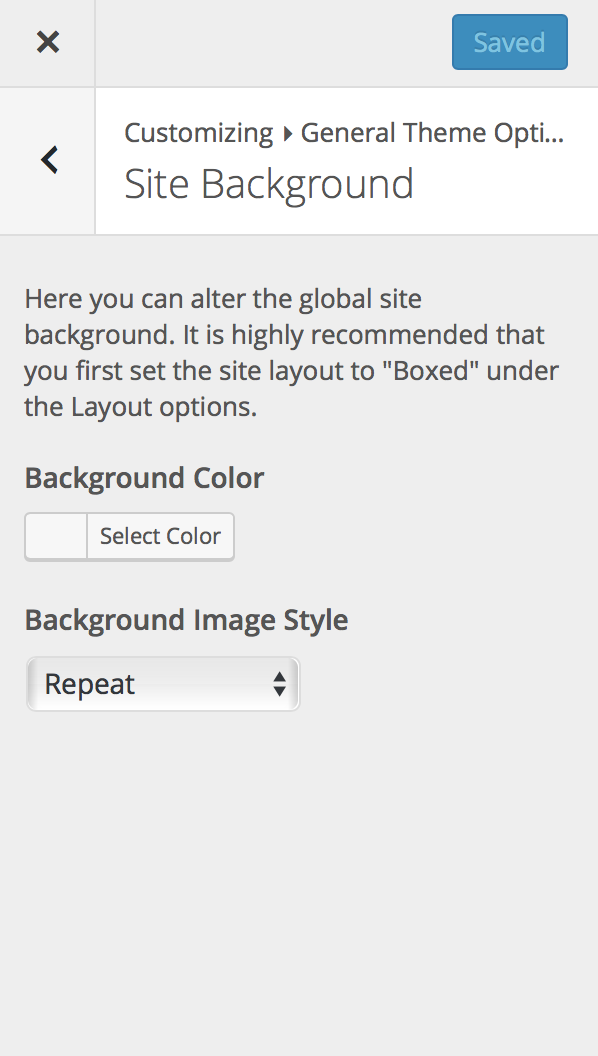
My site does not have an option for changing the background repeat image in the customizer anymore after updating to the latest version. Now the main page has one colour, the rest of the pages have another and I cant change it. Any ideas? http://diversityautofilms.com
Hi,
It actually looks like your site has a custom background set for the homepage only, can you check the page settings to see if it’s set there: https://cl.ly/pDnJ
The option for your background should still be in the Customizer but depending on what version you changed from it could be in a different location. It’s located at Customize > General Theme Options > Background
Like this: https://cl.ly/pEAY
And background “repeat” option (I’m not sure what you mean by I think you are referring to the style perhaps) will not display unless you have a custom background image selected: https://cl.ly/pC21
Does that help? If not, let me know so we can figure out what’s going on here!
- AJ
Thanks for this. The thing I am referring to is your second picture. There is no option in the customizer to set a background image. Why might that be? Here is a screenshot http://diversityautofilms.com/wp-content/uploads/2018/01/Screen-Shot-2018-01-30-at-1.19.31-PM.png
I am using a newer function for the Customizer that was added in a recent WordPress update, is your WordPress version up to date? The only reason I can think for it not showing is if WP is outdated.
- AJ
I just updated to 4.9.2 and it is still not there. Any ideas?
Very weird…I see from your screenshot you are also missing the Pattern option. Any chance you can go to Theme Panel > Import/Export and copy the settings and add it to a gist – https://gist.github.com/ – so I can import your settings and see if there is any setting causing the conflict? Thanks!
I would be happy to log into your site as well to look for you but you need an active support license to be able to submit private tickets – https://wpexplorer-themes.com/support/ – if you don’t want to renew at this point we can figure this out via the comments if that’s ok with you. I’m sure we’ll figure it out, very weird though!
- AJ
Yes! Very helpful, ok give me a minute to check and get back to you.
Ok so the issue is because there was a background and a pattern saved neither options was showing. I fixed the bug for the upcoming update which I plan to release tonight. If you want here is the fixed file: https://cl.ly/pDqN
You can update via FTP at Total/framework/customizer/settings/
And you should then be able to view the settings again.
Thank you for reporting the issue and helping me troubleshoot it. I am amazed no one else ran into this!
- AJ
Thanks!
FYI, the image chooser works, but if I put in a custom image and set it to repeat, it does not work. Just so you know
I’m not having issues when using your imported theme settings and the repeat background. Here is an example: https://cl.ly/pCLn
Do you mind saving the settings so I can view the live site?
- AJ
I changed a bunch of times and worked, thanks!
Oh nice! I’m glad it’s working now. If you need anything else, let me know.
- AJ
 Thanks!
You need to purchase the theme first Then you can install it and use thee demo importer to import the demo.
- AJ
I cannot find within the theme any template modules. How can i access the template library?
Hi,
This is AJ the theme developer.
The “Template Library” in the WPBakery Page Builder is actually a premium add-on so it’s disabled unless you activate your own personal license of the plugin.
But I honestly don’t recommend it, the template library is not very good it has very ugly generic layouts (like a heading with some text and an image to the side), some of them even have some bugs. I wouldn’t recommend buying your own license just for this addon because it’s not good.
I can show you a video if you’d like to see the options.
Now, I am working on a custom template library for Total to release in version 5.0 which will have fully modern “blocks” you could insert to a page. For now if you have an empty/blank site you can start out by using one of our demos – https://wpexplorer-themes.com/total/docs/importing-sample-data/
And you can if you want create your own custom templates, this isn’t a premium function this you have access to: https://wpexplorer-themes.com/total/docs/visual-composer-templates/
I hope this makes sense, if you do have any follow up questions or doubts let me know!
- AJ
Then to bundle the Templatera does not make much sense. I actually bought the theme because it was supposed to be able to use of the templates. Otherwise It will take ages for me to create a page.
Templatera is very different from the “Template Library”. Templatera allows you to create your own templates and save them and edit them. The premium Templatera Library is just some presets you can’t edit or manage.
Does that make sense?
You can also use Templatera to create a custom header, footer or dynamic templates – https://www.youtube.com/watch?v=eGYuBjqkj8Q
- AJ
Oh, have you checked out the video for the page builder? https://www.youtube.com/watch?v=2JyW4yAyTl0
Creating pages is very easy and quick.
That said, if you have a mockup or layout you are looking to copy let me know, I could either show you how in a video or make a simple Templatera template and export it for you so you can import it.
- AJ
That would be great! Please let me know how can i send them over.
You can open a private ticket and request it be assigned to me (AJ) -https://wpexplorer-themes.com/support/
There is an uploader for uploading images but you can also just submit a plain ticket and I’ll reply back for further info (for example if you have a PDF that is too large to send through our form).
I am working on new a new Template System anyway so it would be great to have some inspiration
- AJ
Hi AJ
I’ve tried to add YouTube Videos to the following page
https://www.gardengoals.com/garden-football-goal-videos/I tried by adding the ‘video’ element in vc, but that didn’t work.
I then tried
https://wpexplorer-themes.com/total/docs/insertembed-videos-custom-parameters/But the video two videos fail to appear in the row.
Any ideas ?
Thank you
Hi Chris,
Looks like your site is using https but you are using an http URL for the video, make sure that your youtube video URL is also using https otherwise it won’t load for security reasons.
- AJ
That is great !! Never come across this.
Thank you for your ‘sage’ advice.
GREAT SUPPORT ! ...... as always 
Chrus
I’ve got 20+ sites with Total and some are activated, some are not. I need to figure out which sites are activated and what license they’re using. I don’t have a “Theme License” option in the Theme Panel menu. I tried logging into the WPExplorer Envato-linked support portal and none of the themes show any active/dev URL at all. I’ve also tried contacting through the Envato support thing as well as through the WPExplorer website and I can’t get a response.
Hi,
This is AJ the theme developer. First of all thank you for all the purchases! I searched our tickets (we use Helpscout) and there is no ticket from your username ever submitted (did you recently change your name?) – https://cl.ly/pC9V
When did you try contacting us?
We are definitely here to help, I’m not sure why we didn’t receive your email since we are getting tons of emails still from other customers.
The theme license function is a newer feature so if you don’t have the Theme License option it is because your theme is outdated. It’s possible that none of the URL’s are currently “registered” because they were all using older versions of the theme which is why you wouldn’t see anything in the support portal.
Also if you do have that many licenses I can add you to our exclusive Slack channel for our customers with a lot of licenses where you can always DM me and get access to beta versions, post suggestions, etc. Let me know if interested!
- AJ
Haven’t changed user names :/ I tried contacting you on the 26th, I believe. Anyway, sure, I’d love to get on Slack. This has been a monstrous headache so far and I’d love some advice.
I sent you an invite to the email that I had in our support portal (office at our domain.com)
Do you understand though that unless you manually activated your licenses in the past in the theme setting you won’t have any “active” licenses defined in the support portal? It sounds like you may be working with older versions of the theme prior to the activation function being added.
- AJ
Once in slack feel free to send me a DM by clicking my name on the left hand-side and we’ll figure out what’s going on here.
Hi AJ, I’d like to make a suggestion to enhance your “Blog Grid” and “Post Types Grid” modules. When choosing 1 column with “Left image and right content” , the two columns will be divided 1/2 + 1/2. It would be great to have some flexibility here like you have in the “Customizer – Blog – Archives and Entry” settings, where you can choose the left image width and right content width.
Keep up your awesome work!!!!
Michael
Hi Michael,
The issue with having those options in a module is the CSS needs to go inline and inline CSS overrides responsiveness so if you were to enter custom widths the responsiveness would break.
I do have plans though for some new modules (working on adding some new magazine style modules) and one will have by default that left/right look so I can look into maybe adding custom widths for that.
Since I am planning on having these new and better modules I don’t want to tweak the older ones too much from here on since I believe most customers will make use of the newer modules
- AJ
Hi AJ, does this then also mean that responsiveness breaks when setting a custom width in the “Customizer – Blog – Archives and Entry” setting, when using the 1 column “Left image and right content” style?
No, because the Customizer can output the CSS in a style element in the head tag. When using modules the CSS must be added inline which overrides CSS in stylesheets/head tag.
Is there a way to hook your Image Gallery Metabox into the Row Background function so on page load it’s dynamic and loads a new, random image from the gallery metabox (instead of just being able to choose 1 image for the background)?
Yes, but not via any sort of built-in setting since its not something that has ever been requested before.
You’ll need some custom code hooked into wp_head that grabs the images (you can use the core wpex_get_gallery_images() function to pull an array of image srcs or you can use the wpex_get_gallery_ids() function to pull a list of ID’s if you want to make use of the Total thumbnail function for cropping the image – https://wpexplorer-themes.com/total/docs/total-post-thumbnail-featured-image-helper-functions/ ) and then randomly picks one and inserts inline CSS to target your row’s background (add a unique ID to your row to target it).
It should be pretty easy stuff but if you want some help with the custom code let me know.
- AJ
That’s awesome. Thanks!
Yes, if you could help me with code and where to place it in the child theme, that would be great. I’m only using this function on one page, using the landing page template if that makes a difference.
Here’s the page for reference https://www.jennifermeyering.com/photography/
I want the image to displayed at full so no need for cropping.
Oh hey there Jennifer, I didn’t recognize you from your username, nice to see hear from you again, I hope you are having a great start to 2018.
Whenever I see you site I notice some new little tweaks here and there and keeps getting better and better
I was a bit confused at first because you have a row with white text on a white background so I couldn’t see anything but I see what you are going for.
This code should work (tested locally before sending it you)
add_action( 'wp_head', function() {

    if ( ! is_page( 415131 ) ) {
        return;
    }

    $images = wpex_get_gallery_images();

    if ( ! $images ) {
        return;
    }

    $random_image = $images[ array_rand( $images, 1 ) ];

    if ( $random_image ) {
        echo '<style>.vc_row-o-full-height{background-image: url(' . $random_image . ');background-size:cover;}</style>';
    }

} );
The only issue is depending how your site cache works you may see the same image and not a random one as the image could be cached. If that is the case it’s possible to add a transient to clear the cache every so many hours or days or to disable the cache on this page only.
- AJ
Awe, thanks! If only I knew how to code as well as you… hehe
Thank you so much for that code. It works perfectly and exactly what I wanted!
I use WP Rocket as a cache so if I see problems with the same image repeating, I’ll just disable the cache for that page.
Thanks again! You’re awesome!
Hi, nothing is shown, when i use “image grid” in WPBakery. Never had it before and it works on other sides. Do u have any Ideas?
if i check the html-code in the browser, the element is not in.
there should be an image grid under the textblock
closed i´m gonna reinstall wordpress
the problem still exists after a complete reinstall.
https://www.tenza.de/wordpress_y/there is a image grid under the textblock. but not shown.
Hi,
When I look at your page I don’t see any code for the image grid. When testing locally in the latest version I’m not having any issues: https://cl.ly/p9s6
Unfortunately just looking at the front-end it’s impossible to know what’s going on. Have you selected your images correctly? Do you see any errors in the backend?
If you want you can open a private ticket so we can log in and have a look – https://wpexplorer-themes.com/support/ – as it’s the only way we’ll be able to assist.
Additionally you may want to try first increasing your memory limit as well as enabling WP_Debug (to check for errors):
- http://wpexplorer-themes.com/total/docs/increasing-memory-limit-to-php/
- http://wpexplorer-themes.com/total/docs/enabling-wp-debug/
- AJ
ps: Re-installing WordPress will never fix a bug because all you are doing is installing the same thing you already had.
ok, i opened a private ticket.
HI AJ, how are you doing?
I have two question.
1.- How can I see more testimonials in the testimonial slider in mobile ? When I am in desktop I can see all of them in different dots, but in mobile only appears 3 testimonials. here you can see at bottom of home page. https://psicologialqo.com
2. I use mac book pro retina, and colors are perfect. But I have seen in other laptop that for example in page “CONTACTO” the 3 icons for envelope, location and telephone number doesnt appear.. and the color where the contact form…also disappears.
hope you can help me.
Thank your very much.
HI there,
I am doing well, thank you for asking. I hope you are doing well also.
1. It’s showing all of them for me but there isn’t a lot of space for all those slides – https://cl.ly/pALt – generally I would recommend displaying only 3-4 testimonials at once.
Do you not see all the dots like my screenshot?
You could use the Testimonials Carousel though instead to show multiple at once. It has a custom gray design but it would be easy to tweak via some CSS or via the styling options in the Customizer.
2. The colors look good on my iMac as well, however, it is a very very light hex color (#f2e5fc) so on some displays (lower quality screens) it may not be very easy to see as well on different brightness.
I would recommend increasing the color a bit because it is very light it’s almost a white actually with a slight pink. This is a great tool for that: http://www.0to255.com/
- AJ
HI AJ,
1. yes..Now it is showing… What I did is to remove dots. For the moment my client want to add like 10 testimonials in the same page..if I found a better solution..I will change.
2. Yeah.. This 0to255 is really good tool!!! thank you very much. I add these hex colors that I am using in an old laptop…and it looks like white.. So I will have to look for an other color..very “soft” pink/beige it is nice…but the next one which is just a bit darker..It’s a very girlish color. So maybe gray is the best solution..
Thank you very much! Hope to finish soon this site to share it here for others.
Hi, is there any change to change the logo via custom css on sites? (I´m changing the header-backgroundcolor on some sites)
Hi,
What are you trying to change exactly? The logo itself can be fully customized via Appearance > Customize > Header > Logo. Here you can change the colors if it’s a text logo or you can upload a custom image logo if you want an image logo – https://wpexplorer-themes.com/total/docs/custom-logo/
Now, if you want to change the logo to have a different logo on different pages that wouldn’t be a CSS change because you can’t alter an image src attribute with CSS you would need to use some PHP via a child theme. Here is a sample snippet – https://wpexplorer-themes.com/total/snippets/custom-logo-image/
- AJ
Hi AJ! Do you know how to format this page so it’s not squished? https://www.sleepbabylove.com/testimonials/
Also, do you know where I can change the image size for this page? I couldn’t find it when i’ve changed most other pages! https://www.sleepbabylove.com/news/
Hi there,
Nice to hear from you again
- What do you mean by “squished” it looks good to me: https://cl.ly/pB8q
Now if what you want is to make the testimonials expand so they take up the whole screen, simply edit the row they are on and select to stretch it like this: https://cl.ly/p9qR
- Simply edit the testimonial module on the page and enter a custom size for the thumbnail: https://cl.ly/p9vI
Or if you have selected the “testimonial_entry” for the image size then you would go to Theme Panel > Image Sizes > Testimonials to alter the size there.
- AJ
Everything looked good except for the baby image was cutoff. It used to be correct – I did change the font so maybe that’s it?
The default background position of the page title is 50% 0 for this particular image you may want to center it or place it at the top. Adding some CSS to the page like this would fix that:
.page-header {
    background-position: center center;
}
Which would give you this result: https://cl.ly/pBMg
Changing the font wouldn’t alter this, the only thing that could have changed would be if the image itself was modified since the backgrounds for the page title have worked like this for a long time now.
- AJ
Hi, AJ, I start to build up my website…...Actually, just try to start…..Before I do something wrong, I want to ask you three questions: The first question is that should I delete all those pages I do not need if I use the base lite demo? For example if I want to use homepage 2, do I have to put all other 29 pages into trash? And same with portfolio and shop page as well? The second question is that if I delete those pages which I do not need at this moment, can I get them back later when I need? For example,I delete those pages related to shop because I do not want to open the shop yet. Is it possible for me to open it later? The last one is about language. Can I get any demo which has been translated into other languages e.g. German, Chinese? Or should I use WPML plugin to be translated by my own? Sorry for these basic questions….I have tried to search for some information in the comments but could not get much…. And thanks for helping…
Hi there,
- Yes, delete anything you don’t want or need. You don’t have to but it keeps your site cleaner
But if ALL you want is a specific page layout don’t import the whole demo just tell me and I can give you the code for that page so you can copy/paste it on your site.
- If you remove them completely from the trash the only way to ‘re get them” would be to re-import the demo or ask me so I can send you the code.
But all the pages just use simple layouts/modules so you can pretty much build any page with the page builder in a couple minutes If you don’t know how to recreate something I can explain how via a video.
- You don’t have to setup a shop yet, but in order to import the demo, because it has a shop you do need to activate WooCommerce but you can de-activate it after importing the demo.
- All the demos are in English, we don’t have any demo in German, sorry

If you want to translate a site you don’t need WPML, WPML is only for multi-language sites so if you want your website to be in multiple languages and toggle between them.
- To be honest it sounds like you don’t really want to import a demo since you will be adding things later, if you are familiar with the page builder and you just want a homepage for example to start let me know and I’ll just send you the code for that homepage.
Most customers don’t import demos they just build the site from scratch since most sites are only a few pages and a blog. And importing a demo to do this may actually take longer deleting stuff you don’t want then adding pages from scratch.
- AJ
Many thanks AJ. Your answer is really really helpful. About the language, yes, I plan to build up one multiple languages website. It is OK. I can learn how to use translator plugins. About the site, yes, I agree with you. It could be better to build up the pages I need. Honestly say I have to get some knowledge about word press. This moment I thought I could learn the structure and how the WP is organizing the content by using and changing demo. But it is nice if you can show me the video. Thanks again…..
Have a nice day!
For the most part the content on the demos are just normal pages created with the page builder: https://www.youtube.com/watch?v=2JyW4yAyTl0
Except for Blog posts which are just normal posts with plain text added.
I think the best place to start though is to first have a look at the theme structure here: https://wpexplorer-themes.com/total/docs/total-wordpress-theme-anatomy/
Even though it’s a very “complete” theme it’s still very slim in the sense that there isn’t much to learn and the page above should help a lot.
If you have any specific doubts or confusion let me know so I can help!
Once you get a hang of the theme it should be a piece of cake to use and customize
- AJ
Many thanks, AJ
I am a delinquent updater. I am currently at v 3.6. Do I need to update each version until 4.5? Or can I skip directly to 4.5.4.3?
Ha ha, that made me laugh Thanks for that! (delinquent updater)
No, you never need to or should update step by step because ultimately it does the exact same thing.
Version 3.6.0 is old but not insanely old so I don’t think there is anything to really worry about. Excerpt you should check out the warning notice on version 4.0 – http://wpexplorer-themes.com/total/docs-category/updates/ (click on the left side to scroll down to that version). The main thing to note is the changes to the “center row” function which has been deprecated so if you continue making tweaks or building with the theme that you use the new stretched row functions instead.
Of course I would recommend doing a quick backup of your database just incase anything goes wrong.
Since built-in updates didn’t get added until more recently you would either want to temporarily switch themes, delete Total and upload the new version or use the Envato Market plugin to update it – http://www.wpexplorer.com/envato-market-plugin-guide/
Once updated you can go to Theme Panel > Theme License to activate your license and you will get auto update notices in the dashboard via our own API.
If you have any questions or run into any issues just let me know!
- AJ
Hi AJ,
I have 2 questions regarding Social Media Sharing. I am working on https://www.ibizahorsesanddogs.com/prijzen/
Q1. Is is possbile to influence the text that is being shared? The Facebook Share uses Yoast Search Engine Snippet. The Twitter Share uses the Title of the Page The LinkedIn and Pinterest Share uses the first few lines of the page Google+ uses Yoasts SEO-title
It would be cool if I could change this so I would get a more consistent behaviour. Is that possible?
Q2 Is there a way to center the social media buttons on the page? I can only get it to align left.
Regards, Ron
Hi Ron,
1. The share buttons are created using the default way of sharing links stated by the different sizes.
Facebook share’s are completely independent from the theme because the only parameter they take is the URL the text comes directly from your open graph meta.
Twitter by default takes the title in the share link although you could show a summary, it makes more sense to have the title of the post and when someone clicks it if they don’t want to just tweet the title then they will edit it and write whatever they want (most users do this).
Pinterest and Linked in share links take a title and summary parameter.
Google Plus always looks at the Open Graph meta 9nothing needs to pass through the URL).
You could modify the file at partials/social-share.php to change how the share links work but I don’t really see any problem in the way things are currently setup and no one has ever mentioned any issues before.
I am open to any suggestions you may have, how were you expecting things to work? And were you looking to alter things on a per-post basis or globally?
2. The CSS to center the social share would be this:
.wpex-social-share {
    text-align: center;
}

.wpex-social-share li {
    float: none;
    display: inline-block;
}
To be honest, while Total does have built-in simple share (most customers are creating business sites without even a blog) for high traffic blogs I recommend using 3rd party social share plugins such as AddThis or Sumo (no matter the theme) for optimal social sharing and statistics. Most people though don’t even need to worry about social sharing though because they don’t even get enough traffic for it to matter.
- AJ
Hi AJ,
Thnx for your swift reply. The CSS for center the social share works great.
Somehow it feels weird to me that on 1 page the social media shares behave differently. Of course this goes for other websites as well. I’m probably just nitpicking.
I’d especially like to influence LinkedIn and to lesser extent Pinterest. I suppose I could rewrite the first paragraph. That would work. However, being able to change the Title and Summary on a per-post basis would be neat. I can’t do that now, can I?
I will look into the other plugins you mentioned.
Yes, I’m following standard practice when it comes to adding the social links but I am totally open for suggestions or at the very least adding some filters if you wish to change things via a child theme.
- AJ
Hello AJ,
It would be nice to have a snippet to enable social share on Search results, similar to the one you provided for Archives :
// ENABLE SOCIAL SHARE ON ARCHIVES

add_filter( 'wpex_has_social_share', function( $bool ) {
    if ( is_archive() ) {
        $bool = true;
    }
    return $bool;
} );
Michel
Hi Michel,
You can add social share to the search page by inserting it via a hook – http://wpexplorer-themes.com/total/docs/action-hooks/
But search results aren’t a page or post so the titles/descriptions and open graph meta won’t work. And actually sharing and linking to search result pages is bad for SEO so I highly don’t recommend it. Not to mention people don’t share search results.
Or have you noticed via your site stats that a lot of people are visiting and sharing your search pages already? That would be the only reason to possibly consider it.
- AJ
Thank you AJ.
I’ve looked at the documentation and existing hooks but am unable to find what to add for my objective.
So I’ll follow your advice not to make search results shareable.
The code to add it is very simple:
add_action( 'wpex_hook_content_bottom', function() {
    if ( ! is_search() ) {
        return;
    }
    wpex_social_share();
} );
To see what hook to use you just need to open search.php and see what hooks area available and choose one. And to see how to load any theme file check out the Total/framework/hooks/partials.php file or use simple get_template_part functions to load the file.
And while it will load the code for social sharing (you need to keep the code you mentioned previously as well but change is_archive to is_search) the title, description and open graph meta won’t work so the sharing would be a bit weird.
If you want full-site social share you can always just use something like this – http://www.addthis.com/ – and have it placed in a fixed position across the whole site and just disable the theme’s built-in share function.
- AJ
Thank you indeed AJ, also again for the nice way you provide useful knowledge beyond issue fixes 
Michel