59160 comments found.

Hello, 1. I have problem while adding post using RH front end form. after adding offer url, its parsing and showing thumbnail. If i select one thumbnail and submit the post, it is not displaying in post view(offer grid.) what to do.
2. While adding post using front end form, when i click on upload image.(button to upload thumbnail) it is opening in wordpress format. https://imgur.com/a/skf5A i want to display normal dialog box to access the folder and in mobile, it should open gallery .
3. https://imgur.com/a/Ftj6V in this i want to show both thumb up and down.
not clear what problem you have. with auto parsed thumbnail or with uploaded thumbnail
3
.btn_act_for_grid .table_cell_thumbs, .btn_act_for_grid:hover .thumbscount{display:inline-block} .re_actions_for_grid .thumbscount{display:none}
you can place this in theme options – general options – custom css
How to add thumbnail to post. . while entering url in add deal form , it’s automatically showing thumbnail right ? If I select that thumbnail and submit the post , it’s not showing in grid. Instead store logo is displayed
Please, send admin access in the contact form. Provide also in message: your issues and link on current comment (you can know it if you press on time in your comment)
Sent.
No response
it’s in queue, wait for answer
STILL FACING SAME PROBLEM. NOT RECTIFIED YET. Andrew Berdov asked me to remove two slash from a PHP file. (Via mail). But still it’s not wording and no reply for my mail also.
did you remove it? send screenshot what you have now
write, please, to email of Andrew Berdov. You have his direct email
I wrote before 4 days itself. No reply yet. Can you please help asap
I wrote before 4 days itself. No reply yet. Can you please help asap
I noticed on my home page when loading it wants to load the carousel. I haven’t enabled that yet. How do I eliminate that?
https://kitsn.co/it’s enabled in your theme option – general options
Plz find this attachment and tell me that where is featured-list displayed on product page (Review with block) in product edit page.
I don’t see any attachment
You can add it in Short Description of product
I think so but when i go edit page of this product short description is blank so from where its come?
if you use COntent Egg templates, it will be from description of main offer
Hi I just send you a private email with detailed access to my server and have it pasted here as well. Basically my shopping cart has a bug and it shows 2 set of prices drop-down menu instead of one. I do have this problem for a long time, I reinstall the them and reinstall the baby-theme Re-vendor, and still have this bug happening to in my site. please look at it and fix this fro me as soon as possible. thanks
Looking forward hearing from you soon,
ok, i will check
How to enable products per page or next page functions in vendor store page.
it’s already enabled
1>But Its not visible on the vendor pages, for shop page I use woocommerce product per page plugin. 2>Show on map link on vendor page when clicked doen’t display map. I have attached the screenshot, if you want I can share you the admin access details on you contact page.
https://ibb.co/dYgpt7 https://ibb.co/ipwpt7 https://ibb.co/mc8PRSrequest your solution for the above tasks.
if you use dokan – it has such bug, will be fixed in update
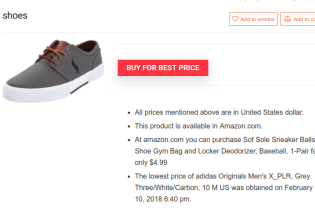
hi in photo http://www12.0zz0.com/2018/02/10/21/302138588.jpg if i click on ( BUY FOR BEST PRICE ) i dont move to amzone i move to my website again so what i do ?
how do you add offer?
i dont make any offer just Add new product and search in content egg and choose products and save
Did you enable woocommerce synchronization?
yes i doooooooooooooo
send screenshot of your product settings, offers which you added, Content egg settings
Is it possible to use the option to reveal the coupon on this page? http://rewise.wpsoul.net/product/nikon-d3300/
yes
Hi fahadc, did you install the zip folder as you downloaded it from here?
please help to reinstall theme
I am not able to install the theme. I am getting an error that “The package could not be installed. The theme is missing the style.css stylesheet.” Please help.
Same error….......
because you install full theme package instead wordpress file http://rehubdocs.wpsoul.com/docs/rehub-theme/theme-install-update-translation/install/
I am not able to install the theme. I am getting an error that “The package could not be installed. The theme is missing the style.css stylesheet.” Please help.
because you install full theme package instead wordpress file http://rehubdocs.wpsoul.com/docs/rehub-theme/theme-install-update-translation/install/
Hi, I want to change the license for another domain. How to proceed?
activate license on another domain
I just bought this theme by my credit card. At checkout screen showed me that only total price would be $61.00 but when I saw my credit card statement after payment it shows me that you charged more $70.00 . I am really very surprised. What dollar rates Envato set? I checked that for last week dollar rates has not been changed against the Indian rupee. I am also not able to contact Envato. Please keep in mind that this is not the first time I am buying anything online. Please do needful.
Please ignore this comment. My bank has resolved the issue and gave me details explanation. I am satisfied by their explanation.
hot thumb like dislike not working page:- https://dealsnow.in
Check fast please
for me it’s working as expected. however you have wrong configuration for your cdn and async plugin for js codes. Ask help from your plugin’s provider or delete plugin
how to sort most viewed content today in backend ? my site:- https://dealsnow.in
where do you want to sort?
In Backend like in all posts page
you can’t do this in backend. only on frontend. You can use statistic plugin or better to use analytics
Infinite Scroll not working perfectly sometimes repeats same deals some times not works (not providing link because my site has traffic for now so i cant annoy users) Just check coding.
thanks…
Hi, i have two questions:
Headings: where are the heights located? Can i change them with my own settings? And is it possible to disable the automatic adding the post name into the post as Heading?
Buttons: is there q way to make square buttons instead of buttons with rounded edges?
Thank you for answering
Greetings Sascha
1. What heading and where?
2. Disable smooth buttons in theme option – appearance
The Headings on pages and posts.
There are many headings in posts and pages. provide details and links
Can you provde an email address? So i will send anscreenshot.
or see here: https://prnt.sc/id3veu
it’s better to share link, because i don’t know what is the page. category or tag, or custom page
Here for example: https://www.blackcatdeals.com/goosevpn/
.title_single_area h1{font-size:20px !important}
you can place this in theme options – general options – custom css
Great – thank you. Can you also provide the breaking points for the template, so I can adjust the size in the different screen sizes? Thank you.
1280, 1024, 768
there is also some additional 600 and 400 but you can ignore them
Thank you for the help. No, I entered it the child themes CSS but nothing happened. In the general options, all works fine. What am I doing wrong? Greetings Sascha
Clear browser cache Ctrl+F5 or website cache. Some server cache styles and scripts. Also, check if your child theme is activated.
what did you add?
Hello. The new price drop from content egg is cool. But how to get the price drop from only selected category? ( or maybe to have 4 price drop widgets and each of them is showing the most price drop from its category only )
For example, 1 widget to show 4 items with most price drop from “phones” and 1 widget to show 4 items with most price drop from “computers”
Content Egg doesn’t have categories, so, you can’t show prices from categories
Anyway, you can write to author of plugin and suggest
support@keywordrush.comKindly see my website i am creating with this theme. I have selected home page first, after editing automatically a sidebar saying Popular products was added. I saw it was from widget so i removed the sidebar from there, now it is showing blank sidebar portion with no widget added. I want full width page, with no sidebar same as home page 1 demo page.
Kindly help me to solve this issue, below is the website link- http://wreckdeals.comthe page attribute option is not in the edit page. How can i remove blank widget from widget area?
It’s in Edit Page, send screenshot what you have
I am on the edit screen of the ReHub Rewise theme and can’t see where to change the Logo image. Also is there any documentation that explains what information is required for the fields of the various elements?
Hi There,
Is the PageBuilder plugin included in your theme? Or do I have to purchase a separate license for that?
it’s included, you don’t need to buy it