19046 comments found.

Hello,
I bought the Betheme and imported the Accountant theme. Everythings now works fine..but in my ’’Articles’’ page (blog archive page), when i click on the homepage ’’Show all’’... there is no articles that shows up. There is the blog sidebar on the right…but no articles shows up… but there is many articles in the post sections and they are all categorized. Otherwise, is there any element such as blog to add in the page builder (in the blog archive page), cuz its empty now  Thx to help.
Hey,
please be so kind and send us WordPress dashboard access privately thru contact form which is on the right side at http://themeforest.net/user/muffingroup#contact so we can have a closer look on it. Please do not forget to let us know in a message, what for this access is.
Best regards,
Muffin Group team
solved!
Great, happy to hear you have sorted it out.
I want to buy ! Can I install the demo version of the theme easily?
Hi,
yes, you can install any pre-built website in a very easy way. For more details, please click here.
Best regards,
Muffin Group team
Need help. Where do you put content that goes in the subheader section?
Hi,
what content from subheader you mean? Any example?
Best regards,
Muffin Group team
Hi, I need media gallery 2 slider revolution slider but its not available in the demo what i downloaded can you help?
Hi,
please show us what is not available exactly because we are not sure what you mean.
Best regards,
Muffin Group team
I need a slide free template named media gallery 2 from slider revolution but while i try to install that i get a popup stating “I need to install from local or online ” through online its redirecting to slider revolution web page while trying through local I did not find a demo zip file of that template in slider revolution demo folder downloaded with a theme file. Please advice
Media Gallery Two is free slider and you should be able to install it using Add Slider From Template option. However, if this somehow doesn’t work for you, please send us private message thru contact form on the right at https://themeforest.net/user/muffingroup#contact but please do not forget to mention, what for this access is.
Wonderful Theme! I wondered how I could remove the ”+” sign and vertical line to the left of the accordion title? Thanks!
Hey,
this could be done with custom css only. If you will send us link to page where you want it to be removed, we will give you the right css.
Best regards,
Muffin Group team
Thanks. http://iclefplus.org/
Thanks. So, to remove icons and vertical line from accordion, you have to use the custom css below:
.accordion .question .title > .acc-icon-plus, .accordion .question .title > .acc-icon-minus { display: none !important; }
.style-simple .accordion .question { border: 0 !important; }
.style-simple .accordion .question::after { display: none !important; }
Hi – I deleted the site that I installed Be theme on & I just tried to install it on a new site & it’s not letting me register the theme. I’m getting this error msg – Purchase code already used. Please deregister purchase code and remove theme folder on: egf.dd3.myftpupload.com. I deleted that site & I forgot to deactivate the theme. As you can see that site isn’t active anymore. What do I need to do?
Please disregard, this has been resolved. Thx!
Hi,
great, we are happy to hear you have resolved it.
Best regards,
Muffin Group team
Betheme options not working. Can you please solve the problem my site is sdprinters.co.za I tried everything including memory, deactivating all plugins etc but nothing
Hi,
please send us WordPress dashboard access privately thru contact form which is on the right side at http://themeforest.net/user/muffingroup#contact so we can have a closer look on it. Please do not forget to let us know in a message, what for this access is.
Best regards,
Muffin Group team
hey guys my google maps isn’t loading correctly. didn’t know if you had any insight in to why that could be?
www.redcube.co/home at the bottom
Hi,
please send us WordPress dashboard access privately thru contact form which is on the right side at http://themeforest.net/user/muffingroup#contact so we can have a closer look on what you did so far. Please do not forget to let us know in a message, what for this access is.
Best regards,
Muffin Group team
Is there a way to import sliders which are offered for free from revolution slider?
Hi,
yes, you can import free sliders via “Add Slider From Template” option.
Best regards,
Muffin Group team
Hey Is it a way to bring back a old copy of a page? It seems that when I use the buildt in building Block there is not revision on older pages?
Hi,
you have to contact with your admin/hosting provider and ask for a backup from the time you wish to recovery.
Best regards,
Muffin Group team
Hi,
I purchased Betheme but i didnt found watchmaker slider demo in slider revolution folder.
Hi,
since version 20, all sliders comes with pre-built websites what means that you can easily import them from BeTheme > Pre-built websites section. More details about this process, you can find in the documentation.
Best regards,
Muffin Group team
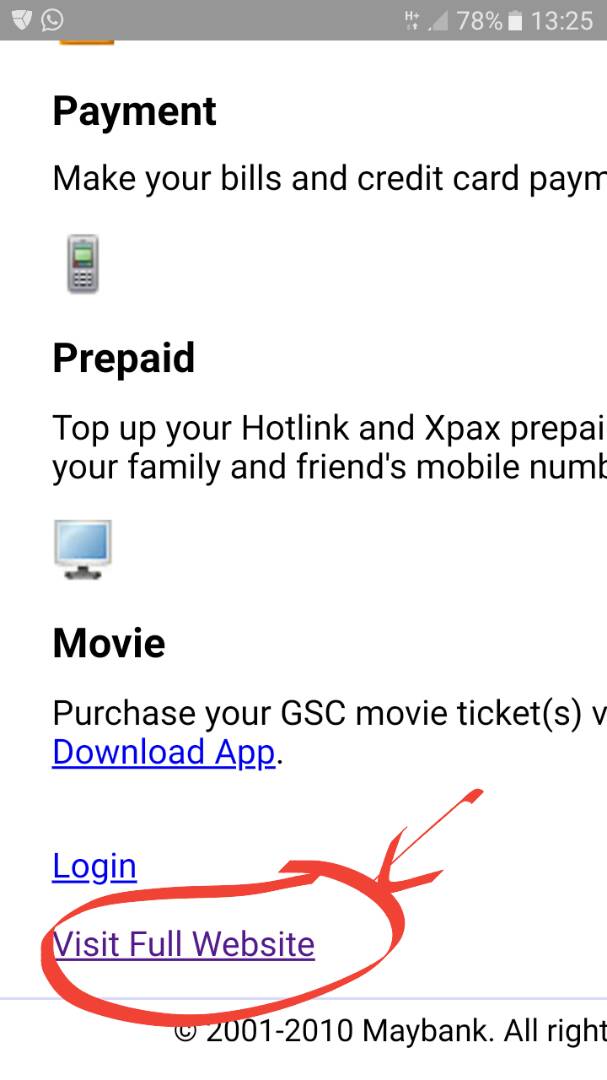
Hello , is there anyway or option to have a ” visit full website ” link on mobile ? like this. http://www.okayworkspace.com/powermatic/wp-content/uploads/2018/04/WhatsApp-Image-2018-04-26-at-1.39.08-PM.jpeg
While looking at mobile responsive , can we have an options to click, so that is back to normal full website like desktop version ?
Hi,
we are sorry but we do not have an option to switch from mobile to desktop version on mobile. We have only option to disable responsive completely.
Best regards,
Muffin Group team
do you think it can be done ? or it need to create an mobile apps for it to work ?
Everything is possible if you know coding but this won’t be easy and quick to make it possible.
I buy Betheme but i have problem to use ” Super Fly Menu ” plugin, because I want to hide the default menu and use custom superfly menu
Hey,
if you want to hide default menu, you have to use custom css. Therefore, please send us link to page where you would like to hide menu so we can provide you proper css declaration.
Best regards,
Muffin Group team
Hi I’ve been trying to use your forum for support but haven’t been able to log in for over a month now. I’m haven’t had any luck getting my password reset through using the “forgot my password”. Is my account locked or something?
Hi,
if you have any issues with logging onto your account on forum, please send us private message thru https://themeforest.net/user/muffingroup#contact so we can help you.
Best regards,
Muffin Group team
Hi guys how can i hide this options to admin wordpress https://pasteboard.co/HijQuXq.png
Hey,
you can disable them under BeTheme Options > Global > Advanced > Theme Functions section.
Best regards,
Muffin Group team
Can you put head menu in http://themes.muffingroup.com/be/agency/
Hey,
yes, you can. Just go to BeTheme Options > Header & Subheader > Header section and switch from current Creative header type to other.
Best regards,
Muffin Group team
thanks
You’re welcome! 
Can we use this video slider in this theme http://nimb.ws/1cnZ4P & paste the vidoe slider here http://themes.muffingroup.com/be/agency/
You can install any slider on any demo you like.
Hello – Can you just import certain pages from other demos without messing up the current site you’re working on? Does that make sense?
Hi,
we are sorry but it is not possible to import certain pages from other demos because each pre-built website have specific settings/options configured.
To do what you need, please create an extra/additional WordPress installation (ex. under sub-domain or sub-folder) and just do the import of any demos you like for tests. This is the easiest and fastest way to learn, how things were done on different pre-built websites. You can also use Import/Export button which is in the right bottom corner of Muffin Builder so you can export necessary page code and import it into another page.
Best regards,
Muffin Group team
I did set up another website & installed the theme. However when I tried to import another demo to see how something was done it wanted me to register the theme & it wouldn’t let me proceed bc the theme was already registered on the main site that I’m working on. So to do what you’re suggesting above to I need to buy 2 themes?
If you want to use same license on 2 different domains, then according to license agreements it is not allowed. In such case, you need 2 licenses.
However, you can register license for main domain and then, you can use same license for unlimited number of sub-domains where you can install separate WP instances and import different pre-built websites.
How would I set up a sub-domain site?
For this purpose, you should contact with your admin/hosting provider.
Hi – How do you change the color of just one last item on the main menu? As seen in the demo – Church? Thanks!
Hi,
we did it with custom css. We set custom class name for this item and later under BeTheme Options > Custom CSS & JS > Custom CSS section, we wrote proper css declaration according class name.
Best regards,
Muffin Group team
I added this – lastmenu to the CSS Classes (optional) field under Appearance>>Menus and then added this -
.lastmenu { font-color: #ed1c2d; } to the Custom CSS & JS > Custom CSS section but it’s not changing the font color to red. What am I doing wrong? Thanks!
Something like font-color does not exists. It should be color. For more details about color declaration, please visit https://www.w3schools.com/css/css_text.asp
This is what I added, but it’s still not working. What am I doing wrong?
Top_bar #menu ul li.submenu .lastmenu {
color: #ed1c2d; }
Thanks!
Sorry – this is what I added:
Top_bar #menu ul li.submenu .lastmenu {
color: #ed1c2d; }
It looks like incomplete css declaration.
I’m still having unable to do this. Can you please tell me the code to make this happen? Thanks so much!!
Please send us link to page where you want do this and also please provide screenshot with marked element that you want to change its color.
Here’s the link to the page – http://educatorsresource.com/ The last item on the right – Dealer Login is the one we would like to make a different color and/or put a background box begind like in the Employment demo. Here’s the link to the screenshot of the particular item – http://educatorsresource.com/wp-content/uploads/2018/06/Menu_Color_Item.jpg Thank you for your help!
Thanks. So, to change background and text colour of this item, you have to use the custom css below:
#Top_bar .menu > li#menu-item-132 a {
    color: #FFF !important;
    background: #000 !important;
}
Thank you! This is what I needed. Is there anyway that I can change the height & width of the background color on the menu item, so it appears more button-like instead of filling the whole space? See screenshot – http://educatorsresource.com/wp-content/uploads/2018/06/Educators-Resource_menuBackground.jpg
If you want it more like a button, you have to apply above css declaration to span:
#Top_bar .menu > li#menu-item-132 a span {
    color: #FFF !important;
    background: #000;
}
Great! Is there any way to make the background smaller? Not as tall?
The css we gave you above makes the background much smaller. Can you show us on the screenshot, what exactly you want to achieve?
Sure, I was thinking something more like the size of the black border on this screenshot – http://educatorsresource.com/wp-content/uploads/2018/06/Educators-Resource_menuBackground_3.jpg Is that possible?
To achieve something like on your screenshot, you have to modify above css a little bit:
#Top_bar .menu > li#menu-item-132 a span {
    color: #FFF !important;
    background: #ed1c2d;
    line-height: 40px !important;
    margin-top: 10px;

}
Pre-sales Q: With this theme: http://themes.muffingroup.com/be/carwash/ Is it possible to have a slider on the top rather than a static image? Also can the home page be expanded adding news and case studies? Thanks
Hi,
yes, you can replace image with slider of course. You can also add any feature you see on other demos. Please notice that pre-built websites are only examples of what could be accomplished with the theme.
Best regards,
Muffin Group team
Thanks for your reply. No the carwash theme, is it possible to add anything above the main horizontal menu? Social icons?
Yes, you can put them in Action Bar, just like we did it on http://themes.muffingroup.com/be/logistics/