59158 comments found.

Howdy,
can ‘Add to wishlist’ be added to [wpsm_bigoffer post_id=”” pricealert=1 wishlist=1] ?
How to remove the ”Deal Score” from “Custom Post Type” like blog posts?
And how to make custom blog page with pagebuilder
cleared ”Deal Score” issues …
I want to create a Static Blog Page
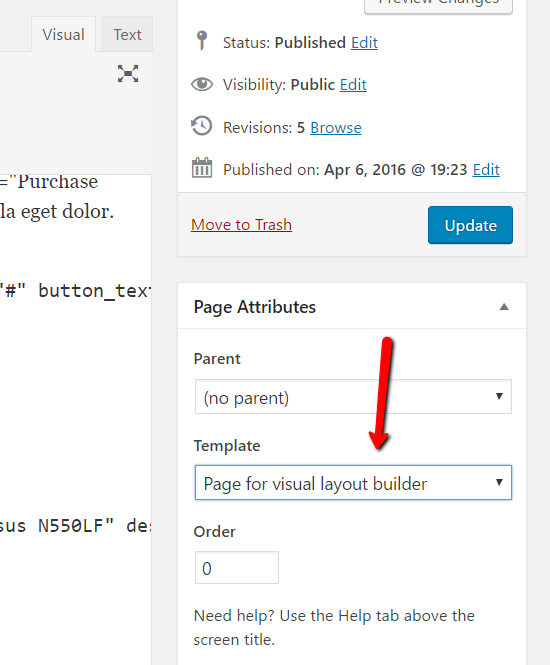
You can create page with page builder and place there any post module with settings as on screenshot. this will be static page with Blog posts
Is it possible to change “Blog Archive” (example.com/blog – also know as Separate Blog) to custom page, because there’s no separate options to change Category Layout, blog Archives and Index Layout, Post layout
.
Is it possible to change “Blog Archive” (example.com/blog – also know as Separate Blog) to custom page, because there’s no separate options to change Blog Category Layout, Blog Archives and Index Layout, Blog Post layout
Blog posts don’t have predefined /blog page, you can create it. To change layout – use theme option – affiliate – Select Blog Archive Layout
Hi, boxed version no longer works. I’ve reinstalled the theme and disabled plugins, still not working. Anyone else had this issue? Is there a fix please.
Hi, Theme ReMarket – Dashboard settings – Vendor Frontend – The Vendor Shop Templates are not there? I want to change it. Thanks for your effort.
Theme uses custom extended template for vendor stores, you can’t change it
good morning the theme I bought it for fullregalo.com, I want to change it for shopox.es how do I remove the fullregalo.com license and put it on shopox.es Thank you
Just activate the same license in new site
full of bugs.
There is no any bugs in theme https://sizamtheme.support-hub.io/articles/how-to-write-to-support-if-you-need-technical-help
Hi
Your recent update (I think) has caused an error on WCMp dashboard. Vendors can no longer add products. I tried switching to theme 20 seventeen, and then it works.
Its regarding site: www.weensu.dk
You can see video here for documentation of error: https://www.dropbox.com/s/dmrxa2zmcbqozfp/REHUB%20makes%20error%20onwcmp%20dashboard.mov?dl=0
Hopefully you can help me solve this fast, cause my vendors are not able to create new products, which is bad… You can contact WCMp team as well on: contact@wc-marketplace.com
Our theme doesn’t have anything for vendor dashboard, it’s totally from plugin. Create support topic
I have created support topic, and as I said it works when changing from REHUB theme to other theme.
trust me, theme doesn’t have any influence on vendor dashboard.your issue goes from plugin
Uncaught TypeError: $(...).block is not a function
https://www.staging2.weensu.dk/wp-content/plugins/wcmp-frontend_product_manager/assets/frontend/js/wcmp_fpm_variable.js?ver=2.2.4it can be caused by incompatibility with some plugins which use scripts, maybe uber menu. Or, you are using some kind of defer parsing scripts or settings which changes wordpress javascripts. For example, i see code
<link rel=’dns-prefetch’ href=’//code.jquery.com’ /> <link rel=’dns-prefetch’ href=’//s.w.org’ />
which is not default in wordpress
I will reach out to WCMp once more.. thanks
They got back to me with this comment:
Michael, can you please ask Rehub that they have blocked jquery-blockui for all the pages except WooCommerce pages in their function.php (see this screenshot : https://prnt.sc/kvsmnn ). Now, our plugin needs jquery-blockui, for the normal flow.
So, let them add this support, and this issue will be resolved.
we didn’t block it. We provided option for affiliate websites to reduce load on server. But I don’t know why you enabled this option, it must be enabled only for affiliate websites
https://www.screencast.com/t/9Vq1SAiOJX0hTheme option – shop settings
Please Igor, help me here. You say it’s not Rehub theme and WCMp says it is. I am caught in the middle as usual… and my customers are unhappy.
If this option is not enabled, so, theme doesn’t block jquery UI as WCMp suggested, so, you should write to them again. Try to disable other plugins, especially autoptimize and all cache plugins
I will write them back but this has nothing to do with caching, since same error is on staging site, and here all caching plugins are delayed.
I meant all caching plugins are deleted on staging site. I trust you saw my video/screencast as well, proving that switching from Rehub theme to other theme, solved the error?
Just tried deactivating ALL plugins on staging site except Woocommerce and WCMp plugins. The error is still there. Only way to correct error is to remove REHUB theme and change to something else. So the error IS related to either Rehub theme or WCMp plugin!!! Please help!!!
send ftp access on support hub
Just did
I checked several sites with theme and plugin, all sites don’t have such problem, so, it can’t be theme. Do you use JavaScript customization? Do you have any scripts in theme option or in Grand child theme or plugin?
I am not using any JS customization and there are no scripts in theme option.
I did install the child theme revendor to begin with, but I dont update childtheme since I dont use it. You told me a while back, that was ok. I also cant update it, cause it will mess up my designs.
I dont have grandchild plugin installed.
ok. So, you have customizations in child theme. Remind me which type of customization you have there
A lot of css. WCMp have made an update that might work. I will test that today and get back to you if not.
Ok. will wait
Their update works!
Great
Hi ,
I want to have content for all countries under single domain .
I want to filter content automatically based on user location
Example : Flipkart.com delivers only to india
People opening site in india will only see content for flipkart ( coupons , products , cashback) etc etc .
That too in local currency INR .
People opening site is US should not see flipkart content
and their currency should be USD
How to enable this
Please guide me with steps
Thanks
Hi. First of all congratulations on the Rehub theme, it’s the best I’ve tried. I would like to ask you some questions: - Do you know if Amazon lets you use discount codes on the web? I see many users use them with your theme but I think Amazon Affiliates forbids it. - I’ve been looking at the documentation on the web and on YouTube and I’m not sure if I can use the Amazon logo on the products (I want to do it as REWISE). Thank you very much.
Which discount codes do you mean?
Are not they all forbidden? Or is there some type of discount code allowed? I usually use 3:
Sellers: xxxx-xxxxx-xxxx (single use) xxxxxxx (various uses)
Amazon: xxxxxxx (promotions)
I don’t know which discount codes you mean. Amazon doesn’t provide any discount codes. Explain, please
Hi ,
From almost years you are saying Cashback feature is under progress .
When you will release it ??
I guess its a fake information to support more sales
If not please tell us when exactly you will release Cashback Feature
Sorry for such comments
Thanks
We already working on this and if you check changelog you will see that we are preparing for this. Latest updates have improved deal lists and store pages which will be used for cash back. Next update will have update for profiles.
Use shortcode with type = logo or type = alpha http://rehubdocs.wpsoul.com/docs/rehub-theme/affiliate-settings/how-to-create-archive-of-all-brands/
This theme is full of bugs. Answer my questions!
Which bugs? You didn’t provide any https://sizamtheme.support-hub.io/articles/how-to-write-to-support-if-you-need-technical-help
Sorry, duplicate comment deleted.
Hi Theme Developer,
I want to configure the page http://repairmine.com/product/lg-g6/ similar to what I saw in the demo page http://rewise.wpsoul.net/product/lg-g6/I want the price table on the right. I don’t want to use a feed, but I want to manually add prices from 3 or 4 external sites. I like how the table of prices is listed on your example page with the SEE IT links.
I want to disable Reviews from the site because my site won’t be selling any products. It will only contain links to external brand product pages.
Also I want to have the £ symbol instead of the Indian rupee symbol.
Thanks, Hemanth
Woocommerce – settings for currency. Woocommerce – settings – product to disable reviews. You can choose product layout here http://rehubdocs.wpsoul.com/docs/rehub-theme/shop-options-woo-edd/product-layout/
You can use Offer module of content egg plugin if you want to add manual offers
Hi sizam,
I don’t see the compare vendor options under the product layout dropdown for my products. Please see the options that display for me. https://ibb.co/cJk3nK
Thanks, Hemanth
how do you add vendors?
They will just need to be external links just like they are displayed on http://rewise.wpsoul.net/product/lg-g6/ . I will want to add the link and pricing manually. No feeds. No affiliate providers for now. Just links taking them to the external site to purchase.
As I wrote. Use content egg bundled plugin and offer module. https://www.keywordrush.com/docs/content-egg/OfferModule.html
Then, you can use all content egg product layouts
Hi Siznam,
After the latest update, Google matched content is only showing three ads from google ( it used to show a lot more, a mix of my own content and google ads). This has resulted in a dramatic decrease in earnings. Is anybody getting this? Is this something caused by the latest theme updates?
Please, explain in details. Currently, I can’t understand which problem you have. Our theme doesn’t change content
Hi sizam,
please see here: http://megratis.co.uk/competitions/win-1-of-5000-mcdonalds-food-trays/
At the end of the post, there should be google adsense matched content ( the code is inserted). Instead, there is a big white empty space – this used to work absolutely fine before the last update. I have checked using another theme and it’s working so it must be theme-related. I have tried everything and I can’t get to the bottom of this, would really appreciate your insight into this.
Thank you.
I see on page that you have ads in sidebars. How can you check that it’s working on site with other theme in fact that other themes don’t have ads area in end of content???
I also don’t see that you have any code in end of posts. How did you add ads and where? You must add it in ads areas in theme option – ads option if you want to place ads in direct place.
enable_page_level_ads option in adsense doesn’t guarantee that you will see ads in place where you want. Also, I see that you added adsense code in header twice – this will not work
https://www.screencast.com/t/ZwDjqmiJS https://www.screencast.com/t/gxVGLUSiVadsense code in head section must be added only 1
The ads I am talking about are called matched content – the code should automatically start pulling content from the website and showing it at the end of the post (please view source to see this code). As you can see in the example I gave: http://megratis.co.uk/competitions/win-1-of-5000-mcdonalds-food-trays/ it’s only showing some disjointed google ads without my own content. Other posts don’t show anything at all!
I have tried everything, including your suggestion (theme options) and plugins like Ad Inserter. I have even paid someone to look at this and still can’t figure it out. I really would appreciate if you could look into this so we can get to the bottom of this.
Thank you
I see that you put ads in end of content and it’s working. If you need directly after content, you can put ads in area “After post area”
sizam, it’s not working. The matched content should pull my own content as well as google ads which it’s not doing.
Here is an example of how it should look: https://helloacm.com/how-to-show-related-articles-using-the-matched-content-from-google-adsense/
At the end of the post, you can see the matched content, a mix of google ads and content from the website. At the moment, there are only Google ads (not properly sized to fill the container) but it’s not syndicating any content from my own website and hence the big empty white space.
Check article. Do you have approved site for this type of ads? How do you add it on page? It must be added in head section and in body section
Yes, I am approved. It is working now but only as text, so it seems to be unstable. I hope you can ad this as a feature in the future – to include adsense compatibility with the theme.
Thank you for your help.
The matched content ad is customised to show 3 columns and 3 rows and to show up as as images – yet it is showing as text and in 2 columns and 8 rows. What do you think is the cause for this?
Google states: “If you place your responsive ad code within a parent container that doesn’t have an explicit width set, for example, within a floating element, then our ad code won’t be able to calculate the required size for the responsive ad unit.” Please see technical specs here: https://support.google.com/adsense/answer/3213689?hl=en-GB
Is this the case with the parent container in the theme? If so, how can you work around this?
I don’t know what I need to add. There is no such thing like “not compatible with AdSense”. Because AdSense doesn’t use theme code, it depends on content of page and place where you add code. Place where you add code must have enough space to show 3 columns
Not really, using another theme – like Newspaper theme for example, everything works fine. They have a work-around to fit the theme, so the problem is definitely inside the theme code. It does not work simply by adding the code – the google adsense Auto Ads don’t work either in theme options and I have to use a plugin to insert the code manually.
This is very frustrating.
One more time. Theme is totally compatible with any kind of ads, works pretty well on thousands of sites. If you have any issue, provide details, screenshots, how to add ads, where you add, what you expect to have, where, how it must look. Screenshot how it looks in other theme. https://sizamtheme.support-hub.io/articles/how-to-write-to-support-if-you-need-technical-help
Enable other theme and show me what is not working
Hi, I have created a top line menu but there are spaces between the top line menu items.
http://monkaya.com/But there are no spaces between the menu items of the primary menu.
How do i remove the spaces between the “Top Line Menu” items on this site?
I have got a solution for this. No need to reply this.
In this link you’ll see the 365Games logo and underneath it states “365games.co.uk” https://wedocompare.com/shop/technology/belkin-mixit-lightning-usb-2-0-15cm/
Is there a way to only have the logo and remove the link?
how i can pull this menu item to the right side like the my wishlist
https://ibb.co/er1W2KHello Presales Question Can the wordings of labels be changed without changing the codebase. Such as ‘Check Demo’ -> ‘Website’ or ‘Usability’ -> ’ Experience’
Where do you find these words?
Its in the directory demo
Provide screenshot please
Can you just explain clearly how to add/remove sidebar and edit the widgets…. For me there is no option… even my checkout has a sidebar i cant remove totaly bullshit
You can enable full width page layout http://rehubdocs.wpsoul.com/wp-content/uploads/2017/06/pagetemplate.png
Anyway, we want to give you refund. Don’t want to have any deals with rude people. Please, request refund
i just bought it so why always.
Sorry, such style of communications are not acceptable for us. Please, request refund.