

8686 comments found.
Hello, i noticed that not all of your options work when using the content block Things like adding custom padding etc. It makes it really difficult to design things like footers without all of the options.Why does this not work? Is this something you will fix in a future release?
Hi iamhugo! Yes we are aware of this, unfortunately it seems there is not an option to pass this values from Content Block to the final page. I alert now developers to have a new check, in case send a message next week so I can update you on this!

Hi! Thanks for this great theme! But I have a big issue. I can’t change anything through the WP Bakery Page Builder. If I click on the edit-icon of a text-block, in the new window no text appears and I am not able to save anything. PageBuilder: Version 5.5.5 Uncode: 1.9.2 WP Version: 4.9.8
Hi basilius78! When this happen? I don’t think you have this from the installation considering you bought Uncode time ago… Is this a new installation? Please try to disable all extra plugins to test.
Sometimes it’s so easy!  Thanks a lot! It works.
Hi basilius78 and thank you for confirm! In case can you please tell what is the plugin that create this issue so we can check?
It was “Slider Revolution”.
It seems really odd, if you activate it again what happen?
They same issue: I can’t edit anything when I open a text block for example. The text is not displayed and I can’t hit “save”. (Sorry, I am from Germany)
Have you also other plugins installed? It’s really odd Slider Revolution is creating this issue, can you please disable other plugin and activate only Slider Revolution? Also can you confirm you don’t have errors in the System Status?
Don’t ask me why – but after deactivating all Plugins and activating each plugin step by step it works – also with Slider Revolution activated.
Hi basilius78 and thank you for confirm! We’ll check on our installation if we are able to replicate 
My theme isn’t loading portfolio categories and pages. It does it’s own thing? www.blueowlmedia.co . Missing the ‘explainer’ and ‘narrative’ tabs…..
Hi, if you refer to this Portfolio loop (https://undsgn.d.pr/HJrxFN), here you are showing only 3 portfolio items, please note that you see filters only for element that are present, so if you have inserted here only 3 elements and none of the them have the ‘explainer’ and ‘narrative’ applied you don’t see these filters. I hope this make sense.
Yes I’ve ensured all portfolio items are categorised correctly and have made sure the Query includes ‘narrative’ and ‘explainer’ . However, none are currently displaying. Tomorrow it may display. It seems to display content randomly
It is currently now displaying ‘narrative’ and ‘event’. ‘Promo’ and ‘Explainer’ are currently taking a break. I have reported this several times to your support team when I still had them, but they dodged the question and couldn’t provide a good answer. Could someone pease login and take a deeper look?
Hi Blue_Owl_Media! If you have inserted in the Query all the categories but you insert a limit of 3, you have only the last 3 items published chronologically. Please upload a screenshot of the Build Query options somewhere so we can check.
Please note that it’s not true that you reported this as an issue multiple times, you only opened 1 ticket and it’s not about this issue (https://undsgn.d.pr/su5xj4). I think that if there is an issue with the Portfolio module you should see here thousand of similar reports. Anyway upload a screenshot.
hey Guys, I have noticed that the media gallery isn’t working properly on Mobile. If I open some images in full size view the lightbox doesn’t scale the image in proper size and the swiping to left and right isn’t fluent. Can you give some adive how to solve this issue?
https://tinyurl.com/ychhnrfcHi elham! Please note that you are using Uncode 1.8.2, actual version is 1.9.2 and there were introduced fixes for the iLightbox plugin: https://support.undsgn.com/hc/en-us/articles/213454129
To test you can check our demo from your mobile device: https://undsgn.com/uncode/homepages/portfolio-photos/
Found one small bug at Portfolio Carousel Page. https://undsgn.com/uncode/homepages/portfolio-carousel/ Crome, Safari, Mozilla the title of the project is on the bottom, but in IE and Edge title is on the top.
Hi and thank you for report! We’ll check and in case implement the fix.
Hi, please paste this code:
manuel [5:29 PM]
.tmb .t-entry-visual .t-overlay-content {
 height: 100%;
}
Thank you! Will you fix this in a next version of the theme? Should I remove it after update?
Not sure if this fix will be part of next small release (probably next days), but surely part of next big update. In case try to remove if you see the issue leave until the next.
Check why the text of the icon element is not translated into WPML and you have to edit it manually changing the language of the upper part. The WPML translation tool (text editing pen) does not display the icon element texts, as well as the subheading if it has.
Hi RBKDSGN! How we should check your installation? Please open a ticket in our Help Center and insert your private logins so we can access: https://support.undsgn.com/hc
PS: What version of Uncode do you have?
Hi,
A quick question, on the following demo https://undsgn.com/uncode/ you have used pagination and filtering. But you have also made the filter menu sticky.
Can you tell me how you did that?
Regards, Tony
Hi Tonysense! This doesn’t have the pagination, anyway you just need to tick this option: https://undsgn.d.pr/ykkYcO
I figured it out, I guess the best way was to download the full demo and look at the settings!
Thank you for confirm!
Just one last quick question…. Obviously the filters are applied to the posts module, building a query etc.
Can filters be used to anchor to a certain section of a page? I’m hoping to keep the second navigation like you have on the homepage demo, but instead of it displaying thumbnails I can set it to full width etc, but can the transitions be changed.
I would like to have a long page with anchored points and use the filters to get to a specific area. Almost like a one page website but with a second menu / navigation.
I hope this makes sense?
Cheers, Tony
You just need to create a Sticky Row and insert a custom menu: https://undsgn.d.pr/5UPztR
Brilliant, Thank you so much!!
Hi Tonysense! Does this helps?
HI, that was brilliant… sorry for the delay in response!!
Hi and thank you for confirm!
And getting this on the main page, when JS minification and grouping is activation: init.min.js:1 Uncaught TypeError: Cannot read property ‘parentNode’ of null at Object.Ce [as initRow] (init.min.js:1) at (index):122
Highlighted code with error: .parentNode.parentNode.getAttribute(“data-parent”)?e.parentNode:e.parentNode
That’s even though I excluded from minification and grouping these files: https://traction.pw/wp-includes/js/jquery/jquery.js https://traction.pw/wp-content/themes/uncode/library/js/init.js https://traction.pw/wp-content/themes/uncode/library/js/min/init.min.js https://traction.pw/wp-content/themes/uncode/library/js/ai-uncode.js https://traction.pw/wp-content/themes/uncode/library/js/min/ai-uncode.min.jsHi Nabu! Please open a private ticket in our Help Center, insert your logins (admin + FTP) in your profile page and give us the permission to disable all extra plugins to test: https://support.undsgn.com/hc
Here’s what I think to be most likely a bug, when going to /my-account/:
Uncaught TypeError: Cannot read property ‘contains’ of undefined at Object.a (init.min.js:1) at init.min.js:1 at s (init.min.js:1) at init.min.js:1 at s (init.min.js:1) at Ae (init.min.js:1) at HTMLDocument.<anonymous> (init.min.js:2)
The error underlining starts at ”.contains(t):void 0},o=function(e,t){null!==e&&e.”
Hi Nabu! Please open a private ticket in our Help Center, insert your logins (admin + FTP) in your profile page and give us the permission to disable all extra plugins to test: https://support.undsgn.com/hc
Hey guys!
For some reason, my mobile menu font size isn’t customizable. Do you have a bit of css for me to target the mobile menu navigation items, so I increase the size. See here:
http://www.triple10boxing.comThanks!
I just discovered that font sizes set in the Theme Options don’t apply to when mobile menu is centered. Is there a way to increase font size when mobile menu is centered?
Hi, yes please check the note, the font size of the center menu is defined in viewport measures: https://undsgn.d.pr/JigI1K
In case you can use this code (not sure if works with your settings, in case apply the center menu and let us know so we can create based on your settings):
@media (max-width: 959px){
body.menu-mobile-centered .main-menu-container .menu-horizontal .menu-horizontal-inner ul.menu-smart li.menu-item > a{
    font-size: 6vw !important;
}
}
PS: Anyway if you need support is offered in our Help Center, there we have a completely dedicated support team, please submit a ticket so we can support the solution privately! Thank you! 
https://support.undsgn.com/hc
That works perfectly! I’ve said it a million times: the Uncode support team is awesome. Thanks guys!
Hi markskoultchi and thank you for confirm, we try to be speedy as much as possible!
PS: If you like our theme and our support don’t forget to rate the theme 5 stars from the downloads page, this will helps us a lot to grow and allows us to continue the development of our theme! http://www.themeforest.net/downloads
I’ve rated you 5 stars many times already and I’m happy to rate you again. Have to purchase a new site license anyway. Will do that today. Thanks again!
Thank you for this much appreciated!
Any idea how to solve this error at checkout? I tried disabling all woocommerce-related plugins, but it didn’t help.
jquery.js?ver=1.12.4:4 POST https://traction.pw/?wc-ajax=update_order_review 403
Hi, no sorry it’s the first time I see this error but actually I still see extra plugins. Moreover is possible to test the checkout? When this happen exactly?
I re-enabled the plugins…
https://traction.pw/checkout/?add-to-cart=11 to see the errorI can give you user:pass from wp-admin to test.
The issue seems related to the server settings, please check on Google similar reports (not related to Uncode): https://www.google.com/search?ei=zS71W5fuHafylwSLmI6IBA&q=wc-ajax%3Dupdate_order_review+server+403&oq=wc-ajax%3Dupdate_order_review+server+403&gs_l=psy-ab.3...36480.39817..40089...2.0..0.181.704.8j1......0....1..gws-wiz.G5XBuBp_Ceg
It seems that I solved it. No idea what did it, because I did a bunch of modifications. One of them was deleting .htaccess and using a simpler version of it that I knew should work. The .htaccess that I was using was very complex, because of a security plugin. This was probably it, the misconfiguration must have been there somewhere.
Yes I’ve read in one of the links above that probably is a problem with .htaccess. Thank you for confirm! Good you solved!
Hi there, sorry I can’t see anywhere the option to set up my homepage. In the reading settings I can’t see the options : “Your homepage displays”, but just from “Blog page shows at most”. Is there a way I can solve this? I’ve passed form a child theme to a normal theme. Maybe this could be the problem? Thanks in advance.
Hi! This issue can happen in WordPress if you trashed some parent pages and one of the child was the index. For example can happen if you imported demo contents and then you trashed most of the pages. Can you please check?
Many thanks for your help. It happened that most of the pages were set as “draft” during the passage from child to normal theme. Works now!
Hi leletaba and thank you for confirm!
In my experience it’s not related to child but to the fact some parent pages are trashed (or draft), anyway now is working as it should!
Hi I know I am out of support but was hoping someone could look at this for me. When I am trying to save settings within the media section they are not being stored.
I recorded a quick video to show this – https://www.useloom.com/share/6a8ffbadae2e445e9392377e628f8f29
It refreshes the page but nothing saves.
This is fresh install of uncode, I have tried disabling and enabling plugins but nothing seems to fix this.
All my system settings are in the green and I am on PHP 7.2
Any ideas?
Hi Allanr101, try to save the Poster ID when you are inside a page, ex: https://undsgn.d.pr/OB4vnz
Anyway please note that if this is a new installation you should have also a dedicated purchase code (according the Envato terms for copyright) and so the possibility to access private support services.
Thanks that works. I yes I do have a purchase code, I wasnt sure if you only allowed support for a set amount of time as per envato rules or not
Thank you for confirm!
Hi, after updating to 4.9.8 / uncode 1.9.2 > Text Block in WPBakery Page Builder not editable see screenshot (https://www.dropbox.com/s/8dhzgniicrm3kfq/Error_EditTextBlock.png?dl=0) Thanks Marco
Hi Marco, we are sorry but it’s the first time we see this, if the issue is caused by the new version of VC I’m pretty sure you should see hundreds of similar report. Are you sure is not a conflict with some plugins? For example check this report for setHspace: https://github.com/chartjs/Chart.js/issues/3168
Hi there, we deactivated and reactivated some plugins, now it’s working…
Hi marcosimonetti and thank you for confirm! Sometimes oddities just happen.
Hi. Great theme first of all with a lot of options. However, I really miss the option to save/copy a row, column or element from one page to another. I cannot find that feature in the visual composer? So right now I need to rebuild elements (rows with columns, elements and content, that I can then tweek from page to page) every time I want to use it on new pages. In the Help Center you write that “One way to make page building proceed more efficiently is to go to use the copy, paste and clone functionalities.” – but all I can find is a “duplicate” feature, and that doesn’t do the trick from one page to another. Is there a way to save a row/column+content from one page to another? It is much needed. Best regards / Jonas
Hi yohonas and thank you for appreciate Uncode!
You just need to use the VC Clipboard plugin that is packed with Uncode, then you can copy a row from one page to another: https://undsgn.d.pr/llP4We
Anyway if you need support is offered in our Help Center, there we have a completely dedicated support team, please submit a ticket so we can support the solution privately! Thank you!
https://support.undsgn.com/hc
I can’t register my theme (I bought 4 licences) and i can’t login to your support because my support expired. Well I really won’t renew support only to register so … any suggestions?
Hi mojca2050, please note that support expiration is not something created by our team, this is part of the Envato terms any ThemeForest customer accepts when buying theme. Moreover if this is a new installation (as I suppose if you need to register) you should have a dedicated purchase code according the copyright terms and so the possibility to access support services (since with any purchase you have at least 6 months of support).
About the issue you can verify here all the known possible causes of registration failing, I hope this helps: https://support.undsgn.com/hc/en-us/articles/115004287985-Product-registration-not-working
It’s not a new purchase and … it’s the right username, right API key and right punchase code. I tried several times and I get: “You have entered invalid credentials, or your Envato account does not include Uncode among your purchased items.” 
Anyway the problems with support expired are there, we can suggest here but we cannot access your installation (this is private support). Anyway please note that Uncode doesn’t use the API KEY anymore from version 1.8, you have the Token: https://support.undsgn.com/hc/articles/360000718649
It’s OK now, but I had to uninstall the theme and install it again. Now I have registered the theme, but I think I’ve lost some work, hope not much. Thx.
Thank you for confirm! Not sure why you have to uninstall and reinstall. If pages were created with VC you have them saved in the database as well Theme Options (if you don’t delete the WP installation).
I can’t seem to find the adjustable padding / margin feature for Mobile/Tablet view. Has Ucode removed this feature? If so how do you change the layout on different devices? http://wpdemos.themezaa.com/pofo/documentation/knowledgebase/wpbakery-page-builder-elements/customise-padding-margin-for-rows-columns-and-other-elements/
Hi Mattyboyzhere! If you need support is offered in our Help Center, there we have a completely dedicated support team, please submit a ticket so we can support the solution privately or at least ask questions with an account that bought the theme! Thank you!
https://support.undsgn.com/hc
hello, is there any way to put vertical texts with links like the “scroll” of this example? http://anthony.charlier.portfolios.isfsc.be/index.html. Another question, why in this example does the animation repeat itself if you raise or lower the scroll http://anthony.charlier.portfolios.isfsc.be/index.html, and my animation (www.celediaz.com) only runs once?
Hi, no this is not an option in fact you don’t see in more 200+ pages of the demo, same as for the repeated animation, this website uses a custom script to repeat the animation. Maybe I’m wrong but I have not seen in any of the popular commercial themes.
Hello, My social share info is not showing up for blog posts! Is it because it is not live?
Hi, we are sorry but apart verify if you have enabled (https://undsgn.d.pr/t7YB1P) it’s not possible to understand the issue, please open a private ticket so we can check your installation: https://support.undsgn.com/hc
Hello, can you please tell me how to show the same category for related posts? Thanks
Hi, the Related Posts are managed completely by the Related Post for WordPress plugin, sincerely I don’t know if there is an option or some trick you can apply, try to check the official plugin dedicated page or ask the plugin author: https://wordpress.org/plugins/related-posts-for-wp/
Ok so have looked on the Plugins Support page and it seems that a lot of people are complaining that it doesn’t even pull the correct posts and are unrelated. It does not have an option either to pull in the related posts within the same category for that post. Looks like your endorsing a pretty bad plugin there!
Is there a way to list three most recent blogposts under the same category underneath a single blog post? ... and If not, why not? Please
Sorry but this is the first question you have requested and we suggested to reference plugin page or ask the author of this popular WP plugin.
Yes I know but the plugin you endorse is not capable of doing the job so I wandered if you had a solution using your post module and content block? It seems like this function should be standard really. whats the point of having related posts if they not even related… theres not! You get me!
Oops sorry me but sincerely this is your opinion, this is a super popular and trusted plugin with more than 40.000 (just 10 users don’t like it).
Sorry, reading all this back I have probably come across as an ignoramus! I am just trying to find a solution that’s all. UNCODE has some great features that other themes don.t have like the CONTENT BLOCK which allows you to create some amazing unique areas including custom footers, and your post module is great too. I just thought you may have a solution for having the last 3 posts in the same category sit at the bottom of a single post. I’ll keep looking for a solution
Do you have lot of categories? The only suggestion I can think of is to create a Posts module or different Posts modules and hide the thumbs based on the actual category body class. Obviously this can works only if you have 2-3 categories.
I only have 3 categories. Don’t forget that the posts need to show on the single blog article. How could this work? How would it know what category it was to show the 3 before it in same category?
In the main content of any single blog post you have the category of the blog posts (https://undsgn.d.pr/S8KXjX), then any thumbs has the category ID applied (https://undsgn.d.pr/NXqWSt), based on this you can create a CSS that hide the categories that you don’t need in a given single blog posts category.
Ok thats great. It sounds complicated so I will get a developer to help out on achieving this. Thanks for your help on figuring this out, really appreciate
No it’s not complicated, please send the link I can show a quick example.
ah ok great, here is link to single article https://www.cas-ukcn.com/competence-management/
This should work (I don’t know the ID of your categories, so it’s an example, but I’m pretty sure you are able to go from here:
.category-insight .grid-cat-3, .category-insight .grid-cat-1{
display: none !important;
}
Let me know how it goes!PS: obviously you have to insert 9 posts and hide for each category the 6 you do not want.
Sorry but I am really not sure what to do here! I added the code to css but it just removes the 2nd and 3rd related posts from the single post page and does not display any others. I am also not sure that the related posts plugin will pull in the 3 posts in same category either as its algorithm does not work like this!
No maybe it’s not clear, you asked my a workaround, so I suggested to create a static Posts module with 9 posts (3 for category, nothing dealing to the related posts, just a static module with a custom Query). With the CSS you can hide the 6 posts that are not of a given category, so you have 3 posts of the category you need. I hope make sense.
But this would mean that I would have to add this to each post each time I post an article wouldn’t it? If so thats not feasible as my client will not be able to do this and has requested automation.
Oh hang on i think I get it
Let me see if I can get it to work then
No you just need to create the code and paste in the Theme Options once for all (at least your clients have to update the loop of the 9 posts but it’s pretty easy), anyway you asked me an idea and this is the best I have for you (alternatively the Related Posts is the best since it’s based on contents of the articles).
Ok awesome we are nearly there. I have added this code
.category-insight .grid-cat-3, .category-insight .grid-cat-1{ display: none !important; } .category-news .grid-cat-2, .category-news .grid-cat-3{ display: none !important; } .category-events .grid-cat-2, .category-events .grid-cat-1{ display: none !important; }
The only thing is they only want 3 and it shows 4. Any idea how to strip that last one out and we cracked it
Mmm, what page are you? Here I see 2 for example: https://www.cas-ukcn.com/competence-management/
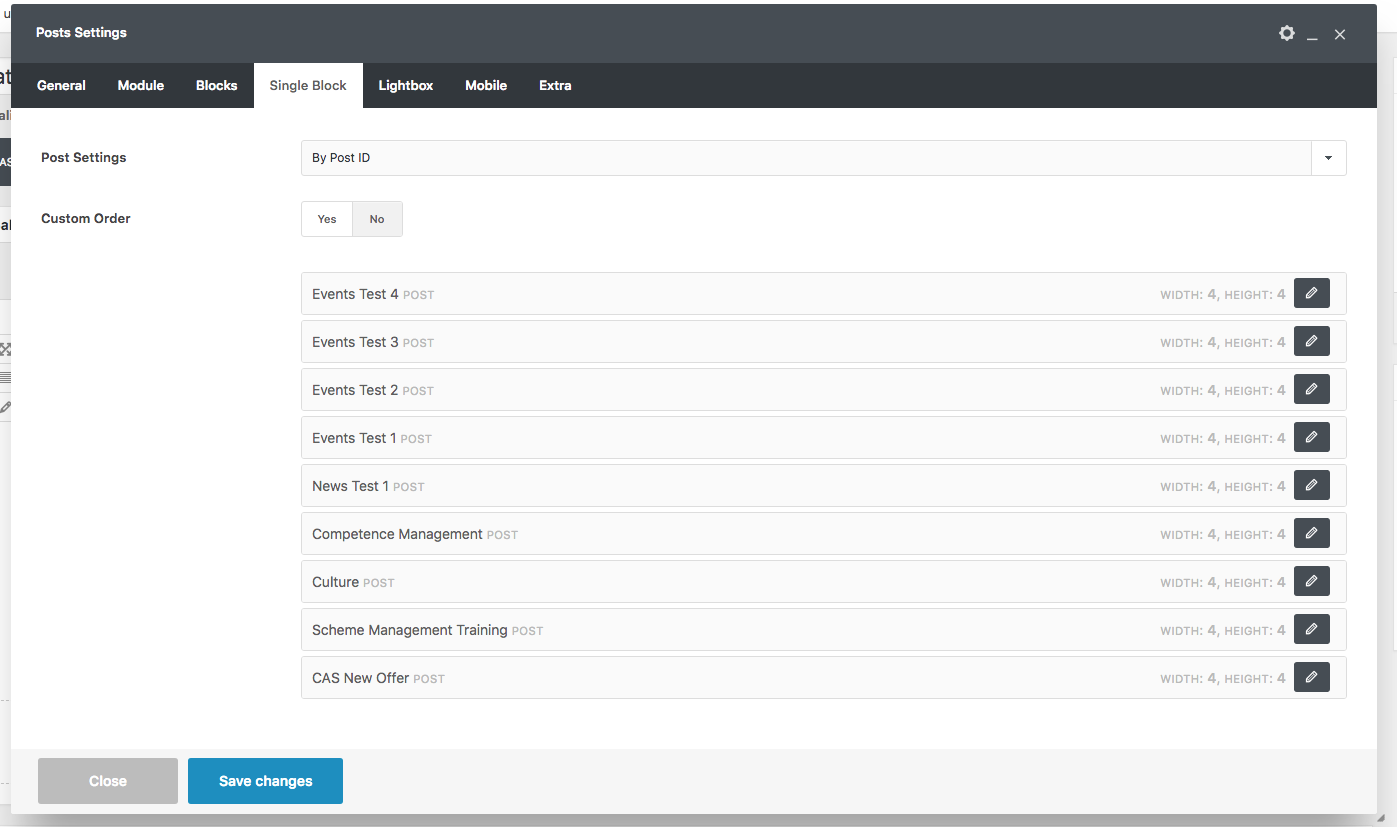
You need to be sure to insert in the loop 9 posts, 3 for each categories to make this working, remember that you can insert also Posts manually in the build query options: https://support.undsgn.com/hc/en-us/articles/213456809#&gid=1&pid=6
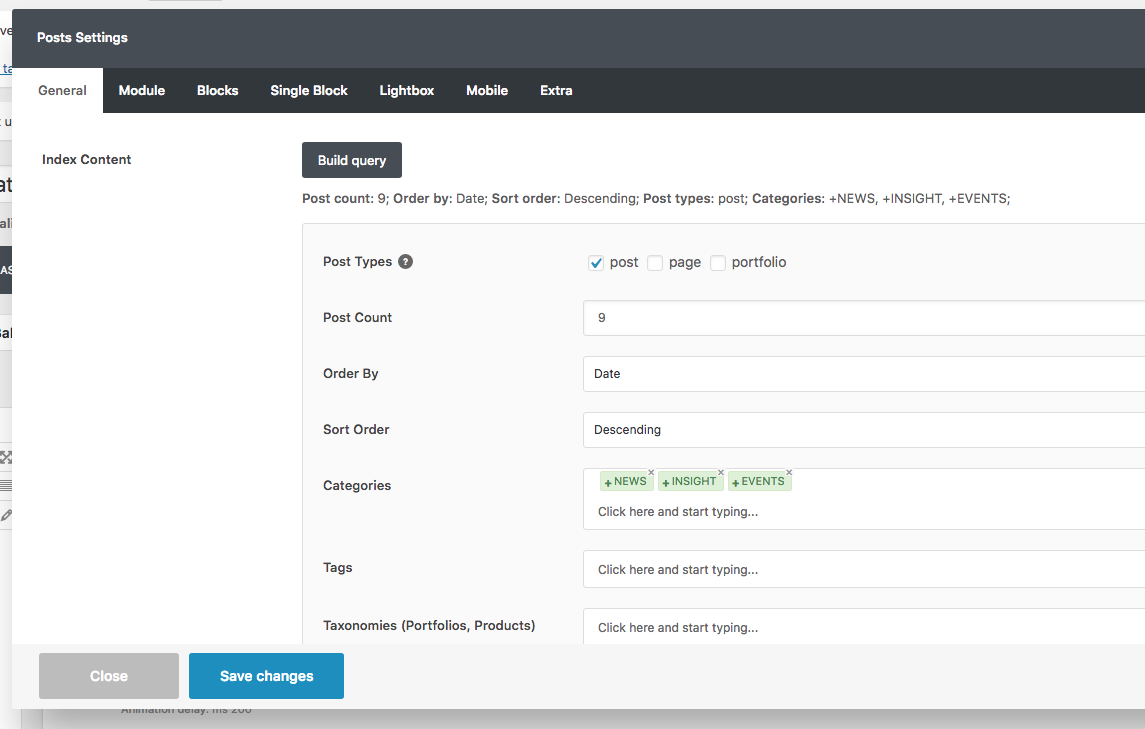
Oh no I really though I had it working! I do have the build query correct but seems maybe the code is not correct https://www.cas-ukcn.com/wp-content/uploads/2018/11/Screen-Shot-2018-11-20-at-18.29.45.png
I have looked at the code and its all good but it does not seem to pull the right amount of posts!
The problem is that this can work if the last 9 posts published are 3 for each categories but I think this is not possible. When you set this as you have done, you just define the categories. You should insert the posts manually in the Individual Posts field of the Build Query (and in case your customer had to update this here and there over time).
Im thinking that the single block area in the post module pulling in latest 9 posts so looks like it aint gonna work https://www.cas-ukcn.com/wp-content/uploads/2018/11/Screen-Shot-2018-11-20-at-18.45.12.png
Ah ok well back to the drawing board. I will just install https://wordpress.org/plugins/related-posts-by-taxonomy/ plugin and get developer to style the same. Maybe this is something you could add in the future. Thanks again and I really appreciate your help on this {thumbsupemoji}
Here you have exactly 3 post for each category? I don’t think this is possible, here you have the last 9 posts published only, please check my latest comment and use the Individual Posts field of the Build Query.
ok i see yes that might work
Ok check my suggestion and let me know! I’m 100% sure it will work.
Ok so I have this working but its pulling more than 3 posts as i have it to pull 9 for each category. Is there a way to show only the first row and hide all others?
No you have to insert 9 posts total (3 for each category). Anyway I have a better idea now that doesn’t require any future update from the client
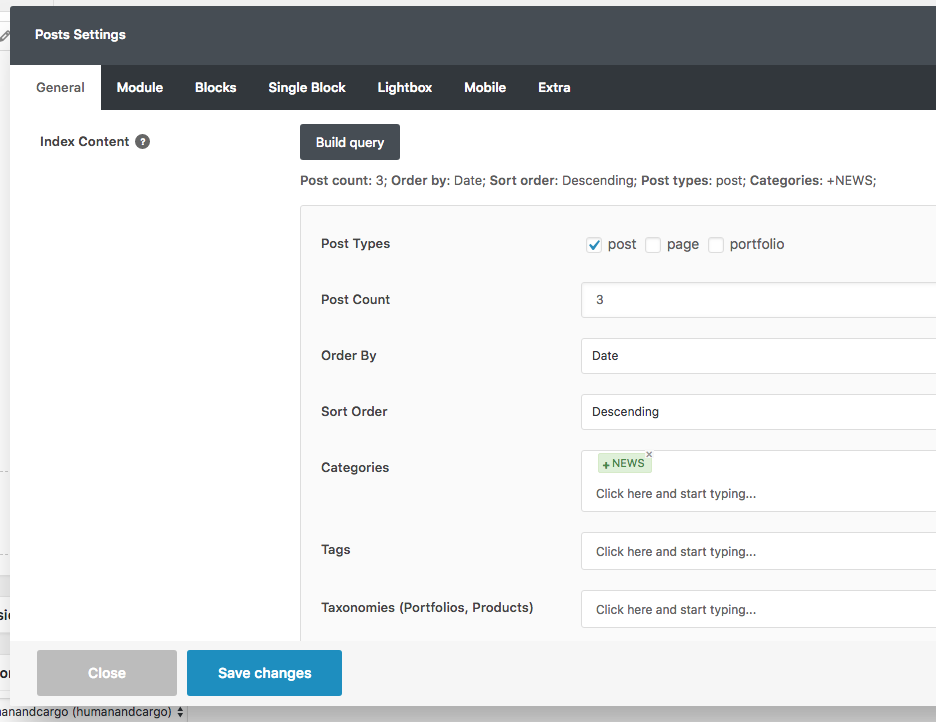
Create 3 posts module (one next each other in the same row) and for each one insert in the build query option only 1 category (as you have done before), then in the extra set the name of the category: https://undsgn.d.pr/p9z1Yc
Once you have done this you should have 3 posts module, each of one pulling the last 3 posts of a given category, when you are ready send the link and I’ll create the code to hide the 2 Posts module that you don’t need. In this way when you are in a blog post you’ll see the last 3 blog posts for that category.
Ok let me get my head round this and try
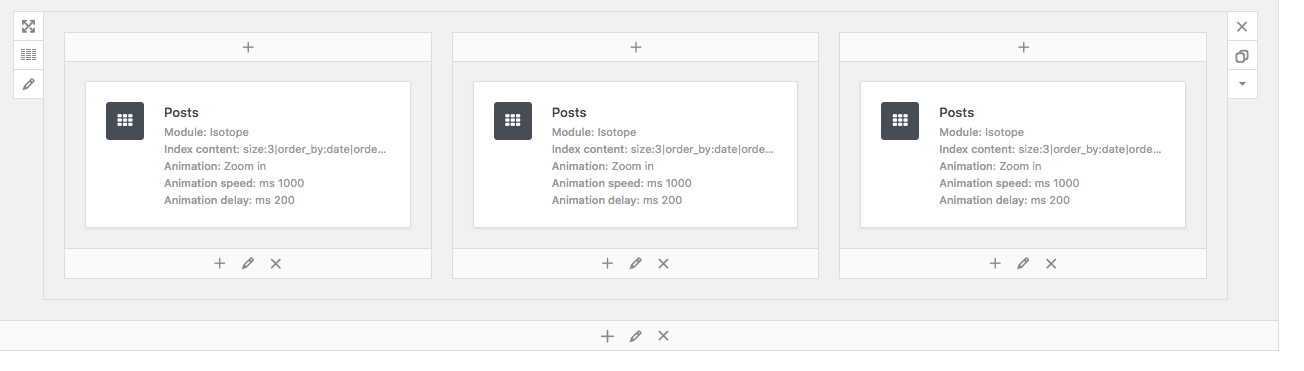
Ok so I think I have done this right. Here are my modules in a row https://www.cas-ukcn.com/wp-content/uploads/2018/11/Screen-Shot-2018-11-20-at-19.31.46.png and here is my build query, 1 for each category https://www.cas-ukcn.com/wp-content/uploads/2018/11/Screen-Shot-2018-11-20-at-19.31.19.png and I have added class in each: news, events, insight
I have removed this code. Do you still need it added?
.category-insight .grid-cat-3, .category-insight .grid-cat-1{ display: none !important; } .category-news .grid-cat-2, .category-news .grid-cat-3{ display: none !important; } .category-events .grid-cat-2, .category-events .grid-cat-1{ display: none !important; }
Hi! Not this way (https://www.cas-ukcn.com/wp-content/uploads/2018/11/Screen-Shot-2018-11-20-at-19.31.46.png), just insert in the same row stacked each other (https://undsgn.d.pr/pNwLIf), you need to have the thumbs horizontal not vertical. Then remove the old CSS codes suggested yesterday and apply this one (this is just for one category but you know how to create the other 2):
.category-insight .isotope-system.news,
.category-insight .isotope-system.events{
display: none !important;
}
I’m pretty sure this do this trick!
Ok I thought that it was not right. I will do this after school run. You are rockin
Perfect you have helped me achieve this, thanks so much. let me buy you a coffeee?
Finally! Thank you for confirm! With this method you always have the last 3 posts published for a given category and I think it’s pretty cool.
No thank you! I’m quitting with coffee but if you like our theme and our support don’t forget to rate (or re-rate) the theme 5 stars from the downloads page, this will helps us a lot to grow and allows us to continue the development of our theme! http://www.themeforest.net/downloads
Ok yes I will do this and I always recommend this theme to other developers because of its versatility and what we have achieved just shows that anything is possible. thanks again :)))))
Thank you for this!





)
,)