19077 comments found.

How do I remove the “buy now” link from my header?
Hey,
it depends if it is button or menu items. Please follow the steps below to find the right solution.
1. If it is Action Button, you can remove it under BeTheme Options > Header & Subheader > Extras section.
2. However, if it’s menu item, you can remove it under Appearance > Menus section.
Best regards,
Muffin Group team
i am using a licence in my main domain.i want do develop a new segment on a subdomain using the same theme. I have to purchase a new licence or i can use it the same.
Hi,
yes, you can use same license for unlimited number of sub-domains but the whole trick is that you have to register license for main domain first and only then, you can register same license/key for its sub-domains.
Best regards,
Muffin Group team
Hi!
Is there any chance to set size of the Background image that it always covers horizontal 3/4 of the section?
many thanks
Hey,
please be so kind and send us WordPress dashboard access privately thru contact form which is on the right side at http://themeforest.net/user/muffingroup#contact so we can take a closer look. Please do not forget to let us know in a message, what for this access is.
Best regards,
Muffin Group team
further i cannot edit any picture click not working js issue here is screenshots http://prntscr.com/m1uai3
i have updated my wordpress 5.0.2 maybe its issue due to wordpress
Hey,
This is Carousel Slider Type and the text you are asking for is the equivalent of slides title http://prntscr.com/m22xnx
Regarding 2nd question, the link you’ve sent above, does not work.
Best regards,
Muffin Group team
I have downgraded to wordpress 4.9.9 and everything working fine please have look if i upgrade to 5.0.2 or 5.0 my js not work in editor like if i try to edit any picture remove current picture button won’t work
2nd how can i appear things 1st that i created with visual composer instead of after muffin group 3rd how can i create woocommerce product slider with muffin group composer Thanks
Because you faced with such a weird issue, which we believe has nothing to with the BeTheme itself, we recommend the following steps:
1. Please go to your FTP account where theme is, remove whole theme folder and then upload the latest version thru FTP as well. Please make sure that all the files were copied correctly.
2. Remove all 3rd party plugins (including cache of course).
3. Make sure, there is no additional cache stuff on server side.
Hope above steps would help you a lot.
Regarding your 2nd question, you can change its order with Content | Display Order option under BeTheme Options > Global > Advanced section.
is there any option that i can show featured product or new woocommerce product slide show like this http://prntscr.com/m2yaau
Thanks
Yes, you can use Shop Slider item/shortcode.
Hello dear, I need a little help, I have created a staging site to test all the updates from wp 5.02 and the theme, but, I have only one problem , the Rev Slider ghive me this error “The package could not be installed. The package contains no files.” It is possible this error to be because the theme is registrated on 2 domains ? Is important for me to know, because I need to test all my plugins to see how will work Thank you! And a Happy New Year!
Hi,
the error “The package could not be installed. The package contains no files.” means that you have not deregistered the website before moving. Please deregister it on both domains and register again on the new one. If this is not possible, then please send us access to your WP dashboard along with full purchase code that you have used for theme registration, so we can take a closer look.
Notice! Please do not forget to attach your license key in the message.
Happy New Year too!
Best regards,
Muffin Group team
Can you please recomand me a good GDPR Plugin ?
Sorry but we can not recommend any as we never used.
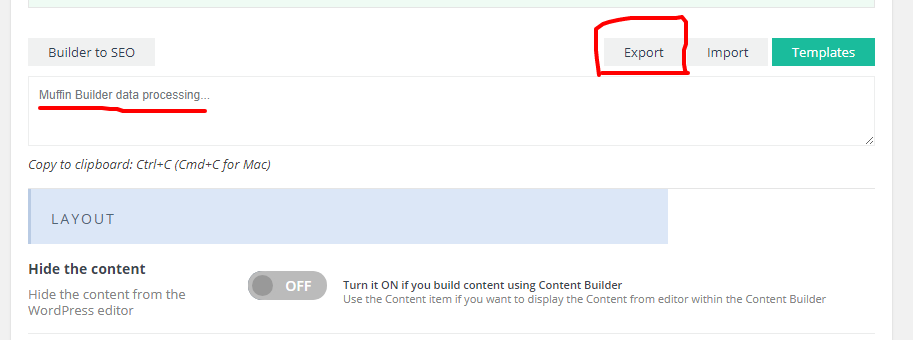
Hello there, My English isn’t very good.
I can’t import the Template I’ve used before into the new portfolio. Or I can’t export the Portfolio template.
“muffin builder data processing …”.
Hi,
please send us WordPress dashboard access privately thru contact form which is on the right side at http://themeforest.net/user/muffingroup#contact so we can have a closer look. Please do not forget to let us know in a message, what for this access is.
Best regards,
Muffin Group team
I sent e-mail I’m waiting for your help.
Be sure you will get the response as soon as possible.
I deleted the theme folder, reinstalled it. I cleaned up the past. sorry the problem is not solved.
https://i.hizliresim.com/Rrozn6.pngIf you have any further questions, please reply on private message instead of writing in comments section as private message contains all necessary details.
Thanks for understanding.
I just bought your Theme. Unfortunately I cannot add or remove any images in your MuffinBuilder !!!!
Something is wrong with the “add image” button.
Please help! This is annoying and very frustrating. Im thinking about a refund, first time trying the theme and already experiencing a major flaw.
Hey,
please be so kind and send us WordPress dashboard access privately thru contact form which is on the right side at http://themeforest.net/user/muffingroup#contact so we can take a closer look. Please do not forget to let us know in a message, what for this access is.
Best regards,
Muffin Group team
Hello, is this compatible with Gutenberg? I want to purchase it but I cannot see if this is Gutenberg optimised? And if not, do you plan to update it really soon?
Hey,
Yes, BeTheme is compatible with WordPress 5.0 and this was stated on item’s page. For more details, we attach the following screenshot http://prntscr.com/ltvp9n
Best regards, Muffin Group team
Hi,
I have a little problem on my web site davideingoglia.lowebagency.com. In mobile version I see two logos in the sticky header. Can you help me?
I used the version 21.0.1 of theme.
Regards
Hey,
please clear or remove cache plugin as this is the reason why you have 2 logos on mobile.
Best regards,
Muffin Group team
Hello. I am using the visual composer to add either a Button or Advanced Button and it’s not accepting the button font color change. The font is blue for the button font but when i change it to white, it stays blue. No matter what i do on either button, it doesn’t change. The background/hover/border etc… change but not the font color. it changes when you hover, but before hover it won’t change. Why? Any help to fix would be appreciated.
Hey,
Because you faced with such a weird issue, which we believe has nothing to with the BeTheme itself, we recommend the following steps:
1. Please go to your FTP account where theme is, remove whole theme folder and then upload the latest version thru FTP as well. Please make sure that all the files were copied correctly.
2. Remove all 3rd party plugins (including cache of course).
3. Make sure, there is no additional cache stuff on server side.
Hope above steps would help you a lot 
Best regards,
Muffin Group team
My Visual Editor could’t be scrolled now…I’ve turn the “Enable full-height editor and distraction-free functionality.”,but it’s could’t be scrolled any more. My wordpress version is 4.9.9
Hey,
please be so kind and send us WordPress dashboard access privately thru contact form which is on the right side at http://themeforest.net/user/muffingroup#contact so we can take a closer look. Please do not forget to let us know in a message, what for this access is.
Best regards,
Muffin Group team
Want to change the action button and the contact form submit button to small …pls help…
Hi,
please send us WordPress dashboard access privately thru contact form which is on the right side at http://themeforest.net/user/muffingroup#contact so we can have a closer look. Please do not forget to let us know in a message, what for this access is.
Best regards,
Muffin Group team
Can you execute a transparent banner on the bottom of a slider like this…
https://spicermansion.com/Thanks
Hey,
do you mean transparent block in the bottom of slider where Menu is? If yes, we do not have such option included into theme unfortunately.
Best regards,
Muffin Group team
Is there any CSS I can add to do this?
Sorry but this can not be achieved with custom css as well.
Hello. When i try to open “pre-built websites” on page */wp-admin/admin.php?page=be-websites There are only the message: Sorry, you are not allowed to access this page. What i do wrong?
Hi,
it sounds like you have disabled this feature under BeTheme Options > Global > Advanced > Theme Functions section.
Best regards,
Muffin Group team
Hello Muffin Group,
1. Please I have been trying to remove the grey vertical divider between the menu and the Call to action tab when I use a “Fixed menu” style. How do I remove it : https://www.dropbox.com/s/ynl8wjf3jau4ckj/Header%20Grey.PNG?dl=0
2. Also, whenever I try to input table, even when I dont want any border to show in the table, this horizontal line still shows. Please how do I remove it : https://www.dropbox.com/s/o36axoz9h9nnhgp/Services%20Table.PNG?dl=0
Hey,
please send us link/s to page/s where you got both so we can have a closer look on it first and provide best possible solution to remove them.
Best regards,
Muffin Group team
Here is the link : https://wilsoncgrp.com/devsite/ where you can find the two points
Thanks.
1. To remove this vertical shadow between the right and left top bar, you have to use the custom css below:
#Top_bar .top_bar_right::before {
    display: none;
}
2. To get rid of horizontal box shadow above table tr/td, please use:
table tr:first-child td {
    box-shadow: 0 0 0 0;
}
Thank you so much, it worked.
You are welcome!
Hello Muffingroup,
On the banners for a typical page on the theme e.g : https://wilsoncgrp.com/devsite/government-and-public-services/ , When I load the page, the Background Color loads first and it takes a while before the Background Image I have selected to load.
Even when I set the Background Color to transparent. It will still load the transparency first, I’ll like to remove this effect. I need the banner to load first.
Example of the one that has a Transparent Background color and a Background Image : https://wilsoncgrp.com/devsite/financial-institutions/
How do I go about this?
Also, the Texts on the banner is exceeding the width of the screen from Screen size 768px downwards. I was thinking this part is expected to be responsive on all mobile?
This is the most proper behave of course as plain background/color would always load much quicker than image. If you wish to avoid this effect as much as possible, we recommend to start by reducing picture size as right now is huge – 5902×3935px.
Regarding your 2nd question, would be great if you can show on the screenshot, what do you mean.
Hi, Pre sale question, Can I have a popup to display for the visitor where he can choose which city he is in, so the post, news will be related to that city and everytime he visit the site he will see the content related to his city based on his previous selection, also he can change the city any tie he wants or just enter the site without selecting any city Please advice, if you theme support this or I have to get another plugin to this, if a plugin is need it please recommend a plugin that works with your theme Regards
Hey,
if you ask for a special popup feature, then we do not have anything like this included into theme. You have to consider 3rd party plugin to get such popup window.
Best regards,
Muffin Group team
Hi greetings. For ‘portfolio slider’ images, how can we disable the link and zoom options appearing on the image upon mouse pointing? Thanks.
Hey,
you can disable this feature under BeTheme Options > Blog, Portfolio & Shop > Portfolio section.
Best regards,
Muffin Group team
Hi there, I’d like to know how to active the lightbox of “photo box”? I set several photo boxes and set the “Link | Target” to “lightbox”, but it’s not effect
Oh! I found it…. I forget to write the image’s url…Thank you all the time~~
Great, glad to hear that you’ve sorted it out
Hi is there anything I should do before upgrading to WordPress 5.0?
Hey,
please make sure you have recent version of BeTheme installed before upgrading to WordPress 5.x.
Best regards,
Muffin Group team
Hi I’m having this eissue in my theme:
Failed to import pa_color Black Failed to import pa_color Blue Failed to import pa_color Green
Can you help me?
Hey,
please be so kind and send us WordPress dashboard access privately thru contact form which is on the right side at http://themeforest.net/user/muffingroup#contact so we can take a closer look. Please do not forget to let us know in a message, what for this access is.
Best regards,
Muffin Group team