8686 comments found.
Hi, just wondering if there is a way to list out specific product categories using the isotope post module? I can see a way to show the products within, but I just want to show the top level categories.
Hi! Not sure to understand the request but if you need to show only some categories you just need to open the Build Query options and insert the taxonomies you need to include in the loop. I hope this helps: https://support.undsgn.com/hc/en-us/articles/213456809-Posts-Galleries-General
How do you change the color of the Submenu text? I see that you can change the background color but not the font.
Nevermind, I see I need to use a different skin for each
Hi and thank you for confirm! 
I want to edit some pages but can’t do it exactly as I want:( Could you recommend any courses about WP Bakery? How to work with it understanding what you do?
Hi AndriyGusak! I don’t think there are courses on WPBakery, what you need to create exactly?
Testing and trying to understand logic of the process. I have very newbie questions:) For example, on my Contact page https://bezmirno.com/contact/ all blocks are shifted to the left. I do not know how to align them in the center of the page:( The most common question is how to align the blocks and set them to the correct position on the page. After adding or removing some blocks, all other blocks begin to move and change their positions:(
Please look this small video https://fex.net/674845026859
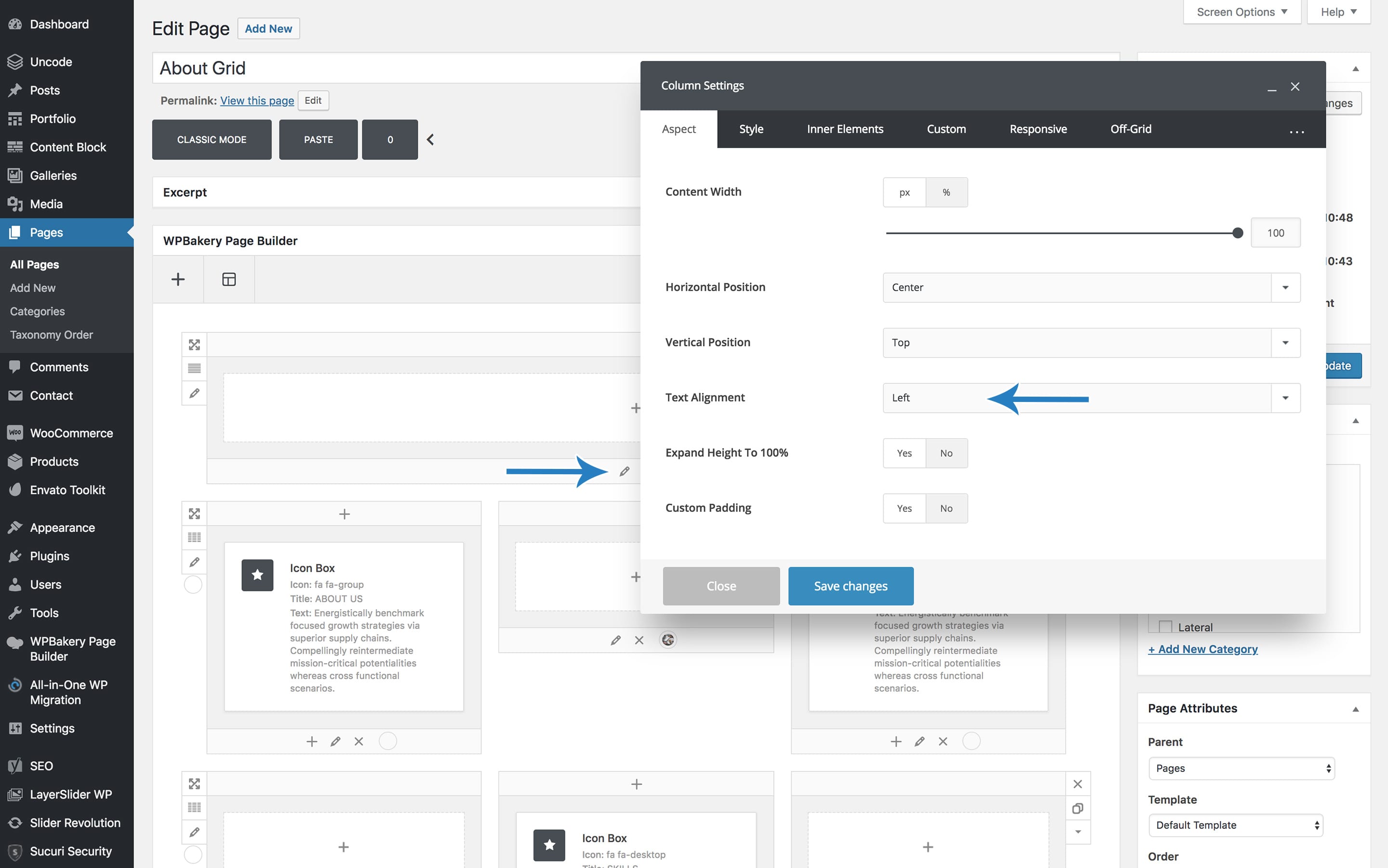
Hi! Thank you for video but I’m really not sure to understand. Anyway if you need to align elements to the center (normally named text align) you just need to use this option: https://support.undsgn.com/hc/article_attachments/360000106765/doc-column-text-align-min.jpg
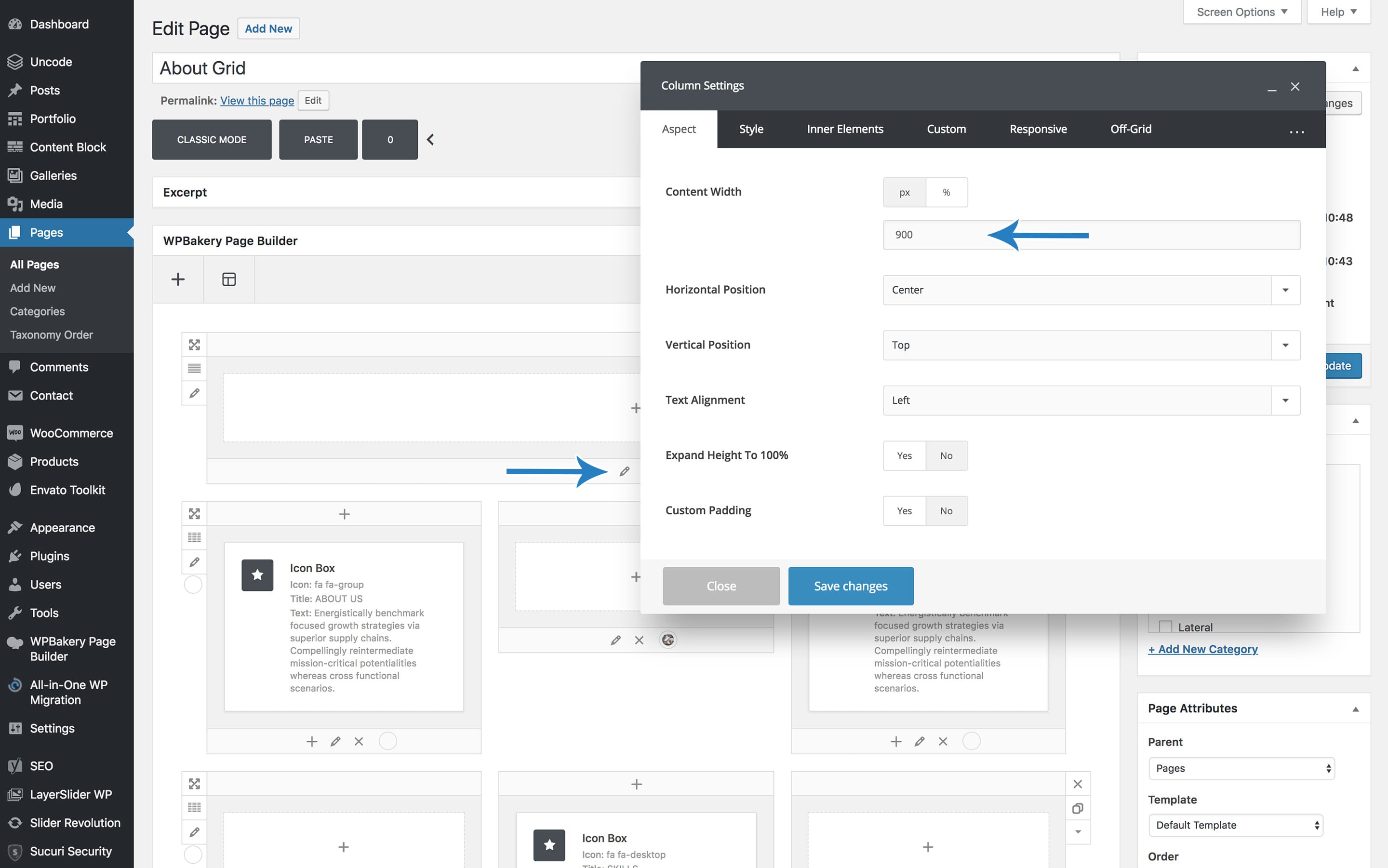
If instead you need a centered small column you can use this and insert your limit width: https://support.undsgn.com/hc/article_attachments/360000106309/doc-column-width-min.jpg
If this doesn’t help please create a raw screenshot of the layout you need so we can understand.
in wp bakery page builder, list with icon, how do you ensure text in new line wraps exactly below the start of the text in the first line and not below the icon?
Hi, please try to apply this code: https://themeforest.net/item/uncode-creative-multiuse-wordpress-theme/13373220/comments?page=197&filter=all#comment_20535698
Not sure if this feature is available, but I’d love if WPBakery Page Builder could truncate the blocks containing text. Longer pages become almost unwieldy with multiple lengthy text blocks.
Hi ephelan! We are sorry but this is not a feature of WPBakery Page Builder and I don’t think there are plugins or add-ons that can accomplish this, sorry!
Anyway if you need support is offered in our Help Center, there we have a completely dedicated support team, please submit a ticket so we can check your installation! Thank you! https://support.undsgn.com/hc
No worries. It’s more of a nice-to-have feature. I found that reducing my browser zoom while full screen helps make the blocks more manageable. 
Hi ephelan and thank you for confirm!

Hi, love your theme. Is there any way for the menu to have the logo above the menu items, with the logo aligned left, and the call-to-action button on the same line as the logo (above the menu items) but aligned right? And if so, would there be a way to stretch the menu items to the full width of the container? Visual reference: http://i.imgur.com/ruZX7Pk.jpeg
Hi markalan87 and thank you for appreciate Uncode!
Not properly you can have this menu but without the CTA (maybe you need some CSS), please check this we helped another user few days ago: https://themeforest.net/comments/21282571
Let us know if helps!
In this case, is there a way to move the menu/navigation beneath the header? Then I could just create a custom header content block and should be able to achieve this.
Hi markalan87, the only menu layout with main menu below the header is the Center, then in case you can align to the left with some codes.
Hi, great template. I Have a pre-sale question. I like your Blog Grid Template. Is it possible to hide the area, where the author is displayed? And when you click on the article you get to the article page. Is there a way to open a video for example on youtube in a lightbox by clicking the article elements?
Hi piktodesign and thank you for interest! Yes it’s possible to hide the author, confirmed. Do you need to only open videos and not show the article at all?
Hi, thanks for quick response. I want to open videos and also want to show article detail page.
Hi, we are sorry but with this specific layout you can have only one link since all the thumbnails is clickable, you can have 2 different links with the layout under (classic layout).
Hi, i don’t want both options in one thumbnail. For example one thumbnail with Video function and the other one with article detail page, is this possible?
No you cannot have this.
Does Uncode meet the Requirements? https://sevenspark.com/docs/ubermenu-3/requirements
Hi tanjinsan! Yes it seems that requirements are fine but we have not tested directly, from a quick search on our internal Help Center a few users asked help for some visual hack to fine tune the menu, so it’s supposed it work combine. otherwise other users installed the similar QuadMenu (which demo site also uses Uncode Theme).
Hello Uncode, I need your help.
I’ve been changing my website from http to https and some problems have occurred.
I’ve been following the instructions listed on this tutorial: https://www.wpbeginner.com/wp-tutorials/how-to-add-ssl-and-https-in-wordpress/?fbclid=IwAR1RbWQ1pyBkdaHomN-1Ziw7hx9asLCpobBiEt2QnDf4wJhi8eDMxQaJnOI
What are the problems? 1 – When I used the Better Search Plugin to change the database parameters (as shown in the tutorial) maybe it has changed the functionality of the main navigation menu. It didn’t show up on the Homepage and other pages of the site. 2 – When I try to access my website via the normal link, sometimes it shows a double link on the URL bar (this is what appear: “www.fpavani.comfpavani.com”). I don’t know why this is happening. 3 – Some images have disappeared from some pages.
can you guys help me to figure out what I’ve done wrong?
Hi fpavani! Is Uncode related to these problems sorry? I think you have the same issues also id you deactivate Uncode and activate the native WordPress theme. Anyway at the moment we are even not able to preview your site so it’s really hard to help or suggest something you missed during the migration, in case the problems are related only to Uncode feel free to notify.
Hello guys,
I am having some problems with the Shop Page on my website and it’s driving me crazy. I need to change the picture, heading text and subheading text from this page https://culturadestrada.com/shopping/ from the header, to replace the text “This is where you can add new products to your store.”.
I tried changing the Header type of the page, nothing worked (no change whatsoever).
I need to lunch the website these days, the client asked.
Hi heviutza! To change this you need to edit the Theme Options > Products. Anyway don’t worry, if you need support is offered in our Help Center, there we have a completely dedicated support team, please submit a ticket so we can check your installation and support the solution privately! Thank you! https://support.undsgn.com/hc
I did edit the Theme options before with no success. I submitted a ticket for this issue. Thank you
Perfect one of our agents will be back asap!
Thank you kindly for the promptitude your agent Ivo resolved all my problems. I finally managed to replace the “This is where you can add new products to your store.” text. Have a great day!
Hi heviutza and thank you for confirm!
Hi guys thanks for the last message , quick one
I want to create a page based solely on the classic landing template
But I want to replace where the buttons that say ’’purchase uncode’’ and ’’download now’’ with ios and android download images please see example screenshot here : https://prnt.sc/maulse
I went to edit the buttons as they were and simply went to light box to add those images as lightbox images to those buttons but nothing seemed to happen.
(PS anyone who buys this theme its awesome and support is phenomenal I’ve being a fan since like 2016)
Hi Cobscreator! You have not to use the button module but the Single Media module, the option you refer is to open an image from a button. Thank you for support!
Portfolio CPT in Gutenberg – no categories
Uncodes Portolio CPT does not display Categories in the Gutenberg Documents Panel. Any fixes?
Hi iHuman and thank you for note! I’ll check with developers and in case insert this small fix in next update. By the time you can assign them from here: https://undsgn.d.pr/FOOwi6
Thanks – that’s what I’ve been doing as a work around, but was hoping it would work the way it should. Thanks for the reply
Hi iHuman! This is just fixed for the next update! Thank you for note!
1. how can you make the large fluid buttons not shrink in size on mobile? There’s weird padding that’s introduced on mobile that kicks it down to a smaller size despite setting this in the column/row. http://i67.tinypic.com/1gt2l5.png 2. There’s a bug that doesn’t seem to kick off the ‘Author Name Link’. Plus it would be nice to customize this link to your own specific text via data entry. I’d like to put my own name and not my wordpress username. Any help would be great… <3
2. I see that you can change the username in users! woo! fixed.
Hi WestKC! If you don’t like that buttons are scaled a bit please use this code to avoid it:
@media (max-width: 569px){
.btn:not(input), .btn-link:not(input) {
    transform: scale(1);
}
}
thanks for the support – it worked out beautifully!
Ok wait, its fixed, but now the width is getting screwed up on mobile. I would still prefer the buttons to be fixed in ratio in terms of being close to the top/bottom and right and left.. any idea?
when using safari’s responsive design mode, I like the proportional length of the iPhone 8+ 414pxx736px look – how can I maintain this?
Ok I guess the clear way of putting it a fixed width at this dimension haha
Hi WestKC! We are sorry but really don’t understand you this time. Anyway we remind that if you need support is offered in our Help Center, there we have a completely dedicated support team, please submit a ticket so we can check your installation and support the solution privately! This wall is not for support and can be used only for limited requests. Thank you! https://support.undsgn.com/hc
Bought this awhile ago. Having trouble centering the logo on mobile. I browsed the comments and my settings/logo size are fine, but for the life of me I can’t get the logo to center on mobile  – also there should be an option to get rid of the mobile hamburger menu when there’s not a menu.
Hi WestKC! Not sure what comments you refer since there is not a build-in option to center the logo on mobile, anyway please send the link to your site so we can suggest a quick code to make this works for you based on your settings!
mr-west.com!
@media (max-width: 959px){
.menu-wrapper div[class*=col-lg-] {
    text-align: center;
}
}
Don’t sure from your comment but if needed you can hide the burger menu with this:
@media screen and (max-width: 959px){
.mobile-menu-button {
    display: none;
}
}
Thank you! So bad ass. It looks great! Think this should be an option in the theme!
Hi, I’m using Uncode, and I think I found a bug, so I report here. It is about Search. When I try searching a page with numbers like 4174, pages which includes the VC blocks that have close numbers like 74174 are unexpectedly hit. 74174 is Uncode_block_id which we are not able to edit. Could you let me know how to fix this matter? I want not to let hit the pages by Uncode_block_id.
Hi japantrends! This is simply not possible, ids don’t work for proximity (as you say similar numbers…) this is just how WordPress works. The Uncode search is native from WordPress, this mean that when you hit search all the functionality are standards, to test this just activate the native WordPress theme Twenty Seventeen and perform a search. Not of the scenario without without a link but we invite to this this simple test, you’ll have the same results.
Anyway if you need support is offered in our Help Center, there we have a completely dedicated support team, please submit a ticket so we can check your installation and support the solution privately! Thank you! https://support.undsgn.com/hc
Hello,
My WordPress version is updated to the latest, but I don’t have Gutenberg enabled on articles and plugins. How is this possible?
At start I thought you may have disabled the plugin / feature through your theme features, can it be this way?
Sorry, I posted with my account and not the client’s one, but if you can answer otherwise I wlll repost the question with the other account which has support
Hi ipergraphic! Always better if you can use the account that bought the theme, anyway please find all info here: https://support.undsgn.com/hc/en-us/articles/360000284218
Hi! I’m trying to have a constant height for images on a row, can you help me ? : https://www.sebastienboudot.com. ( first row, I’ve cheated with % but not perfect) Thank you!
Hi lomoseb! The only 100% perfect solution you can have to create a perfect grid is the Metro mode, note that it can be used also with the Content Under Image layout mode (text below the thumbnails): https://support.undsgn.com/hc/en-us/articles/115002645349
Anwyay if you need support is offered in our Help Center, there we have a completely dedicated support team, please submit a ticket so we can check your installation and support the solution privately! Thank you! https://support.undsgn.com/hc
I have many problems and unit now I waiting to support me plz
Hi budoor66! Support Team replies ticket in order received, from a first check it seems that most of your problems are related to translations and the fact you don’t want to use a Premium plugin like WPML. Anyway Support Team will be back shortly.
No, I have issue with map and menu which you send me css to change it and it is shown in browser good but in mobile not work see the ticket#34067
Hi budoor66, I see this ticket is closed (and anyway is related to custom codes you need for extra plugins not native of the theme). Anyway you just need to reply the ticket or ask the agent you are assigned a bit more help to fine tune the tweak for mobile too.
plz, you do not understand me, there is a problem when I add the sub-items in sub menu in space , the support send me code css after I add it it is work in browser computer but in mobile not work, see the image in this #34600ticket, note I delete the plugin and not relate it with it
I perfectly understand you but now this is a new ticket not the closed one you reference above As told in my first message, support agents reply ticket in order received, I hope you can understand this. One of the agent will back to you asap. Thank you for understanding!
Hello! Just a notice. Call to action menu in Uncode 1.9.3 has display problem in firefox 64.0.2 (latest release). Bad align. Please check. All the best!
Hi alexeythemes and thank you for notice! Do you see in our demos too? Sorry but we are not able to verify, in case can you send the link to our demos or your site to check? Thank you!
Hello, I’ve been using this theme for a few years now and so far it’s been great. I do have one question though. Recently I tried adding in custom Javascript into “Theme Options > CSS& JS > Javascript”. However when I did that, the Javascript code actually appears at the bottom of the site underneath the footer and doesn’t actually work.
It’s a third party code from Codepen so I’m not sure if it’s the code itself or some issue with the theme. Have you guys had any similar comments before? If so, any solution? Thanks!
Please disregard. I am dumb and had a simple spelling error which caused the error. Thanks.
Hi hesh0925! Sorry for delay during weekend and thank you for confirm!