26979 comments found.

Hi,
When i search something in woocommerce searchform in shop, then the results shows in ordinary search.php page, instead of shop page.
When i search by category or post type, there is no problem, and the results shows on shop page: https://example.com/?s=&product_cat=0&post_type=product But, when i add a keyword to search, then whole results shows on simple search results page: https://example.com/?s=something&product_cat=0&post_type=productI want to show search results, even with keyword, on shop page How can i solved this?
Hello,
Our theme uses the default search of WordPress. This is the way WordPress uses the search option. There is no separate search for products only. maybe you can find a plugin that can offer such a search functionality but we have not tested any so we cannot make a suggestion which one will work or not. Try a few of them out with a bit of trial and error. I’m sure you will find a search functionality that works.
Our support team will be happy to help with any requests on our official support forum at https://forum.tagdiv.com/forum/newspaper/
Thank you! Bogdan B
Your Theme is adding an og:image tag (http://www.screencast.com/t/Ze1OmUjJ). If we use «yoast seo» there will be two og:image tags.
Is there a way to disable the theme OG:IMAGE tag?
Hello,
Indeed the theme adds an OG image. If you want to remove it, please remove it from this code: https://www.screencast.com/t/t6T42koXOur support team will be happy to help with any requests on our official support forum at
https://forum.tagdiv.com/forum/newspaper/Thank you! Bogdan B
Why is there no update option in the theme to 9.5? Im still on 9.2 and now my images on Social Media does not work…
Hello,
The theme needs the envato market plugin to be able to update automatically. Otherwise there will be no update option present in the theme section. Please read this guide in order to learn how to update the theme. https://tagdiv.com/update-newspaper-theme/
Our support team will be happy to help with any requests on the official support forum at https://forum.tagdiv.com/forum/newspaper/
Thank you! Bogdan B
Completely messed up my AMP/Mobile with the new update.
Hello,
In the new version you have to use the implementation mentioned here. Indeed there was a big change in the way AMP is used in our theme. Please read this guide to learn the new amp implementation: https://tagdiv.com/amp-newspaper-theme/Our support team is happy to help with any requests you may have but please use the official support forum at
https://forum.tagdiv.com/forum/newspaper/Thank you! Bogdan B
Hi there, When using the Flex 1 block, and selecting multiple modules per row (for example 3 modules in the row), when viewed on a mobile it doesn’t put them on a new line, it just bunches them together and they are unreadable. Is there any way to make each module in the row go on a new line on a mobile? Thanks !
Hello,
This is only visible in the tagdiv composer if you change to multiple rows on some elements. You can overcome this by saving the page and hitting a refresh. That will make the composer load the proper layout for multiple columns as well.
Our support team is happy to help with any requests you may have but please use the official support forum at https://forum.tagdiv.com/forum/newspaper/
Thank you! Bogdan B
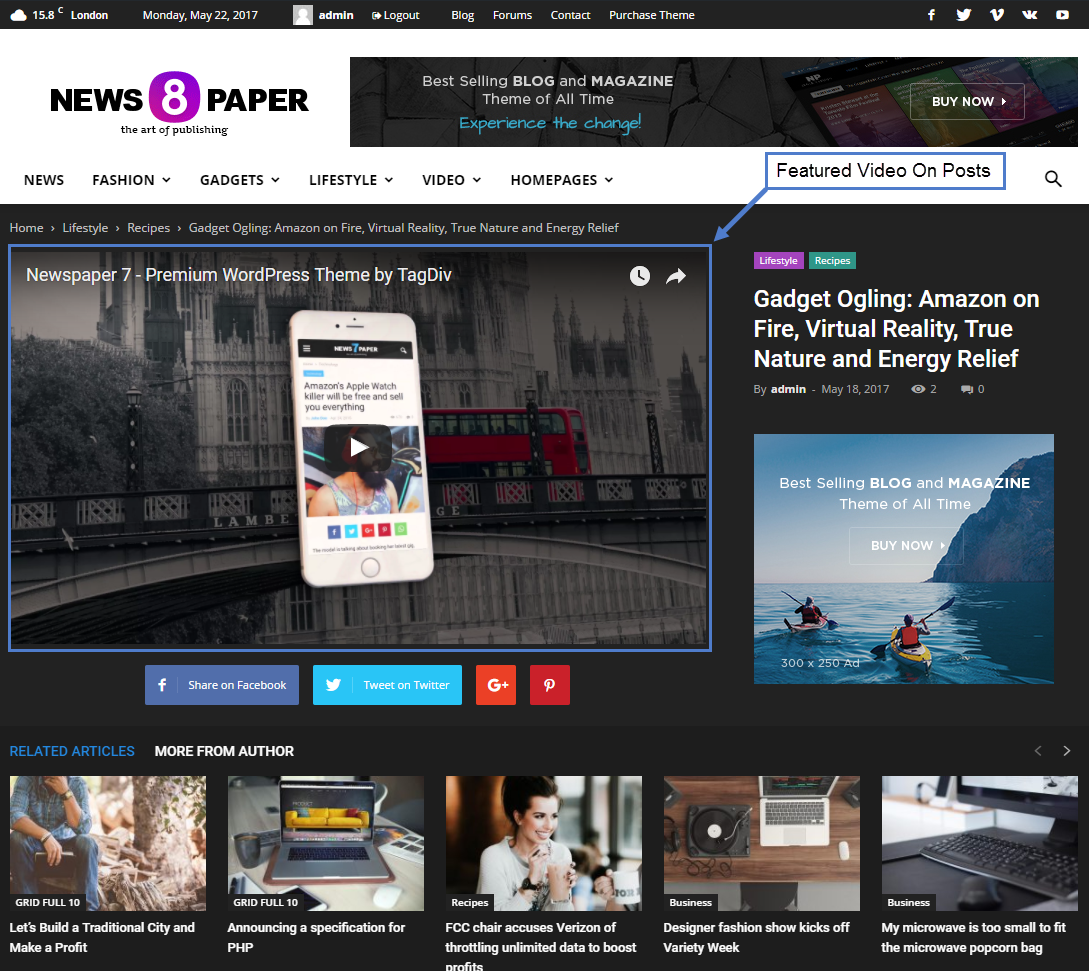
how to set a video post as https://forum.tagdiv.com/wp-content/uploads/2017/05/featured_video.png
i try to set a video post without any text but the post header and top sharing button alway show on the post.
This looks a bit redundant
how to set a simple post with only one video(hide the post header and top sharing button).
Hello,
The mentioned elements come from the post style. Please choose a different post style like for example: https://demo.tagdiv.com/newspaper/td-post-major-deep-feelings-january-2015-deep-house-mix/ https://demo.tagdiv.com/newspaper/louge-music-reasons-why-in-form-leicester-city-will-finish/This guide shows how you can change the post style: https://forum.tagdiv.com/post-templates-2/
if need any further help, give our support forums a try: https://forum.tagdiv.com/forum/newspaper/
Thank you! Bogdan B
You ruined my amp traffic, you made changes too abrupt and not optimize…
The mobile version is incomplete,
- No Sharing Button
- No search button in the Header for the mobile version
- Bug of the menu button on the mobile version
Your mobile theme is not yet 100% AMP compatible and is full of errors
Please back up
Hello,
I’m not sure if you installed AMP properly. You need to install the mobile theme plugin and activate AMP for the mobile theme. You will have a search button, a menu button, sharing buttons, etc. Every functionality of the mobile theme will now work as AMP native. Please read this guide: https://tagdiv.com/amp-newspaper-theme/
I have tested the menus again but I cannot see any menu bug as mentioned. Please open a new topic on our official support forum and provide a link to your site so we can inspect this issue: https://forum.tagdiv.com/forum/newspaper/Thank you! Bogdan B
My website https://lesavoirperdudesanciens.com/
Why did you change the AMP version, the old one worked very well…
It’s horrible what’s going on.
My AMP version is correctly installed… and it is now in classic version.
Before it was very beautiful because we had the theme newspapers with…
Does this mean that now I have to buy an AMP theme?
And I tell you again even when AMP is disabled, the mobile version has no search bar and the header menu button does not open…
The loss of traffic is colossal
Hello,
No, you do not have to buy any amp template. The template is already provided in the theme. It is called the mobile theme. Please activate the mobile theme and turn amp on for it and you will have all the benefits of the mobile theme now on amp.
The initial AMP plugin we released was designed based on the first version of the official AMP plugin for WordPress. Even though it was a tagDiv plugin, it still required the API of the official plugin.
The changes came from the official plugin as they limited the theme support in the version we used and instead of updating it, they launched a new version with another, better implementation. They also announced the initial release will shortly become deprecated. This is why we decided to abandon our initial AMP plugin and use the new AMP implementation through the mobile theme. The new version required a specific theme for it as it would not have worked through the standard theme. There was no decision to take, unfortunately. If we have not made this step, soon the AMP plugin would have stopped working once the official AMP plugin implementation we used became deprecated.
In order to implement the new functionality of AMP please use this guide: https://tagdiv.com/amp-newspaper-theme/
If you need any further help please open anew topic on the support forum at :https://forum.tagdiv.com/forum/newspaper/
Thank you! Bogdan B
I want to buy your theme but I’m wondering why your theme’s Pagespeed value is so low?
https://developers.google.com/speed/pagespeed/insights/?hl=en&url=https%3A%2F%2Fdemo.tagdiv.com%2Fnewspaper%2F&tab=mobileFor main page Mobile : 63 – Dekstop : 89
For post page Mobile : 55 – Desktop : 91
Hello,
Google recently changed their page speed algorithm as we used to get over 90 on desktop and near 80 on mobile. there is no need for concern as there are are ways to increase your site loading speed and we can provide a few guides into how you can do this. However all themes on envato have a severe dropdown in google’s test now. It does not only affect newspaper. We can provide the needed tools to make your site load faster and get better scores in such tests.
Thank you! Bogdan B
Plug in TD Composer always auto Deactive. Why and how i can fix ?
Hello,
The plugin will always deactivate when updating the theme. This is an implementation made by our developers to make sure you update the tagdiv composer to the proper version every time. You should not use older versions of the composer with later versions of the theme as it will not work properly. Please update the plugins after each theme update: https://forum.tagdiv.com/newspaper-how-to-update-a-plugin/Thank You! Bogdan B
My TD is Version 2.3 | built on 06.03.2019 12:47. But it still not work (Plug in include in zip file theme)
OK,
Please contact us via email at contact@tagdiv.com and provide a username and password so we can login and investigate why this happens.
Thank you! Bogdan B
Hello
quick question:
Is it possible to use a cloud template ” i am using it only because of auto load articles” and then instead of showing subtitle , show the excerpt ? i can do it in php on post template that comes with the theme but not in cloud templates. just please give an answer, if is it possible , i will try to do it my self , but where are the php files to change cloud template
thanks a lot for such amazing theme
Hello,
If you want to alter a single post template and replace the subtitle with an excerpt, you can find the shortcode in the cloud library plugin here: https://www.screencast.com/t/H2M9byRoxrIf you need any further assistance please contact us via the official support forum: https://forum.tagdiv.com/forum/newspaper/ and our support team will provide a helping hand.
Thank you! Bogdan B
I have purchase license, I have 2 license. But when I try to reinstall the demo, the picture post is not showing on sing post. I installed on wordpress Version 5.1. Please help?
Hello,
If the images do not show up properly it can be caused by many factors. We will need a link to your site so we can inspect it and see how the images are implemented and why they do not show up. Please open a new topic on our official support forum at https://forum.tagdiv.com/forum/newspaper/ and provide a link to your site and more details about the issues you face so we can help provide a solution.
Thank you! Bogdan B
Getting same error as edward above.. .also wat is the 9.5 – 9.6 patch
Hello,
Please try to deactivate third party plugins and deactivate the child theme as they are the most likely causes to this issue. If this is not the case, please also contact us via email and we will do our best to investigate your site and figure it out. We will need admin access to do so.
As for the patch, it contains the modified files between the 2 versions. It only contains the files that have changed between versions so you do not have to replace every theme file on your install. This is useful if you have code modifications of the PHP files. If you do not, then you can ignore the patch.
Thank you! Bogdan B
Well I deactivated all the plugins same error
OK,
Please contact us via email at contact@tagdiv.com and provide wp-admin and cpanel access so we can investigate why this is happening.
Thank you! Bogdan B
Hi Bogdan, if you solve Edwards problem above let me know how and ill try to fix it myself…. if you work on my site will it go down?
Hello,
Yes, we will solve it for you as well. Usually we try to be as careful as possible not to break the site and not have any downside in our investigations but it depends on the issue itself. Not all are the same. Some can be fixed with no down time at all while others cannot. It depends.
Please contact us via email at contact@tagdiv.com and provide a full description of the issue you are facing along with a username and password so we can login. If you can provide cpanel as well would be perfect in case we need it to access your theme files and host settings. But that is only if the situation calls for it.
Thank you! Bogdan B
I have emailed with a login, I haven’t provided cpanel access but if you need it I can create and account. Can you let me know when you can get back with me.
OK, we will reply via email one we investigate using the wp-admin and we will reply if we need cpanel.
Thank you! Bogdan B
Hello,
Do you have any advice on tweaking the theme to give it a better speed score?
I have a dedicated server with litespeed and litespeed cache along with paid version of cloudflare, autoptimize plugins and a friend who is a web developer who tweak everything for best performance, yet we can’t seem to get the score on Pingdom past D75 of google speed test is 44 for mobile and 67 on desktop.
Sometimes we can get it to C score, but end up getting a lots of jQuery errors and pictures not loading and theme design issues.
You advertise A grade speed scores for your theme yet D is the best possible… Am I missing something?
Hello,
Page speed is a very personal matter that depends from the host that you use all the way down to your content. There are lots of factors that can influence page speed. We can provide the following guide to speed up your website:
– https://forum.tagdiv.com/cache-plugin-install-and-configure/
– https://forum.tagdiv.com/how-to-make-the-site-faster/
– https://forum.tagdiv.com/cloudflare-cdn/
For speedbooster you can disable the compatibility check like so: – https://forum.tagdiv.com/topic/tinymce-advanced-and-other-various-disabling-speed-boster/
Thank you! Bogdan B
Getting this error: wp_booster error: td_api_base::mark_used_on_page : a component with the ID: tdc_state is not set. Also: wp_booster error: Missing parameter: ‘file’
Hello,
Please update your theme to the latest version by using this guide: https://forum.tagdiv.com/how-to-update-the-theme-2/ Also please test without any third party plugins active as plugin conflicts can also influence the theme functionality. If you use a child theme, please switch to the main theme for testing purposes. If you still face this issue afterwards, please let us know via contact@tagdiv.com and we will investigate if needed. usually the issue is a plugin conflict though.
Thank you! Bogdan B
Hi, I’m wondering if you can clarify two things. 1) Cost – is the purchase price $59 the only price or are there costs for plug-ins and premium features that I’d need to pay for. and 2) do you have or integrate with an RSS feed that does feed to post?Thank you.
Hello,
Thank you for your interest in our theme. 1) The only cost is 59$ You do not have to pay anything extra beyond that except for theme support if you want to extend it beyond the 6 months period.
2) Feeds are not handled by the theme. You will have to use third party plugins for feeds as we have created our themes with creating content in mind.
Thank you! Bogdan B
tagDiv team, please write me answer on one my question
Which plugin was tested with last version theme Newspaper (now 9.6) for change admin login page? Is here some plugin what was tested on 100% working?
Thank you for answer.
Into this time we always used these two plugins: FREE VERSION WPS Hide Login + WPS Limit Login
But these two plugins is not listed in recommends in tagdiv forum.
https://cs.wordpress.org/plugins/wps-hide-login/ https://cs.wordpress.org/plugins/wps-limit-login/ So what FREE VERSION of the plugin “iThemes Security (formerly Better WP Security)”? This was tested on 100% working? https://wordpress.org/plugins/better-wp-security/We need find minimal one security plugin what was tested from authors on maximal compatibility without any problems with your theme.
Hello,
Sorry but we have no official tested and recommended security plugin. There are also no reports of security plugins breaking the theme functionality though. We see wordfence being used a lot by our user base, but we cannot recommend a specific plugin though.
The only tested and recommended plugins to use with our theme are these ones:
WP Super Cache- caching plugin
Contact form 7- used to make contact forms
bbPress- forum plugin
BuddyPress- social network plugin
Font Awesome 4 Menus- icon pack, supported in the theme menus
Jetpack- plugin with lots of features *it may slow down your site
WooCommerce- eCommerce solution
WordPress (Yoast) SEO- SEO plugin
Wp User Avatar- Change users avatars
WPML – multilingual plugin
Anything beyond this list is not tested and we cannot say for sure if it will work or not.
Thank you for understanding. Bogdan B
Hello, can you help me about change “Latest Article” on all entire site view.
Image: https://imgur.com/4h72USZ
Hello,
As much as i would love to help, there is no universal setting that can affect all of these elements site-wide. You will have to go on in on each page and change the settings from the post loop settings: https://forum.tagdiv.com/page-templates-2/
If you need any further assistance please open a new topic on our official support forum at https://forum.tagdiv.com/forum/newspaper/ and our support team will be happy to help.
Thank you! Bogdan B
Oh i see. After update to 9.6. I got 9 URLs w/ new AMP errors (It’s new post from Blog Post after I updated to latest version). Can you suggest me about to resolve that problem? Thank you and much appreciate
Hello,
Please make sure you activate the plugins and also activate the Amp option in the mobile theme settings: https://tagdiv.com/amp-newspaper-theme/Without the option set to on, you will get amp errors.
Let us know how it goes Bogdan B.
Hmm I already Activated “Show on AMP” on Theme Panel “Mobile Settings” sections. Is there any solution again?
Where are you receiving the AMP errors? How are you testing your pages? Please contact us via email at contact@tagdiv.com and provide a link to your site and more details about how you are testing and the errors you get so we can investigate this.
Thank you! Bogdan B
After update, I’m getting too many error in AMP plugin. https://www.visualupload.com/u/EML In my phone, amp pages redirecting to normal page atm. But on computer, there is no problem.
Hello,
You have to activate AMP in the mobile theme from here: https://www.screencast.com/t/NfrlCbpWOWjq The errors will go away once you activate the amp implementation.
If you need any further help please open a new topic on our official support forum at https://forum.tagdiv.com/forum/newspaper/ and our support team will gladly give a helping hand.
Thank you! Bogdan B
1- How do I add a php code to a new single template page (with composer). Already add a manual to the loop-single-2.php file.
2- I want to move to the new version, but my home page has a lot of area. So I don’t want to use the mobile theme, but I want to use new or old amp system. Is it possible?
3- I use the new version (9.6) on my other site, but the pages are blank. http://prnt.sc/mu7irf (Only singular posts are selected in the amp settings.) -> https://prnt.sc/mu7jpn
Thanks.
Hello,
1. Sorry but there is no way of adding php code through the theme settings. PHP ode is added to the theme file in the back-end. There is no option to add php from wordpress. Sorry We recommend using the cloud library templates if you need a customized post layout. Please read this guide: https://tagdiv.com/customize-articles-with-single-post-templates/
2. The new theme version cannot use the old amp implementation. If you want the amp implementation without the mobile theme you should use the official wordpress AMP plugin bu Automattic.
3. The blank pages happen because of the mobile theme. When using the mobile theme, you have to use the mobile editor to add mobile content to your pages
If you need any further assistance, please open a new topic on our official support forum at https://forum.tagdiv.com/forum/newspaper/
Thank you! Bogdan B
Hi TagDiv!
Without using the mobile theme, is there a way to customize the link for the mobile logo?
Thank you! Awesome theme!
Hello,
Yes, you can actually. You can use the new header manager to create a custom header and link the logo to your preferred URL. It allows separate settings for desktop/mobile as well as separate settings for standard menu/ sticky menu so there are 4 areas you can customize to your liking. Please use the following guides to learn more about the header manager:
https://tagdiv.com/mobile-header-newspaper-theme/ https://tagdiv.com/header-main-menu-newspaper-theme/ https://tagdiv.com/newspaper-theme-customize-the-header-manager/Thank you! Bogdan B