26721 comments found.

Hello. Is there any possibility to add video to background of some section like here?: https://adyuga.com/
Hello,
Thank you for taking interest in our theme. Yes, of course we have it also on one slide on our Original Bridge demo. Please, check there https://demo.qodeinteractive.com/bridge/ If there is any other doubt, we are here.
Don’t forget to sign up for our newsletter and be the first to find out all the latest news.
Hola, Mi Nombre es Fabian
¡¡¡¡¡....Quiero mi dinero de regreso AHORA MISMO…!!!
Exijo la devolución de mi dinero 61 usd, tengo problemas con este tema desde el primer día. (TENGO CAPTURAS DE PANTALLA DE TODO ESTO).
( NO ME INTERESA SOPORTE TÉCNICO, QUIERO MI DINERO DE REGRESO, NO ME INTERESA EL ESTAR REPARANDO DAÑOS DE UN TEMA QUE SE SUPONE , DEBE PRESTAR UN EXCELENTE SERVICIO Y ACTUALIZADO )
1) No esta actualizado para woocommerce.
Por ende mi plugin “complemento” de Alidropship woocomerce, pide que instale “Storefront ” Es el tema creado por defecto de wordpress para Woocomerce, el cual no necesito, debido a que compre un supuesto tema llamado BRIDGE ,el cual me costo 61 usd
2) – No vienen incluidos los 376 temas publicados en el sitio web.
- Intente adjuntar la demo 226 de layerslider wp y no existe.- Este tema, no funciona,- ¡¡¡¡¡Quiero mi dinero de regreso AHORA MISMO!!!!!!3) Al momento de importar la demo que me gusta del listado de layersliderwp, me dice que el archivo no ha sido encontrado,
4) Tengo mas de 38 archivos mixtos por temas de seguridad , estuve en la pagina web (whynotpadlock) y mi sitio web www.malamutestore.co no es seguro, se muestra , pero no da confianza, intenté hacer una copia de respaldo de seguridad porque tenia planeado instalar el tema nuevamente y me muestra una gran cantidad de errores.
Yo intenté forzar el tema con una aplicación llamada Easy https y me bloqueo el acceso a mi cuenta de wordpress.
5) no estoy a gusto con este producto, no tengo el tiempo para solucionar algo que deben hacer ustedes.
6) Me han causado un daño muy fuerte a mi y a mi empresa, tengo una programación y no he podido avanzar por tantas dificultades, hace 8 días compre el tema BRIDGE y es una estafa.
Este es mi correo electrónico fabianbaquero123@gmail.com, Estoy sumamente disgustado.
- exijo la total devolución de mi dinero.¡¡¡¡¡....Quiero mi dinero de regreso AHORA MISMO…!!!
Hello,
We are really sorry because of this bad experience you’ve had. But all mentioned things are not actually related to any issue within theme, just should be set on a right way. 1) Our theme is fully compatible with WooCommerce latest version and you are able to use extensions for shop made by WooCommerce.
2) &3) All 370+ demos’ content could be imported on your installation, including Layer or Rev Sliders, and here is article where it is explained how to achieve this https://qode.ticksy.com/article/10481
4) As we could see, on this website you provided you are not using our Bridge theme, so we couldn’t check this closer. Anyhow, here is explained how mixed content could be resolved https://qode.ticksy.com/article/9543
5) & 6) We are sorry because you are not satisfied, but it is so unfair to tell that this is theme related, since as we could see you just didn’t set up our theme and plugins on a right way.
You are always able to submit refund request on Envato Market that will be considered.
Really hope you will actually change this bad experience you’ve had and you’ll find a joy working with our theme. Our support team is on your service at http://qode.ticksy.com for any doubt you have and will gladly help you.
Don’t forget to sign up for our newsletter and be the first to find out all the latest news.
Hello, I bought 2 licenses for bridge theme, I want to use my second one but is says it has expired. Can you help?
Hello there,
Thank you for choosing Bridge theme.
Please try to install the theme via FTP as explained in the following video tutorial:
https://www.youtube.com/watch?v=QMTctyQKhl4 For any further assistance, our support team is on your service at https://qode.ticksy.com/Don’t forget to sign up for our newsletter and be the first to find out all the latest news.
I’m trying to install my second license for the bridge theme but it says it expired? I’ve only installed it once for live use on a site. How can I get the theme to work?
Hello there,
Thank you for choosing Bridge theme.
Please try to install the theme via FTP as explained in the following video tutorial:
https://www.youtube.com/watch?v=QMTctyQKhl4 For any further assistance, our support team is on your service at https://qode.ticksy.com/Don’t forget to sign up for our newsletter and be the first to find out all the latest news.
Dear sir/madam,
I’m using BRIDGE WP Theme. I’m having problems to submit a ticket so would you be so kind to tell me how can I get the latest versions of following plugins:
WPBakery Page Builder
LayerSlider WP
Thanks,
Ivana
Hello there Ivana,
Please, note that our Bridge theme has been updated recently, so all latest versions of included plugins are included. We managed to find your tickets on our support forum and our agent answered you there. You could check whole response on ticksy.
Don’t forget to sign up for our newsletter and be the first to find out all the latest news.
Website: theloanroom.com.au Side Area > Nav Menu – How do change font hover color? It’s currently white and I’ve tried but can’t seem to change it.
Hello,
Try just to use this part of code:
.side_menu .widget a:hover, .side_menu .widget li:hover,
.side_menu .widget li:hover>a {
    color: #000;
}
with your desired color and paste it in Custom Css.
Don’t forget to sign up for our newsletter and be the first to find out all the latest news.
My changes are no longer working. Can you please help? I didn’t update the theme or anything.
Hi,
We need to ask you to explain this further more? Which changes exactly? Did you change the code? Or are you referring to custom css? Or our Qode Options? Thanks
Don’t forget to sign up for our newsletter and be the first to find out all the latest news.
Yes the custom css. Here’s all the code:
.one-fourth { float: left; width: 23%; margin-right: 2%; } .one-fourth:last-child { margin-right: 0; } .wpcf7 .white-submit { background-color:#ffffff; width: 100%; margin-top: 10px; } .one-half { float: left; width: 48%; margin-right: 2%; } .one-half:last-child { margin-right: 0; } .custom_column_spaces .vc_column_container>.vc_column-inner { width: auto; } @media screen and (max-width: 850px) { .no_margin .vc_column_container>.vc_column-inner { padding:10px !important; margin:0 !important; } @media screen and (max-width: 850px) { .extra_padding_mobile { padding-top:30px !important; } @media screen and (max-width: 1000px) { /mobile button size/ i.qode_icon_font_awesome.fa.fa-bars { font-size: 25px; color: #303030; } } @media screen and (max-width: 1000px) { /side menu button size/ qodef-icon-linea-icon icon-basic-headset { font-size: 25px; color: #303030; } } .menu-item-17558 { font-family: ’’, sans-serif; font-size: 20px; line-height: 45px; margin-top: 11px; margin-bottom: 3px; border-top: 1px solid rgb(227, 227, 227); border-bottom: 1px solid rgb(227, 227, 227); } .menu-item-17559 { font-family: ’’, sans-serif; font-size: 20px; margin-top: 5px; padding-bottom: 9px; border-bottom: 1px solid rgb(227, 227, 227); } .menu-item-17572 { font-family: ’’, sans-serif; font-size: 20px; margin-top: 5px; padding-bottom: 9px; border-bottom: 1px solid rgb(227, 227, 227); } .menu-item-17589 { font-family: ’’, sans-serif; font-size: 20px; margin-top: 5px; padding-bottom: 9px; border-bottom: 1px solid rgb(227, 227, 227); } .menu-item-17630 { font-family: ’’, sans-serif; font-size: 20px; margin-top: 5px; padding-bottom: 9px; border-bottom: 1px solid rgb(227, 227, 227); } .side_menu .widget li, .side_menu a, aside .widget a { color: #00d5c0; } .side_menu .widget a:hover, .side_menu .widget li:hover, .side_menu .widget li:hover>a { color: #303030; } nav.main_menu>ul>li.button_menu_item > a > :nth-child(2){ width: auto; border: 2px solid #303030; text-align: left; letter-spacing: 1px; -o-border-radius: 4px; -moz-border-radius: 4px; -webkit-border-radius: 4px; -ms-border-radius: 4px; border-radius: 4px; text-shadow: none; transition: color .1s linear,background-color .1s linear,border-color .1s linear; -webkit-box-sizing: initial!important; -moz-box-sizing: initial!important; box-sizing: initial!important; color: #00d5c0; border-color: #00d5c0; background-color: #ffffff; height: 30px!important; line-height: 30px!important; font-size: 12px; padding: 0 17px; }
Thanks. As we could see, all that code is part of your custom css file that is loaded well on your website https://www.screencast.com/t/50G0GP8dOwO So, where for example some code should be applied and it is not? Thanks
Don’t forget to sign up for our newsletter and be the first to find out all the latest news.
Thanks. Please check the header specifically. APPLY ONLINE should have the appearance of a button and the Side Area menu items should be a larger font and in blue
There are some media queries that don’t have closing bracket so whole code below cannot be applied
https://www.screencast.com/t/dcjTVOMDJust make sure that each media query need to have closing tag and then everything should be working well.
Don’t forget to sign up for our newsletter and be the first to find out all the latest news.
Can you please be more specific and provide the adjusted code?
Hi again,
Please, check this screenshot https://www.screencast.com/t/awlCF9IKL and this should be done on the same way for all code you have in Custom css field.Don’t forget to sign up for our newsletter and be the first to find out all the latest news.
Why are all this stuff : .last_toggle_el_margin, .wpb_button, .wpb_content_element, .wpb_row, ul.wpb_thumbnails-fluid > li with margin-bottom force to “0 !imporntant” on the last update?? This is insane! Several pages finished long time ago without a single problem and now we have to check every single section because we can no longer use the margin-bottom of the elements??? And why the css customization set on every page is no longer working without !important??? Seriously?? I insist, too many work finished long time ago, perfectly set all this time and now we have to re-do a huge amount of work because some settings no longer works the way they used to?
You can’t release this kind of actualizations without a detailed warning first!! This is really a bad joke.
HI,
We completely understand you. But, please, note this is not changed in our theme, but in latest WPBakery page builder, since they removed rending of custom css to the beginning, so this css is overridden. We are facing with the same problem on our demo websites, where we need to add page id on each pages’ custom css or to add important, and we already wrote to them to change this or to provide some solution in the meantime, but they didn’t do that. So, we understand you, and we are not sure why they made this change. But at the moment there is no other solution.Don’t forget to sign up for our newsletter and be the first to find out all the latest news.
Me toco regresar a la versión anterior, ya que tenia problemas con logo, menu movil, visualización pestañas, y imagenes miniaturas no pasaban. css de las imagenes no funcionaba. grabe versión 18.0
Hello,
Like we explained in your first comment if you follow procedure for update step by step everything should be working well. So, try to do everything again, following instructions we sent you, and if there is any issue after, just provide us here with your website URL. ThanksDon’t forget to sign up for our newsletter and be the first to find out all the latest news.
Hello.. it seems that the newest version is taking alt value for images from the title field instead of the alt field… This is for the team module in wpbakery… can anyone else confirm this or is it just me? If just me, is there a setting that could cause this? Thanks!
Hello,
May we ask you, please, to open a ticket at https://qode.ticksy.com/ and to include your website URL with wp-admin access so our agent could check this closer. Thanks
Don’t forget to sign up for our newsletter and be the first to find out all the latest news.
Hello,
I can’t find where to change the color of top menu button (black on my site https://www.moodie.fr/).
Thanks for your help Mel
Hi there,
Thanks for sharing website link. Since you’ve added this as custom css for active menu item https://www.screencast.com/t/aWVTBULM5vMF You could just change background color inside this css: nav.main_menu>ul>li.active>a>span:not(.plus) { position: relative; display: inline-block; vertical-align: middle; padding: 10px 13px 10px 15px; border-radius: 2px; background-color: #393939; }Don’t forget to sign up for our newsletter and be the first to find out all the latest news.
Thank you so much ! Sorry, I didn’t remember I did it.
You are welcome.
Don’t forget to sign up for our newsletter and be the first to find out all the latest news.
Buen Dia, Tengo problema actualizacion plantilla a versión 18.0, no muestra el logo y tampoco aparece el menú en los dispositivos móviles. que podemos hacer para corregir este problema
Hello,
Just note that right procedure for doing update of Bridge is to: – first update our theme, here are instructions http://bridge.qodeinteractive.com/documentation/2-getting-started/2-3-installing-the-bridge-theme/2-3-4-theme-update/ – then to install/activate our new Bridge Core plugin and after you could update other of our plugins. Also, make sure to have parent theme activated while doing this update. Then if you have child theme and made some modification in functions.php code of your child theme, just check if you are using any method with “qode” prefix and replace it with “bridge_qode” After this, you are able to activate child theme, too. Everything should be working well. Please, let us know how it goes.
Don’t forget to sign up for our newsletter and be the first to find out all the latest news.
No funciona, no aparece el logo y el menu en movil tampoco. ¿ como lo puedo solucionar?
Please, send us here your website link so we could check this closer. Thanks
Don’t forget to sign up for our newsletter and be the first to find out all the latest news.
Hi there,
So my customer told me about portfolio items, on mobile. When trying to zoom a picture to show specific details, it doesn’t work smoothly and it’s very jumpy. I tested this on iPhone Safari and iPhone chrome.
The theme version was still on 13.1, so I updated to 18.2 I figured it might be fixed, but unfortunately not.
It’s occurs for every Portfolio item when using Portfolio -> Portfolio type = Portfolio gallery.
I’m also experiencing the same issue in your demo at https://bridgelanding.qodeinteractive.com/portfolio/gallery/three-columns-grid/
Maybe it has something to do with the lightbox where the image pops up in.. I’m not sure.
EDIT: It actually looks like it’s zooming into the page behind the light box.
Kind regards, R
Hello,
Could you, please, send us some screenshot of exact part you want to zoom? Are you referring to zoom with fingers? Because, that is actually disabled on touch device completely, but it could be enabled.
Don’t forget to sign up for our newsletter and be the first to find out all the latest news.
Hi,
Yes I’m trying to zoom with my fingers.
Screenshot: https://www.dropbox.com/s/jilqudu6cwa78it/IMG_0345.PNG?dl=0 Screenvideo: https://www.dropbox.com/s/pux7fnkoekexzhk/RPReplay_Final1566288360.MP4?dl=0
Hello,
We actually disabled that zooming with fingers, so if you want to enable it on your side, just open functions.php file like here https://www.screencast.com/t/G3sud6KvQ02 and then instead of no set yes for this scalable param.
That should be helpful.
Don’t forget to sign up for our newsletter and be the first to find out all the latest news.
Hi there,
It does not fix the issue. It’s still the same and very jumpy when zooming 
It’s like the actual page behind the image overlay is zooming too.
Please check video again.
Hopefully this can be fixed.
Hi,
We have checked again. As we could see you are trying to zoom it with fingers when image is opened in lightbox and since zooming is disabled, it is start with scrolling. It is not actually intended to be scrolled on zoomed when lightbox is enabled, since image in that case is taking 100% of width and background is dimmed.
Support
Video Tutorials
Qode
Don’t forget to sign up for our newsletter and be the first to find out all the latest news.
I understand. Basically my customer wants to show details of the projects they’ve made. I understand they want to zoom in on this, especially when you are doing sales for new customers that you want to show specifics on your phone.
So this is not possible then, and won’t be made possible?
I think it’s a bit weird that you can’t zoom on pictures in a Portfolio..
When pictures are opened in lightbox those cannot be zoomed in, and this is how this prettyphoto script is working.
Support
Video Tutorials
Qode
Don’t forget to sign up for our newsletter and be the first to find out all the latest news.
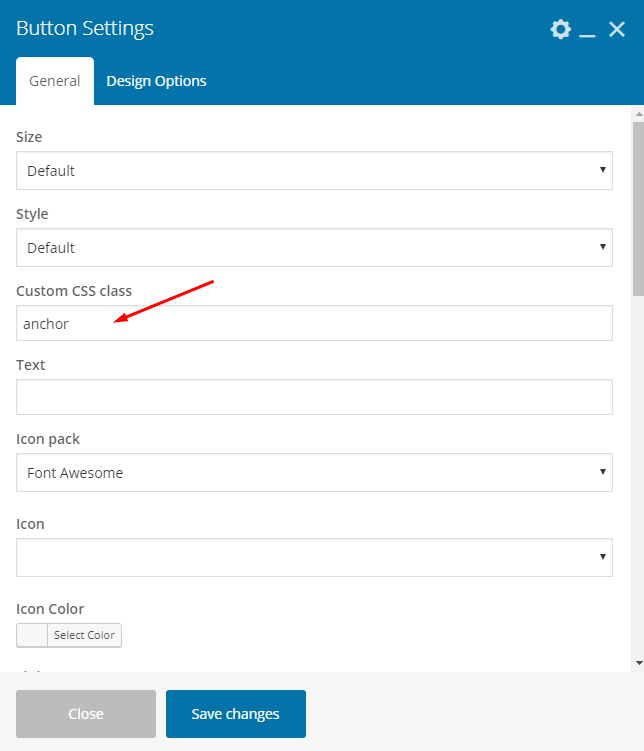
Using Qode Button V2 and want to add anchor link here to a Row on the page, how can I do this? I would it to smooth-scroll. Thanks
Hi,
Add the Anchor ID to the row you want the button to lead to. Make sure to leave the Row ID empty as the two don’t work well when both are set:
https://ticksy_attachments.s3.amazonaws.com/2942276500.png87389https://ticksy_attachments.s3.amazonaws.com/8738984162.png 2. Add the class ‘anchor’ to your Button using the Custom CSS class field: https://ticksy_attachments.s3.amazonaws.com/6871165046.png 3. Link the button to your page with the anchor tag added to the page URL like in the screenshot, and make sure that the Link Target is set to ‘Self’: https://ticksy_attachments.s3.amazonaws.com/3118588832.png4.We hope this is what you’re looking for.
Don’t forget to sign up for our newsletter and be the first to find out all the latest news.
Hello there!
Pre-sale questions:
1. Is it possible to create a section layout on the home page with an info box (with 2-3 icons) on the left and right with an image in the center? Like this- https://imgur.com/ar9y6FM
2. Can we customize the Product Layout Page? Ours is a single product website for now and would need content style similar to that of the home page in the product page – like split section content for example.
Thanks.
Hello,
Thank you for taking interest in our Bridge theme.
1) Yes, this could be done.
2) There are no such possibility to edit product single page without editing code for this template.
If there is any other doubt, we are here.
Don’t forget to sign up for our newsletter and be the first to find out all the latest news.
I submitted 2 tickets about 24 hours ago. I was wondering when I can get a response or are you guys off until Monday? Please respond if you can or let me know when support is available. You guys are usually pretty good with responses which i love. These issues are very important. Thanks
Hello,
We are sorry for waiting a bit longer, it is because you’ve submitted tickets during weekend. We managed to find two of your tickets on our support forum and those are assigned to our support agent who is working on it and will reply to you asap. So, you could check response on ticksy soon.
Don’t forget to sign up for our newsletter and be the first to find out all the latest news.
hi was trying to update using envato plugin but its saying i need to enable permissions even tho i have enable the following permissions:
View and search Envato sites View your Envato Account username Download your purchased items Verify purchases of your items List purchases you’ve made Verify purchases you’ve made
Hi there,
Please, check all instructions from here https://envato.com/market-plugin/ and here is that part from our Official Manual http://bridge.qodeinteractive.com/documentation/2-getting-started/2-3-installing-the-bridge-theme/2-3-4-theme-update/2-3-4-2-auto-theme-update/ We hope that will be helpful.Don’t forget to sign up for our newsletter and be the first to find out all the latest news.
thanks!  oddly enough when i went to check it today it was working but if failed to install the update correctly so ended doing it manually anyway. :/
Anyhow, we are glad to hear this is resolved. Thank you for the update.
Don’t forget to sign up for our newsletter and be the first to find out all the latest news.
Hey, is it possible to get a previous version of the Bridge theme? I need 18.0.9 for troubleshooting purposes.
Hello,
On ThemeForest you are able to download only latest theme version, since that is packed with licence and all other files.
We are not in position to distribute other packages
Sorry for that.
Don’t forget to sign up for our newsletter and be the first to find out all the latest news.
Hi,
How can i take my purchase code for Slider Rev?
Thanks,
Hello,
There is no need to activate plugins that came bundled using purchase code, and here you could find more about it https://qode.ticksy.com/article/9426Don’t forget to sign up for our newsletter and be the first to find out all the latest news.
Can you please provide css to display the ‘Header Bottom Right’ widget on mobile – BELOW the nav menu? So it’s the last item under the page navigation.
Hello,
Please, share with us your website link so we could check if that could be done on your installation and provide you with right css.
Don’t forget to sign up for our newsletter and be the first to find out all the latest news.
Hi,
Thanks. So, if you add custom css to show this widget area on mobile, you’ll get something like here: https://www.screencast.com/t/Z3WE0lWJqBut, since you want this button “Apply online” as last menu item, in that case we could suggest to make it as menu item, and we will help you to make it as button using css.
Don’t forget to sign up for our newsletter and be the first to find out all the latest news.
Ok sure. As long as it looks the same and can appear on the menu let’s do that. Please provide instructions and css to achieve this.
Hi again,
So, just go to edit your menu, and for latest menu item Apply online, add css class for example like here https://www.screencast.com/t/2dbBRZdAqu “button_menu_item” and then add this custom css in QOde Options > General > Custom Code > Custom css:
nav.main_menu>ul>li.button_menu_item > a > :nth-child(2){
    width: auto;
    border: 2px solid #303030;
    text-align: left;
    letter-spacing: 1px;
    -o-border-radius: 4px;
    -moz-border-radius: 4px;
    -webkit-border-radius: 4px;
    -ms-border-radius: 4px;
    border-radius: 4px;
    text-shadow: none;
    transition: color .1s linear,background-color .1s linear,border-color
.1s linear;
    -webkit-box-sizing: initial!important;
    -moz-box-sizing: initial!important;
     box-sizing: initial!important;
    color: #00d5c0;
    border-color: #00d5c0;
    background-color: #ffffff;
    height: 30px!important;
    line-height: 30px!important;
    font-size: 12px;
     padding: 0 17px;
}Hope this is what you’re looking for.
Don’t forget to sign up for our newsletter and be the first to find out all the latest news.
That’s great. Thank you!
You are welcome.
Don’t forget to sign up for our newsletter and be the first to find out all the latest news.
Hi Qode! I noticed the three dots ”...” after the excerpt on the Latest Post 2 are gone… Is there a way to put them back with some code? Thanks as always!
Hi,
Thank you for writing in. No, we didn’t edit that part. But you could open this file: bridge\wp-content\plugins\bridge-core\modules\shortcodes\shortcode-elements\_latest-posts-two\latest-posts-two.php and find this line of code, where you’ll add three dots after exceprt variable like here: https://www.screencast.com/t/Zy7AW3ojEBFeDon’t forget to sign up for our newsletter and be the first to find out all the latest news.
Excellent! That did the trick… Thanks for the support!
You are welcome.
Don’t forget to sign up for our newsletter and be the first to find out all the latest news.