177 comments found.

Visual Composer does not work
Hello,
Thank you for reaching us!
Since author’s dashboard is meant for general inquiries and pre-sale questions, we would appreciate if you could submit a ticket to our forum and include your website URL along with wp-admin access and one of our support agents will assist you.
Support
Select Portfolio part of
Qode Interactive
Don’t forget to sign up for our newsletter and be the first to find out all the latest news.
Hi, Select-themes. I have bought this theme and now I am having a trouble: there is a ‘Countdown Month label error’. I am sure this is because of the near end of the need to use the word “months” in the plural, as it usually works when it is more months. So, the error occurs when the word “month” (in singular) is required. My support is over, but the error just happened now, with the event approaching. Please, help me!
Hi there,
Please reach us at support@select-themes.com with your site url, your wp admin credentials and your purchase code so we can investigate on this further.
Support
Select Portfolio part of
Qode Interactive
Don’t forget to sign up for our newsletter and be the first to find out all the latest news.
Hi, I am planing to get this theme. can you let me know what I need to make this website work from plugins or adds-on
Hi there,
Thank you for taking interest in our theme!
You will get all the required plugins in the zip file when you purchase our theme.
You can see which of the plugins come with our theme on this link: https://themeforest.net/item/wellexpo-a-modern-event-and-conference-wordpress-theme/22335758#item-description__theme-featuresIf there’s anything else, feel free to ask!
Support
Select Portfolio part of
Qode Interactive
Don’t forget to sign up for our newsletter and be the first to find out all the latest news.
Hi there,
I have a few pre-sales questions if you don’t mind:
Does the schedule support multiple events ? I’ll be building a festival website, and various events will be happening at the same time in different venues.
Is it actually possible to filter by venue (or add a popup box on hover) with Schedule 2?
Finally, on the Schedule 2 page, is it possible to add a link (‘Read More’) after the schedule excerpt to go directly to the Event page ?
Many thanks!
Hi there,
Thank you for taking interest in our theme!
You can find the timetable documentation on this link: wellexpo.select-themes.com/wp-content/plugins/timetable/documentation/index.html
There is no read more option, but you can add a custom link and set it’s text to be ‘read more’: http://prntscr.com/omcz5tIf there’s anything else, feel free to ask!
Support
Select Portfolio part of
Qode Interactive
Don’t forget to sign up for our newsletter and be the first to find out all the latest news.
How do I change global colour theme on Wellexpo?
Hi there,
Thank you for writing in.
You can set the first main color in Select Options >> General.
If there’s anything else, please submit a ticket on our official support platform: https://select.ticksy.com and one of our agents will assist you.
Support
Select Portfolio part of
Qode Interactive
Don’t forget to sign up for our newsletter and be the first to find out all the latest news.
Wher would i find options? under Theme customization?
Hi again,
You can set it like in the screenshot: http://prntscr.com/ojrjvc
Support
Select Portfolio part of
Qode Interactive
Don’t forget to sign up for our newsletter and be the first to find out all the latest news.
How do I change the text on the moving bar?
Hi again,
Please submit a ticket on our official support platform: https://select.ticksy.com and one of our agents will assist you.
Since author’s dashboard is meant for general inquiries and pre-sale questions, please submit a ticket on our official support platform: https://select.ticksy.com and one of our agents will assist you.
Support
Select Portfolio part of
Qode Interactive
Don’t forget to sign up for our newsletter and be the first to find out all the latest news.
I cant install the theme. Uploading the zip-file, but WordPRess rejects it as it “Doesn’t contain the stylesheet style.css”
Hello,
This is the common issue when installing a theme, this error message does not mean that the theme is broken. It means that the files are not uploaded correctly, and there is an easy fix for it described in this article: https://select.ticksy.com/article/9562
Support
Select Portfolio part of
Qode Interactive
Don’t forget to sign up for our newsletter and be the first to find out all the latest news.
Hi, any possibility to archive older conferences/events including all speakers etc?
Hello there,
Thank you for taking interest in our theme. All events will be listed even if dates are in past. And when it comes to speakers, here is page where this example is covered https://wellexpo.select-themes.com/schedule-3/ If there is any other doubt, we are here.
best, Select
Thanks for the quick reply
You are welcome 
Hello, is it possible to make one page website instead of multipage, and use in menu scroll view, instead of going to another page ? if yes, do I need extra plugin or can the main page move down to specific sections from menu bar ?
Hello,
Thank you for taking interest in our theme. Yes, you are able to create One Page site using WellExpo and you don’t need any extra plugin for it.
Best, Select
Hello,
We are really enjoying this theme a ton! I was hoping you would be able to provide a PSD for the site so that we can make some custom pages to go along with this theme. Please let me know if this is a possibility!
Cheers!
Hello,
We are glad to hear this. Yes, just request PSD files here https://select.ticksy.com/ Open a ticket and our support agent will provide you with PSDs.
Best, Select
Hi, I’m working on an inner page template. First I customized the content on an existing page that was included in th edemo upload. But then when I create my own new page, there is a strange white space of 80px tall above the header image. Can you tell me where this exists in the admin so I can delete it? I’m trying to format new inner pages to have the nav overlap the header with no white space between them. Thanks so much! Kim
Hello,
Please open a ticket at https://select.ticksy.com/ and provide website link and WordPress admin access and one of our support agents will gladly help.
Best, Select
Hi, how can I change the hamburger menu breakpoint?
Hello,
Thank you for reaching us!
Since author’s dashboard is meant for general inquiries and pre-sale questions, we would appreciate if you could submit a ticket to our forum and include your website URL along with wp-admin access and one of our support agents will assist you.
Best,
Select
Cant tell you the amount of things that should work easily that just dont and 3 days to get a reply from tech support? I am using this theme for a client, I would not recommend it. Things that you advertise as being possible shouldn’t require me adding a ton of css. Please have your support staff look at my ever growing ticket of things that dont work and consider either hiring a few more people or doing something to the theme that it doesnt require so many tickets. Not a happy customer 
Hello,
We couldn’t find any ticket registered under your username on our forum. Can you please forward your ticket ID or URL? Thank you.
Select
Apparently you found me once on a previous ticket and you found me again this morning. I stand by my statements, I would not recommend this theme, unless you want a carbon copy of the demo site. As a developer I wont work with this theme again. You really need a better response time on tickets. I appreciate it gets busy, but both tickets I have opened had a 3 day turnaround on both original and replies.
Hi,
Thank you for the feedback. We’re constantly doing our best to improve our services as much as we can. It’s important to note that due to some major theme updates response time grew a bit in the last couple of days. However, we expect the situation to normalize in the days to come. Thank you for your patience and understanding.
Select
Thing is cherie, the last time I put in a ticket you did not have the luxury of major updates and it took over a week to get answers. Patience and understanding tends to fly out the window when a client is on a deadline. Only after I contact the public face of your theme do i get a response, the response I get however, is not one that makes sense and I have no desire to wait another 3 days to solve it.
I want a sidebar to appear on the product categories section, your solution, make a page, add a widget with the categories and use that. That doesn’t allow for people clicking the hard coded category section.
For Example: https://wellexpo.select-themes.com/product-category/business/
Product category page, generated by clicking the business category under a product and you have a side bar. I do not. my settings are set to show sidebars on all pages.
Hello,
We located your request #1977649 and forwarded to our support team for some quicker response. Please check ticket status in a couple of minutes. Thanks!
Select
2 days ago, you posted this to your support team two days ago and their response? Turn it off and back on again.
I am begging my client to ditch this theme and go with another, I would rather rebuild the site than keep waiting. There is NO reason for my product page to suddenly look horrendous, i have no external css other than to remove the giant green border on the contact form and to change the blockcode to white. I also have no other plugins except those supplied by you.
Your support team have an admin login/pass to look at this and still here we are.
As far as I am concerned at this point, your product does not work and I look forward to you proving me wrong
Hi,
Our agent already provided you with a fix, couple of minutes ago, please check their response. Get back to us with some feedback, thank you.
Select
You agent provided me with a fix to the issue that broke when he suggested I turn everything off and update. what he has NOT done is fix the problem I brought up a WEEK ago. I have given him admin access and made it clear what the error is.
Your category pages have a sidebar: https://wellexpo.select-themes.com/product-category/design/
Mine do not: https://shovelduck.ca/product-category/original-collection/
A week, and all that has occurred is the site was broken further from the updates.
You’re the author, tell me what I need to do to make that sidebar appear
It appears here: https://shovelduck.ca/shop the generic shop page, but not on the category pages.
For the love of God will you tell me how to fix this so my client can go live and I can get paid!
Hi,
Your ticket is, once again, updated. Please check it’s status.
Select
My ticket is once again updated with a response that doesnt make sense. I have replied with a screen shot showing that there are NO options on the main shop page to change headers, logos, sidebars etc. I have also supplied another login for your support to look for themselves. But grats on the response time.
Hi,
We would appreciate if you could be a little bit patient, we’re not doing live chats. We’ve forwarded your ticket to our support team already couple of times and we need to refer to other users as well. Please be patient, we’ll get back to you as quickly as possible.
Select
I would appreciate it you read my ticket and see how little has been achieved in how long a time. I would appreciate not waiting 3 days to be told “try turning it off and back on again” I would appreciate not being given directions to things that do not exist. Feel free not to reply here, I’m done with your idea of customer service. If your support people can not deliver on your theme’s promise, I will leave it in the hands of my client as to which other theme he wishes to use. Good day Sir.
llo,
Your ticket is assigned to our agent who is currently working on it and will reply to you asap. So you could check response on ticksy soon.
Best regards, Select
Yes he replied telling me I had version 1.2 and it was out of date. So I downloaded the file again this morning to be certain and the only update available is 1.2. can you clarify which version is running and how do I get 1.2.1 as it is not the one in my download list.
Hello,
Please, check again reply on your ticket. Our agent will help you there.
best, Select
Hi, is there an option to remove the search icon on the menu?
Hello,
Yes, of course. Please go to Appearance > Widgets > Header Widget Area One and remove Search Widget.
Select
Was that easy after all, thanks!
You’re welcome.
Theme looks fantastic but in some reasons doesn’t work properly-I cannot edit extra options on pages and team section. In my case my tickets are ignored on select.ticksy.com. So please help
Hello,
Thank you for your kind words. We located two of your tickets and our agent just answered. Please, check responses on ticksy. Sorry for waiting longer.
Best, Select
Hi. Sorry, but first time I had this kind of support level… Yes. I got partial answer from you. But still the most important issue is not solved. I gave you credentials to my hosting but from 2 days there are no answer and actions on my server(you didn’t login to my wordpress). I installed your theme twice on two clean Wordpress instances and still I don’t have theme options per page what is kind of core of your product. I don’t like this kind of solving problems but I’m loosing my time and I don’t want to lose my client. So please answer on my question and solve the problem. I found on your ticket system that I’m not only one who has this kind of troubles.
Hi,
Our agent replied back to you on your tickets. Please, check response there and our agent will assist you to resolve this. Thanks
Select
Hi,
I have the same problem that aquagd. I don’t see the customs fields on Members, Testimonials and Gallery. And I can’t access to ticket #1944885. Is It this URL https://select.ticksy.com/ticket/1947324/ ?
Regards,
Steve T.
Hello Steve,
Neither this #1944885 nor this #1944885 is your original thread. If you need further help, please submit a new one.
Thank you.
Select
Any update ? We can’t edit members fields…
Hi,
Your ticket just got updated, please check it’s status.
Select
hi, i cant edit Masonry Gallery after theme update… can you help?
Hello,
Thank you for reaching us!
Since author’s dashboard is meant for general inquiries and pre-sale questions, we would appreciate if you could submit a ticket to our forum and include your website URL along with wp-admin access and one of our support agents will assist you.
Best,
Select
i tried to submit, but forum form is not working, nothing happen after i click submit…
Hi,
You already managed to send 2 tickets. We will forward them to our support team for some quicker response.
Select
thanks for your fast respond
You’re welcome!
i habe submited a ticket 3 days ago, still no response from you… how long should i wait?
Hi,
As far as we can see, your ticket just got updated. Please check it’s status. Thank you.
Select
Good Day,
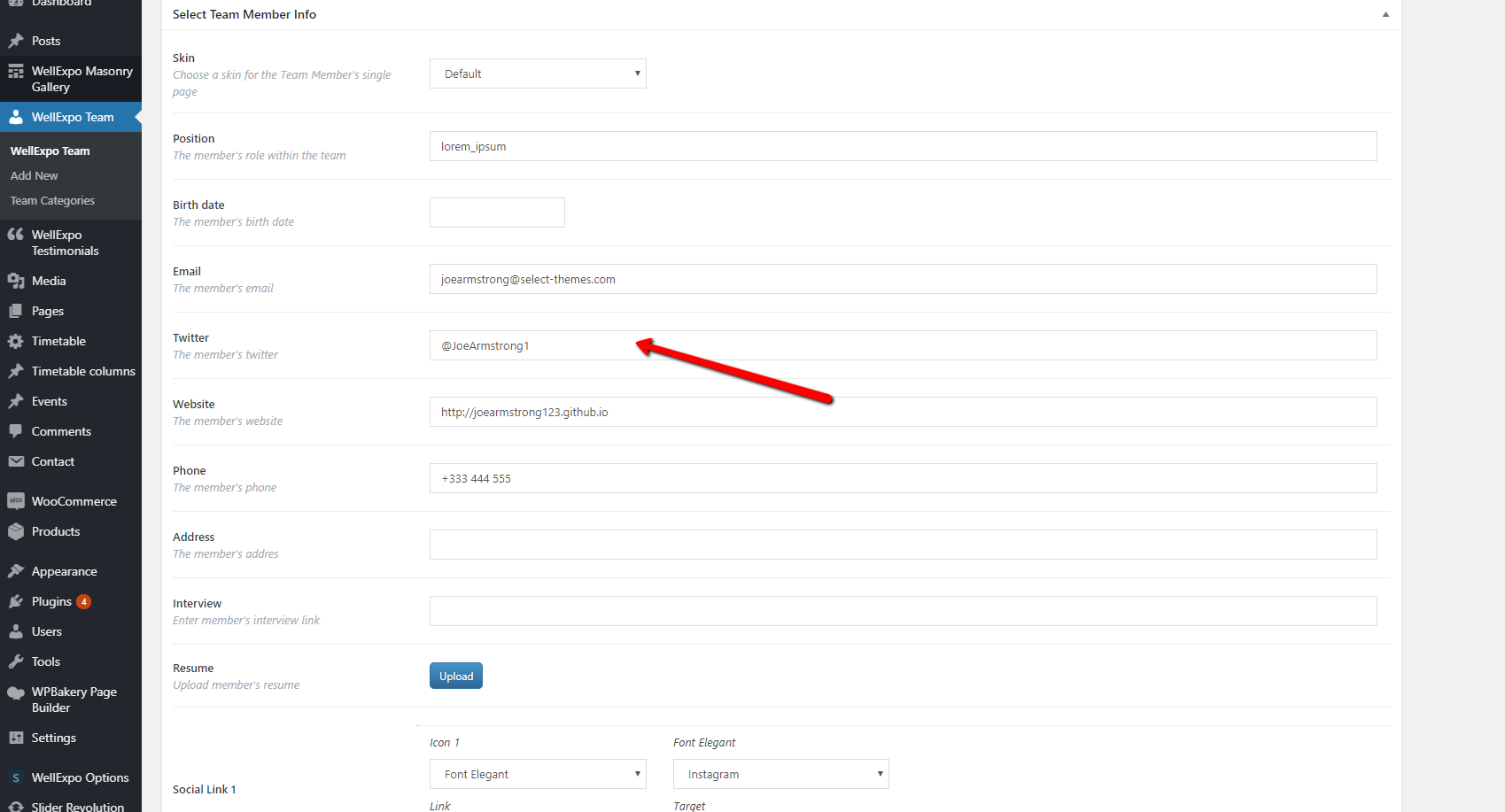
We want to be able to edit the team member section on the Conference Home Page. We see that when you hover there are social links and when you click them you see info about that member and a websites links etc. However we cannot find where to edit those options. We go to the WellExpo Team section and see nothing but the excerpt. No where near what we see that is displayed on the front end.
Thanks and Regards
Hello,
We located your request #1944885 and forwarded to our support team for some quicker response. Please check ticket status in a couple of minutes. Thanks!
Select
Good Day,
Unfortunately the response we got was not helpful at all. We responded to the support team and have yet to get a response. What we want is to edit the social links and the websites links for a Team Member that was imported in the demo content. We are clearly seeing the information on the front end but we are not seeing where that information is pulling from on the dashboard end. When editing a team member from the WellExpo Team section, there is no place found to enter social links or the website links, yet we are seeing them on the front end. Your help will be appreciated.
Thanks and Regards
Hi,
Support agent has been informed, your ticket will be answered as soon as possible.
Select
Thank you. It seems that we dont have the same options as shown in the screenshot sent by the support team. We have responded to the ticket.
Regards
Hi,
We have located your ticket on our support forum. One of our support agents will answer your ticket as soon as possible. Please continue the conversation on the ticket.
Select
Good Day,
They told us to update to version 1.2.1 to fix the issue. However, you don’t seem to have that update available for us here on themeforest to download. Can you please direct us to where we can download that update?
Thanks and Regards
Hi,
Version 1.2.1 is the latest for WellExpo theme, here’s a change log https://themeforest.net/item/wellexpo-a-modern-event-and-conference-wordpress-theme/22335758#item-description__update-log
Select
Yes we know thats its in the change log. But it is not updated on themeforest. It is still version 1.2 that is available for download. Even the date for last update says 14 March 19. Please upload the newest version so we can download it please.
https://postimg.cc/k6zDbFPJThanks and Regards
Hi,
It’s only a mistake in the date in the update log. All files are properly uploaded. I just checked, the last theme version is, indeed, 1.2.1. Please download your files once again and update your copy.
Select
Hi,
We have updated the theme as suggestted by the support team. However, we are still having the same issue. We are suppose to be seeing this option
https://ticksy_attachments.s3.amazonaws.com/4830419468.pngThe screenshot above was posted by the support team. But on our end we are not seeing this option. They told us to update the theme to fix the issue but this has not fixed the issue. We still dont see those fields.
Hi,
We located your request #1944885 which is, from what we can see, already updated by our agent. Can you please continue converstaion there. Thank you.
Select
Hi, How can i put the menu from “music” template in another page
Hi, the updated file its wrong, is still version 1.2
Hello,
Thank you for reaching us!
Since author’s dashboard is meant for general inquiries and pre-sale questions, we would appreciate if you could submit a ticket to our forum and include your website URL along with wp-admin access and one of our support agents will assist you.
Best,
Select
So, based on the above comment, is it safe to update?
Hello,
Yes, of course, feel free to update your copy of WellExpo theme.
Here’s how – http://wellexpo.select-themes.com/documentation#getting_started_updating_wellexpo
Select
Just uploaded the new version of the theme, the options on page aren’t available anymore I can’t change the header menu, or remove the footer, is it normal ?
Thank you
Hello,
We located your request #1936119 and forwarded to our support team for some quicker response. Please check ticket status in a couple of minutes. Thanks!
Select
Thank You !!
You’re welcome!