23249 comments found.

I get the message: Your ip address is blocked as spam!!! please help me
Hello,
Can you please contact us via our support system and share your product purchase code with us so we will check it for you.
Best Regards.
Hello,
Have you purchased the Porto WordPress theme? If yes, then please contact us through your theme purchase account to get the free support for Porto WordPress theme.
Best Regards.
Yes I have purchased the theme but your “Create Support Account is not working. When I enter my purchase code it does not let me create an account. Also I’ve reached out to you through the “Contact Us” form on your website but have not received a response. In that email I gave you the purchase code.
Hello,
Can you please share your product purchase code PDF files with us via our email newsmartwave@gmail.com so that we will check/verify and create the support account for you.
Best Regards.
Ok I sent you an email, but haven’t heard back from you yet.
Hello,
First of all, our business hours are Monday to Saturday – from 12:00 AM to 08:00 AM EST, so always please be patience as we have to reply all the queries in a queue, you will always get the reply of your query when it has been fixed.
And we have just replied your email with a proper solution, please check your email reply and do the following written in it.
Best Regards.
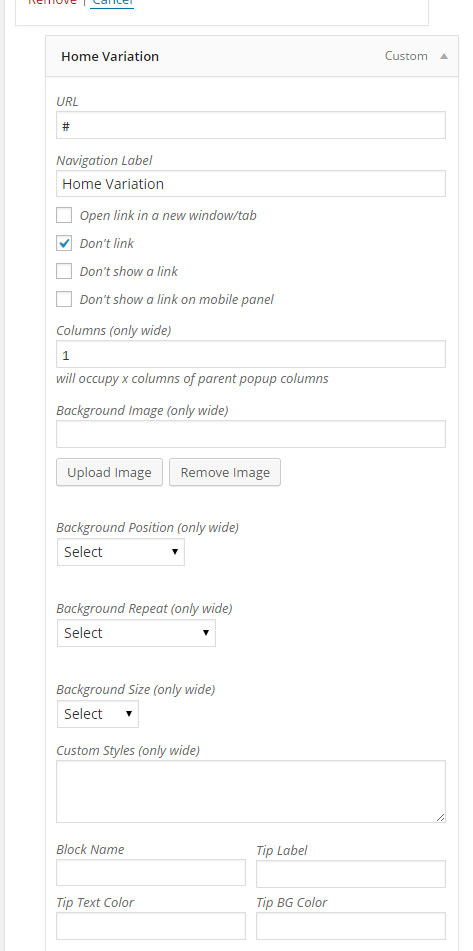
Thanks for your help getting this resolved. It turned out it was a pop up maker plugin that were adding fields to the menu options that conflicted with the mega menu fields from the theme. We didn’t need the plugin so we deleted which resolved everything.
Sound’s Great!..:)
And thanks for sharing the solution here, It will help other peoples as well.
Hi do you have size chart/guide option?
as well as variable swatch image option instead of color
Hello,
First of all, thanks for showing your interest in Porto WordPress.
1. Yes, we have Size Chart Option in the Theme, Please watch the Configuration video below:
https://www.youtube.com/watch?v=FF953zRk-Fs&feature=youtu.be
2. Yes, we have Image Swatches Option for variations as well, Please watch the Configuration video below:
https://jmp.sh/Fd7K6ti
Best Regards.
a simple question how to change only the button color? http://prntscr.com/psbylg thanks
Hello,
Please copy and paste the below given CSS code to Appearance >> Theme Options >> Skin >> Custom CSS and check your site after removing the browser cache and also you can change the color code in the given code as per your requirements.
.single-product button.single_add_to_cart_button.button.alt {
    background-color: #fdd918 !important;
    color: #000 !important;
}
Best Regards.
thanks and the code to change ADD to CART button in sticky Header when scroll the page down ? http://prntscr.com/psls61 thanks
Hello,
Please copy and paste the below given CSS code to Appearance >> Theme Options >> Skin >> Custom CSS and check your site after removing the browser cache and also you can change the color code in the given code as per your requirements.
.single-product button.single_add_to_cart_button.button {
    background-color: #dd6033!important;
}
Best Regards.
thanks
Most Welcome!.. 
How can I Change the images on the slider?
Hello,
Please read and follow the instructions written in the below-given articles:
https://smartwave.freshdesk.com/support/solutions/articles/12000056892--18-home-page-slider-configuration-slider-images-and-text-changing-slider-button-url-link-changing
https://smartwave.freshdesk.com/support/solutions/articles/12000057396--24-how-to-configure-porto-inter-active-banner-home-page-slider
Best Regards.
Dear sir,
I have a couple of pre-sales questions about the medical template of this Porto theme.
1) Directly beneath the slider there are 4 blue blocks that unfold 1 by 1 on scrolling down (in full view). a) Can all 4 of these blocks be directly/instantly shown on loading the page (so without the unfolding behaviour)? b) Can the first blue block (that contains the text: ‘Medical Treatment’) also contain a link (just like the second one on the left containing the link to the timetable).
The other questions are about the mobile version of the medical template.
2) On this url: http://www.akindworld.com/Eric/screen1.jpg you can see a mobile screen of this theme on my iPhone. a) The pull-down arrow next to “Departments’ is tiny and rather invisible compared to the nice blue box around the hamburger-menu. Clicking on Departments without touching the pull down arrow, won’t result in the submenu items. Can this pull down arrow have a blue box around it? like the hamburger icon. b) Is it a standard option to directly show all the submenu items, upon clicking on the hamburger? (then visibility of the submenu items doens’t depend on the user noticing the pull down arrow).
3) On this url: http://www.akindworld.com/Eric/screen2.jpg you see another view on my iPhone. The ratio of the banner(text) versus the blue boxes is very different to the full desktop-view. I understand that the blue boxes can be adjusted by bootstrap values for mobile. Is it also possible to enlarge the slider(text) on mobile to give it the same relative proportions compared to a desktop view?
Thanks in advance. Eric
Hello,
First of all, thanks for showing your interest in Porto WordPress.
1. Yes, you can, those all have different columns and the animation has been set using Custom CSS and classes for Custom CSS has been set in Columns setting you just have to remove it and the animation will be removed and Yes you can also set the URL for the first as when clicked on it.
2. Yes, it is the default Option to click on the icon to expends/show the sub Menu and yes you can set the background Box/Circle behind arrow using Custom CSS, You just have to contact us via our support system after purchasing the Theme we will provide you the Custom CSS for it.
3. Again, Yes, simply using Custom CSS, You just have to contact us via our support system after purchasing the Theme we will provide you the Custom CSS for it.
Best Regards.
Thanks for your fast answers… I will start building soon …
Most Welcome!..
Hey! How can I decrease the menu bar hover height? Right now it’s taking the entore menu space. Or can I decrease the menu bar height?
Hello,
Please copy and paste the below given CSS code to Appearance >> Theme Options >> Skin >> Custom CSS, It will solve your issue reduce the height of the Menu Bar.
#header .main-menu > li.menu-item > a {
    padding: 20px 16px 20px 16px !important;
}
Best Regards.
Hi i need solution for below mentioned points 1. how to get new registration information mail and also how to send reply after registration. 2. how to get reset password new information mail. Also am sending reset password link mail to email but not received am mail regarding reset password.
Thanks
Hello,
1. There is no default option in WooCommerce plugin for it, You have to do it using some Customization, please read the below-given thread or you can contact our customization team as well:
https://gist.github.com/claudiosanches/755fbc92941830eebda46151fc57688f
2. If reset password not working, Please read and follow the instructions written in the below-given threads:
https://wordpress.org/support/topic/reset-password-email-for-woocommerce-customers-is-not-working/
https://stackoverflow.com/questions/26592043/woocommerce-reset-password-not-working
Best Regards.
Hello , how can i set each photo size to 360×360 (small ), and each 3 photos in a row?
Hello,
You can divide the single ROW in 3 COLUMNS and insert/use Single Image WP Bakery element in each column differently and set the Image size as per your requirements: https://pasteboard.co/IF6N0dw.png
Best Regards.
WPBakery Page Builder Settings, we only have three :general setting,role manager, product licence,shortcode mapper, where to find SINGLE IMAGE WPP BAKERY ELEMENTS????
Hello,
When you edit the page you have to click on Add element and under elements you will find the Single Image element: https://pasteboard.co/IFgLfR6.png
and here is the element: https://pasteboard.co/IFgLExx.png
How to use WP Bakery page builder, please watch the video:
https://wpbakery.com/video-academy/wpbakery-page-builder-tutorial-for-beginners/
Best Regards.
Question : how to get “wishlist” and “my account” icon design like in SHOP 26 demo?
Hello,
That header has been created using Header Builder and the “wishlist” and “my account” icon design has been created using Shortcodes as showing below:
https://pasteboard.co/IF5OtR0.png
https://pasteboard.co/IF5OTu6.png
My Account Shortcode:
[vc_row][vc_column][porto_info_box icon="fas fa-user" icon_size="25" icon_color="#000000" icon_style="advanced" icon_color_bg="" icon_border_style="solid" icon_color_border="rgba(0,0,0,0.5)" icon_border_size="1" icon_border_radius="26" icon_border_spacing="50" title="Hello!" subtitle="My Account" read_more="box" link="url:https%3A%2F%2Fwww.google.com%2F|title:My%20Account||" title_font_style="400" subtitle_font_style="700" el_class="mb-0" title_font_size="12" title_font_line_height="12" title_font_color="#000" subtitle_font_size="13" subtitle_font_line_height="13" subtitle_font_color="#000"][/porto_info_box][/vc_column][/vc_row]
Wishlist Shortcode:
<a href="wishlist/" class="wishlist d-none d-sm-inline-block"><i class="porto-icon-wishlist-2" /></a>
Best Regards.
Thanks! Why header builder only for desktop and tab and not available for mobile version?
Hello,
It is for Mobile version as well, You can set the Mobile Header as well using Header Builder Feature, Please see this screenshot: https://pasteboard.co/IF6S5Ae.png
Best Regards.
About search form : can I select which categories to be displayed under search form?
Hello,
Sorry to say that but this is not possible, you can not display your desired categories only under Search Form, It takes all the Categories by default. This requires Customization or you can contact with Yith WooCommerce Ajax Search plugin Author and ask plugin Auhtor if this is possible with Premium plugin, If yes then you have to purchase it and use it.
Best Regards.
how many domains for one license ? I need to build the site in a different domains before transfering the main domain to the site
Hello,
First of all, thanks for showing your interest in Porto WordPress.
You can only use the single License of the Theme for the single site/domain, If you want to use the Theme on 10 different sites/domains, you have to purchase 10 different licenses of the Theme, this is Envato Policy you may wish to confirm from them as well:
https://help.market.envato.com/hc/en-us
And if you want to Install and Complete the site first on Test site and then want to transfer it on Live site, No need to worry, we have a workaround for you in this scenario, you just have to deactivate the Theme License from Test site and then you will be able to Activate the Theme on the main site with same purchase code it will work for you and in case you Lost the site without deactivating the License then you just have to contact us we will reset your purchase code to use it on the new site.
Best Regards.
How do I customize the Popup newsletter?or How do I disable the popup?
Hello,
Please read and follow the instructions written in this article:
https://smartwave.freshdesk.com/support/solutions/articles/12000052389--1-home-page-pop-up-modal-box-background-image-and-text-changing-or-removing-
Best Regards.
Hi, I need to deactivate the licence code for a test website. directpiece.com is not working under wordpress, and I need to install the porto template for another website. I can’t access the old installation (I deleted the wordpress installation).. Thanks a lot!
Hello,
I have reset your purchase code, now you can use the same purchase code for registration of your theme.
Best Regards.
Hello astrange thing with Gtranslate Plugin: if i go to translated page in italian https://www.nicolameyer.com/it and click on FAQ on top bar menu… it finds the translated page http://prntscr.com/prycqv .. but if i switch to another language e.g DE it not find the page… probably because it is a virtual way to manage the FAQ page by your theme ? it is not as a real page, is it? the GTRANSLATE plugin put a it/de/es suffix for any language to translate vurtually the page on their servers can you test and let me know if can be a workaround to work with your FAQ management ? thanks
Same thing for 404 error (block page)
Hello,
This seems to be the issue with your permalinks, Please try once reset/refresh the permalinks from WP-Dashboard >> Setting >> Permalinks and save changes and check your site after removing the browser cache, Hope it will solve your issue, If not then please once check with plugin Author that you have translated the Theme properly with plugin or not.
Best Regards.
Yes done but not works
Hello,
Then please check once with default WP Theme Twenty Nineteen that will it work for you with default WP Theme, If o, then it is plugin issue you have to contact plugin Author and if it is working fine with default WP Theme then there may be 2 reasons, one plugin setting, you have to contact plugin Author and check the plugin setting one or confirm from plugin Author that you used the plugin properly or not, follow the plugin Doc, or it may be the plugin confliction with Theme or with any other third party plugin, so you have to check once with deactivating all the plugins as well and if it solve your issue then again activate all the third-party plugins one by one and check which one is creating an issue on your site.
Best Regards.
ok i will try
Sure
Hello i found an issue not know if related to your themecan you check ?
here
https://www.nicolameyer.com/leather-goods/build-your-own/leave charge the infinite scroll for products and the products that appear have add to cart and select options buttons…. showed
i use a plugin that remoive the ADD to cart…
in first result products it is correct only Select options but with products charged after infinite scroll appear add to cart near select options
https://prnt.sc/ps47yri try to deactivate infinite scroll from theme for SHOW more
but same issue
Hello,
This seems to be your site any third party plugin conflcition issue, Please deactivate your site all the third party plugins and check your site after removing the server, site and browser cache, Hope your issue will solve and then again you have to activate all the third party plugins again one by one and check which one is creating an issue on your site and please generate a support ticket for your remaining or new issues via our support syste so that our experts will check and help you in sorting out your issues, this platform is only used for getting help on small queries.
Best Regards.
can you test what happene when the page charge ?
Hello,
Can you please contact us via our support system with your site WP Admin Login details so we will check it for you on your site.
Best Regards.
ok it is related to infinite scroll or load more of your theme http://prntscr.com/pt4m7k because if i choose default mode products in more pages it not happen https://www.nicolameyer.com/leather-goods/build-your-own/page/2/ Now as workaround i make 20 products per page
Hello,
OK, Please contact us via our support system with your site WP-Admin Login details so we will check it for you on your site.
Best Regards.
Question 3: Can I change the background color of “ADD TO CART”?
Question 4: How to remove Paypal logo and change the background color of “BUY NOW” on product page?
Thank you.
Hello,
1. Please read and follow the instructions written in this article:
https://smartwave.freshdesk.com/support/solutions/articles/12000052389--1-home-page-pop-up-modal-box-background-image-and-text-changing-or-removing-
2. Regarding Header Color changing, Please read and follow the instructions written in this article:
https://smartwave.freshdesk.com/support/solutions/articles/12000057054--20-how-to-change-color-of-header-in-porto-wordpress-
And you have to change the sidebar category background color using Custom CSS, Please copy and paste the below-given CSS code to Appearance >> Theme Options >> Skin >> Custom CSS and change the color value in the given code as per your requirements, It will work for you: https://pasteboard.co/IF5tyiB.png
.porto-onepage-category .category-list {
    background: #f11010 !important;
}
3. You can change the Add to Cart Button color from Appearance >> Theme Options >> Skin >> Shop as per your requirements: https://pasteboard.co/IF5r8Iy.png
4. Please copy and paste the below-given CSS code to Appearance >> Theme Options >> Skin >> Custom CSS and check your site after removing the browser cache.
.paypal-button-logo {
    display: none !important;
}
.paypal-button.paypal-button-color-gold {
    background-color: #21ff13 !important;
}
If you have any issue remaining or the new issue then please generate a ticket via our support system so our team experts will help you in sorting out your issues.
Best Regards.
Great. Thanks for your support. Is there any doccuments to show how to set up the theme?
Hello,
Most Welcome!..
You can read the Theme Documentation here:
https://www.portotheme.com/wordpress/porto/documentation/
You can read our Support FAQ’s here:
https://smartwave.freshdesk.com/support/solutions/folders/5000171807
You can watch our support videos here:
https://www.youtube.com/channel/UCxpC6FotEXtn49agAdMEJhw?view_as=subscriber
Best Regards.
Great. Thank you.
Most Welcome!..
My question is about footer: I just want a basic footer with menu and sign up . Also I want to disable few rows for the mobile version 1) how to set footer blocks to page? I can see 2 footers under blocks. I dunno how it’s connected to the main page. 2) can I import just the footers from demo files? 3) what is the options under themeoptions – footers? It just shows me layout. 4) I want to add a script above the body tags. How do I do this? I
Hello,
1. Regarding Footer, Please read and follow the instructions written in the below-given articles:
https://smartwave.freshdesk.com/support/solutions/articles/12000056890--17-how-to-configure-footer-in-porto-wordpress-
https://smartwave.freshdesk.com/support/solutions/articles/12000057055--21-how-to-change-color-of-footer-in-porto-wordpress-
You can create a block and add/insert/set anything in it as per your requirements and then copy the block slug name and then you have to go to Appearance >> Widgets >> Footer Widgets and insert/set Porto Block Widget under it and finally paste the copied block slug name under Porto Block Widget and save changes.
2. No, you can not only Import the Footer using Demo Import functionality.
3. You will find all the Footer Options under Appearance >> Theme Options >> Footer: https://pasteboard.co/IF5nC3B.png
4. You can add your JS/JQuery script without <script> <noscript> tags under Appearance >> Theme Options >> Skin >> JavaScript code: https://pasteboard.co/IF5ooLS.png
It will work for you, and without tags is because the tags are already included in the Theme section default.
Best Regards.
Thanks for the quick reply. The script is for footer and sign up form. It’s asking me to paste the code before the body tags.
Hello,
Yeah, you can paste it under Appearance >> Theme Options >> Skin >> JavaScript code as I showed you above.
Best Regards.
Hello,
Can you please contact us via our support system with your site WP Admin Login details so our experts will check it for you and provide you best possible solution.
Best Regards.
Can I contact your support team? Plz provide me the email I’d.
Hello,
Please generate your support ticket via our support system here: http://portotheme.com/support
Best Regards.
Hello! When loading any demo on my site, the page view is not what it should be. And Google shows a warning about insecure content. Please help. https://raspili-dsp.ru/
Hello,
This is your server SSL certificate issue, Please contact your hosting provider for it.
OR
Simply Install and Activate the below-given plugin, it will solve your issue.
https://wordpress.org/plugins/really-simple-ssl/
Best Regards.
Thank!!! You really helped !!!
Most Welcome!..
Hello, the category pages appear to be buggy! https://ozolle.com/product-category/men/accessories-men/
Hi guys, issue has been resolved. An external plugin from another Woocommerce theme was the culprit. The other vendors plugin was deactivated which got Porto working like a charm. Thanks guys.
Hello,
Sound’s Really Great!..
You are the best
Those are incredibly kind words, That is exactly what Porto and this team are all about, we do our best to be the best, We hope you are enjoying the latest update and look forward to continuing to work together!!
Best Regards.
Hello!
sir, please help me to provide a solution, i want to install this demo Ex- https://www.portotheme.com/wordpress/porto/real-estate – then i want to know how can public easily post their properties specification on this site. is it possible or not?? https://prnt.sc/prm57pif is it possible then please kindly help me to provide a solution.
Best Regards.
Hello,
Sorry to say that but this is not possible, Only Admin can Post the Properties, If you want Customers/Users can Post the properties then you have to use any third party plugin for it, this is not the default Theme Functionality.
Best Regards.
thank you so much for cooperate.
Best Regards.Most Welcome!..