8686 comments found.

Hi, the patch for the row height bug doesn’t word. The link is incorrect.
Hi, do you refer to this link? https://support.undsgn.com/hc/en-us/articles/214092169
Yes, the link to de dropbox shared folder doesn’t work
This is correct! Thank you!
Thank you for the confirmation! 
The previously linked uncode account was disconnected and I purchased a new uncode theme. I tried to register product in the system status but failed. Error phrase ‘Invalid credits, or your Envato account does not have an uncode among committed items’
What is the reason? I need you to tell me how to solve this.
Anyway, if you need support is offered in our Help Center, there we have a completely dedicated support team, please submit a ticket so we can check your installation and support the solution privately! Thank you! https://support.undsgn.com/hc
Please can you assist, I cannot log into my site, I am getting this error:
Fatal error: Cannot declare class Walker_Nav_Menu_Edit_Custom, because the name is already in use in /home/site/public_html/wp-content/themes/uncode/core/inc/edit_custom_walker.php on line 0 There has been a critical error on your website. Please check your site admin email inbox for instructions.
Hi nasan! What version of WordPress and version of Uncode you have? Have you extra plugins?
Thanks for the quick reply! I havn’t used the site in a few months. Is there anything I can try in the cpanel to try and get this working?
Hi nasan! Sorry but we cannot help if you don’t reply our questions. What version of WordPress and version of Uncode you have? Have you extra plugins? Please note that is possible your WordPress automatically update to last version or your host changed some settings.
Here you go:
WordPress version 5.3 Current theme: Uncode (version 1.6.4.1) Current plugin: (version ) PHP version 7.1.33
I’m assuming you don’t have a child theme with some PHP customisations, if you have updated to WordPress 5.3 you need also to update to the last version of Uncode that is Uncode 2.2.3: https://support.undsgn.com/hc/articles/214001205
Hello ! when i activate “adaptative images” i have a code appeared on my homepage aboce an image: “Warning: A non-numeric value encountered in /var/www/html/wp-content/themes/uncode/core/inc/helpers.php on line 282” I don’t understand why ? can you help me
Hi gaglain! Are you using the last version of Uncode?
Yes !
No sorry, we don’t have other similar reports, not here not in the Help Center, please share your site URL so we can have a check. PS: did you have extra plugins that can trigger the issue?
Is this the only image affected?
The only fix we have relative to this file is this, can you please test? Please open the file ”/uncode/core/inc/helpers.php” and about line 270 try to insert these codes:
$targetWidth = $originalWidth;
$targetHeight = $originalHeight;
Please check to understand better: https://undsgn.d.pr/eXIfcd
no, there are the same problem on carousel for example here : https://espritplanete.com/nos-produits/gobelets/ep-25
Please check our last message, this is the only fix related to this file we know.
I already have this line of code in my helper : $targetWidth = $originalWidth; $targetHeight = $originalHeight;
I already have this line of code in my helpers.php : $targetWidth = $originalWidth; $targetHeight = $originalHeight;
Hi gaglain! Can you please send the shortcodes of this section so we can replicate in our installations? Please copy the row and remove all other elements, just left the problematic image and copy the codes.
Découvrez notre gamme de produits : row_height_percent=”0” overlay_alpha=”50” equal_height=”yes” gutter_size=”3” column_width_percent=”100” shift_y=”0” z_index=”0” css=”.vc_custom_1516050605617{margin-top: -120px !important;}”]vc_column column_width_percent=”100” position_vertical=”middle” align_horizontal=”align_center” gutter_size=”3” overlay_alpha=”50” shift_x=”0” shift_y=”0” shift_y_down=”0” z_index=”0” medium_width=”0” mobile_width=”0” width=”1/4”[vc_button button_color=”color-jevc” size=”btn-lg” radius=”btn-circle” border_animation=”btn-ripple-out” wide=”yes” hover_fx=”full-colored” border_width=”0” link=”url:https%3A%2F%2Fespritplanete.com%2Fnos-produits%2Fgobelets|||”]Gobelets/vc_button
Notre gamme inédite de gobelets avec languette
column_width_percent="100" align_horizontal="align_center" gutter_size="3" overlay_alpha="50" shift_x="0" shift_y="0" shift_y_down="0" z_index="0" medium_width="0" mobile_width="0" width="1/4"]vc_single_image media="67133" caption="yes" media_width_percent="100" media_ratio="one-one" alignment="center" advanced="yes" media_text="under" media_overlay_opacity="1" media_overlay_anim="no" media_padding="2" media_link="url:https%3A%2F%2Fespritplanete.com%2Fnos-produits%2Fverres-a-vin|title:https%3A%2F%2Fespritplanete.com%2Fnos-produits%2Fverres-a-vin|target:%20_blank|"Gamme Verre à Vin/vc_buttonNotre gamme de verres à pied classique et prémium/vc_column_textvc_column column_width_percent="100" align_horizontal="align_center" gutter_size="3" overlay_alpha="50" shift_x="0" shift_y="0" shift_y_down="0" z_index="0" medium_width="0" mobile_width="0" width="1/4"[vc_button button_color="color-jevc" size="btn-lg" radius="btn-circle" border_animation="btn-ripple-out" wide="yes" hover_fx="full-colored" border_width="0" link="url:https%3A%2F%2Fespritplanete.com%2Fnos-produits%2Fporte-gobelets|||"]Porte gobelets/vc_buttonCaisse de rangements/vc_column_textvc_column column_width_percent="100" align_horizontal="align_center" gutter_size="3" overlay_alpha="50" shift_x="0" shift_y="0" shift_y_down="0" z_index="0" medium_width="0" mobile_width="0" width="1/4"[vc_button button_color="color-jevc" size="btn-lg" radius="btn-circle" border_animation="btn-ripple-out" wide="yes" hover_fx="full-colored" border_width="0" link="url:https%3A%2F%2Fespritplanete.com%2Fnos-produits%2Fvaisselle|title:Vaisselles||"]Vaisselles/vc_buttonVaisselles Compostablesthnanks, i disable adaptive images for the moment
Hi, it seems broken, can you please be sure to copy all the codes needed for this section and insert in a text file, please don’t insert here since it will be broken.
i don’t know how to do that ?
Be sure to copy the exact code since your code is broken, then paste in a simple text file (.txt), upload somewhere on the web or use a tool like Paste Bin: https://pastebin.com/
We need to test your exact section since testing this image doesn’t’ produce error for us: https://undsgn.d.pr/gkvGOD
Hello ! Sorry, i had to move : Is it ok for you to test this?
column_width_percent="100" position_vertical="middle" align_horizontal="align_center" gutter_size="3" overlay_alpha="50" shift_x="0" shift_y="-2" shift_y_down="0" z_index="0" align_medium="align_center_tablet" medium_width="0" align_mobile="align_center_mobile" mobile_width="0" width="1/1"]rev_slider_vc alias="Slider1"/vc_rowvc_column column_width_percent="100" position_vertical="middle" align_horizontal="align_center" gutter_size="3" overlay_alpha="50" shift_x="0" shift_y="0" shift_y_down="0" z_index="0" align_medium="align_center_tablet" medium_width="0" align_mobile="align_center_mobile" mobile_width="0" width="1/1"Gobelets écologiques/vc_custom_heading/vc_rowvc_column column_width_percent="100" position_vertical="middle" align_horizontal="align_center" gutter_size="3" override_padding="yes" column_padding="3" overlay_alpha="50" shift_x="0" shift_y="-2" shift_y_down="0" z_index="0" align_medium="align_center_tablet" medium_width="0" align_mobile="align_center_mobile" mobile_width="0" width="1/1"Découvrez notre gamme de produits : row_height_percent=”0” overlay_alpha=”50” equal_height=”yes” gutter_size=”3” column_width_percent=”100” shift_y=”0” z_index=”0” css=”.vc_custom_1516050605617{margin-top: -120px !important;}”]vc_column column_width_percent=”100” position_vertical=”middle” align_horizontal=”align_center” gutter_size=”3” overlay_alpha=”50” shift_x=”0” shift_y=”0” shift_y_down=”0” z_index=”0” medium_width=”0” mobile_width=”0” width=”1/4”[vc_button button_color=”color-jevc” size=”btn-lg” radius=”btn-circle” border_animation=”btn-ripple-out” wide=”yes” hover_fx=”full-colored” border_width=”0” link=”url:https%3A%2F%2Fespritplanete.com%2Fnos-produits%2Fgobelets|||”]Gobelets/vc_button
Notre gamme inédite de gobelets avec languette
column_width_percent="100" align_horizontal="align_center" gutter_size="3" overlay_alpha="50" shift_x="0" shift_y="0" shift_y_down="0" z_index="0" medium_width="0" mobile_width="0" width="1/4"]vc_single_image media="67133" caption="yes" media_width_percent="100" media_ratio="one-one" alignment="center" advanced="yes" media_text="under" media_overlay_opacity="1" media_overlay_anim="no" media_padding="2" media_link="url:https%3A%2F%2Fespritplanete.com%2Fnos-produits%2Fverres-a-vin|title:https%3A%2F%2Fespritplanete.com%2Fnos-produits%2Fverres-a-vin|target:%20_blank|"Gamme Verre à Vin/vc_buttonNotre gamme de verres à pied classique et prémium/vc_column_textvc_column column_width_percent="100" align_horizontal="align_center" gutter_size="3" overlay_alpha="50" shift_x="0" shift_y="0" shift_y_down="0" z_index="0" medium_width="0" mobile_width="0" width="1/4"[vc_button button_color="color-jevc" size="btn-lg" radius="btn-circle" border_animation="btn-ripple-out" wide="yes" hover_fx="full-colored" border_width="0" link="url:https%3A%2F%2Fespritplanete.com%2Fnos-produits%2Fporte-gobelets|||"]Porte gobelets/vc_buttonCaisse de rangements/vc_column_textvc_column column_width_percent="100" align_horizontal="align_center" gutter_size="3" overlay_alpha="50" shift_x="0" shift_y="0" shift_y_down="0" z_index="0" medium_width="0" mobile_width="0" width="1/4"[vc_button button_color="color-jevc" size="btn-lg" radius="btn-circle" border_animation="btn-ripple-out" wide="yes" hover_fx="full-colored" border_width="0" link="url:https%3A%2F%2Fespritplanete.com%2Fnos-produits%2Fvaisselle|title:Vaisselles||"]Vaisselles/vc_buttonVaisselles CompostablesPailles Compostables/vc_column_text/vc_rowvc_column column_width_percent=”100” align_horizontal=”align_center” gutter_size=”3” overlay_alpha=”50” shift_x=”0” shift_y=”0” shift_y_down=”0” z_index=”0” medium_width=”0” mobile_width=”0” width=”1/1”Blog/vc_custom_heading/vc_column
Unfortunately, we are not able to replicate, this is your page with your image and Adaptive Images active, please check: https://undsgn.d.pr/5mBN2n
This suggest the issue is limited to your installation and probably related to the use of some plugins or some server limitations.
Try to verify if for the incriminated images you have this issue: https://support.undsgn.com/hc/en-us/articles/213459729
Otherwise to help, we need to debug your installation privately.
I try to change my image but it changes nothing i will test if one of my plug-in make the bug.
Please don’t forget the test described here (it’s important to understand the possible issue): https://support.undsgn.com/hc/en-us/articles/213459729
Up. i test all my plug in but i don’t see the change.
OK, feedback on the test we asked you?
i don’t have the attachement display settings in my wordpress and i don’t know why.
Ah ok, this make sense and it’s not caused by Uncode. In fact, if you disable Uncode you’ll have the same with the native WordPress theme, this part is native of WordPress. Please find all the info in the article and ask your host to fix.
Ok, i will try that.
Why does my WPbakery Page Builder not work anymore ive tryed to disable all of my plugins and i dont have SEO yoast installed ? its showing the page builder but all of its items a missing ? My support expired but since this seems to be a bug?
Hi Marco_Jacobsen! Unfortunately, we don’t have other report. If this is a bug here you should see thousand of similar reports. What version of Uncode and WordPress you have?
Hello my Uncode Page Builder (Visual Composer) plugin is Version 5.4.5 and Wordpress Version is 5.3 just updated it today.. My stuff is still there on some of my pages but looks like some of my images are missing. But when im in the backend it and on the Page builder its just blank and looks like this https://imgur.com/a/0uY3NQf can’t add anything ? Thanks for the reply!
Hi Marco_Jacobsen! Probably you have some JavaScript errors, try to disable all extra plugins. Otherwise, try to delete the Page Builder plugin and re-install. Let us know how it goes!
Still not working just reinstalled and tryed to disable one plugin at the time… These are the plugin that are installed: https://imgur.com/a/DDoV5NI I read on this post that people have some problems that sounds like me dont know if it yours plugin that you guys use https://codecanyon.net/item/visual-composer-page-builder-for-wordpress/242431/comments?page=1045
What is the exact message you refer? Please click on the date of the message and then copy the URL so we have the direct link to the message.
PS: did you update also the Uncode Core plugin?
Can’t seem to find a Deactivate and delete button for the Uncode Core plugin. I is just weird i think i worked on it like 4 weeks ago i login and update and then all of the stuff in the backend is gone but its on the font end ?
Yes, it is strange but if we knew the reason we would have helped you immediately (instead of writing messages here), out of 60.000 copies of Uncode if it were a problem directly related to the theme we would have known it since the update was published on November 13th. Also in the WPBakery wall, only few users reported this problem and Yoast SEO was the problem for all of them, If you are in a hurry you can open a ticket in our Help Center so we can debug your installation.
Oh okay so sorry for all the questions, Im just super sad that its not working never had a problem with you guys. Super thankfull for for your time. Where Can i find that help center, Im in a bit of a hurry Cause its a personale portfolio that Im using to find a job since Im done with study. Many thanks Marco
Here you are (please insert all your credentials in the ticket so we can access and check): https://support.undsgn.com/hc/en-us
Thank you so much!
Looks like i cant since my support expired… Your ThemeForest’s item support license for Uncode WordPress Theme is expired.
Hi Marco_Jacobsen, we don’t know when you bought your copy but on ThemeForest when you buy a theme you have 6 or 12 months of support included. This is the same for any theme you buy.
Ugh… don’t have the money for that… guess Im on my own. Thanks for The help
Hi Marco_Jacobsen! Unfortunately, we cannot offer private support if the support is expired. We as an author, also have to abide by the terms of the contract with Envato (ThemeForest) which is to the customer and the marketplace’s own interests. Try to check this board or contact us in a few days maybe some other users with support not expired report the same problem and we are able to verify the problem.
We’re just evaluating various potential themes for a new project and need some pointers…
The project will be a listing site based on the following example:
https://beautifulstays.com/Note: interestingly this site runs on Shopify with the Debut theme.
We’re looking to do something similar in terms of its simplicity but we’d like to run our project on WordPress.
We’re looking for same layout as their product details page, same search archive, i.e. a grid of 3 per row, and similar layout as their homepage.
Possibly via WooCommerce, but obviously in catalog mode. Though that might be a rather clunky solution and we’re wondering if we can develop something similar using your theme alone?
Your theme is absolutely colossal in terms of its features, so we’re not sure where to start.
Any pointers of the pathway we should take with your theme, to get somewhere close the example above, would be greatly appreciated.
Hi shotoshi and thank you for interest!  Unfortunately, your link is not accessible from here: https://undsgn.d.pr/s4G5XW
Is this the correct URL?
I’m sorry but it’s not working for us, at least try to upload a few screenshots from the part you are interested: https://undsgn.d.pr/pXQtbr
That’s strange, it is working fine here. I will try to upload some screenshots instead.
Do you have a demo installation that we can access to try before we buy?
Hi shotoshi! No sorry, it’s not possible to access the admin, you can evaluate the purchase from the demos, from the video tutorials https://support.undsgn.com/hc/en-us/categories/201692745 and from the customer showcase https://undsgn.com/uncode/showcase/
OK thanks, but it’s not the same as being able to access admin and see all options and how they can be applied to our idea. We can’t afford to go down a rabbit hole!
Understand! You need to search for a theme that give you access to the admin.
OK, before we buy your theme we need to know if it supports…
- Custom Post Types & custom taxonomies
- ACF plugin (Advanced Custom Fields)
... or…
- Metabox plugin
We have decided not to use Woo Commerce for our project and instead create a custom post type with associated custom taxonomies and custom fields.
Will your page builder and wireframe plugin support this?
Uncode supports extra CPT but we don’t provide support for ACF (even if some users used it, the fact is that each users need something different and ACF it’s all related to customisations): https://support.undsgn.com/hc/en-us/articles/213457309
OK, so how do we manage custom fields with your theme?
Feel free to use ACF but our support doesn’t support since ACF it’s all related to customisations: https://themeforest.net/page/item_support_policy#whats-not-included-item-support
OK, thank you. Understood.
We’re thinking of using Metabox: https://metabox.io/
Similar to ACF.
As I understand it, custom fields for these plugins can be deployed in themes using shortcodes.
So my next question is, does your page builder enable us to implement layouts using shortcodes, i.e. is there a ‘block’ type that enables us to enter a shortcode value in order to output the content in our post/page template?
Thanks.
No the point is exactly this, when you talk about ACF or Metabox everything is custom, for you maybe is a text, for another user is a value, for another user is an image, for another user is a link… and then… how would you like to display and where? Metabox and Custom Fields are customizations and developer’s territory.
Well, we’re not planning to build a ‘static’ site for a barber shop, for example.
Our plan is to build a listing site and for that we need structured and organised data in custom fields as the data needs to be portable. It also needs to be filterable using the FacetWP plugin.
I cannot see how we can achieve this with your theme if it doesn’t support custom fields.
For example, in your theme demos, with the exception of the shop demos (and media library), where and how is the content stored?
If all content is stored in the page builder tool then this is not portable.
OK, but I don’t know how to say it any other way… Some users have done what you ask (plus or minus) but since it’s all about customization we do not support it (in the Help Center), as per Envato policy.
Hello! How do I enable the CALL TO ACTION MENU on mobile?
Hi piesse! The CTA buttons are inside the menu on mobile as for the demo, ex: https://undsgn.com/uncode/homepages/classic-agency/
oh, sorry I expressed myself in a wrong way. I mean the top Line text: in the secondary menu. If I activate it I can see it only on top of the page, over the header just in the desktop version
Ah ok, yes this is how it works on Uncode this element, ex: https://undsgn.com/uncode/homepages/shop-classic/
You can show with a code like this but then you need to fine tune with custom CSS:
@media (max-width: 959px) and (min-width: 570px){
body:not(.menu-mobile-centered) .top-menu.tablet-hidden {
    display: block !important;
}
}
@media (max-width: 569px){
body:not(.menu-mobile-centered) .top-menu.mobile-hidden {
    display: block !important;
}
}
I’ve found this solution already in another thread and I’ve already tried it, it works …but this code disables all the responsive options already set inside rows and columns.
Please use the code we suggested above, it’s different and it targets only the top menu.
yes, sorry, i see the difference (.top-menu), now it works, thank you very much
Thank you for the confirmation!
Hi, after the last theme update this “turn-around method” to show (on mobile) the top line text in the secondary menu stopped to work. How can I fix it again?
Hi piesse! Sincerely in the lat update there is nothing related to this, anyway please share the link to your site so we can inspect what is the possible issue.
Yes sure, here we are:
On this website, with the latest version of Uncode (2.2.6) the code is not working: https://www.villacrespi.it/ On this one, with Uncode 1.9.1 the code is working: https://www.laquaspasorrento.it/Ah ok, you are updating from an old version not the last one before the last update, please try these instead of the old suggested ones:
@media (max-width:959px) and (min-width:570px) {
    body:not(.menu-mobile-centered) .top-menu.tablet-hidden:not(.menu-icons):not(.social-icon) {
        display: block !important;
    }
}
@media (max-width:569px) {
    body:not(.menu-mobile-centered) .top-menu.mobile-hidden:not(.menu-icons):not(.social-icon) {
        display: block !important;
    }
}
super WOW! now it works again. I will use this code also on the other website after the update. Thank you very much you’re very precious
Hi piesse and thank you for the confirmation! Nice site for a very famous italian hotel/restaurant!
thank you!
For the same client (a very important Italian Chef) I’m using Uncode also here: https://www.cannavacciuolobistrot.it/
Yes i know about Antonino, famous worldwide chef and also media personality.
I found three bugs, when you turn on breadcrumbs on the blog archive pages and click on any category I receive an error:
Warning: sprintf (): Too few arguments in … uncode / partials / elements.php on line 2427
the category name cannot be turned off, the slider does not make any changes
and the next error also on the archive page, styles from content blocks (padding and border) are not loaded
I am updated to the latest version any idea how to repair that ?
Hi hexprpl! Unfortunately, we are not able to verify none of this issue with latest version of Uncode, I verified both now and at the same we don’t have similar reports. Please share your site URL so we can understand better the scenario, maybe it’s possible to replicate.
I can provide login and password if I get the right email
No sorry, we cannot accept private email for support (only in the official Help Center), by the way this is the sense of support expiration from Envato. We as an author, also have to abide by the terms of the contract with Envato (ThemeForest) which is to the customer and the marketplace’s own interests.
not a problem i bought another copy  i am suported now
Ok, as you prefer, please open a ticket and let us know when opened so we can check your installation: https://support.undsgn.com/hc/en-us
Ticked submited, login details provided with photo documentation. PLS HELP 
Sure!
Hi, I would like to ask you, If I use my regular license to build a website, can I use the same license in order to build an other website with different domain if I remove the first? Thank you in advance!
P.S. Can you please tell me if I had an activate use in the past because I do not remember?
Hi bill_ch! Yes sure, the Envato Policy states that you can build only one final product but if the first website is not available anymore you can create a second one.
If you have a license problem you will be notified when you try to use it and in case there is a link to follow to ask for the portability of the license.
Hi, is there a way to specify an alternative logo when the menu is shrank? I know it’s not in the features but if there’s an easy css to accomplish this, I’d highly appreciate it. Thank you!
Hi Engin! No sorry all the Uncode features are available in our demos and we never show this. Actually, the only method it’s with some CSS.
You can send us a feature request from here: https://support.undsgn.com/hc/en-us/articles/213714949
Anyway, if you need support is offered in our Help Center, there we have a completely dedicated support team, please submit a ticket so we can check your installation and support the solution privately! Thank you! https://support.undsgn.com/hc
Hi Team, I am very surprised why my Uncode theme is showing Not verified copy in my WordPress while I properly registered by filling all the required fields. Today, I am trying again to register with my Purchase Code and API but it is denying to do so and showing the following message “Invalid credentials, or your Envato account does not have Uncode among purchased items”.
Also, Visual Composer is not working now in my WordPress.
This is becoming very frustrating to me, please help asap.
I would like to create a Content Block with a post element, but I would like to be able to set the query in the page/post that uses it (and not in the Content Block definition itself). Is this possible? The reason I’d like to do that is to define the styling within the Content Block, but define the query within the page/post that uses the Content Block.
Hi nahcnivek! We have options both to define the Posts module query (to Posts, Portfolios, Pages, Products etc), both to define an “automatic” query… Unfortunately, it’s really not clear what you need to achieve and what you mean with the “define the query within the page/post that uses the Content Block”. Can you please explain better with a practical example?
Anyway, if you need support is offered in our Help Center, there we have a completely dedicated support team, please submit a ticket so we can check your installation and support the solution privately (maybe it’s better so you can explain all the details privately)! Thank you! https://support.undsgn.com/hc
Hi! Let me try to explain more clearly for you with an example. I am building a travel blog. It’s structured with master “itinerary” pages that link out to specific blog posts. For example… “Seven Days in Iceland” is an itinerary page. It links out to blog posts titled “Day 1”, “Day 2”, etc. Within the “Day 1” post, I would like to link back to the “Seven Days in Iceland” itinerary page and also feature links to all the other related posts (“Day 2”, “Day 3”, etc). I would like to build a Content Block to define the formatting of these link modules in one place. So when I build the “Day 1” post, I want to just pull in the Content Block, pull in the related links for “Seven Days in Iceland” through a custom query. When I create pages and posts for a new itinerary, like “Five Days in New York”, I would like to use the same Content Block, but pull in posts related to “Five Days in New York” only. How would I do that? Thanks!
Not sue to understand but I don’t think there is not a method to define what you ask… in a few words, what feature of WordPress is this and how is named in WordPress this query? If it’s something WordPress is capable it’s probable you can do also in Uncode…
Hmm, let me try to ask one more time… let’s say I define a Content Block that contains a Post module. Each time I use it in a page, can I make the Post module in the Content Block pull in different content? Like one instance of the Content Block pulls in posts tagged “cats” and another instance of the Content Block pulls in “dogs.” Is that possible?
You can use Automatic Query only in the archives since this is the only template where there is a native WordPress Query. I hope this make sense.
Can you explain how an Automatic Query is different from a regular query?
Single blog posts doesn’t have a query in WordPress unless the query of the post itself, you are searching for something that doesn’t exist in WordPress.
Hi! The search icon in the global nav disappears on mobile sizes. Is there a way to force it to remain visible no matter the screen size?
Hi nahcnivek! No as for all our demos the search icon functionality is inside the main menu on mobile.
Hi Team…May i know, how to open the link in new tab…?
Hi venu05 and sorry for the delay! What element do you refer?
Anyway, if you need support is offered in our Help Center, there we have a completely dedicated support team, please submit a ticket so we can check your installation and support the solution privately! Thank you! https://support.undsgn.com/hc
if i click on learn more, or title is linked… i want to open the page in New tab… i could not find the settings to change that…
If you need support is only offered in our Help Center and offered to users with the “Purchased” badge, you account has never bought our product: https://support.undsgn.com/hc
yes… My client bought the theme… i will request through his account…
Ok perfect, thank you for the confirmation!
I’m wondering if there is a built in option in the theme to disable “related posts” in Woocommerce products – similar to disabling the header ?
I’ve tried with the standard code for doing this, but it doesn’t work. Where am I going wrong ?
remove_action( 'woocommerce_after_single_product_summary', 'woocommerce_output_related_products', 20 );Thanks !
Hi yogananda! At the moment I don’t have the change to test since I’m quick replying from mobile for your convenience, but you can hide using this code: https://themeforest.net/comments/20557110
Hi, thanks for your reply.
I wish to disable via functions.php. I have working css code already, but am looking for php code. I suspect something with the theme coding, that changes the standard woocommerce action and am wondering if this is true and if so what the php code then is ?
Thanks
Hello again,
since Uncode filters the default WooCommerce function to add functionalities, we also have an additional filter to remove “Related Products” from the single product page:
add_filter( 'uncode_show_woocommerce_related_products', '__return_false' );
You can find it together with many other hooks available in Uncode at the dedicated page: https://support.undsgn.com/hc/en-us/articles/360000874278-Actions-and-Filter-Hooks-Reference
Let me know, best
I’ve tried pasting the code into my functions.php file, but I cannot see that it does anything to the product page.
If you could please have a look:
http://svarupa.dk/product/savasana-aanden-indspilning/
Thanks for the link !
Hi yogananda! Are you using the last version of Uncode?
Just checked and no. I’ll try and update…
Just updated to the latest theme version and now the code snippet works.
Thanks a lot for your help !!!
Much appreciated !
Hi yogananda and thank you for the confirmation!
Single media item doesn’t seem to work anymore. Tried multiple images and none were showing up.
Hello,
please consider that if you have updated WordPress to 5.3 you have to update Uncode to 2.2.3 too: we have added compatibility to some features of the last version of WP regarding images https://support.undsgn.com/hc/en-us/articles/213454129-Change-Log
Is that your case? More info about how to update are here: https://support.undsgn.com/hc/en-us/articles/214001205-Theme-Update
Privacy Plugin – I refer to the suggestion of Madi_:
When someone clicks on “i agree” is it possible that it accepts all cookies?
Unfortunately the author of the theme thought there would be legal problems. But this is the way all other intelligent solutions work e.g. https://borlabs.io/.
If it’s leggally correct, just depends on the banner text.
I am waiting for an update If the Uncode’s privacy plugin is not revised, it is worthless for practical use.
Hello,
if I have understood correctly, you would like to have a “select all at once” button. When we started working on the Privacy Plugin and discussed it with experts about GDPR, it emerged that cookies should have been accepted one by one by the user and explained carefully before being accepted. Other solutions could give rise to problems and not comply with the norm. The solution you linked above is certainly pretty from the point of view of usability, but in this case we are more interested in the legal aspect.
We’ll keep your proposal under consideration, of course, and investigate. If possible and if it complies with the law we’ll certainly include the feature in one of the next updates. If you have some online reference that can help us with this is welcome (I mean official documents, legal notices etc.)
Thank you again. Best
I updated our theme to the latest version in wordpress and none of the images are showing up. We’re just seeing and empty src tag for the images..
can you please tell us what went wrong with the theme in combination with the latest wordpress version?
Hi Ark123! If you updated to WordPress 5.3 you also need to update Uncode to the last version Uncode 2.2.3: https://support.undsgn.com/hc/articles/214001205
I’d like to add: - this worked in a previous version of wordpress, updating to wordpress 5.3 broke all the images. - I de-actived all the plugins, but it’s still broken = so it’s nothing to do with the plugins but with this theme in combination with wordpress 5.3.
- I have this issue when we update on the live site but also when we update localhost = so it’s nothing to do with the hosting
Did you checked our message? You need to install the new version of Uncode 2.2.3.
thank you for your reply (sorry I hadn’t refreshed on time).
Wordpress doesnt tell me there is in fact an update for the theme. Can I also manually download it? It seems the current theme is version 1.5.0
Please find here the info at the part “Update with the Envato Market Plugin”: https://support.undsgn.com/hc/articles/214001205
thanks for your help! will carry out the updates now!
Thank you for the confirmation!
Hi. I’ve installed the classic startup theme. but I can’t find where I can change the video background? thanks
Hi fabiocatani! Headers are external in Uncode and you find the connection in the Page Options: https://support.undsgn.com/hc/articles/213459649
The video is the background of the row, so once you will have opened the relative Content Block you’ll find it here: https://support.undsgn.com/hc/en-us/articles/214003585#&gid=1&pid=5
Anyway, if you need support is offered in our Help Center, there we have a completely dedicated support team, please submit a ticket so we can check your installation and support the solution privately! Thank you! https://support.undsgn.com/hc
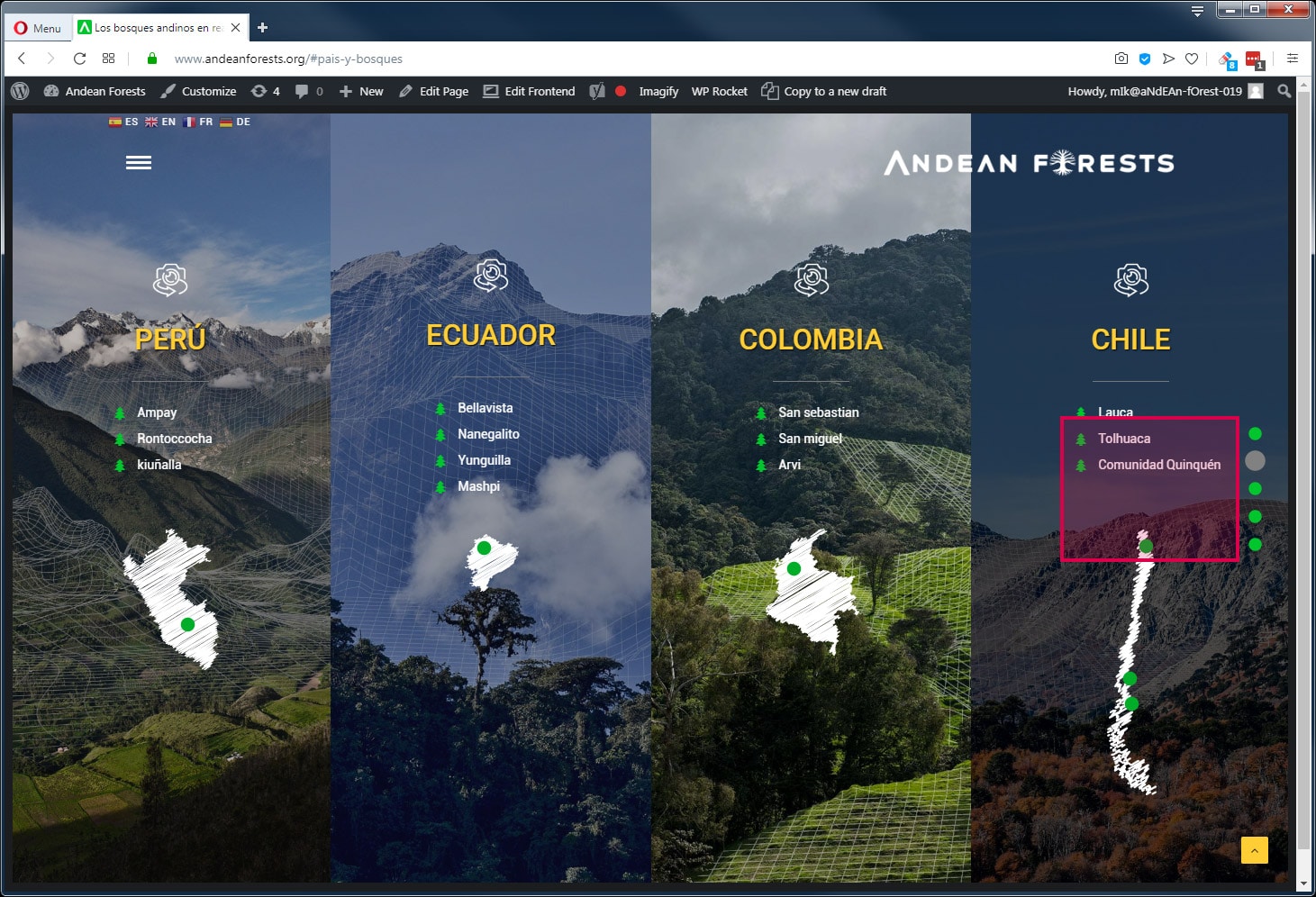
About one page navigation and section name, there a very annoying issue, active link/click space is ALL the one page navigation spaces EVEN when it’s not active (no hover on an item). Have a look here https://www.andeanforests.org/#pais-y-bosques All chile column is active to go to chile page BUT when clicking chile column around one page navigation we go to another slide and not to chile page. We use a lot the one page navigation and have this problem for a lot of pages. Is there a way to have one page item only active when an item is active (sounds the way it should be). Thanks for answer and hope solution.
Hi fredblago! I’m sorry but I think to not understand you, when you open the page you are directed to the correct slide, then when you click the Chile column you open the Chile page: https://undsgn.d.pr/nTI0VP
Anyway, if you need support is offered in our Help Center, there we have a completely dedicated support team, please submit a ticket so we can check your installation and support the solution privately! Thank you! https://support.undsgn.com/hc
Yes indeed misunderstood, sorry my explanation wasn’t that good, please have a look at this image you will understand https://bit.ly/2DsZrcg The problem come from the red space, all the one page items nav size. Please try on https://www.andeanforests.org/#pais-y-bosque When you click this zone/space you don’t go to chile page BUT to another slide. One page item are not on (hover) but they are still active and linked, quite strange and disturbing. I think you understand and hope have a solution.
Hi fredblago! Your first link is broken so it’s not possible to understand what is “this zone/space”...
Sorry too bad, here is it https://www.andeanforests.org/wp-content/uploads/2019/11/uncode-onepage-space-bug.jpg
Hello again and thank you for the heads-up. We looked into that and actually there was an issue we’ll fix in the next update. Fortunately it is matter of CSS so, if you prefer, you can already add the fix to your child theme or to ‘Theme Options -> CSS & JS -> CSS’:
.no-touch .onepage-pagination .cd-label {
    left: -12px;
    pointer-events: none;
    position: absolute;
    transform-origin: 0% 50%;
    transform: scale(.5) translateX(-100%);
    z-index: 0;
    white-space: pre;
}
.no-touch .onepage-pagination span.cd-dot-cont:hover + .cd-label {
    transform: scale(1) translateX(-100%);
}
.no-touch .onepage-pagination li {
    position: relative;
}
.no-touch .cd-dot-cont {
    z-index: 1;
}
.onepage-pagination {
    width: 30px;
}
.no-touch .onepage-pagination .cd-label:after {
    right: -4px;
}
Let me know, best
U rock ! It’s working fine Thanks
Thank you for the confirmation and for note this glitch! This will be part of the next update!