5515 comments found.

I don’t know why but the child-theme really torn the css and layouts apart. Using the main theme is perfectly fine.
Hi,
Please use our client support to check http://support.wpestate.org/
But read this too https://help.wprentals.org/article/detailed-change-log/ . Perhaps you’re using an old child theme with the latest theme and you just need to update the child theme as instructed. https://prnt.sc/rn07zvThank you
Hello I liked this theme, before i buy it i would like to ask if i can use it for real estate agency (Listing) is it possible to customize it for selling properties? ( i know that its designed for booking)
Hello, I am afraid we cannot list “sale” All properties come with a the booking form by default. You can remove booking with code, but there are many aspects to remove through code in this case. Thank you
Hi, just a simple pre-sale question: Can I set up 3 different main properties (ie apartment buildings) each one with multiple rooms for rent? We would like to manage just the 3 main buildings and book their rooms separately, but we don’t want to have dozens of entries on the page for each room. thanks in advance.
Hello hopper7 Thank you for the interest in our theme. We do not have a hotel style booking theme. In the example you share, each room would need to be listed as a property to have its availability calendar. Thank you
Hi, is there any way to offer discounts based on days?
For example:
1-3 days 100 per day 3-8 days 90 per day 8-20 days 60 per day
Hi Webcodio, Thank you for the message.
Our discount options have a different structure and I am afraid we don’t have the example your comment describes.
What we have:
1. You can set a different price per day for 7d+ bookings and 30d+ bookings – https://prnt.sc/rj3sjf https://help.wprentals.org/article/how-to-choose-different-prices-for-different-dates/
2. You can set a discount for bookings made in advance – https://help.wprentals.org/article/where-the-early-bird-fee-is-calulated-where-the-fees-are-calculated-in-theme-code/
3. Custom discount when issuing invoice – https://help.wprentals.org/article/how-to-add-manual-discount-when-issuing-an-invoice-how-to-add-custom-elements-to-an-invoice/
Thank you
is this theme compatible with divi?
Hello, We don’t work with Divi. We work with Elementor, Bakery, Gutenberg (wordpress editor), Thank you
Hi,
[Pre-sales Question] I’m creating a booking website with just 1 property owner. By the way, thank you for the demos!
1) Is it possible to add countries to categorize the location and enable it for the advanced search? (i.e., Country A > City F – K, Country E > City A, Country O).
2) Is it possible to fully customize the header area? (i.e., add search bar)
3) Still with regards to having multiple locations, is it possible to be able to display the main category/location on any page? (i.e., https://paste.pics/8AYE4)
4) Is it possible to allow an accommodation to be booked and to block another?
5) Possible to have different minimum bookings per location? (i.e., Country A – 1 day minimum booking, Country F – 90 days minimum booking)
Thanks in advance!
Hello,
Thank you for the comment.
1. We don’t have that kind of feature. You can use location with google places -> https://help.wprentals.org/article/how-to-disable-google-places-in-search-and-submit-how-to-enable-advanced-search-with-theme-auto-complete/
2. Header area -> you mean the menu area? There are specific elements you can add. Please see our demos
Search form https://prnt.sc/rhq6pp can be positioned:
float (over header google, slider, theme slider, image or video), before header media – we don’t have a demo now with this, but to understand it would be here https://prnt.sc/rhq7fc after header media – https://skirent.wprentals.org/
3. We have shortcodes for categories – https://main.wprentals.org/places-shortcodes/
4. I don’t understand. If a booking is confirmed, the dates are blocked and that period is not available in calendar.
5. No. We have minimum days by property. Please login with user / 1234 in any demo to test submission options.
Thank you
Hello,
Thank you so much for the quick response and for clearing up which can be done and which are not.
1. I meant something like this: https://paste.pics/8D8QY I’d like to know if it’s possible to create 2-3 category levels. ( Country > City > Street / Building Name )
2. What I meant is something close to this: https://paste.pics/8D8U3 I already like the advanced search float you have. I’d just like to have another way to search, specially if the menu is a sticky.
3. It’s close to the link provided, I’d just like to know if it’s possible to add another level before the City or Area. Whether it’s possible to categorize them by country as well. ( Country > City > Area / Street / Building Name )
4. I understand what you mean. Taking this sample search: https://bit.ly/2x1iHh9 All apartments within New York would still be displayed but for example 1 of the apartments in Manhattan needs to be closed for renovation, so it would only allow enquiry but no booking. Not necessarily just because they’re already occupied.
5. What does it mean that minimum days are by property? For this, what I meant was that the minimum days are set by the owner. e.g., As the owner, I’d like to be able to set different minimum days.
Case 1: Min. of 90 days (3 months) stay for All properties in Singapore
Case 2: Min. of 7 days (1 week) stay for All properties in Vietnam
Case 3: No min. stay for other properties outside of Case 1 & 2
Thank you so much!
Hello
1. I meant something like this: https://paste.pics/8D8QY I’d like to know if it’s possible to create 2-3 category levels. ( Country > City > Street / Building Name )
—> My answer still applies from before.
2. What I meant is something close to this: https://paste.pics/8D8U3 I already like the advanced search float you have. I’d just like to have another way to search, specially if the menu is a sticky.
—> WE don’t have that search option.
3. It’s close to the link provided, I’d just like to know if it’s possible to add another level before the City or Area. Whether it’s possible to categorize them by country as well. ( Country > City > Area / Street / Building Name )
—> We don’t have this kind of option.
—> We have the location search as explained in my previous answer . Please see the help link too
4. I understand what you mean. Taking this sample search: https://bit.ly/2x1iHh9 All apartments within New York would still be displayed but for example 1 of the apartments in Manhattan needs to be closed for renovation, so it would only allow enquiry but no booking. Not necessarily just because they’re already occupied.
—> We search by availability only.
5. What does it mean that minimum days are by property? For this, what I meant was that the minimum days are set by the owner. e.g., As the owner, I’d like to be able to set different minimum days.
Case 1: Min. of 90 days (3 months) stay for All properties in Singapore Case 2: Min. of 7 days (1 week) stay for All properties in Vietnam Case 3: No min. stay for other properties outside of Case 1 & 2
—> It’s not possible. We have a minim days field in EACH PROPERTY, so you fill that for every property. We don’t have global option for minim days.
Thank you
Noted. Thanks!
Hi – I bought your theme a while ago but haven’t used it live yet. I’m just testing it out and I have the following questions (so far) before I decide whether to renew support or move on to a different theme.
1. Is Woocommerce mandatory for accepting membership payments?
2. Can the booking form be replaced with an enquiry form, I don’t intend to deal with bookings, just pass on enquiries to owners.
3. Can minimum nights be set according to season? For example, in peak seasons such as July/August the minimum nights might be 7 days, whereas other times of year it might only be 2 nights. This also varies according to the property so it would need to be set on a listing by listing basis rather than globally.
Many thanks in advance!
Hello errolp
Thank you for the comment. Please see my reply
1. No. It’s optional and it’s a feature that allows users to add other merchants for “Paid submission” or “Booking deposit” (not membership)
2. Bookings can be also inquiries. Owner can decide if he wants to approve a request. There is a contact form separate -> https://prnt.sc/rhq4m3
If you want to remove the booking form, that has to be done through code. Please open a ticket in support for instructions http://support.wpestate.org/
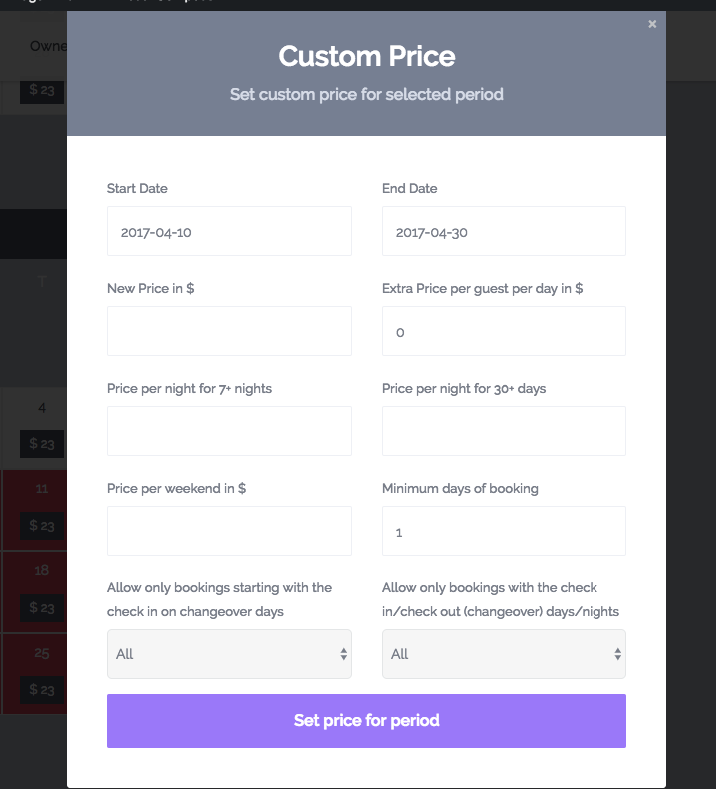
3. Yes. Custom price https://help.wprentals.org/article/how-to-choose-different-prices-for-different-dates/ allows to set a custom number of minim nights – https://help.wprentals.org/wp-content/uploads/2015/12/custom-price-1.png
Thank you
Also, custom price is just by property. Thank you
Hi, do you have different user types? e.g. a listing owner and a normal website visitor user? And can you customise the dashboard features available to each user type?
Hello, You can separate on registration owners from users who just want to book https://help.wprentals.org/article/how-to-allow-only-certain-users-to-submit-properties-in-front-end/
The dashboard is set as in demos. It cannot be customized further in terms of what options show for each unless you modify through code.
Thank you
Hi, is it possible to customise the Dashboards? I just want the listing owner to have access to messaging/inbox and booking approval and profile details.
Hello maaaaaaaat
Owner has access to his listings too.
This is mandatory.
Thank you
Hi, is it possible to remove all options related to payments? I want to have free bookings so don’t want buttons for invoicing etc.
Hello maaaaaaaat
Yes, this is possible, but please see the other answers too.
Thank you
Hi, can you have multiple slots for a booking? e.g. 10am (3 slots available)
Hello, We don’t use “slots”. Availability can be only 1 for a selected period.
Thank you
Hi, is it possible to have a single date for a booking? e.g. book a viewing? I don’t need the end date. I just need the booking date and time. Thanks
Hello maaaaaaaat
Thank you for the comment.
It’s not possible. Check-out is mandatory in the theme.
Thank you
Thanks but could I get a developer to hide the Check-Out option and make check-out default to a year in the future so that all listings are shown in the search?
Hi, It won’t work like that. You must select both check-in and check-out. I don’t recommend to consider modifying the theme as this is a key component. Thank you
Hello, are there any plans in future updates, to add the ability to pay reservation fees directly to the owner instead of site admin? Thanks.
Hello niknik20
Thank you for the comment.
Payment to owner won’t be possible I am afraid. Merchants don’t work like that. Transactions are done via APIs and API can be configured in a specific way. For each owner to add their API would be impossible.
Thank you
in the first lines of the product description you mention “Translations Included: Spanish, German, French, Italian, Portuguese Please be aware translations may require edits. “Where can I get the Spanish translation?
Hi rafaelrook, Thank you for buying the theme. Please install the child theme -> https://help.wprentals.org/article/how-to-activate-child-theme/ The spanish po is in wpresidence-child/languages and in plugins/wprentals-core/languages. Help https://help.wprentals.org/article/translation/
For further help, please use our client support http://support.wpestate.org/ and my colleagues will assist asap. Our standard office hours are Monday – Friday, 9AM-5PM Europe timezone.
Thank you
Hola me ha encantado el tema pero hay algunos detalles que no se aun como ponerlo ,como la pestaña después de cada alojamiento que te indica ¿que hay cerca ?
Hi Tania, I am very sorry but I don’t understand. Please send the question in English and we will guide as best as possible. Thank you
hi I have the Main demo installed and configured and I can only configure it for days, I want to sell the accommodation and the rest of the activities for hours, my question is, can I do both things in this demo or do I have to install another demo as Office Space & Events (hourly or daily) Rental, thanks
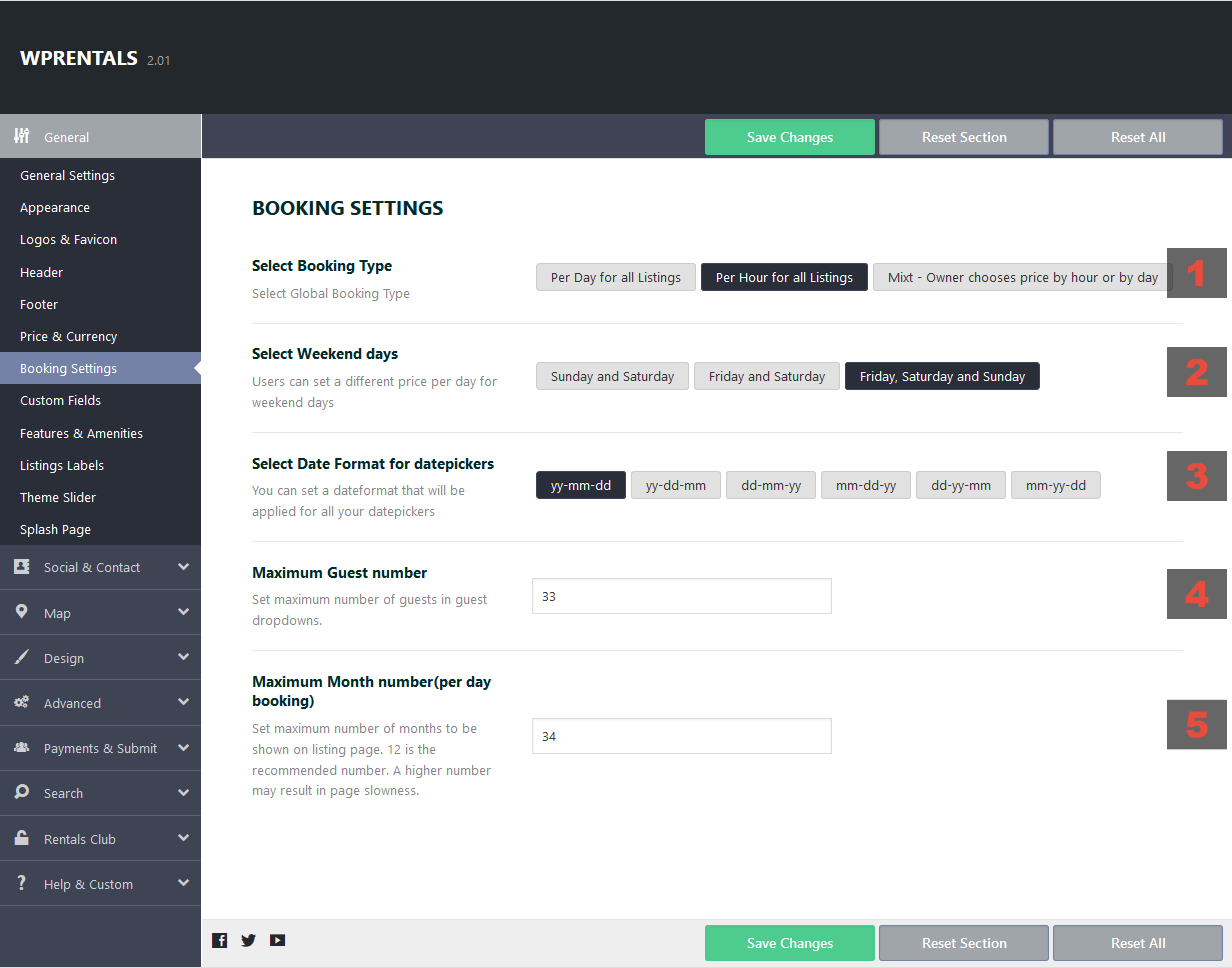
Hi, Thank you for the comment. You can select Booking Type in any demo. Set Mixed https://help.wprentals.org/wp-content/uploads/2018/05/settings-booking.png then in front end, when you add properties, you will have the dropdown for hourly or daily as in office. This can be enabled with any demo. You don’t need to start over.
Thank you
Hi, is it possible to disable the booking system of your theme and to replace this with a simple booking request form?
Thanks!
Hello nikl_tiefseh
Thank you for the comment.
We have these 2 help articles to remove booking
https://help.wprentals.org/article/remove-booking-form-with-css-from-property-type-1-the-one-with-small-property-slider-in-property-page/ https://help.wprentals.org/article/how-to-remove-booking-for-from-template-type-2-and-make-description-full-width/And this option to redirect booking to a different URL page – https://help.wprentals.org/article/add-a-redirect-url-instead-of-book-now-button/
We don’t have another booking form. It’s only the one we have built in.
Thank you
Where can i edit the custom page templates. – i would like to modify the contact page.
Hello nikl_tiefseh
The templates we have are in code – The template for comtact page https://main.wprentals.org/contact/ – is wprentals/contact_page.php
Thank you
Hi, Presale Question: Can this theme be made to work with WooSubscriptions?
Hello shadyel, Thank you for the comment. We don’t work with subscroptions from Woo. We have our built in subscriptions which work with PayPal or Stripe or Wire Transfer (built in merchants). Thank you
can i remove the map from listing page
Hi yasinkhan1, Thank you for the comment. Please see this help https://help.wprentals.org/article/can-i-hide-or-remove-the-map/ Thank you