5515 comments found.
Hi! You deselect it to show in submit form – https://help.wprentals.org/article/1-30-how-to-manage-submit-form-fields-and-mandatory-fields/ Thank you
Good Morning,
Sorry, I visited this page, but did not understand where to disable this option. Can you show me exactly where, please?
Thank you
Hi! Uncheck this https://prnt.sc/s8hdwz as in the screenshot. Thank you
Thank you!
You’re welcome!

Hello,
I’m looking to change the labels on the actual category listings pages. Using the “Winter Sports Rental” demo, the dropdown options on these pages are “Brand”, and “Type”. How can I change these labels to something more appropriate for the website I am building?
Thanks
Hello nexgenbryce
Thank you for the message
You change those labels in Theme Options -> https://prnt.sc/s7y0vu
Scroll down and you will see the text labels from demo which you change to your names.
Thank you
You are awesome! Thanks
You’re welcome  Thank you too.
Hello, its possible to make commission from the owner and from the guest who want to book? Or its only possible to take commission from the owner?
Hi blauwai
Thank you for writing,
Unfortunately, we do not have a fee that will apply to the guest. All fees are deducted from owner earnings.
Thank you,
Hi, I have few questions before I decide to purchase the theme. It will be rather item rental than apartament booking.
1. Is it possible to book without an account and upfront payment?
2. Does every booking has to be confirmed by admin?
3. How a given issue can be solved on the page: Customer books an item for 3 days, but he did not pick it up on day one. a) The item have to be confirmed as taken by the admin otherwise (automaticaly) booking is cancelled. b) If not picked up, the booking have to be cancelled by admin. c) Something else, or up to me?
4. If somebody books inhouse can admin input booking or it have to be done by another “inhouse” account?
Hello Pablo
Thank you for th emessage
1. No, it’s not possible. You can register for an account + book while you make a deposit payment – https://demo1.wprentals.org/
2. Does every booking has to be confirmed by admin?—> Admin doesn’t approve, owner does. And not, it’s not mandatory. Owner can enable instant booking which bypasses his approval.
3. If a booking confirmed needs to be canceled for whatever reason, property owner can do it from his account
4. I don’t understand. Sorry
Thank you
Thank you for your reply 1. Is it not possible to make booking on account without payment as well? 4. Can admin or rather owner makes booking himself?
Hi Pabloo98.
By default the theme has the following
1. Default booking form (requires login to send a request). This is always on.
To remove you can use some code workarounds -
https://help.wprentals.org/article/remove-booking-form-with-css-from-property-type-1-the-one-with-small-property-slider-in-property-page/ https://help.wprentals.org/article/how-to-remove-booking-form-from-property-page-template-style-2-image-in-header/2. Contact owner – can be used by people who didn’t register https://prnt.sc/s62cdz
3. Redirect URL option for booking form so that people are redirected to another page to send the request. In this case you could make it a page of your liking with a contact form that you wish (like a plugin contact form) – https://help.wprentals.org/article/add-a-redirect-url-instead-of-book-now-button/
Owner can add manual bookings, but booking form and contact form can work as explained above.
Thank you
Hi there, I am having a problem with the feature image not showing up in my page. When I import an image into the feature image section of wpbakery editor, It appears to have changed images but if I try to view the page it only shows black in place of where the feature image should be. I’ve tried to make the change with Gutenberg as well with no success. I was hoping I am overlooking something simple. Thanks for all your help.
Hi apcarrier
Thank you for the comment.
When I import an image into the feature image section of wpbakery editor,—> I don’t recognize this option.
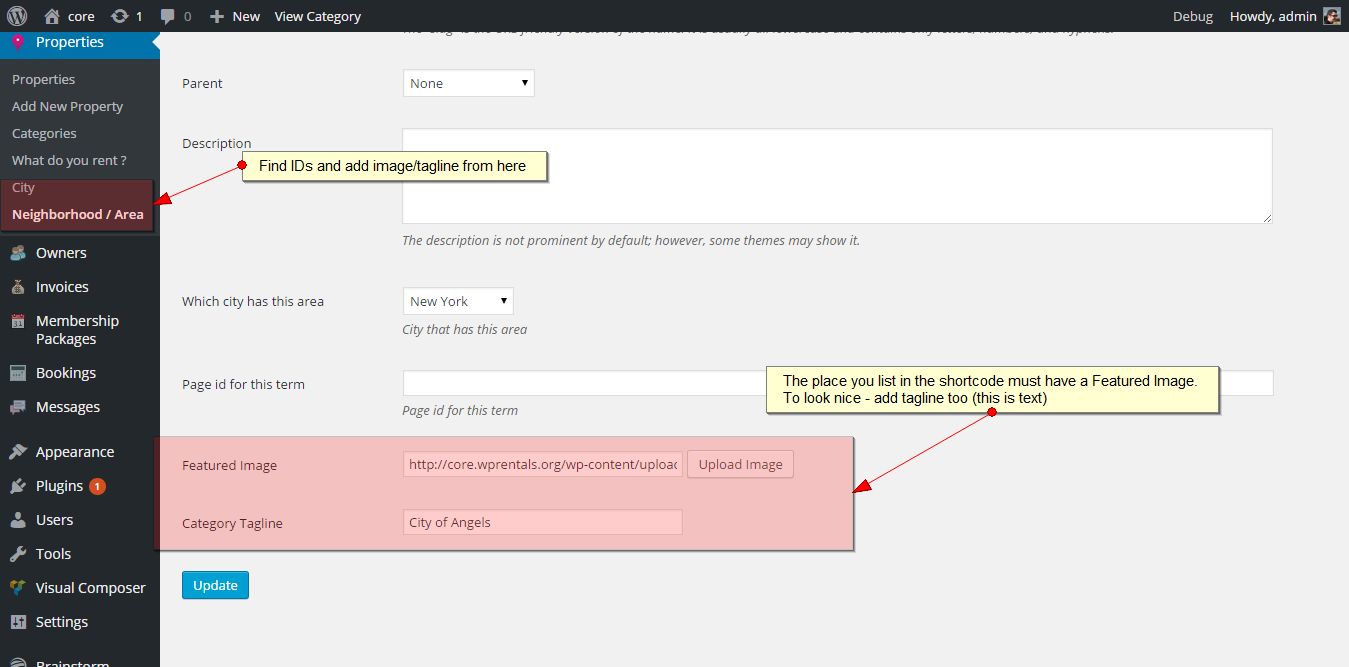
—> If you try to change featured image for a category, you add that in category (not bakery) – https://help.wprentals.org/assets/images/list4.jpg
Please use our client support http://support.wpestate.org/ to send us your site details (url and wp-admin access) and see further what you’re trying to do. That will help us guide you more efficiently.
Our standard office hours are Monday – Friday, 9AM-5PM Europe timezone.
Thank you
Hello
I need to assign parks to states/counties/areas and for them to only show up when that state or county is chosen, for example, the visitor selects ‘California’ (as the state) and the next drop down only displays parks in California, not parks from a different state.
Is this possible with the WP Rentals theme or would I need to get it modified using something like the WP Facets plugin?
Thanks!
Hi errolp
Thank you for the message.
We don’t have this solution I am afraid. I don’t know if that plugin can do what you wish, but it can be done with custom development. However, it needs a developer assistance to find the solution.
Thank you
Thanks for your reply – do you take on paid customisations as an additional service? Thanks
Hi! WE don’t have any custom development services now I am afraid. Thank you
Hello,
I’m trying to have multiple photos/gallery available in one property (listing) but I don’t know how I should proceed to enable this. I just have the featured image and the text box. I’d like to have a permanent place to display this gallery among all properties that I create, so I’m not sure if this is something quick or requires tweaking the template code. I really appreciate your help.
Thanks,
Hi nrizzo
Thank you for writing
I am not sure if you wish the same images or if you’re not sure how to add images to a property as it works now.
Now we allow each owner to add separate images to properties. Even if you are site admin, you manage properties images in front end dashboard as in this help
https://help.wprentals.org/article/how-to-add-edit-images-in-a-property/Please let me know if you need further assistance
Thank you
Hello, Would you please let me know if it’s possible to enable Listing media uploading within edit listing (from wordpress dashboard), just as you can do when you access through the wprentals create/edit listing menu? The reason I want to do it this way is because my site is not meant to be for anyone to access and post properties, it’s meant for only the admin to post them. So I want to have a similar layout of uploading and managing media following the theme’s interface (drag and drop, ,delete, star for feature, etc) within the wordpress usual interface. Please let me know if it’s possible or if I need to modify a template or function, please give me a hint on it.
Thank you.
Hi nrizzo
Since you will be the single owner, I recommend to use this theme admin option and limit submit possibilities just to your administrator account – https://help.wprentals.org/article/use-wprentals-for-a-single-property-single-owner/
You still use your admin account and only you will add listings, but this way you can control over all property related options (custom price, ical export and import, bookings, reservations).
For further help, please use our client support http://support.wpestate.org/ and my colleagues will assist asap. Our standard office hours are Monday – Friday, 9AM-5PM Europe timezone.
If you need help to register for support please send a message from here https://themeforest.net/user/wpestate
Thank you
RentalClub says their discontinuing their service starting July 2020. Does that mean there will be no payment options for this theme? Will the theme updates be discontinued as well?
Hi benedgreat
Thank you for the message.
No, the theme and rentals club and payment options are separate.
Rentals Club is an add-on which offers some extra options for the theme .It’s always been optional and not mandatory, and has offered only 2 extra and optional solutions.
Our theme has been updated continuously and will continue to be for a long time.
From Rentals Club, SMS with twilio addon will be added to our theme as included (not optional) before Rentals Club shuts down.
From rentals club payments to owner from admin paypal to owner paypal through PayPal adaptive payments api will be discontinued because pay-pal discontinued this service from their end and they do not allow new applications (it’s very possible old applicants will have to be discontinued too)
The theme has its built in payment solution to admin which continue to work and have no connection to Rentals Club system.
Hope now it’s clear.
If you need further help please let me know.
Thank you
Hello, I wonder if it is possible to add period, adress, and other fields to invoices that clients can retrieve from their bookings, at their admin area. What they can print just offer some incomplete data. Thanks
Hi dsumeki
Thank you for the comment.
The property location can be hidden until booking is confirmed, so it’s visible only on property page which user can access easily
Booking dates and other info already exist in Invoice (My Reservations -> Dashboard)
Perhaps you wish something else, but please send more details to understand the request first.
You can send the details here as well https://themeforest.net/user/wpestate
Thank you
What I need is a document (invoice is perfect), where client can see all data together when printing, location is one thing, but also features or custom fields would be nice to have. We want to rent vehicules and pick up location of each vehicule is mandatory. Can address fields be retrieved to invoices?
Hi dsumeki, I am afraid I don’t know the answer. We only added the fields that exist now. Maybe my colleagues can guide to existing theme files for you to test and print other variation.
For further help, please use our client support http://support.wpestate.org/ Our standard office hours are Monday – Friday, 9AM-5PM Europe timezone.
Thank you
Hello, can you tell me what version of datepicker or daterangepicker is used on the end property page and how I can modify it please?
I have looked at the property.js file, I need to edit this file. I only want Mondays,Fridays and Saturdays as the available option on the booking date picker please.
Hi. Thank you for the message. I would recommend to block dates with ical feed – https://help.wprentals.org/article/how-to-make-calendar-and-booking-unavailable/ To modify it it’s too complex and this solution with ical is much easier.
Thank you
Hi, hope you are doing well.
One of my client needs to charge a service fee ( fixed ) from the customers. I see that we can charge service fee from the sellers. Can you please tell me how a service fee can be taken additionally from a customer as well?
Looking forward to your reply. Regards, MS Shohan
Hi. We only have service fee from the owners. We do not have another fee for users who send the request.
Thank you
Hello,
I tried to contact you from support ticket, but I didn’t receive a password on my email account…
Anyway, there is a bug about translation of LISTINGS LABELS, I edited them from WpRentals Option > General > Listings Labels but it doesn’t work. I did that using English/Italian language.
I also tried to translate them from WPML > Strin Translations, but it doesn’t work.
This help https://help.wprentals.org/article/wpml-translate-property-labels/ was created a few months ago after testing exactly what you describe and the screenshots confirmed it works.”
I’ve just did this, but it doesn’t work.
I seached it in your Documentation, too… So, how can I resolve, please?
Thank you in advance!
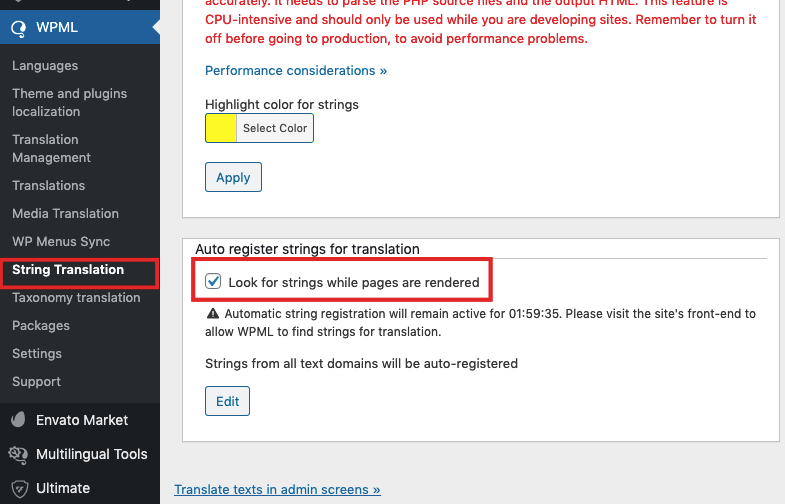
Hi. In WPML you must enable string translation to register new strings manually https://help.wprentals.org/wp-content/uploads/2019/06/WPMl-String.png
Without that new strings don’t register.
It’s not an option WPML lets always on (it increases speed) -
Then open a translated property (2nd language) and let WPML register the strings. Then they show in String translation.
It’s how WPML works with custom labels and works for sure as we check this regularly for clients.
For support, I see the support expired. Please send a message here https://themeforest.net/user/wpestate to help with this one but will have to check next week as support office will close for weekend very soon.
Thank you
Hi
I have a problem. I have categories but even though they have listing belong them advanced search 3 category option does not show categories under it and also home page categories says 0 listings under every category.
for reference check www.yazlikevlerim.com
please i need help
Hi. Could be just cache – https://help.wprentals.org/article/how-to-enable-or-disable-wp-rentals-theme-cache/ or you’re categories are empty so you need to enable the option to show categories with 0 listings – https://prnt.sc/s184xv Applies to categories too in this case.
If you need further help please use the buyer account to confirm your purchase here or register in support with the purchased license code – http://support.wpestate.org/
If you need help to register for support please send a message from here https://themeforest.net/user/wpestate
Thank you
Hi again. I registered the support portal and created a ticket under ”#182776 Categories do not show under search category field” name.
Thanks for your support ^^
HI. I answered. Thank you
Hi,
Is there any way to customise the “listing submission” fields? I need to change some labels and also I need to remove amenities tab
Hi Webcodio
Thank you for the message
You can manage what fields you show in submit -> https://help.wprentals.org/article/1-30-how-to-manage-submit-form-fields-and-mandatory-fields/
You can add custom fields and then add them to submit form -> https://help.wprentals.org/?s=custom+fields
You can edit default fields that you wish to show but with a different name – https://help.wprentals.org/article/how-to-modify-theme-text-in-english-with-poedit/
An entire section can be removed but needs some code. Please see here how – https://help.wprentals.org/article/remove-a-section-from-front-end-submit-form/
For further help, please use our client support http://support.wpestate.org/ and my colleagues will assist asap. Our standard office hours are Monday – Friday, 9AM-5PM Europe timezone.
If you need help to register for support please send a message from here https://themeforest.net/user/wpestate
Thank you
Hello,can’t manage to register on support system, i don’t received the password email! I test your theme for a small coworking. I would like to, if you can tell me if possible: - use a per month price as well - and have a Stripe or Paypal reccurring payment monthly plan - have the option to not include tax in price! - apply a per member fixed discount (to specific users or by promo code) - do not have opening and closing time for specific members - than some ressources can be booked multiple times (with inventory like 5 for example for desk plan… - define a maximum price for the type of booking (if by hours, additionnal hours won’t be charged) - tu use as well to book for events.
Thanks.
Hi cyberligne
Thank you for buying the theme.
If you need help to register for support please send a message from here https://themeforest.net/user/wpestate and I will help.
We only have price per day (price per day for 7d bookings, price per day for 30d bookings), but not price per month.
Tax is not included in the price – This explains how taxes work https://help.wprentals.org/article/invoice-details-taxes/
use a per month price as well - and have a Stripe or Paypal reccurring payment monthly plan -—> This exists for submission of properties with membership enabled. Help https://help.wprentals.org/article/membership-submission/
- apply a per member fixed discount (to specific users or by promo code)
—> We have only booking manual discount which owner can give for a booking request – https://help.wprentals.org/article/how-to-add-manual-discount-when-issuing-an-invoice-how-to-add-custom-elements-to-an-invoice/
do not have opening and closing time for specific members
—> This I do not understand, I am sorry. Please give more details.
than some ressources can be booked multiple times (with inventory like 5 for example for desk plan…
—> I am afraid our system books by availability (single availability), not inventory. So it’s 1 desk as 1 listing if each desk can be booked separately.
- define a maximum price for the type of booking (if by hours, additionnal hours won’t be charged) – tu use as well to book for events.
—> There is 1 price (default) which can be used as fixed price. If you don’t add the other price options only this is considered the price per hour.
Thank you
Hi, I have few pre-sales questions..it would be great if you can reply for the following points to me at the earliest. 1. Roles – If a owner submit a property than admin should verify the post to upload, before verification it will not show on site right?? And can admin hide few property or details to publish? If no, than can you guide us on code to understand the site flow than will do our self.
2.a) At the Homepage – Can it be a video banner instead of a image banner? b) Can we remove guest filter? And add a category filter same as Guest? So, is it possible to modify/add/delete filters?
3. Is Google API is chargeable? Or it’s come with your theme?
4. Can we have a shop page for addons like flower, chair followed by a view cart & checkout? If yes, than how? Or suggest an alternate option.
5. After selecting a product – How can we book that? Through a contact form is the only option? Because, I want when a user book a property- he can also shop for addons …which are there in the shop option. Is possible to create it? I need a shop Page.
6.Is there any Chat Box in your theme? If possible can I see the dashboard wherein I have to edit the theme please (Screenshot also will work) – As I bought a theme earlier from envato only but the customization of the theme was very complex ..even the programmer also stuck at some point and the author also not responsive. So just wanted to see..how much
Hope you can understand my concerns..I am really looking forward to your positive reply ..as I am interested in this theme .Please help
Thanks, Tan
Hi. Thank you for writing.
1. Roles – If a owner submit a property than admin should verify the post to upload, before verification it will not show on site right?? And can admin hide few property or details to publish? If no, than can you guide us on code to understand the site flow than will do our self.
—> The theme has over 400 theme options and functionality. TO give you our theme code flow for the entire process is not possible, sorry. You can go through the code and edit, but I cannot show you a flow.
—> Admin can enable manual approval for listings.
—> 1 field is private always. The rest of the fields will show if they are filled in or you change in code what you don’t wish to show.
2.a) At the Homepage – Can it be a video banner instead of a image banner?
—> Yes. https://main.wprentals.org/homepage-elementor-v2/
b) Can we remove guest filter? And add a category filter same as Guest? So, is it possible to modify/add/delete filters?
—> In search? Yes, you can create your custom search with your fields and not put guest.
3. Is Google API is chargeable? Or it’s come with your theme?
—> Google API is chargeable for anyone in the world who use their API. Api is 1 per domain and each domain owner must register his API. They give a $200 monthly free credit which can cover your costs (does that for all our demos)
—> And we also have Open Street API alternative which for now is free.
4. Can we have a shop page for addons like flower, chair followed by a view cart & checkout? If yes, than how? Or suggest an alternate option.
—> I don’t know. We didn’t create a shop option connected to our existing dashboard. You can try to see if this can be used with WOoCommerce (should be ok, but again, we didn’t design anything intentionally)
5. After selecting a product – How can we book that? Through a contact form is the only option? Because, I want when a user book a property- he can also shop for addons …which are there in the shop option. Is possible to create it? I need a shop Page.
-> “Product” in our theme is booking. You book from property page -> https://main.wprentals.org/homepage-elementor-v1-3/ through the booking form. Contact is separate.
—> I cannot advise for how you can create a shop. If you wish to book + sell products, that’s not a feature we designed by default.
6.Is there any Chat Box in your theme? —> No. Only private messages.
If possible can I see the dashboard wherein I have to edit the theme please (Screenshot also will work) – As I bought a theme earlier from envato only but the customization of the theme was very complex ..even the programmer also stuck at some point and the author also not responsive. So just wanted to see..how much
—> As I said before, this is a complex theme. Showing you just some lines of code, I don’t know how it can help
You can see here some screenshots https://help.wprentals.org/article-category/technical-how-to/
If you wish complex changes we won’t be able to assist with directions. If you wish to test the theme as it is, you can send a message from here https://themeforest.net/user/wpestate
Thank you
is it possible to send a automatic mail when the booking’s status is changed (by hand) from pending to confirmed?
Hi Rickkorsten, Thank you for the comment.
The booking status change sends a notification, but by “hand” should mean owner confirms the booking from his user dashboard -> My Bookings
Don’t use wp-admin.
For further help, please use our client support http://support.wpestate.org/ and my colleagues will assist asap. Our standard office hours are Monday – Friday, 9AM-5PM Europe timezone.
If you need help to register for support please send a message from here https://themeforest.net/user/wpestate
Thank you
Hello, I have a problem on the wordpress desktop listing option, I am missing the Features & Amenities and PROPERTYS STATUS options. I have searched in options of the theme but I cannot find how to activate it so that they appear, I want to know what I must do to make these options appear, thanks
Hi, Thank you for the message.
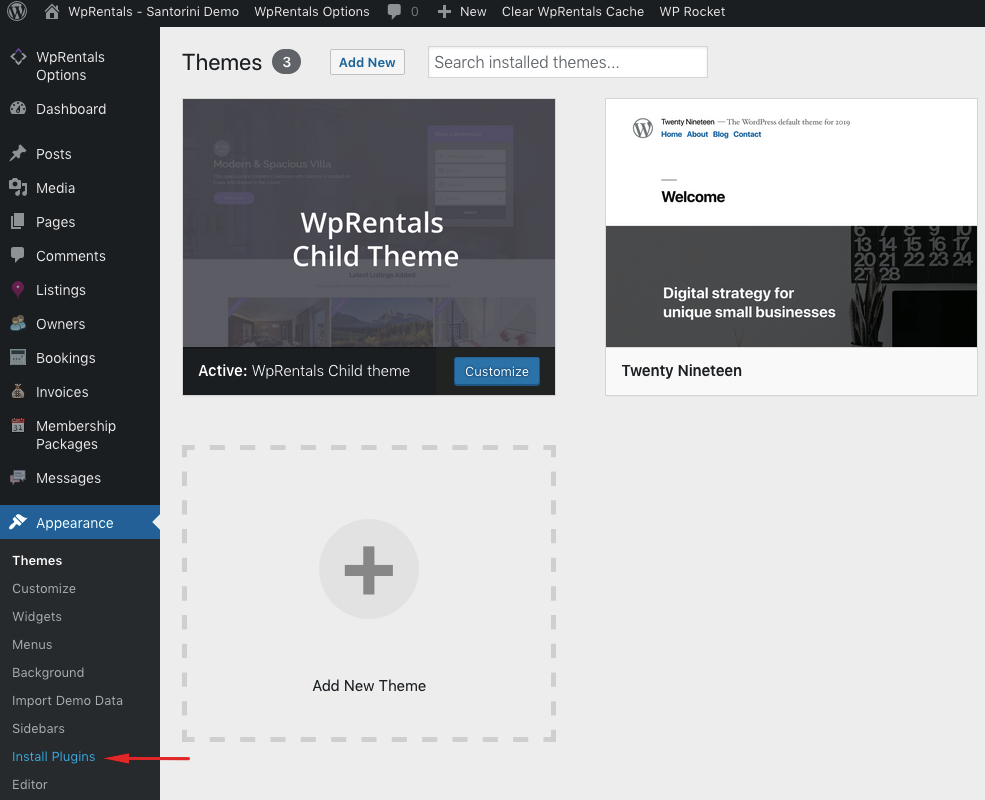
1. Check you updated the core plugin https://help.wprentals.org/wp-content/uploads/2018/01/install-plugins.png There should be no update message for WpRentals Core FUnctionality
2. If wordpress desktop listing option refers to wp-admin, that should be all and you will see both status and features same as categories, types, cities, areas. Help https://help.wprentals.org/article/listings-features-and-amenities/
3. If “the wordpress desktop listing option” refers to submit form, check features are saved in theme options – https://help.wprentals.org/article/1-30-how-to-manage-submit-form-fields-and-mandatory-fields/
For further help please use our support http://support.wpestate.org/ as it’s the best I can guide here to check
Thank you
Hi I have a few of presale questions…
1) I want to use the hourly rental template. Is it possible to change it to 30 minute options instead of a 1 hour minimum?
2) When someone books a rental is there a chat window where they can talk to the owner to arrange things?
3) I want to remove location-based information as it is not relevant to my project…is this possible? What I mean is, can the owner post something without specifying their location? (Can I remove these requirements)
Thanks!
Hello camsmith48
Thank you for the message. Please see my reply
1) I want to use the hourly rental template. Is it possible to change it to 30 minute options instead of a 1 hour minimum?
—> No. It’s not possible I am afraid.
2) When someone books a rental is there a chat window where they can talk to the owner to arrange things?
—> We don’t have chat. We have direct message (through inbox) but we don’t have chat.
3) I want to remove location-based information as it is not relevant to my project…is this possible? What I mean is, can the owner post something without specifying their location? (Can I remove these requirements)
—> You can remove specific fields in submit, but entire sections require code. And on property page to remove the map is easy, but you can hide with css or code. We have the code directions, but you would need to make the changes.
Thank you
Hi, I would be interested to this theme but I need some informations. 1. Is it possible to remove the search bar and replace it with a simple information request form? 2. Is it possible to enter the properties but make them private so not visible on the site but visible only from the backend by the administrator and the owner of the property? 3. Is it possible to add a field in the registered owner’s profile in order to exchange messages or notes with the site administrator? 4. Is synchronization possible with the booking calendar or airbnb? Thank you!
Hello Alice
Thank you for the comment. I will answer here to all your questions
1. Is it possible to remove the search bar and replace it with a simple information request form? —> Search can be disabled from theme options. —> About a form we don’t have this kind of option. Will add to wishlist. Perhaps on the pages where you need this you can use a combination of shortcodes to create this. I will send in private the test admin to check if this can work.
2. Is it possible to enter the properties but make them private so not visible on the site but visible only from the backend by the administrator and the owner of the property? —> Properties can be disabled – https://prnt.sc/ryyuhb which means they stay in owner account and in wp-admin / listings for admin to see, but they are not published on the site
3. Is it possible to add a field in the registered owner’s profile in order to exchange messages or notes with the site administrator?
-> We have this field (private) which only user and admin can see -> but it’s part of My profile (so after registration) – https://prnt.sc/ryytqa
4. Is synchronization possible with the booking calendar or airbnb? —> Yes. We have multiple ical feed import and the option to export the property calendar availability in ical as well (to platforms that allow ical import)
Thank you