23249 comments found.

Hello, can I reset my purchase code
Hello, @omurtada,
I have reset your purchase code, now you can use the same purchase code for registration of your theme.
Regards, P-THEMES.
i created a ticket in support and no body answer
Hello, @Kareem_Youssef,
First of all, Our business hours are Monday to Saturday – from 12:00 AM to 08:00 AM EST, and you have generated the support ticket when we were OFF (a weekend), so now we are on desk and we already replied your support ticket #101214, please check your support ticket now and reply to your support ticket accordingly and please do not panic here and always be patience.
Regards, P-THEMES.
Hi, Can you please disconnect my license from my previous domain I am now going live and am getting the “This code was already used in r*.com” message.
Hello, @ashjayjay,
I have reset your purchase code, now you can use the same purchase code for registration of your theme.
Regards, P-THEMES.
after updated to the latest version, woo category sidebar is not working. Can’t display product attributes on the sidebar. please check
Hello, @aqvapex,
Can you please contact us via our support system with your site WP Admin Login details so that we will check and solve the issue for you on your site.
Regards, P-THEMES.
submitted ticket, but no reply yet
Hello, @aqvapex,
Please be patience, once your support ticket will be resolved you will get the reply to your support ticket.
Regards, P-THEMES.
This is taking too long. I provided the admin access via support ticket. it has been a week, no one even try to login and take a look the problem. very disappointed.
Hello, @aqvapex,
We have already replied your support ticket #101946 (4) days ago, please check your SPAM folder in email or please try to check your support ticket reply after removing the browser cache.
Solution:
WooCommerce use cache table to increase the loading speed.
So some filters of products or attributes might not work well after demo or products import or clone site.
You need to clear this cache(transient) in this case.
Please go to WooCommerce -> Status -> Tools and clear transients and regenerate lookup tables.
This will solve your issue.
Regards, P-THEMES.
What typography setting controls the price font on single product pages?
Hello, @collinvankessel,
The Price on Single Product Page took the Font-Family from Body, and it has been set from Porto >> Theme Options >> Skin >> Typography as showing below:
And also could you please purchase support extension to get further support? Your 6 months of support period is expired from 05/08/2020. According to Envato support policy, renewing support is required for further support.
Thanks for your understand.
when active PayPal checkout product not loading screen : https://imgur.com/a/YDu6utf when deactivate paypal method it working done
i cant find contact in my wp-admin https://imgur.com/a/zcPsfTl
how to show tags, sku, category in product page plz with screen shot
i am sorry too many questions i asked
Hello, @Kareem_Youssef,
First of all, sorry for the inconvenience but this platform is only used for small queries or for pre-sale questions, for too many issues we have our dedicated support forum, so please always try to contact us via our support system here:
http://portotheme.com/support
1. Product not loading:
Please go to Porto >> Theme Options >> General and turn OFF the Skeleton Mode from there, save changes and check your site after removing the browser cache.
2. Cant find a contact in my wp-admin:
Please make sure that you have installed the Contact Form 7 plugin from Wp-Dashboard >> Appearance >> Install Plugins, If not then Install it and the contact option will appear in your WP -Dashboard Panel.
3. How to show tags, SKU, a category in the product page:
Please go to Porto >> Theme Options >> WooCommerce >> Single Product and turn it ON from there as showing below as per your requirements.
4. How to remove a number of stoke and release ” in stock”:
Please copy and paste the below-given CSS code to Porto >> Theme Options >> Skin >> Custom CSS and check back your site after removing the browser cache.
.single-product .woocommerce-variation-availability {
    display: none !important;
}
.single-product span.product-stock.in-stock {
    display: none !important;
}
Regards, P-THEMES.
in number 4 i mean number of stock not all span
Hello, @Kareem_Youssef,
Ok, If you only want to remove the Number of Stocks, then remove the previously given CSS code and copy and paste the below given one, it will work for you:
.single-product .product_meta span.product-stock.in-stock span.stock {
    display: none !important;
}
Regards, P-THEMES.
Hello, @drcslm,
Can you please share the Page URL where that button is so that I’ll check and provide you the best possible solution for it, OR contact us via our support system with your site WP Admin Login details so that our experts will check and provide you the proper solution for it.
Regards, P-THEMES.
Hello, @drcslm,
That button has been set using Custom HTML under Header Builder, so you have to change it from Porto >> Theme Options >> Header >> Header Type >> Header Builder as per your requirements as showing below:
Regards, P-THEMES.
I installed the Porto theme on one of my domains (aairas.pk. But when putting a license, it’s showing it is already being used on another domain (one of my other domains synchcom.com.pk). Actually it’s not being used on other domains anymore. It was long ago for testing purposes. Please let me know how can you verify the key on my domain or allow me to use the theme activation key on my new domain.
Hello, @syscon78,
I have reset your purchase code, now you can use the same purchase code for registration of your theme.
Regards, P-THEMES.
Hi, thanks for this great theme. I want to ask, I’m using demo “protfolio4”, is there a possibility to add extra metadata like “skills” ? I need for example to add: Color, size …etc
Hello, @dabbas,
To add more skills and your portfolio please go to portfolio from wp dashboard and then open portfolio skills and there you have to first add skills that you want to mention and then add attributes and those skills. I created a detailed video https://drive.google.com/file/d/1TtPUALlXwmymHEZ3FdbuZVsjaipJJEdW/view?usp=sharing on my test. Please watch it and follow it to solve your issue.
And if you want to completely remove skills and add colors and size instead of that then it is not possible with theme options it requires huge customization and portfolio backend templates of theme. Item support does not include services to modify or extend the item beyond the original features, style, and functionality described on the item page. For customization services that will help you tailor the item to your specific requirements, we recommend to contact our customization team or hire a developer.
Regards, P-THEMES.
OK consider I have a developer, is there a support to tell me what are the steps to add extra meta like skills ?
Hello, @dabbas,
I am sorry but this is not only the single line or file of Customization, This requires a huge Customization with many files linked, so please ask your developer to Google it and do it for you.
Regards, P-THEMES.
Hey i cant find the buy now button on your demos
Hello, @bejamin838,
First of all, thanks for showing your interest in Porto WordPress 
You will find Add to Cart Button on our Demos which is the default functionality of the WooCommerce, you can use any third party plugin for any button on your site as per your requirements.
Regards, P-THEMES.
How do I put color (hashcodes) for new colors in color swatches? I don’t want the names of the color on the side panel – https://www.postmygift.in/product-category/electronics/mobile-accessories/headphones-headsets/
Hello, @rohitrrpaul,
Please go to Products >> Attributes and click on “Configure terms” in Color Attribute as showing in this screenshot:
And then edit any color and change the color in it as per your requirements as showing in the below given screenshot:
Regards, P-THEMES.
how to add photo to menu, screen shot https://imgur.com/undefined
and how add product categories in search screen: https://imgur.com/oZSOv4P
Hello, @Kareem_Youssef,
1. Please watch and follow the instructions showing in this video I have created for you:
https://jmp.sh/x954ft8
2. Sorry to say that but this is not possible, you can not add the image beside the category in the search category dropdown, This requires Customization.
Regards, P-THEMES.
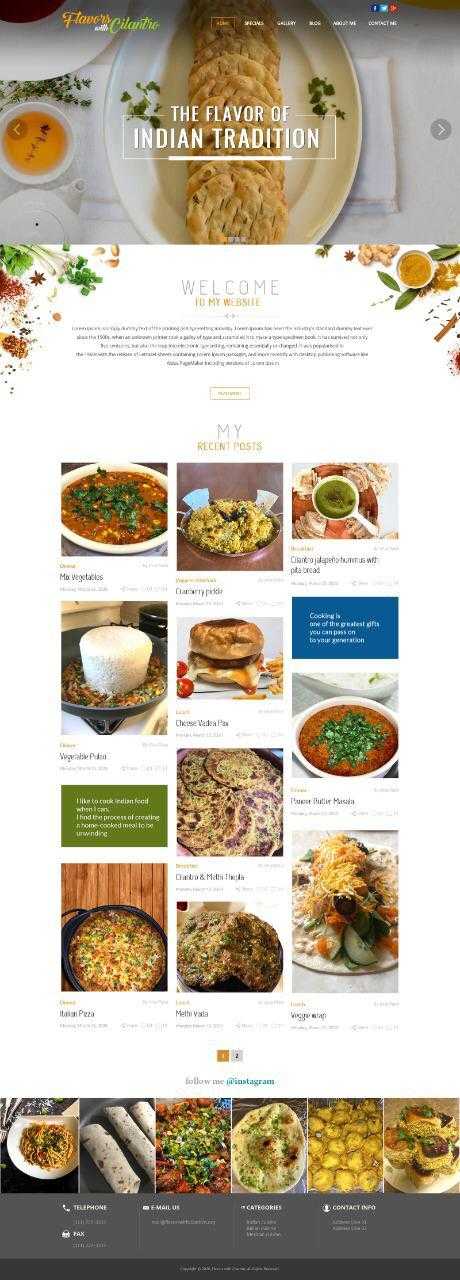
Hello Team,
we want to start a food blogging WordPress website.
your required design is as below:
Page 1 : https://snipboard.io/oe4fkx.jpg page 2 : https://snipboard.io/4Lq82c.jpg
if there is any related design in your demo than we want to buy your theme.
Please suggest us your demo design link.
Thanks Pratik Patel
Hello, @pratikthubmar,
First of all, thanks for showing your interest in Porto WordPress
We have the Restaurant Demo, you can check it here:
https://www.portotheme.com/wordpress/porto/restaurant/
&
Also, you can check all our Pre Built Demos here:
https://www.portotheme.com/wordpress/porto_landing/
Regards, P-THEMES.
When will my support request be answered?
ticket number :
- 101103
Hello, @yildiz86,
We have just replied your support ticket #101103, please check your support ticket reply and reply to your support ticket accordingly: https://postimg.cc/cv0d8hCG
and please always be patience, do not ask here for the support tickets, you will always get the reply when your support ticket will resolve.
Regards, P-THEMES.
Please, can anyone help me out? From the support forum I do not receive the confirmation for registration, and therefore I cannot register, I wrote to the assistance via email (with purchase code) but no one answers me. I’m still after the last update, the whole product sheet is gone, on every article … Thanks
Hello, @polxxx,
Please share your Theme purchase code PDF file via our email newsmartwave@gmail.com so that we will check/verify and create the support account for you.
https://help.market.envato.com/hc/en-us/articles/202822600-Where-Is-My-Purchase-Code-
Regards, P-THEMES.
I’m thinking of buying your baby shop demo theme, but when you press the accordion button on the top left in the mobile version, the screen is black and the words are small. Are these things that can be corrected?
Hello, @ihyesilyurt,
First of all, thanks for showing your interest in Porto WordPress
Those are basically the Mobile Menu Panel and Mobile Menu items and yes you can easily set the color and size as per your requirements using simple Custom CSS, after purchasing the Theme you can contact us we will share the Custom CSS with you.
Regards, P-THEMES.
Hi! In the mobile menu, is it possible that clicking on the word will display the submenu? Now only works with clicking on arrow.
Hello, @adriboixet,
Sorry to say that but this is not possible, because the Parent Menu Item is also linked with any page, So when you click/tap on the Parent Menu Item it will take you to the particular page with which it is linked, So you can not set it as for open the Child Menu/Sub Menu Items or open all the menu items by default when clicked on a mobile hamburger, This requires Customization and if you want our paid Customization services you can contact our Customization team as well.
Regards, P-THEMES.
Hi,
Is there anyway that i can remove the newsletter pop up from my porto theme? I keep getting the gray overlay screen which i want removed.
Thank you in advance!
Hello, @DelaniZwan,
Have you purchased the Porto WordPress theme? If yes, then please contact us through your theme purchase account to get the free support for the Porto WordPress theme.
Regards, P-THEMES.
My website lost all its layout, is there any way to get it back? At the moment it looks all jumbled with no theme layout, happened suddenly too
Hello, @coheed1984,
Please do the following debugging processes one by one listed below, It will help you in solving your issue.
|.   Make sure you have everything up to date (Theme, Plugins, Translations files)
||.  Remember to reset ALL cache etc after a plugin or theme update.
|||. Disable all plugins except WooCommerce and recheck if the issue persists
|V.  Check the browser dev console on errors (F12, on most if not all browsers)
V.   Double-check your own Custom CSS, or Custom Snippets in function.php is causing it
And also could you please purchase a support extension to get further support? Your 6 months of support period is expired from 07/05/2020. According to the Envato support policy, renewing support is required for further support.
Thanks for your understand.
can you reset my purchase code. I no longer have the other domain setup that it was on and I forgot to disable it before removing it.
Never mind I was able to remove it by reinstalling WordPress again on old domain
@skgranan, Sound’s Great!!!
You are the best