

23249 comments found.

I plan to buy porto theme and need to make sure about something.
1. I am new to use wordpress, is porto suitable for me? 2. My web will have thousands products and many layers categoties, is it suitable for my web? 3. I just want to display my product without its price, is it possible? 4. I want to change the main color of the web, os it possible?
Hello, @Heewee,
First of all, thanks for showing your interest in Porto WordPress 
1. Yes, Porto WordPress is super easy and have a brand new detailed documentation, Support Videos and best Support on ThemeForest, so it is the best fit for new commers
2. Yes, Porto WordPress handles the large amount of data as well, it is fully compaitable with WooCommerce plugin for making Store functionality and the plugin is pre pakcged with the Theme.
3.Yes, you can, Porto WordPress provides the functionality of Catalog Mode, and you have to turn the Catalog Mode ON from Theme Options and you will be able to hide show the price, add to cart button, review for your products as per your requirements.
4. Yes, you can, simply by changing the colors from Theme Options as per your requirements.
Regards, P-THEMES.
Hello
is it possible to make the mobile footer menu only shown as click to drop down menu? (only in mobile)
example screenshot: https://i.ibb.co/RSR2KGb/footre-23.pngHello, @khalil__,
Sorry to say that but this is not possible, This requires customization. Item support does not include services to modify or extend the item beyond the original features, style, and functionality described on the item page. For customization services that will help you tailor the item to your specific requirements, we recommend to contact our customization team or hire a developer.
OR
You can try with any third party plugin which better meets your requirements at your own risk.
Regards, P-THEMES.
Can i delete the Plugin “Redux Framework”?
Hello, @sonnefes888,
Yes, you can, Its not required or recommended by the Theme and no use of it with our Theme.
Regards, P-THEMES.
Hi,
I have purchased the Porto theme and I am trying to generate the dynamic styles but the files in uploads folders are not being generated. I have checked the folder permissions and they are 777. Please advise.
Hello, @lveness,
Please read and follow the instructions written in this article:
https://smartwave.freshdesk.com/support/solutions/articles/5000612747--14-unable-to-change-color-settings-or-setting-from-theme-options-cache-problem
Regards, P-THEMES.
I have already disabled the cache plugin and the theme is still not creating the “porto-styles” directory. I have tried it many times.
Hello, @lveness,
Ok, Got your point, I have just tested your site now and finds some 404 issues from your server in your site console as showing in this screenshot: https://postimg.cc/tZNS1HJW
, ask your hosting provider to solve the issue for you on your site and regarding “porto-styles” not generates itself when save changed from Theme Options, so its purely the permission issue, Yes, I have read your point, you already set the permission but sometimes, service providers applied restrictions on accounts so that user changes will not affect the server, maybe that is the reason, again, please contact your hosting provider and ask to check the permissions for you once and try again. Otherwise, please contact us via our support system with your site WP Admin and CPanel Login details so that we will check and provide you the best possible solution for it.
Regards, P-THEMES.
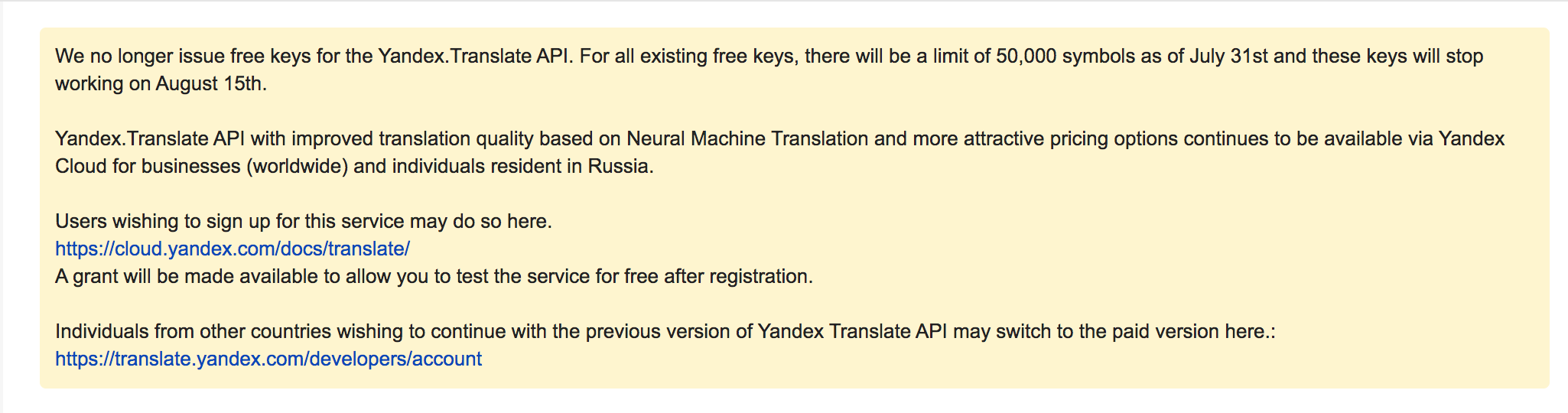
Hi, you tell me to translate the end purchase page trough loco translate plugin. This requires to get an API in a website (yandex) but when I was about to get the API, the website says this: https://www.pinkvita.es/wp-content/uploads/2020/09/Captura-de-pantalla-2020-09-08-a-las-9.53.43.png
Please I need help, do you know another way to do it? Thank you
Hello, @palomavallhonrat,
Can you please contact us via our support system with your site WP Admin Login details so that we will check and provide you the best possible solution for it.
Regards, P-THEMES.
Hello, i changed domain name, how do i change the domain name linked to my license?
Hello, @safamutur88,
I have reset your purchase code, now you can use the same purchase code for registration of your theme.
Regards, P-THEMES.
Hi, I am unable to login my portotheme account. How to upgrade “WPBakery Page Builder” without my porto theme account?
Hello, @leathermanfashion,
Please share your Theme purchase code with us via our email newsmartwave@gmail.com so that we will share the latest plugins with you.
Regards, P-THEMES.
Hi! I want to install porto on 3 websites, how do I do? the purchase of Porto includes the themes If I buy this theme can you help me install
Hello, @dolanor24,
First of all, thanks for showing your interest in Porto WordPress
If you want to use the Theme on 3 different sites then you have to purchase 3 different licenses of the Theme, 1 single license for 1 single site, This is Envato Policy you may wish to confirm from them as well.
And here is the Installation Guide video:
https://www.portotheme.com/wordpress/porto/documentation/installation-video/
If you are unable to Install the Theme, we will install it for you on your site.
Regards, P-THEMES.
How can I change the “shop” page? I have imported a demo (shop) site.
Hello, @kalak,
You can set any page of your site as a shop page from WooCommerce >> Setting >> Shop as per your requirements.
Sorry to say that but you can not directly edit the Shop Page because it is an Archive page and you can not directly edit any of the Archive pages.
If you want to change/remove the Banner on Shop Page: Please read and follow the instructions written in this article:
https://smartwave.freshdesk.com/support/solutions/articles/12000052390--2-how-to-edit-shop-page-banner-and-changing-images-
If you want to change/set the Sidebar of the Shop Page: Please read and follow the instructions written in this article:
https://smartwave.freshdesk.com/support/solutions/articles/12000052832--16-how-to-configure-shop-page-sidebar-and-configure-the-widgets-inside-it-
If you want to change the Style and Layout if the Shop Page you can change/set it from Appearance >> Theme Options >> WooCommerce >> Product Archives as per your requirements.
If you manually want to add some data on Shop Page then please go to WP-Dashboard >> Pages and finds and Edit the Shop page and add/remove/set any data on it using WP Bakery elements as per your requirements.
Hope it helps and all clears.
Regards, P-THEMES.
Please select some product options before adding this product to your cart. product variable
Hello, @Kareem_Youssef,
I have just tested it at my end as you mentioned and it is working fine, here is the video:
https://streamable.com/iztww2
Regards, P-THEMES.
Why aren’t styles applied on my site? Functional plugin installed. http://prntscr.com/ud42tc
Hello, @NaumKo,
Can you please make sure by going into WP-Dashboard >> Setting >> General and make sure that site URL is set there as HTTPs if you are using the SLL certificate on your site, and if not then please change your site URL as HTTPs from HTTP there and save changes and then check your site after removing the browser cache.
Otherwise, you can use this plugin as well:
https://wordpress.org/plugins/really-simple-ssl/
Regards, P-THEMES.
which option to change font size RTL site
Hello, @Kareem_Youssef,
Whether the site is RTL or LTR, you can change the Font from Porto >> Theme Options >> Skin >> Typography as per your requirements.
Regards, P-THEMES.
Typography as per your requirements not show in wp-admin
Hello, @Kareem_Youssef,
Please follow the path that I listed above, Porto >> Theme Options >> Skin >> Typography as showing below:
Regards, P-THEMES.
Hello this is a very important design issue and not sure why woocommerce doesnt have it as standard but how can we display the entire product name on archive pages to display instead of it being limited to one line and then dots. Ideally we need a CSS that make the product title to go to the second line (or howevery many lines it needs) and this CSS must also make all distances even so that if in one line you see three products that have equal product names the grid still shows evenly instead of the “add to cart” button, price etc having different height from the product on the same line
We are aware that if you change from the following code white-space from nowrap to normal it shows the product title to the next line but the alignment of all products is not right.
ul.products li.product-col .woocommerce-loop-product__title { white-space: normal; overflow: hidden; text-overflow: ellipsis; }
Hello, @parisalex,
We have added that white-space: nowrap for truncate the product title so that the Grid alignment does not disturb because of the different title length. If you want a full title then you have to simply override that nowrap to normal using Custom CSS and it will work for you.
Now, the alignment of the grid is still not perfect, now this is because of the image size, The Images settings of the products are coming from WooCommerce, Please read the below-given articles: https://smartwave.freshdesk.com/support/solutions/articles/12000052416--7-woo-image-sizes-changing
https://smartwave.freshdesk.com/support/solutions/articles/12000052417--8-woo-images-looks-blurry-and-not-change-from-low-to-high
Regards, P-THEMES.
Thank you for the reply, the images is not the reason why the alignment is not perfect. The problem is that some product names takes 1, 2 or even 3 lines so if you view them one next to each other then you can see the add to cart button is not aligned one next to each other
Hello, @parisalex,
Ok, I get it, then you have to set the Title div length using Custom CSS, Please copy and paste the below given CSS code to Porto >> Theme Options >> Skin >> Custom CSS and check your site after removing the browser cache.
ul.products li.product-col .woocommerce-loop-product__title {
    height: 50px !important;
}
Regards, P-THEMES.
The women’s apparel size guide at the user panel is seen for all the categories. Is there any option dynamically where I can update relevant size guide for each categories? https://www.postmygift.in/product/jaipuri-design-pure-cotton-king-size-bedsheet-with-2-pillow-covers/
Hello, @rohitrrpaul,
Please read and follow the instructions written in this article:
https://smartwave.freshdesk.com/support/solutions/articles/12000057083--22-how-to-remove-size-guide-tab-how-to-create-different-size-guide-chart-for-different-products-
Regards, P-THEMES.
hello team, Is there any multi vendor woocommerce option is there or not or else this plugin will supported on or not https://wedevs.com/dokan/
Hello, @bhanu2217,
Porto WordPress is fully compaiatable with Dokan plugin and it is also pre packaged with the Theme you can Install the plugin from Appearance >> Install Plugins.
And also could you please purchase support extension to get further support? Your 6 months of support period is expired from 02/03/2016. According to Envato support policy, renewing support is required for further support.
Thanks for your understand.
my site is not centered…its aligned to the left, in full body wrapper. https://ilioperato-aegina.com/ and I cant seem to find the option putting it in the center….
Hello, @spand10,
Please deactivate all the third party plugins and check back your site after removing the browser cahce, I am sure your issue will solve and then again you have to activate all the third party plugins one by one and check which one is creating an issue on your site.
Regards, P-THEMES.
Thanks for the quick answer. I deactivated all the plug-ins but nothing. All were left aligned. Any Idea? Thanks in advance
Hello, @spand10,
Then please remain all the third-party plugins deactivated and share your site WP-Admin Login details and the permission to debug your site which includes deactivating all the third-party plugins and on-site Customization as well via our support system so that we will check and solve the issue for you on your site.
Regards, P-THEMES.
Thanks
Most Welcome!!!
Hi!
Do you have a working demo of the sticky add to cart?
Hello, @falz04,
First of all, thanks for showing your interest in Porto WordPress
You can check it on my test site here:
http://hubdatasolutions.com/pearl/porto/shop1/product/black-grey-headset/
Regards, P-THEMES.
hello, I tried to change or translate the text “VIEW CART” that appears in a mini cart in the header. It doesn’t change at all, I would like to know how do I change.
Hello, @jefterlael,
You have to translate it into the Theme language files as showing below as per your requirements, you can use the Loco Translate plugin for translating the Theme language files.
Regards, P-THEMES.
I’ve tried it several times and it doesn’t work. https://postimg.cc/94747qv5
I’ve tried it several times and it doesn’t work. https://postimg.cc/94747qv5
[url=https://postimages.org/][img]https://i.postimg.cc/k5jWLQs4/Capturar.png[/img][/url] I’ve tried it several times and it doesn’t work.
I’ve tried this several times
I’ve tried this several times
Hello, @jefterlael,
You are translating the wrong word, you have to translate the correct word, Capital word as showing below, and if you are not able to find it, then click on the “Sync” button and save changes and find the word again, translate it and check back after removing the browser cache.
And if still, you are unable to translate it then contact us via our support system with your site WP-Admin Login details so that we will check and solve the issue for you on your site.
Regards, P-THEMES.
I have been unable to find the slider to edit, even with the newest revolution slider installed. I sent in a support ticket a couple of days ago and no response and I am ready to go live with my site and cant. The demo slider is not in the sliders and all i see on the page is default slider which is not available nor am i able to select another slider.
Hello, @maudenton,
Really sorry for the inconviniance but this is not true at all, we already replied your support ticket #101000 three days ago with proper solution as showing in this screenshot: https://postimg.cc/jLQMsJWZ
, If you did not get the reply then please check your Spam Folder in Email OR try to clear the browser cache and cookies and check back your support ticket reply again.
Regards, P-THEMES.
i created ticket has number #101214 in 15 hours ago and no answers
Hello, @Kareem_Youssef,
First of all, <stong>Our business hours are Monday to Saturday – from 12:00 AM to 08:00 AM EST and you have generated the support ticket when we were OFF (a weekend), so now we are on the desk and we already replied your support ticket #101214, please check your support ticket now and reply to your support ticket accordingly and please do not panic here and always be patience.
Regards, P-THEMES.




![https://postimages.org/][img]https://i.postimg.cc/k5jWLQs4/Capturar.png[/img][/url]](https://postimages.org/][img]https://i.postimg.cc/k5jWLQs4/Capturar.png[/img][/url])