38434 comments found.

Hi there. I’ve updated the theme to the latest release and the hamburger menu on mobile has disappeared. Is any new setting I need to work with to get it back? Thanks
Hey ZSL_digital,
Please ensure that if you’re using a child theme that it’s not conflicting by including overrides that are outdated. If that’s not the case in your setup, please share the URL in regards.
Thanks,
My portfolio horizontal filters not showing. Could you help me?
Hey riolec,
Please share the URL in regards where the issue can be observed and provide further information on the issue. i.e., did it just start occurring after an update to WP/Salient?
Thanks,
is it possible to create landing pages with the theme? is there a dedicated template for that?
Hey mathiasfiedler,
Yes, there’s the option to assign a template which removes the header/footer area.
Cheers
Hey titansdesign,
We’ll be providing the most up to date list of Google fonts in the coming feature based release. If you’d like to get early access, please reach out via the contact form on my author page https://themeforest.net/user/themenectar
Cheers
A friend of mine is thinking about buying your theme. but I dont know if it has a landing page. is that possible with your theme? does a template exist for that?
Hey mathiasfiedler,
Yes, there’s the option to assign a template which removes the header/footer area.
Cheers
Hello! how can i change the color for background of the menu and letter in the xs movil version.?
Hey namso92!
In the Salient options panel > header navigation > logo & general styling tab, select “custom” for the “Header Color Scheme” and utilize the available color pickers towards the bottom.
Cheers
Hi there, I was wondering what the total width was and what column / gutter widths are?
Hey lauraszulu,
The max container width and column gaps can be globally defined by you in the Salient options panel > general settings. The relevant options are labeled “Max Website Container Width” (Functionality tab) and “Column Spacing” (Styling tab).
Cheers
I saw a problem by using identifiers (one page with #link). look: https://ascendal.segurihost.com/ if you click on “OUR GROUP”, it’s ok, but go to CONTACT and then in the menu click on “OUR GROUP” it leave you in another position (lower). it cut the image al title when you get from CONTACT page. why happen that?
Hey segurihost,
The logic used to find the scroll position is slightly different when directly accessing a page vs when clicking a link. When directly accessing a page, the calculations are using the header settings directly from the theme options to calculate correctly. Since you’re modifying the header space to be less than what’s set and changing the header padding with custom CSS, it’s messing with the final position slightly.
Since you’re not utilizing it, you should be able to correct it by turning off the option “Header Resize On Scroll” in the Salient options panel > header navigation > animation effects tab.
I’m creating iFrames dynamically using Vimeo’s API. However this is creating an issue where they are randomly loading after the javascript that resizes iframes dynamically. I’d actually prefer to go with a fully css solution using width:100% and padding-bottom to keep the iframe at a certain ratio. It would be nice if there was a way to disable the js iframe resize feature, preferably in a way that will not get overwritten if some updates the salient parent theme.
Video of the issue: https://youtu.be/Xg0SqLtTsTEHey veggie_89,
You can bypass that logic by adding the class “skip-nectar-video-size” on any Vimeo iframe. Let me know if that corrects the issue you’re seeing 
Cheers
Brilliant! Thanks for the help! Might be nice if there was a “Developers Documentation” online somewhere for Salient that had that sort of info. But again, thanks for the help!
Glad I could help veggie_89
I’ve noted the feedback.
Cheers
Is it possible to add event calendar to the plugin and does the theme support shortcode for external plugins ?
Hey shesan19,
Yes, Salient supports the event calendar plugin: https://wordpress.org/plugins/the-events-calendar/
Cheers
Hi guys,
has anyone site with this theme has got hacked before??
Vinoth Kumar
Hey Vinoth,
We take security seriously, and there are no known security exploits in the current release. What version of the theme are you using and which plugins are active in your setup? Server security is a complex topic that extends far beyond the current theme you’re using. If you believe you’ve been hacked, here’s a good resource to start with: https://wordpress.org/support/article/faq-my-site-was-hacked/
Hi, how do I change from “hamburger” menu to different style of menu? (using “Nonprofit” demo if it matters)
Hey dadjan,
All the off canvas menu styles are available to choose in the Salient options panel > header navigation > off canvas menu tab. Are you referring to the menu icon itself rather than the off canvas section? If so, kindly let me know what you’re trying to alter the menu icon to be.
Thanks in advance
hey guys, i have a post slider on the front page with the style “slider multiple visible”. The text is a bit hard to read on the images, so how can I change the overlay transparency on the images, so that the text is easier to read? thanks!
Hey titansdesign
Add this into the custom css box located in the Salient options panel > general settings > css/script related tab:
body .nectar-recent-posts-slider_multiple_visible .nectar-recent-post-slide .nectar-recent-post-bg:after {
    background-color: rgba(0,0,0,0.6);
}
Cheers
sweet, thanks!
You’re welcome titansdesign
Hey, I’ve noticed that when I place a youtube embed inside an accordian toggle – the toggle doesn’t open properly & only opens half way. Example : https://prnt.sc/uxteti
How can I fix that? Seems like a CSS issue
Hey katyp_11,
Can you verify that you’re using a “Video Player” element inside the toggle section and not directly placing an embed code within a text widget?
https://ibb.co/tMYLjV0 If so, please share the page URL in regards.Thanks,
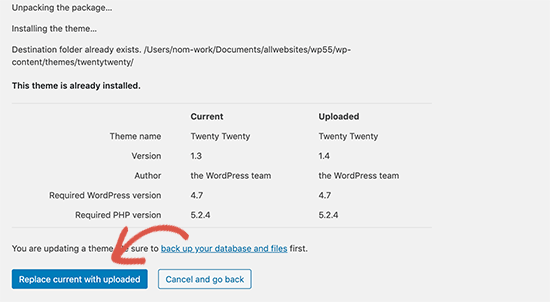
Hi, for updating theme should I remove salient folder and upload new salient folder or it’s better to replace new salient folder with the old one ?
Hey dazepuzzle,
It’s best to delete the old salient first.
However, as of WordPress 5.5, there’s now a built-in feature to upload your new theme .zip from the admin and have WordPress automatically handle deleting the old version. In Appearance > Themes, when you click “add new” at the top and upload the “salient.zip”, you see the following option: https://cdn.wpbeginner.com/wp-content/uploads/2020/07/replacetheme.png
Cheers
Do you have any suggestions on how to add a timed graphic overlay on an embedded youtube video? I want to promote a product when a video plays. Thanks!
Hey ehong33234
Unfortunately I don’t have a plugin to recommend for that specific functionality
Hello! Perhaps this question has already been asked, but how can I make a spoiler in the text?
Hey Volkofrenia!
Can you elaborate more on what you mean by a “spoiler” and which element you’re currently using to display the text?
Thanks in advance
I meant the hidden text as on forms. You press the spoiler and the text unfolds.
Hey Volkofrenia,
In Salient, that element is called a “Toggle Panel” and can be added via the page builder: http://themenectar.com/demo/salient-promo/toggle-panels/
understood thanks!
You’re welcome Volkofrenia
Thanks, this is what I was looking for! The theme is awesome!
Glad that I could help Volkofrenia
Hi there, I have a ‘404 not found’ error on portfolio items (deadlink checker). It gives the link mydomain.com/portfolio/my-portfolio-item/feed/. Where is this feed coming from and is there an easy way to fix this?
Hey Mikel2020,
Try to add the following into a child theme functions.php: https://pastebin.com/WRJFfcKV
If that doesn’t sort it for you, please reach out in regards via the contact form on my author page: https://themeforest.net/user/themenectar
Cheers
Good day,
Is it possible to style the button of the nectar slider to look like a CTA link underline?
Hey aglet,
You can actually copy and paste the call to action element shortcode into your slide’s caption box. e.g.
[nectar_cta btn_style="underline" heading_tag="h6" text_color="#ffffff" button_color="default" link_type="regular" alignment="left" display="block" link_text="Text"]
Cheers
Thank you!
You’re welcome aglet
Good day,
Is it possible to place the Subtitle on the heading page above the title?
Hey aglet,
Can you kindly share your URL in regards so that I can see what header settings you’re using?
Thanks in advance
Thank you for your feedback, it is http://gzi.agletonline.co.za/about-us/core-values/
Thanks aglet,
add this into the custom css box located in the Salient options panel > general settings > css/script related tab:
#page-header-wrap .inner-wrap {
    display: flex;
    flex-direction: column-reverse;
}
Cheers
Thank you, that works perfectly
Glad I could help aglet