6358 comments found.

I made a simple button with a link. How do I make it pop a new window when user click the button? Usually you can do target=”_blank” but I’m not sure how to do this with the backend editor or impreza. Thanks
Hello,
Check the “Open link in a new tab” box when adding a link: https://prnt.sc/vyspbs
Let us know if you have further questions!
Hi I want to change the background color of portfolio page as white and text as red or black. I can’t seem to find the option. For example, here is the page I want to work on: https://new.devconpk.org/portfolio/early-recovery-livelihoods-support/ I tried changing colors in Theme Options for Contents but it didn’t work. Anyone help please.
Hello,
Do you use a custom Content Template for Portfolio Pages? Please provide your website (URL, admin username, and password) credentials via this contact form so we could investigate the issue better: https://themeforest.net/user/upsolution#contact
Thanks in advance!
The header menu colours is not in version 7.11, how do I change my header menu colours?
Hello,
Go to Impreza > Headers, open your header in Header Builder, open Menu element settings > Colors and apply the desired colors, please take a look at this screenshot https://prnt.sc/vys9xn
Let us know if it helped!
Is there any way to disable the header builder now that it is part of the core plugin? I want to use an external plugin to create my navigation (i need some specific features for a mega-menu), but I can’t disable the header builder.and it screws up the menu I created.
Hello,
You can simply set all headers at Theme Options > Pages Layout to “Do not display” and use your third-party menu plugin. At the moment there is no such option to disable Header Builder available.
Let us know if you have further questions!
Why do the products appear duplicates? https://thephoneplanet.es/productos/
Hello,
This is a complicated question, a good one for our smart support guys, please create a ticket on the Support Portal: https://help.us-themes.com/ and provide credentials via private reply (URL, admin username, and password)
Thanks in advance!
My support time expired but you helped me anyway.
Thank you for perfect support!
10 stars of 5.
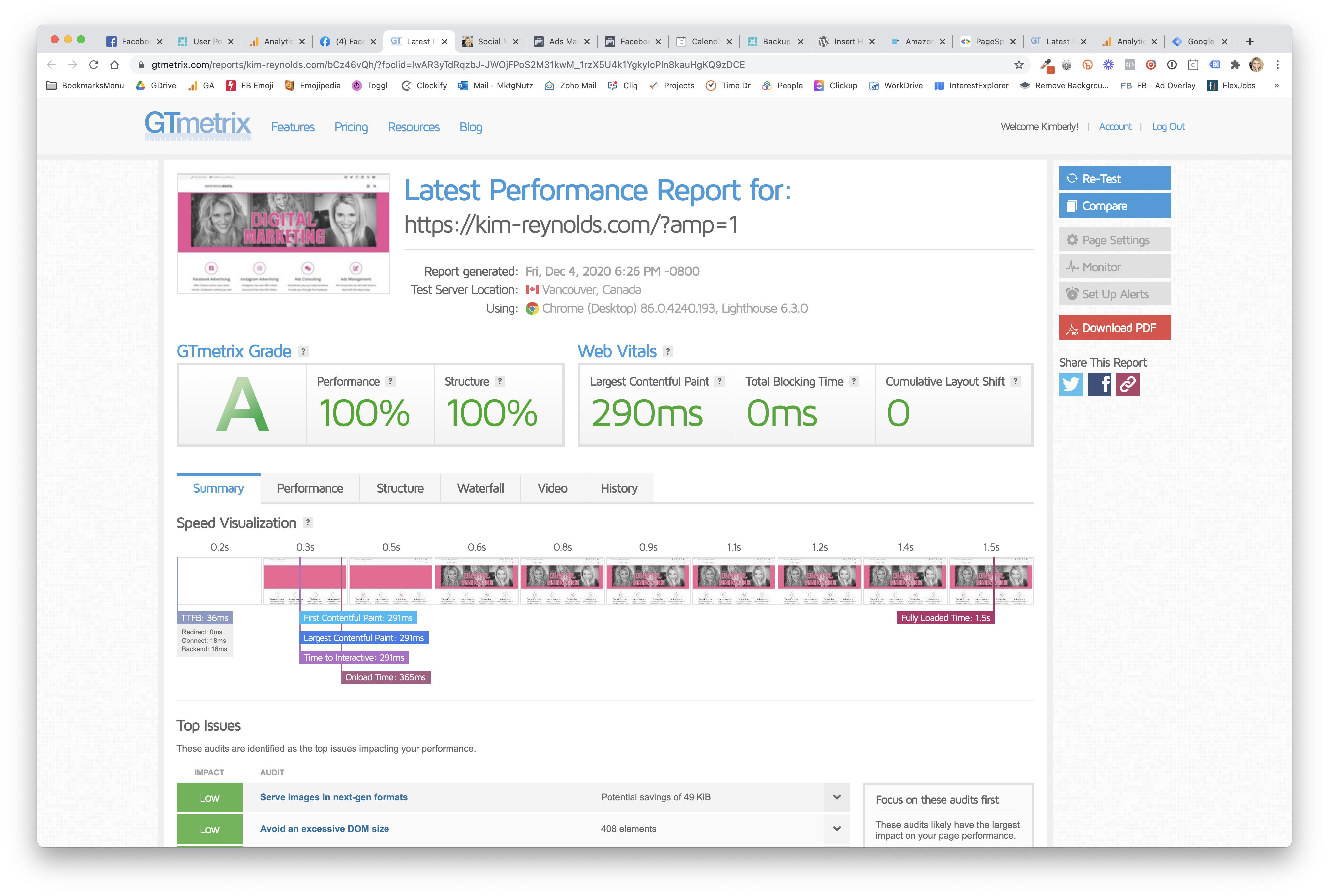
I’m in love with this theme! Check out my Gtmetrix score: https://kim-reynolds.com/KRD-1001-out-of-100.png Google page speed is in the 90s!!
Hello!
After last update I have grid view issue. Some grid elements fit on top others.
Could you please help me?
Hello,
Please provide your website (URL, admin username, and password) credentials via this contact form so we could investigate the issue better: https://themeforest.net/user/upsolution#contact
Thanks!
my website “https://www.indiaivf.in”
how to add “Preload key requests” your theme like this <link rel=preload>`
Hello,
You can add your custom code to Theme Options > Custom Code > Code before </head> to preload any request.
Let us know if you have further questions!
Hello, After updating to last version on classic page editor no more wpbakery buttons?
Hello,
Please describe the issue better, which exactly buttons are you referring to? If possible, provide us with a screenshot and a relevant URL so we could check your website.
Thanks!
hello If one site has more than 500 categories or tags (example) and use certain and dedicated page template for each category, ]mpreza can handle this? without any problem certainly at speed of site? thanks
Hello,
Yes, Impreza handles such configurations. It’s rather an overall WordPress performance question, the more posts and taxonomies you have, the more resource your server requires.
Let us know if you have further questions!
hello thanks for reply yes, i know that, my question was about dedicated template by impreza for each category or tag page
Hello,
Yes, you can easily assign custom Content Templates to category or tag pages, please see this: https://prnt.sc/vvib78
Let us know if you have further questions!
hello thanks yes i know that impreza has this ability, but my question is that if i had more than 1000 categories and make a certain and customize template for these categories with this ability of impreza, is it ok ?
Yes, it’s okay. But it will require over 1k of different templates, I think that it will be hard to manage them. What’s the goal of assigning a separate template to each category?
i want to have dedicated design for each categories and pages , WP bakery dont work at category pages even with plugins like ACF i cant design what i want then i think i need to design with impreza template for each categories
Then it should work well.
Let us know if you have further questions!
Hi,
I have 2 issues.
1. My posts are not showing up on the categories page. 2. My category pages are not using the selected content template but it is using the header and footer template that I have selected.
Hello,
Please provide your website (URL, admin username, and password) credentials via this contact form so we could investigate the issue better: https://themeforest.net/user/upsolution#contact
Thanks!
Hello,
Open Dropdown Settings and change “Drop to” to “Left”, read this article for details: https://help.us-themes.com/impreza/general/menus/#customizing-header-menu-dropdown
Let us know if you have further questions!
How can I import the revolution slider like “impreza3.us-themes.com”?
Hello,
We don’t use Slider Revolution on our demo sites. You can import any section from any demo website tho. Please take a look at this guide: https://www.youtube.com/watch?v=jLhEp7C-zsA
Let us know if you have further questions!
Hello, after update (WP 5.5.3) and theme (7.11), backend WPBakery Page Builder (6.4.2) is not working – shows white “paper” in any blocks (old or new blocks – creates empty). Cache plugins not used. May you help?
Hello,
Please provide your website (URL, admin username, and password) credentials via this contact form so we could investigate the issue better: https://themeforest.net/user/upsolution#contact
Waiting to hear from you soon!
hello I want know about <aside> tag that use for site sidebar dos Impreza support and use from this tag for sidebars ?? i checked some demo of site that designed by Impreza, and i didnt find this tag thanks alot
Hello,
Impreza doesn’t use ASIDE tags.
Let us know if you have further questions!
hello why you dont support and use this tag for sibebars ?
Hello,
We don’t use this tag because not all the users use Sidebars only for asided content, so for better compatibility we use DIV tags.
Let us know if you have further questions!
thanks however I checked your site and you use aside tag for yourself however most user design their site sidebar directly at pages or category or tag templates but best practice is used sidebar and sidebar tag to show google which of our contents are not for main content part, you used footer and hedear and nav tag on best way suggest to add this tag for sidebars, or i will be happy to hear a good reason then “all the users use Sidebars” thanks alot
Where exactly did you find aside on our websites? Please provide me with a relevant URL so I could take a look.
This is a Support Portal that doesn’t use WordPress, it’s an in-house PHP-based solution, obviously it can use this tag because only UpSolution team manage this site. On multipurpose theme we can’t add this tag to all sidebars because it might affect SEO.
Let us know if you have other questions!
thanks but why use use header and nav and footer tag? aside tag is another tag that is need for you site and sidebar contents good luck thanks for answers
I am confused by the documentation. I am creating language translations of my website posts and making each language its own post category for that language. I therefor need to change the main menu to a custom menu specific for a language for the posts with matching language category. I can not figure out from your documentation how to do that? Do you know how I can accomplish this with your theme?
Hello,
How do you create translations? Are you using WPML or any other plugin?
Hi, no plugins, just new posts with translated version with it’s own post category e.g. German.
Frankly, I don’t think that it’s right approach, please create a ticket on the Support Portal: https://help.us-themes.com/ so our engineers could investigate the issue better.
Thanks!
I don’t want to make a support ticket, I just want documentation explaining how to use a custom menu for a specific page or post with your theme. I didn’t even need to tell you what it was for but did out of being thorough. So forget what I wrote, I just need a custom menu on specific pages and posts apart from the default. How do I do that?
Hello,
Go to Appearance > Menus and create a menu there, then go to Impreza > Headers, create a header and assign the created menu to Menu element of this header. Once set, you can assign this header to any post, page via Page Layouts, take a look at this article: https://help.us-themes.com/impreza/pages/page-options/
Let us know if you have further questions!
Hi a little help, after updateing the Upsolutione core to the 7.11.1versione, i get massive error on my wordpress website, now i’m in recovery mode and i can’t restart the plugin, all the website is broken, can you help me?
It seems that version 7.11.1 of Upsolution core is not compatible with Impreza 7.11, I know it will serve the support service but the problem with the site was triggered by your theme, could you please help me anyway?
Hello,
We already answered your emails, please ask your hoster to enable mb string extension, it should help.
Let us know how it goes!
Hi,
The images are different sizes in the category pages.
See: https://www.hortcom.com.br/produto/bebidas/bebidas-quentes-vinhos-e-expumantes/
How can i set the same size?
Thanks.
Hello,
Go to Appearance > Customize > WooCommerce > Product Images and set Thumbnail cropping to 1:1, please see this https://prnt.sc/vqap2u
Let us know if it helped!
Hi,
it was set up that way ever since, before i send you the first message.
Hello,
Please provide your website (URL, admin username, and password) credentials via this contact form so we could investigate the issue better: https://themeforest.net/user/upsolution#contact
Thanks!