1353 comments found.

Hi again
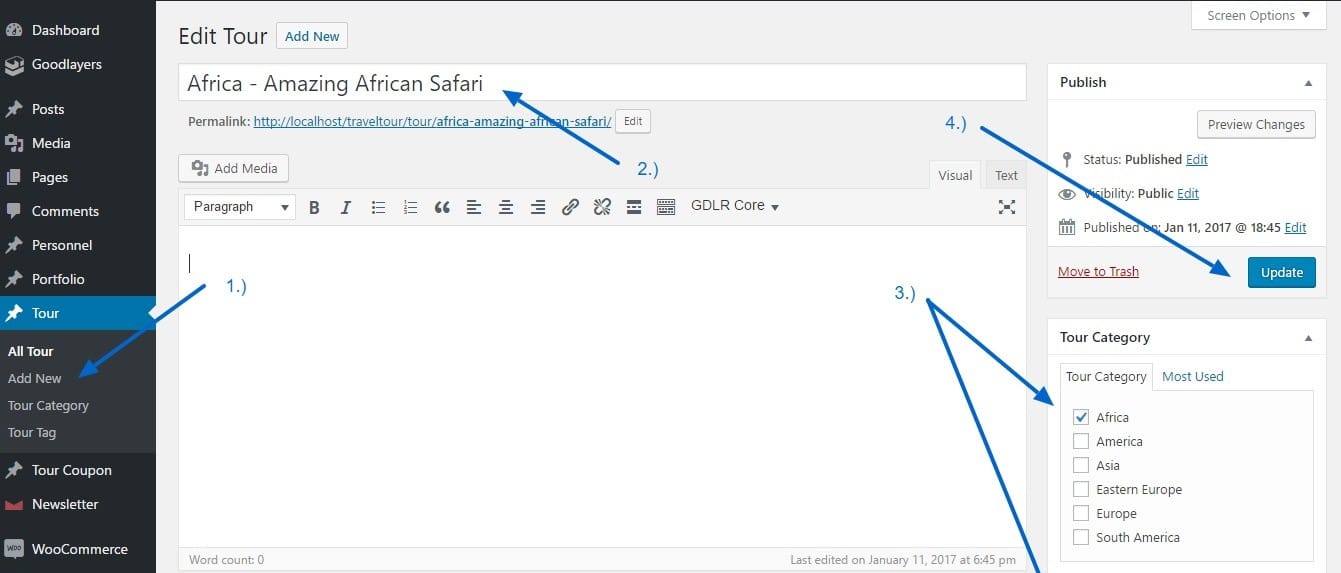
I apologise but just another question – how do you choose destinations to go in the filter menu as these do not appear automatically either. Thanks!
Hi,
The destinations are generated from the Tour Categories option: https://demo.goodlayers.com/document/traveltour/images/tourmaster/creating-tour-1.jpgHi there.
Can I please ask, how does the find my trip search work? Do I need to set search terms?
When I type a keyword I KNOW to have a result or choose a location which I KNOW to have many results, it always comes back with ‘Search Results. undefined’
It basically doesn’t work and renders no results for anything.
Do I need to define the search terms? I Assumed it would do this intuitively.
Thanks!
Hello,
This should work intuitively, could you provide your site URL so we can see what’s wrong? Thanks.
or on our support website: https://support.goodlayers.com/
Thanks!
Hi there, it’s definitely the tour package theme here https://tinyurl.com/ycy5v584
There is a filter on the lower front page
Any help would be greatly appreciated.
Thanks.
This seems to be happening because of a conflict with another plugin.
Could you try this after disabling your other plugins and see if it helps? If that resolves the issue, you can reactivate them one-by-one and see which one is causing the trouble.
If that doesn’t fix it, please send the WordPress username-password using the form here: https://themeforest.net/user/GoodLayers so we can check.
Make sure you use the account that was used to purchase the theme.
We want to update our theme from version 1.02, is the problem with Yoast fixed with your latest version and is there a problem to update from v1.02? Thks
To update the theme : https://goodlayers.ticksy.com/article/1893/ (Please make sure to update GoodLayers’ plugins as well.)
Yoast will be working fine. However, please make sure that you didn’t cusotmize the theme’s files, otherwise you may have to do it agian.
If you have any further questions, feel free to submit a ticket in our support site 
Please note that, Right now, all support will be conducted through https://support.goodlayers.com/(Purchase code can be found here : https://support.goodlayers.com/purchasecode.png )
Thank you very much! 
Hi there. I wondered if you could help (the license has been purchased by the previous developer). When ever we try to use the package filter, an error comes up saying ‘The information that you’re about to submit is not secure’- is there a way to fix this? Thanks!
Can you please submit ticket in our support website? Our dev and supporters only provide support in there, not here 
Please note that, Right now, all support will be conducted through https://support.goodlayers.com/(Purchase code can be found here : https://support.goodlayers.com/purchasecode.png )
Thank you very much!
Now only the frontpage is loading after I have updated some plug-ins.
I have deactivated all plug-ins, erased the htaccess and saved the permalink setting. When I activate another theme, the problem is gone.
Only found out that there is an error in the fontloader.php in Line 264 foreach($goodlayers_element[‘gdl_panel_font’] as $field)
Can anybody help me?
Hello,
Could you send us the site URL, WordPress and FTP username-password so we can take a look? You can send this info using the form here: https://themeforest.net/user/GoodLayers
Hello, did you already had the chance to take a look? I had send you the links and passwords yesterday.
Hi,
This was happening because you changed the portfolio slug to / in the theme options. Changing it back to ‘portfolio’ fixed the issue.
WordPress doesn’t allow you to remove slug from custom post types by default. You could try changing the word portfolio to something else or using this plugin and see if it helps: https://wordpress.org/plugins/remove-cpt-base/
Hi, but know it is not loading the portfolio like it was before the update. Now there is a page saying that you can click on a link that than opens the Page that was before loaded directly. And this page is opened in a new tab.
Got it fixed with the remove-cpt-base plug-in, thanks for the help
I have updated to Version: 2.3.2 and now I have 2 problems.
I have all portfolios on the Startpage and when I click on the picture of a portfolio it opens the link to page that is set in “Link to URL” like “www.xytours.com/Glaciertours”, but when I click on the Headline under the picture it links to a portfolio-page like “www.xytours/portfolio/Glaciertours” instead of the URL I have set in to open.
And these links are both opened in a new tab, which shouldn´t be.
I solved the problem. Just go to the seetings from Tour Package, choose Blog / Port Style and under PORTFOLIO SLUG you need to exchange the preset Portfolio with /
It can be used wpbakery or elementor?
You may use third party page builder plugin but note that most element in demo site will not show as it must be called by our page builder.. For example, blog layout, portfolio layout, column service, stunning text..
When you use page builder plugin, it will call its own element, layout.
Hi, this is Nigelfish, I am now logged into the envato account of the purchaser! I will download the theme again from the “Downloads” under the account top-right, as suggested in the article. Thanks for your help.
Just answered your email. Hope that helps
Hi, I have just taken over a website and it has your theme on it but its v2.06 which is from 2016. According to your changelog the current version in v2.3.2. How can I upgrade the theme? I cannot see any options to upgrade in WP dashboard.
To update the theme : https://goodlayers.ticksy.com/article/1893/ (Please make sure to update GoodLayers’ plugins as well.)
*Please note that you must contact the purchaser in order to get the update.
Thanks. I cannot submit a ticket because I do not have the purchase code nor do I have access to the envato account that the original purchase in 2016. I have reached out to them via their contact@goodlayers email address, hopefully they can help.
Yes, I saw your email but unfortunately, the only way to get the update is that you need to contact the purchaser to obtain the update.
Please note that, we do not send the files via email.
*I just provided you the instruction to update the theme: https://goodlayers.ticksy.com/article/1893/ not to open a ticket.
ok noted, the purchaser is not replying to me so I am not sure what to do. I am an experienced developer and have many themes from envato so am aware of how theme updates work. However all the ways need the purchase code and I was hoping that as I am the new owner of the company/website then there would be an alternative way to do this, for example by buying 12mths support for $15.75 instead of the theme for $54. No problem if not, we’ll just have to reassess what we need to do over next few days.
Hi,
I saw you new email and just answered that.
Hi! I use Translatepress to translate the site, but when I change the language the homepage is missing. How can I solve this?
Hello,
The translatepress plugin is not supported in the theme, you can use Polylang or WPML instead.
Hi everyone, I bought this theme and I really like it, but when I add the items to the menu, the logo stands up and is no longer at the same level. Is it possible that the logo cannot be moved further to the left? How can I solve?
Can you please submit ticket in our support website? Our dev and supporters only provide support in there, not here
Please note that, Right now, all support will be conducted through https://support.goodlayers.com/(Purchase code can be found here : https://support.goodlayers.com/purchasecode.png )
Thank you very much!
Hi there, one of my clients was considering purchasing this theme for his ATV rental business, but had a few questions that I thought I could research for him.
1. They want to know if your theme does location based searching so his clients can show the experiences closest to them. Does this theme offer that?
2. Do you think this theme be compatible to a atv tour business?
3. They want to integrate the calendars with this booking software Activity Booking Software, do you think this would work?
Thanks for your help 
Hello,
1. You can use the search options shown on the homepage to search activities from a certain location: https://demo.goodlayers.com/tourpackage/ This won’t be of use if you use the 3rd party booking software.
2. It should work, but we don’t include any specific options for an atv rental business.
3. This should also work, you may need to customize the theme to integrate it.
Hey guys, I’ve had this theme for many years now and already gone through three sets of support!
Recently the tabs have stopped working on my site (see below page for example). I’ve disabled plug-ins one by one but the problem persists.
Can anyone help please?
https://www.cotswoldsadventures.co.uk/package/classic-cotswolds-private-tour/Got this error log
Plugin or theme File location Triggered on page
2021-04-22 21:50:18 jQuery.fn.load() is deprecated Theme: Tour Package https://www.cotswoldsadventures.co.uk/wp-content/themes/tourpackage-v2-00/javascript/jquery.cycle.js https://www.cotswoldsadventures.co.uk/
2021-04-22 21:50:18 jQuery.fn.load() is deprecated Theme: Tour Package https://www.cotswoldsadventures.co.uk/wp-content/themes/tourpackage-v2-00/javascript/gdl-scripts.js https://www.cotswoldsadventures.co.uk/
2021-04-22 21:50:18 jQuery.fn.bind() is deprecated Theme: Tour Package https://www.cotswoldsadventures.co.uk/wp-content/themes/tourpackage-v2-00/javascript/jquery.cycle.js https://www.cotswoldsadventures.co.uk/
2021-04-22 21:50:18 jQuery.expr[\’:\’] is deprecated; use jQuery.expr.pseudos Theme: Tour Package https://www.cotswoldsadventures.co.uk/wp-content/themes/tourpackage-v2-00/javascript/jquery.cycle.js https://www.cotswoldsadventures.co.uk/
2021-04-22 21:50:18 jQuery.isFunction() is deprecated Theme: Tour Package https://www.cotswoldsadventures.co.uk/wp-content/themes/tourpackage-v2-00/javascript/jquery.cycle.js https://www.cotswoldsadventures.co.uk/
2021-04-22 21:50:24 jQuery.isArray is deprecated; use Array.isArray Plugin: WP Google Maps https://www.cotswoldsadventures.co.uk/wp-content/plugins/wp-google-maps/js/jquery.dataTables.js https://www.cotswoldsadventures.co.uk/package/classic-cotswolds-private-tour/ Time Notice Plugin or theme File location Page
Please make sure that you update the theme to latest version in order to use with WP5.7 Also, by updating the theme, please make sure that you update GoodLayers’ Plugins as well and please clear browser cache after updating.
You can follow this : https://goodlayers.ticksy.com/article/1893/
Please also make sure that all your being used plugins are compatible with WP5.7 as well.
Thanks, I updated layersdlier and all other plugins but still have same problem. I have a child theme of v2.0 and if I try to update the parent theme to 2.21 I get a error saying parent sheet is missing. Help!!!
You must update the parent theme as well.
To install wordpress theme, please follow these steps.
1.) After you downloaded file from Themeforest. Do not upload it yet. Extract it!
2.) You will find 6-7 folders and some files inside. You’ll see the file called ‘tourpackage.zip’
3.) Upload this file through wp backend.
Don’t forget to clear cache after this.
thanks. I did this and now I have two versions of tour package installed (2.0 and 2.32)- the child theme relates to 2.0. How do I update the child theme so the parent theme is the newer version of tour package?
You don’t need to update the child theme.
Normally child theme won’t be updated, it’s just for calling customized functions that you put.
Hi, I just updated the theme and cannot change the background image of the Eiffel Tower in a few areas. It appears in all of my blog posts no matter what slider I choose and it also appears at the top of all the packages. Blog: https://www.journeymachupicchu.com/blog/ packages: https://www.journeymachupicchu.com/package/machu-picchu-express-tour/
I was able to change the image in the other sections but these don’t seem to respond. Any idea what I can do? Tx in advance.
Follow up: I was able to fix it. The update seems to have issues with the google site kit plugin. I’m not really sure which one else but I am also getting warnings under site health: “background updates are not working as expected”
Hi,
This seems to be an issue with the caching plugin, we haven’t come across any issues with the site kit plugin.
The other error doesn’t seem to be related to the theme either, you can find others facing the same issue here: https://www.google.com/search?q=background+updates+are+not+working+as+expected+site:wordpress.org
Try this after disabling all the plugins and switching to the default theme(temporarily). If this happens only on our theme, then please post the WordPress and ftp username-password so we can look into this: https://themeforest.net/user/GoodLayers
Thanks.
How to import demo content
You can check this out : https://www.youtube.com/watch?v=bOHGPjs0k5A
How to import demo content
I have an inquiry for 3 concerns 1-We are working in the field of tours so we want to add different categories about hotels in the reservation system 5 star hotels, 4 Stars hotels,3 Stars hotels So that the customer can choose the hotel category
2- we need a group discount function, but the counting shouldn’t include the children’s 3- which payment getaway I can integrate with
Hello,
Sorry, there’s no hotel category or a group discount feature in this theme. You could check our other themes that offer more features for hotel/tour bookings:
https://themeforest.net/item/hotel-wordpress-theme-hotel-master/11032879/ https://themeforest.net/item/travel-tour-travel-tour-management-system-wordpress-theme/19423474How to remove the theme and reinstall it. I have already purchased the theme from different ID on 2015. I can send purchase code if required.
As i Auto Updated the theme once i guess, since then Book Now, Toggles, Accordions are not clickable. (If this problem solved, i can edit the website) else I am planning to re do the full website again. Please help.
Can you send us the message again via the contact form in our profile page? And please also provide purchase code so we can verify your purchase.
Thanks!
Message sent. Thank you.
Hi, is the latest version of the theme compatible with Wordpress 5.6
Hi,
Yes, it is but please make sure to run the recent theme version.
To update theme : https://goodlayers.ticksy.com/article/1893/ (Please make sure to update GoodLayers’ plugins as well.)f
Thank you
Planning to purchase this. Will you help in setting up this website with demo content. Also Confirm would you need FTP login or CPANEL login. Thanks
Hi,
First of all, Thanks for your interest
Unfortunately, that’s a bit beyond our support scope. However, we have video tutorial how to set the demo content up and our support team will help looking if there’s any issues with the process.