5515 comments found.

If the buyer selects any of my membership packages, then when this package expires, the buyer will automatically block or deactivate my website on his account. I want this system.
Hi samusmedicine,I think there is something wrong in translation. You wish your site blocked? Or your client properties disabled?
In our theme the properties published can get status expired when membership expires.
Thank you
Hi I want when a user wants to register on my website then the user will be able to see how many packages he selects, then user can see the property on my website, when this package expires he will not be able to see any other property. is it possible?
https://drive.google.com/file/d/1Qq2Dwi1hPjZ5zuKENu6hQ768Q8TbBlQi/view?usp=sharingThe shortcode of this page comes through so I couldn’t edit it. I want to customize this page as my own. The packages I have are the most important. If possible guide me a little on how to do what I do then
https://drive.google.com/file/d/1OcQyeSqXj1lqRHitPhF6NKa0wVcg-OjH/view?usp=sharingHi. We do not have a subscription to view property. This is not possible in our theme. Thank you
Hi Guys,
It’s safe to update to WP 5.7?
Thank you
Hi, We updated and it has been ok. Thank you!
Thanks!
Please I just moved my Wordpress website from .com.gh to .com.gh/short using Updraft. After the migration, when I click on a listing it says Page not found. Pls any help ?
Hi. Please save permalinks – it seems like it is needed – help https://help.wprentals.org/article/404-page-not-found-on-properties-and-categories-pages/
Please use our client support http://support.wpestate.org/ if you need further help. This is also a private support where you can send us your site details (url and wp-admin access). Our standard office hours are Monday – Friday, 9AM-5PM Europe timezone. If you wish my assistance to register in support please send a message from here – https://themeforest.net/user/wpestate
Thank you
Our final project, together with the support we did a great job – https://teviapartments.com
Hi masskk, Thank you very much for sharing the link. The site looks really great, congratulations for your work too 
Thanks Your support also helped for a few things.
is the Changeover option (Allow only bookings with the check-in/check-out on) only in wp administrator area as i can’t find it at user-dashboard?
Hi. It is for users too. Check the submit form includes it – https://nimb.ws/eBSoNM Thank you
thx yes i did forget to enable it.
With each edit of the property, the main photo (featured image) disappears from everywhere – frontend and backend?
Any idea why this is happening? This is not good to happened on the production site!
Hi, Please check if you have the latest theme update – https://help.wprentals.org/article/detailed-change-log/ We released a fix in Version 3.2.1 – February 2021
Please use our client support http://support.wpestate.org/ if you need further help. This is also a private support where you can send us your site details (url and wp-admin access). Our standard office hours are Monday – Friday, 9AM-5PM Europe timezone. If you wish my assistance to register in support please send a message from here – https://themeforest.net/user/wpestate
Thank you
good morning, i want to change this warning text that shows if a renter have chosen to many guests:
“The number of guests is greater than the property capacity – 4 guests” so i want to change it to “Max 4 guests (use extra guests option below if available.)” please see here https://ibb.co/dBmrB81
i tried in loco translate but i cant add anything behind the “4 guests” word as the text in loco translate is only this (The number of guests is greater than the property capacity – )
please advice!
Hi. I do not not know how to combine the text you wish
You need a 3rd variable in code
Max (new variable) 4 guests (in code ) The number of guests is greater than the property capacity – (in code now and managed in .po https://prnt.sc/10i0kxc
Because this needs to read the actual number of max guests, I am not able to advise on the easiest way to make the change.
Perhaps you can replace the variable in property.js and put the guest variable first and then the text variable and translate the text variable with loco as Max (use extra guests option below if available.)
js/property.js is the file from screenshot and this is the variable that sets the message now – https://prnt.sc/10i0n8o
Thank you
hello, can’t find the code in wprentals/js/property.js is it in any other folder?
hi again, i found the code and change to this but is not working
('book_not_available').append(property_vars.guests+' '+property_vars.guestoverload+max_guest);
Hi. I know you use child theme, but JS and child theme is not copy paste. So make sure you do in main theme first. The code seems ok. Thank you
i have not used child theme for this and still not working
Hi. It is extremely difficult to advise on js changes. I do not know if I can help more. You can send me here the file you modified to show my colleagues for a 2nd view – https://themeforest.net/user/wpestate
Thank you
i have open a ticket #197515
Hi. I just replied. Thank you
Hello! I have encountered a problem and have seen that it is also present on your demos.
Basically, the block for elementor WpRentals Recent Items doesn’t load the alternative text in images.
Take a look at screenshot: https://housevillas.it/vacanze-in-sicilia/screen-alternative-text-error.jpg
Please fix this, it is important for SEO.
I await for a response
Best regards!
Hi Eggeno, I cannot answer this without checking with development team first. I added the question on our list to check for next update. Thank you for writing!
OK! and is your latest version compatible with latest wordpress version 5.7?
Hi. We updated and so far it is all ok. Thank you
Hi, is it possible to manually change the ID number of a listing? Or is it generated randomly
Hi, Is autogenerated by WordPress by incrementing an internal counter. It’s may be possible to change the id directly into database but this could create a lot of problems and is not recommended. Thank you
Hi, may I know can this theme able to use woocommerce to do the online booking? Customer can direct do payment using woocommerce for their booking.
Another question: Because currently I will insert my own property, but soon I will open for other owners which they can submit their property into the website and start to rent their property to others, can this theme do like this?
Hi Alex, Thank you for the message. Woo commerce is used only to pay admin the deposit for a booking (if set), remaining balance to admin (optional) and paid submission (pay a fee for each added listing to be published)
Below are more details about the booking system
WPRentals can be used for multi owners or single (specific owners). If you allow it as admin, people register to add listings for rent and users register to send booking requests to property owners, similar to airbnb or homeaway.
As the admin you can ask for a deposit and a service fee (these can be the same value if you wish to take as a deposit just your service fee) in % or fixed value, and this value is deducted from the total booking. As the admin, you can choose if you wish to include in this deposit the cleaning and city fee or not. If you ask for a 100% deposit, the fees are automatically included.
The user will need to pay that deposit in order for the booking to be confirmed (even if the owner approves the booking request). The money goes to the admin.
The difference will be paid by the user to owner outside the theme (we have the option to pay the remaining value in the theme, but the money goes still to admin, so if you don’t wish that to exist, we can show you how to hide with CSS).
At the moment payment to owner cannot be done in the theme. We’re not sure if in the future we will be able to extend this functionality. If you make a decision please consider only the existing features.
If you need further info or want to test our theme, please send a message from here https://themeforest.net/user/wpestate
Thank you
Hi, how about at the moment there is not other owner only the admin and admin will upload their own property then if customer want to book the property can the customer direct do full payment to admin using woocommerce payment gateway?
Hi. If another owner adds a property, money can be paid to site admin with woo commerce. But money goes only to site admin. Thank you
Hi, how about the website only got 1 owner which is admin itself, so customer do the booking by paying whole amount by using woocommerce payment gateway it will direct pay to admin right?
because the important things for me is the customer or visitor got to view this website they can direct do online booking by paying deposit or full amount using woocommerce instead of submit booking form
Hi Alex
Hi, how about the website only got 1 owner which is admin itself, so customer do the booking by paying whole amount by using woocommerce payment gateway it will direct pay to admin right?—> yes.
because the important things for me is the customer or visitor got to view this website they can direct do online booking by paying deposit or full amount using woocommerce instead of submit booking form—> Woo is used stricly to pay. As methods to pay, we have 2 ways
a. pay after owner approves the request (user logins -> goes to my resrevations -> pays)
b. Pay with instant booking and deposit eblaed from booking form and if user is not logged in, we create the account as user pays. demo https://demo1.wprentals.org/properties/condo-in-liberty-state-park/
Thank you
My client has several four-bedroom apartments in the same building. He wants to rent out bedrooms to college students. Each bedroom will be rented separately, so each tenant will get their own room, and they will share the living room, kitchen, bathroom, and toilet.
So briefly: 1. rooms rental in one building 2. one-year lease agreement with the tenant 3. a recruiting monthly payment for rent
Is it possible in your theme?
Hello. This is not possible in the theme : one year lease and recurring monthly payment. Each room can be a single listing and the users can send booking requests, but the price can be per night or per day. Thank you
Hi there, presale question. Is it posible to change “Price per night (3d+)” and set a price per night (29+ days)?
Hi Marifriki
Thank you for the interst.
We have option to Manage 30+ & 7+ price options from theme options so can Change 30 and 7 to your desired numbers. Theme options screenshot for option setup: https://prnt.sc/10fwf91 Screenshot with the place where is setup in submit property: https://prnt.sc/10fwhwo
Thank you
My client is looking for an AirBnB clone and his list of needs is a digital signature upon booking. Is there away to add this with your platform?
Hi brandonx49
Thank you for the interest
Please provide more details about what would you like to achive and what features you need to advise you correctly.
Also if wish a test area send a message at https://themeforest.net/user/wpestate and mention you wish to test rentals admin area.
Thank you
Hi. We do not have digital signature support. Documents are not exchanged between. Thank you
Hello, I have few lasts questions before buying your theme.
1. When someone confirms a booking, can I set service fees for both owner and guest?(example: set 5% fee to owner and 10% fee to guest, per confirmed booking)
2. Is it possible to hide the guests fee in the property page and add them directly to the cost per night? (instead of showing the service fees separately on the property page, they’re added in the total booking cost. Example: owner set 100$ price/night, with 8% guest fee enabled by me—> guests see only the final price on the property page = 108$).
3. If I understand correctly, when deposit is enabled, guests have to pay only the deposit fee to confirm the booking. But how the rest of the payment is paid to the owner?
Thanks in advance
Hi Mattcosta, Thank you for the comment.
1. The fee is deducted from total booking and only owner would see this fee. We do not have a way to split the fee between user and owner.
2. The fee as you wish would show as an extra fee in booking form, but since we do not have it, I cannot help further.
3. As the admin, you can choose if you wish to ask a service fee. If you wish the fee, you make sure deposit is at least equal to service fee.
The user will need to pay that deposit in order for the booking to be confirmed (even if the owner approves the booking request). The money goes to the admin. The difference – remaining balance can be paid in the theme, but the money goes still to admin, so if you don’t wish that to exist, we can show you how to hide with CSS.
At the moment payment to owner cannot be done in the theme. We’re not sure if in the future we will be able to extend this functionality. If you make a decision please consider only the existing features.
Thank you
Hi there. Is it possible to view a backend demo?
Hi
Thank you for the comment.
Please send a message at https://themeforest.net/user/wpestate and mention you wish to test rentals admin area.
Thank you
Theme cache breaks WPML Features & Amenities translations. It is an important bug. I understand that you need time to talk with WPML stuff to solve this, but in the meantime, could you please provide a temporary solution to avoid disabling theme caching and keep that taxonomy out ot it? Thanks in advance!
Hi Thank you for the comment.
We raised this issue to WPML. Please open a ticket in our private support system to follow up in there.
Client support: http://support.wpestate.org/
Thank you
Hi envato22, The only way to solve this is to disable theme cache when WPML is on and that is what we will do in the next update, but just for features and amenities. You can disable the cache globally now – https://help.wprentals.org/article/how-to-enable-or-disable-wp-rentals-theme-cache/ Thank you
Hi, it’s been a while since I wrote the above question about the problem with the theme cache and wpml Features&Amenities translations. Is it yet solved? Thank you!
Hi. Thank you for the follow up.
We added this in verion 3.3 https://prnt.sc/26izigf You can check our change log to see the changes added in detail https://help.wprentals.org/article/detailed-change-log/
Please see here our help to update https://help.wprentals.org/article/how-to-update-the-theme-and-plugins/
Thank you
A test area? The best is more to implement if this is possible in your template, it’s odd that no one has mentioned it before here. It would perhaps be good to include a rental formula under 7 days style like stone and vacation one of the big global groups or even maeva.com, center park. Why should you include this option such as a reservation that would be a week which would be from Saturday to Saturday or 7 days. In case if you can put us an example formula or modify the source code
Hello Mygale06
Thank you for the interest. I am afraid we cannot offer this feature.
Thank you
Hi. Please send a message from here https://themeforest.net/user/wpestate for a test area. For the features you need, we have part of the details
Turn-over days (you can choose just check-in or check-in and check-out) So it you need to be Saturday check-in and check-out, that you can choose. OR you can put check-in on a specific day – like sunday and make min 7 days requirements But this will allow use to check-out after 7 days anytime.
Thank you
I have the exact same question as Mygale06: Can we build this to only have 7-day/6-night holiday packages? Essentially keep it simpler to start?
Hi,
Thank you for the interest in the theme.
Our theme doesn’t work for bookings on the same day. The price per day/night considers 24 hours (including night). When submitting a property have the option “Allow only bookings with the check-in/check-out on:” https://prnt.sc/10dm7iw We don’t have option for packages.
If wish I can provide a test area to check if can achieve what you need with the above option.
Thank you
Hello why the template only offers day and night reservations. While in France the reservation system is based on a weekly basis from Saturday to Saturday for our large groups. Is it possible with your template to do this before we consider shopping for the WP Rentals – Booking Accommodation template? Sincerely yours
Hi,
Thank you for the interest in the theme.
I understand what do you wish but our theme isn’t working for booking on the same day. The price per day / night that we have considers 24 hours (including night)
Thank you
Too bad because this system is widely distributed throughout Europe to make weekly reservations under a 7-day basis, do you think about integrating this or not? Otherwise I continue my research cordially to you
Hello Mygale06
Thank you for the comment.
I am afraid that we don’t have plans to integrate packages.
Thank you
any advice on design and config woocommerce checkout to look nice and have similar look text with your theme?
Hi
Please open a ticket on our private support system and provide more details about what would you like to achieve in order to advise you correctly.
Thank you
Hi, We already included the design to match as best as possible. If you wish to do something specific, we can try to see if there is a way to extend the default design. Thank you, Anna
Hi, ok i just want to change words as adding for example the word deposit and so on..
And i need more info from the renter as it is now at woocommerce payment only name, email and phone number. is that possible to change wording and more boxes for getting more info from customer?
And this is it connected to wprentals system: Returning customer? Click here to login
Hi Birken
We understood you wish to change design initially. Please see my answer below
Hi, ok i just want to change words as adding for example the word deposit and so on..—> I do not see the word deposit in checkout https://prnt.sc/10gt39w please send a screenshot to understand where the word is, so that ic an confirm if it is theme end managed, or woo managed.
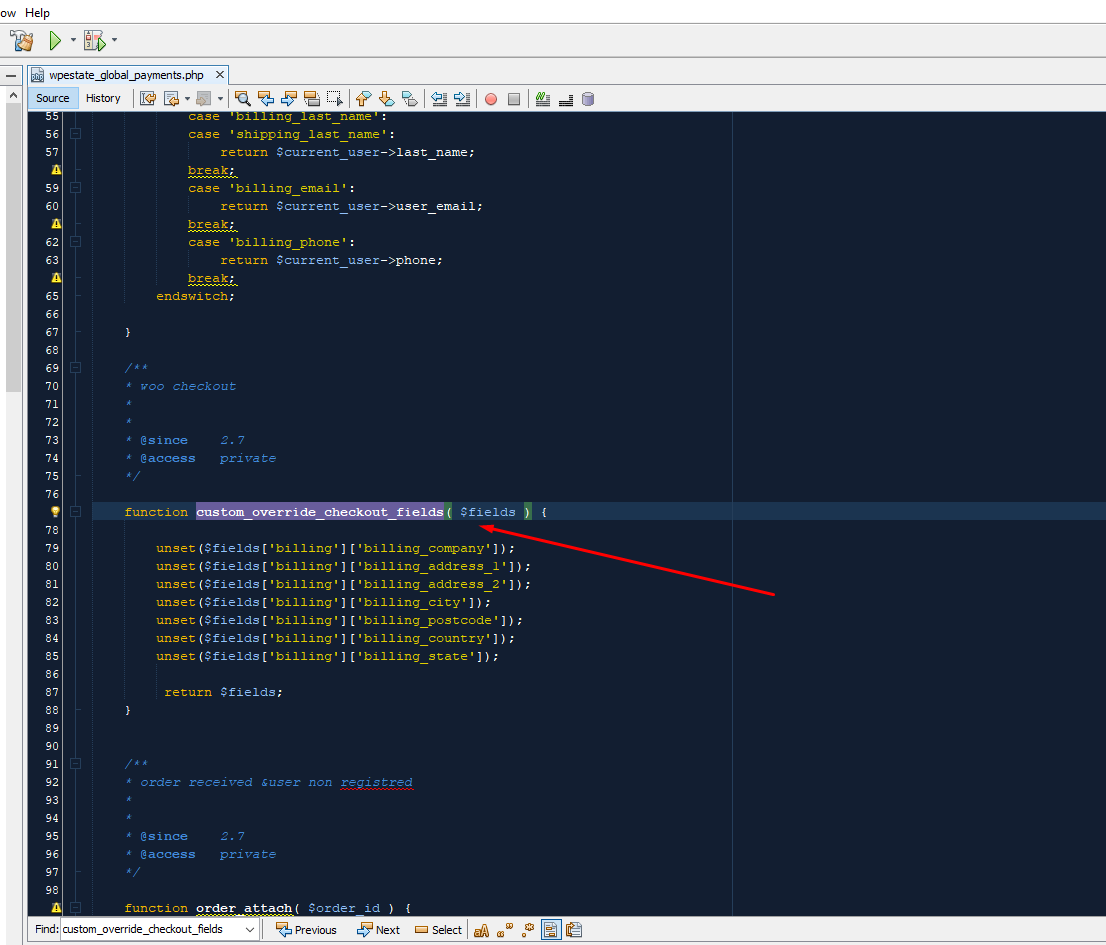
And i need more info from the renter as it is now at woocommerce payment only name, email and phone number. is that possible to change wording and more boxes for getting more info from customer?—> The checkout form is from the woo commerce. We disabled some default fields like shipping – you have here the code to restore to original woo form https://help.wprentals.org/article/install-woocommerce-and-use-woocommerce-payments/
—> To add extra fields, they would show in the order only (they would not sync with the dashboard my profile). There are plugins to add more fields to checkout – i googled and found this one https://www.wpdesk.net/blog/custom-fields-woocommerce-checkout/#:~:text=To%20add%20custom%20fields%20to,And%20it's%20done! There may be other too.
And this is it connected to wprentals system: Returning customer? Click here to login-> The woo commerce login syncs with the account registered in the theme, yes.
Thank you
sorry for my bad explanation again, i wonder if is possible to add the Deposit word when they pay deposit?
also i found these extra field plugins any advice maybe what one could be used with your system?
https://codecanyon.net/item/woocommerce-custom-fields/11332742 https://codecanyon.net/item/woocommerce-registration-plugin-add-custom-registration-fields/20515456Hi Birken, I tried to find the answer for the deposit comment, but I cannot answer without investigating this with development team. I understand you wish to have the word here – https://prnt.sc/10hzzj7
Instead of Payment for Invoice 30792 , Booking 30791, Name: Condo in Central Park, Period: from 21-12-27 to 21-12-30 × 1
To e Deposit Payment Invoice 30792 , Booking 30791, Name: Condo in Central Park, Period: from 21-12-27 to 21-12-30 × 1
When deposit is paid.
I will add to wishlist the question, but I do not know the answer now.
A plugin I found from other clients suggestions for checkout is this one – https://wordpress.org/plugins/flexible-checkout-fields/ It is free and pro. Maybe the free already has what you need, but make sure you remove the theme code for woo checkout to not affect the 3rd party plugin functionality (which could happen)
Thank you
hello,
could you please explain what you mean with this
“but make sure you remove the theme code for woo checkout to not affect the 3rd party plugin functionality (which could happen)”
should i remove some code?
Hi Birken, In the help shared there was a screenshot https://help.wprentals.org/wp-content/uploads/2019/08/custom_checkout_fields.png https://prnt.sc/10n0ck1
Depending on how you configure your check-out, if it will include the fields we hide by default, you must delete them from wprentals-core/misc/wpestate_global_payments before changing the checkout form.
Thank you